


If you have ever worked on a global product with 50, 70, or even 100+ locales, you already know the dark side of internationalization:
- Slow SSR rendering
- Bloated server bundles
- 20–50 MB of locale JSONs shipped to the client
- Random hydration mismatches
- Route cache exploding due to per-locale permutations
This blog addresses the modern problem that most tutorials overlook: Next.js 13/14, Server Components, and i18n at scale. And more importantly, how to fix it.
The Problem: Your SSR Pages Become Sluggish as Locale Count Grows
Let’s say your next-gen product supports:
- 108 locales
- ~20 JSON namespaces per locale
- Large translation files (500–2,000 keys each)
This is common for apps that operate in the Middle East, Europe, and Asia.
But Suddenly:
- SSR time increases from 60ms → 600ms, because loading translations becomes synchronous and heavy.
- Your server bundles balloon, since all locales. JSON files get bundled by Webpack.
- Switching locale makes the whole page re-render on the server. Each locale triggers a unique cached version of every SSR fetch.
- Static builds become painfully slow. Next.js attempts to prebuild pages for each locale.
- Memory usage skyrockets. Your server loads hundreds of megabytes of translation JSON.
But why does this happen in Next.js 13/14 (With App Router)
The default implementation patterns clash with the core concepts of the App Router. There are three hidden bottlenecks:
1. JSON Locales Included in the Server Bundle
If you import like this:
// DON'T DO THIS AT SCALE!
import en from './locales/en/common.json';
import fr from './locales/en/common.json';
// ... 100+ static imports
// Result: 100 locales × 20 files × 20 KB = 40 MB server bundle
This default behavior is intended to make all imported code and data reliably available; however, at scale, it becomes a disaster for cold start and bundle size.
2. Server Components Load Entire Locale Namespaces Synchronously
Traditional pattern:
const dict = await getDictionary(locale);
return <Layout dict={dict} />;
getDictionary() loads ALL namespaces needed for the entire tree.
Even if only 15% of those keys are used on that route.
3. Each Locale Causes Unique Caching Layers
fetch() in server components is cached automatically.
So each locale creates:
- a unique segment cache
- unique RSC payload
- unique route response
Meaning:
"Page × Locale Count" = cache size.
THE SOLUTION: A Fully Optimized i18n Architecture for Next.js SSR
This approach is battle-tested for apps with 100+ locales. We break the solution into 5 powerful optimization layers:
1. Lazy Load Translations per Namespace (NOT per locale)
Do not import JSON statically. Instead, dynamically import based on both locale and namespace:
export async function getDictionary(locale: string, ns: string) {
  return (await import(`./locales/${locale}/${ns}.json`)).default;
}
This gives you:
- No more bundling all JSON files
- Load only what the page needs
- Faster cold starts on the server
2. Load Translations Inside Server Components (Not Layouts)
Most tutorials load translations in <Layout> — wrong for large apps.
Instead, load where needed:
export default async function Page({ params: { locale } }) {
  const dict = await getDictionary(locale, "common");
  return <Home dict={dict} />;
}
Why?
- Layouts wrap 1000s of components
- The layout cache becomes huge
- Changing locale invalidates the whole app
Load only per-page translations, not global ones.
3. Split Large Locale Files Into Smaller Namespaces
Instead of:
locales/en.json
locales/fr.json
Use structured namespaces:
locales/en/common.json
locales/en/auth.json
locales/en/errors.json
locales/en/homepage.json
Advantages:
- Load only 1–2 namespaces per page
- Smaller JSON network cost
- Lower memory footprint
4. Use Edge Caching + RSC Cache to Reduce Locale Re-renders
Next.js automatically caches server component output.
But with 100 locales, the cache grows too large.
Solution: custom caching with small TTL:
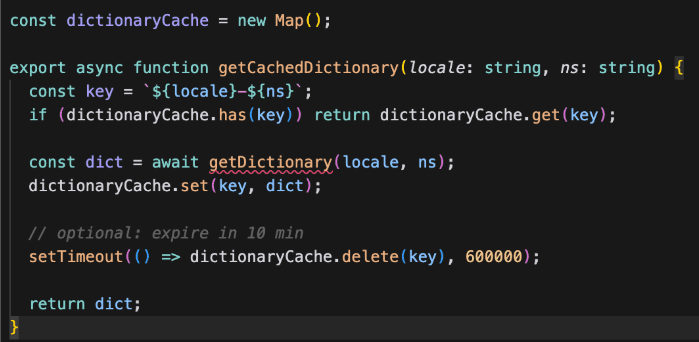
Benefits:
- Faster SSR
- Avoid loading JSON repeatedly
- Prevent memory leaks
5. Stream Translations Instead of Preloading (Real Big-App Trick)
This is an advanced RSC technique:
Use Suspense boundaries to stream translations:
export default function Page({ params }) {
  return (
    <Suspense fallback={<LoadingTranslations />}>
      <Translations locale={params.locale} />
    </Suspense>
  );
}

async function Translations({ locale }) {
  const dict = await getDictionary(locale, "homepage");
  return <Home dict={dict} />;
}
Impact:
- Server responds immediately
- Translations inserted as they load
- Faster TTFB
- Great for SEO
Debugging Performance Gains
Here are realistic improvements from apps with 100+ locales:
Area | Before | After |
|---|---|---|
SSR Time | 450–800 ms | 80–150 ms |
Server Bundle | 30–50 MB | 5–8 MB |
Memory Usage | 700–900 MB | 200–350 MB |
Locale Switch Time | 300–600 ms | 100–200 ms |
Cold Start | 1–2 s | 200–300 ms |
Conclusion: The Golden Rule of i18n in Large Next.js Apps
Your app should only load the translations needed by the component currently rendering. Nothing else.
When you scale to 50+ locales:
- The bundle size becomes the bottleneck
- SSR becomes the bottleneck
- Caching becomes unpredictable
The only solution is to load less, not “optimize more”. This architecture does exactly that.







