


In an era where speed, accuracy, and cost-effectiveness are critical, Robotic Process Automation (RPA) has transformed business operations by automating repetitive tasks. While RPA is widely used in various business processes, it has also proven to be invaluable for software testing, enabling testers to automate repetitive test cases and improve overall test coverage and efficiency.
In this blog, we’ll explore the advantages of using RPA in software testing, walk through a practical example using UiPath, and highlight some challenges to consider. This guide is designed to provide both testers and business users with insights into how RPA can streamline testing processes and enhance software quality.

What is RPA?
Robotic Process Automation (RPA) is a technology that uses software bots to automate repetitive and rule-based tasks in digital systems. RPA bots can mimic human actions—like clicking, typing, and navigating applications—making them ideal for handling high-volume, routine operations across various software applications
Why RPA is Useful for Testers
Here are some key ways RPA is beneficial for software testers:
- Increased Efficiency: RPA bots can execute tasks continuously, significantly reducing test cycle times. This efficiency is particularly helpful in regression testing, where the same test cases need to be repeated across multiple software versions.
- Enhanced Accuracy and Consistency: RPA bots follow instructions exactly, minimizing human errors. Bots perform with high accuracy, especially valuable in data validation, UI checks, and verification of large datasets.
- Cost Savings: By automating repetitive and mundane tasks, RPA reduces the workload on testers, allowing them to focus on more complex testing scenarios and exploratory testing. This shift in focus can lead to long-term cost savings for QA teams.
- Broader Test Coverage: RPA allows for the quick execution of a wide variety of test cases, helping testers expand the scope of their testing to cover more scenarios and environments.
- User-Friendly Interface: Many RPA tools, such as UiPath, offer visual workflows and low-code or no-code options, making automation accessible to non-programmers. This ease of use allows testers without deep coding knowledge to create and deploy automated tests.
Manual Vs RPA
Aspect | Manual Process | RPA (Robotic Process Automation) |
Efficiency | Slower due to human limitations and multitasking | Faster, as bots work without breaks or delays |
Accuracy | Prone to human errors | Highly accurate with near-zero errors, as bots follow rules exactly |
Cost-Effectiveness | Higher labor costs, especially for repetitive tasks | Reduces operational costs after initial setup |
Scalability | Requires more resources (hiring/training more staff) | Easily scalable by deploying more bots |
Speed | Limited by human capacity | Performs tasks much faster, especially high-volume tasks |
Productivity | Limited due to human factors (fatigue, time constraints) | Continuous operation, boosts productivity for repetitive tasks |
Consistency | Variability due to human factors | Consistent results with no deviation in task performance |
Customization | Flexible, adaptable to complex and varied tasks | Best suited for repetitive, rule-based tasks but adaptable with reprogramming |
Deployment Time | Quick, as it mostly requires onboarding/training | Takes time for initial setup but is highly efficient thereafter |
Adaptability to Changes | Humans adapt quickly to changing processes | Bots need reconfiguration to handle process changes |
Human Intervention | Requires human involvement in most steps | Operates autonomously but may require human intervention for exceptions or decisions |
Training/Onboarding | Continuous learning and onboarding required | Bots do not need training but require reprogramming for new tasks |
Error Handling | Errors must be manually identified and fixed | Can automatically handle or log errors and exceptions for review |
Installing UiPath Studio
To begin using UiPath, follow these steps:
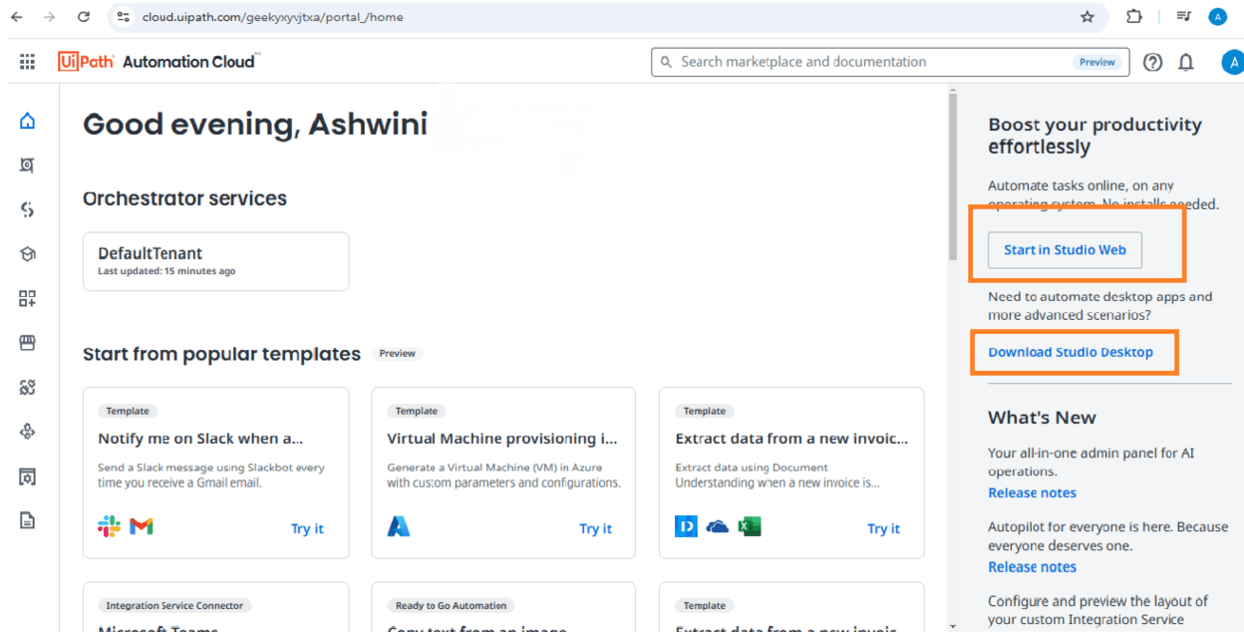
- Signup/Login: Visit the UiPath Automation Cloud and create an account.
- Accessing UiPath Studio: Once registered, you can either use the web-based version or download the desktop application.
Creating a New Project
1. After installation, you can start building automation projects:
- Select a Template: Open UiPath Studio and choose a framework template suitable for
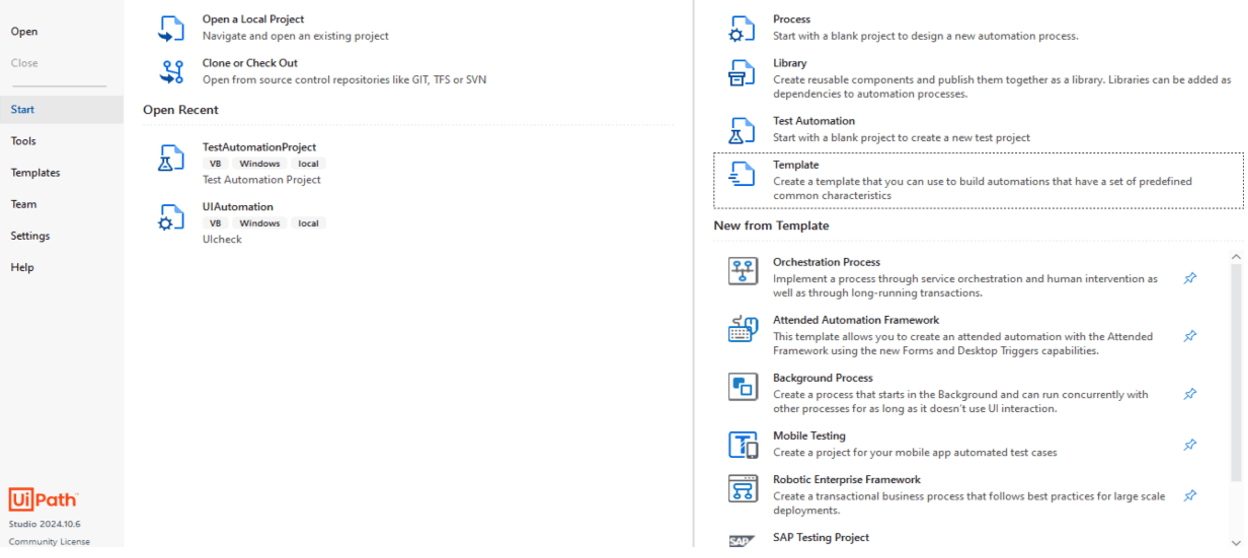
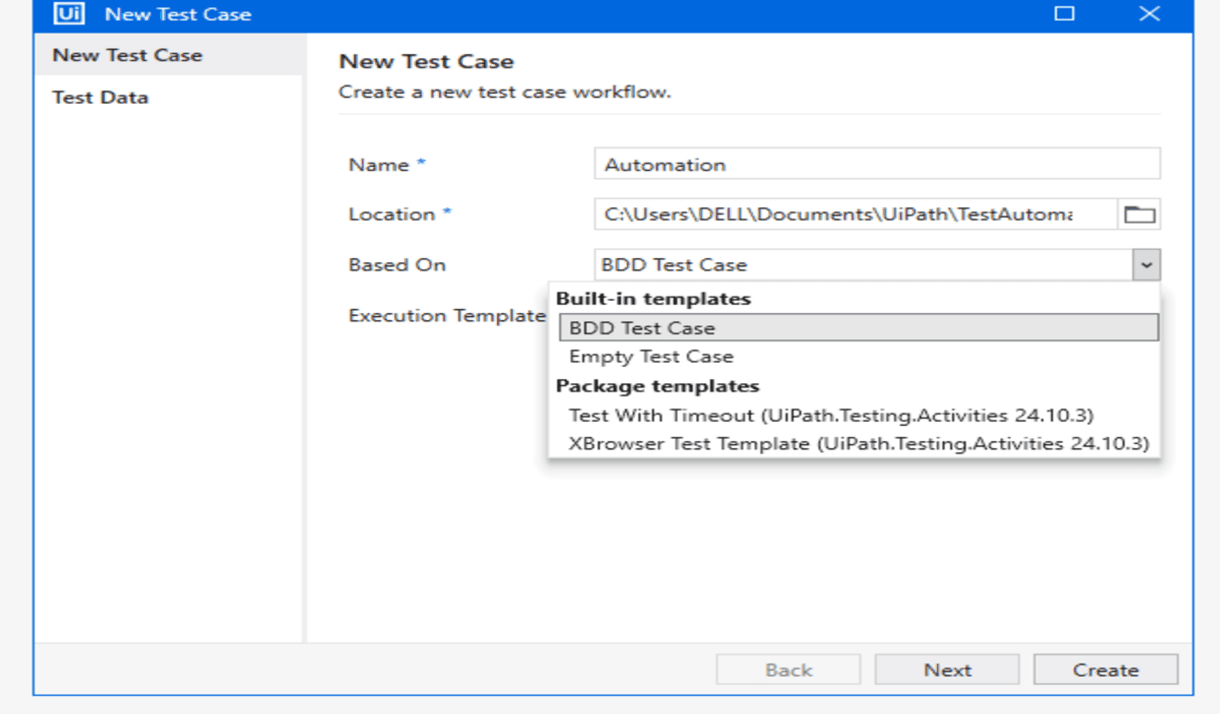
2. Test Case Creation: Create test cases by clicking on "New."
- Test cases can be:
- Empty Test Cases for basic workflows.
- BDD Test Cases using Gherkin language, structured as Given, When, Then statement
Working with Test Data
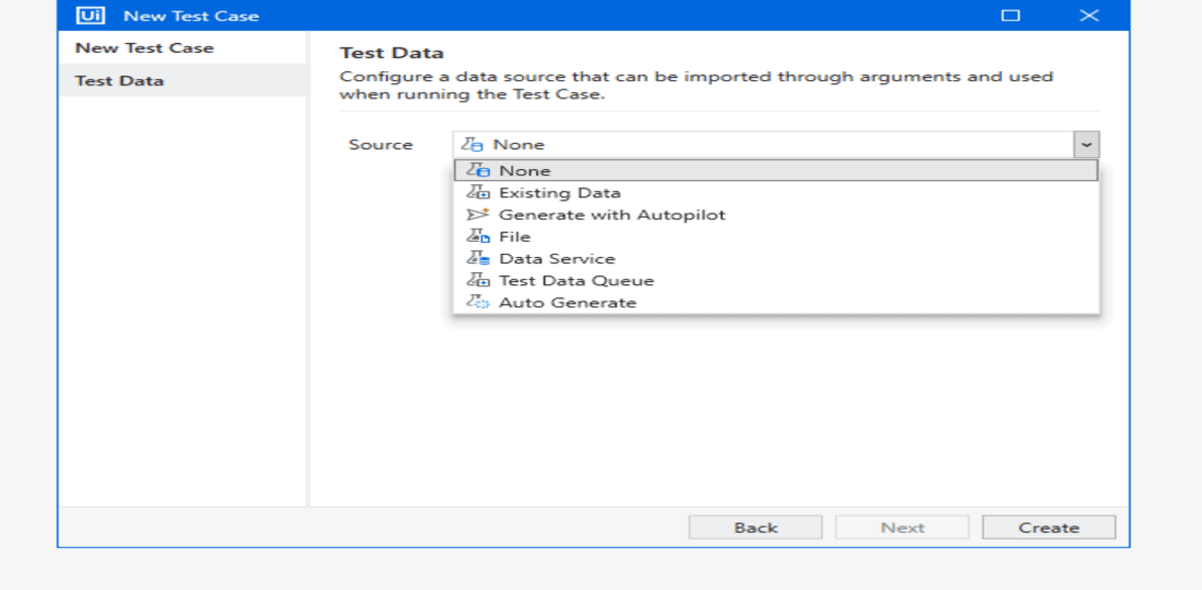
UiPath makes it easy to integrate test data into your workflows:
- Upload CSV Files: Import your datasets directly.
- Auto-generate Data: Utilize VB scripts to create test data dynamically
Essential Features of UiPath Studio
UiPath Studio offers several powerful features to streamline automation:
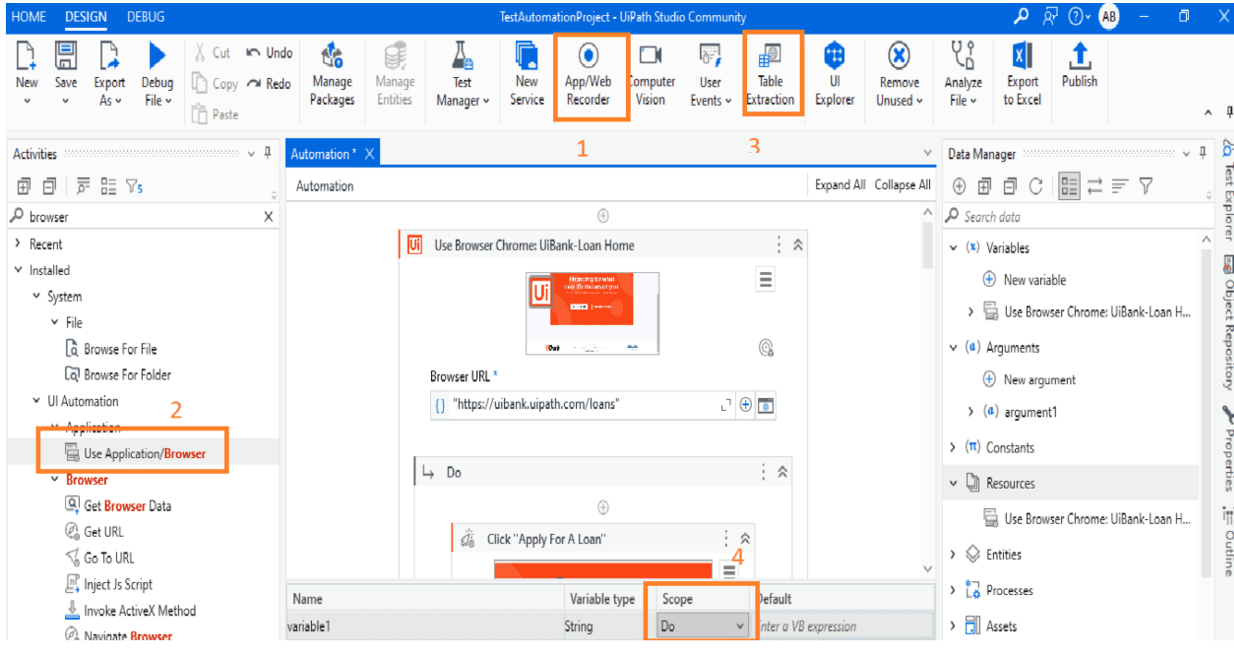
1. App/Web Recorder
- Record a sequence of actions on applications or web pages to create reusable workflows.
- Save and run the recorded sequence as part of your automation.
2. Activities for Actions
- Open applications or browsers using the Activities pane.
- Use pre-built actions like Click and Type to interact with elements.
- Define Selectors for identifying target elements where actions will be performed.
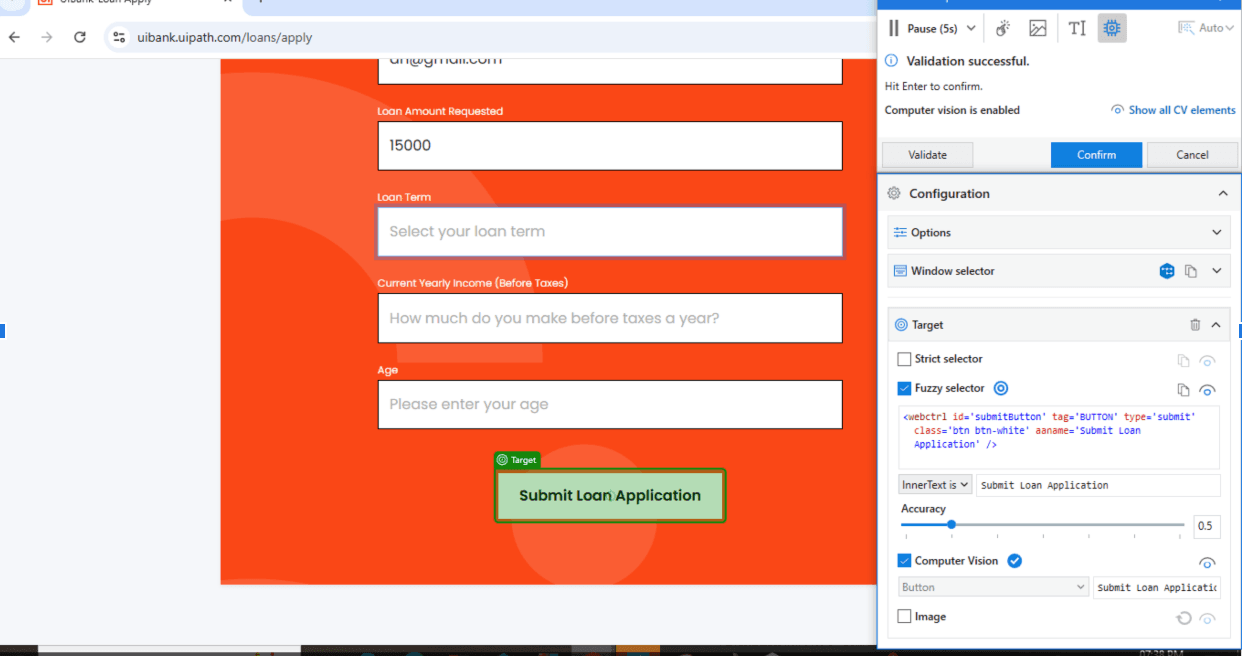
- Table extraction - It helps in getting all the values available in a table like when any search retrieves more data
- Arguments and variables can be used to store a variable and scope can be defined to use.
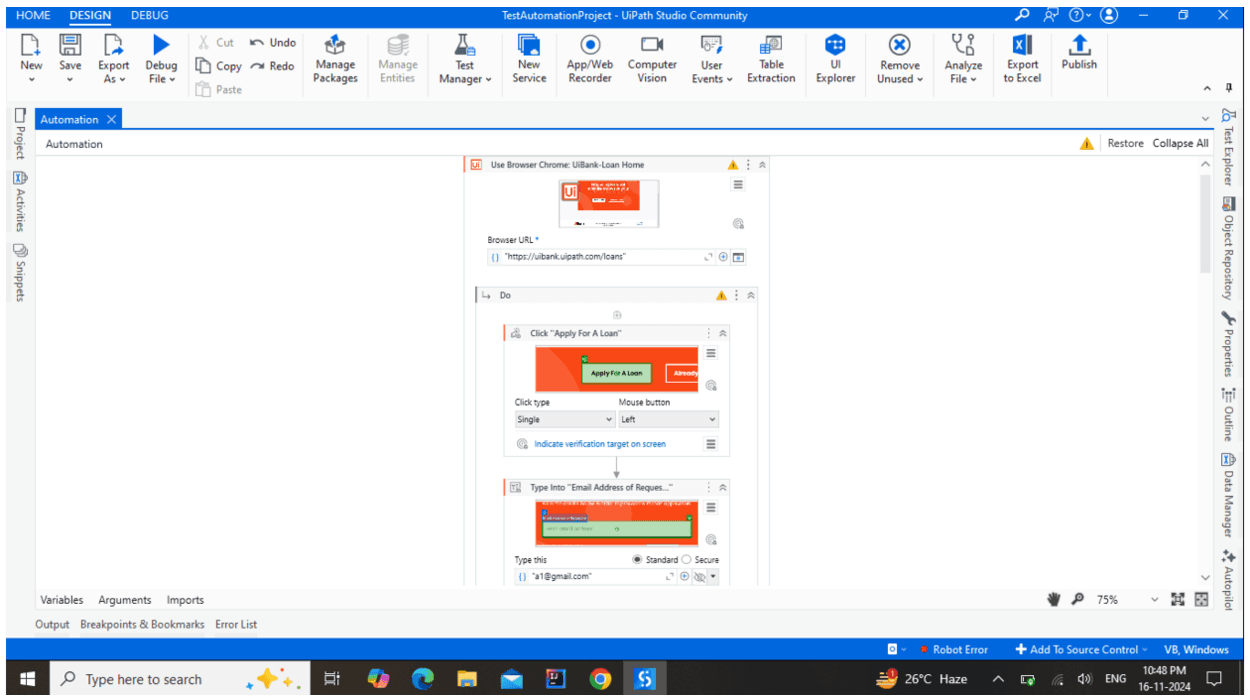
Below is an example of a case with activities like using the browser, typing in, clicking actions
Key Advantages of Using RPA for Testing
By incorporating RPA into software testing, QA teams can experience the following advantages:
- Faster Time-to-Market: Automating repetitive test cases with RPA reduces the time spent on testing, allowing for faster product releases and updates.
- Improved Test Consistency: Since bots perform tasks exactly as instructed, the consistency of test executions across environments improves, reducing the risk of inconsistencies that often arise with manual testing.
- Scalability: RPA allows teams to scale their testing efforts quickly. Multiple bots can run tests in parallel, which is particularly useful for larger applications and load-testing scenarios.
- Better Resource Allocation: By offloading repetitive tests to RPA, testers can focus on high-value tasks like exploratory testing, complex scenarios, and defect analysis. This shift enhances the QA team’s overall productivity and effectiveness.
Challenges of Implementing RPA in Testing
While RPA brings significant benefits, implementing it in software testing presents some challenges:
- Bot Maintenance: Bots require regular updates to keep pace with application changes. UI changes or updates in application workflows may break the bots, necessitating timely adjustments.
- Scalability for Complex Scenarios: RPA is highly effective for repetitive and structured tasks, but automating complex or highly dynamic scenarios can be challenging and may require advanced bot configuration.
- Initial Investment: Implementing RPA requires an initial investment in tool licensing, training, and setup, which may be a barrier for smaller QA teams.
- Handling Unexpected Errors: Bots are rule-based, and unexpected changes in application logic can cause them to fail. Ensuring robust error-handling mechanisms within bots is essential but may require extra effort.
- Dependency on External Tools: Integration with other testing and reporting tools may sometimes be limited, especially if the RPA tool doesn’t natively support specific testing frameworks or software.
Conclusion
Test automation with RPA tools represents a significant step forward in improving software testing processes. By leveraging the power of automation, organizations can enhance efficiency, reduce costs, and improve the quality of their software. As the demand for faster and more reliable testing continues to grow, embracing RPA could be the key to staying competitive in the ever-evolving tech landscape.







