

Key Takeaways
- Set clear AI approval rules by deciding which tools and use cases employees can access, which ones require additional review, and which ones are prohibited activities.
- Protect business information by defining the data employees can share with AI tools and the situations requiring stronger safeguards or human review.
- Assign accountability by naming the people responsible for policy decisions, vendor reviews, exceptions, and AI-related incidents.
- Measure readiness before expanding by tracking approved-tool coverage, unresolved exceptions, employee training, and incidents to identify gaps before scaling AI adoption.
McKinsey’s State of AI survey found that 88% of respondents said their organizations used AI in at least one business function. Whereas, Gartner reported that only 13% of organizations believed that they had the right governance in place for AI agents, which points toward a gap between adopting AI tools and knowing how to manage them.
The gap between AI adoption and governance creates risks that enterprise leaders need to address. When a company approves an AI assistant for employees, they discover an additional tool being used that may have crept in through a software subscription, developer workflow, or an employee’s personal account. Nobody may have deliberately ignored the rules, as the rules were not explicitly expressed before to guide the decision.
Let’s say employees may upload customer records to unapproved chatbots, developers may accept AI-generated code with security flaws, and procurement teams may approve software without checking how its AI features handle company data.
All of these choices can expose confidential information, put customer commitments at risk, and make it difficult for executives to know who is accountable for the decisions involved.
Setting the Required Rules for AI Tools, Data, and Approvals
Enter the enterprise AI policy.
The rulebook that provides employees the right instructions on tool usage, shareable information, AI-generated work checks, and approval exceptions. This gives leadership a way to see the tools that are reviewed, risks involved, and the person responsible for addressing them.
Responsible AI use should not depend on guesswork; the policy should leave room for employees to use AI and innovate while firmly protecting customer data, customer-facing decisions, software releases, and vendor access.
Before a company expands its use of AI, leaders need to know which tools employees use, whether those tools process confidential company or customer data, and whether AI-generated outputs are checked before they inform business decisions. These details help leaders decide which uses are safe to approve and which of them require additional control.
 Kunal KumarChief Revenue Officer
This guide explains how to create an enterprise AI policy, set rules for different business functions, and use an editable AI policy template to document ownership and approvals. It also covers implementation responsibilities, employee training, enforcement, and a 30/60/90-day rollout plan to help your team use AI responsibly.
What is an Enterprise AI Policy, and Why Does Your Business Need One?
An enterprise AI policy sets the rules for how employees can utilize AI at work. It explains the tools that they can use, information that they can share, checking AI-generated work, and the person responsible for approving the exceptions. This helps the team to use AI in their work and protect company data, customers, and business operations while leaving security, quality, and accountability to individual judgment.
An AI usage policy is just a part of a larger AI governance policy. The policy guides everyday decisions, such as whether a developer can use an AI coding assistant or if the marketing team can upload customer data to the chatbot. Whereas, the governance framework covers the wider picture, including who approves AI projects, how risks are assessed, who remains accountable, and how the organization checks whether their controls are working.
Reducing Shadow AI Risks and Improving Work Quality with AI Policy
This distinction is important to note, as this encourages employees to use AI responsibly and help them distinguish between different scenarios, be it for when a tool asks for access to customer records or offers to generate code for a payment system. They need to get better guidance about the rules so that they can make the decisions accordingly.
In addition, without any policy, employees could end up turning to shadow AI, where they can use tools or AI features without their organization’s approval. This can expose company information to services that have not been reviewed for security, privacy, or contractual requirements.
Unmanaged AI tools also affect the quality of work. An AI tool could produce an incorrect financial summary, suggest a faulty software fix, or generate code with a security weakness. These problems tend to slip through if the teams follow different review practices. Checks should match the intended use, especially when AI-generated work affects customers, financial records, or production systems.
How Can You Create an Enterprise AI Policy in Five Steps?
An enterprise can use these five steps to build a policy around the work that teams do every day.
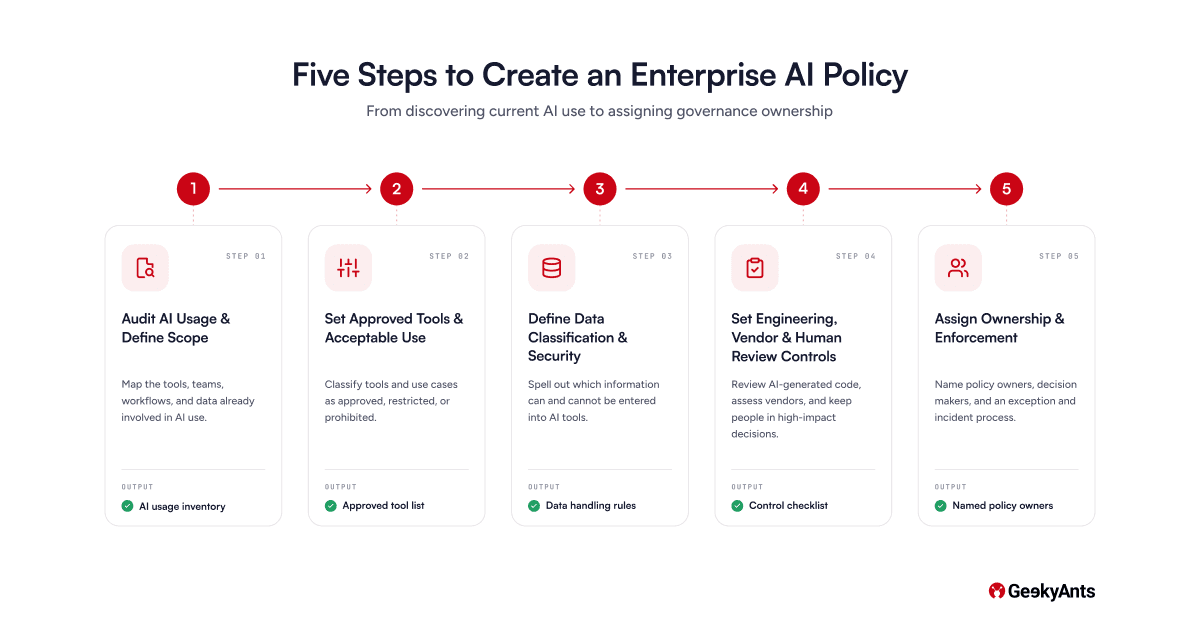
Step 1: Audit Existing AI Usage and Define the Policy Scope
Start by identifying the following:
- Tools and Accounts: AI products used by employees, including free versions, personal accounts, and features built into the existing software.
- Teams: Include IT, engineering, HR, finance, marketing, legal, procurement, and business teams that already use AI.
- Tasks and Workflows: Employees using AI to write content, summarize documents, review code, analyze data, or support customer service.
- Information Involved: The tasks involving public information, internal documents, customer records, employee details, financial data, or proprietary code.
- Existing Rules: Checking if IT, privacy, information security, procurement, or employee policies already cover parts of this activity.
- Unapproved Use: Are employees using tools that IT or security teams have not reviewed.
Employees who work with these tools can explain where existing processes slow them down and why they choose one tool over another.
Step 2: Draft the Approved AI Tools and Acceptable Use Rules
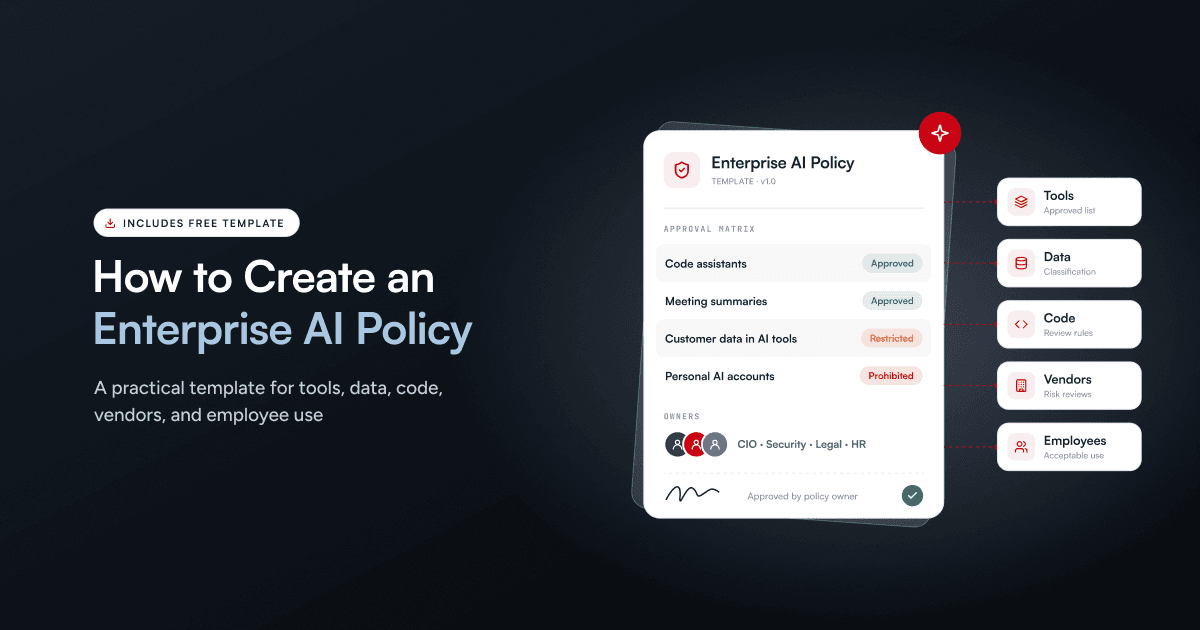
Create a list of approved, restricted, and prohibited tools and use cases:
- Approved: Tools and use cases that have passed the organization’s review and can be used within stated limits.
- Restricted: Tools or activities that require additional approval, specific security settings, or human review before use.
- Prohibited: Tools or activities that create risks the organization is unwilling to accept, such as entering company credentials into an unapproved AI service.
Microsoft 365, Salesforce, and other business platforms may introduce AI capabilities through product updates or optional add-ons. The policy must explain how employees must request approval for using new features, add-ons, and tools.
Step 3: Set Data Classification and AI Security Requirements
One of the crucial parts of an enterprise AI policy is to explain the type of information that the employees can enter into the AI system. A general instruction to ‘protect confidential data’ leaves too much room for interpretation. Employees need examples of the information that is allowed, restricted, or prohibited.
Data Category | Example | Policy Direction |
Public Information | Publishes product descriptions or public website content. | May be used in approved tools, subject to normal review. |
Internal Information | Internal meeting notes or project plans. | Use only in tools authorized for that information. |
Confidential Information | Customer records, contracts, financial forecasts, or employee files. | Restrict use to tools and workflows with the required approvals and protection. |
Credentials and Secrets | Passwords, API keys, authentication tokens, and private encryption keys. | Use approved secret-management methods instead. |
Proprietary Technical Information | Unreleased source code, system architecture, or security findings. | Share only through approved development workflows with the required access and security controls. |
Align these examples to your organization’s existing rules and obligations. Some confidential or regulated information may be permitted in a specific enterprise AI environment if the necessary safeguards and approvals are in place.
Step 4: Define AI Controls for Software Development, Vendors, and Human Review
An AI policy for software development must explain when can developers use coding assistants, restrictions on sharing source code, and requirements for reviewing AI-generated changes. Engineering teams should document AI-assisted changes through existing code review records, including the responsible developer, testing results, security checks, and approvals.
For higher-risk uses, such as AI agents accessing sensitive data or modifying production systems, organizations should establish permission limits, human approval requirements, and activity logs.
Third-party vendors must go through security and privacy reviews covering data handling. Access controls, retention and deletion, subprocessors, and contractual obligations. The depth of review should reflect the data involved and potential business impact created.
Employees should verify AI-generated outputs that affect customers, finances, security, or compliance. For high-impact decisions, the policy should specify who approves the results, when human intervention is required, and whether AI assistance must be disclosed.
Step 5: Assign Ownership and Enforcement of the Enterprise AI Policy
A policy needs named owners across the organization. Responsibilities may vary depending on the company’s size and existing governance structure.
Owner | Main Responsibility |
CIO or designated policy lead | Provides executive oversight, resolves cross-team issues, and monitors implementation progress. |
AI policy owner | Maintains the policy, manages the approved-tool register, coordinates reviews, and tracks exceptions. |
Procurement | Coordinates vendor assessments and checks that require contractual terms are in place. |
HR and Department Leaders | Communicate the rules, arrange role-specific training, and answer employee questions. |
Engineering Leaders | Apply development controls, code review, testing, and release requirements. |
Business Owners | Approve and monitor AI use cases within their areas of responsibility. |
To make the policy applicable in day-to-day tasks, explain how employees can get help, follow the rules, report problems, and keep the policy up to date.
- Requests and escalation: Explain how to request tools, seek exceptions, report incidents, and escalate concerns. Assign clear reviewers and approvers.
- Employee training: Use short, real-world examples to help employees apply the policy.
- Enforcement: Define how violations are reviewed and corrective actions are decided, including for serious or repeated breaches.
- Technical controls: Use safeguards such as access restrictions, approved accounts, and appropriate monitoring.
- Regular reviews: Review the approved-tool list quarterly and the full policy annually, or sooner after major tool changes, regulatory updates, incidents, or new AI use cases.
What Should an Enterprise AI Policy Template Include?
The enterprise AI policy turns expectations about AI use into rules employees can follow. It explains which tools they can use, what data they can share, when human review is needed, and who approves exceptions.
The policy should give every department the same core rules without treating every task as identical. Developers using AI coding assistants, recruiters reviewing resumes, and marketers drafting campaigns face different risks and need specific guidance.
An AI policy works well when the team understands their responsibilities. It should identify the person or team authorized to approve exceptions, the reviewers required for new AI use cases, and the role accountable for checking if the agreed controls are followed. Clear responsibilities help teams apply the same rules across the business.
 Varun Kumar SahuChief Digital & Privacy Officer
What Core Rules Should Every Enterprise AI Policy Cover?
Policy area | What to include | Accountable role |
Purpose and scope | Who must follow the policy, which AI tools and activities it covers, and how it connects to existing company policies. | AI policy owner |
Approved tools and acceptable use | Approved, restricted, and prohibited tools; permitted uses; and the process for requesting approval. | IT lead |
Data privacy and security | What information can be shared, how vendors handle prompts and files, and how employees report accidental data exposure. | CISO |
Human review and responsible use | When employees must verify outputs, who approves consequential decisions, and when disclosure or additional review is required. | Relevant business-unit leader |
Vendor and third-party reviews | Checks covering security, privacy, data retention, model training terms, subcontractors, and contractual obligations. | Procurement lead |
AI-assisted software development | Approved coding assistants, source code handling, code review, testing, and security checks before release. | Head of Engineering |
Training and incident reporting | Role-based employee guidance, required acknowledgments, reporting channels, and escalation responsibilities. | HR lead |
Ownership, enforcement, and review | Policy maintenance, exception approvals, records, consequences, review dates, and measures of adoption. | AI policy owner |
For each policy area, document required approvals and when reviews are needed. Check new tools for data-handling risks, and define what AI agents can access or do, how they are monitored, and when human intervention is required. If possible, ensure agents can be stopped if something goes wrong.
How Can One AI Policy Work Across Different Departments?
Keep the enterprise baseline mandatory for everyone, then add short appendices for teams with specific needs.
- Engineering: Coding assistants, source-code sharing, testing, and release approvals.
- HR: Candidate and employee data, recruitment workflows, and human review.
- Marketing: Fact-checking, intellectual property, and publication approval.
- Finance: Financial data protection and verification of AI-assisted calculations.
- Customer Operations: Customer information, AI-assisted replies, and escalation of sensitive cases.
- Procurement: Vendor assessments and AI features in purchased software.
Each appendix should have a named owner, approval route, and review date. This approach keeps company-wide expectations consistent while allowing departments to address the risks in their own work.
The editable AI usage policy template provides the team with a starting point for documenting tool permissions, data restrictions, review requirements, and approval ownership.
Get the Enterprise AI Policy Template and Approval Matrix
Set rules for AI use, protect company and customer data, decide how new AI tools get approved, and help employees use AI responsibly.
Download the Free Template
How Can Enterprises Implement and Enforce an AI Policy Across Business Units?
An enterprise AI policy works effectively when employees can follow it in their day-to-day work and managers know what to do when someone needs an exception.
Publishing a policy on the company intranet is a starting point. Employees still need approved tools, clear instructions, training, and a way to report problems. IT and security need controls to support the written rules, while business leaders need evidence that their teams are following them.
For large enterprises, the challenge is consistency. The marketing team could use AI to create campaign-related copies, engineering teams could use a coding assistant, and HR might use AI features to review applications. Each team has different needs, but they should follow the same company-wide rules for data protection, approved tools, human review, and accountability.
A rollout starts by finding out how AI is already being used, naming the people responsible for decisions, and agreeing on which risks need attention first. From there the organization can introduce approval workflows, train employees, apply technical controls, and track whether the policy is working.
Who Should Own AI Policy Decisions and Exceptions?
Each function should have a policy owner responsible for keeping decisions consistent across the organization.
Role | Main Responsibility | Evidence of Completion |
CIO or executive sponsor | Accountable for the rollout, resolving cross-functional disagreements, and reporting progress to leadership. The AI policy owner coordinates day-to-day delivery. | Approved implementation plan and documented decisions. |
AI policy owner | Maintains the policy, coordinates reviews, and tracks exceptions and unresolved issues. | Current policy version, decision log, and review schedule. |
CISO and IT | Assess tool security, manage access, and implement available technical controls. | Security reviews, approved-tool register, and access-control records. |
Legal and compliance | Review relevant legal, privacy, contractual, and regulatory obligations. | Documented review and recorded requirements or restrictions. |
Procurement | Assess AI vendors and check contractual terms, data handling, and subcontractor arrangements. | Vendor assessments and completed contract reviews. |
HR | Coordinate employee communication, training, policy acknowledgement, and consistent disciplinary processes. | Training records, acknowledgement records, and employee guidance. |
Engineering | Set rules for coding assistants, code review, testing, secret handling, and production releases. | Developer guidance, review records, and required testing evidence. |
Business-unit leaders | Confirm local use cases, appoint departmental contacts, and ensure teams follow the enterprise policy. | Current departmental AI inventory, documented use-case approvals, and records of unresolved risks and follow-up actions. |
What Should a 30/60/90-Day AI Policy Rollout Look Like?
A 90-day rollout allows an enterprise to move from policy drafting to day-to-day use.
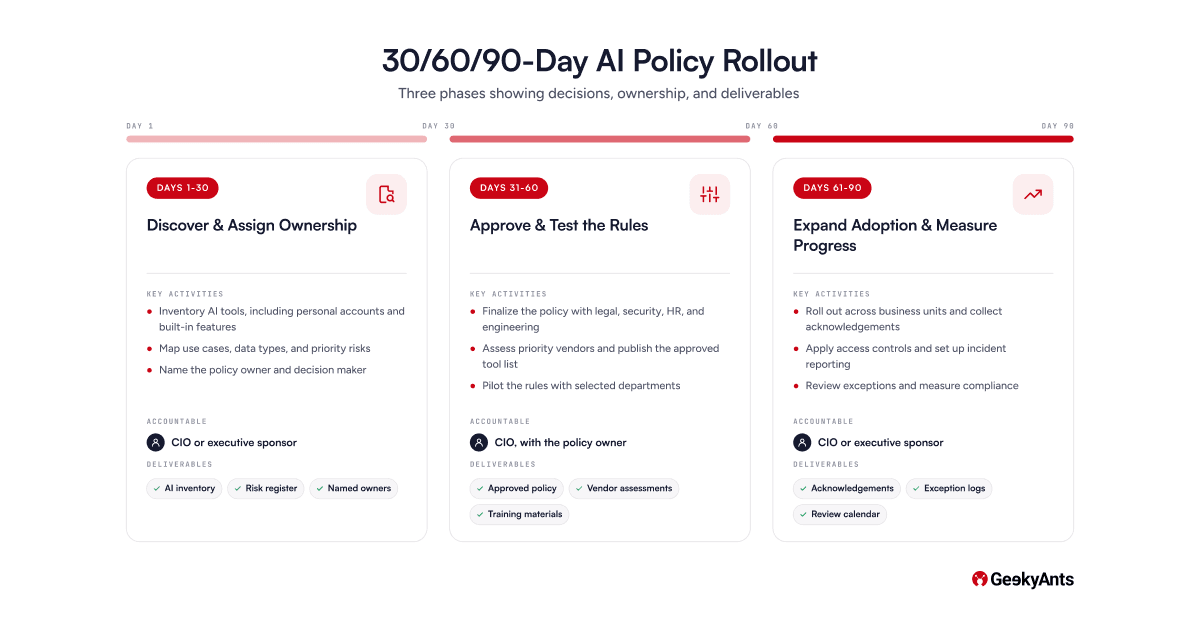
The timeline provided below is an illustrative operating model. Companies with complex systems, multiple jurisdictions, or high-risk AI applications may need more time.
Days 1-30: Discover Existing AI Use Cases and Assign Ownership
- Key Decisions and Activities: Identify the AI tools that are already in use, including personal accounts used for work and AI features inside existing software. Map out the use cases, data types, business owners, and the risks that need attention first. Name the policy owner and decision maker.
- Accountable Executive: CIO or designated executive sponsor
- Deliverables and Evidence: AI inventory, initial risk register, named owners, priority actions, and a documented policy approval process.
Days 31-60: Approve and Test the Rules
- Key Decisions and Activities: Finalize the policy with legal, security, procurement, HR, engineering, and business-unit input. Assess priority vendors, publish the approved tool list, and test the rules with selected departments while preparing employee guidance and training.
- Accountable Executive: CIO, with the policy owner coordinating approvals
- Deliverables and Evidence: Approved policy, completed vendor assessment records, departmental pilot feedback, and training materials.
Days 61-90: Expand Adoption and Measure Progress
- Key Decisions and Activities: Expand the policy across business units, collect employee acknowledgements, apply available access and security controls, and establish incident reporting. Review exceptions, measure compliance, and schedule ongoing policy reviews.
- Accountable Executive: CIO or executive sponsor, supported by functional leaders.
- Deliverables and Evidence: Training and acknowledgment records, control reports, incident and exception logs, baseline performance metrics, and a scheduled review calendar.
Once each of the phases is completed, leadership should make the right decision whether to proceed, address the gaps, or delay a particular use case until risks are controlled.
Which Metrics Show Whether an Enterprise AI Policy Is Working?
Leadership should track a set of measures that show where adoption is progressing and where decisions or safeguards remain outstanding.
Indicator | What to measure | Suggested owner |
Approved-tool coverage | The proportion of identified AI tools and use cases that have completed the required review | AI policy owner and IT |
Unresolved exceptions | The number of open exceptions, their age, and the risks awaiting a decision | AI policy owner and relevant business owners |
AI-related incidents | Reported incidents by type and severity, along with the status of corrective actions | Information Security, with relevant risk or business teams |
Policy acknowledgment | The proportion of employees in scope who have completed the required acknowledgment or training | HR and department leaders |
Approval cycle time | The time taken to review and decide on new tools, vendors, or AI use cases | AI policy owner and designated reviewers |
Assign an owner and review frequency to each measure. Establish a baseline before setting targets, and interpret the results in context.
Is Your Enterprise AI Policy Ready for Rollout?
Use it to identify gaps before employees begin using the policy in their daily work. If an item is missing, assign an owner and a deadline, instead of treating the policy as ready.
Tools and acceptable use
- Maintain a list of approved AI tools and identify tools that need additional approval.
- Employees know which AI uses are allowed, restricted, or prohibited.
- Employees have a clear process for requesting a new AI tool or use case.
Data protection and security
- The policy explains what public, confidential, customer, employee, and financial data can be shared with each approved tool.
- Access, data retention, and vendor data-use terms have been checked even before sensitive information is entered.
Engineering Safeguards
- Developers must know which of the coding assistants can be used and which code or credentials must not be shared by them.
- AI-generated code and data must pass the required code review, testing, and security checks before initiating any release.
Vendor and third-party reviews
- AI vendors undergo the organization’s security, privacy, and contract reviews before approval.
- The relevant teams assess data storage, retention, deletion, and use for model training where applicable.
Ownership and Approvals
- A named policy owner and executive sponsor are in place.
- Each department knows who approves new use cases and exceptions.
- Approval decisions, unresolved risks, and required follow-up actions are documented.
Employee training and incident response
- Employees receive guidance relevant to the AI tools and tasks they use.
- Employees know how to report an AI-related incident, questionable output, or possible policy breach.
- Training, policy acknowledgment, escalation routes, and corrective-action procedures are defined.
Monitoring and review
- The organization tracks approved-tool coverage, unresolved exceptions, AI-related incidents, policy acknowledgment, and approval cycle time.
- The approved-tool register has a named owner and review schedule.
- The entire policy has a scheduled review date and clear triggers for earlier review, such as a major tool change, a relevant regulatory change, or an AI-related incident.
If any critical item is incomplete, record the gap, assign an accountable owner, and set a target date. Leadership should consider whether the affected use case can proceed safely or needs to wait until the necessary controls are in place.
What Must Be Done After Completing the Readiness Check?
After identifying the gaps, decide who will close each of the gaps and when. For guidance on assigning responsibilities, choosing controls, tracking progress, and planning the next 90 days, read GeekyAnts’ AI Governance Framework for Enterprises: Policies, Roles, Controls, Metrics, and a 90-day roadmap.
How Can GeekyAnts Help Turn AI Policy Into Implementation?
GeekyAnts combines AI consulting with digital product engineering to help businesses move from approved AI use cases to working products. With 20 years of engineering experience since 2006 and 550+ engagements across products and enterprises, the team brings experience in AI product development, system integration, software testing, and modernization.
How Has GeekyAnts Delivered AI Solutions for Document Automation and Clinical Workflow Efficiency?
1. Pillar Engine - Automating Document Processing With AI
Pillar Engine uses AI-powered document intelligence to process large volumes of documents. According to GeekyAnts, the platform can process 10,000 pages in around two minutes, reducing manual effort by 99% and achieving reported accuracy of over 85%. For similar implementations, enterprise AI policy requirements can guide engineering decisions around data access, output validation, human review, and performance monitoring.
Read the Pillar Engine Case Study
2. Dentify - Using AI to Support Clinical Workflows
Dentify uses AI transcriptions and retrieval-augmented generation (RAG) to support clinical workflows, including treatment planning. The solution reduced doctor onboarding time by 40% and improved doctor efficiency in treatment planning by 35%. These implementations show why AI policy requirements should be translated into technical controls for sensitive data access, secure integrations, and human verification of AI-generated outputs.
How Can an AI Implementation Engagement Move From Assessment to Production?
The engagement includes four stages:
1. Assess readiness and use cases: Identify business priorities, existing systems, data requirements, risks, and success criteria.
2. Create an implementation plan: Translate approved use cases and policy requirements into technical specifications, delivery ownership, testing requirements, and release criteria.
3. Build and validate: Develop a bounded pilot, test its outputs and integrations, address security and reliability issues, and involve the business reviewers.
4. Deploy and improve: Release the solution with agreed monitoring, incident handling, operational ownership, and performance reviews before expanding its use.
AI creates opportunities when it solves a problem that teams face in their daily work. Before committing more time and money, we need to see whether it helps people do their work better and whether the results justify the investment. This helps guide the decision to take an AI solution further.
Kunal KumarChief Revenue OfficerGeekyAnts supports the engineering work involved in these stages. The organization remains responsible for approving its AI policy and determining its legal, regulatory, privacy, and compliance obligation, with advice from its own legal, security, risk, and compliance teams. As an engineering partner, we’ll implement the resulting requirements without replacing qualified legal or regulatory counsel.
How Can You Turn Your Enterprise AI Policy Into an Operating Framework?
Start with the risks your organization faces today by assigning owners, closing the gaps in the approval process, and reviewing the policy as your tools and business needs change. You do not need to solve every AI challenge at once; however, it is necessary to have a clear purpose and ensure someone is responsible for putting these rules into practice.
As your team uses AI, update the policy when the requirements change or when new risks come up, and make sure employees can still follow the rules in their day-to-day work. This will help your organization make responsible use of AI and keep up with the new AI tools in the future.
Frequently Asked Questions About Enterprise AI Policy
1. Is an enterprise AI policy legally required in the United States or Canada?
There is no single, universal requirement that every business in the United States or Canada should maintain a separate document called an enterprise AI policy. However, organizations may have legal, regulatory, contractual, privacy, employment, consumer-protection, or sector-specific obligations that affect how they use AI. Requirements depend on the jurisdiction, industry, type of AI application, and information being processed. Organizations should obtain appropriate legal advice to determine which requirements apply to their operations.
2. Can the enterprise use its existing information security policy instead of creating a separate AI policy?
Yes. A company can extend its existing security policy, but it should also address AI-specific risks, including inaccurate outputs, AI-generated code, automated decisions, and human review. A separate policy is useful when certain existing rules have gaps.
3. Who is legally responsible when an AI system makes a decision that harms a customer or business?
Legal responsibility depends on the facts, applicable laws, and each party’s role. A business may be held accountable for decisions made using AI, even when a third-party vendor supplies the system. Using AI does not automatically remove that responsibility.
4. How should enterprises handle AI capabilities already embedded in Microsoft 365, Salesforce, and other SaaS platforms?
Enterprises should review built-in AI features before enabling them. Check what data they access, how vendors handle that data, which permissions apply, and whether additional approval, employee training, or monitoring is needed.
5. How should enterprise AI policies change after a merger or acquisition?
After a merger or acquisition, review both companies’ AI tools, vendor contracts, data practices, and existing rules. Resolve conflicting policies, identify security gaps, and assign ownership before expanding AI use across the combined organization.
6. What is the difference between an enterprise AI policy and ISO/IEC 42001 certification?
An enterprise AI policy sets internal rules for AI use. ISO/IEC 42001 provides requirements for an AI management system that organizations can implement and seek certification against through an independent certification body.
7. Should enterprises disclose their internal AI policies to customers and business partners?
Enterprises do not always need to share their full internal AI policy. They can provide a summary of their AI practices and safeguards, while disclosing specific information when contracts, applicable laws, or customer commitments require it.
8. Can an enterprise AI policy cover autonomous AI agents that execute business actions?
Yes. An enterprise AI policy can define what autonomous agents are permitted to access or execute, including limits on sensitive data, transactions, and system changes. It should also establish monitoring requirements, human approval for high-impact actions, and procedures to stop agents or reverse their actions where technically possible.
Sources and Citations
1. https://www.mckinsey.com/capabilities/quantumblack/our-insights/the-state-of-ai-2025