

Google is starting to ship Flutter’s engineering workflows as machine-readable guidance for AI agents. It may look like another AI feature, but it hints at a much bigger shift in how teams build with Flutter.
The Consistency Problem
Over the past few years, AI coding tools like Cursor, Claude Code, Copilot, and OpenCode have become part of many developers’ daily workflows. They produce code, explain unfamiliar APIs, write tests, and navigate large codebases with impressive accuracy.
But if you have been using them on a reasonably large project, you have probably noticed something.
They are not very consistent.
Ask an AI to implement the same feature in two different sessions, and there’s a good chance you will get two different approaches. Switch models, and the implementation changes again. Sometimes it follows the latest framework recommendations. Other times, it relies on outdated patterns.
Most teams respond the same way: write better prompts, add repository rules, or create a custom skill.md files to steer the agent toward the right decisions.
We took the same approach by documenting our architecture, coding conventions, review expectations, and engineering practices as custom Skills. They made the agent noticeably more consistent.
So when Flutter announced official Agent Skills, my first reaction was not: “How do we use them?” It was: “If we already have our own Skills, what problem are Flutter's official Skills actually solving?”
That question turned into a couple of experiments.
Three Layers of AI-Assisted Development
Looking back, Flutter's recent AI investments weren't isolated features. They were building on each other.
First came Rules, giving teams a way to define project-specific conventions and preferences.
Then came Model Context Protocol (MCP), allowing AI agents to inspect, debug, and interact with running Flutter applications instead of reasoning purely from static code.
And then came Agent Skills.
If Rules tell an agent how your team works, and MCP tells it what’s happening inside your application, Agent Skills answer a different question: how does Flutter itself recommend solving this problem?
That is the important shift.
Flutter is now versioning its engineering workflows alongside the framework itself. Instead of relying entirely on what an AI model happened to learn during training, agents can follow workflows maintained by the Flutter team.
Today, those workflows cover areas like:
- Localization
- Responsive layouts
- Routing
- Widget and unit testing
- Static analysis
- JSON serialization
- Platform integration
- Architecture best practices
In other words, Flutter is shipping its engineering knowledge as structured workflows.
That naturally led to the next question: does this actually change how an AI agent behaves?
I ran two experiments to find out.
First Experiment: Declarative Routing
It is one of those features where there is not just one thing to do. Depending on the prompt, an AI could jump straight into writing routes, miss platform-specific configuration, skip deep linking altogether, or recommend an approach based on what it learned during training rather than Flutter's latest guidance.
So I kept the prompt intentionally simple:
“Set up declarative routing for this Flutter application.”
I wanted to see how the agent would approach the problem before I told it how to solve it.
The first thing it did caught my attention.
Before generating an implementation plan, it explicitly selected the flutter-setup-declarative-routing skill.
Flutter Agent Skill Selection for Declarative Routing
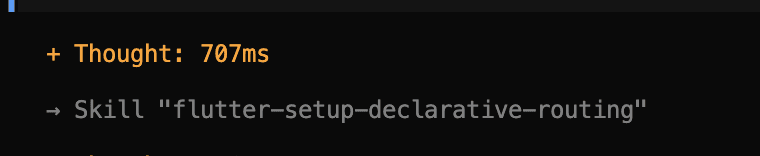
From that point on, it was not about figuring out a solution; it was following Flutter's own workflow.
That was the interesting part.
Without Agent Skills, the implementation depends on the model’s reasoning and whatever Flutter knowledge it has internalized. With Agent Skills, the framework itself becomes the starting point.
What happens when Flutter's Skills and our own Skills are both available?
I tested this with a login screen.
It needed:
- Flutter's localization workflow
- Our project conventions for authentication, repositories, dependency injection, and state management
I kept the prompt simple and let the agent decide how to approach it -
“Implement a login screen for this application. Follow the existing project architecture and add localization for all user-facing strings.
It picked the right source every time.
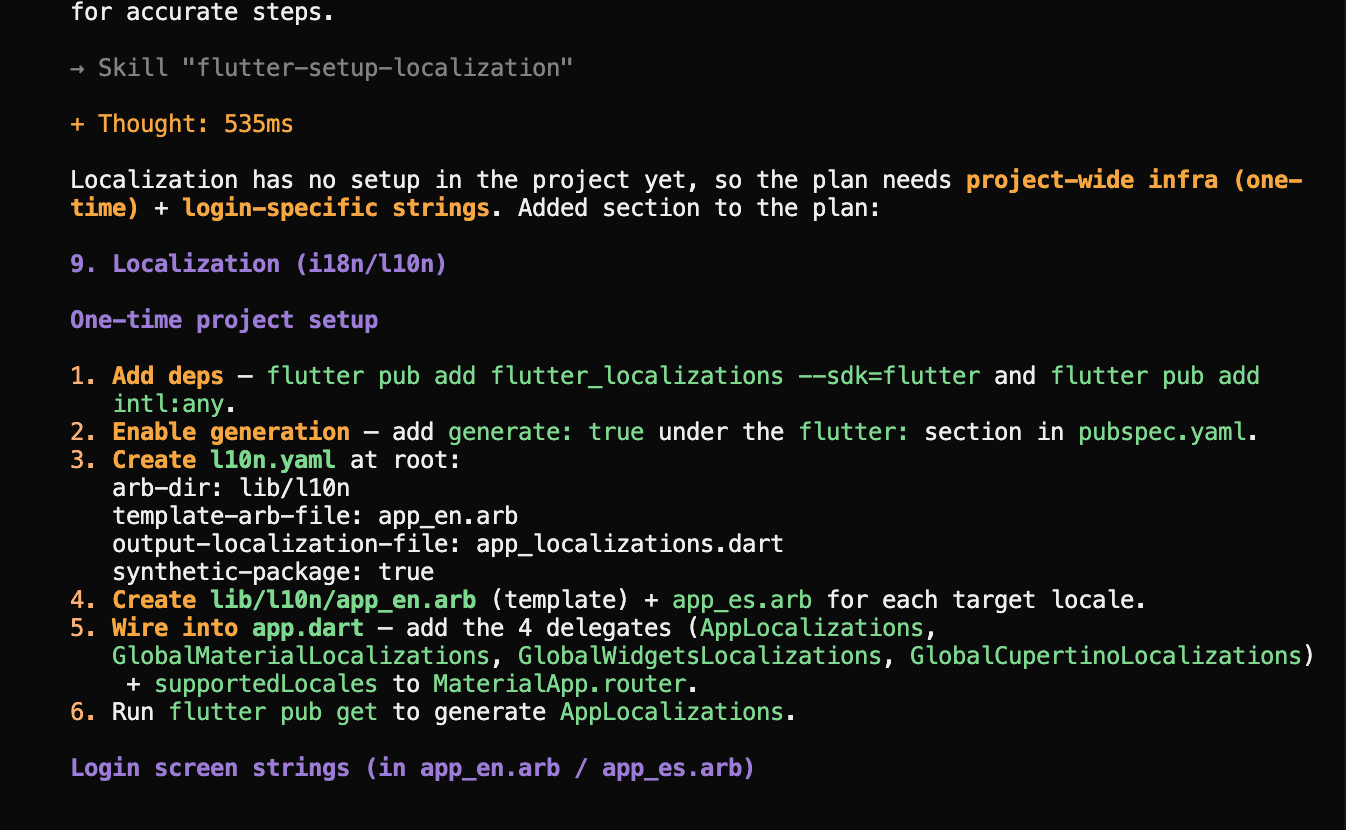
For localization, it used Flutter’s official Skill. For everything related to our application architecture, it followed our custom Skills. I did not have to tell it which one to use or write a carefully engineered prompt.
The two sets of Skills worked together naturally. Flutter handled the framework guidance, while our repository continued to define how our application was built.
Flutter Localization Workflow Using Agent Skills
Why This Matters: A Floor, Not a Finish Line
So, what actually changed?
Flutter is taking ownership of its engineering expertise.
Engineering teams no longer need to teach AI how Flutter expects routing, localization, responsive layouts, or testing to be implemented. Flutter now ships that knowledge itself.
That removes a significant amount of duplication. Instead of every team maintaining its own version of Flutter best practices inside prompts or custom Skills, the official workflows become the source of truth.
Even better, those workflows evolve alongside Flutter. As recommendations change, the official Skills change too, and every compatible AI agent benefits automatically.
Of course, that’s only half the story.
Flutter’s Agent Skills provide a strong foundation, but they do not replace your organization’s architecture, coding standards, or business-specific workflows. Those remain your responsibility, and that is exactly how it should be.
Final Thoughts
Looking back, Flutter’s recent AI features fit together surprisingly well.
Rules capture how your team works. MCP gives agents runtime context. Agent Skills teach them how Flutter itself expects problems to be solved. Custom Skills layer on everything unique to your organization.
Together, they reduce the amount of engineering knowledge an AI has to infer. That is the real significance of Flutter’s recent AI investments. Engineering knowledge is becoming explicit, versioned, reusable, and maintained by the people best positioned to own it.
Today’s skill library covers foundational workflows, but it already hints at what’s possible. Imagine Skills for performance profiling, DevTools workflows, accessibility audits, plugin development, migrations, or advanced rendering patterns. Every new skill moves another piece of framework knowledge out of documentation and into a reusable workflow.
The answer to how much of Flutter an agent should really guess keeps shrinking with every release.







