

Key Takeaways
- Performance testing is an architecture-aware discipline, not a final sprint before release.
- Tool choice matters—only real-world simulators reveal real-world issues.
- CI/CD integration ensures consistency, eliminating regressions with every build.
- Monitoring post-launch is where proactive performance assurance begins.
- GeekyAnts combines tool expertise, domain experience, and real-user simulation to unlock peak mobile performance.
App performance is the invisible feature that your users notice the most. It does not appear in your UI, but it defines how users experience every interaction, from screen loads to background syncs. The moment that experience falters, users lose trust, and often, the app itself.
According to industry data, nearly 80% of users uninstall an app due to poor performance, and a delay of even one second can lead to a 7% drop in conversions. These numbers are not marginal; they are fatal for apps trying to scale in today’s hyper-competitive market.
Mobile app testing is the only way to safeguard against such losses. While functional testing ensures that features work as intended, performance testing evaluates how your app behaves under stress, on different devices, networks, and usage conditions. Without it, even the most well-designed apps risk crashing under real-world pressure.
This blog explores how to achieve peak mobile app performance through structured performance testing, covering key metrics, testing strategies, CI/CD integration, top tools, troubleshooting techniques, and real-world examples.
Our insights are based on the multiple projects GeekyAnts has done for close to 450+ clients. We also share examples of the different projects that we have built where we achieved peak app performance metrics. You’ll also find a live demo and downloadable checklist to help you start testing with confidence.
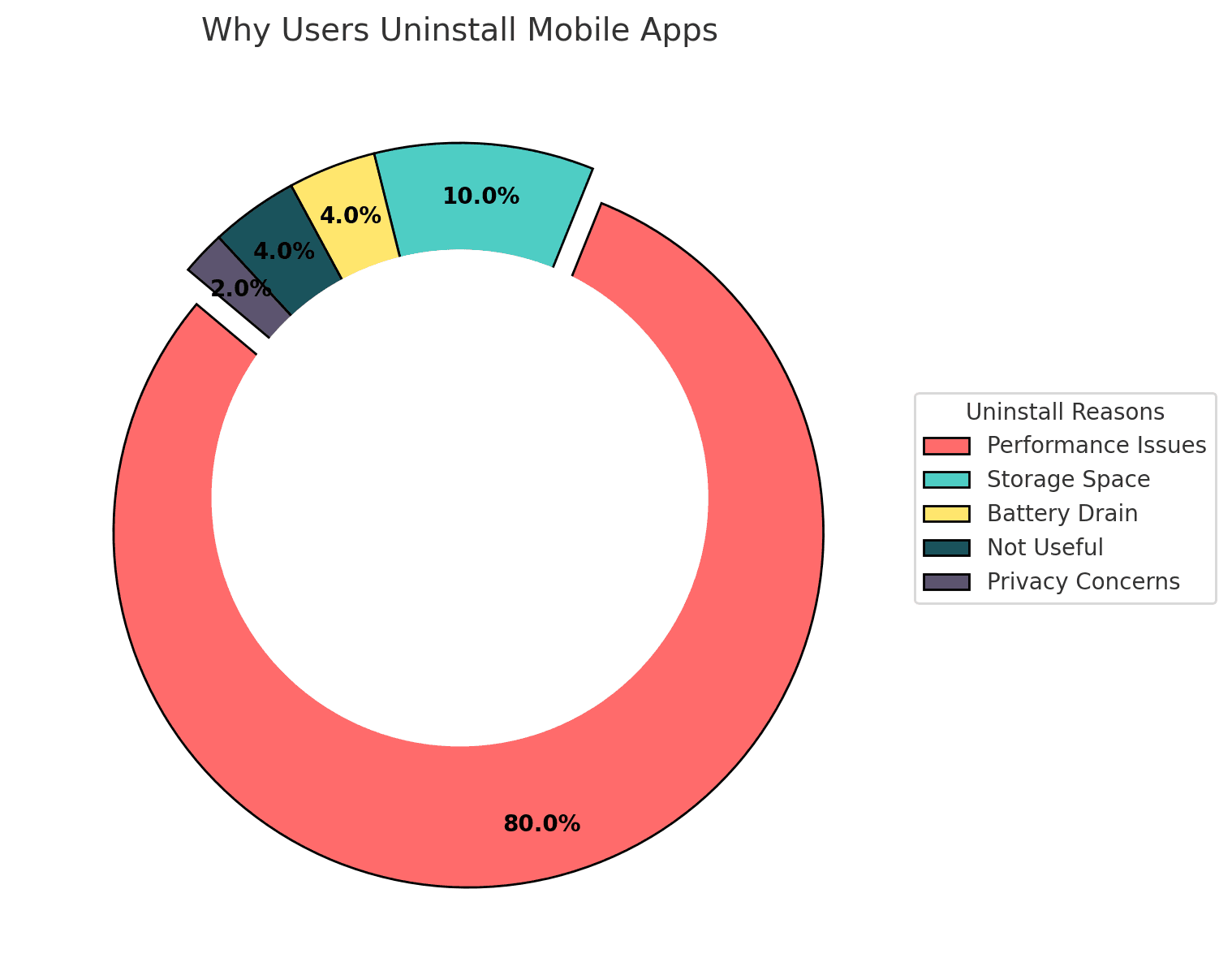
Data Source: Fast Company ME, User Behavior Survey 2024
Understanding Mobile App Performance Testing
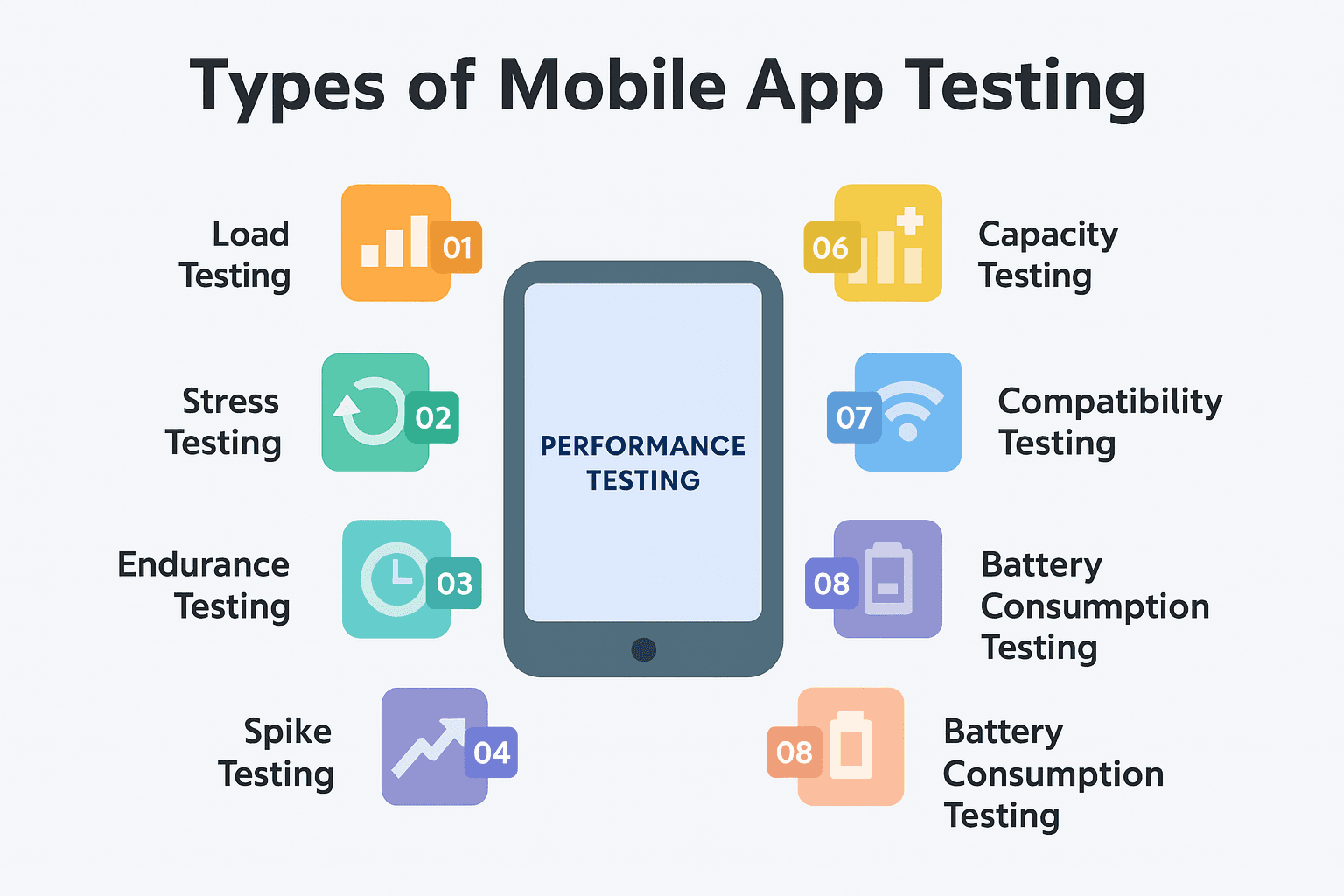
Types of Mobile App Testing
Effective mobile app performance testing involves a combination of different testing types, each designed to uncover specific performance risks:
- Load Testing: Assesses how the app performs under normal user load to ensure it remains stable and responsive.
- Stress Testing: Evaluates app behavior beyond its maximum capacity to identify failure points and recovery mechanisms.
- Spike Testing: Tests how well the app handles sudden, extreme increases in user activity.
- Endurance Testing: Determines how the app performs over extended periods, checking for issues like memory leaks or performance degradation.
- Network Testing: Simulates different network conditions (e.g., 3G, 4G, poor connectivity) to observe app behavior and user experience.
- Compatibility Testing: Ensures the app functions consistently across multiple devices, screen sizes, and operating systems.
- Battery Consumption Testing: Measures how much power the app consumes to avoid excessive battery drain, especially on mid- and low-end devices.
- Usability Testing: Focuses on user experience and interface flow to ensure intuitive interaction and ease of use.
- Localization Testing: Verifies that the app content and formatting adapt correctly to various languages and regional settings.
User Acceptance Testing (UAT): Conducted with real users to confirm the app meets business and functional expectations before deployment.
Key Performance Metrics to Monitor
To ensure a mobile app delivers peak performance, QA engineers and developers must track and optimize specific metrics:
- App Launch Time: Should fall within the following benchmarks:
- Cold Launch: 2–4 seconds
- Warm Launch: 2–3 seconds
- Hot Launch: 1–1.5 seconds
- UI Responsiveness: Time between user action and visual feedback should be less than 100 milliseconds to prevent perceived lag.
- Network Performance: API response times and client-server interactions should ideally stay below 1 second for smooth operations.
- View Rendering Time: Each frame should render in under 17 milliseconds to maintain a consistent frame rate and avoid UI jank or ANRs (Application Not Responding errors).
- Compatibility Stability: Continuous monitoring across device variants and OS versions ensures consistent performance across environments.
- Custom Logic Traces: Key business processes and user flows should execute within 2 seconds or less to maintain app responsiveness.
These metrics form the foundation of performance testing and directly influence user satisfaction, retention, and app store ratings.
Mobile App Performance Testing Checklist
1. Test Across Real-World Devices, Not Just Flagships
An app that works well on an iPhone 15 Pro can crash on a budget Android phone. To avoid this, test across a wide device matrix—different OS versions, screen sizes, RAM, and processors. One fintech app learned this the hard way when it performed well in QA but lagged on budget phones during launch, costing them thousands in retention.
2. Focus on Core Metrics: Launch Time, Frame Rate, Responsiveness
If your app takes more than 3 seconds to load, over half of your users may abandon it. Track cold/warm/hot launch times, ensure 60 FPS rendering, and keep UI response under 100ms. A travel app improved engagement by 18% just by fixing carousel load delays during app startup.
3. Simulate Network Chaos, Not Just Wi-Fi Labs
Real users deal with 3G, weak signals, and network drops. Performance testing must simulate poor connectivity to ensure stable behavior. A food delivery startup failed here, leading to over 20% of order failures in patchy zones on launch day.
4. Validate Load Handling During Traffic Spikes
Apps need to withstand real-time spikes. Load and stress testing help identify the breaking point. A fantasy sports app crashed during a match toss due to a lack of load simulation—something they fixed with automated stress testing for future events.
5. Optimize for Battery, CPU, and Background Efficiency
An app that drains the battery loses users. Test for energy consumption and background services. A fintech app reduced energy usage by 60% by optimizing data sync intervals, leading to longer sessions and better reviews.
6. Monitor Crashes in the Wild, Not Just QA Labs
Use tools like Firebase or Sentry to monitor crashes and errors on real devices. One language learning app fixed a model-specific crash on Samsung phones that had gone undetected in QA, improving ratings from 3.6 to 4.2.
7. Performance and Security Go Hand-in-Hand
Heavy SDKs, inefficient encryption, or session handling can slow down performance and risk compliance. A retail app saw 22% faster page loads after removing a poorly built coupon SDK, plus better data privacy.
8. Test Real Journeys, Not Just Functional Flows
Go beyond “does it work” to “how well does it work under real usage.” Simulate a full user session—like searching, browsing, and checking out. This real-world lens makes apps not just functional, but resilient.
Mobile App Performance Testing: A Practical, Step-by-Step Playbook for Stability at Scale
Most performance issues do not show up in development, they appear at scale. Mobile app Performance testing isn’t a one-time task; it’s a continuous, architecture-aware discipline. Based on years of real-world QA execution, below is a step-by-step walkthrough of how we approach mobile app performance testing in high-stakes environments.
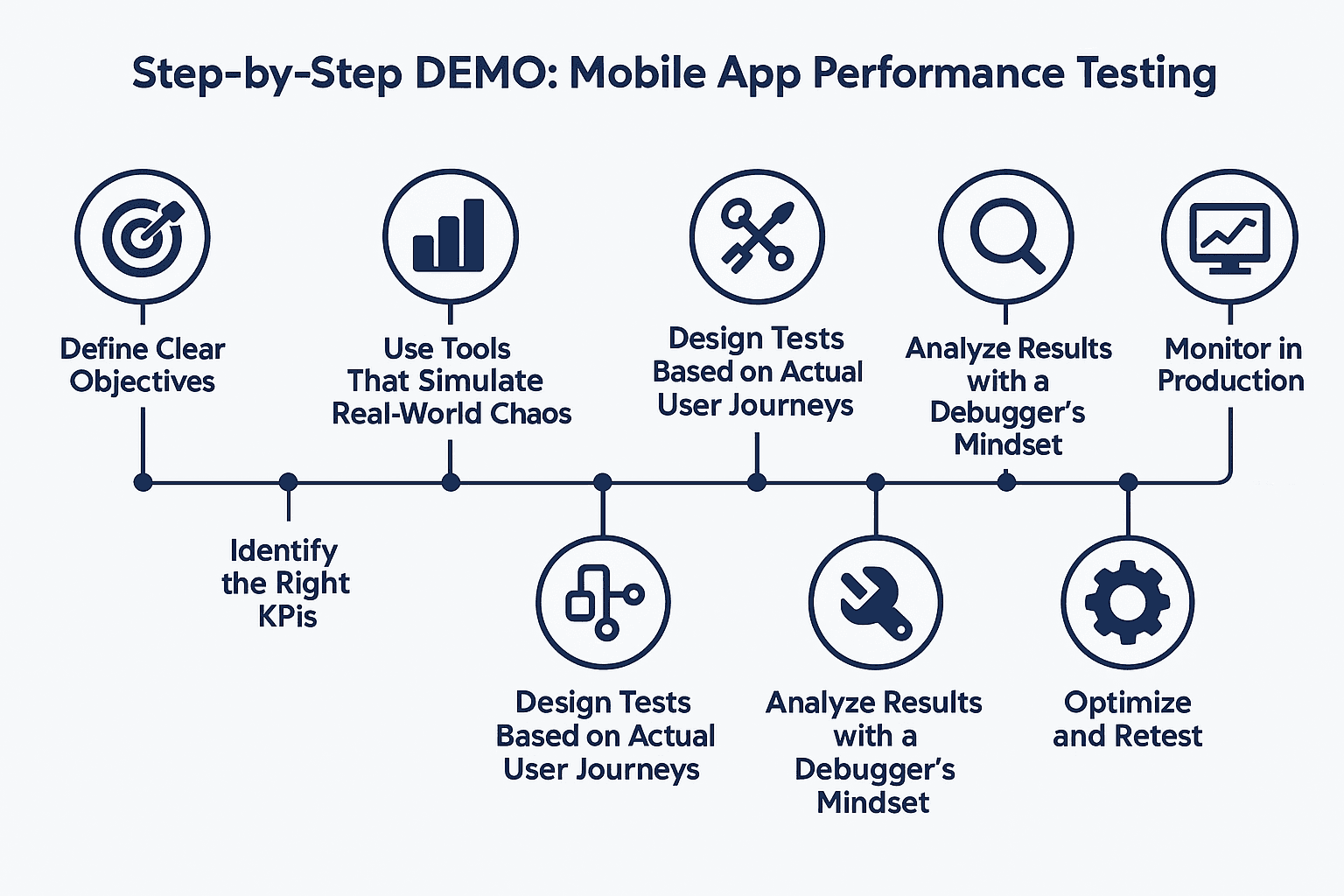
1. Define Clear Objectives—Before You Write a Single Test
The biggest mistake teams make is starting performance testing without clarity on what “good performance” actually means. For some, it’s fast API calls; for others, it’s smooth animations on low-end devices. That's why we begin every performance test cycle by defining quantifiable objectives:
- Response time thresholds (e.g., max 2s for login, <500ms for search)
- Acceptable crash-free session rate (usually 99.5%+)
- Resource usage benchmarks (battery <5% per 30 min session, memory <100MB idle)
- Peak user simulation goals (e.g., 5,000 concurrent sessions)
These benchmarks guide tool selection, scenario design, and reporting.
2. Identify the Right KPIs for Your Use Case
Testing without the right KPIs is like navigating without a compass. In mobile apps, we focus on the following performance indicators:
- App launch time (cold, warm, and hot)
- Frame rendering rate (should maintain 60 FPS)
- UI responsiveness (tap-to-render delays)
- API response times
- Battery and memory usage
For example, a media streaming app may prioritize frame rendering, while a banking app will optimize for API response and memory stability. Tailoring KPIs to the app’s core workflows is essential.
3. Use Tools That Simulate Real-World Chaos
Tool choice is not about what’s popular—it’s about replicating user behavior in unpredictable environments. We typically combine:
- Load Testing Tools: JMeter, Gatling
- Device Profilers: Android Profiler, Xcode Instruments
- Network Simulators: Network Link Conditioner, Charles Proxy
One of our projects, a logistics app serving remote areas, revealed a critical sync delay under 3G simulation, which didn’t surface in Wi-Fi-based QA tests. Tools must mimic actual pain points.
4. Design Tests Based on Actual User Journeys
Rather than testing isolated features, we simulate complete workflows:
- First-time user onboarding
- Realtime checkout under fluctuating network
- Search → filter → view product → add to cart → payment
We test each flow under different stress levels (low signal, background apps running, battery saver on) to discover performance bottlenecks where they truly occur—in the flow, not in isolation.
5. Execute Layered Testing in Stages
Testing is not a one-shot activity. We break execution into controlled phases:
- Baseline Testing: Evaluate performance under normal load
- Load Testing: Simulate 100%, 150%, and 200% traffic levels
- Spike Testing: Inject sudden traffic bursts to test elasticity
- Endurance Testing: Run the app continuously for 6–8 hours to catch memory leaks or session buildup
In one fintech deployment, memory bloating occurred only after 4+ hours of usage, which would have been missed in short QA cycles. Our endurance testing caught it before launch.
6. Analyze Results with a Debugger’s Mindset
Numbers are meaningless unless you connect them to root causes. Once data is collected, we go beyond dashboards:
- High API latency? → Trace backend processing vs network delay
- Dropped frames? → Examine render cycles, thread blocking
- Crash reports? → Stack traces + device logs for reproducible issues
Every metric is mapped back to a code or infra-level cause. For example, a consistent 800ms delay in the payment gateway turned out to be an SDK wrapper conflict with async handling.
7. Optimize and Retest—Until Confidence Replaces Guesswork
Optimization is not about making things faster—it’s about making them stable under worst-case conditions. This often involves:
- Code-level fixes: async optimization, image compression, object pooling
- Infra tweaks: autoscaling backend, CDN placement
- App architecture tuning: lazy loading, offline cache fallbacks
And then we retest. Always. Performance testing is iterative, not a one-time signoff.
8. Monitor in Production—Because Real Usage Has No Scripts
Even after passing all test environments, production is unpredictable. We use tools like Firebase Performance Monitoring and Sentry to continue observing:
- API latency spikes in real user regions
- Device-specific crashes
- High memory use in backgrounded sessions
A post-launch crash in a popular smartphone model was traced within 24 hours using live crash data and hotfixes within 48—saving the app from a negative PR spiral.
Sharing the demo video for Web App Performance Testing: Simple Step-by-Step Guide for Stability. Please have a quick look to see how the process works.
Mobile Application Testing Strategy
Mobile app testing is a product discipline focused on real-world performance, user behavior, and operational stability across devices and networks. We approach it with a strategy that’s deeply integrated into development, built from years of shipping high-performance apps across industries.
1. Start with a Purpose-Driven Test Plan
Every testing initiative begins with clarity. Before a single test case is written, we define key aspects:
- What are the business-critical features?
- Which devices and OS versions matter most to our user base?
- What are the potential performance risks?
By answering these upfront, we reduce noise and align testing efforts with the product's business outcomes. For example, a retail app that focused early tests on low-end Android devices in Tier-2 cities reported 23% higher retention in its first month compared to its previous version.
2. Functional Testing That Covers the Full Picture
Beyond testing if features "work," we validate how they work under different inputs, usage patterns, and workflows. We simulate edge cases and run validation across login flows, checkout systems, real-time chat, and more. This ensures every interaction, from first tap to final transaction, holds up under real-world conditions.
3. Performance Testing Under Real Load
We test for more than speed—we test for resilience. Performance testing includes:
- Launch time across device states (cold, warm, hot)
- Frame rates during animation-heavy flows
- Network latency on 2G/3G/4G
- Battery and memory consumption over sustained use
A logistics platform we supported had perfect UI responsiveness during dev testing, but failed under poor network simulation. After load testing and optimization, they achieved a 40% drop in task completion time and virtually eliminated mid-task crashes.
4. Compatibility Testing Beyond the Obvious
Today’s mobile ecosystem is fragmented—hundreds of screen sizes, chipsets, OS builds. Our strategy includes testing across a curated matrix of real devices that match our target audience. This includes budget phones, older iOS models, and devices with custom OEM skins. It’s not about covering everything, it’s about covering what matters.
5. Security Testing as a Performance Safeguard
Security testing is often treated separately, but in our framework, it’s a performance conversation too. We validate how encrypted data flows affect response times, how authentication mechanisms impact app launch, and how third-party SDKs behave under load. A payments app we audited gained both PCI compliance and a 20% improvement in checkout time after we optimized their encryption handling flow.
6. Usability Testing with Real Feedback Loops
We simulate real users. This means testing the app’s navigation logic, readability, error messages, and flow clarity—especially in edge cases. We also run internal "dogfooding" sessions and limited beta rollouts to gather qualitative insights that structured test cases often miss.
7. Regression Testing—Speed Without Compromise
Every code push can cause unintended breakage. That’s why regression testing—especially automated regression—is a foundational block in our strategy. We maintain and continuously update a regression suite that covers critical flows. Every new feature is vetted not just for function, but for side effects.
8. CI/CD-Aligned Testing for Faster, Safer Releases
Our testing strategy lives inside the CI/CD pipeline. Every pull request triggers automated test runs—unit, UI, and API. This ensures fast feedback loops, early bug detection, and fewer last-minute surprises. With test gates in place, teams gain confidence to ship faster without compromising stability.
9. Post-Release Monitoring as a Testing Extension
Testing doesn’t end at deployment. We integrate performance monitoring tools to track real-world crashes, UI jank, and API response trends. If an issue emerges in production, we capture the logs, trace the flow, and hotfix it quickly, often before users can report it.
Measures for Solving Mobile Application Performance Issues
Solving performance issues in mobile applications requires more than reactive debugging. It’s a structured, iterative process grounded in systems thinking. Every lag, crash, or delay has an origin, often buried in overlooked architecture decisions, inefficient code, or mismanaged resources.
Here is how we approach performance troubleshooting with precision and depth.
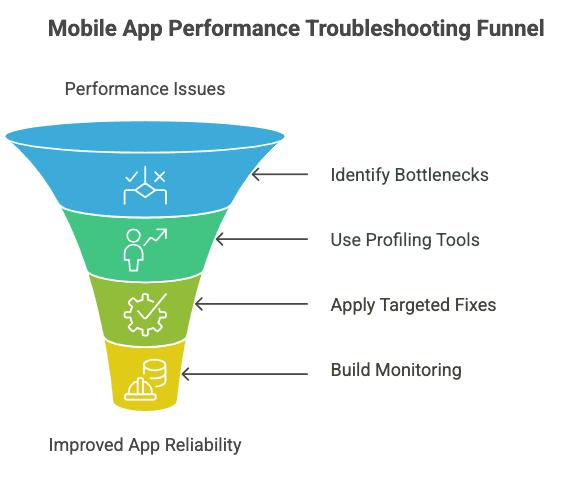
1. Locate the Bottlenecks Before Optimizing Anything
Performance issues are rarely random—they follow patterns. The most common culprits we encounter include:
- Inefficient code execution, such as nested loops, unbounded recursions, or poorly structured data traversal that increases CPU overhead.
- Memory leaks from uncollected objects or retained listeners that inflate the app’s memory footprint over time.
- Slow or unreliable network transactions, often caused by a lack of caching, unnecessary payloads, or sequential blocking calls.
- Unoptimized database queries, like missing indexes or repeatedly hitting the local DB from the main thread.
- UI thread blocking, where heavy calculations or network operations are executed on the main thread, leading to frozen screens or unresponsive taps.
Instead of treating symptoms, we start with profiling to pinpoint exactly where the degradation originates.
2. Use Profiling Tools with a Hypothesis-Driven Mindset
Blind profiling generates noise. We begin with hypotheses, then use profiling tools to validate or disprove them. On Android, we monitor CPU spikes, heap size, and frame rendering timelines. On iOS, we trace memory allocation graphs and battery usage patterns. We track:
- App startup duration across device types
- Peak CPU usage during screen transitions
- Network latency across geographical regions
- Memory leaks from uncollected service objects or retained activities
Each metric is tied to a real technical decision—no data point is observed in isolation. For example, a sudden spike in memory after backgrounding the app often signals retained ViewModels or dangling observers.
3. Apply Targeted Fixes, Not Blanket Optimizations
Optimization without diagnosis is wasteful. Once the root causes are clear, our fixes are scoped and specific:
- For CPU inefficiencies: We refactor algorithms, remove UI overdraws, and eliminate unnecessary lifecycle observers.
- For memory issues: We use weak references where needed, break cyclic references, and ensure object lifecycles align with the UI lifecycle.
- For network latency: We apply response caching, reduce payload size, use HTTP2 where supported, and make all calls asynchronous with timeout/retry logic.
- For database lag: We index the right fields, move heavy joins to the backend when possible, and batch writes to minimize IO pressure.
In one real-world case, a shopping app experienced cart freeze issues. The cause? A large image payload is being rendered inline without compression. Fixing this single bottleneck reduced crash rates by 35% and improved checkout completion time by 22%.
4. Build Monitoring Into the Product Lifecycle
Troubleshooting isn’t complete at QA—it continues in production. We embed real-time observability into our apps, capturing traces, error rates, and API timings per user segment. This allows us to:
- Detect latency spikes tied to a new device OS version
- Identify crash clusters from specific OEMs
- Analyze user flows that result in unusually high memory consumption
More importantly, this feedback loop informs product decisions. If a certain animation is killing performance on mid-tier devices, we replace it, not just patch it. If a feature triggers consistent slowdowns post-login, we question its place in the flow.
Performance issues are not defects—they are signals. They point to architectural gaps, missed assumptions, or overlooked usage patterns. Troubleshooting them isn’t a checklist; it’s a diagnostic craft. When done right, it doesn’t just fix bugs—it transforms the reliability of the entire product.
How to Integrate Performance Testing
1. Define What Success Looks Like
Performance testing in CI/CD begins with thresholds. Define benchmarks for:
- API response time (e.g., 95% under 800ms)
- Error rate ceilings (e.g., <1%)
- Memory and CPU bounds per session
- Concurrent user load thresholds
These metrics guide pass/fail logic in the pipeline.
2. Author Load Tests to Match Real Usage
Design scripts that mimic production traffic: common user flows, peak transaction volumes, and edge-case interactions. Modularize tests so they can be reused for smoke, baseline, and stress scenarios.
3. Hook Into CI/CD Stages
Integrate performance test execution into the pipeline at the right point:
- Run smoke performance tests on pull requests.
- Execute full load tests post-deployment to a staging environment.
- Gate production deployment based on threshold checks.
This layered approach balances test coverage with pipeline speed.
4. Automate Evaluation and Failures
Configure the CI/CD system to parse test results and auto-fail builds when thresholds are breached. Alert the team with actionable logs and trace reports. This ensures performance debt never silently ships to production.
Tooling Comparison: Jenkins, GitLab CI, CircleCI
Tool | Strengths |
Jenkins | Highly customizable. Extensive plugin support. Requires manual config. |
GitLab CI | Seamless integration with version control. Built-in YAML pipelines. |
CircleCI | Fast cloud execution. Easy parallelization. Great for scaling tests. |
Each of these tools supports scripting, containerization, and report parsing, making them capable platforms for embedding performance test automation.
Top 10 Mobile App Performance Testing Tools
As a QA lead at GeekyAnts, I have worked on performance-critical mobile apps across fintech, e-commerce, and healthcare. Here’s a breakdown of the top 10 tools we’ve used—and when, why, and how they’ve proven themselves under real deadlines.
1. Apache JMeter
JMeter remains our go-to load testing tool for backend-heavy mobile apps. We used it extensively during the scale-up of a ride-sharing platform where thousands of concurrent API calls had to be validated.
- What stands out: Plugin flexibility and scripting support.
- Personal insight: We used JSR223 samplers to dynamically generate payloads for location-based ride requests, mimicking actual production behavior. Without JMeter, those edge cases would've gone untested.
2. Gatling
Gatling's Scala-based DSL gave us fine-grained control over custom scenarios in a fintech project where authentication and session tracking had to be tested with precision.
- What stands out: Lightweight, great for CI/CD integration.
- When we use it: When response time SLAs are tight (e.g., <300ms on key endpoints).
- Pro tip: Integrates beautifully with Jenkins for running stress tests on every staging deployment.
3. LoadRunner
Enterprise-grade and incredibly powerful—but overkill unless you’re dealing with legacy systems or complex protocols.
- Use case: We brought in LoadRunner when testing a banking app’s internal transaction APIs due to its protocol support beyond HTTP/REST.
- What stands out: Granular performance insights across tiers.
- Caveat: Steep learning curve. Best used when you’ve got a dedicated QA performance team.
4. Appium
Not traditionally a performance tool, but Appium has been invaluable when we wanted to measure UI responsiveness in real-world conditions.
- How we used it: Combined with Android Profiler to track render delays during automated login and cart flows.
- Why it's useful: Simulates actual user taps and gestures, allowing us to measure tap-to-response time under different loads.
5. BrowserStack
Crucial for testing across devices and OS versions. In one healthcare app rollout, a lag issue showed up only on an older iOS version running on an iPhone 8, and BrowserStack helped us catch that pre-release.
- What stands out: Access to real devices without maintaining a lab.
- Bonus: Network throttling + geolocation testing.
6. TestComplete
This tool shines when dealing with apps that require visual test validation alongside performance metrics.
- Use case: Tested a multi-brand eCommerce app with dynamic layouts and heavy image rendering.
- Strength: Smart object recognition helped us locate UI lag points that weren’t visible in logs.
7. Katalon Studio
We’ve used Katalon for performance regression testing in long-running app flows, like onboarding journeys or payments.
- Why we recommend it: Fast setup, great reporting.
- Best for: Mid-sized teams needing a no-code test strategy that still tracks resource usage and endpoint delays.
8. BlazeMeter
One of the best platforms for scalable cloud load testing. It builds on JMeter’s foundation but removes the hardware headache.
- Use case: Load-tested a job marketplace app simulating 20,000 concurrent users from multiple regions.
- Pro insight: It helped us validate our autoscaling rules on AWS—before production ever saw that traffic.
9. HeadSpin
This is where performance meets UX. HeadSpin has helped us correlate performance drops with user satisfaction metrics (like ANR rates and uninstalls).
- Use case: For a streaming app, it flagged dropped frames on specific GPU models.
- AI-powered insights: One of the few tools that tells you why something feels slow, not just that it is.
10. Apptim
A great tool to analyze performance from a mobile-first lens.
- We use it to Track FPS, CPU, memory, and render metrics on real devices.
Example: During a logistics app rollout, it caught subtle animation hitches on scroll, which we traced to oversized SVGs.
Bonus: Combining Tools for Real Results
The truth? No single tool is perfect. We often combine:
- Appium + Android Profiler to automate UX scenarios and monitor frame rendering.
- JMeter + BlazeMeter to scale cloud tests across global endpoints.
- Gatling + Jenkins to fail builds when latency exceeds SLA thresholds.
This integrated, tool-stacked strategy ensures our apps do not pass—they perform under fire. And that’s what separates an average QA process from an engineering-led performance culture.
Advanced Optimization Tips (From My QA Bench)
Over the years, I have seen firsthand that performance issues do not always stem from flashy bugs, they often hide in overlooked details: a bloated loop, an unindexed column, or a forgotten listener. Here is how I have tackled some of the toughest mobile performance challenges in production-grade apps.
1. Code Optimization Is Where the Real Wins Begin
I still remember a logistics app we were testing that looked clean at first glance. But once we simulated real-world user traffic, the UI froze mid-scroll. We traced it to a poorly written image rendering loop that didn’t throttle loading on low-end devices.
We refactored the logic to include debouncing, reused component instances with object pooling, and offloaded expensive tasks using requestIdleCallback on the frontend. That alone cut the frame drops by over 60%.
2. Database Bottlenecks Are Silent App Killers
In a food delivery app we built, there was a strange lag on the home screen—right when the app loaded nearby restaurants. After digging in, I found we were querying without indexes, running nested loops to calculate distances, and re-fetching data already present in session memory.
We introduced query optimization, indexed geolocation fields, and cached frequent queries locally using SQLite. The API latency dropped from 2.5 seconds to under 600ms. The impact on user retention? Immediate.
When it comes to databases, clean architecture is not optional—it’s the safety net for scale.
3. Monitoring is not Optional—It’s Preventive QA
No matter how much we test pre-release, real users behave in ways we don’t expect. In a recent healthcare deployment, we started seeing spike patterns in ANR (App Not Responding) rates, only during peak hours.
Thanks to real-time monitoring (we used Firebase + HeadSpin), we pinpointed a memory leak tied to a background service that didn’t dispose after API sync. Without that data, we might’ve blamed it on device fragmentation.
Performance optimization is not about hacks—it’s about consistently making the right decisions in code, data handling, and monitoring. These aren’t theoretical tips—they’re battle-tested lessons that helped us keep critical apps fast, responsive, and production-safe.
Case Study: Resolving Performance Bottlenecks in a Mobile Application
Background
While working on a mobile application for a client in the retail sector, we encountered significant performance issues that were affecting user experience. The app was designed to handle high traffic volumes, especially during promotional events, but users reported slow load times and occasional crashes.
Identifying the Problem
Initial diagnostics indicated that the app's performance degraded under heavy user load. We observed that the application struggled with:
- Handling multiple concurrent API requests.
- Efficiently managing memory usage during prolonged sessions.
- Rendering complex UI elements smoothly.
Performance Testing Approach
To pinpoint the exact causes, we implemented a comprehensive performance testing strategy:
- Load Testing: Simulated peak user loads to observe how the app behaved under stress.
- Stress Testing: Pushed the app beyond its expected capacity to identify breaking points.
- Endurance Testing: Ran the app over extended periods to detect memory leaks and performance degradation.
- Network Simulation: Tested the app under various network conditions, including 3G, 4G, and fluctuating connectivity, to assess its resilience.
Findings
The testing revealed several critical issues:
- API Bottlenecks: Certain API endpoints were not optimized, leading to increased response times under load.
- Memory Leaks: Prolonged usage caused the app to consume increasing amounts of memory, eventually leading to crashes.
- UI Rendering Delays: Complex UI components were not efficiently rendered, causing noticeable lag during navigation.
Solutions Implemented
Based on the findings, we took the following actions:
- API Optimization: Refactored backend services to handle concurrent requests more efficiently and reduced payload sizes.
- Memory Management: Identified and fixed memory leaks by properly managing object lifecycles and utilizing efficient data structures.
- UI Enhancements: Simplified complex UI elements and implemented lazy loading techniques to improve rendering performance.
Results
Post-optimization, the application exhibited significant improvements:
- Load Handling: Successfully managed peak user loads without performance degradation.
- Stability: Eliminated crashes related to memory issues, enhancing overall reliability.
User Experience: Achieved smoother navigation and faster response times, leading to increased user satisfaction.
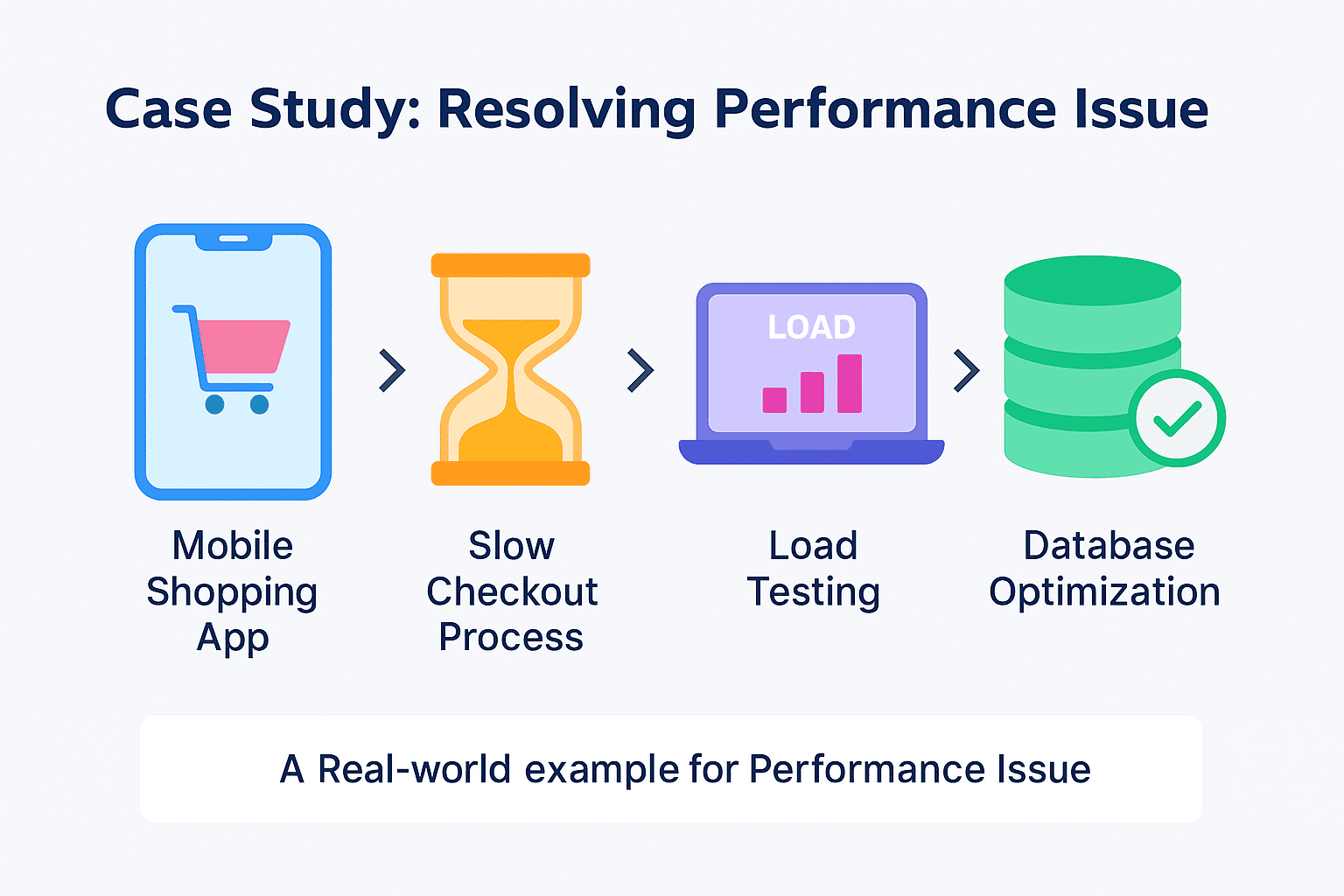
This case underscores the importance of thorough performance testing in the development lifecycle. By proactively identifying and addressing performance issues, we ensured a robust and user-friendly application.
Peak app performance comes from discipline, real-world testing, and continuous optimization. Our goal is to deliver speed with resilience at scale.
 Saurabh SahuChief Technology Officer (CTO)
Conclusion: From Tests to Triumph
Peak performance is not a byproduct; it’s engineered, tested, and continuously refined. From identifying KPIs tailored to your app’s real-world usage to simulating network chaos, analyzing metrics with a debugger’s eye, and embedding testing into your CI/CD pipelines, performance testing is what separates resilient apps from forgettable ones.
At GeekyAnts, we have helped scale fintech, healthcare, and commerce apps to handle millions of users without compromising speed, memory stability, or battery life. Our approach isn’t theoretical—it’s forged from real deployments and constant iteration. The result? Apps that do not launch—but thrive under load.