

How we designed, tested, and operationalized a practical multi-cloud disaster recovery setup using AWS EKS, Azure AKS, PostgreSQL streaming replication, and automated DNS failover.
Cloud outages are no longer rare edge cases.
AWS has had seven major incidents since 2021. Azure has had its share too. And every time, the story splits in two: teams with tested DR plans treated it as an operational issue. Teams without them made infrastructure decisions in the middle of production downtime.
The most visible example came from the December 2021 AWS us-east-1 outage. Slack went down. McDonald’s mobile ordering collapsed. Even some of Amazon’s own internal systems were affected.
But the interesting part wasn’t the outage itself.
It was how differently companies experienced it.
We decided to be the first kind of team. This is what we built, what broke, and what we’d do differently.
Why Single-Cloud Is Still a Risk
AWS, Azure, and GCP publish SLAs that look reassuring on paper. AWS EC2 targets 99.99% uptime — roughly 52 minutes of downtime per year.
That sounds fine until you realize production outages rarely happen because a single service disappears completely. They happen because of networking issues, IAM failures, degraded DNS, control plane problems — things that make your application unavailable while the provider technically considers it “running.”
And timing matters more than percentages. A short outage at 3am is a footnote. The same outage during a product launch or payment cycle is a very different business problem.
SLA credits don’t solve that. Lost transactions, incident response fatigue, customer trust erosion — these cost far more than the infrastructure bill.
That’s why DR is ultimately less about redundancy and more about business risk.
What We Built
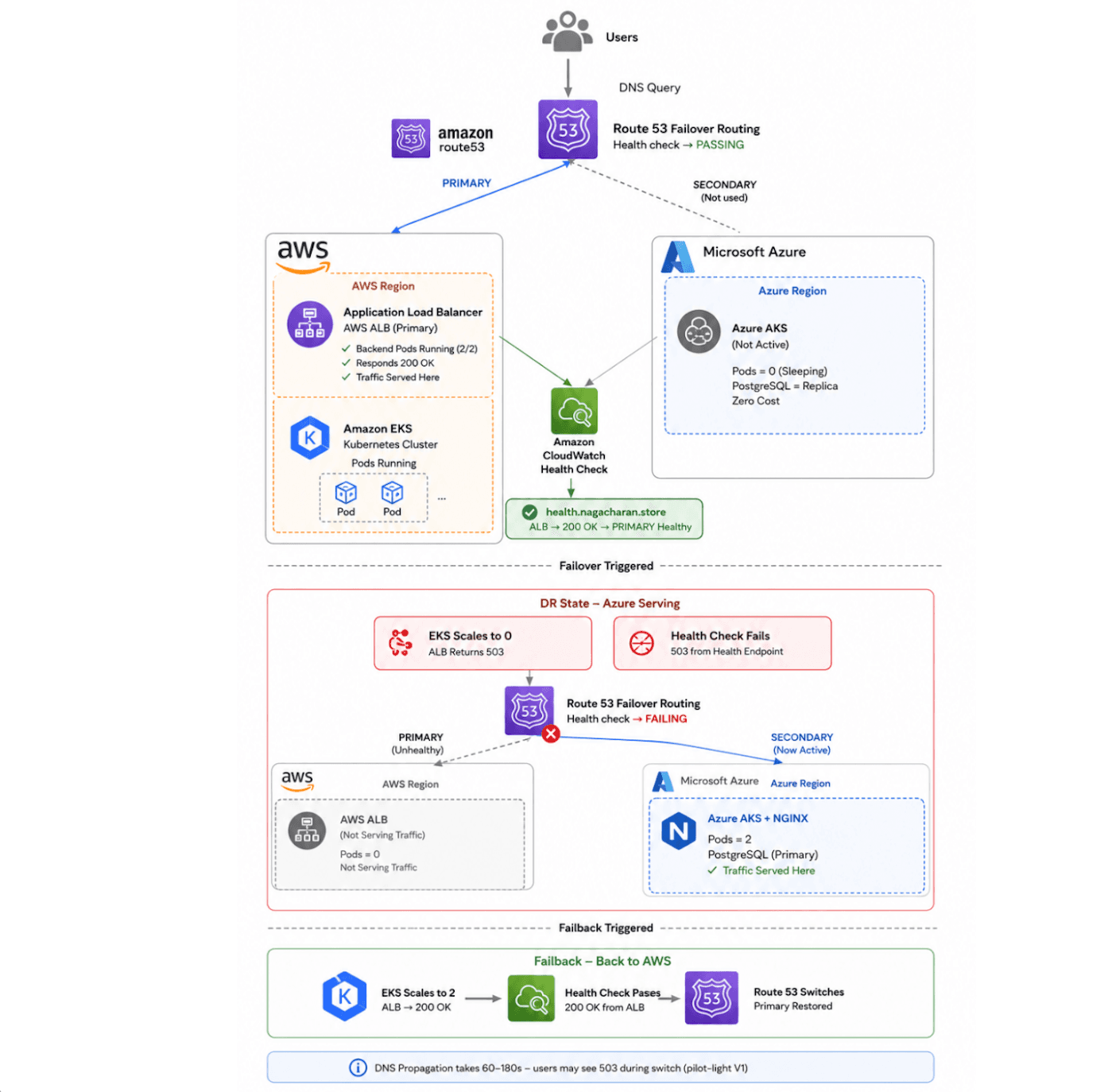
Our setup:
- AWS EKS — primary cluster, serving all production traffic
- Azure AKS — warm standby, nodes running but pods scaled to zero
- PostgreSQL 16 streaming replication — Azure DB always in sync, zero lag
- Route 53 failover routing — DNS switches automatically when AWS goes unhealthy
The standby cluster runs at roughly 18% of the primary cost. Full DR capability at 18 cents per primary dollar.
The entire failover — database promotion, Kubernetes rollout, DNS switching, smoke tests — averaged 114 seconds during drills.
We didn’t get there on the first try
The DR Maturity Ladder
Before getting into what broke, it’s worth being honest about where most teams actually sit:
Level 0 — Recovery depends entirely on people figuring things out during the incident. Backups exist somewhere, probably.
Level 1 — Backups exist and can be restored. Slow, stressful, but survivable.
Level 2 — Cold standby. Infrastructure exists elsewhere but isn’t running. Expect hours of recovery time.
Level 3 — Warm standby. Infrastructure running, workloads at zero, replication active. This is what we built. Recovery in minutes, not hours.
Level 4 — Hot standby. Secondary environment fully live, failover is purely a routing event.
Level 5 — Active-active. Both clouds serve traffic simultaneously. Powerful, but expensive and operationally complex. Most teams don’t need this.
Most organizations sit between Level 0 and Level 2 and think they’re at Level 3. The drills are what reveal the truth.
What Actually Broke
The first drill took 35 minutes and failed in three places. That ended up being the most valuable part of the project.
PostgreSQL promotion timing
We promoted the Azure replica and immediately started scaling AKS pods. Sometimes it worked. Sometimes PostgreSQL was technically promoted but not yet accepting connections.
Pods would start healthy. Database connections would fail silently. It looked random. It wasn’t.
The issue: we assumed promotion completion and connection readiness happened at the same time. They don’t.
Fix: replace sleep 5 with polling:
until ssh nexusadmin@$PG_STANDBY_IP \
 "sudo -u postgres psql -t -c 'SELECT pg_is_in_recovery();'" \
 | grep -q "f"; do
 sleep 2
done
Don’t move on until the database confirms it’s ready. That single change removed most of the inconsistent failover behavior.
The circular DNS dependency
This one cost us days.
Our Route 53 health check pointed at api.nagacharan.store. During a drill, when DNS switched to Azure, the health check started getting 200 OK — from Azure. Route 53 concluded AWS was healthy and switched DNS back to AWS. Which had no pods running. Which failed the health check. Which switched back to Azure. Loop.
The fix: a dedicated subdomain that never participates in failover routing.
health.nagacharan.store → always points to AWS ALB (never changes)
Route 53 checks this every 30 seconds:
200 OK → PRIMARY healthy → serve AWS
503 → PRIMARY unhealthy → serve Azure
health.nagacharan.store is a plain alias to the ALB. It never gets swapped. No circular dependency. Ever.
The double-failover state
Run the failover script twice without running failback in between. PostgreSQL on Azure is already promoted. pg_promote() throws:
ERROR: recovery is not in progress
The script continues. Nothing works correctly.
One guard check at the start fixed this permanently:
IS_RECOVERY=$(ssh nexusadmin@$PG_STANDBY_IP \
 "sudo -u postgres psql -t -c 'SELECT pg_is_in_recovery();'" | tr -d '[:space:]')
[ "$IS_RECOVERY" = "f" ] && fail "Azure is already primary. Run failback first."
Sequence conflicts on failback
After multiple drill cycles, the PostgreSQL sequence on the newly-promoted instance falls behind the actual max ID. The next write throws a duplicate key violation.
Fix — one line, run before every write test:
SELECT setval('items_id_seq', (SELECT MAX(id) FROM items) + 1);set -euo pipefailShell scripts that fail quietly
Early scripts continued execution after partial failures. A missing variable or failed command would let the workflow proceed and leave infrastructure in a broken intermediate state.
That’s it. Failures became loud and early instead of silent and late. It sounds minor. It dramatically improved debugging.
The Part Most DR Writeups Skip
During the DR period, your application keeps writing data. New rows. Advanced sequences. Committed transactions.
When you fail back to AWS, your AWS database is stale.
Our failback script handles this explicitly:
# Export everything written to Azure during DR
ssh nexusadmin@$PG_STANDBY_IP \
 "sudo -u postgres psql -d nexusdb -c 'COPY items TO STDOUT CSV HEADER'" \
 > /tmp/items-dr-export.csv
# Import into AWS, skip existing rows
INSERT INTO items (id, name, created_at)
 SELECT id, name, created_at FROM items_import
 ON CONFLICT (id) DO NOTHING;
Then rebuild streaming replication from scratch — pg_basebackup from AWS to Azure in 12 seconds. Azure is a replica again. The system is back to normal state.
No manual reconciliation. No data loss.
The Numbers
Metric | Target | Achieved |
|---|---|---|
Total RTO | 60 minutes | 114 seconds |
DB promotion | - | 12s |
AKS pod startup | - | 33s |
DNS propagation | - | 60–90s |
RPO | 5 minutes | 0 seconds |
Failback total | - | ~3 minutes |
DR cost vs primary | - | 18% |
Drill | Time | Manual Fixes |
|---|---|---|
1 | ~35 min | Multiple |
2 | ~8 min | One |
3 | 114 seconds | - |
The RPO of 0 comes from streaming replication. At the moment of failure, Azure has already applied every transaction AWS committed. The data is already there before the incident happens.
The progression across drills:
The difference wasn’t better cloud infrastructure. It was fixing the assumptions that only reveal themselves when things break.
Why Multi-Cloud Over Multi-Region?
Multi-region inside AWS is genuinely better than single-region. But it still assumes AWS itself is operational.
Some failures don’t respect regional boundaries: IAM outages, control plane failures, DNS disruptions, provider-wide networking issues. In those situations, us-west-2 doesn't help if us-east-1 is the symptom and IAM is the disease.
Multi-cloud also changes your negotiating position. When you can realistically move workloads, pricing conversations with providers get a lot more interesting.
What We’d Tell Teams Starting This Today
Start with a single non-critical workload. Get replication working. Automate a basic failover. Run drills until it’s boring. That teaches more than months of architecture discussions.
Test failure intentionally. Most of the useful fixes came from deliberately breaking things — GameDays, controlled outages, introducing race conditions. The circular DNS bug only became obvious because we kept drilling until edge cases surfaced.
Monitor the standby continuously. The standby environment cannot be something teams only look at during outages. Replication lag, cluster health, DNS state — these should already be visible. The worst time to discover standby drift is during a production incident.
Automation is not the hard part. Trust is. Most teams still want a human involved before traffic moves between clouds during a real incident. That’s probably healthy. Building trust in the process is what makes automated failover eventually feel safe.
The Bottom Line
Before this project, multi-cloud DR felt like something only very large organizations could operate.
After five drills, it felt achievable. Not easy. Achievable.
Most of the problems weren’t exotic cloud infrastructure challenges. They were timing assumptions, sequencing gaps, incomplete automation, and replication edge cases. Solvable problems. Problems you can practice.
The 114-second failover didn’t come from a single architectural insight.
It came from running the process until it broke, fixing what broke, and running it again.
Disaster recovery is less about having the right architecture and more about having a process your team actually trusts.
During a real incident, nobody reads the architecture diagram.
What matters is whether traffic recovers safely, whether data stays consistent, and whether the engineers running the recovery have done it enough times that it feels routine.
The best time to get there is before the outage forces the conversation.







