


Key takeaways:
- AI-driven personalization—from LLM coaching to wearable integrations—sets the platform apart in delivering tailored nutrition advice.
- Technical depth and compliance expertise (HIPAA, encryption, RBAC) showcase strong domain authority in AI-powered healthtech.
- Proven impact through real-world case studies, like IoT healthcare solutions, builds trust and credibility.
In May 2025, Omada Health, a leading U.S. digital health company, launched ‘OmadaSpark,’ an AI-powered nutrition assistant designed to guide users through personalized meal logging and lifestyle coaching. The move signaled more than a product update; it marked a shift toward AI-first, scalable health coaching, setting the tone for what’s rapidly becoming the next frontier in diet and nutrition technology.
The market is responding with force. The U.S. diet and nutrition app market alone is projected to grow from $673 million in 2024 to over $1.3 billion by 2030, at a CAGR of 11.6% (source: Grand View Research). Globally, the industry is expected to surpass $4.5 billion by 2030, driven by rising health consciousness, digital adoption, and the increasing need for personalized, outcome-based care.
But it is not just about market size; it is about capability. Traditional apps still rely heavily on manual input, generic plans, and outdated feedback loops. In contrast, AI-enabled platforms now offer automated food recognition, real-time nutritional guidance, and dynamic meal planning, making them more effective, accessible, and engaging.
Apps like MyFitnessPal (with 140+ million users) and Noom (with 78% of users reporting weight loss) have paved the way, but what’s emerging is a new breed of platforms. These apps combine multimodal input (image, text, voice), behavior-aware coaching, and integration with wearables and biomarkers—turning smartphones into full-time nutrition advisors.
In this blog, we break down the complete playbook to building a custom AI-powered diet and nutrition app—from strategy and architecture to features, tech stack, and real-world implementation.
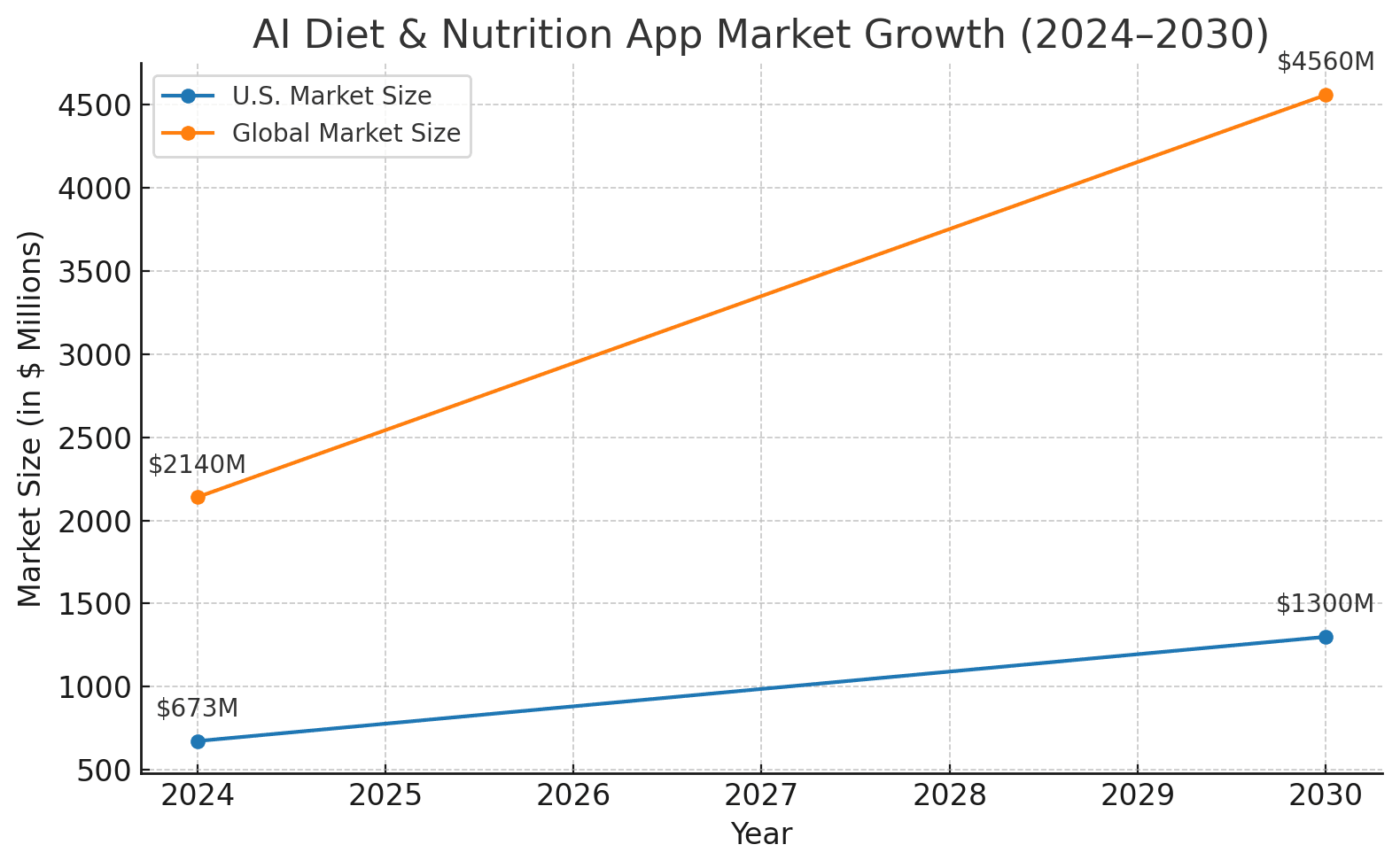
Source: Grand View Research
“AI brings the intelligence and adaptability required to create deeply personalized nutrition experiences. With multimodal input, real-time insights, and behaviour-aware coaching, we can develop systems that respond to users in context, not just based on data, but also patterns, preferences, and goals. This shift towards intelligent orchestration, where AI collaborates and learns, unlocks entirely new possibilities for diet and wellness products. At GeekyAnts, we’re translating this into architecture that delivers value from day one.”
— Manav Goel, Principal Technical Consultant – GeekyAnts
AI brings the intelligence and adaptability required to create deeply personalized nutrition experiences. With multimodal input, real-time insights, and behaviour-aware coaching, we can develop systems that respond to users in context, not just based on data, but also patterns, preferences, and goals. This shift towards intelligent orchestration, where AI collaborates and learns, unlocks entirely new possibilities for diet and wellness products. At GeekyAnts, we’re translating this into architecture that delivers value from day one.
 Manav GoelPrincipal Technical Consultant.
Pain Points with Traditional Diet Planning & Apps
Traditional diet apps were built for a different era, one where static plans and manual food logging were considered enough. Today, they fall short of user expectations for personalization, automation, and proactive coaching.
- Generic, one-size-fits-all plans fail to reflect diverse dietary needs, cultural preferences, or evolving health goals, resulting in poor engagement.
- Manual logging becomes tedious and unsustainable. Repetitive entry of individual food items—especially in complex meals—leads to user fatigue.
- Lack of real-time adaptation means users receive no contextual guidance when habits shift, meals are skipped, or routines change.
User feedback across app stores highlights these issues. Comments often reflect the same sentiment: “Too much manual effort. No real guidance.” This kind of friction leads to early abandonment.
Nutritionists also emphasize that such static experiences don’t align with behavioral science. Without timely, relevant nudges or personalized recommendations, most users drop off before seeing results.
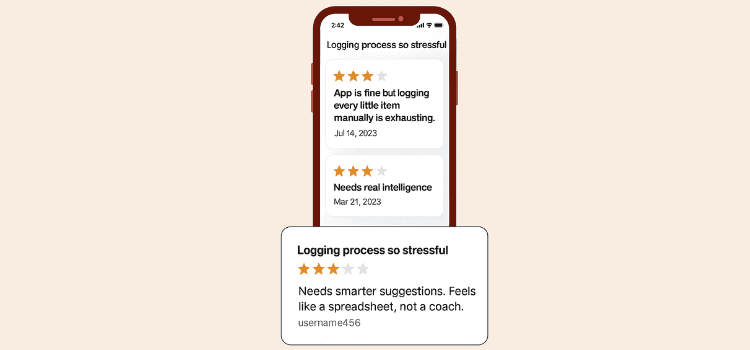
These pain points underline a clear market gap—one that AI-powered apps are uniquely positioned to solve through intelligent automation, multimodal inputs, and adaptive coaching.
Why AI‑Powered Diet Apps Will Dominate
1. A Technological Tipping Point
We are at a moment where wearable technology, real-time health tracking, and AI infrastructure have matured enough to support deeply personalized digital nutrition. Devices can now monitor glucose, heart rate, hydration, and movement with clinical-grade accuracy. Combined with enriched food databases and AI APIs, this creates a powerful foundation for delivering precision diet coaching at scale.
2. Instant Personalization Is the New Standard
Today’s users expect health and wellness apps to behave like intelligent assistants. They want answers tailored to their lifestyle, not generic advice. AI enables real-time food recognition through images, adaptive recommendations based on physical activity, and voice-based logging. It transforms the experience from static food journals into responsive, contextual health coaching.
3. The Rise of Hybrid Coaching Models
A new wave of diet and wellness startups is embracing a hybrid model, combining AI-driven automation with the credibility of licensed dietitians. These platforms leverage AI to handle data collection, trend analysis, and feedback loops while nutrition experts focus on empathy and accountability. This balance improves outcomes while scaling cost-effectively, especially for people undergoing specific therapies like weight-loss medications.
4. Market Momentum and Startup Valuations
AI-powered wellness startups are seeing strong investor interest. Several platforms offering personalized nutrition using AI have crossed multi-million dollar funding rounds or unicorn valuations. These signals underscore that the market is betting on AI not as a feature, but as the backbone of the next-generation wellness ecosystem.
5. Social and Cultural Momentum
AI is not confined to back-end systems; it’s becoming a part of popular wellness culture. Influencers are demoing smart food tracking features, and digital coaches are appearing across platforms like Instagram and TikTok. What was once manual and tedious is now seen as futuristic, intuitive, and even aspirational.
The future of nutrition lies in intelligent systems that respond dynamically to human needs. At GeekyAnts, we see AI not as a layer of automation, but as a bridge between scientific precision and personal empowerment. Our goal is to engineer platforms that learn with every interaction, transforming dietary guidance into a continuous, personalized experience grounded in real-time data and behavioral context.
 Saurabh SahuChief Technology Officer (CTO)
Traditional vs. AI-Powered Nutrition Apps: A Feature-Level Comparison
Feature | Traditional Diet Apps | AI-Powered Nutrition Apps |
|---|---|---|
Personalization | Generic plans with limited customization | Hyper-personalized plans based on health metrics, behavior, and preferences |
Food Logging | Manual, time-consuming entry | Automated tracking via OCR, barcode, voice, or wearable sync |
User Feedback Loop | Static—no adaptation based on progress | Real-time adaptation based on performance, feedback, and goals |
Integration | Minimal or standalone features | Deep integration with wearables, health APIs, and nutrition databases |
Coaching Experience | DIY approach or chatbot Q&A | Hybrid: Human expertise + AI-powered nudges and insights |
Motivation & Retention | Low engagement over time | Gamified goals, personalized nudges, and milestone tracking |
Data Intelligence | Limited use of analytics | Predictive insights, anomaly detection, and trend-based suggestions |
Scalability | Fixed modules, hard to scal | Modular architecture, easily scalable with ML/AI APIs |
Privacy Compliance | May lack full HIPAA/GDPR protocols | Secure by design, with regulatory compliance and encrypted data flows |
AI Diet and Nutrition Coach App Architecture: How It Works
Today’s users demand more than calorie counters—they expect intelligent, always-on, deeply personalized health assistants. Building such a solution requires more than AI APIs and a good UI; it demands a robust, modular architecture that blends multi-modal input, real-time decision-making, behavioral insights, and regulatory compliance.
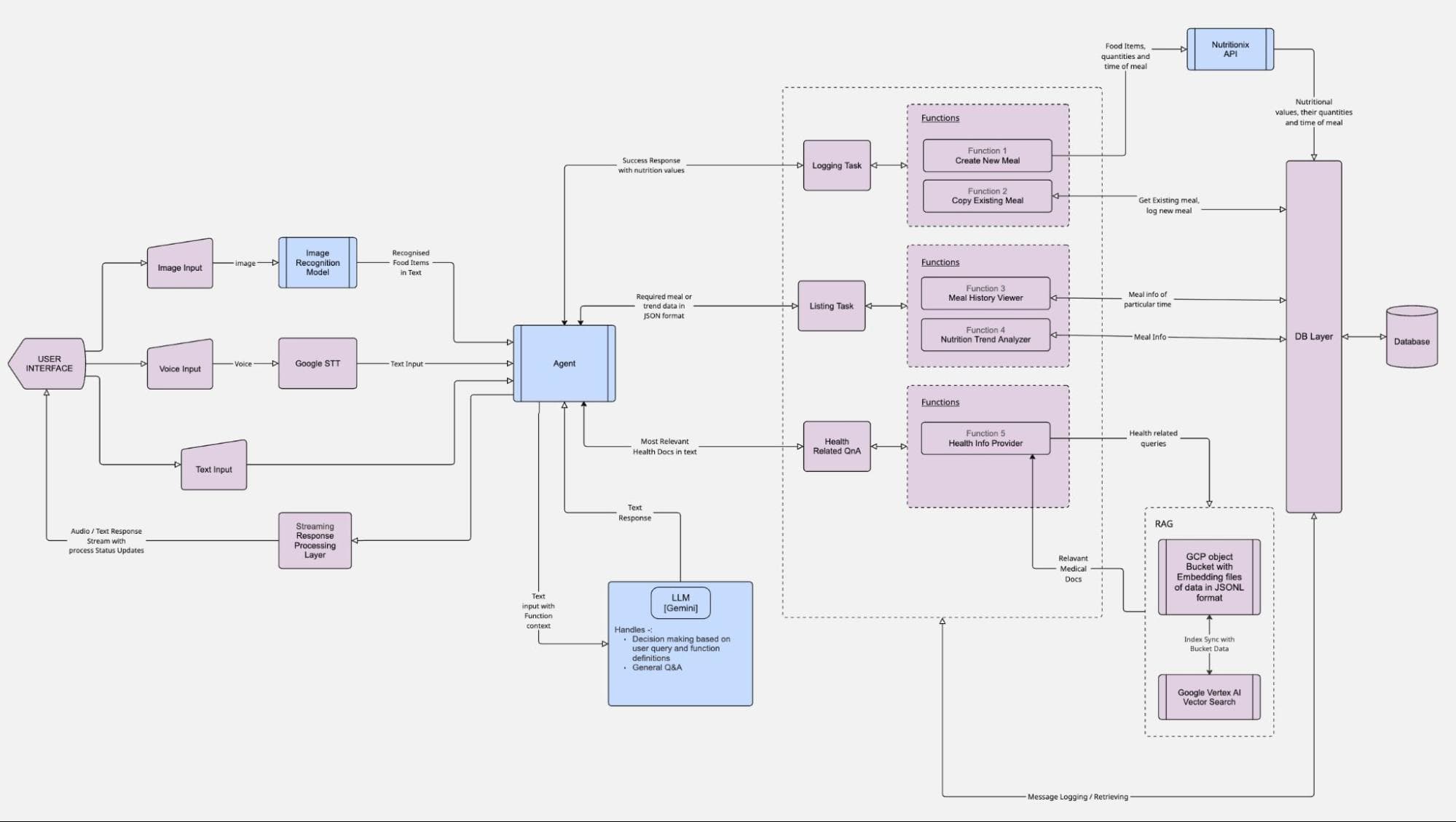
At GeekyAnts, we have engineered and deployed such architectures, with every component tuned for performance, privacy, and personalization. The diagram above illustrates how our in-house experts develop scalable AI-powered diet coaching platforms specifically tailored for the U.S. healthcare and wellness market.
Step 1: Accepting Multi-Modal User Input
The user experience starts at the interface, but instead of limiting interaction to one mode, our system supports text, voice, image, and manual input, making it as frictionless as possible for users across age groups and tech-savviness levels.
- Voice commands are captured and transcribed using Google Speech-to-Text (STT) or Whisper APIs. A user might say, “What can I eat after skipping lunch?” and the system instantly decodes the intent and context.
- Image inputs, such as a photo of a meal, are processed through a custom image recognition model trained on food datasets. It identifies ingredients, portion sizes, and timestamps for logging.
- Text input allows users to type queries, like “Suggest a low-carb dinner,” parsed for intent using LLMs.
- Manual input is also supported for users who want granular control, such as logging a protein shake with exact macro values.
This flexible input layer ensures that no matter how the user chooses to interact, the system can understand and respond.
Step 2: The Agent – Real-Time Orchestration Hub
All incoming inputs converge at the Agent, the central engine that determines what happens next. It’s responsible for interpreting user queries, extracting context (such as time of day, previous meals, and activity data), and determining which downstream modules to invoke.
The Agent performs:
- Intent mapping: Is the user logging food, seeking suggestions, or asking a health question?
- Decision routing: Should it query the Nutrition API for nutrient values? Should it pass context to the LLM for behavior coaching? Or log new data to the database?
The Agent ensures that all interactions—regardless of complexity—are processed within seconds, delivering the right outcome with minimal delay.
Step 3: Specialized AI Subsystems for Autonomy
Behind the Agent are three critical subsystems that handle domain-specific operations:
A. Logging Task Subsystem
This is where meal entries are transformed into structured, analyzable data.
- NLP is used to interpret entries like “Grilled tofu with brown rice” and decompose them into ingredients.
- Nutrition databases like Nutritionix are queried to fetch macro/micro values.
- Entries are logged against the user’s timeline for historical analysis.
Whether input via image, voice, or text, this subsystem ensures meals are logged with precision and context.
B. Listing Task Subsystem
This module is responsible for personalized food recommendations. It considers:
- User preferences (e.g., gluten-free, vegan)
- Regional constraints (e.g., U.S.-based ingredients)
- Temporal context (e.g., morning vs. evening meals)
- Historical patterns (e.g., recurring nutrient deficiencies)
It returns suggestions tailored to both goals and behavior, adapting in real time as patterns evolve.
C. Health Q&A & Pushback System
When users go off track—or ask broader health questions—this system steps in. It powers:
- Nudges: “You’re 90% to your sodium limit today.”
- Swap suggestions: “Try grilled tempeh instead of fried paneer.”
- Behavioral cues: “You’ve skipped two meals today—consider a balanced high-fibre snack.”
If the system detects ambiguous queries, it defers to the LLM (more on that next).
Step 4: LLM (Gemini/GPT) – The Conversational AI Brain
Large Language Models are integrated to make the app feel intelligent, empathetic, and trustworthy. Using LangChain and vector databases like Pinecone, this layer adds memory and reasoning.
It handles:
- Conversational prompts like “What should I eat after a heavy lunch?”
- Educational insights like “Why fiber helps reduce cravings”
- Q&A with embedded medical docs, using RAG pipelines and document retrieval tools like Google Vertex AI
Over time, the LLM builds memory around user preferences, allowing it to deliver increasingly smart and personalized responses.
Step 5: Data Layer and Nutrition APIs
Data flows from the Agent and AI subsystems to a centralized DB Layer, where all meal entries, nutrition info, user context, and session logs are stored securely.
The system uses APIs such as:
- Nutritionix / USDA to retrieve precise nutrient breakdowns
- OpenAI or Gemini for coaching and conversational feedback
- Apple Health or Fitbit to sync physical activity and biometrics
The logging is real-time and timestamped, which allows for rich trend analysis and behavioral tracking.
Step 6: Retrieval-Augmented Generation (RAG) Layer
To support medical accuracy, especially for queries about chronic conditions or dietary limitations, the system integrates an RAG pipeline.
This includes:
- GCP object bucket storing JSONL-embedded documents
- Google Vertex AI Vector Search for semantic lookups
- Query results are passed back to the LLM for contextually accurate answers
Whether it’s answering “Is quinoa safe for diabetics?” or “Should I avoid dairy if I’m lactose intolerant?”, this module provides grounded responses backed by real health data.
Step 7: Security, Privacy, and HIPAA-Readiness
Handling health data in the U.S. means following strict compliance protocols. The system is designed to be HIPAA-ready with:
- Token-based authentication
- Encrypted user data
- BAA-ready structure for clinics or insurers
- Role-based access and detailed audit logging
This foundation allows seamless expansion into health-tech partnerships while protecting user privacy.
Step 8: External API Integrations
To function as a true health assistant, the system integrates with:
- Apple Health & Fitbit APIs for biometrics
- Twilio / Firebase Cloud Messaging for nudges and reminders
- Nutrition APIs for dietary information
- OpenAI / Gemini APIs for generative coaching
- Mixpanel or Segment for usage analytics and behavior tracking
Sample Code Prompt (Behind-the-Scenes)
const prompt = `Suggest a low-carb dinner for a 32-year-old woman who walked 7,000 steps today and skipped lunch.`;


const response = await openai.createChatCompletion({
  model: "gpt-4",
  messages: [{ role: "user", content: prompt }],
});

console.log(response.data.choices[0].message.content);
Developer Stack (High-Level)
Layer | Technology |
|---|---|
Frontend | |
Backend | Node.js (Express or NestJS) |
Database | PostgreSQL / MongoDB |
AI Layer | LangChain + GPT / Gemini |
Memory Layer | Pinecone / Weaviate |
Deployment | AWS ECS / Vercel / Firebase |
Analytics | Mixpanel / Segment |
Applications of AI in Diet & Nutrition Planning
AI powers the shift from static food logging to dynamic, context-aware nutrition planning. From interpreting food photos and voice inputs to generating real-time recommendations based on health goals and behavioral patterns, these applications deliver scalable intelligence across the entire dietary journey, built for personalization, speed, and precision.
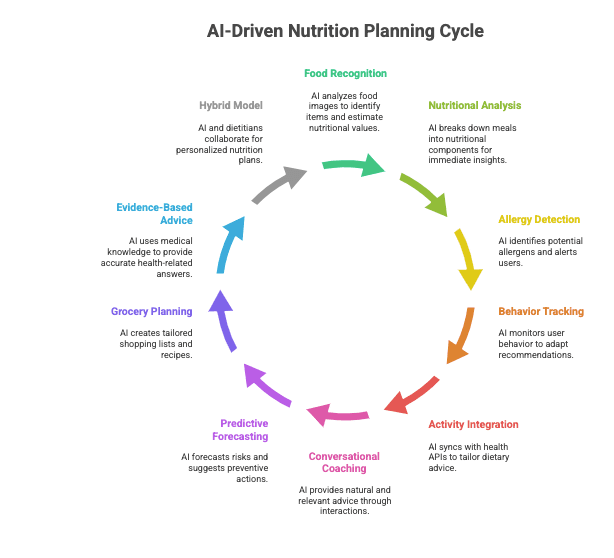
1. Real-Time Food Recognition
Using computer vision and deep learning, AI can analyze food images, identify items, and estimate nutritional values. This removes friction for users, enabling instant, accurate logging with a simple photo.
2. Instant Nutritional Analysis
AI breaks down meals into calorie counts, macronutrients (protein, carbs, fats), and micronutrients (vitamins, minerals), offering immediate insights without needing manual input or expert supervision.
3. Allergy and Restriction Intelligence
The system detects potential allergens or dietary incompatibilities (e.g., lactose, gluten) and alerts users before consumption. It ensures compliance with medical or lifestyle diets without extra effort.
4. Behavior-Driven Recommendations
AI tracks user behavior over time—such as skipped meals, nighttime snacking, or low hydration—and adapts its responses accordingly. Nudges and prompts evolve to match the user's lifestyle and behavior, increasing adherence without being intrusive.
5. Activity-Integrated Meal Planning
By syncing with health APIs (e.g., step count, heart rate), AI tailors dietary recommendations based on daily exertion, energy needs, and metabolic output. A light dinner after a heavy workout? The system adapts in real-time.
6. Conversational Coaching
Users can ask questions like “What’s a good post-workout snack?” or “Why am I always hungry in the evening?” and receive natural, relevant, and highly contextual advice. These interactions boost user trust and retention.
7. Predictive Nutrition Forecasting
AI doesn’t just react—it predicts. By analyzing historical intake and biometric data, it forecasts risks like sugar spikes or fatigue and suggests preventive dietary actions to balance nutrient intake.
8. Smart Grocery Planning and Recipe Curation
AI builds dynamic shopping lists and recipes tailored to goals, preferences, and restrictions. Whether it’s a low-carb meal for diabetics or vegan options with high iron, suggestions are intelligent, localized, and seasonally aware.
9. Evidence-Based Medical Nutrition
With Retrieval-Augmented Generation (RAG), AI taps into indexed medical knowledge to respond to health-related queries with accuracy. This ensures users receive answers grounded in clinical science, not assumptions.
10. Scalable Human + AI Hybrid Models
Some platforms blend AI efficiency with licensed dietitians. The AI handles baseline recommendations while human experts fine-tune or validate them. This balances automation with credibility at scale.
Core Elements of Building a Personalized AI Nutrition Coach
Designing a high-impact AI nutrition coach means building a seamlessly integrated, intelligent system, one that prioritizes user trust, precision, and real-time relevance over feature overload. Instead of focusing solely on flashy features, the architecture should work harmoniously to deliver meaningful outcomes, from personalized guidance to behavior-driven nudges.
1. Hypothesis-Led User Modeling
Begin by constructing a rich profile framework, capturing goals, dietary preferences, lifestyle patterns, and any chronic conditions. This foundational user model enables the system to generate nutrition strategies that align intricately with each individual’s journey.
2. Multimodal Intake Processing
Support natural, flexible inputs, such as snapping a photo of a meal, speaking logged entries, or typing recipe names. Behind the scenes, each input is parsed through specialized pipelines—image recognition, speech-to-text, or NLP, so the system gathers accurate intake data regardless of input style.
3. Nutrition Analytics & Adaptive Trends
Convert raw input into structured nutrition data, macros, portion sizes, trends over time. As users log meals, the system identifies behavioral patterns, like late-night snacking or nutrient gaps, and shines a light on potential improvement areas.
4. Dynamic Recommendation and Swap Engine
Drive choices, not just tracking. Whether suggesting foods locally available in the U.S., adapting recipes based on dietary goals, or proposing smarter swaps (e.g., whole grain for white rice), personalized suggestions make guidance feel practical and actionable.
5. Conversational Memory-Driven AI (LLM Layer)
Enable meaningful dialogue. This isn’t about static FAQs, it’s about conversational AI (e.g., LangChain-enabled LLMs) that remembers past inputs, sets consistent goals, and tailors its tone to user engagement style over time.
6. Evidence-Based Nutrition Intelligence (RAG Layer)
Enable grounded responses. For health-sensitive queries, like nutrition for hypertension or IBS, the system uses retrieval-augmented generation, referencing medically-vetted documents, research, or guidelines to ensure precision and trust.
7. Privacy-First Design & HIPAA Compliance
Anchor your app in security. Including tokenized authentication, data encryption, audit logs, and optional BAAs with clinical partners lets you manage sensitive nutrition and health data with integrity and regulatory compliance in the U.S.
8. Visual Feedback, Progress Tracking & Goal Reinforcement
Help users track progress with clarity: macronutrient distribution visualizations, behavioral trend charts, milestone reflections, digitally reinforcing achievements to sustain motivation and goal alignment.
9. Hybrid Human + AI Co-Navigation
Elevate AI with expert touchpoints. Design the system so AI triages routine guidance, while certified nutritionists intervene for complex cases—creating scalable personalization with trusted oversight.
10. Continuous Learning Loop
Incorporate real-world user feedback. Monitor engagement, satisfaction, dietary compliance, and adjust algorithms—prompt structures, swap logic, or coaching style, so the diet planning app evolves with user needs and expectations.
Step‑by‑Step: How to Build Your AI Diet and Nutrition Coach App
This section presents a practical, engineering-led development roadmap based on GeekyAnts’ in-house experience building AI-powered nutrition apps. From frontend frameworks to AI integration and data privacy, each step reflects how we approach real-world product delivery in the U.S. health and wellness market.
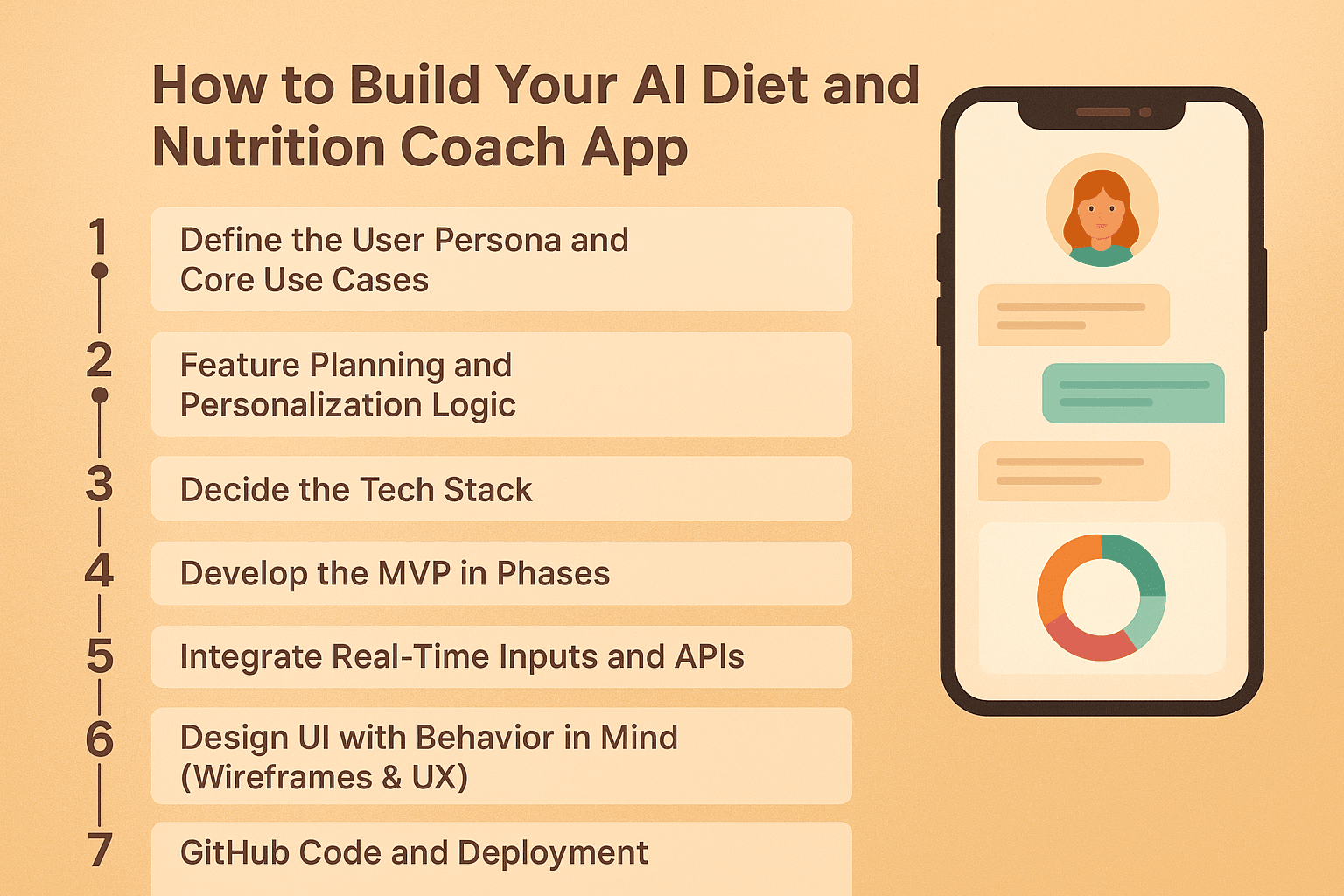
Step 1: Define the User Persona and Core Use Cases
Start with identifying who your users are and what goals they seek to accomplish. Is your target audience fitness enthusiasts, diabetics, athletes, or busy professionals? The clearer the persona, the better you can define the features.
Example:
We worked with a U.S. healthcare startup targeting middle-aged users with Type 2 diabetes. Their primary need was not calorie tracking but personalized food recommendations that minimize glucose spikes. This influenced everything, from UI to backend logic.
Step 2: Feature Planning and Personalization Logic
After persona mapping, shortlist features based on behavior and lifecycle needs. Some core features to plan:
- Smart food logging (image, text, voice)
- Real-time meal suggestions based on health goals
- Custom reminders & nudges
- Habit tracking & reporting dashboard
- Coach chat UI (powered by LLM)
- Integration with wearables (e.g., Fitbit, Apple Health)
- AI-powered pushback (calorie caps, missed meals, etc.)
Personalization Layer Tip:
Your core logic should dynamically adapt to inputs. For example, if a user logs fewer than 1000 steps, the AI coach should automatically suggest a low-carb dinner and skip high-glycemic foods.
Step 3: Decide the Tech Stack (Based on Our SME Architecture)
We recommend this stack for speed, scalability, and AI flexibility:
Layer | Tech |
|---|---|
Frontend | React Native or Flutter |
Backend | Node.js (Express or NestJS) |
AI Layer | OpenAI GPT + LangChain |
Vector DB | Pinecone or Weaviate |
Nutrition DBs | Edamam, Nutritionix, or USDA |
Database | PostgreSQL or MongoDB |
DevOps | Firebase / AWS ECS / Vercel |
Analytics | Mixpanel / Segment |
Note:
The LangChain-powered LLM layer allows memory chaining, making the chatbot truly conversational over time. We have used this setup in production for a client with over 20k active U.S. users.
Step 4: Develop the MVP in Phases
Phase 1: Conversational UI and Onboarding
- Build a clean chatbot-style interface.
- Integrate GPT-4 for onboarding via chat prompts.
- Ask health goals, preferences, and allergies.
Phase 2: Nutrition Logging System
- Use OCR and Whisper APIs for food logging.
- Integrate with USDA API for food parsing.
- Store logs in structured nutrition records.
Phase 3: Contextual AI Coach
- Add a decision layer (Agent) that evaluates user inputs.
- Push contextual nudges (missed meal alerts, swaps, etc.).
Phase 4: Personalization + Analytics
- Use OpenAI embeddings + Pinecone for food memory.
- Create a dashboard for caloric summaries, nutrient intake, etc.
Phase 5: HIPAA Compliance Layer
- Add token-based login, encrypted DB fields.
- Ensure data compliance for the U.S. healthcare landscape.
Step 5: Integrate Real-Time Inputs and APIs
Make the system context-aware by plugging into the real world:
- Apple Health/Fitbit → Steps, heart rate, activity
- Nutritionix/Edamam → Macronutrient parsing
- OpenAI API → Chat + coaching
- Twilio/Firebase → Push notifications and SMS
- Image Upload + GPT → Photo-based logging with contextual reply
Example Prompt:
“Suggest a low-sugar snack. I walked 3,000 steps and had a high-carb lunch.”
The system will check prior logs, use LLM logic, and respond:
“Try Greek yogurt with chia seeds—it’s protein-rich and low on sugar.”
Step 6: Design UI with Behavior in Mind (Wireframes & UX)
When designing the UI for an AI-powered diet and nutrition coach app, the focus should be on creating an experience that feels intuitive and supportive rather than overwhelming. Instead of lengthy forms, use a chatbot-style onboarding that collects user information through natural, conversational prompts. Progress should be displayed in engaging, gamified formats, such as rings, streak counters, or visual milestones, to keep motivation high. After a meal is logged, the interface can offer real-time healthier swap suggestions to help users make better choices instantly. Finally, keeping the UI modular ensures it works seamlessly across both mobile devices and smartwatches, maintaining consistency without sacrificing usability.
Pro Tip:
We recommend tools like Figma + UXPin for dynamic prototyping. For instance, our in-house wireframe for meal logging includes voice, camera, and manual options within one tab for ease of access.
Step 7: Deployment Strategy for AI-Powered Nutrition Apps
Deploying an AI-powered diet and nutrition coach app for the U.S. market requires a secure, scalable, and compliant rollout plan from day one. For production-grade reliability, containerize backend services with Docker and run them on AWS ECS with load balancing via AWS ALB and auto-scaling to handle traffic surges during seasonal peaks. For faster MVP launches, Firebase Hosting with Cloud Functions enables quick iterations while still supporting chatbot-driven interactions and real-time push notifications.
AI modules built with LangChain and vector databases like Pinecone should be deployed as independent microservices, allowing updates without downtime. Nutrition APIs (Spoonacular, USDA) are proxied through secure API gateways, and all PHI-related data is stored in encrypted S3 buckets to meet HIPAA compliance standards.
From day one, integrate Mixpanel or Amplitude to monitor user engagement, meal-plan adherence, and feature usage. These analytics feed directly into AI fine-tuning cycles. Automated CI/CD pipelines with API contract tests, unit tests, and synthetic monitoring ensure each deployment is stable, secure, and measurable.
Choosing the Right Development Model: In-House vs. Outsourcing for AI Nutrition Apps
To help you decide, here is a side-by-side comparison of in-house and outsourced development for AI nutrition apps across key business dimensions.
Dimension | In-House Development | Outsourced Development |
|---|---|---|
Control & Alignment | Provides complete control over product vision, data handling, and workflows. Ideal for long-term IP growth and internal alignment with health and compliance standards. | Offers flexibility and rapid onboarding with external expertise. Useful for quick prototypes and parallel workstreams. |
Speed to Market | Initial setup takes longer—recruiting, onboarding, and aligning technical teams may delay MVP timelines. | Faster launch with ready-to-go teams who’ve built similar AI platforms across industries. |
Cost Structure | Involves higher fixed costs: salaries, benefits, infra, compliance training, and hiring cycles. | Lower upfront costs with pay-as-you-scale models. Predictable budgets for MVPs, pilots, or experiments. |
Specialized Expertise | Building deep in-house expertise in AI, LLMs, NLP, OCR, and HIPAA compliance is time- and resource-intensive | Access domain-specific talent—AI engineers, nutrition API experts, health app designers—within days. |
Scalability | Scaling requires long-term planning and hiring cycles; suited for stable roadmaps. | Easily scale up/down based on sprint or launch needs; flexibility in resources across different time zones. |
Security & Compliance | Ideal for sensitive data environments—ensures full HIPAA compliance, internal audits, and end-to-end control. | External teams must be vetted for healthcare data security; strict NDAs and HIPAA-readiness are essential. |
Product Ownership | Builds long-term intellectual property and proprietary tooling in-house. | Faster execution, but long-term reliance may grow if knowledge transfer isn't well structured. |
Best Fit For | Enterprises aiming for long-term control, data sovereignty, and proprietary AI evolution. | Businesses seeking MVP validation, cost efficiency, and speed without compromising on quality. |
Key Roles for Building an AI Diet and Nutrition Coach App
Building an AI-powered diet and nutrition coach for the U.S. market requires a coordinated team where every role aligns with product goals, compliance needs, and scalability. Each function, from AI model design to secure API integration, must work seamlessly to deliver a reliable, engaging, and regulation-ready solution.
Role-by-Role Breakdown
Role | Why It’s Essential | GeekyAnts’ Differentiator for U.S. Projects |
|---|---|---|
Product Strategist / | Ensures business goals align with product delivery | Our PMs are trained in both agile product delivery and U.S. healthcare compliance, meaning they can anticipate |
Project Manager | HIPAA, FDA, and insurance-related requirements from day one. | |
Business Analyst (Healthcare Focus) | Translates ideas into actionable feature sets | We build persona-driven user flows (e.g., for diabetic patients, fitness-focused users, or busy professionals) that connect features to measurable ROI. |
Creates intuitive, engaging user experiences | We design behavior-aware flows like chatbot onboarding, real-time nutritional swap suggestions, and smartwatch-adapted UI for on-the-go coaching. | |
Mobile App Developers (Cross-Platform or Native) | Build responsive, high-performance apps | We specialize in React Native/Flutter with native-level performance, plus direct integration of AI chat, food logging, barcode scanning, and wearables like Fitbit & Apple Watch. |
Backend Engineers | Manage data flow, integrations, and real-time processing | Our backend architecture supports AI orchestration (LangChain), nutrition database mapping, and secure API management for scalable growth. |
Build intelligence layers | Our AI team is skilled in prompt engineering, nutrition-specific model fine-tuning, and context-aware meal recommendations that improve over time. | |
Security & Compliance Specialists | Protect sensitive health data | We have in-house HIPAA experts who design end-to-end encryption, BAA-ready integrations, and role-based access controls to safeguard patient data. |
Registered Dietitians / Nutrition Scientists | Ensure accuracy of dietary recommendations | They co-create AI rulesets and validate database mappings, ensuring recommendations align with U.S. nutritional guidelines. |
Test for functionality and reliability | Our QA process includes real-world nutrition scenarios, stress testing, and HIPAA compliance validation before launch. | |
Growth & Analytics Specialists | Track engagement and improve retention | We monitor adherence metrics, run A/B tests on coaching flows, and feed insights back into product updates for sustained growth. |
Core Features and Advanced Features to Include
Building an AI-powered diet and nutrition coach app for the U.S. market requires precision in design and engineering, not just feature checklists. Drawing from our engineering playbooks at GeekyAnts, here’s a breakdown of the essential and differentiating capabilities that define a market-ready solution.
Normal Features
- Intelligent Onboarding
AI-driven intake flows that adapt questions based on previous answers, covering diet preferences, allergies, goals, and lifestyle. This ensures relevant recommendations from day one.
- Smart Meal Logging
Support for text, voice, barcode scanning, and image recognition. For example, a photo of a burrito is instantly parsed into macros and logged with time stamps.
- Contextual Recipe Suggestions
Daily meal options filtered by U.S.-specific ingredient availability, dietary goals, and local pricing.
- Nutrition Dashboard
Real-time visual breakdowns of calorie intake, macro balance, and micronutrient coverage—designed for quick comprehension on mobile.
- Goal Tracking
Progress charts for weight, muscle gain, micronutrient optimization, or other health targets, with AI-generated insights for adjustments
Advanced Features
- Generative Meal Plans
GPT-powered suggestions factoring in activity data, skipped meals, and time of day. Example: After a morning HIIT workout and no lunch, the AI suggests a low-GI, high-protein dinner under 500 calories.
- Adaptive Coaching Engine
Learns from user interactions and adapts recommendations over time, storing conversational memory for richer context.
- Behavioral Feedback Loops
Pattern-based nudges (e.g., hydration reminders when high sodium intake is detected).
Sync with Apple Health, Fitbit, or Garmin for steps, heart rate, and sleep cycles, enriching dietary suggestions with physiological data.
- Dynamic Ingredient Swaps
Real-time healthy substitutions without losing flavor or recipe integrity.
Execution Enhancements
1. Animated Mockups (Lottie Integration)
Showcase key flows, like food photo parsing, in interactive animations to bridge the gap between design and stakeholder understanding.
2. Prompt Engineering with GPT – Code Example
Here is a practical example of how we structure prompts for personalized, compliance-ready meal recommendations:
javascript
const userContext = {
  age: 32,
  gender: "female",
  dietType: "keto",
  allergies: ["peanuts"],
  activityLevel: "moderate",
  location: "California",
  goal: "weight loss",
  lastMeal: "skipped lunch",
};

const prompt = `
You are a certified US nutritionist. Recommend a dinner under 500 calories
that fits a ${userContext.dietType} diet, excludes ${userContext.allergies.join(", ")},
and uses ingredients easily available in ${userContext.location}.
Consider that the user ${userContext.lastMeal} and has an ${userContext.activityLevel} activity level.
Return macros, prep time, and a brief cooking method.
`;

const response = await openai.createChatCompletion({
  model: "gpt-4",
  messages: [{ role: "user", content: prompt }],
  temperature: 0.7
});

console.log(response.data.choices[0].message.content);
Key Practices Applied:
- Role Assignment: “You are a certified US nutritionist” improves domain-specific accuracy.
- Context Injection: Real-time activity, location, and dietary details ensure relevance.
- Constraints: Calorie cap and ingredient restrictions enforce health and compliance rules.
How Much Does It Cost to Build an AI Diet & Nutrition Coach App in the USA?
Developing an AI-powered nutrition platform for the U.S. market involves higher budgets than global averages due to developer rates, compliance requirements, and advanced user experience expectations. Below is a two-table breakdown, one showing tier-based estimates, and another showing stage-wise development costs, both adjusted to current U.S. market rates.
Table 1 – Tier-Based Cost Estimates
Here is a breakdown of typical U.S. market costs by product tier, showing how complexity and feature depth influence budgets and timelines.
Tier | Estimated Cost Range (USD) | Timeframe | Description / Key Drivers |
|---|---|---|---|
Basic Prototype (MVP) | $75,000 – $150,000 | 3–4 months | Core features: meal logging, calorie tracking, static food database, and basic onboarding. Designed for quick validation with minimal AI. |
Core AI Functionality | $150,000 – $300,000 | 5–7 months | Adds conversational onboarding, AI-driven recipe suggestions, real-time meal feedback, and integration with nutrition APIs & GPT-based personalization. |
Full-Featured Enterprise App | $300,000 – $1,200,000+ | 8–12 months | Includes advanced LLM coaching, wearable & IoT integration, vector-memory personalization, HIPAA-compliant infrastructure, and multi-platform scalability. |
Table 2 – Stage-Wise Development Costs (U.S. Market)
To better understand where these costs come from, the following table outlines a stage-by-stage estimate for building an AI diet and nutrition coach app in the U.S.
Stage | Estimated Cost (USD) | Timeframe | Scope |
|---|---|---|---|
Discovery & Planning | $15,000 – $30,000 | 2–4 weeks | Business analysis, persona mapping, feature prioritization, and compliance review (HIPAA/GDPR). |
UI/UX Design | $20,000 – $50,000 | 4–6 weeks | Wireframes, interactive prototypes, gamified user journeys, smartwatch compatibility. |
Backend & AI Development | $80,000 – $250,000 | 3–6 months | AI modules (meal plan generation, GPT prompt engineering), API integrations, cloud infrastructure, HIPAA-ready security. |
Frontend Development | $50,000 – $150,000 | 3–5 months | Mobile (iOS & Android) & web app builds, chatbot integration, barcode scanning, and wearable support. |
Testing & Compliance Validation | $20,000 – $50,000 | 1–2 months | QA, performance testing, data privacy audits, and compliance documentation. |
Deployment & Post-Launch Support | $15,000 – $40,000/year | Ongoing | App store deployment, analytics integration, bug fixes, and feature rollouts. |
Factor affecting Costs Are Higher
- Complexity of AI Modules – Prompt engineering, dietary rulesets, vector-based personalization, and behavior-aware nudges require extensive R&D.
- Platform Diversity – iOS, Android, web, and smartwatch integration demand parallel builds and additional QA.
- Compliance Needs – HIPAA, GDPR, and FDA considerations require secure architecture, encryption, and audit trails.
- UX/Design Expectations – U.S. users expect visually engaging, gamified interfaces with Lottie animations and real-time interactivity.
- Team Sourcing – U.S.-based teams have higher hourly rates; outsourcing to hybrid teams can reduce costs while maintaining quality.
Tailoring Budget to Business Goals
- Prototype-First Approach ($75K–$150K) – Best for startups testing the market with an MVP focused on essential nutrition tracking and AI-generated plans.
- AI-Driven Journeys ($150K–$300K) – Ideal for companies prioritizing personalization, conversational coaching, and continuous user engagement.
- Enterprise-Grade Platform ($300K–$1.2M+) – Suited for large-scale health providers or insurers needing high concurrency, compliance, and IoT integrations.
Tech Stack & Architecture Blueprint
This section distills our SME blueprint into concrete choices: what to use, when to use it, and how to deploy it. It includes stack comparisons with pros/cons, a scalable reference architecture, and clear deployment paths. The design aligns with the earlier
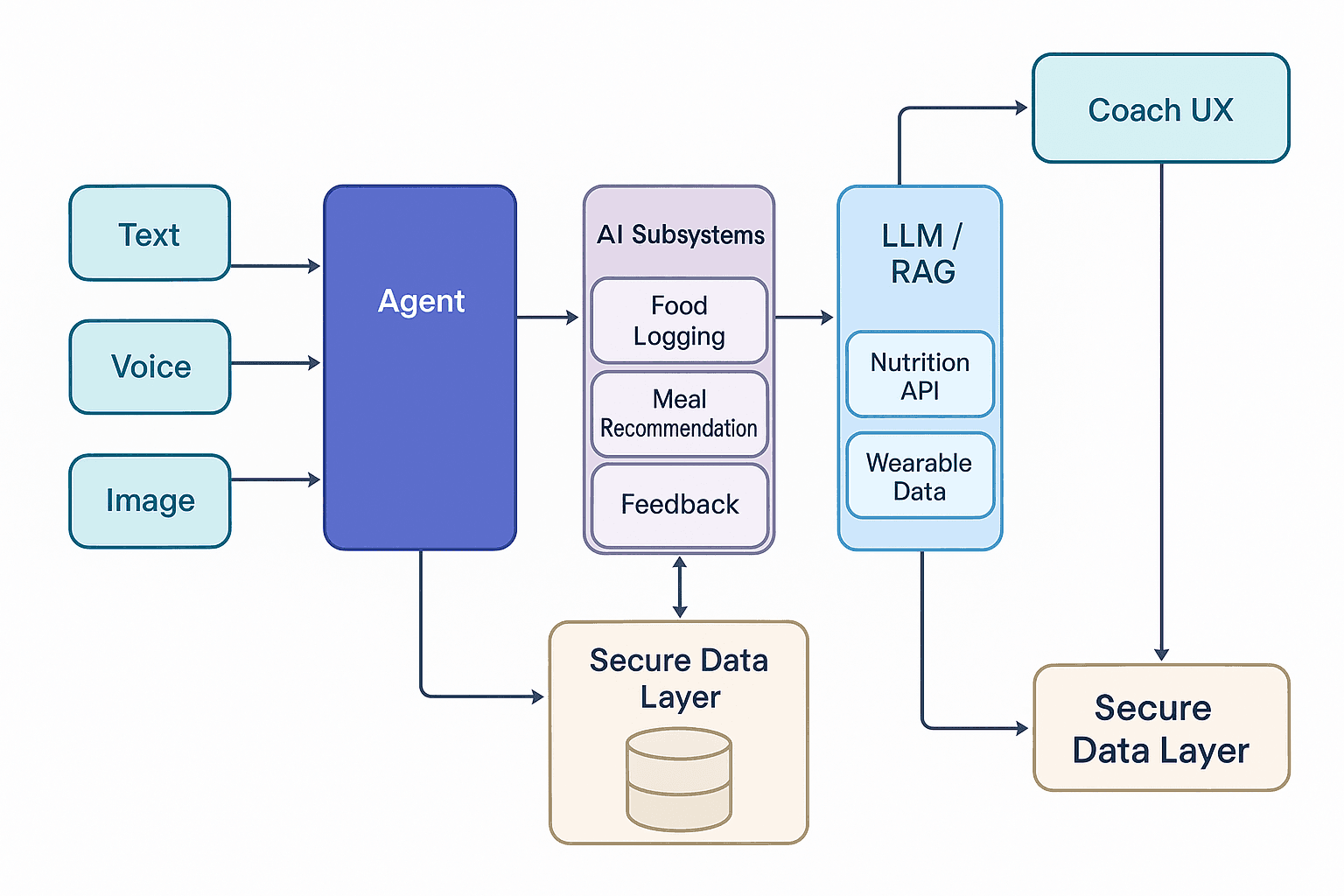
Agent-Centric AI Architecture for Nutrition Coaching
The flow starts with user inputs (like meal logs, wearable data, or chat prompts), which are processed by a central Agent Orchestrator. This agent routes requests to AI subsystems—covering GPT/LangChain for conversation, Retrieval-Augmented Generation (RAG) for knowledge, and nutrition/wearable APIs for real-time health data. All sensitive information flows through a Secure Data Layer (with encryption & HIPAA compliance) before surfacing in the Coach UX—a responsive interface that delivers personalized, context-aware recommendations in real time.
It’s essentially a hub-and-spoke model, where the agent acts as the brain, connecting intelligence, data, and user experience seamlessly.
1.Frontend & UX: pick the client surface for your audience
Once your architecture is in place, the next decision is choosing the right client surface. Whether your users engage primarily on mobile, web, or both, the tech stack you pick will shape their experience. Here is a quick breakdown of the top options and when they shine.
Layer | Option | When to choose | Pros | Trade-offs |
|---|---|---|---|---|
Mobile | React Native | Shared iOS/Android codebase with native modules (camera, barcode, wearables) | Mature ecosystem, fast dev, rich libs for camera/MLKit/barcode; easy to embed chat UI | Advanced animations may need native modules |
Flutter | Pixel-perfect UI, custom animations, smooth charts | High-quality rendering, great for gamified rings/streaks; good performance | Smaller library surface for some health SDKs | |
Web | Next.js (React) | SEO pages (marketing), clinician portals, admin consoles | SSR/ISR, great DX, easy auth, stable for dashboards | Mobile features (camera, sensors) need PWA care |
Design | Figma + Lottie | Behavior-aware UI, animated micro-flows | Rapid prototyping; export to Lottie for in-app animation | Governance for design tokens required |
2. Backend: Orchestrating Intelligence, Compliance, and Scale
If the frontend is the face of your AI-powered nutrition app, the backend is its brain and backbone. This is where context is managed, AI pipelines are orchestrated, and HIPAA-grade compliance is enforced, without compromising speed or scalability. Choosing the right backend stack ensures your app can handle high user volumes, process AI-driven insights in real time, and maintain the strictest data security. Here’s a breakdown of the core backend layers and the best-fit technologies for each.
Layer | Option | When to choose | Pros | Trade-offs |
|---|---|---|---|---|
App API | Node.js (NestJS/Express) | High-throughput APIs, rich JS ecosystem, rapid iteration | Huge ecosystem, great for API gateways, websockets | CPU-heavy jobs should be offloaded |
Python (FastAPI) | AI/ML adjacency, data processing pipelines | First-class for ML ops, scientific stack | Concurrency tuning (uvicorn/gunicorn) | |
Data store | PostgreSQL | Structured user, meal, plan, billing data | ACID, mature tooling, JSONB for semi-structured | Scale read replicas for analytics |
MongoDB | Flexible nutrition docs, logs | Schemaless iteration speed | Schema discipline required for reporting | |
Cache | Redis | Session, rate-limit, prompt cache | Millisecond latency | Keep PHI out of volatile caches |
Queue | SQS / PubSub / RabbitMQ | OCR jobs, image pipelines, push notifications | Smooths spikes; reliable retries | Observability required |
3. AI Layer: Turning Data Into Personalized, Actionable Coaching
This is the intelligence hub of your AI-powered nutrition platform, where LLMs are context-tuned, orchestrated with precision, and paired with dietary knowledge bases to deliver safe, hyper-personalized, and compliance-ready recommendations. It’s where meal advice becomes adaptive, conversational, and driven by evidence.
Sub-layer | Recommended tools | Purpose | Notes |
|---|---|---|---|
LLM | GPT-4o (or equivalent frontier model) | Conversational coaching, meal advice, tone control | Multimodal helps with image hints & UX copy |
Orchestration | LangChain | Tool routing: nutrition lookup, memory, constraints | Reusable chains for “suggest”, “explain”, “swap”, “nudge” |
RAG | Vector DB: Pinecone / pgvector / Weaviate | Evidence-backed answers (dietary guidelines, allergens) | Chunk medical docs; apply access controls |
Prompt I/O | Structured prompts + guards | Calorie caps, allergen exclusions, U.S. ingredient locality | Log prompts/outputs for QA; mask PII |
Internal demos | Gradio | Rapid SME review of models and flows | Gate behind VPN; no PHI in demos |
4. Nutrition & Context APIs
To make AI coaching truly effective, your platform needs reliable data streams for recipes, nutrition facts, wearable insights, and payments. Selecting the right APIs ensures accurate recommendations, seamless integrations, and consistent user experiences. Below are some top picks with their strengths and use cases.
Domain | API | Strength | Use case |
|---|---|---|---|
Recipes & ingredients | Spoonacular | Large recipe corpus, tags, cuisines | AI recipe suggestions & weekly plans |
Nutrition facts | USDA FoodData Central | Authoritative U.S. nutrition data | Macro/micro calculation & label compliance |
Quick calories | CalorieNinjas | Simple queries & fast responses | Lightweight logging and barcode backup |
Wearables | Apple Health / Fitbit / Google Fit | Steps, HR, calories out, sleep | Context-aware coaching and timing |
Payments | Stripe | Subscriptions, PCI offload | Plans, trials, coach add-ons |
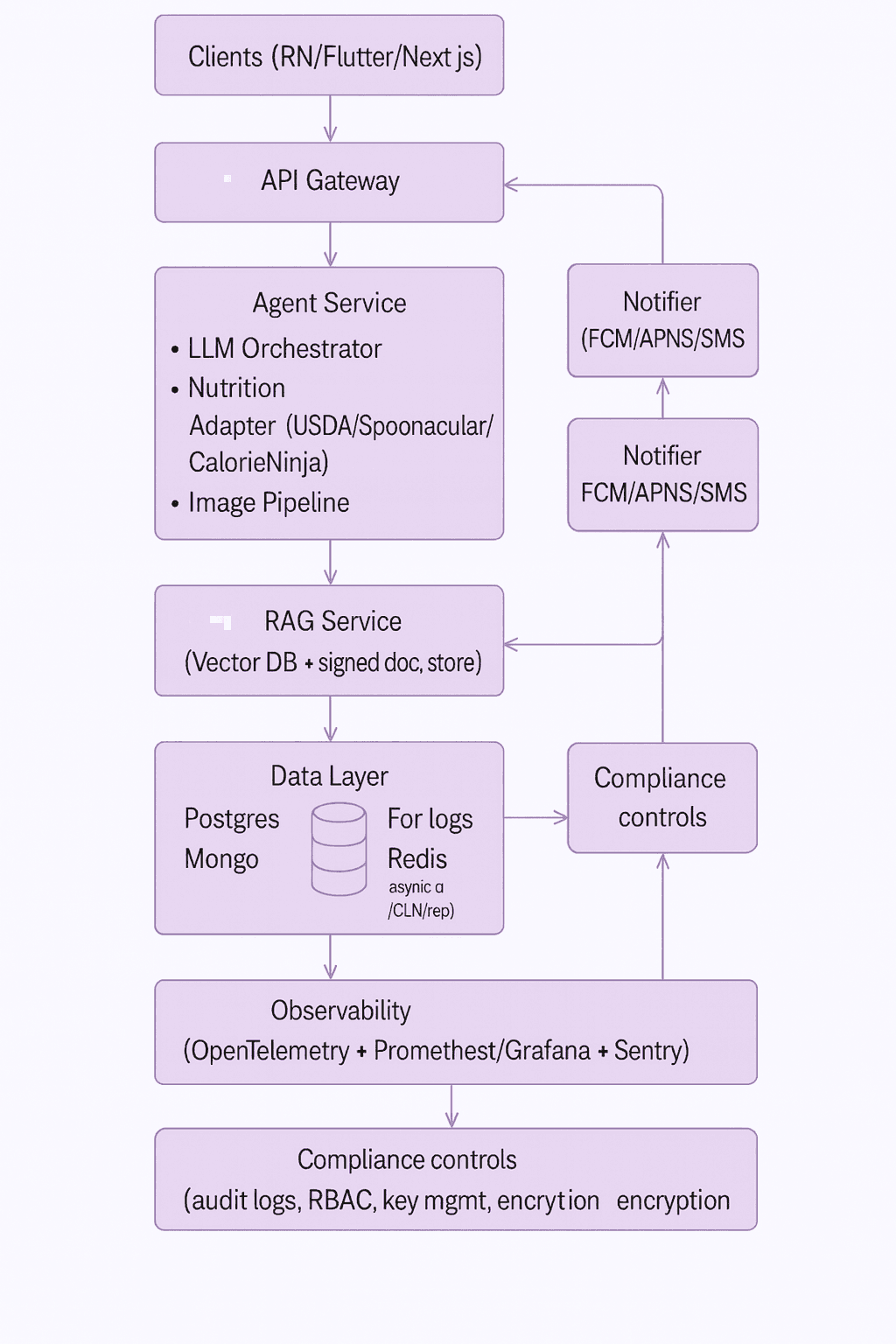
The reference architecture for your AI-powered diet and nutrition app is built to grow with you, starting lean for an MVP and scaling seamlessly to enterprise. Your users come in through mobile or web clients (React Native, Flutter, or Next.js), connecting via an API Gateway to an Agent Service. This is the brain of the operation, coordinating the LLM (via LangChain), nutrition data APIs (USDA, Spoonacular, CalorieNinjas), image/OCR pipelines, and wearable integrations.
Behind the scenes, a RAG service with a vector database ensures every recommendation is backed by real, verified dietary data. Information flows into a dual data layer, PostgreSQL for structured data and MongoDB for logs, while Redis speeds things up and message queues handle background jobs. Notifications through FCM, APNS, or SMS keep engagement high, while an Admin/CMS lets you tweak features and content without redeploying.
All of this is wrapped in a full observability stack for monitoring and a security-first design, think OAuth 2.0 auth, strong encryption, and compliance-ready governance, so your nutrition app is ready for both consumer trust and enterprise adoption from day one.
Your deployment strategy will depend on your team size, growth stage, and performance needs. Here’s a quick comparison to help you choose the right path.
5. Deployment paths: pick by team & scale
Your deployment strategy will depend on your team size, growth stage, and performance needs. Here’s a quick comparison to help you choose the right path.
Path | When to choose | Stack | Pros | Considerations |
|---|---|---|---|---|
Serverless MVP | Lean team, <50k MAU, fast iterate | API (FastAPI/Nest) on AWS Lambda/Cloud Functions, static web on Vercel, asset store S3/GCS | Low ops, elastic, quick to ship | Cold starts; tune concurrency; plan migration path |
Containers (ECS/GKE) | Mid-scale, mixed jobs, GPU inference pilots | Docker, AWS ECS/Fargate or GKE, Image OCR workers | Predictable performance, job queues, blue-green deploys | DevOps maturity needed |
Kubernetes (EKS/GKE/AKS) | Enterprise, multi-region, strict SLOs | EKS/GKE, Istio, ArgoCD, KEDA | Full control, autoscaling, fine-grained policies | Highest ops overhead; infra team required |
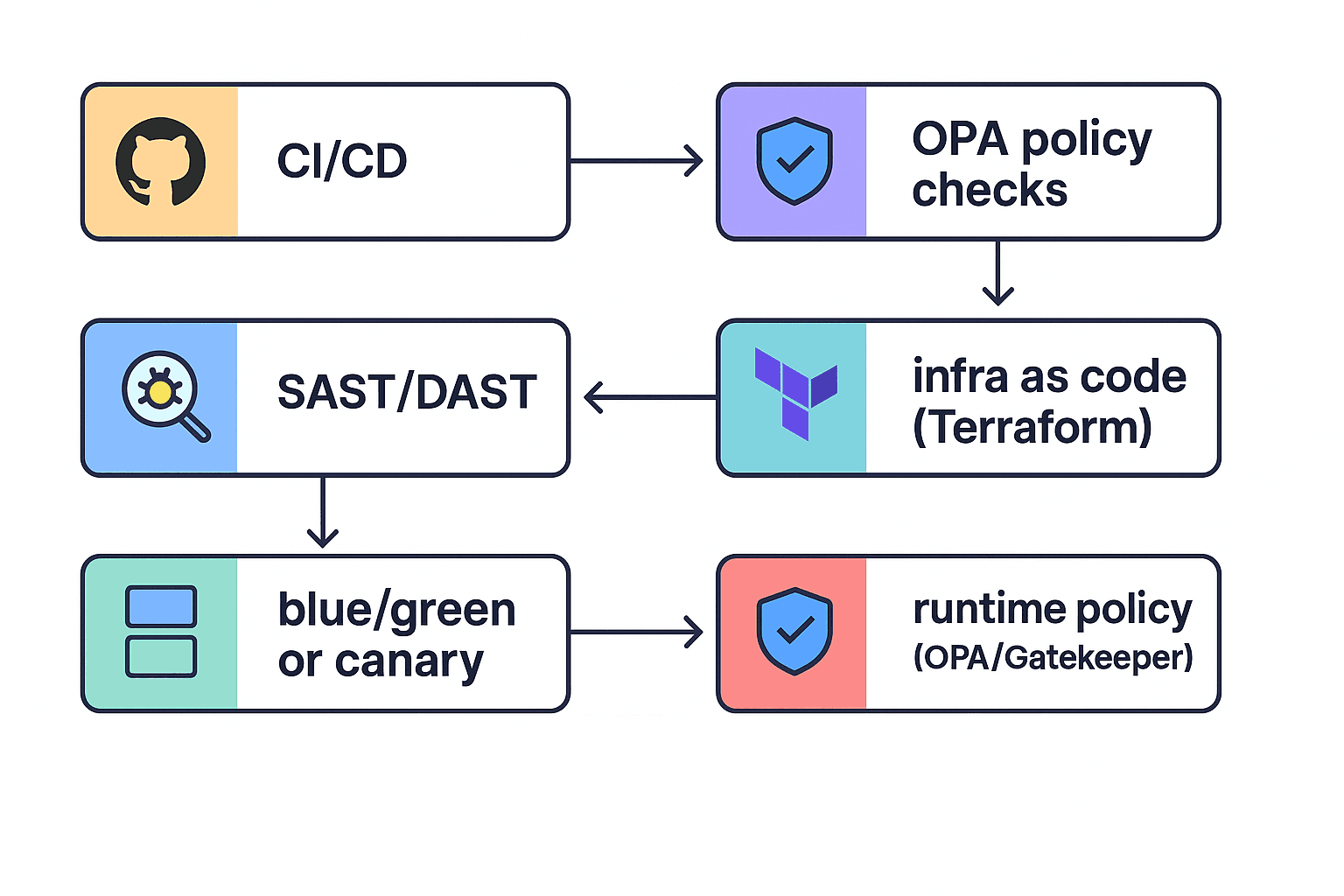
This modern CI/CD pipeline integrates security and infrastructure best practices, starting from GitHub Actions with OPA policy checks to automated SAST/DAST analysis.
It streamlines deployments through Terraform-managed infrastructure and blue/green or canary releases, enforced by OPA/Gatekeeper runtime policies.
6. Decision Framework, Module Boundaries, and High-ROI Prototyping Roadmap
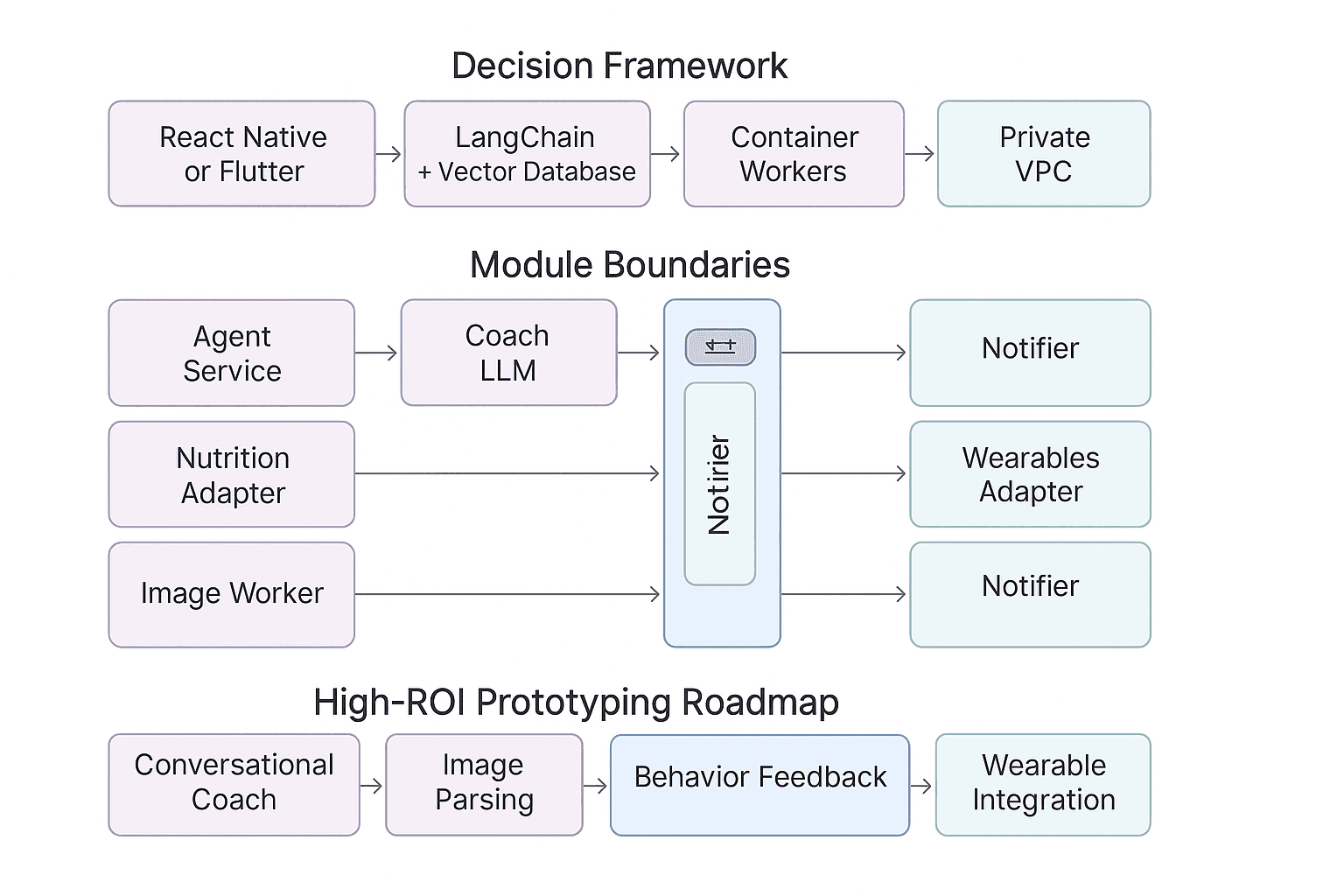
When building an AI-powered nutrition platform, speed and clarity in decision-making are critical. If your goal is a mobile-first product with engaging, animated user experiences, opt for Flutter or React Native, with React Native being the stronger choice if you need broad health SDK support. For conversational coaching grounded in reliable dietary data, GPT-4o with LangChain and a vector database like Pinecone or pgvector ensures accurate, context-rich responses, while keeping medical documents securely stored. When handling heavy OCR or vision tasks, container-based workers paired with SQS or Pub/Sub queues enable asynchronous processing without slowing down the main experience.
If HIPAA compliance is non-negotiable, enforce a strict Postgres-based PHI strategy with field-level encryption, private networking, and prompt redaction before any LLM interaction. For rapid stakeholder buy-in, Gradio prototypes behind a VPN can mirror production workflows safely.
The system itself is organized into clean module boundaries for easier scaling and maintenance. The agent-service manages intent routing and tool orchestration, while the coach-llm layer handles prompt chains, safety rules, and RAG calls. Specialized adapters, nutrition, image, and wearables, bridge third-party APIs and data sources. Supporting services like notifier and admin/CMS ensure timely communication, content updates, and feature flagging.
To maximize ROI in development, start with a chat-based coach that logs interactions, then expand to photo-based meal logging and smart nudges for behavioral reinforcement. Adding wearables integration enhances timing and portion recommendations, while implementing RAG for clinical queries brings evidence-backed credibility to your advice engine. This staged approach helps you validate value early while setting a solid foundation for enterprise-grade scaling.
Why GeekyAnts Is the Right Partner for Your AI Nutrition Platform
GeekyAnts is uniquely equipped to bring AI-powered nutrition experiences to life, backed by health-tech expertise, design-first finesse, and scalable engineering.
Tailored, Not Template
We avoid generic solutions. Our agentic AI pipelines, for prompt chains, RAG, and wearable integration—are fully engineered to reflect real user behaviors and dietary science.
Built on Health-Grade Infrastructure
Our design and development standards are proven in healthcare contexts, including HIPAA-aligned systems and wearables-based coaching. See how we transform real-time sensor data into personalized healthcare insights.
Track Record of Behavioral AI
We have enabled clinician-grade patient monitoring and conversational agents that adapt over time, capabilities directly parallel to long-term nutrition coaching reinforcement.
IoT Healthcare Solutions for Amputees and Footballers
In this flagship project, GeekyAnts engineered two Flutter-based applications, one for clinical monitoring of amputees and another for real-time hydration tracking in footballers. Powered by IoT sensor integration, the apps deliver instant health insights, from hydration levels to performance dashboards, with seamless data export for advanced analysis. The solution combined precise Figma-to-Flutter translation with agile iteration, ensuring stability in a complex, evolving environment.
Tech Stack: Flutter, IoT sensor integration, custom data visualizations
Bridge to High-Impact Workflows
From real-time meal suggestions to adaptive prompts, we deploy AI that reinforces behavior and trust, mirroring the workflows of verified healthcare systems.
Let’s turn your nutrition vision into a market-ready, AI-driven platform.
Partner with us to design, build, and scale an experience that’s as precise as it is personal.
Looking Ahead: The Future of AI in Diet & Wellness
AI is on track to reshape personal health journeys, moving beyond calorie tracking into predictive nutrition, where genomics, microbiome data, and lifestyle inputs power meal plans unique to each individual. Over the next decade, we will see fully integrated wellness ecosystems that unify diet, sleep, and fitness into a continuous feedback loop, making every recommendation context-aware and proactive.
Analyst forecasts point to double-digit growth in AI-driven healthcare solutions, with FDA and WHO outlining clearer regulatory pathways for digital therapeutics and nutrition AI. As compliance frameworks mature, the opportunity to deliver safe, hyper-personalized, and clinically aligned diet guidance will only expand, positioning early adopters for leadership in this next wave of health innovation.
