
Presales estimation is one of the most resource-intensive activities in a software agency and one of the least scalable.
A single proposal requires a senior architect to read a brief, infer missing requirements, break the scope into modules, evaluate a tech stack, estimate hours, and write a client-ready document. That process takes 3–5 hours per lead. According to a 2025 Gartner survey, presales activities consume 15–20% of a solutions engineer's time, making it one of the largest drains on senior technical capacity.
The deeper problem is consistency. Two architects given the same brief will produce estimates that differ by hundreds of hours. There is no shared baseline, no calibration against historical data, and no standardized way to scope a project. The result is proposals that vary in quality, accuracy, and turnaround time depending on who is handling the lead.
We built a system to solve this, an AI-powered proposal automation engine that takes a project description or an uploaded requirements document and produces a calibrated hour estimate, a tech stack recommendation, and a client-ready proposal in under 60 seconds.
The Five Problems With Traditional Presales
Before getting into how it works, it is worth naming the problems it addresses.
It consumes expensive senior time. The people best at estimation are the most experienced architects, the same people needed on active engineering work. Presales pulls them away for hours at a time, on work that may never convert.
Estimates are inconsistent. Without a shared baseline or access to historical project data, every estimate reflects the individual doing it. Two architects with the same brief will produce numbers that differ significantly. There is no way to know which is closer to reality.
It does not scale. When inbound leads increase, after a conference, a marketing campaign, or a referral push, the presales team becomes a bottleneck. Leads go cold while waiting for proposals.
Proposals feel generic. Most proposals are built from templates with minimal customization. A proposal that does not reflect the client's specific domain, platform needs, or business context does not build confidence.
Institutional knowledge disappears. When an experienced architect leaves, their estimation judgment leaves with them. Historical project data sits in spreadsheets, never used again.
Our setup addresses all five.
The Core Approach: Separating Reasoning From Calculation
The temptation when building AI-powered tools is to send everything to a language model and wait for an answer. Describe the project, ask the AI for an estimate, and get a number back.
That approach fails in practice. Language models are not reliable at estimating software effort. Ask the same model the same question twice, and the numbers can vary by hundreds of hours. When you ask a single model to classify a domain, extract features, estimate hours, and write a proposal, the quality of each task suffers.
Our system uses a different approach: AI handles reasoning, and deterministic engines handle calculation.
AI is used for tasks it does well, such as classifying a project's domain, deciding which features are relevant, and generating written content. Structured calculation engines handle everything that requires precision, hour estimation, confidence scoring, and team sizing. These engines use fixed formulas and historical project data, not inference.
This separation is the core design decision. It is what makes the system reliable rather than just fast.
How the System Works: Eight Stages
Our system runs every project through an eight-stage pipeline. Each stage has a single responsibility. The output of one stage feeds directly into the next.
Stage 1: Reading the Input
The system accepts a typed project description, an uploaded requirements document, or both together. Supported document formats include PDF, Word, and Excel.
Real client documents are rarely clean. PDFs often have formatting issues. Word files contain nested tables. Excel sheets have merged cells and inconsistent layouts. The system uses format-specific reading tools for each file type and applies a cleanup step when the extracted content is of poor quality.
When both a typed description and an uploaded document are provided, the system merges them into a single unified input before any analysis begins.
Stage 2: Identifying the Domain
The first analysis step classifies the project into one of 24 supported domains, including ecommerce, fintech, healthcare, education, marketplace, logistics, and more.
Getting the domain right matters because it determines which feature sets are considered next. The system looks at the primary business purpose and the end user, not just keywords. This prevents misclassification. A "pet care marketplace with booking" should not be classified as healthcare simply because the word "care" appears.
Stage 3: Selecting Relevant Features
This is where most simple systems fail. A basic approach would take the detected domain, say, healthcare, and include every possible feature: telemedicine, electronic health records, billing, care coordination, lab results, pharmacy integration, and more. The estimate would reflect a product the client never asked for.
The system we built uses an AI agent to read the project description and make a deliberate decision about which features are actually needed for this specific project. Every inclusion must be justified against one of four criteria:
- The feature is directly mentioned or implied in the description
- The feature is a dependency for something else that is included
- The feature is a standard requirement for that industry (such as compliance requirements for healthcare or financial platforms)
- The feature is required by the selected platforms (mobile, web, and admin panel)
If the brief only mentions appointment booking and billing, the system excludes telemedicine and electronic health records, even though those exist in the healthcare feature set.
For entirely new domains with no existing template, the system generates a feature set from scratch using a structured approach covering business logic, user management, transactions, communication, administration, integrations, and security.
Stage 4: Structuring the Features
Once the relevant features are selected, the system organizes them into a structured list with complexity ratings and sub-features for each item.
Complexity levels — Low, Medium, and High — follow specific definitions:
- Low: Standard screens, basic forms, simple user flows
- Medium: Business logic, third-party integrations, real-time features, data dashboards
- High: Regulatory compliance, location tracking, AI or machine learning components, multi-tenant architecture, offline functionality
This structured output is what the estimation stage uses to calculate hours.
Stage 5: Estimating Hours
Hour estimation involves no AI. This is deliberate.
The system applies base hour values for each complexity level, then adjusts them using a Calibration Engine that draws on data from 14 real historical projects. When a feature matches historical data with at least two data points, the calibrated hours from real projects replace the base estimate.
The matching works across three levels of precision: exact name matches, partial name matches, and word-level similarity above a defined threshold. This means even features described slightly differently can still benefit from historical calibration.
When the project description signals a limited scope, through words like "basic," "simple," "MVP," or "small business", a scope reduction factor is applied to the total estimate.
The result is hours grounded in what similar projects actually took, rather than what an AI infers.
Domain | Frontend | Backend | Database | Third-Party |
|---|---|---|---|---|
healthcare | React, TypeScript, Material-UI | FastAPI, Node.js | PostgreSQL, Redis | Twilio Video, AWS KMS |
ecommerce | React, Next.js, Tailwind | Node.js, Express/NestJS | PostgreSQL, Redis | Stripe, SendGrid, Cloudinary |
fintech | React, TypeScript, Material-UI | FastAPI, Node.js | PostgreSQL, Redis | Plaid, Stripe, AWS KMS |
Stage 6: Recommending a Tech Stack
For known domains, technology recommendations come from curated mappings built from real project experience, not AI inference. A healthcare project gets a specific set of frontend, backend, database, and infrastructure tools that have been validated in practice, along with the reasoning behind each choice.
For unknown domains, an AI agent generates recommendations and explains the justification for each tool selected.
Stage 7: Scoring Confidence
A formula-based engine calculates how much of the estimate is backed by historical data. The score reflects what percentage of features have calibrated hours from real projects, weighted by how many data points support each one.
This score is shown to users alongside the estimate. It gives a transparent signal about how much to rely on the numbers and where the estimate is based on base values rather than historical calibration. The score is capped at 95% because no estimate is ever certain.
Stage 8: Proposal
With domain, features, hours, tech stack, and confidence score all determined, an AI agent writes the client-facing proposal. Because it receives fully structured inputs rather than a vague description, the output is specific to the project.
The proposal covers an executive summary, scope of work, deliverables, timeline, team composition, and risks with mitigation strategies.
Stage 9: Building the Team Plan
The final stage calculates team sizing and phase distribution from total hours and the stated timeline. It applies standard phase ratios across frontend development, backend development, quality assurance, and project management, and enforces minimum team sizes regardless of the hours involved.
The User Experience
The interface is built around two tabs: Estimates and Proposals.
Submitting a Project
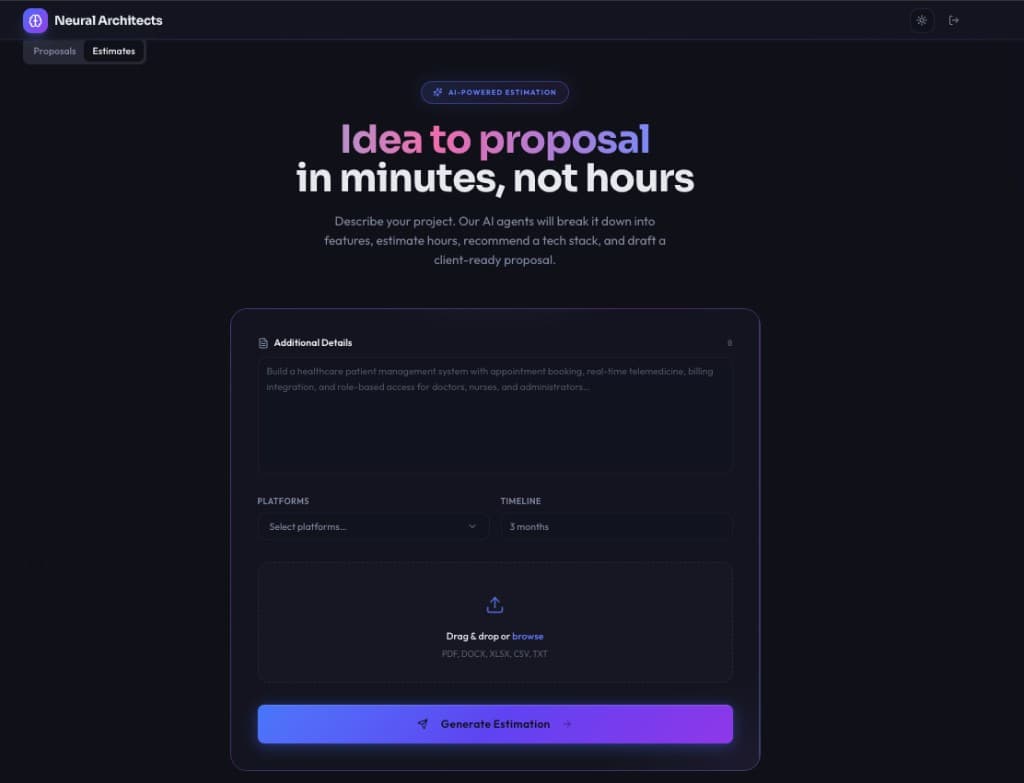
The input screen gives users a description field, a platform selector (Mobile, Web, Admin Panel, Backend API, Design System), a timeline field, and a drag-and-drop area for uploading documents.
Watching It Work
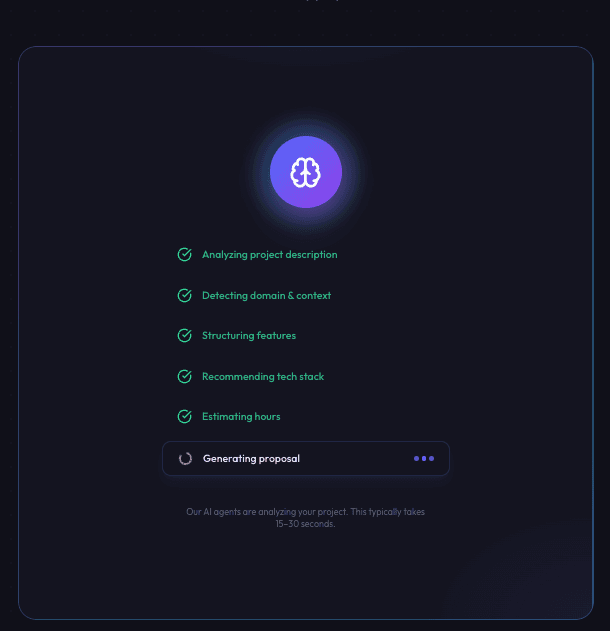
When a project is submitted, the interface does not show a loading screen. It shows a live progress feed of each pipeline stage completing in sequence, with a visible confirmation. Users watch the system work through their project step by step.
This matters for trust. When the reasoning is visible, users have more confidence in the output than they would from a number that appears after a silent wait.
Reviewing the Results
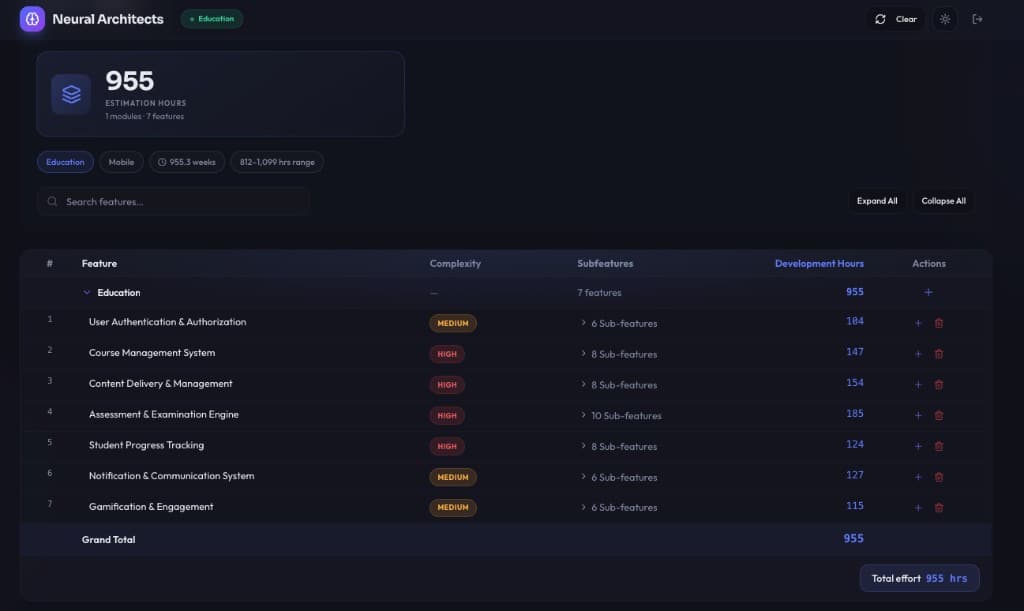
The results screen shows a summary card with total hours, module count, and an hours range. Below that, a searchable feature table lists every module with its complexity level, sub-feature count, and estimated hours. Users can expand any module to see the full list of sub-features.
Users can also modify the estimate without re-running the pipeline. Adding a feature, removing a module, or adjusting scope is done by typing a plain-language instruction, "add an analytics dashboard" or "remove social login," and the estimate updates accordingly.
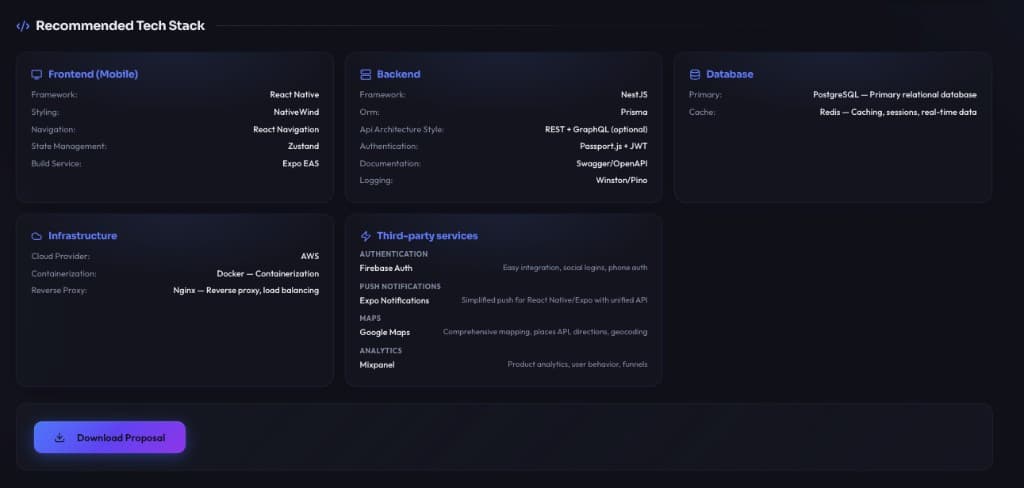
A separate section shows the tech stack recommendation, with cards for each layer of the system and written justifications for each tool.
Exporting Proposals
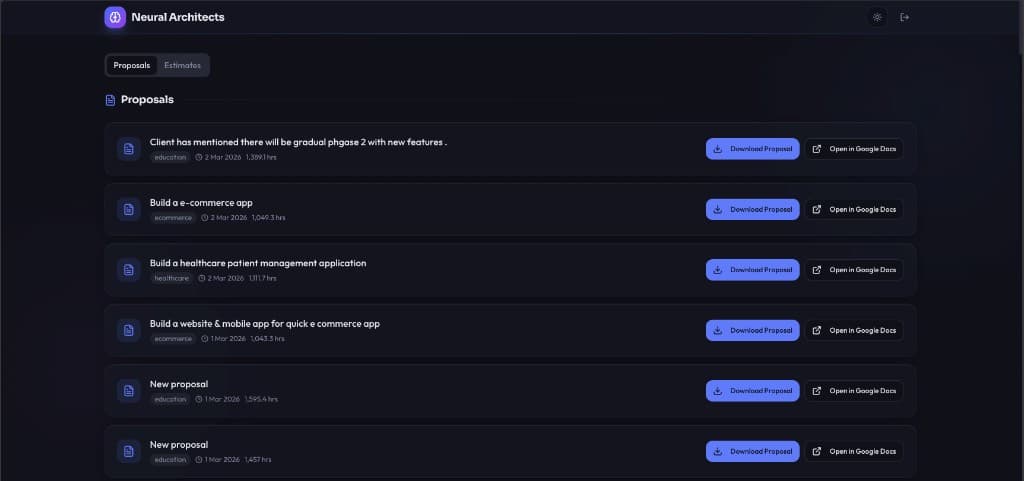
Every estimate is saved and accessible from the Proposals tab. From there, users can:
- Download a PDF — a formatted proposal document with a cover page, executive summary, feature breakdown, tech stack overview, timeline, team plan, and risk section
- Open in Google Docs — creates an editable document that can be shared with clients directly, with no additional formatting work required
The Problems We Encountered and How We Solved Them
Building this system surfaced four recurring issues worth documenting.
1. The AI included everything
Early versions of the feature selection stage selected every module in the domain template regardless of what the project actually described. A simple booking application would receive a full set of twelve healthcare modules.
The cause is a known tendency: AI models default to being thorough when shown a list of options. The fix was changing the instruction. Instead of asking the model to select relevant modules, it was instructed to act as a solutions architect, making deliberate scoping decisions — with explicit criteria for exclusion and a requirement to justify each inclusion.
2. Hour estimates were unreliable
Early prototypes used AI to estimate hours. The results varied by two to three times between identical inputs. The fix was removing AI from that step entirely. Hours are now calculated by deterministic engines using base values calibrated against historical project data. AI is only used to classify complexity levels, which it handles consistently.
3. Domain classification was confused by keywords
Certain project descriptions produced incorrect domain classifications because the model was responding to individual words rather than the overall context. A pet care marketplace was sometimes classified as healthcare because of the word "care."
The fix was updating the classification instructions to analyze the end user and the primary business purpose rather than surface-level keywords. Additional rules were added to handle common edge cases; multi-vendor platforms are always classified as a marketplace regardless of the industry they serve.
4. Client documents were difficult to parse
Real requirements documents do not parse cleanly. The fix was using format-specific reading tools for each file type, with fallback options when the primary tool fails, and a quality check that triggers a cleanup step when the extracted content falls below a readability threshold.
What Is Being Added Next
The current roadmap includes:
- Real-time proposal text generation, so users see the proposal being written rather than waiting for the full output
- A client feedback loop that feeds scope adjustments back into the calibration data
- Proposal generation in multiple languages
- CRM integration to auto-create opportunities in Salesforce or HubSpot when a proposal is generated
- An email-to-estimate workflow where forwarding a client email returns a structured estimate
- Version history to track changes across re-estimations of the same project
- Team availability overlay to factor in actual capacity when calculating timelines
Frequently Asked Questions
1. How accurate are the estimates?
Estimates are calibrated against 14 real historical projects. When a feature has at least two matching historical data points, real project hours replace the base estimate. The confidence score shows how much of the estimate is grounded in actual data. In practice, outputs fall within 15% of what a senior architect would produce manually.
2. What document formats does it support?
PDF, Word (DOCX), and Excel (XLSX and XLS). A cleanup step runs automatically when the extracted content quality is poor.
3. How is this different from asking an AI assistant to estimate a project?
Three differences: calibration against historical project data rather than inference; a structured pipeline where each reasoning step is separated and testable; and production-ready output including downloadable proposals, Google Docs export, persistent storage, and a team plan, not a chat response.
4. What happens for domains the system has not seen before?
A fallback process generates a feature set from scratch using a structured framework covering business logic, user management, data and content, transactions, communication, administration, integrations, and security. Novel domains are handled without being forced into an ill-fitting template.