

Key Insights
- Google I/O 2026 connected prompt-based app generation to Google Play's internal testing track, covering the mobile delivery lifecycle from a single interface.
- Android CLI 1.0 opens Google's core Android toolchain to any AI agent, reducing LLM token usage by 70% and completing tasks three times faster based on Google's internal experiments.
- Generated prototypes are starting artifacts, not shippable code. Architecture, security, accessibility, and performance require human engineering judgment before release.
- Teams that benefit from agentic tooling are those that define repository structure, QA journeys, review gates, and measurement baselines before agents touch the codebase.
Google I/O 2026 marked the point where AI tools for mobile developers stopped being about writing code faster and started being about delivering software end to end. What changed is the scope, as confirmed in Google's I/O 2026 developer highlights. Google announced a set of tools that cover the mobile software delivery lifecycle from initial prototype to Google Play's internal testing track, not just the moment a developer opens a code file.
AI Studio can now generate a Kotlin and Jetpack Compose Android app from a text prompt, run it inside an embedded browser emulator, push it to a physical device over USB, and publish it to Google Play's internal test track from a single interface. Android CLI reached stable version 1.0, giving AI agents from Antigravity, Claude Code, or any other tool direct programmatic access to Android Studio's build, analysis, and testing capabilities. Antigravity 2.0 arrived as a full agent orchestration platform with a desktop app, a new CLI built in Go, and an SDK for custom workflows.
Each piece connects. A prompt in AI Studio exports with full context into Antigravity. Android CLI bridges agent-driven terminal work with Android Studio for visual review and debugging. The pipeline Google sketched out goes from prompt to prototype to emulator validation to CLI-driven quality checks to device testing to release handoff. Antigravity compresses portions of that pipeline. The open question, and the one enterprise delivery teams need to answer, is what happens after the prototype lands and before the app ships.
That gap is where GeekyAnts works.
What Google Announced for Mobile Developers
The volume of announcements at I/O 2026 was high, and the mobile-specific ones are scattered across several product surfaces. Here is what matters for enterprise app delivery teams.
Google introduced native Android app creation capabilities inside the web-based Google AI Studio, bringing a process that required weeks of environment setup down to minutes. Apps are built using Jetpack Compose, Kotlin, and recommended developer patterns. Developers can go from prompt to prototype, test in an embedded Android Emulator in the browser, and install the app on a physical Android phone over USB using the integrated Android Debug Bridge (ADB). Connecting a Google Play Developer account in AI Studio allows publication to Google Play's Internal Test Track with a single click.
AI Studio also expanded beyond Android generation. A new mobile app for AI Studio is available to pre-register, letting developers capture an idea on the go and have a working prototype ready by the time they reach their desk. Projects move from AI Studio to local Antigravity development with a single click, carrying over full project context.
Antigravity 2.0 shipped as a full development platform with five components: a standalone desktop app, a new CLI, a developer SDK, a Managed Agents tier inside the Gemini API, and an enterprise deployment path. The desktop app lets teams orchestrate multiple agents and execute tasks at the same time, design custom subagent workflows, and schedule tasks that run in the background. Integration with Google AI Studio, Android, and Firebase is native. The new Antigravity CLI is built in Go and replaces Gemini CLI, which Google is retiring on June 18, 2026 for consumer users.
Android CLI provides a lightweight interface for AI agents to perform tasks and retrieve knowledge about Android development, and is now stable at version 1.0. The stable release lets agents perform semantic analysis, render Compose previews, and run UI tests without opening the IDE. According to Google's internal experiments, the machine-friendly interface reduces LLM token usage by more than 70% compared to agents using standard toolsets, with tasks completing three times faster.
Google also open-sourced Android Skills, which are modular markdown-based instruction sets that tell LLMs how to follow best practices for specific workflows, such as migrating to Jetpack Compose or Jetpack Navigation 3. New skills added at I/O cover CameraX migration, adaptive UI for multi-device support, Compose Styles API adoption, Perfetto SQL for performance tracing, and testing setup. Android Studio previewed a Migration Assistant that helps developers port iOS and React Native apps to native Android. The agent maps features, converts assets, and outputs Jetpack Compose code following recommended patterns. Google claims conversions that took weeks can now be completed in hours.
For enterprise app delivery leaders, the summary is this: Google has connected prompt-based generation to production-track deployment and opened its core Android toolchain to any AI agent on the market, not just its own.
From Vibe Coding to Production Mobile Engineering
The term "vibe coding" appears in Google's own I/O documentation. It describes the act of describing what you want and letting an AI generate the code. For a solo developer building a utility app or a startup validating an idea before writing a line of production code, this is a meaningful shift.
For an enterprise mobile team, a generated prototype is a starting artifact.
Consider what the prototype lacks. There is no tested error handling across network failure scenarios. The code has not been reviewed against the team's security policy for local data storage, which matters most for apps handling credentials, health records, or payment tokens. No accessibility audit has run. Screen reader compatibility, color contrast, and touch target sizing are not things a generator guarantees at the standard a production app requires.
Performance is another gap. An enterprise app that performs poorly on a mid-range Snapdragon 680 device will collect one-star reviews faster than any feature will recover the rating. Generated code also carries no architectural conventions, which matters the moment a second engineer opens the project.
None of this means the prototype is worthless. A working build in hours versus a sprint is a real advantage for discovery, client alignment, and early UX decisions. The mistake is treating the prototype as deployable and the engineering work as optional polish.
Generated code is the first artifact for review, not the last one before release.
Do | Don't |
|---|---|
Use the generated prototype for discovery, client alignment, and early UX decisions | Treat the generated prototype as production-ready code |
Review generated code for security policy compliance on local data storage | Skip security review for apps handling credentials, health records, or payment tokens |
Run a dedicated accessibility audit for screen reader compatibility, color contrast, and touch targets | Assume the generator meets production accessibility standards |
Test error handling across network failure scenarios | Ship without testing edge cases like network failures |
Validate performance on a reference mid-range device (e.g. Snapdragon 680) | Assume generated code meets your performance budget |
Enforce architectural conventions before a second engineer opens the project | Let generated code set the architectural baseline |
The New Agentic Mobile Development Workflow
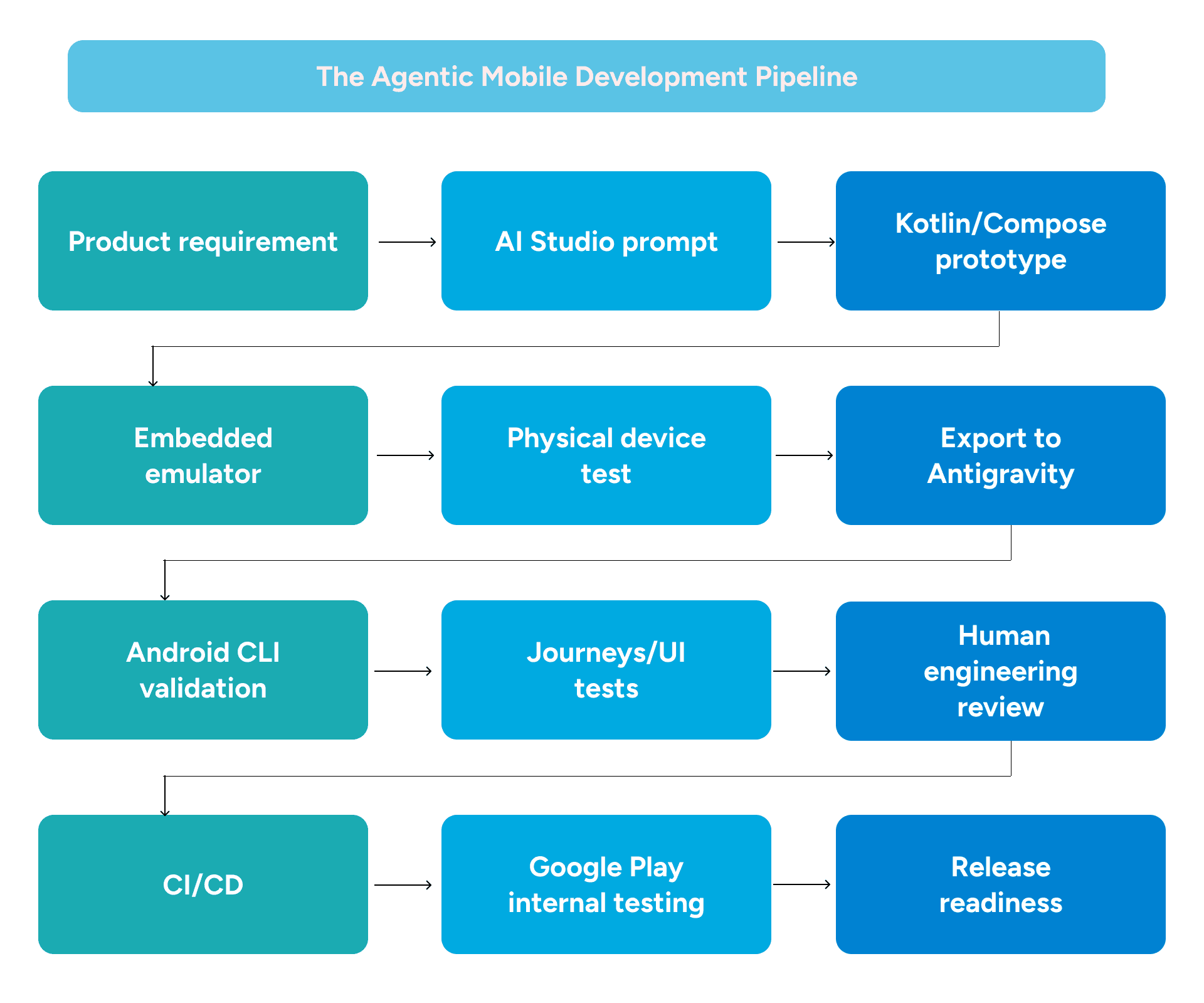
The workflow Google demonstrated at I/O 2026 changes how delivery teams should structure their sprints. Here is how it maps to an enterprise pipeline.
A product requirement or feature brief goes into AI Studio as a prompt. The agent generates a Kotlin and Jetpack Compose Android application. The developer previews the app in the embedded browser emulator, confirms the core flows render, and pushes it to a physical test device over ADB. This prototype stage can happen in a single session.
From AI Studio, the project exports to Antigravity with full context intact. Engineers prompt Antigravity to refactor components, restructure the data layer, or adjust navigation architecture. The Antigravity CLI runs in the terminal alongside the desktop app. Subagents handle parallel tasks, such as one agent working on the UI layer while another handles API integration.
Android CLI enters the workflow at the validation stage. Agents call it to run semantic analysis on modified files, check for warnings, and render Compose previews without opening Android Studio. Journeys, which is Android CLI's feature for running end-to-end UI tests from the terminal, provides the first structured QA pass before a human engineer opens the code.
The project then moves into Android Studio for review, debugging, and UI refinement. A senior engineer examines the architecture for correctness, checks that state management follows team conventions, and reviews any third-party library additions. This review gate is not optional.
CI/CD picks up after human review clears. The pipeline runs the test suite, checks lint rules, validates accessibility, and enforces the performance budget thresholds the team has defined. A passing build goes to the internal test track.
GeekyAnts structures the repositories, branch policies, and review gates so agents can contribute at each stage without bypassing the checks that protect production quality.
What This Means for Native Android Teams
Native Android development in 2026 is defined by Kotlin and Jetpack Compose. Android 17 marks a shift toward a single, Compose-based development model for all widgets, with Google unifying the developer experience across mobile, Wear OS, and cars through Jetpack Glance. Teams still building UIs in XML-based View layouts should note that Google has moved View components to maintenance mode, with Compose now the standard for Android UI development — and the new agent tooling is built around that assumption.
Android CLI 1.0 is the most useful announcement for senior Android engineers. It gives agents access to tasks that required the full Android Studio IDE to be open: SDK management, device connectivity, semantic symbol resolution, file analysis, Compose preview rendering, and UI test execution. The CLI works with any agent, meaning Claude Code, OpenAI Codex, and Antigravity can all invoke the same Android toolchain without locking the team into one AI provider.
Android Skills are worth adopting at the same time. Each skill is a markdown-based instruction set that tells an LLM how to follow Google's best practices for a specific task. The library now covers Display Glasses and Compose Glimmer for XR development, CameraX migration from older camera APIs, Perfetto SQL for translating natural language into performance trace queries, adaptive UI for multi-device layouts, testing setup, and Compose Styles API adoption. Teams can add these from the command line and modify them to encode their own conventions.
The Migration Assistant previewed in Android Studio handles a problem that many Android teams have deferred. It can migrate app code to native Kotlin regardless of whether the source is React Native, a web framework, or iOS. The output still requires architectural review before being treated as production-ready. The agent maps features and converts assets, but it does not know the team's release constraints or the edge cases already logged in the backlog.
Senior Android engineers in this environment are not replaced. Their role shifts to defining the architecture that generated code must conform to, writing the skills and custom agent instructions that encode team-specific patterns, and serving as the review gate before code enters the main branch. The engineers who understand Kotlin coroutines (Kotlin's built-in approach to handling concurrent operations without blocking threads), the Compose state model, and Android's permission and security architecture are the ones who catch what agents miss.
What This Means for Flutter and React Native Teams
Flutter and React Native sit in a distinct position relative to Google's I/O announcements. Flutter and React Native are both widely adopted frameworks in enterprise mobile development, and neither is a niche choice. Neither framework is a niche choice, and the I/O tooling does not ignore them.
Android CLI works with any agent, including those used by Flutter and React Native teams. A Flutter team running Claude Code can have their agent invoke Android CLI to run device tests or check Android-specific warnings without switching toolchains. The openness is deliberate on Google's part. Android CLI's documentation lives at d.android.com/tools/agents, available to any agent, not gated behind Antigravity or Gemini.
The Migration Assistant creates a question worth addressing for cross-platform teams. It can assess a React Native codebase and propose a migration path to native Kotlin and Compose. For some teams, that option makes sense for the Android surface. For others, the business case for a single codebase across iOS and Android is stronger than the case for a rewrite.
The answer depends on the specific app, the existing team skills, the roadmap, and the state of the codebase. Flutter delivers performance close to native on both Android and iOS based on available benchmarks, and a well-built Flutter app is not distinguishable from a native app by most users - Source. React Native 0.76, released in 2024, shipped with the New Architecture enabled by default, marking a significant step forward from the bridge-related performance limitations of earlier versions.
Where both frameworks need focused engineering attention is on platform-specific quality. Native modules that wrap Android system APIs, state management at scale, design tokens (the centralized values that define color, typography, and spacing across an app), and platform-specific QA scenarios all require human engineering regardless of how much application logic an agent generates.
GeekyAnts works across Flutter and React Native. Whether a team should modernize their current stack or phase toward native is a question that needs a real technical assessment, not a default recommendation.
Question | Yes | No |
|---|---|---|
Is your app Android-only? | Native Kotlin + Compose is worth evaluating | Do you need a single codebase across iOS and Android? |
Do you need a single codebase across iOS and Android? | Stay cross-platform (Flutter or React Native) | Does your team have strong Kotlin/Compose expertise? |
Does your team have strong Kotlin/Compose expertise? | Native migration is viable | Does your codebase heavily rely on platform-specific APIs? |
Does your codebase heavily rely on platform-specific APIs? | Native gives you more direct control | Is delivery speed and shared logic across platforms a priority? |
Is delivery speed and shared logic across platforms a priority? | Flutter or React Native remains the stronger choice | Reassess based on team roadmap and app complexity |
Where Human Engineers Must Stay in Control
The I/O 2026 tooling compresses the time from idea to prototype and from prototype to a testable build. It does not compress the judgment required to ship an enterprise-grade mobile application.
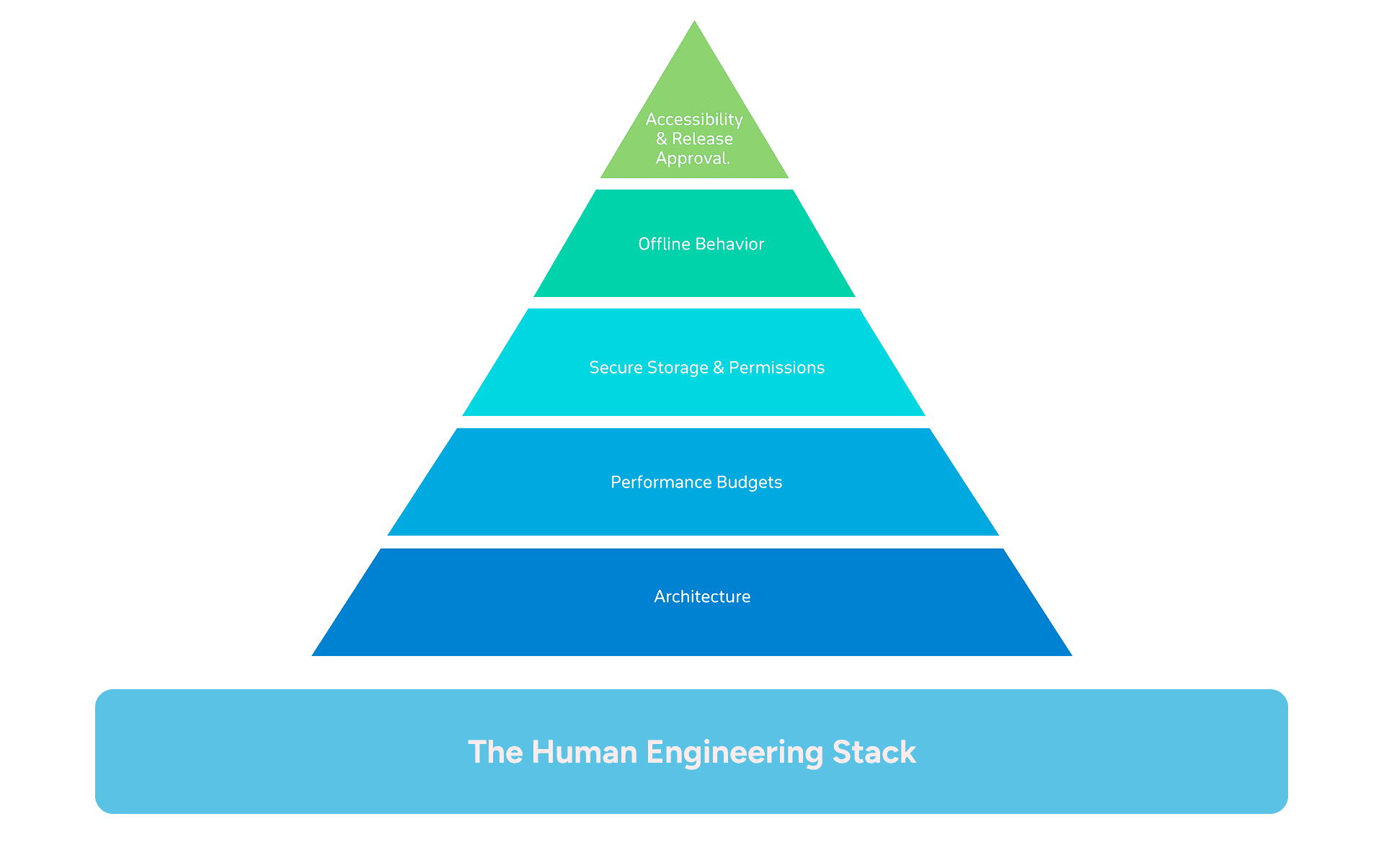
Take architecture. The choice between a layered structure and a feature-first module approach, how the data layer handles offline states, and where business logic lives relative to the UI layer all have downstream consequences for years. An agent generating a clean prototype cannot know the team's release cadence, the compliance requirements shaping how data is stored on device, or the edge cases already logged from prior releases. A generated architecture that works for a demo will crack under the weight of a real product backlog.
Performance budgets are another area that needs human ownership. Someone must decide what the acceptable cold start time is, what the memory ceiling is on a reference mid-range device, and when a performance regression blocks a release. An agent can profile code and flag issues, but it cannot set the threshold or make the release call.
Secure storage and permission handling is where generated code most often produces functional but non-compliant outputs. Android's permission model for location, camera, microphone, and contacts has behavioral requirements around when and how permissions are requested. Keystore usage, certificate pinning (the practice of hardcoding trusted server certificates into an app to prevent traffic interception), and token handling require design decisions that a generator optimizing for functionality will not consistently get right.
Offline behavior follows a similar pattern. The logic for resolving conflicts when a device reconnects after a period without internet access, the queue management for actions taken offline, and the UX for degraded states require engineering judgment that goes beyond what prompt-to-code tools produce.
Accessibility compliance under WCAG 2.1 (the Web Content Accessibility Guidelines that set the international standard for accessible digital products) and platform guidelines is not validated by default in any generator. Content descriptions on interactive elements, focus order for keyboard navigation, and contrast ratios across all device display modes require a deliberate audit process with human sign-off.
Release approvals remain human decisions. The agents do not know what changed between versions, what the rollout strategy is, or what monitoring is in place to catch regressions after launch. An engineer who understands the product, the user base, and the risk profile of a given release makes that call.
Mobile engineers on teams that adopt these tools become the architects of the workflow itself and the reviewers who define what passes each gate.
Build an Agent-Ready Mobile Engineering Pipeline
Google's I/O 2026 announcements make a clear case that agentic tooling is now part of the mobile delivery stack. The teams that benefit most are not the ones that adopt every new tool at once. They are the ones that define the structure within which agents operate.
Four things determine whether an agentic mobile workflow produces production-ready output or a backlog of unreviewed prototypes.
Repository structure comes first. Agents produce better outputs when architectural patterns are documented, file organization is consistent, and team-specific rules are encoded in skill files or custom agent instructions. A repo that an engineer cannot navigate in fifteen minutes will not be one an agent navigates well either.
QA journeys need to exist before agents begin generating. Android CLI's Journeys feature runs end-to-end UI tests from the terminal, but the test scenarios must be written and maintained by engineers who know the application's critical paths. Generating code without test coverage is generating risk.
Review gates must be defined in writing. The checks a pull request must pass before merging, who approves architecture-affecting changes, and how generated code gets flagged for additional scrutiny are policies that need to exist before an agent touches the codebase, not after the first incident.
Measurement baselines matter more than most teams expect. Build times, test coverage, cold start times on a reference mid-range device, and crash-free session rates need to be recorded before agent-assisted development begins. Without a baseline, there is no way to verify whether the workflow is improving delivery quality or eroding it over time.
GeekyAnts can assess your current mobile repository, identify the gaps in structure and documentation that would limit agent contribution, and implement the pipeline that makes agent-generated code safe to ship. Whether your team works in native Android, Flutter, or React Native, the work starts with understanding what you have before deciding what to adopt.
Talk to the GeekyAnts AI Engineering team to start that assessment.