

Key takeaways
- Operational fit matters more than trend: Choosing between Tap to Pay and Scan to Pay is not about hype—it's about aligning with your restaurant's flow, tech stack, and customer behavior.
- Both technologies drive speed and scale, but in different ways: Scan to Pay wins on cost and reach; Tap to Pay leads in throughput and frictionless UX.
- With the right partner like GeekyAnts, you get more than tech delivery—you get scalable architectures, compliance-ready systems, and payment experiences engineered for long-term growth.
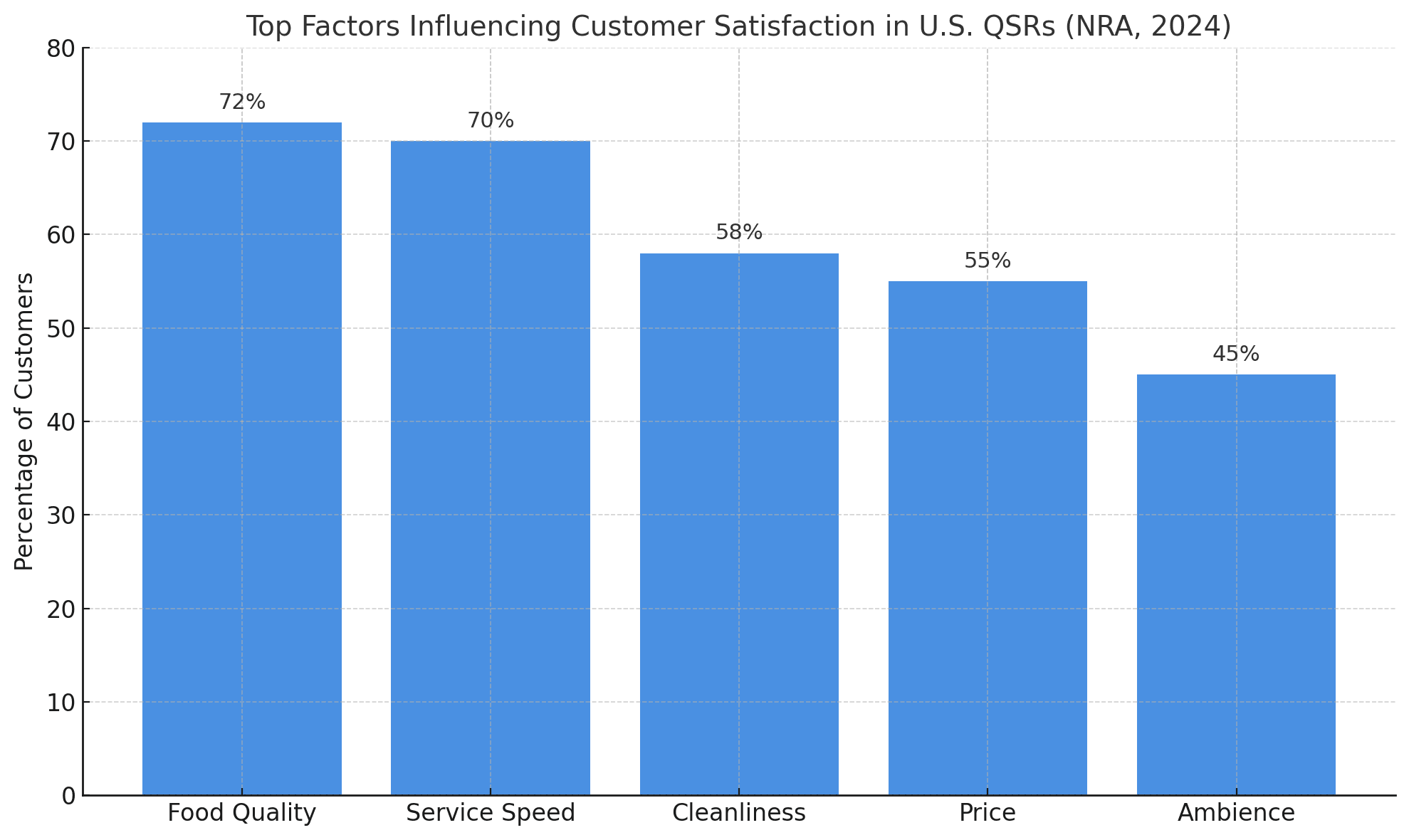
A long checkout line can cost a quick service restaurant more than a customer; it can cost brand loyalty. In the high-speed world of American quick service restaurants (QSRs), where 70% of consumers say speed is as important as taste (National Restaurant Association, 2024), the payment experience has become the new battleground for customer satisfaction.
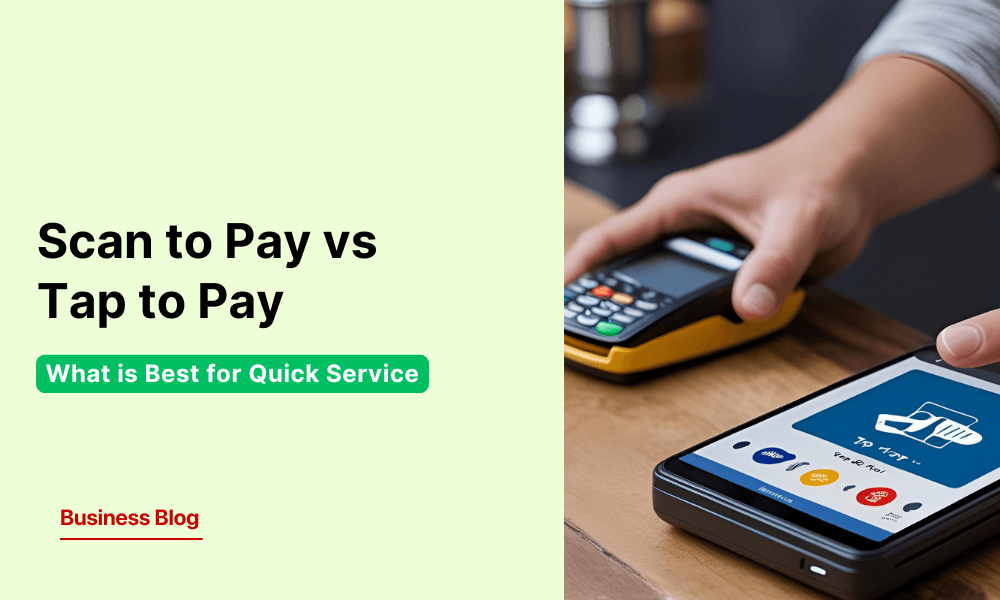
Yet, restaurant owners face a critical choice: Should they bet on QR-based Scan to Pay or the NFC-driven Tap to Pay? Both are contactless. Both promise speed. However, under the hood, they differ drastically in terms of cost, security, scalability, and user behavior, especially in the context of the U.S. restaurant market, where over 60% of QSRs are now investing in payment modernization (Statista, 2023).
In this blog, we break down both options—Scan to Pay vs Tap to Pay—through a US-focused lens to help QSRs choose what’s best for their bottom line and customer experience.
Scan to Pay: Turning Every Table Into a Checkout Counter
On a packed lunch hour in a downtown Los Angeles taco joint, a group of office workers walks in, grabs a table, and immediately scans the QR code printed on a tabletop card. In under a minute, they browsed the menu, split the bill, tipped the staff, and paid—without having to wave down a single server. The kitchen fires the order. No lines. No waiting. That’s Scan to Pay in action—built for speed, powered by simplicity.
Adoption has moved from experimentation to wide-scale deployment. In the U.S., QR code-based payments in quick service restaurants have surged by 350% since 2020, while over 52% of American diners now actively seek contactless options when paying for their meals (TouchBistro, 2024; Statista, 2023). For modern QSRs, Scan to Pay has evolved from a digital convenience into a core driver of customer satisfaction and operational efficiency.
At its core, Scan to Pay leverages QR (Quick Response) codes to create a frictionless checkout experience using a smartphone camera. But in the context of U.S. quick service restaurants (QSRs), it has become much more than a clever tech trick—it’s a response to operational bottlenecks, changing diner behavior, and rising labor costs.
How It Works Behind the Scenes
The system is deceptively simple:
- A static or dynamic QR code is placed at the table, on receipts, or on printed menus.
- Customers scan the code using their phone’s camera—no app needed.
- A secure web-based checkout page opens, showing the order summary.
- Customers pay via card, Apple Pay, Google Pay, or even restaurant wallets.
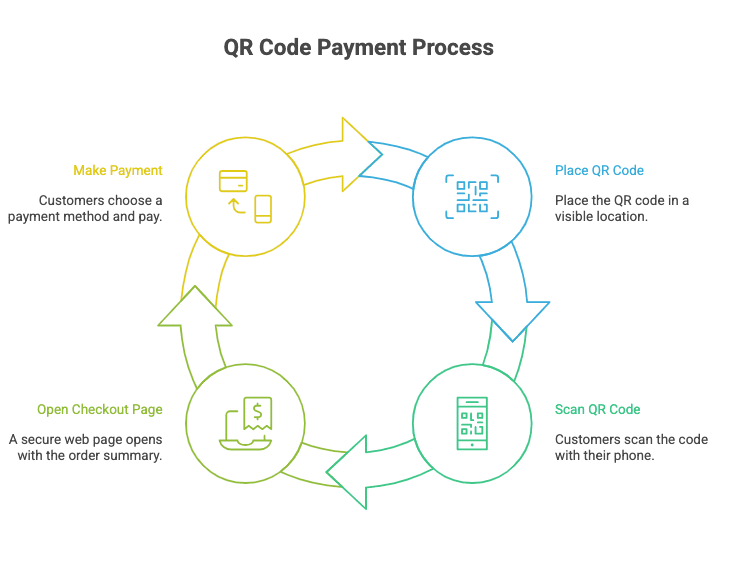
Everything happens on the customer’s device, in their time, with zero staff intervention—and yet the POS updates in real-time.
Operational Wins for Restaurants
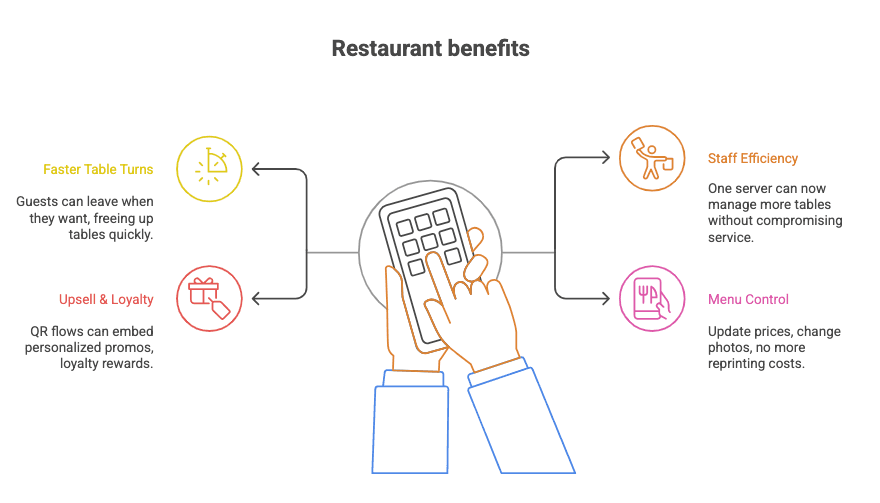
- Faster Table Turns: No more waiting for the check. Guests leave when they want, freeing up tables quickly.
- Staff Efficiency: One server can now manage more tables without compromising service.
- Upsell & Loyalty Ready: QR flows can embed personalized promos, loyalty rewards, or tipping nudges.
Menu Control: Update prices, 86 items, or change photos on the fly—no more reprinting costs.
Tap to Pay: Engineered for Peak Efficiency in Quick Service
Tap to Pay is a payment technology built on Near Field Communication (NFC), a short-range wireless protocol that allows two devices to exchange encrypted data instantly when held close together. It enables a seamless interaction between a payment terminal and a customer’s contactless card, smartphone, or wearable.
There is no need to insert a card, enter a PIN, or scan anything. When the device comes within a few centimetres of the reader, the system initiates a secure exchange, typically completing the transaction in under a second.
The brilliance lies in its invisibility. From the guest’s point of view, it’s one motion—tap and done. Behind the scenes, a layered process of tokenization, real-time authentication, and encrypted transmission ensures both speed and security, without manual inputs.
Contactless payments have evolved into a core lever for streamlining operations and elevating the guest journey—blending precision, speed, and trust into a single tap.
 Kunal KumarChief Revenue Officer
Scan to Pay and Tap to Pay solve different operational challenges,” said Kunal Kumar, COO, GeekyAnts. “Scan to Pay offers flexibility and lower infrastructure costs—turning every table into a checkout point without hardware dependencies. Tap to Pay, on the other hand, delivers speed and consistency for high-volume, fast-movement environments like drive-thrus. The choice isn’t about picking a trend; it’s about matching the payment experience to the flow of your restaurant and customer behavior, ensuring technology supports both efficiency and customer satisfaction at scale.
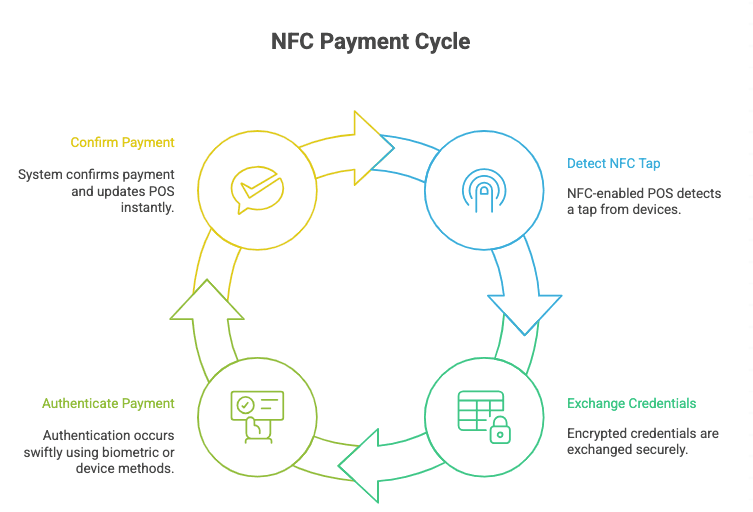
Behind-the-Counter Simplicity
- NFC-enabled POS detects a tap from cards, smartphones, or wearables.
- Encrypted credentials are exchanged with built-in tokenization protocols.
- Authentication (biometric or device-native) occurs in milliseconds.
- The system confirms payment and updates the POS instantly.
Operational Value for U.S. QSRs
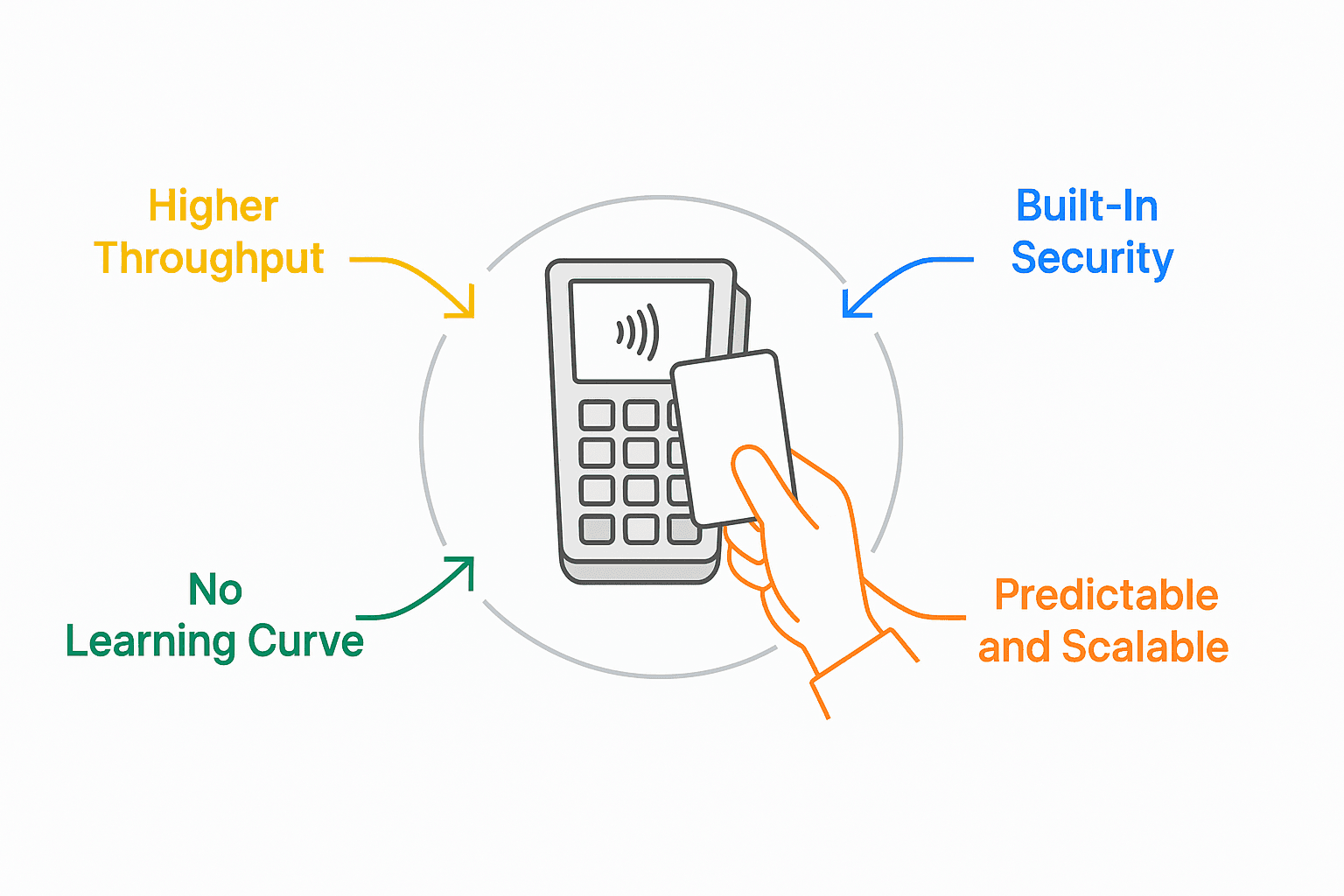
- Higher Throughput: One-tap checkouts reduce wait times across peak hours.
- Built-In Security: Compliance with EMVCo and PCI standards ensures trust at scale.
- No Learning Curve: Universal adoption across iOS, Android, and contactless cards.
Predictable and Scalable: From a single food truck to a 300-location chain, the experience remains consistent.
Scan to Pay vs Tap to Pay: Feature-by-Feature Breakdown
Choosing the right contactless payment method should involve evaluating customer flow, transaction volume, and operational layout to ensure technology aligns with real-world service demands. This side-by-side comparison unpacks how Scan to Pay and Tap to Pay differ across key operational, user experience, and business impact metrics, specifically tailored for quick service restaurants in the U.S. market.
Feature | Tap to Pay | Scan to Pay |
Speed at Checkout | Fastest (under 2 seconds) | Fast (2–5 seconds, depending on network) |
Ease of Use for All Ages | Very High (Intuitive for all users) | Moderate (older users may hesitate) |
Hardware Requirement | Requires an NFC-enabled POS terminal | Only QR code print/display needed |
Setup & Maintenance Cost | Moderate to High | Low |
Mobile Device Support | Universal (iOS, Android, Wearables) | Universal (camera access only) |
Card Support | Full Support (All contactless cards) | Yes, via web checkout |
Security Standards | Compliant by design (EMVCo & PCI) | Depends on the platform provider |
Offline Capability | Limited (depends on provider) | Strong (especially with static QR) |
POS Integration | Seamless with modern POS | May require middleware |
Customer Familiarity (US) | Very Familiar | Growing, but not yet default |
Loyalty & Upsell Readiness | Limited unless tightly integrated | Excellent (loyalty, tips, upsell embedded) |
Scalability | Excellent (from single unit to enterprise) | Excellent |
Line Skipping Experience | Excellent | Good |
Order Confirmation Clarity | Moderate (device feedback only) | High (order visible on screen) |
Real-time Menu Syncing | Not applicable | Dynamic syncing possible |
Brand Personalization | Minimal | High (custom checkout page, offers, visuals) |
Tech Stack & Integration Considerations: Building Scan to Pay for Modern QSRs
Scan-to-Pay systems are engineered as modular, cloud-native ecosystems—built to support real-time transactions, dynamic user flows, and seamless backend orchestration. At GeekyAnts, our technical approach balances scalability, latency-sensitive responsiveness, and security, tailored specifically for high-velocity environments like Quick Service Restaurants (QSRs).
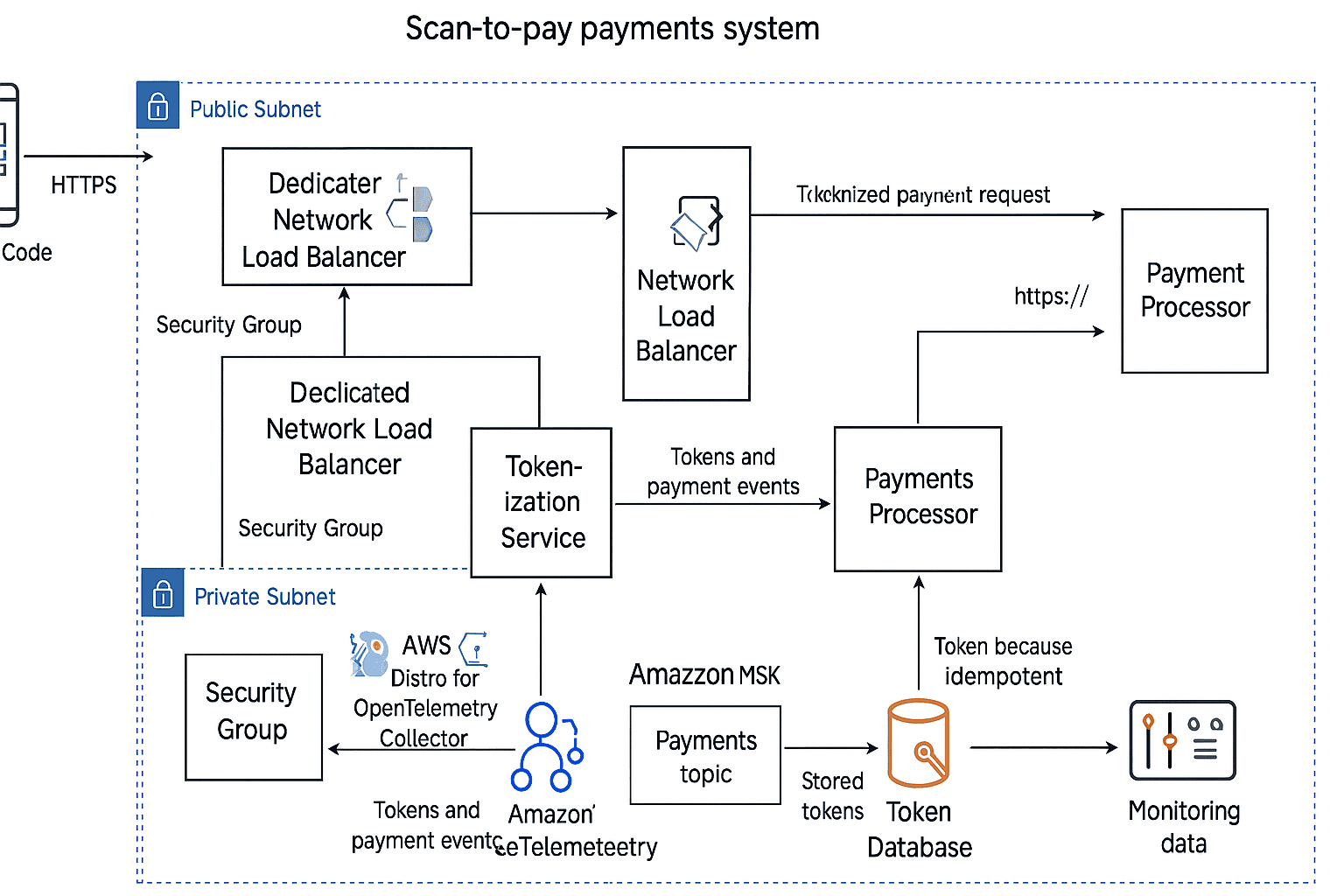
From Code to Checkout: How It All Connects
At the front end, the user experience begins with a dynamically generated QR code, often tied to a session ID or table identifier. This is powered by secure APIs from providers like Razorpay, Square, or Paytm, with support for dynamic URL resolution. These codes are printed, embedded in digital signage, or displayed in-app.
Once scanned, the QR directs diners to a mobile-optimized web interface, typically built with React, React Native, or Flutter, chosen for their cross-platform flexibility and responsive performance under load. This UI pulls data asynchronously from the backend, which syncs menu data, order states, and user preferences in real time.
Behind the interface, our architecture leans on microservices that separate concerns cleanly:
- The Order Management Service manages cart state, order flows, and pricing logic.
- The QR Session Service ties the scanned code to a specific transaction instance or table number.
- The Tokenization & Payment Handler securely integrates with Stripe, Apple Pay, or PayPal, adhering to PCI-DSS compliance and ensuring zero card data touchpoints at the application layer.
This modular stack is hosted in a containerized cloud environment (AWS/GCP), where Kubernetes-based orchestration allows horizontal scaling during peak hours. A Redis-based caching layer ensures that high-frequency reads—such as menu browsing—don’t hit the database repeatedly, improving response latency.
The final handoff occurs when the order is confirmed. Here, the system synchronizes with the restaurant’s POS—either via direct SDK hooks or through an integration bridge. The architecture supports both bi-directional sync for inventory and status updates, as well as failover mechanisms for offline fallback.
Security and observability are embedded into the flow:
- TLS 1.3 encryption secures all interactions.
- API Gateway authentication ensures all services are identity-aware.
Monitoring hooks (Datadog, Prometheus) track uptime, error rates, and drop-offs in the checkout funnel.
Tap-to-Pay: Real-Time Precision, Embedded at the Edge
Tap-to-Pay systems are architected for edge-level precision and real-time validation, powered by secure NFC protocols and hardware-grade encryption. At GeekyAnts, we engineer these experiences to be frictionless, PCI-compliant, and optimized for rapid-turnover QSR environments.
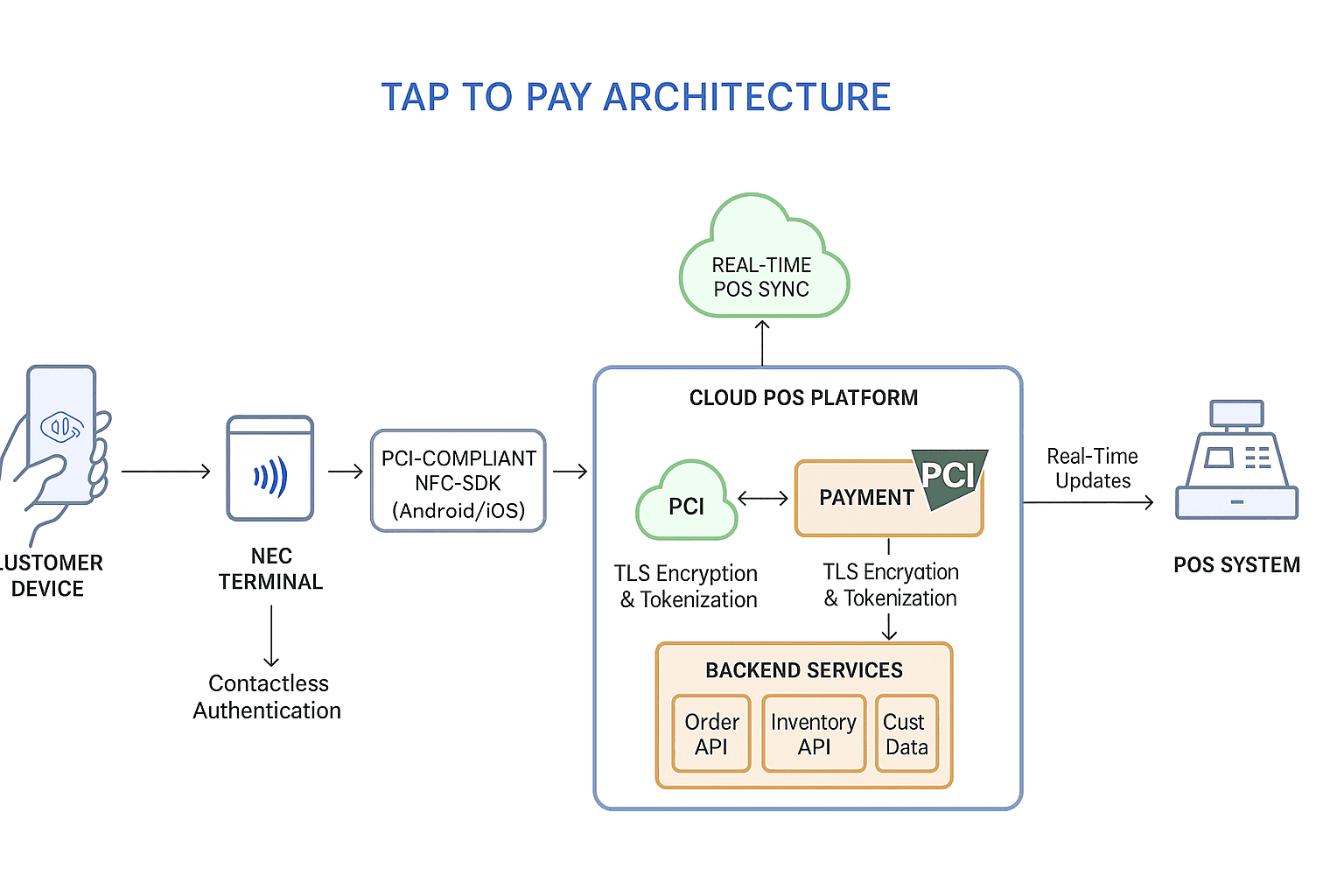
Unlike QR-based systems that rely on visual interaction, Tap-to-Pay systems operate in a closed-loop, real-time protocol that starts and completes at the hardware edge. As depicted in the architecture diagram, the technology stack is built to prioritize speed, security, and minimal touchpoints.
At the core is the NFC (Near Field Communication) layer, which connects the customer’s device (smartphone, card, or wearable) directly to EMV-certified contactless terminals. This interaction does not rely on internet latency or UI rendering—it happens over a localized, encrypted radio signal in milliseconds.
Once triggered, the tap-to-pay gesture communicates directly with the on-premise or cloud-synced POS system, which is typically built on robust platforms like Square Terminal SDK, Stripe Terminal, or Clover SDK. These SDKs handle tokenization, device pairing, and EMVCo compliance—all without exposing sensitive card data.
The payment authorization flow is handed off to integrated gateways like Visa Tap to Pay, Apple Pay, or Google Wallet, which are configured through PCI-DSS compliant middleware and backed by cloud microservices (typically in AWS or GCP environments).
From a system integration lens, the architecture supports:
- Synchronous updates to POS systems via RESTful APIs or WebSocket layers—ensuring real-time order reconciliation.
- Tokenized payment flow, secured using hardware encryption modules and monitored by fraud-detection pipelines.
- Instant feedback loop to the customer's device (approved, declined, retry), closing the loop in under 2 seconds.
For QSRs, the final touchpoint involves auto-generated digital receipts (pushed via SMS or in-app) and real-time updates to loyalty systems, CRM platforms, and inventory via middleware APIs.
In effect, Tap-to-Pay architecture is not a payment feature—it’s a distributed system optimized for edge responsiveness, PCI-grade compliance, and frictionless throughput during peak volumes.
Cost & Setup Comparison: Tap to Pay vs Scan to Pay (US + Global Markets)
Cost Component | Tap to Pay (US) | Scan to Pay (US) | Tap to Pay (Global) | Scan to Pay (Global) |
Hardware Cost | $300–$700 | $0–$50 | $100–$300 | $0–$20 |
Software Licensing / SDKs | $50–$150/month | Often bundled or < $50/month | $20–$80/month | Often free or < $25/month |
Installation & Configuration | $150–$400 | $50–$150 | $50–$150 | $20–$80 |
Staff Training | $200–$500 | $100–$300 | $50–$200 | $20–$100 |
Transaction Fees (per payment) | 2.6% + 10¢ | 2.2% + 5¢ | 1.5%–2.2% + fixed fee | 0.8%–2% |
Maintenance & Support | $100–$250/year | $50–$150/year | $30–$100/year | $20–$70/year |
Security & Compliance in the U.S. Contactless Payment Landscape
In the highly regulated U.S. payments ecosystem, security is not an optional layer—it’s a built-in expectation enforced by stringent compliance frameworks. For QSRs adopting contactless payment infrastructure, aligning with these standards is critical not only for legal adherence but also for customer trust.
QR Payments: Flexibility Meets Variable Risk
While QR-based systems offer rapid deployment and operational flexibility, their security posture depends heavily on implementation architecture:
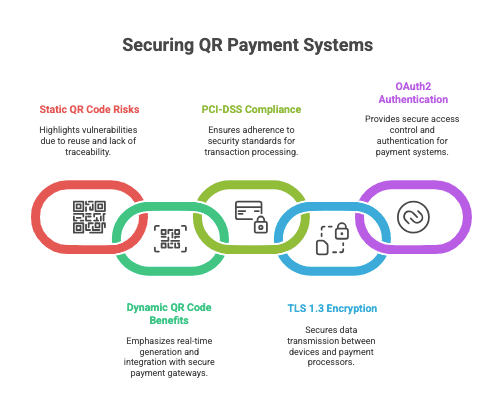
- Static QR Codes pose the highest risk—often hard-coded and reused, they can be easily spoofed or replaced by malicious actors. These implementations lack transaction-level traceability and dynamic authentication.
- Dynamic QR Codes, by contrast, are session-bound and generated in real-time. When paired with tokenized payment gateways like Stripe or Razorpay, they allow secure checkout flows, audit logs, and fraud mitigation.
- PCI-DSS Compliance applies at the point of transaction processing—especially for QR-based systems that involve hosted checkout pages or third-party gateways.
- TLS 1.3 Encryption and OAuth2 / API Gateway-level Authentication are essential for securing data transit between the QR session, customer browser, and payment processor.
For U.S.-based QSRs, the secure implementation of dynamic QR code flows—paired with certified gateways and real-time validation—is crucial to reduce PCI scope and mitigate risk.
Tap to Pay: Hardware-Enforced Trust with EMVCo Compliance
Tap-to-Pay systems are inherently built around EMVCo-certified NFC protocols—a global standard co-developed by Visa, Mastercard, American Express, and others. These standards enforce end-to-end encryption, device identity, and one-time transaction tokenization.
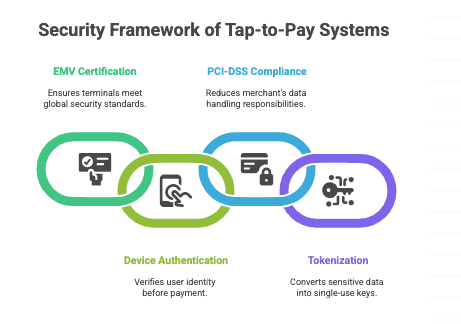
- NFC Terminals used in U.S. QSRs must be EMV Level 1 and Level 2 certified, and often rely on hardware secure elements (SE) to store cryptographic keys.
- Payment Authentication is typically device-based (Face ID, fingerprint, etc.) and occurs before the NFC handshake, adding a layer of pre-authorized intent.
- PCI-DSS Scope is lower for Tap-to-Pay terminals, as customer card data never directly touches the merchant’s software environment.
- Tokenization & Real-Time Fraud Detection are often embedded via providers like Apple Pay, Google Pay, and Stripe Terminal, which abstract the entire payment payload into single-use keys.
In the U.S., Tap to Pay is regarded as the gold standard for contactless payment security, combining biometric authentication, tokenization, and hardware-level compliance in a near-invisible user experience.
Future Trends: AI-Driven Payments, Embedded Loyalty, and the Data Advantage
The evolution of contactless payment systems in QSRs is not slowing—it’s entering a new phase defined by intelligent personalization, seamless loyalty integration, and data-rich interactions. For restaurants competing on both convenience and retention, future-ready payment tech will be about far more than completing a transaction.
Shift Toward App-Based & Wallet-Native Payments
With nearly 53% of U.S. consumers preferring mobile wallets over physical cards (Statista, 2024), QSRs are increasingly integrating wallet-native flows—where payments are tied directly to the brand’s app or loyalty system. This shift enables:
- One-tap reorders (based on past behavior)
- Embedded loyalty accumulation (points auto-applied)
- Push-based promotions during checkout
Example: Starbucks' app accounted for 31% of all its U.S. sales in 2023, driven by its seamless tie between payment, rewards, and order customization.
Rise of AI-Powered Kiosks and Smart Checkouts
AI is transforming self-service. In QSRs, AI-enhanced kiosks now offer real-time cross-sell recommendations, dietary filtering, and behavioral personalization.
- McDonald’s deployed Dynamic Yield AI to optimize upsells at kiosks, resulting in a 15–20% increase in average order value in test markets.
- KFC and Taco Bell in the U.S. are experimenting with voice-enabled AI kiosks, streamlining high-volume ordering during peak hours.
For Tap and Scan flows, this means tighter POS integration—so both payment methods sync with the AI backend for real-time interaction and dynamic pricing models.
Loyalty, Cross-Selling, and Analytics Integration
Future-ready QSRs won’t treat payment as the end of the journey—it will be the trigger for value extraction:
- Scan-to-Pay systems will drive personalized offers at the point of payment based on cart content and behavior.
- Tap-to-Pay flows will start linking to account-level loyalty, driven by tokenized user identification (Apple/Google Pay profiles).
- Payment data will feed into predictive analytics dashboards, helping operators track high-LTV customers, peak-hour conversion rates, and campaign ROI.
Data Point: According to Deloitte’s 2024 Restaurant Industry Outlook, 62% of QSRs plan to use real-time analytics from payment data to inform inventory, staffing, and promo timing.
Real-World Impact: A Scan-to-Pay Case Study by GeekyAnts
Client Profile
A U.S.-based Quick Service Restaurant (QSR) chain operating 85+ outlets across six states, known for high footfall and peak-hour congestion, partnered with GeekyAnts to modernize their payment experience. Their objective: reduce queue times, increase table turnover, and integrate a frictionless, contactless payment model without overhauling existing POS systems.
Challenge
While their food service was optimized, the checkout process created a significant bottleneck. Customers often waited 5–8 minutes during peak hours to receive the check, make a payment, and get confirmation, leading to frustrated diners and delayed table turns. The existing payment system lacked real-time integration with backend inventory and loyalty platforms, creating operational silos.
Solution
GeekyAnts implemented a Scan-to-Pay system, designed for real-time processing and modular POS integration. Using a microservices-based backend and React Native for the frontend, the solution was built for high concurrency, device independence, and deep customization.
Key Implementation Highlights:
- QR Code Generation: Dynamic, per-table QR codes via Razorpay APIs embedded with order data and session tokens.
- Payment Gateway: Integrated Stripe and Apple Pay for seamless one-tap checkout across iOS and Android.
- Mobile UX: A lightweight, web-based checkout app developed using React Native Web, optimized for <3 second load times on 3G+ networks.
- POS Integration: Webhook-based two-way sync with the restaurant’s legacy POS to auto-update billing, order status, and loyalty rewards.
- Security: PCI DSS Level 1 compliance with encrypted tokens and zero data persistence on client devices.
Outcomes
The impact was measurable within the first 60 days of deployment:
KPI | Before Implementation | After Implementation |
Average Checkout Time | 5–8 minutes | Under 45 seconds |
Table Turnover Rate (Lunch) | 3.2 per hour | 4.6 per hour |
Staff-to-Table Ratio | 1:4 | 1:7 |
Tip Uplift via QR Nudges | N/A | +18% average increase |
Loyalty Redemption Rate | 12% | 41% |
Payment Mode Shift | 85% card/cash | 68% QR/Apple Pay |
Why It Worked
By aligning tech architecture with real operational bottlenecks, GeekyAnts delivered a cost-efficient, cloud-native, and scalable system. The solution required no app downloads, worked across devices, and integrated deeply with both the frontend and backend of the restaurant’s ecosystem.
Case Study: Scan-to-Pay in Action for Queue-Free QSR Operations
Client: Multi-location QSR Chain (inspired by Domino’s India and Starbucks USA operations)
Objective: Simplify digital payments using QR-based scan-to-pay while integrating seamlessly with mobile ordering and in-store POS systems.
Business Challenge
The QSR brand aimed to:
- Reduce transaction friction at both dine-in and takeaway counters
- Offer a hygienic, no-touch payment option post-COVID
- Unify online ordering with in-store payments under one wallet/gateway system
- Avoid long integration cycles or costly hardware upgrades
Technical Solution
To solve these pain points, the QSR implemented a cloud-native Tap-to-Pay infrastructure with the following components:
- Hardware: NFC-enabled terminals compatible with Apple Pay, Google Pay, and contactless cards
- SDK Integration: PCI-compliant NFC SDKs embedded into custom mobile POS apps
- POS Architecture: A centralized cloud POS setup with real-time sync using Amazon Aurora DB and AWS Lambda
- Latency Optimization: Edge computing with Cloudflare Workers to reduce payment lag during lunch-hour surges
- Security: Tokenized payment protocols with end-to-end encryption and PCI DSS Level 1 compliance
Outcome
Metric | Before Implementation | After Implementation | Impact |
Average Checkout Time | 45–60 seconds | 20–25 seconds | ⬇ ~30–40% faster |
App-Based Payment Adoption | 18% | 47% | 2.5x increase |
Hardware Upgrade Cost | Estimated $25K+ (for POS sync) | $0 (used API-first integration) | No new hardware needed |
Onboarding Time | Not initiated | 3 weeks | Rapid rollout |
Billing Errors | 6–8 per 1000 transactions | <1 per 1000 | ~85% error reduction |
Customer Satisfaction (CSAT) | 3.9 / 5 | 4.5 / 5 | Significantly improved experience |
Learnings for Product Teams
- Scan-to-pay thrives when the mobile journey is frictionless—latency in redirection must be <2 seconds
- QR reliability is directly tied to in-store internet stability; fallback via static UPI QR helps in low-network zones
- Real-time sync with POS is essential; delays over 5 seconds can cause customer confusion at pickup counters
- QR works best for loyalty integration—users are already engaged in-app, allowing for offer pop-ups and wallet credits
How to Choose the Right Payment Method for Your QSR: A Framework Built on Reality, Not Trends
Choosing between Tap to Pay and Scan to Pay isn’t a tech debate—it’s a business decision. For QSR leaders, it’s about how well a system handles peak-hour pressure, syncs with your POS, reduces friction for staff, and scales with minimal overhead.
If you are running multiple outlets or launching a fast-moving QSR brand, you need a solution that fits your pace, not one that adds complexity.
Here is a practical framework to help founders, ops heads, and CTOs make the right call.
1. Order Flow & Speed Expectations
- Tap to Pay is ideal where speed per transaction is critical—think drive-thrus, food courts, or transit-linked restaurants. It completes payments in seconds, ideal for environments with short dwell times.
- Scan to Pay works better in seated dining or casual setups where customers prefer control and are willing to engage via phone.
2. Customer Behavior & Demographics
- Urban millennial or Gen Z audiences often favour Scan to Pay for its flexibility and phone-based control.
- Tap to Pay resonates better with users familiar with contactless card culture, especially in high-volume, older-demographic regions.
3. POS & Tech Ecosystem Compatibility
- Scan to Pay requires QR generation APIs, mobile-first UX layers, and backend orchestration. It integrates well with cloud POS and mobile apps (built in React Native or Flutter).
- Tap to Pay demands NFC terminal readiness, PCI-compliant SDKs, and low-latency POS–reader sync. It’s more hardware-dependent but smoother when set up.
4. Maintenance & Learning Curve
- Tap to Pay has a minimal learning curve—tap and go. But it does demand upfront hardware investment.
- Scan to Pay may require some user education, but it avoids hardware limitations and adapts better to remote and hybrid ordering flows.
5. Scalability & Rollout Model
- Scan to Pay allows faster rollout across new locations (especially pop-ups, events, or international markets).
- Tap to Pay offers predictable performance at scale, especially when paired with EMVCo/PCI certified systems and centralized POS.
6. Security & Compliance
- Both systems can meet high security standards, but Tap to Pay with EMV/NFC terminals typically has more robust, hardware-enforced compliance.
- Scan to Pay must ensure secure APIs, HTTPS, tokenized transactions, and fraud detection via payment gateways.
7. Cost & ROI
- Tap to Pay requires upfront investment in terminals and ongoing maintenance.
- Scan to Pay can be more cost-efficient in regions with high smartphone usage and internet reliability.
Business Goal | Recommended Method |
Drive-thru speed + hardware stability | Tap to Pay |
Low-infra rollout + customer flexibility | Scan to Pay |
Fast learning curve for staff | Tap to Pay |
Mobile integration + promo flows | Scan to Pay |
Consistent UX across devices | Tap to Pay |
Event-based, remote, or pop-up model | Scan to Pay |
GeekyAnts: Your Expert Tech Partner for Tap to Pay Solutions
Why Choose GeekyAnts?
At GeekyAnts, we specialize in building custom Tap to Pay systems that bring speed, reliability, and compliance to the heart of restaurant operations. From NFC integration to EMVCo-compliant flows, we architect solutions that fit the real-time demands of Quick Service Restaurants (QSRs) and retail businesses.
GeekyAnts QSR Payment Solution Capabilities
GeekyAnt's Capability | Description | Value Delivered |
QR & NFC Payment Flows | Custom-designed, fast checkout experiences using secure QR codes and NFC tap-to-pay | Minimized wait times and improved customer satisfaction |
POS & Payment Gateway Integration | Stripe, Square, Razorpay, PayPal, Apple Pay, Google Pay with real-time POS sync | Seamless backend workflows and reduced transaction errors |
Cross-Platform App Development | Built using React Native, Flutter, or native SDKs for mobile and kiosks | Consistent performance across iOS, Android, and in-store devices |
Cloud-Native Backend Architecture | Microservices, real-time sync, scalable for single to multi-location brands | Resilient infrastructure that scales with your business |
Compliance & Security | EMVCo, PCI DSS, and data privacy compliant systems | Enterprise-grade security and audit readiness |
Analytics, Loyalty & Upsell | In-app reward systems, personalized offers, and behavioral analytics | Increased repeat business and higher average order value |
Why It Matters
We do not build apps for the sake of features; we engineer solutions that drive real business outcomes. From reducing queue times to increasing order throughput, our systems are designed to deliver measurable efficiency and elevate customer convenience across every touchpoint.
Let’s Build Your Payment Future
With 500+ products delivered globally and a strong presence across the US, UK, and India, GeekyAnts is ready to be your partner in building the next generation of QSR payment experiences.
Book a free discovery session with our payment system experts today.
FAQs
1. What’s the difference between Scan to Pay and Tap to Pay?
Scan to Pay uses QR codes that customers scan with their smartphone cameras to access a payment page. It’s app-free and works on any device with a browser.
Tap to Pay relies on NFC (Near Field Communication), allowing customers to pay by tapping their phone or card on an enabled terminal—no scanning required.
Key differences:
- Technology: QR (camera/web-based) vs. NFC (chip-based proximity)
- Hardware: QR needs printed codes; NFC requires reader terminals
- Device Dependency: QR is universal; NFC needs compatible phones/cards
- UX Flow: QR opens a browser checkout; NFC completes on tap
2. What are the key features of modern restaurant payment solutions?
Modern QSR-focused payment systems go beyond basic checkouts. They include:
- Real-time POS sync for accurate order and inventory management
- Multi-device compatibility: Phones, kiosks, tablets, and smartwatches
- Cloud-native architecture with offline fallback
- Built-in loyalty and upsell options
- Integrated support for Apple Pay, Google Pay, Stripe, and more
- Security compliance (PCI DSS, EMVCo standards)
3. How do restaurant payment solutions improve operational efficiency?
By minimizing manual steps and staff dependency, these systems:
- Speed up checkouts and table turns
- Reduce staff workload by enabling self-checkout
- Cut errors through automated order sync
- Offer real-time data on peak hours and payment trends
This leads to improved service quality and reduced operational costs.
4. Which is more secure: QR or NFC payments?
Both are secure when implemented correctly, but they differ in architecture:
- NFC (Tap to Pay): Hardware-based encryption, secure element storage, and dynamic tokens make it extremely secure for proximity transactions.
- QR (Scan to Pay): Web-based but can be highly secure with HTTPS checkout links, tokenization, and PCI-compliant gateways.
Verdict: NFC has a slight edge in built-in encryption. However, secure QR systems using Stripe/PayPal APIs are still robust and widely trusted.
5. Are newer restaurant payment systems secure?
Yes, modern systems are designed with security and compliance at the core:
- End-to-end encryption from customer device to payment gateway
- PCI DSS and EMVCo certification
- Tokenization to avoid storing card details
- Secure APIs with OAuth2 authentication
Reputable providers (e.g., Stripe, Square) ensure compliance across devices and geographies.
6. Is Scan to Pay cheaper than Tap to Pay for restaurants?
Generally, yes. Scan to Pay has lower upfront costs because:
- It does not require NFC hardware terminals
- QR codes can be printed or displayed on-screen
- It works on any smartphone without POS upgrades
However, transaction fees depend on gateway providers. Tap to Pay may offer bundled rates with POS systems, especially at scale.
7. Do restaurant payment solutions integrate with POS systems?
Absolutely. Integration is one of the top priorities today. Most systems:
- Sync real-time with POS for order tracking and reconciliation
- Allow inventory updates post-payment
- Support multi-location data centralization
- Enable loyalty, analytics, and customer data to flow into the POS
Providers like Stripe, Square, and custom solutions by companies like GeekyAnts ensure robust backend integration with tools like Toast, Revel, and Lightspeed.