

Key Takeaways
- As the agent uses linked abilities, its risk factor is higher than that of the AI assistant which writes text.
- The prompt injection safeguard reduces risk and never eliminates it, and thus the controls on the model itself are what matter.
- There is an AI agent security checklist designed to reduce the blast radius through identity, least-privilege AI agent permissions, and an allow list of tools.
- Measure production readiness based on actions performed by the AI agent and the consequences of those actions, which should be tested in order to validate the AI agent security checklist.
- Maintain agentic AI post-deployment using AI agent governance, permissions management, AI agent monitoring, and revocation.
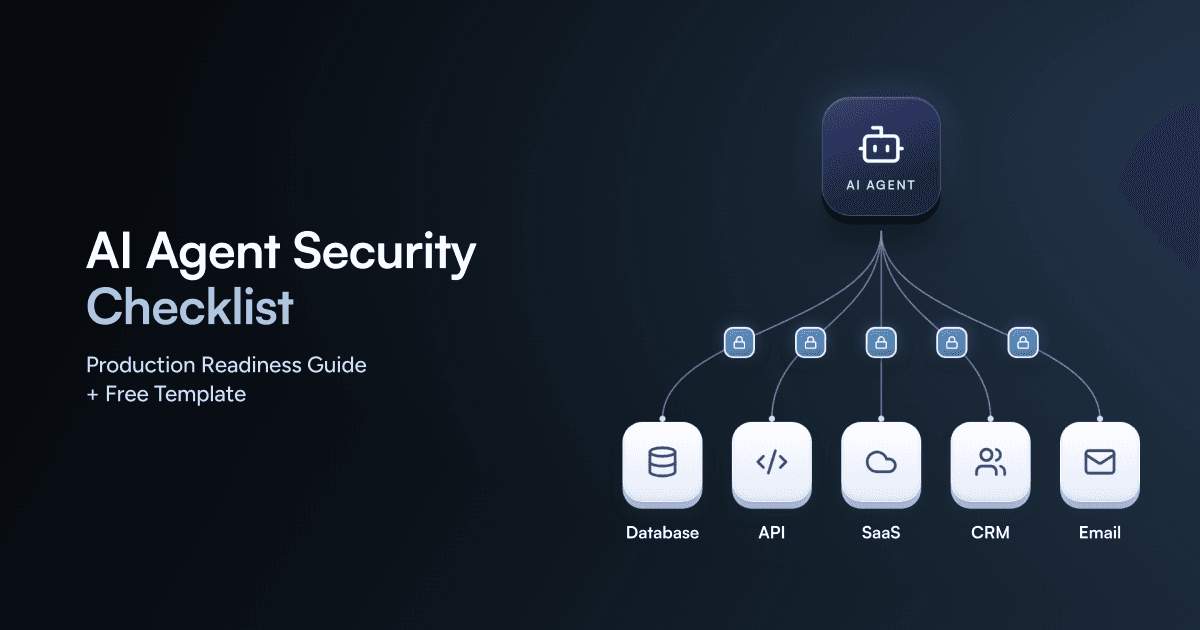
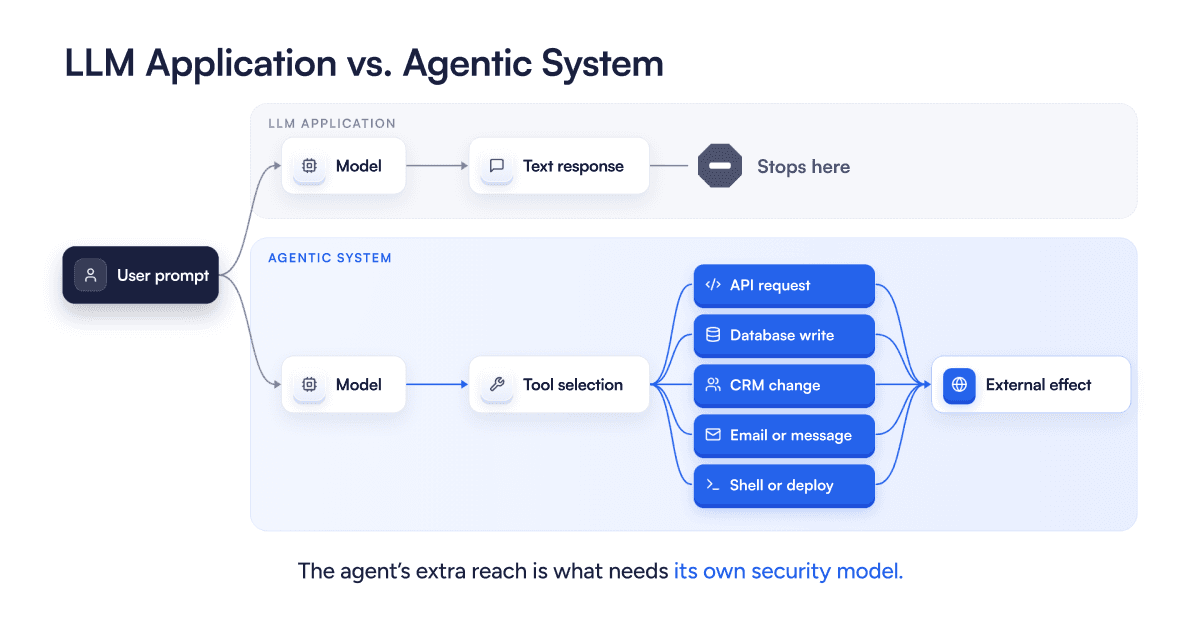
Securing an AI agent surfaces a problem that traditional AI security was never built to handle. An AI assistant on its own just generates text. The same model but equipped with a set of tools becomes an agent capable of reading an instruction, planning action, choosing a tool, and then acting. That can involve querying a database, invoking an API call, updating records in a CRM system, messaging someone, or executing some code.
As soon as the agent is connected to APIs, databases, software-as-a-service products, and other company services, the attack surface grows from the model to all of its capabilities, which is why AI agent security needs more than just an implementation of application security.
There are four main types of risks: prompt injection, too many permissions, data leakage, and misused tools. The bigger the adoption, the higher the risk and Gartner forecasts, 25 percent of enterprise GenAI applications will encounter at least five minor security incidents per year by 2028 compared to 9 percent in 2025 due to agents and MCP expanding the attack surface.
This checklist covers the controls that decide how far a compromised or mistaken agent can reach into your production systems.
Why Is AI Agent Security Harder Than Securing a Standard LLM Application?
A standard LLM application typically stops at text. But what the agentic use case accomplishes is to go beyond just the text and make an API call, update the database, send an email, update the CRM, make a payment call, run a shell command, or delegate to another agent. That is exactly why security for AI agents is so different from chatbot security.
The adoption curve makes the gap concrete. McKinsey's State of AI 2025 reports that 62 percent of organizations are at least experimenting with AI agents, while no more than 10 percent have scaled agents in any single function. Security maturity trails that interest. In a Gartner survey of 360 IT application leaders, 74 percent viewed AI agents as a new attack vector, and only 13 percent strongly agreed they had the governance to manage them.
As the idea of the concept and its implementation is related to the real world of data and systems, then the first question that potential customers ask changes from -What can the agent do? To- What can the agent be allowed to do?, Which systems can the agent access?, and how fast can the agent be turned off?
 Kunal KumarChief Revenue Officer
Model behavior is one of the layers of security for agentic AI. Operational impact will depend on both the model itself and the permissions, tools, data, pathways, and authorization policies surrounding it. Agentic AI security checklist starts with the identification of threats that could exploit that harness.
What Are the Four Biggest AI Agent Security Risks?
Every item on an AI agent security checklist traces back to one of four risks. Each one exists inside the broader OWASP Top 10 for Agentic Applications, with the OWASP Agent Control Standard covering the controls in more depth, both of which treat the four as umbrella categories rather than the full threat model.
1. How does Prompt Injection Hijack an AI Agent's Goals?
Injection of prompts occurs either through the user input itself or through the document the agent is reading, where the document may be an email, support ticket, webpage, PDF, RAG, or tool output.
The problem with agents is that an injection of a command into the system will steer the agent towards actions that occur after the writing of the text itself. Filtering helps to minimize the risk, but prompt injection prevention is still not complete; hence, the retrieved document must still be considered untrusted after it passes through the filter.
Real-world scenario: a customer-support agent reads a ticket that hides instructions to pull customer records and route them through an approved outbound tool.
2. What makes AI Agent Permissions so Dangerous?
The combination of great power and independence in implementation is not a good pairing, needless to say. The use of compromised credentials, sharing of service accounts, wide API permissions, having read-write-delete capabilities all at once, and having access after the completion of the workflow process increases the potential risk of compromising just a single action.
For the permissions of Microsoft AI agents, each individual agent is a principal, with role-scoped tasks, separation of read and write capabilities, and temporary elevations.
Real-world scenario: An agent of the CRM system that only drafts account notes possesses credentials that can either edit or delete all the records in the tenant.
3. How Does an Agent Leak Data Without Being Hacked?
Data leaks don’t necessitate any kind of breach of the model. The agent will have legitimate access to the private document and leak it via an output channel, external API, URL, memory writes, or another agent.
AWS guidance on agentic AI security use classification and output controls in response, downstream systems, memory, and inter-agent communications, as opposed to only filtering the chat response.
Real-world scenario: The knowledge agent gets hold of a pricing document from inside, and then an external, malicious file drives the agent to send out a message with the extracted figures.
4. What Counts as Tool Abuse and Unsafe Action?
An approved tool does not automatically imply that the act is safe. This could happen when the agent uses the wrong function, gives invalid parameters, applies the tools in a strange sequence, or accesses the third-party tool whose behavior has changed since approval.
OWASP's prompt injection guidance and the agentic Top 10 both fold in tool misuse, privilege abuse, and agentic supply-chain risk, with Model Context Protocol components named as a specific concern.
Real-world scenario: a coding agent holds repository, shell, deployment, and package-registry access, and a bad chain of calls walks from a code edit to a credential to a production push.
What Should Be on an AI Agent Security Checklist Before Production?
It also determines the explosive radius of all the agents you use. They are the seven criteria agreed by all teams, plus one more criteria that is not there in standard checklists, and it is damage containment and reversal in the event of failure.
Here is the list of checklists grouped together to test against a build. Now proceed to the information about each individual criterion:
AI agent security checklist
Identity and access
- Each agent runs under its own service identity with a named owner, so every action is traceable and one agent can be disabled without stopping the rest
- Access is least-privilege with read separated from write, so a hijacked agent cannot make changes no one can undo
Tools and input
- A tool allowlist gates each approved function and validates arguments before a call runs, so the model’s choice never bypasses authorization
- All retrieved content is treated as untrusted, so an instruction hidden in an email, PDF, or RAG result cannot override policy
Data and actions
- Egress controls classify sensitive data and restrict outbound destinations, so a readable document cannot leave the approved boundary
- High-risk actions sit behind a human approval gate triggered by a fixed rule, not the model, so irreversible steps need a person
Logging and containment
- The full action trail is logged and tamper-resistant, so an incident can be reconstructed from what the agent actually did
- Memory is isolated and rate limits, revocation, and rollback are in place, so one bad run stays contained
Download the AI agent security checklist template
A four-sheet pack to record each control, prove it holds under attack, sign off go-live, and keep ownership and reviews running after launch.
These eight controls together form a system, and it is the combined running of all of them that reduces the blast radius, not just the use of any single one of them alone.
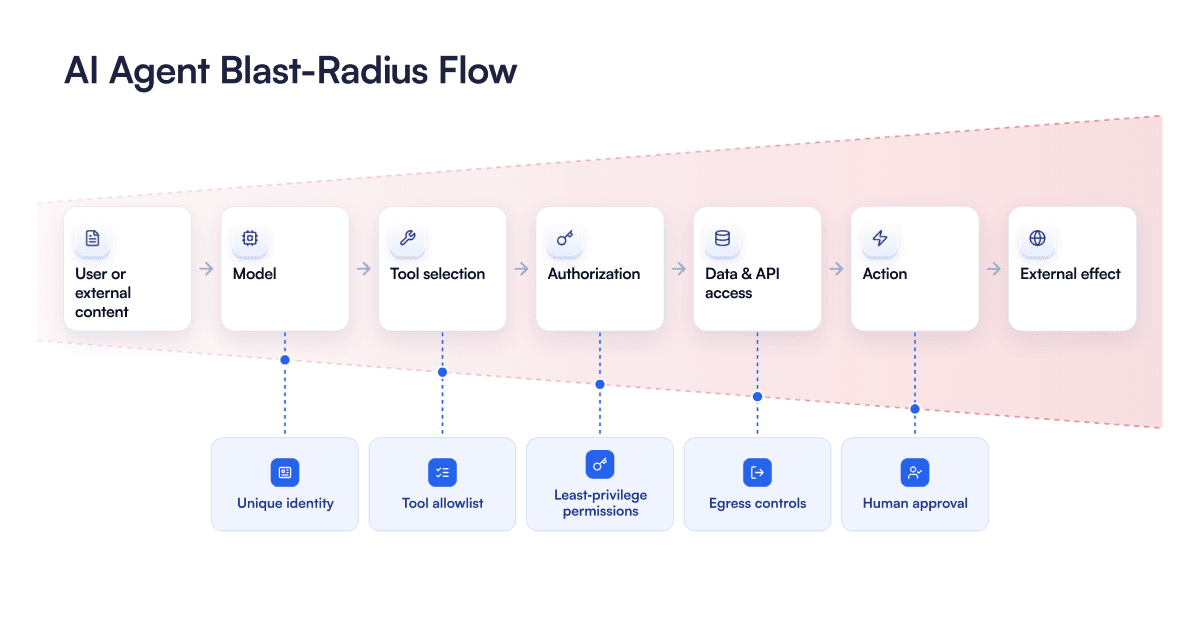
1. Give every agent its own identity
Dedicated identity allows tracking all actions and enables shutting down an agent without affecting others, which is not possible through shared or employee logins.
Provide individual identities based on the role performed by the agent, along with a human identity as owner and credentials that have expiration period.
When the same account is used by a support agent and billing agent, then a leaked credential affects both the agents.
2. Apply least-privilege access
Permissions should be job-specific; read/write permissions should be separated so that once an agent is compromised, it won’t be able to make permanent alterations. Provide only the permissions required for the job, restrict API/database access to specific resources, revoke unused permissions, and grant temporary elevation when necessary.
An agent used for a CRM system that generates notes on account holders should have read/write permissions but no permission to mass-delete accounts.
3. Enforce a tool allowlist
The agent needs to be allowed to have access to approved methods only. The agent should have certain methods approved and others disallowed by default, schema validation for arguments prior to executing a function, pinned versions of reviewed MCP and third-party libraries, and an immutable authorization mechanism for each method regardless of the model's preference.
The coding agent that can use the repo, shell, and deploy capabilities is safe if they are isolated from one another.
4. Treat external content as untrusted
Whatever the agent reads can be a source of instructions; therefore, the retrieved text should provide an insight into answering and not an instruction.
This should apply to emails, PDF files, web pages, and uploaded user content, API answers, knowledge base results, and even to RAG text. Whatever is retrieved cannot instruct contrary to authorization or a tool policy.
5. Protect sensitive data at the egress layer
Restricting what an agent can read is half the battle, but restricting where it can transmit data is what turns a leak into a breach.
Classify sensitive data, whitelist the destinations to which an agent can connect, filter outgoing commands, and block transmission to unauthorized domains and APIs. An internal knowledge agent can read a price list without problem only if it cannot transmit it off domain.
6. Gate high-risk actions with human approval
Irreversible decisions require a human in the loop, but the decision about who to ask for such approval needs to follow from an invariant rather than the model that can be gamed.
Gates around payments/transactions, transfer/deletion, change/deployment, communication/export, and permission/security policy changes. A payment gate is drafted and queued up by the agent but executed by a human.
Risk level | What puts an action here | Representative actions |
|---|---|---|
Low | Reads only, no state change, no sensitive data | Fetching public docs, reading telemetry, listing non-sensitive records |
Medium | Writes that are internal and reversible | Editing a draft, updating a single owned record, posting to an internal channel |
High | Touches sensitive data or many records, hard to undo | Exporting customer data, bulk-editing accounts, sending external messages |
Critical | Irreversible or production-altering, direct business or security impact | Moving funds, deploying to production, changing permissions, bulk deletion |
7. Log the full action trail
The audio recording of the discussion will not provide any information on the actions performed by the agent. All the data regarding the actions is contained in the action trail.
Agent ID, initiator ID, invoked tool, authorization, parameters, resource, action, result, and timestamp should be identified. These details should be stored somewhere where the agent does not have access to them.
8. Contain and reverse the blast radius
Finally, it assumes that some data will get through no matter what. It uses limits and a kill switch to make sure that what may be a problem for one doesn’t become a problem for all. Segment memory according to user, tenant, agent, and level of trust. Also include rate limiting, transaction limits, and circuit breakers.
These containment controls are the ones most generic checklists skip.
Permission decomposition shows these controls on paper. A payments agent should not hold one broad payment credential.
This workflow is divided into- read invoice, validate supplier, create draft, request approval, and execute, each step preceded by a decision on the company’s policy. This pattern can be applied to business-critical workflows in general.
Workflow | Lower blast-radius design |
|---|---|
CRM | Read account, draft update, block bulk modification |
Customer support | Read assigned cases, draft reply, approve sensitive outbound messages |
Code repositories | Read scoped repos, open a branch or pull request, block direct production deploys |
Knowledge bases | Read authorized collections only, prevent open-ended exports |
Production systems | Read telemetry by default, use temporary elevation for fixes |
Payments | Draft first, apply fixed limits, require approval before settlement |
The most expensive mistake to make is to give an individual agent the credential to do all of the things mentioned above. Our first step towards this goal will be separation of these capabilities and placement of the policy check before each operation.
 Konakanchi Venkata Suresh BabuPrincipal Technical Consultant.
The table provided below gathers all eight of these controls together, matches each of them with the risk it mitigates, and provides the proof that the control is indeed being used.
Security Control | Risk Reduced | Verification Evidence |
|---|---|---|
Own identity per agent | Lost attribution; one credential exposing many agents | Named identity with an owner, individually disablable |
Least-privilege access | Irreversible changes by a hijacked agent | Task-scoped roles, read split from write |
Tool allowlist | Unapproved or malformed tool calls | Approved tools only, arguments schema-checked |
Untrusted external content | Indirect injection overriding policy | Retrieved text treated as input, never instruction |
Egress controls | Sensitive data leaving the boundary | Data classified, destinations allowlisted |
Human approval gate | Irreversible action on a bad instruction | Fixed-rule trigger, person executes |
Full action logging | Incidents that cannot be reconstructed | Complete action trail, tamper-resistant |
Blast-radius containment | One bad run spreading wide | Memory isolation, limits, revocation, rollback |
How Do You Security-Test an AI Agent’s Risk Before Production Deployment?
It is during the testing phase that an AI Agent Security Checklist gets tested for its validity. A practical risk assessment of an AI agent checks whether a manipulated AI agent achieves the harmful end-state beyond just responding to a negative command.
That is the difference between a test and a prompt filter demonstration. The following seven tests are all based on outcomes, meaning each will end with an action done by the attacker.
Pre-production security test
- Direct prompt injection: can the user override the task or the security instructions from the input box?
- Indirect prompt injection: can an email, PDF, webpage, RAG document, or tool response redirect the agent?
- Unauthorized tool request: can the agent invoke a capability outside the user and task scope?
- Excessive-permission reach: after one compromised step, what extra data or actions become available?
- Sensitive-data exfiltration: can retrieved secrets or customer records reach a destination you never approved?
- Destructive action: can injection or faulty reasoning trigger a delete, send, publish, deploy, or pay without approval?
- Boundary failure: when the task has no valid path, does the agent stop safely or hunt for other systems, credentials, and tools?
The boundary-failure test matters most and tends to be missing from an AI agent risk assessment. NIST's AI Risk Management Framework treats pre-deployment testing as a lifecycle activity, and the working version here assumes the agent will eventually be manipulated, then proves the controls still hold.
Prompt injection prevention is one test in the suite, and the rest exist because prevention is never complete.
What Does a Secure AI Agent Architecture Look Like in Production?
A secure design puts deterministic checkpoints between the model and the world, so the model never becomes the thing that enforces policy. This is where the AI agent security checklist turns into a running system.
The diagram below follows a request from input to execution. At each stage, a security control either limits what the agent can do or records what it has done.
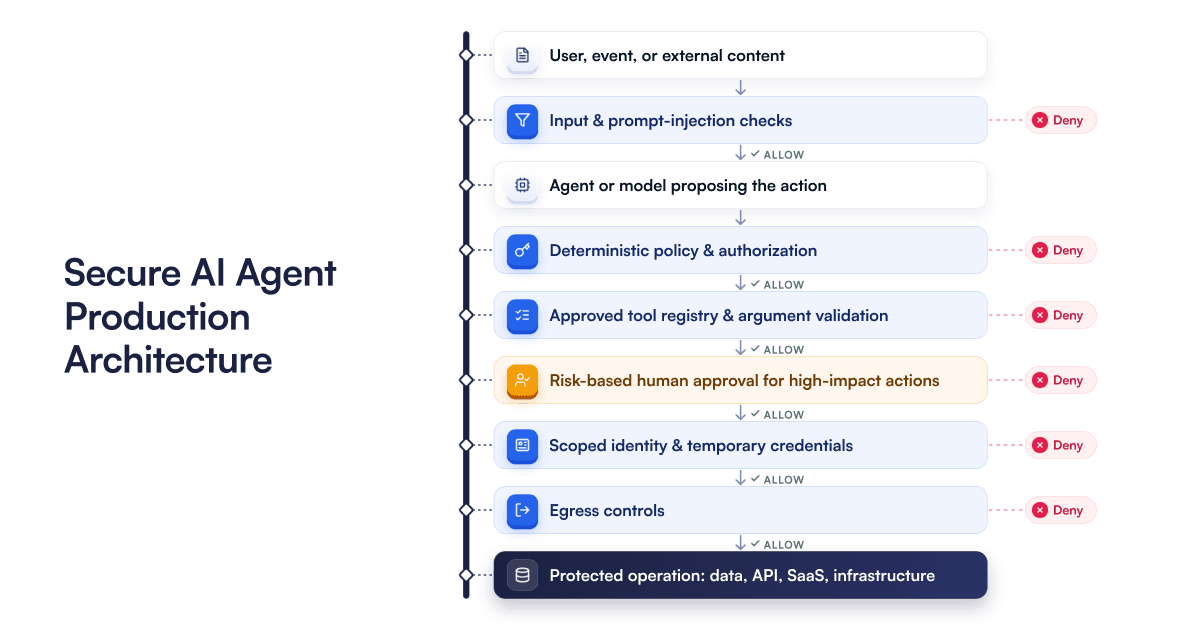
The architectural rule is that the authorization layer, the tool registry, and the egress controls sit outside the model and stay deterministic.
AWS recommends pairing identity, schemas, and policy engines with the probabilistic model controls, so a wrong decision inside the model still meets a fixed gate before it becomes an action.
How the Architecture Works
A request first passes through input validation and prompt-injection checks before reaching the AI model. The model then plans the task and selects the tool it needs.
Before that proposed action can affect an external system, it must pass through four deterministic controls:
- Policy and authorisation layer: Checks whether the requested action is permitted under predefined security policies.
- Tool registry and validation: Confirms that the selected tool is approved and its arguments follow the required schema.
- Scoped identity and credentials: Provides temporary, least-privilege credentials limited to the authorised task.
- Egress controls and audit logging: Inspects outgoing data, enforces transmission restrictions, and creates a tamper-resistant audit record.
These controls operate outside the AI model. This separation allows the agent to make plans without giving it unrestricted authority to execute them. Only actions that pass the required checks can reach protected data, external systems, or a human approval step.
What Should Teams Verify on the AI Agent Security Checklist Before Going Live?
This is the go-live gate. Before an agent touches real systems, the release owner works down this list and confirms every control above has been tested, documented, and approved for this specific deployment. The release owner records pass or fail evidence against each required control, assigns a remediation owner to anything that fails, and holds production deployment while any mandatory gate stays unresolved.
Go-Live Check | Evidence Required to Pass |
|---|---|
Agent identity and ownership are confirmed | Actions are traceable to a dedicated agent identity and initiating user where applicable. A named owner can disable the agent independently. |
Access stays within the approved task | Tests confirm that permitted operations succeed while unauthorized reads, writes, deletions, and cross-tenant access are denied. |
Tool calls are authorized before execution | Unapproved tools, unsafe arguments, and requests targeting unauthorized resources are blocked, including when the arguments match the tool’s schema. |
Prompt injection cannot bypass mandatory controls | Direct and indirect injection tests show that authorization, approval, and data controls still block prohibited actions when the agent follows a malicious instruction. |
Sensitive data stays within approved boundaries | Tests block disclosure to unauthorized destinations, recipients, tenants, and memory stores, including through approved tools. |
High-risk actions require valid approval | Approval identifies the action, resources, destination, and limits. Changed parameters or expired approval prevent execution until approval is renewed. |
Action logs support incident investigation | Permitted and denied actions record identity, tool, authorization decision, approval, outcome, timestamp, and correlation ID. Secrets are redacted, and the agent cannot alter the records. |
Monitoring detects defined unsafe behavior | Simulated policy violations, unusual destinations, or excessive tool use trigger alerts that reach a named responder. |
Revocation and containment work during an active run | A drill confirms that disabling the agent blocks further operations within the agreed response target. Limits prevent uncontrolled retries, spending, or action volume. |
Recovery and release approval are documented | Reversible changes have tested recovery procedures. Irreversible actions have containment or compensation plans. The release owner records the decision and any formally accepted residual risks. |
How Should AI Agent Governance and Monitoring Work After Launch?
Deployment is where the operating phase of AI agent governance begins, so an AI agent security checklist that stops at launch leaves the riskiest period unmanaged. Permissions, tools, and data access drift as workflows change, which means the controls need a standing owner and a routine rather than a one-time sign-off.
The post-launch routine covers a few standing jobs. Keep an agent inventory of identities, credentials, owners, connected tools, data classes, and risk tier. Review AI agent permissions and tool versions on a cadence set by risk, so a high-risk agent with production writes gets more scrutiny than a read-only one.
Run AI agent monitoring on the action layer and keep tamper-resistant audit logs of tool calls, denied operations, unusual destinations, and privilege elevation, so every incident has a trail to review. Treat model upgrades, new tools, new RAG sources, and MCP changes as triggers to re-approve and retest, and run shadow-agent discovery so unregistered agents surface before they spread.
Ownership has to be shared, since no single team can hold the whole surface. The table below ties each part of the operating model to a named owner, drawn from current AI agent governance guidance.
Owner | Responsibility |
|---|---|
VP Engineering | Production sign-off and delivery accountability |
Platform Engineering | Runtime, identity integration, and the tool gateway |
Security | Threat model, authorization, monitoring, and red teaming |
Compliance | Data handling, retention, and audit evidence |
Digital Transformation | Agent inventory, standards, and portfolio governance |
Red teaming and incident review close the loop. Adversarial testing runs on a schedule, and every real incident feeds a review that updates the checklist and the permissions behind it.
How Does GeekyAnts Help Teams Build Secure AI Agents for Production?
GeekyAnts approaches an AI agent security as a production engineering challenge spanning architecture, integration, identity boundaries, testing, monitoring, and lifecycle governance. Most generic articles ask how to stop prompt injection.
The more useful enterprise question is what prevents a manipulated or mistaken instruction from becoming a harmful business action, and that question decides whether a build to deliver secure AI agents holds.
Working close to production has taught the team to behave more like consultants than coders. They watch the real workflow, question which AI agent permissions an agent truly needs, and stay near the system after launch.
GeekyAnts positions its AI agent development services around that discipline, and judges total cost by what it takes to reach a reliable production outcome rather than an hourly rate.
Teams almost always postpone revocation and action-level logging during a pilot, because nothing has gone wrong yet. Those are the two controls we put in before an agent is allowed to change anything in production.
Konakanchi Venkata Suresh BabuPrincipal Technical Consultant.
Conclusion
This is the decision that the secure checklist is supposed to inform on go live. The agent is production ready only when all controls have been implemented, validated against the expected attack result, and authorized for the exact deployment with an accountable release holder until all gates are met.
Production readiness is not an assessment of the model alone. This is an assertion that identity, authorization, instrumentation, exfiltration, authorization, and logging controls hold when the agent is manipulated and that revocation and rollback drills are practiced prior to deployment and not during the attack.
When this happens, the worst case scenario for the agent will be limited before it can cause any real damage.