


Editor’s Note: This article was originally written by Shubham Kumar, Tech Lead - II, and published in February 2024. Previously titled ‘Top 5 Flutter UI Libraries for 2024 (Updated)’ and later updated as ‘Top 5 Flutter UI Libraries for 2026 (Updated)’. It was revised and updated by Harrini in August 2026 to reflect the latest Flutter UI libraries, package recommendations, compatibility guidance, and current Flutter development best practices. The technical content was reviewed by Chayan, Growth Marketing Specialist.
Key Takeaways
- Flutter offers a rich ecosystem of UI libraries and packages that accelerate cross-platform app development.
- Choosing libraries based on active maintenance, Flutter and Dart compatibility, community adoption, and production readiness helps build more applications.
- Material Design, Cupertino, Fluent UI, Tencent TDesign, and GetWidget provide flexible UI options for different platforms and design requirements.
- Essential packages for networking, state management, navigation, storage, and connectivity simplify development and improve application scalability.
- Regularly reviewing package compatibility and maintenance ensures Flutter projects remain secure, performant, and aligned with the evolving ecosystem.
Our aim is to provide readers with the most current and relevant content to ensure they derive maximum value and assistance from our blogs.
Flutter provides developers with a rich ecosystem of libraries and packages to help build high-quality, production-ready apps. The best Flutter UI libraries in 2026 include Material Design, Flutter Cupertino, Fluent UI for Flutter, Tencent TDesign, and GetWidget. These libraries are useful in building consistent, production-ready user interfaces across mobile, web, and desktop applications. In this blog post, we'll explore some of the most powerful Flutter libraries that can take your development skills to the next level.
We'll start by looking at the top design systems - your secret weapons for crafting beautiful, consistent UIs in a snap. From Google's ever-popular Material Design to Apple-inspired Cupertino, you'll have an arsenal of tools to create flawless layouts that delight users across platforms.
Then, we'll dive into the most game-changing utility packages that will give your apps some serious muscle. We're talking essentials that will have you loading data blazing fast, integrating slick maps and location services, adding push notifications with ease, and more.
By the end, you'll have the inside scoop on the libraries that have helped build some of the most successful Flutter apps out there.
How We Select the Best UI Libraries?
The Flutter ecosystem continues to grow, with new libraries and updates released regularly. For this list, we focused on UI libraries maintained actively and are compatible with recent Flutter and Dart releases, well-documented, widely adopted by the developer community, and ready for building production-ready applications across multiple platforms.
Top 5 Flutter UI Frameworks and Design Systems
1. Material Design
Material Design is a design language developed by Google that aims to create a consistent and visually appealing user experience across different platforms and devices. It provides a set of design principles, guidelines, and components that help developers create intuitive and visually cohesive applications.
In Flutter, which is Google's UI toolkit for building natively compiled applications for mobile, web, and desktop from a single codebase, Material Design is implemented through the "material" package.
- Supported Platforms: Android, iOS, Linux, macOS, Web, Windows
- Dart 3 compatible
2. Flutter Cupertino
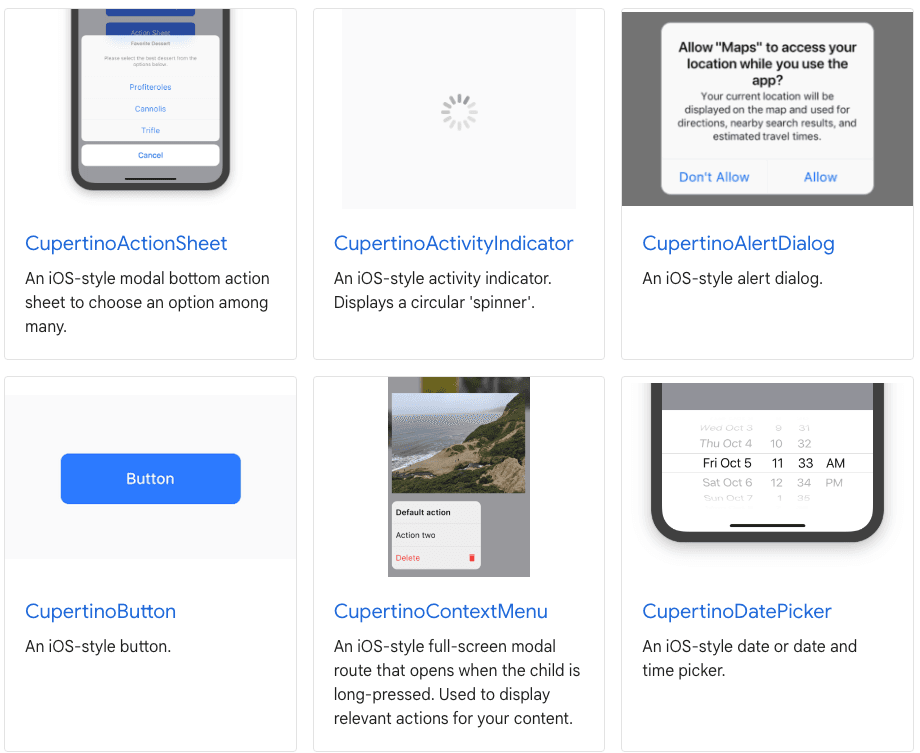
The Cupertino Design System in Flutter is a set of design principles, guidelines, and widgets specifically tailored for creating iOS-style user interfaces in Flutter applications. Named after the location of Apple's headquarters, Cupertino, this design system allows Flutter developers to build applications that mimic the native look and feel of iOS.
- Supported Platforms: Android, iOS, Linux, macOS, Web, Windows
- Dart 3 compatible
3. Fluent UI for Flutter
Fluent UI for Flutter is an open-source widget library that brings Fluent Design System to Flutter applications. It provides a collection of desktop-optimized components that follow Windows design principles while supporting Flutter applications across multiple platforms. The library includes widgets for navigation, forms, dialogs, and layouts, making it well suited for productivity tools and enterprise applications.
Overall, Fluent UI for Flutter is a valuable choice for developers building desktop-first Flutter applications or creating experiences that align with Microsoft's design language.
Supported Platforms: Android, iOS, Linux, macOS, Web, Windows
Dart 3 compatible
4. Tencent TDesign
Tencent TDesign UI is a comprehensive Flutter component library designed for mobile projects, offering a rich set of UI components adhering to the TDesign design style.
- Supported Platforms: Android, iOS, Linux, macOS, Web, Windows
- Dart 3 compatible
5. Getwidget

GetWidget, a leading Flutter app development company, proudly operates as a 100% free and open-source platform. They encourage and support an active, healthy community that accepts contributions from the public – including you.
- Supported Platforms: Android, iOS, Linux, macOS, Web, Windows
- Dart 3 compatible
How to Choose the Right Flutter Library?
Not every Flutter project needs the same libraries. When evaluating a package, consider:
- Is it actively maintained?
- Is it compatible with your system’s Flutter or Dart versions?
- Does it have good documentation?
- Is it widely used in production?
- Does it support the platforms you are targeting?
- Will it reduce development effort without adding unnecessary complexity?
Choosing libraries based on long-term maintenance and project requirements is useful in building the best Flutter applications.
Top 10 Flutter Libraries (Packages)
Flutter offers many useful packages and libraries to simplify app development. Here is an overview of 10 popular Flutter packages:
Library | Primary Use | Best Use Case | Flutter-supported Platforms |
Dio | HTTP networking | REST APIs, file uploads, interceptors | Android, iOS, Linux, macOS, Web, Windows |
permission_handler | Permission management | Runtime permissions | Android, iOS, macOS, Web, Windows |
flutter_riverpod | State management | Scalable application architecture | Android, iOS, Linux, macOS, Web, Windows |
go_router | Navigation | Declarative routing and deep linking | Android, iOS, Linux, macOS, Web, Windows |
cached_network_image | Image caching | Faster image loading | Android, iOS, macOS, Web |
flutter_svg | SVG rendering | Icons and vector graphics | Android, iOS, Linux, macOS, Web, Windows |
Hive | Local storage | Offline storage and caching | Android, iOS, Linux, macOS, Web, Windows |
firebase_messaging | Push notifications | Firebase Cloud Messaging integration | Android, iOS, macOS, Web |
freezed | Code generation | Immutable models and union types | Android, iOS, Linux, macOS, Web, Windows |
connectivity_plus | Connectivity monitoring | Detecting network status changes | Android, iOS, Linux, macOS, Web, Windows |
Conclusion
At GeekyAnts, we're more than just developers; we're core contributors to the Flutter ecosystem. As official Flutter consultants, we've embraced open-source principles and fostered a thriving Flutter community at GeekyAnts Flutter Community.
Join us in shaping the future of Flutter development and unleash the full potential of your apps with our cutting-edge solutions.







