


In the world of modern mobile apps, users have been trained to expect instant. Whether scrolling through TikTok, swiping on Instagram Reels, or watching course content, they expect videos to play immediately—even in tunnels, elevators, or spotty network conditions.
To achieve this instant feel, offline caching is non-negotiable. You need to pre-download the next few videos in the feed so they are ready before the user even scrolls to them.
React Native Developers often rely on the Expo ecosystem to abstract away the complexity of native media players. With the release of Expo SDK 52, the team introduced the powerful new expo-video library (replacing the older expo-av). It brought a modernized player implementation, better performance, and, crucially, a native useCaching prop that stabilized in Expo SDK 53.
For many use cases, this seemed like the final piece of the puzzle. But as we dug deeper into building a high-performance, offline-first video feed, we hit a significant roadblock: iOS HLS support.
The Gotcha with HLS
While Android (via the powerful ExoPlayer/Media3) and standard .mp4 files worked seamlessly with the new native caching, trying to cache HLS (.m3u8) streams on iOS resulted in... nothing.
The native iOS AVPlayer is fantastic at streaming, but it simply doesn't support a straightforward, "one-line code" way to cache complex HLS playlists to the disk for offline retrieval. This left us with a critical feature gap: our Android users enjoyed a smooth, offline-ready experience, while our iOS users faced buffering or playback failures the moment they lost connection.
We decided to solve this. This post details how we built expo-video-cache, a drop-in solution to enable offline HLS playback on iOS, and the lessons we learned along the way.
Why HLS is Hard to Cache
To understand the solution, we first have to understand why HLS is fundamentally different from the video files you might be used to.
MP4: The "Single File" Approach
When you play a standard MP4 file, you are dealing with a monolithic file. Caching it is trivial:
- Download movie.mp4 (500MB).
- Save it to file:///documents/movie.mp4.
- Tell the player to play that local path.
HLS: The Tree Protocol
HLS (HTTP Live Streaming) is a file and streaming protocol. It behaves less like a single book and more like a library card catalog.
If you simply download the .m3u8 link, you have not downloaded the video. You have only downloaded a tiny text file (a few kilobytes) that contains links to other files.
To cache HLS, you must traverse a complex tree structure:
- The Master Manifest: The entry point. It lists available resolutions (1080p, 720p, etc.).
- The Media Playlist: Once a resolution is chosen, this file lists thousands of tiny video chunks.
- The Segments: The actual video data (usually .ts or .fmp4 files), lasting 2-6 seconds each.
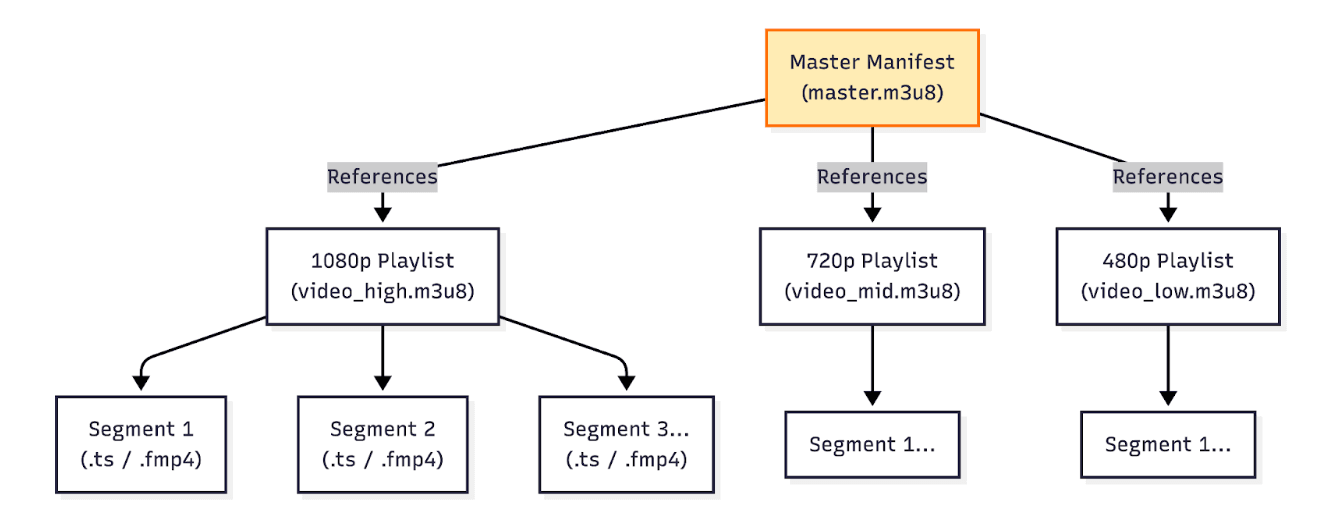
The iOS Roadblock. On Android, the native ExoPlayer is smart enough to handle this "tree walking" and caching internally.
On iOS, the AVPlayer is designed primarily for streaming. While Apple provides APIs for downloading HLS (like AVAssetDownloadTask), they are complex, restrictive, and often designed for long-form content (like downloading a movie on Netflix to watch on a plane) rather than the instant, short-form caching required for a TikTok-like feed.
We needed a way to make AVPlayer treat a cached HLS stream just like a live one, without it knowing the difference.
The Solution: A Local Proxy Server
Since we could not force AVPlayer to cache the stream natively, we decided to trick it. We built expo-video-cache using a Local Proxy Architecture.
The concept is simple but powerful: we spin up a tiny web server on the device itself (localhost) that sits between the video player and the internet.
Instead of feeding the player the remote URL: https://example.com/video.m3u8
We feed it a local URL pointing to our proxy: http://127.0.0.1:9000/proxy?url=https://example.com/video.m3u8
Visualizing the Flow
Here is exactly what happens when you press "Play." The proxy acts as a traffic controller, deciding whether to fetch data from the internet or serve it from the device's storage.
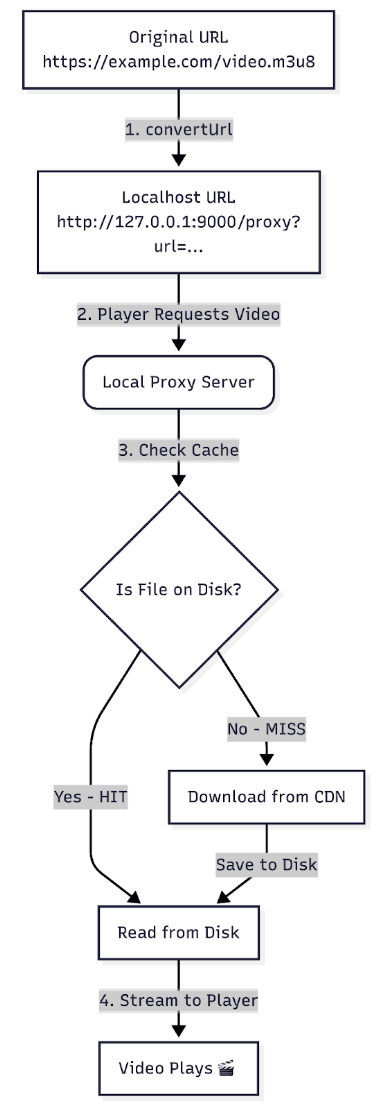
How It Works Under the Hood
The magic happens in three distinct phases:
1. Interception
When the AVPlayer tries to load our localhost URL, it connects to our internal server instead of the internet. The player has no idea it is talking to a local script; it thinks it's streaming from a standard web server.
2. Manifest Rewriting
This is the most critical technical step. To prevent the player from bypassing us, our proxy downloads the manifest and parses it line-by-line.
However, we added an optimization here. We check our local cache for each segment listed in the manifest:
- If the file exists on disk, we rewrite the URL to point to our localhost proxy (serving it instantly from storage).
- If the file is missing, we keep the original remote URL in the manifest.
This ensures the player only uses our proxy when we actually have the data, reducing overhead for new content.
3. Smart Caching
Finally, when the player reads our rewritten manifest:
- Cache Hit: If we point the player to localhost, we serve the video segment instantly from the disk. This enables offline playback and eliminates buffering.
- Cache Miss: If the segment wasn't in our cache, the player reads the original URL and streams it directly from the internet. Crucially, we trigger a background download simultaneously. This ensures that while the user watches the "live" stream, we are silently saving a copy to the disk so that the next time they view it, it will be instant.
This architecture allows the AVPlayer to function exactly as Apple intended—streaming small chunks—while we silently manage the file persistence in the background.
Implementation: The "Hybrid" Strategy
When building cross-platform modules, it is tempting to force both platforms to behave exactly the same way. However, we realized that Android's native caching (via ExoPlayer) is already excellent. It supports HLS caching out of the box.
We didn't want to add the overhead of a local proxy server on Android where it wasn't needed. We only wanted to intervene on iOS.
This led to a "Hybrid" Implementation Strategy:
- Android: Passthrough (Let the native player handle it).
- iOS: Intercept (Route through our local proxy).
Visualizing the Logic
Here is how our application decides how to load a video URL at runtime:
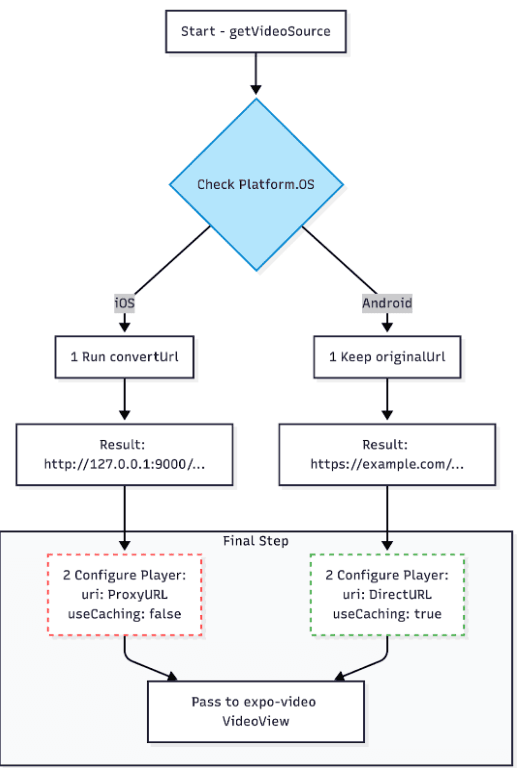
1. Installation
Bash
yarn add expo-video-cache2. The Global Server Setup
We spin up the local server once when the app launches. A great place for this is your root _layout.tsx file.
We use a "Fire and Forget" approach here. We do not wait for the server startup before rendering the UI because the server starts almost instantly (in milliseconds), and we don't want to block the user from seeing the splash screen or home feed.
TypeScript
// app/_layout.tsx
import { startServer } from 'expo-video-cache';
import { useEffect } from 'react';
import { Slot } from 'expo-router';

export default function Layout() {
  useEffect(() => {
    // Start server on port 9000 with a 1GB cache limit
    startServer(9000, 1024 * 1024 * 1024)
      .then(() => console.log('✅ Proxy Server running'))
      .catch(err => console.error('❌ Proxy failed', err));
  }, []);

  return <Slot />;
}
3. The Smart Source Helper
This is the most critical piece of code in your app. We created a utility function, getVideoSource, to abstract away the platform differences.
Critical Note on useCaching: On iOS, we explicitly set useCaching: false.
- Why? Our proxy is already caching the file to disk. If we told the native AVPlayer to cache it too, it would try to cache the response from our localhost server, leading to redundant data duplication and potential conflicts. We want the player to treat our proxy as a "live" stream.
TypeScript
import { Platform } from 'react-native';
import { convertUrl } from 'expo-video-cache';

export const getVideoSource = (url: string) => {
  const isAndroid = Platform.OS === 'android';

  // 1. URL Transformation
  // iOS: Convert remote URL -> Localhost Proxy URL
  // Android: Keep remote URL
  const finalUrl = isAndroid ? url : convertUrl(url);

  return {
    uri: finalUrl,

    // 2. Native Cache Configuration
    // Android: Enable native caching (ExoPlayer handles it)
    // iOS: Disable native caching (Our Proxy handles it)
    useCaching: isAndroid,
  };
};
Using it in your component becomes trivial. You no longer need to think about platforms inside your UI code:
TypeScript
const player = useVideoPlayer(getVideoSource(hlsUrl), (player) => {
  player.play();
});
Here is the enhanced version of Part 5.
I have added context to "The MP4 Trap" to explain why it fails (lack of streaming/range support during the initial download phase) and clarified the "Race Condition" fix with a practical tip.
Challenges & Caveats
Building a native proxy server from scratch wasn't without its hurdles. Here are the key "Gotchas" we discovered during development that might save you some headaches.
1. The MP4 Trap
In our first prototype, we got excited and tried to run everything through the proxy. This was a mistake.
- The Issue: If you try to proxy a large static file (like a 500MB .mp4 movie), the proxy attempts to download the entire file to disk before it serves the first byte to the player.
- The Result: The user sees a black screen and a loading spinner for 2 minutes.
- The Rule: Use the right tool for the job.
- HLS (.m3u8): Use expo-video-cache. The segments are small (~2MB), so they download and play instantly.
- MP4: Use standard expo-video caching. The native player is much better at handling large static file buffering.
2. The "App Launch" Race Condition
We ran into an edge case where a video on the very first screen of the app would fail to load.
- The Cause: The app launched so fast that the React Native UI tried to request the video URL before our localhost server had finished binding to port 9000 (which takes ~10-50ms).
- The Fix: We built a safety check into the convertUrl function. If the server isn't ready, it simply returns the original remote URL. The video still plays (uncached), preventing a crash or error screen.
3. DRM Limitations
This approach relies on Manifest Rewriting—literally opening the text file and changing the URLs.
- The Issue: DRM systems (like Apple's FairPlay) rely on digital signatures to verify that the manifest hasn't been tampered with. Rewriting the URLs breaks this signature.
- The Limit: This solution is strictly for non-DRM (Clear) content. If you need offline playback for Netflix-style DRM content, you must use the platform's native offline download managers, which are significantly more complex to implement.
Performance & Size Impact
We know that bundle size matters. We measured the impact of adding expo-video-cache to a production build to ensure it respects your app's footprint.
iOS Impact: ~2.5 MB
The iOS module includes a lightweight embedded Swift HTTP server (Swifter). In a production release build (stripped and optimized), this adds approximately 2.5 MB to your final .ipa size.
Android Impact: ~0 KB (Negligible)
Since Android relies entirely on the native ExoPlayer for caching, our module acts as a simple pass-through shim.
- Logic: 100% Native implementation.
- Dependencies: None.
- Size Increase: Effectively Zero.
This creates a "best of both worlds" scenario: robust utility where it's needed (iOS) and zero overhead where it's not (Android).
In Conclusion
expo-video-cache was born out of necessity, but it has become a robust solution for our offline-first requirements. It bridges the critical gap between iOS's strict streaming protocols and the need for a modern, instant, cached user experience.
We’ve open-sourced this package for the community because we believe no one should have to write a Swift web server just to play a video loop.
If you are struggling with offline HLS on iOS, give it a try.







