
AI is no longer just a tool for answering questions—it’s evolving into a hands-on test automation companion that actively contributes to solving real-world problems. It's empowering QA professionals by reducing repetitive efforts, improving test coverage, and enabling faster release cycles. As AI continues to learn and adapt, it's becoming a collaborative partner that enhances productivity and supports the community in building resilient automation systems.
Model-Based Testing (MBT) helps automation testers by enabling the automatic generation of test cases from behavior models. Instead of manually scripting each test, testers define a model that reflects the application's logic, and tools use this to produce optimized test scenarios. This approach improves test coverage, reduces repetitive effort, and minimizes human error. It also ensures better alignment with requirements and accelerates the automation process.
Why playwright MCP for Testing
MCP helps you build agents and complex workflows on top of LLMs. LLMs frequently need to integrate with data and tools, and MCP provides
- A growing list of pre-built integrations that your LLM can directly plug into
- The flexibility to switch between LLM providers and vendors
- Best practices for securing your data within your infrastructure
What is MCP
Model Context Protocol (MCP) is the intelligence layer between natural language inputs and automated test execution. It enables seamless coordination between AI models like Claude and automation tools like Playwright, translating high-level intents into executable test scripts.
By integrating MCP into your QA pipeline, teams can run the test cases dynamically, reduce manual intervention, and accelerate the path from idea to test execution through contextual understanding and smart decision-making
Think of MCP as your test conductor — receiving inputs, understanding the context, and directing the right test actions across environments, browsers, or devices.
Components Breakdown
Components | Purpose |
|---|---|
MCP Server | Orchestrator to receive requests (e.g., test triggers, context, logic) |
Claude AI | An AI model to interpret test commands, generate test cases, or make decisions |
Playwright | Executes browser automation based on test scripts |
CI/CD | Backend to run and schedule tests, manage environments |
MCP Workflow
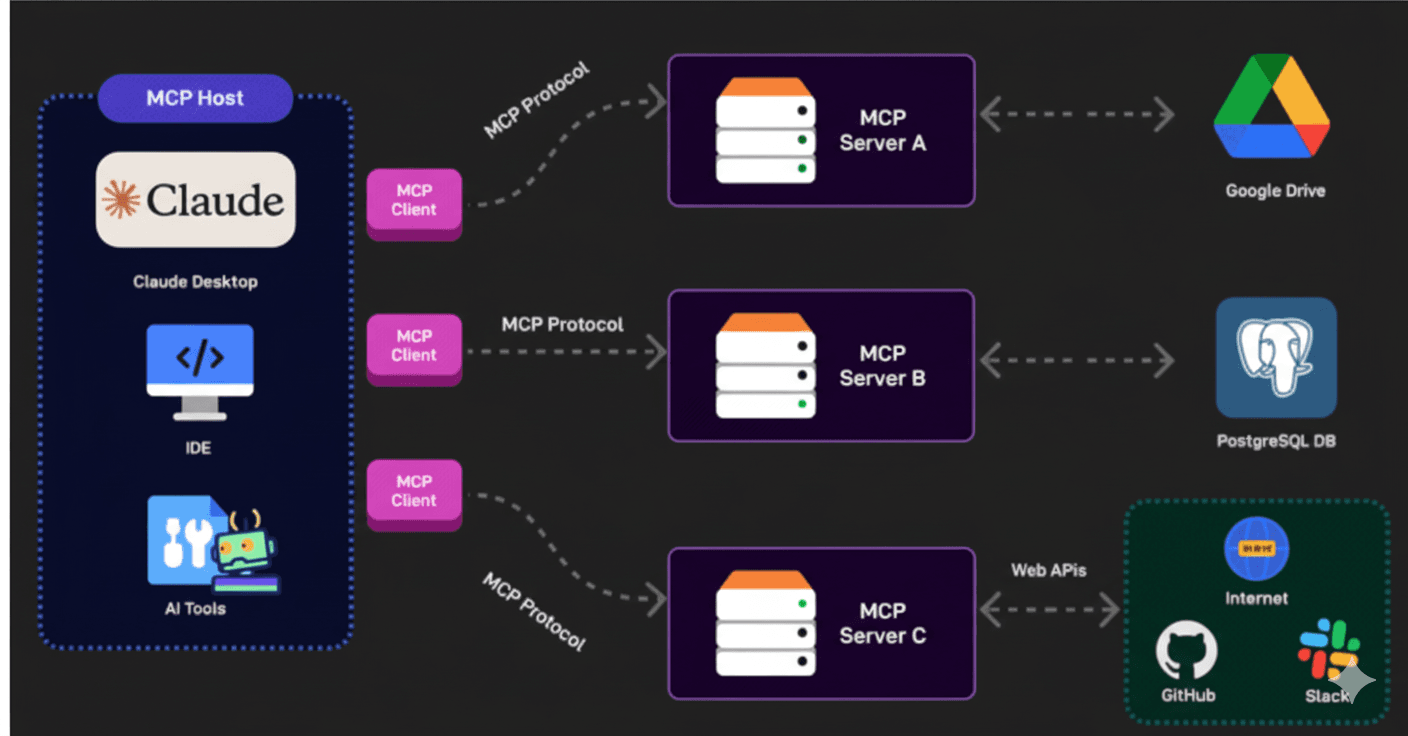
MCP follows a client-server model with 3 key components:
- MCP Hosts: These are applications (like Claude Desktop or AI-driven IDEs) that need access to external data or tools
- MCP Clients: They maintain dedicated, one-to-one connections with MCP servers
- MCP Servers: Lightweight servers exposing specific functionalities via MCP, connecting to local or remote data sources
- Local Data Sources: Files, databases, or services securely accessed by MCP servers
- Remote Services: External internet-based APIs or services accessed by MCP servers
Visualizing MCP as a bridge makes it clear: MCP doesn't handle heavy logic itself; it simply coordinates the flow of data and instructions between AI models and tools.
Key Advantages of Playwright MCP for AI-Powered Testing
Playwright MCP allows LLMs to interact with web pages, enabling automated testing with natural language commands, reducing the need for manual coding
Simplified Testing:
It simplifies the testing process by allowing testers to interact with web pages using plain English commands,
LLM-Friendly:
It operates purely on structured data, eliminating the need for vision models and making it ideal for LLM-driven testing.
Comprehensive Testing:
Playwright MCP enables testing across multiple browser engines (Chromium, Firefox, WebKit), ensuring that web applications function seamlessly across different environments.
API Testing: It facilitates API testing by allowing you to send HTTP requests and verify responses using natural language, eliminating the need for manual coding
Zero-Code Testing: Playwright MCP allows for zero-code testing, enabling testers to automate browser UI interactions and web scraping using plain English commands
Test Code Generation: Playwright MCP can generate test code while running UI automation, further streamlining the testing process
Real Browser Environment: Playwright MCP enables LLMs to interact with web pages in a real browser environment
Test across multiple tabs, origins, and users:
Playwright creates a browser context for each test, allowing you to test scenarios that span multiple tabs, multiple origins, and multiple users
Setting Up Playwright MCP
To harness Playwright MCP’s capabilities, you first need to configure your environment.
Step 1
Install Node.js: Playwright MCP relies on Node.js
Step 2
Install Playwright MCP Server: Open your terminal and run
npm install -g @executeautomation/playwright-mcp-serverThis command sets up the server, enabling MCP functionality.
Step 3
Install Claude desktop client
Configure Claude Desktop Client: Playwright MCP integrates with Claude’s MCP ecosystem. To connect it, edit the claude_desktop_config.json file in your Claude Desktop Client directory. Add the following configuration:
{
  "mcpServers": {
    "playwright": {
      "command": "npx",
      "args": ["-y", "@executeautomation/playwright-mcp-server"]
    }
  }
}
This tells Claude to recognize the Playwright MCP Server.
Step 4
Launch Claude Desktop Client: Start the Claude Desktop Client. Once running, you’ll see the Playwright MCP Server listed, ready for action.
Writing UI Tests with Playwright MCP
- Playwright MCP shines in UI testing by letting you automate browser interactions with simple English commands. This feature reduces complexity and speeds up test development.
- Additionally, Playwright MCP supports advanced tasks. For instance, to wait for an element or capture a screenshot.
- This flexibility makes Playwright MCP ideal for testing dynamic web applications. Transitioning to API testing, let’s see how it handles backend validation.
Testing APIs with Playwright MCP
Beyond UI automation, Playwright MCP excels at API testing. It allows you to send HTTP requests and verify responses using natural language, eliminating the need for manual coding.
For example, to test a GET request:
Send a GET request to https://api.example.com/users and check if the status is 200Playwright MCP sends the request and confirms the server returns a 200 OK status. To dig deeper into the response:
Send a GET request to https://api.example.com/users and check if the response contains "userId"This ensures the response body includes a "userId" field, validating data integrity.
For POST requests with payloads, try this:
Send a POST request to https://api.example.com/users with body { "name": "John", "age": 30 } and check if the status is 201Playwright MCP submits the JSON payload and verifies the 201 Created status, confirming successful resource creation.
What’s more, Playwright MCP supports chained API calls. For instance:
Send a GET request to https://api.example.com/users/1 and store the userId
Then send a GET request to https://api.example.com/posts?userId={userId} and check if the status is 200
This sequence retrieves a user ID from the first call and uses it in the second, mimicking real-world workflows.
Combining UI and API Testing for End-to-End Workflows
Playwright MCP’s true strength lies in its ability to combine UI and API testing into cohesive end-to-end scenarios. Imagine testing an e-commerce checkout process:
Go to https://shop.example.com and click the button with the text "Add to Cart"
Send a GET request to https://api.shop.example.com/cart and check if the response contains "itemId"
Fill the input with id "promo" with "SAVE10"
Click the button with the text "Checkout"
Send a POST request to https://api.shop.example.com/order with body { "userId": "123" } and check if the status is 201
This script navigates the site, adds an item, verifies the cart via API, applies a promo code, and submits an order, all in one flow. Playwright MCP ensures each step executes smoothly, providing comprehensive coverage.
Pros and Cons
Snapshot Mode (Default - Accessibility Tree Based)
Pros:
- Fast: Uses structured text, not heavy image data.
- LLM-Friendly: Perfect for LLMs that process text.
- Lightweight: Requires less CPU/GPU power.
- Reliable: Less likely to break due to layout changes.
- Deterministic: Element references are precise, not based on screen position.
Cons:
- Depends on Accessibility: Needs pages with good accessibility markup.
- Struggles with Custom UIs: May miss non-semantic or canvas-based elements.
Vision Mode (Screenshot + Coordinate Based)
Pros:
- Handles Visual-Only Elements: Useful for canvas, graphics, or custom UI.
- Flexible: Can interact even if accessibility info is missing.
- Better for Vision Models: Supports models trained to “see” and interpret layouts.
Cons:
- Slower: Needs screenshot capture and possible image processing.
- Less Reliable: Coordinate-based clicks can fail with layout shifts.
- Requires Vision AI or Manual Input: Needs a system that can interpret visuals.
Conclusion:
Leveraging an MCP server with Playwright allows engineers to centralize and standardize mocks, decouple tests from external dependencies, and eliminate flakiness caused by inconsistent test data. This pattern ensures deterministic test outcomes, simplifies debugging, and provides a scalable foundation for testing complex workflows. By mocking at the protocol level rather than at the test layer, teams can maintain higher fidelity in simulations while keeping tests fast, reliable, and easier to maintain.