

Editor’s Note: This article was originally written by Boudhyan and published in June, 2025. It was revised and updated by Shivangi Agarwal in July, 2026 to include current technologies, implementation practices, industry requirements, and examples. The technical content was reviewed by Divya Tripathi, Sales Head and Gaurav Porwal, Principal Technical Consultant.
Key Takeaways:
- AI is becoming part of the full mobile app lifecycle, from product planning and development to testing, security, and post-launch optimization.
- On-device, cloud, and hybrid AI architectures give businesses greater flexibility around performance, privacy, connectivity, and cost.
- The strongest AI-powered mobile applications use intelligence to improve personalization, automate workflows, strengthen security, and reduce user effort.
- AI-assisted development tools can accelerate coding, testing, documentation, and debugging, but still require human review and quality controls.
- App development costs depend on complexity, AI model requirements, data preparation, integrations, compliance, infrastructure, and long-term maintenance.
- Future mobile apps will increasingly use multimodal interfaces, agentic workflows, specialized models, and privacy-preserving personalization.
- Businesses should choose a development partner with expertise across mobile engineering, AI integration, backend architecture, security, compliance, and post-launch support.
Who this guide is for:
This resource is tailored for CTOs, Heads of Product, and decision-makers at U.S.-based enterprises, FinTech startups, healthcare innovators, and any company building high-performance mobile apps with AI at the core. If your team is navigating complex user journeys, regulatory demands, or fast-moving markets, this guide speaks directly to those realities.
What you will gain:
- A strategic understanding of how AI fits into modern mobile development
- A detailed breakdown of key development models, costs, and compliance considerations
- Proven insights on evaluating and hiring the right development partner
- Real-world use cases and success stories that demonstrate what works—and why
- A grounded framework for making product, engineering, and business decisions with clarity
In 2026, AI in mobile app development is no longer an added layer after the product is approved. It has increasingly become a part of the mobile operating environment and roadmap. Apple Foundation Models support on-device capabilities and newer multimodal and cloud-supported workflows, but availability depends on the OS, device, region and feature eligibility. On the other hand, Android offers an equally comparable shift through Gemini on device, ML Kit’s Prompt API, and hybrid inference through the Firebase AI logic.
Overall, this boils down to the core design questions having changed. Businesses have shifted to incorporating AI in the entire framework- where intelligence should run? How much latency and privacy matter? Which tasks deserve on-device or hybrid or full cloud based execution?
In essence, this implies that AI-powered mobile applications of 2026 are being expected to serve three objectives at the same time: intelligence, economics, and governance. GeekyAnts is built around this principle. From design strategy to post-launch optimisation, they help businesses create software that works, grows, and endures.
The Expanding Role of AI in Mobile App Development
In 2026, AI isn’t confined to an app’s chatbot, recommender system, or some kind of experimental functionality in an application. The technologies are becoming a part of the entire mobile app development application lifecycle from product discovery, design, development, testing, security, personalization and optimization.
That transformation is also taking place at the platform level. In the United States, mobile developers can leverage compact AI models running locally on a device, cloud models for more advanced functions, or a combination of the two with hybrid inference. This allows businesses to have better control over the time, privacy, reliability, and cost of their operations.
At that point of AI adoption, mobile product managers need to make decisions about where to apply the technology to add value while avoiding extra complexity.
Below are seven key areas where AI is actively shaping mobile app development, with measurable outcomes and immediate value.
1. Predictive Personalization
AI models now learn from user preferences, location, usage patterns, and in-app behaviour to craft personalized journeys. Apps adjust dynamically—reordering content, suggesting actions, or launching features based on real-time predictions.
Instead of displaying the same interface or content to everyone, an AI-powered app can:
- Reorder content based on predicted relevance
- Recommend products, services, or next actions
- Adapt onboarding journeys to user behaviour
- Personalize notifications and offers
- Identify users at risk of abandoning a task or leaving the app
2. AI-Assisted Development Workflows
AI copilots and ML-based automation tools are changing how development teams work. These systems can auto-generate boilerplate code, write test cases, and review pull requests, reducing the time spent on manual tasks.
For U.S.-based teams operating under aggressive go-to-market schedules, this reduces development friction and allows engineers to focus on solving complex product challenges.
3. AI-Enhanced Security and Risk Detection
Sectors like healthcare, finance, and logistics demand higher standards of data integrity and user protection. AI-powered security tools monitor behavioural signals, detect anomalies, and act on threats such as credential stuffing or inconsistent biometric input.
AI-powered mobile security systems can analyze signals such as:
- Login location and device changes
- Typing, swiping, and navigation behaviour
- Abnormal transaction sequences
- Repeated authentication failures
- Credential-stuffing patterns
- Biometric inconsistencies
- Unusual API or account activity
In the United States, where compliance and trust are tightly regulated, AI systems are proving indispensable—not only in real-time defence, but in establishing a proactive security posture.
4. Image and Object Recognition
With AI-powered vision systems, mobile apps can now “see” and interpret the real world. From virtual try-ons in retail to real-time skin analysis in health apps, image classification and object detection models have found widespread adoption.
Common applications include:
- Visual product search
- Virtual try-ons
- Identity and document verification
- Barcode and inventory scanning
- Medical-image assistance
- Damage assessment for insurance claims
- Plant, object, and defect identification
- Augmented-reality guidance
The United States' strong AR infrastructure and mobile camera usage have accelerated this trend, making real-time visual intelligence a major differentiator.
5. Optical Character Recognition (OCR)
AI-based OCR is redefining how mobile apps process printed or handwritten text. Insurance apps scan claim documents. Field service tools capture serial numbers. Translation apps detect foreign signage instantly.
Mobile applications can use intelligent document processing to:
- Scan invoices and receipts
- Capture identification documents
- Extract insurance claim information
- Process medical or legal forms
- Read serial numbers and equipment labels
- Digitise handwritten field notes
- Translate signs and printed material
- Automate compliance and onboarding checks
In enterprise contexts across the United States, OCR contributes directly to operational efficiency, especially in high-volume, multilingual environments.
6. Natural Language Processing and Voice Interfaces
Voice interaction has become a primary channel for support, accessibility, and productivity. NLP models help apps interpret speech and text, extract meaning, and respond accurately with contextual intelligence.
Mobile use cases include:
- Conversational customer support
- Voice-controlled workflows
- Meeting and call summarization
- Real-time translation
- Accessibility assistance
- In-app search using natural language
- Voice-based data entry
- Contextual financial or healthcare guidance
- AI assistants that complete bounded tasks
In the United States, adoption extends beyond Siri and Google Assistant. There are now voice-enabled apps for mental health support, compliance guidance, multilingual transcription, and customer service. These interfaces are increasingly natural and adaptive.
7. Route Optimization and Mobility Intelligence
AI supports route planning for delivery services, mobility platforms, and ride-hailing apps by analysing real-time traffic, weather, and historical patterns to optimize performance.
Rather than selecting the shortest route alone, an AI-powered system can consider:
- Traffic conditions
- Weather
- Vehicle capacity
- Delivery windows
- Driver availability
- Fuel or energy consumption
- Road restrictions
- Historical delays
- Changes in customer demand
This functionality is particularly valuable across U.S. cities, where congestion, fuel prices, and service demand constantly fluctuate. AI-based routing provides measurable improvements in delivery accuracy and fulfillment timelines.
By the Numbers: AI in U.S. Mobile App Development
The figures below show why AI is becoming a core part of mobile product strategy, software development, and long-term technology investment in 2026.
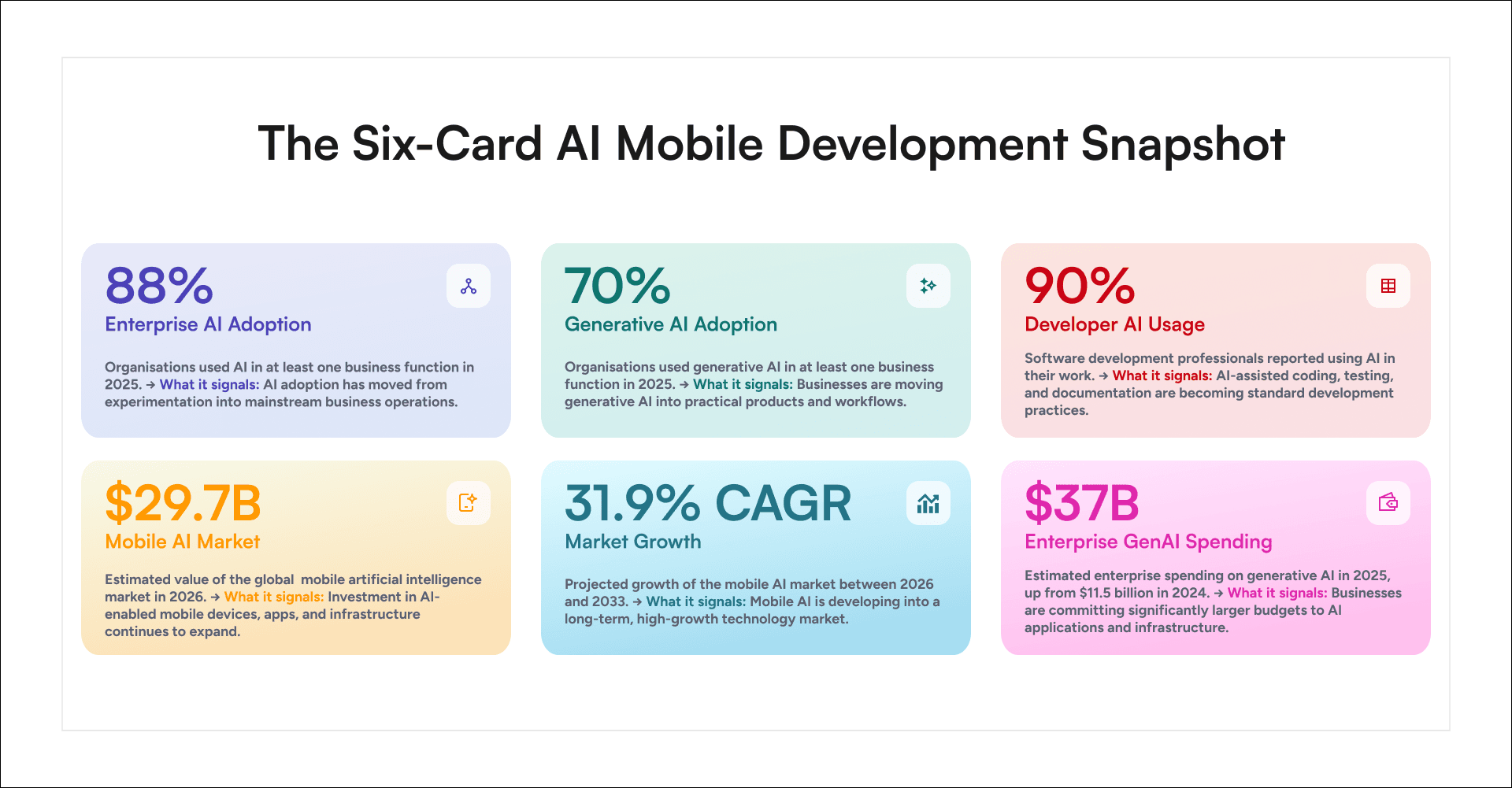
Sources: Stanford HAI, 2026 AI Index Report; Google, 2025 DORA Report; Grand View Research, Mobile Artificial Intelligence Market Report; Menlo Ventures, 2025 State of Generative AI in the Enterprise.
- Enterprise AI Adoption
88% of organizations used AI in at least one business function in 2025. This signals that AI adoption has moved beyond experimentation and into mainstream business operations. - Generative AI Adoption
70% of organizations used generative AI in at least one business function in 2025. Businesses are increasingly integrating generative AI into practical products, services, and operational workflows. - Developer AI Usage
90% of software development professionals reported using AI in their work. AI-assisted coding, testing, debugging, and documentation are becoming standard practices across the development lifecycle. - Mobile AI Market
The global mobile artificial intelligence market is estimated to reach USD 29.7 billion in 2026. This reflects continued investment in AI-enabled mobile devices, applications, models, and supporting infrastructure. - Market Growth
The mobile AI market is projected to grow at a CAGR of 31.9 percent between 2026 and 2033. This sustained growth indicates that mobile AI is developing into a long-term, high-growth technology market. - Enterprise GenAI Spending
Enterprise spending on generative AI is estimated to reach USD 37 billion in 2025, up from USD 11.5 billion in 2024. This signals that businesses are committing significantly larger budgets to AI applications, infrastructure, and implementation.
Development teams use AI to fix what slows them down. They deploy it to ship faster, catch bugs earlier, secure user data, and design interfaces that adjust as people use them. It is not an experiment. It is part of the daily workflow—from planning and prototyping to production and post-launch.
How to Integrate AI in Mobile Apps: A Step-by-Step Blueprint
Integrating AI into a mobile application is not just about model selection or using an SDK. It requires a structured, multi-stage workflow—starting from the problem definition to post-launch iteration. Below is a comprehensive yet accessible guide for embedding AI into a mobile app, tailored for product and engineering leaders.
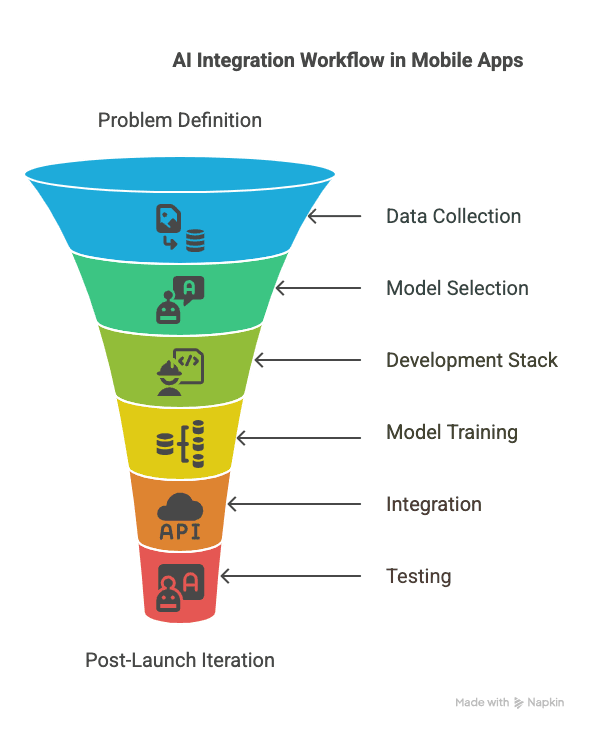
1. Define the Problem and Success Criteria
Start by articulating the business problem the AI feature is meant to solve—whether it is personalization, automation, or prediction. Tie the feature to clear user needs and define measurable success metrics (like accuracy, latency, or retention uplift). This gives the project a direction and sets up meaningful validation later.
2. Collect and Prepare the Right Data
Good AI is data-driven. Gather relevant datasets—be it user behaviour, images, audio, or text—and ensure they are cleaned, deduplicated, and free from bias. Preprocessing may include normalisation, outlier removal, or converting raw data into structured formats. The quality of your training data often determines how reliable the model will be.
3. Choose the Right Model Type
Select your AI model based on the specific task. A CNN works well for image processing, while LSTMs or transformers handle text. You can either use open-source pre-trained models (like BERT, ResNet) and fine-tune them or build a custom model from scratch using libraries like TensorFlow, PyTorch, or scikit-learn. The decision depends on your performance requirements, data availability, and deployment constraints.
4. Pick Your Development Stack
For AI, decide between cloud-based APIs (Google ML Kit, AWS Rekognition) or on-device SDKs (TensorFlow Lite, Core ML). For mobile development, your choice between native (Swift, Kotlin) and cross-platform (React Native, Flutter) must support easy model integration. For example:
- Core ML supports direct integration with trained models in iOS apps.
- TensorFlow Lite allows fast, on-device inference on Android and Flutter.
Your tech stack must align with both your engineering team’s skillset and the needs of your AI feature.
5. Train and Validate the Model
Use your processed data to train the model. Monitor training metrics like accuracy, precision, and recall, and fine-tune hyperparameters accordingly. Validation is just as important—test the model on unseen data to catch overfitting. Iterate on data, architecture, and training loops until the results align with your original goals.
6. Integrate AI into the Mobile App
This can be done in two primary ways:
- On-device integration: Embed the model directly into the app using Core ML or TensorFlow Lite. This improves performance and allows offline use but may increase app size.
- Cloud-based inference: Host the model on a server and call it via API. This approach supports real-time updates and heavy computation but requires a stable network connection.
Regardless of approach, make sure the AI interacts cleanly with the app’s UI, does not introduce latency, and enhances the experience rather than interrupting it.
7. End-to-End Testing
Test both the app and the AI layer:
- Check the functional accuracy of predictions or classifications.
- Evaluate performance across different devices and OS versions.
- Simulate edge cases, such as low light for vision models or slang for NLP.
AI adds variability, so combine traditional QA testing with specific AI evaluation benchmarks.
8. Deployment and Release Strategy
For on-device models, either bundle them into the app or enable model downloads at first launch. For cloud models, ensure secure hosting with redundancy and scalability in place. Address privacy concerns during deployment, especially if the model handles sensitive or regulated data.
Track usage via in-app analytics. Monitor AI predictions, latency, and user interactions to identify friction points or improvement opportunities.
9. Post-Launch Monitoring and Iteration
AI is never “done.” After launch, model accuracy can degrade over time due to changes in user behaviour or data distribution. To address this, implement post-launch MLOps practices to monitor live performance, collect user feedback, and update models using real-world data. This includes retraining, version control, and continuous testing pipelines.
Ensuring Scalability and Streamlining Maintenance in AI App Development
A great AI app is not just functional—it is scalable, maintainable, and capable of evolving. From architecture to automation, here is how to build AI-powered apps that keep pace with growth.
1. Architect for Scale with Modular Design
Design AI features as independent modules that can be swapped, scaled, or rebuilt without affecting the entire codebase. For instance, isolate recommendation logic or chatbot models as services. Modular apps enable faster iteration and simplify testing, versioning, and feature additions.
2. Choose the Right Frameworks for Faster Growth
React Native and Flutter offer cross-platform compatibility with strong support for AI libraries. React Native supports TensorFlow.js and native bridges, while Flutter integrates with TensorFlow Lite and ML Kit. These frameworks allow you to scale to both iOS and Android quickly without compromising feature quality.
3. Optimise Early for Performance
AI features can be compute-heavy. To maintain app responsiveness:
- Offload model inference to background threads.
- Apply lazy loading and caching for datasets.
- Use memory-efficient state management tools (Redux, Provider).
Testing on low-end devices ensures smooth performance across all user tiers.
4. Design the Backend for Elastic Growth
Use cloud-native infrastructure—such as AWS Lambda, Google Cloud Functions, or Azure ML endpoints—for AI computation. These tools scale automatically with demand and enable frequent model updates without app-store deployments. Use APIs and microservices that handle traffic spikes, cache results, and isolate faults.
5. Automate with CI/CD and MLOps
Set up automated build and deployment pipelines not just for your app but also for your AI lifecycle. Include:
- Continuous integration of model training.
- Validation testing for new model versions.
- Automatic rollback or version control if issues arise.
This MLOps approach ensures your app adapts as your data evolves, without excessive manual effort.
6. Enable Seamless Model Updates
AI models improve with better data. Instead of embedding static models, let the app fetch updated models from your server. This decouples model updates from app updates and enables faster iteration. Use model versioning and A/B testing to test new versions gradually.
7. Monitor Everything
Set up observability for both app performance and AI behaviour. Monitor:
- App crashes and UI latency.
- Model prediction confidence and error rates.
- User engagement with AI-powered features.
Flag anomalies early to avoid silent failures. Use tools like Sentry, Firebase, or custom dashboards to stay informed.
8. Foster Cross-Functional Collaboration
AI success requires alignment between product owners, data scientists, engineers, and QA. Document model assumptions, training methods, and performance expectations. Use version control for datasets and track model iterations alongside codebase updates.
Traditional Apps vs. AI-Powered Apps: A New Standard for Digital Intelligence
The way mobile apps are built—and what they are expected to do—has changed. Static screens and rule-based flows can no longer keep up with markets that move fast and users who expect more. AI-led apps now define the standard. These products are designed to adapt, learn, and respond in real time.
For product leaders and investors alike, the difference is not abstract. It affects architecture, experience, and performance at every level. The table below breaks down how AI-enabled mobile apps differ from traditional builds—and why that matters.
Feature-by-Feature Comparison: Traditional Apps vs. AI Apps
Feature | Traditional Apps | AI-Powered Apps |
Adaptability | Operate based on fixed logic; updates require developer intervention. | Continuously evolve based on data, context, and user behaviour without manual updates. |
Decision-Making | Follow predefined rules and workflows. | Use machine learning models to make context-aware decisions, often in real time. |
Personalization | Offers basic settings-based customization. | Dynamically personalizes content, layout, and experiences based on individual usage patterns. |
Learning Capability | Do not learn or improve over time. | Self-improving through user data and feedback, performance increases over time. |
Data Processing | Handles structured, limited data sets via manual input or predefined scripts. | Ingests, processes, and analyses massive, unstructured datasets (text, images, audio, video). |
User Interaction | Responds with static interfaces and fixed outcomes. | Interacts conversationally, adapts to tone, intent, and context using NLP and feedback loops. |
Automation | Relies on user actions to initiate tasks. | Automates complex workflows — predicts, recommends, and executes based on patterns. |
Efficiency | Performs reliably on repetitive, known tasks. | Excels in solving ambiguous, multi-variable problems with speed and accuracy. |
Error Handling | Breaks or returns limited options when encountering unexpected inputs. | Learns from failures; uses probabilistic reasoning to recover or adjust output. |
Security Intelligence | Reactive; follows predefined rules for authentication and alerts. | Proactively detects anomalies, behaviour shifts, and potential breaches using pattern recognition. |
Voice & Vision Input | Typically limited to text and touch inputs. | Natively supports voice commands, image recognition, and multimodal inputs for richer interactions. |
Latency in Response | Fixed processing times based on app logic and APIs. | Adjusts response times intelligently based on urgency, context, and model inference. |
Use Case Suitability | Best suited for static workflows and predictable use cases (e.g., form filling). | Ideal for dynamic, real-time experiences (e.g., virtual assistants, telemedicine, eCommerce). |
Examples | Budget calculators, note-taking apps, and booking systems. | Recommendation engines, AI-powered diagnostics, and voice-based productivity apps. |
Why Should Businesses Leverage AI in Mobile App Development
Businesses adopting AI in mobile app development are not experimenting with emerging trends—they are addressing concrete performance challenges. The following use cases show how AI is being applied to optimize experience, efficiency, and product impact at scale.
1. Personalization at Operational Scale
AI enables mobile applications to adjust interfaces and content based on user behaviour, contextual signals, and interaction history. These systems interpret granular inputs such as navigation patterns, usage timing, and session depth to modify the experience continuously without requiring manual configuration.
2. Enhancing Brand Consistency Through Interaction Intelligence
Digital brand equity depends on the quality and uniformity of user interactions. Mobile applications function as the primary environment for customer engagement, and their responsiveness, tone, and stability reflect directly on the brand.
AI systems contribute by monitoring interaction sequences, identifying repetitive patterns, and managing adaptive elements to maintain consistency. These adjustments promote a coherent user experience across sessions and devices, reinforcing user trust and familiarity over time.
3. Engagement Optimization Through Usage Analysis
AI systems integrated into mobile apps record and analyse behavioural data to support experience refinement. Variables such as feature engagement frequency, task abandonment points, and timing between actions allow teams to evaluate which flows sustain user interest.
Insights derived from these patterns inform layout adjustments, content prioritization, and prompt calibration. This leads to sustained engagement without reliance on prompts or incentives, reducing attrition over repeated sessions.
4. Competitive Product Positioning Through Adaptive Systems
In saturated digital markets, minor improvements in usability and clarity influence long-term adoption. AI supports these outcomes by enabling product behaviour to evolve in alignment with real-time usage conditions.
Elever, a financial planning platform developed with GeekyAnts, adopted this approach by incorporating AI into its mobile-first architecture. The system allows users to define and manage goals through minimal input while maintaining data integrity and contextual continuity throughout the experience.
5. Precision Messaging Through Contextual Triggers
Mobile applications equipped with AI can detect optimal messaging conditions based on live user behaviour. This includes identifying receptive windows, tracking recent actions, and adapting message tone and frequency according to user interaction history.
The result is a communication flow that reduces message fatigue and increases the probability of action. Messages are issued in alignment with task context, which enhances their functional value and reduces user resistance to prompts.
6. Continuous Product Refinement Through Live Feedback Models
AI facilitates ongoing product improvement by transforming real-time usage into structured, actionable insights. These systems detect process inefficiencies, flow interruptions, and incomplete actions without requiring user surveys or manual reviews.
Product teams can act on this input within existing release cycles, enabling smaller, targeted updates that improve usability metrics over time. The feedback loop remains operational throughout the product lifecycle, supporting long-term optimization across feature sets.
Understanding the Frontend and Backend in the Mobile App Lifecycle
Every mobile application depends on the coordination of two core systems: the frontend and the backend. These layers shape how the app behaves, how it performs under load, and how efficiently it can be maintained and scaled. Their technical relationship influences development workflows, deployment timelines, and user outcomes across devices.
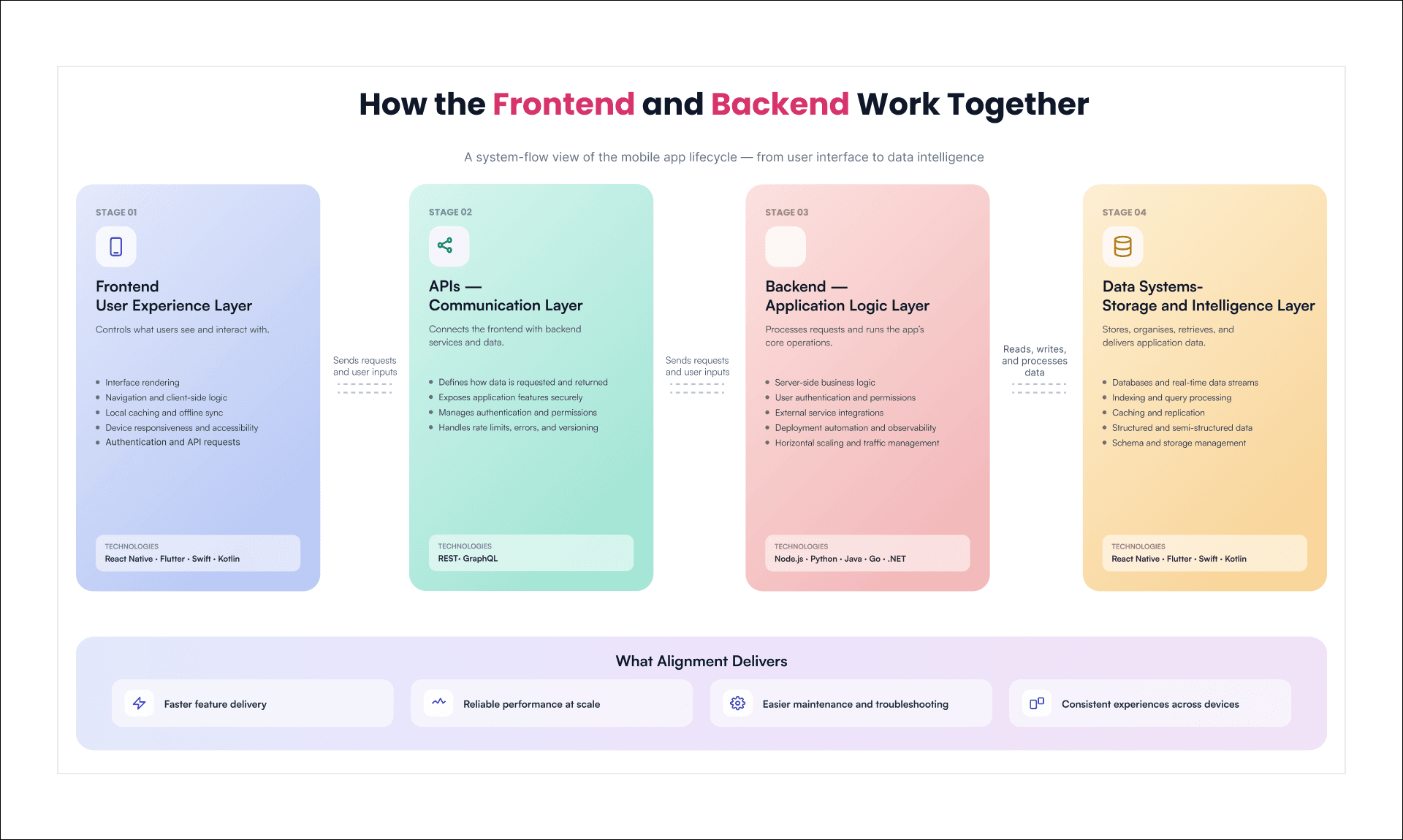
The frontend delivers the user experience. It handles interface rendering, client-side logic, navigation, local caching, and device-level responsiveness. This layer supports authentication flows, API integrations, and offline synchronisation while maintaining visual continuity and accessibility. Frameworks such as React Native, Flutter, Swift, and Kotlin provide the structure for responsive and cross-platform development. In some cases, HTML, CSS, and JavaScript are used to support hybrid builds or embedded web views. The frontend is also responsible for ensuring that app interactions remain consistent across varying screen sizes, input types, and network conditions.
The backend provides the computational foundation. It processes requests, manages databases, handles user authentication, and supports external integrations. It also coordinates server-side logic, deploys new features, and ensures that APIs and data pipelines function with stability. Technologies such as Node.js, Python, Java, Go, and .NET are used to support modular architecture, security, and operational performance. The backend also manages deployment automation, observability tooling, and horizontal scaling to accommodate user growth.
APIs define the connection between the frontend and the backend. These interfaces specify what data is available, how it is accessed, and how application logic is exposed. REST and GraphQL are widely adopted formats, with well-designed APIs incorporating standards for rate limits, latency management, error handling, and version control.
Data systems underpin the entire structure. Whether operating on structured, semi-structured, or real-time data, the performance of the application depends on how data is stored, indexed, cached, and queried. Backend efficiency depends on write operations, schema flexibility, and replication strategy. Frontend responsiveness depends on pagination design, payload minimization, and consistency in state management.
Throughout the product lifecycle, frontend and backend architecture determine how effectively teams can deliver new features, investigate issues, and respond to user demands. When development is aligned across these layers, the result is an application that remains reliable at scale and responsive across contexts.
Building a Secure and Compliance-Friendly Mobile App
Security and compliance are non-negotiable in modern mobile app development. For any product handling personal data, financial information, or regulated content, aligning with compliance frameworks is essential to minimize legal risk and build long-term user trust.
Today’s apps operate in a complex regulatory environment. Global data laws and industry-specific rules shape everything from design to deployment. Understanding these frameworks early helps teams build safer, more responsible products.
Key Regulations to Address:
1. PCI DSS (Payment Card Industry Data Security Standard)
Required for any app processing card payments. It enforces encryption, access control, and fraud prevention from the ground up. Developers must integrate PCI-compliant processors and design secure input flows from day one.
2. GDPR (General Data Protection Regulation)
Applies to apps handling data from EU users. It requires clear user consent, data portability, deletion options, and secure session management. These rules impact both frontend flows and backend data practices.
3. HIPAA (Health Insurance Portability and Accountability Act)
Applies to healthcare apps managing patient data. It demands secure authentication, encrypted storage, and access logging. Backend systems and API layers must meet medical-grade privacy standards.
4. CCPA (California Consumer Privacy Act)
Applies to apps collecting data from California residents. It mandates transparency, opt-out options, and data access controls. Apps must give users control over how their data is used and stored.
Supporting Frameworks That Strengthen Compliance:
- SOC 2
Focuses on operational trust—availability, confidentiality, and processing integrity. Relevant for enterprise and SaaS mobile platforms.
- ISO/IEC 27001
A broad standard for managing security controls, assessing risk, and maintaining secure infrastructure across app development and deployment.
- OWASP Mobile Top 10
Lists the most common mobile app vulnerabilities. Helps developers address threats like insecure storage, weak cryptography, and improper session handling.
Compliance influences more than documentation—it shapes architecture, data flows, and the way teams respond to risk. From token handling to audit logging, from permissions to encryption, compliance defines how securely an app operates.
For mobile products in high-trust environments, these standards are not extra. They are the foundation for credibility, scalability, and long-term growth.
Types of App Development Businesses can explore
Choosing the right development approach significantly impacts how your app performs, scales, and reaches users across various devices. This section breaks down the core options—native, cross-platform, PWA, hybrid, and low-code—so you can align your tech choices with real product and business needs.
Approach | Key Strengths | Limitations | Ideal Use Cases |
Native | Highest runtime efficiency | Separate codebases for each platform | Performance-intensive apps |
Cross-Platform | Cross-Platform | May lack parity with native in edge cases | Consumer-facing apps |
Progressive Web App | Instant access via browser | Limited native integration (e.g., sensors, biometrics) | E-commerce sites |
Hybrid | Uses web technologies (HTML, CSS, JS) | Performance bottlenecks in graphics-heavy or real-time tasks | Internal-facing apps |
Low-Code / No-Code | Visual app development environment | Limited scope for deep customization | Internal business tools |
Use Cases of AI In Mobile Apps
Artificial Intelligence is transforming mobile applications into intelligent, context-aware digital assistants. By embedding AI capabilities, developers are unlocking advanced features that enhance usability, personalization, and business outcomes.
Best Examples of AI in Mobile App Development
The following examples demonstrate how AI is elevating mobile experiences across domains:
1. Personalized Recommendations
Streaming platforms like Netflix and Spotify leverage AI to curate highly tailored content feeds. These systems analyse user behaviour, preferences, and contextual data to deliver suggestions that keep users engaged and reduce churn.
2. Intelligent Virtual Assistants
Mobile applications integrate AI-powered assistants such as Google Assistant, Siri, and Alexa to perform tasks through natural language. These assistants utilise speech recognition, intent classification, and contextual understanding to provide seamless voice-based interactions.
3. Predictive Text and Smart Reply
Messaging apps like Gmail and WhatsApp use AI to suggest replies or auto-complete phrases based on user patterns. This not only improves typing speed but also enhances user convenience through contextual awareness.
4. Facial Recognition and Biometrics
Security-centric apps, including banking and authentication platforms, employ AI for facial recognition, fingerprint analysis, and liveness detection. These biometric features ensure robust security while maintaining user convenience.
5. Real-Time Language Translation
Applications like Google Translate offer real-time speech and text translation, powered by neural machine translation models. This enables users to overcome language barriers during travel, commerce, or communication.
6. AI-Powered Health Monitoring
Wearable-connected apps such as Fitbit and Apple Health track heart rate, sleep, and physical activity. AI models process sensor data to provide insights, detect anomalies, and recommend lifestyle changes.
7. Fraud Detection in Fintech Apps
Payment and banking applications integrate AI models to detect unusual patterns, flag suspicious transactions, and prevent fraud in real time. These systems continuously learn and adapt to emerging threats.
Challenges of Implementing AI
AI implementation often sounds promising in theory, but putting it into production reveals a more complex reality. From fragmented data environments to regulatory scrutiny, the path to value is layered with technical and organizational challenges.
1. Data fragmentation is among the most common hurdles.
Businesses rarely have clean, structured, and ready-to-use data across all systems. Valuable insights are often trapped in disparate formats or legacy platforms. At GeekyAnts, this is addressed by designing ingestion layers that unify real-time and batch data, building pipelines tailored for both model training and high-speed inference.
2. Scalable infrastructure is another constraint.
AI workloads—particularly real-time ones—place heavy demands on system performance. Legacy systems often fall short when models must operate at scale and respond within milliseconds. At GeekyAnts, infrastructure is engineered with modular components, container orchestration, and native AI workflow support, enabling seamless deployment and horizontal scaling without bottlenecks.
3. Model reliability is also an operational risk.
Even accurate models can underperform post-deployment due to data drift or unfamiliar inputs. The absence of explainability deepens trust issues, especially when outcomes affect users or finances. To counter this, GeekyAnts implements continuous feedback loops, monitoring layers, and explainability tools such as SHAP directly into the pipeline, ensuring models evolve with real-world complexity and remain audit-ready.
4. Cross-functional silos tend to slow things down further.
AI projects span engineering, product, compliance, and data teams—but seamless coordination is rare. Through integrated delivery models, GeekyAnts helps align these functions under shared KPIs and clear governance, accelerating both time-to-value and strategic coherence.
5. Security, privacy, and compliance remain non-negotiable.
As AI systems handle sensitive data, adherence to global standards like GDPR, HIPAA, and SOC 2 must be built in, not bolted on. At GeekyAnts, this is achieved through secure architecture patterns: encrypted data flows, access control by role, and privacy-preserving techniques such as differential privacy and tokenisation, ensuring performance does not come at the cost of trust.
6. Finally, business alignment can make or break an AI initiative.
Models that do not contribute to revenue, efficiency, or risk reduction tend to stall. That is why AI systems designed by GeekyAnts are scoped from day one to tie model outputs to measurable outcomes—whether it is fraud detection, smarter recommendations, or faster onboarding.
These challenges are real, but solvable. With the right design choices and production-focused implementation, AI systems can be deployed with confidence, scaled sustainably, and governed responsibly.
AI Mobile App Future Trends to Watch in 2026 & Beyond
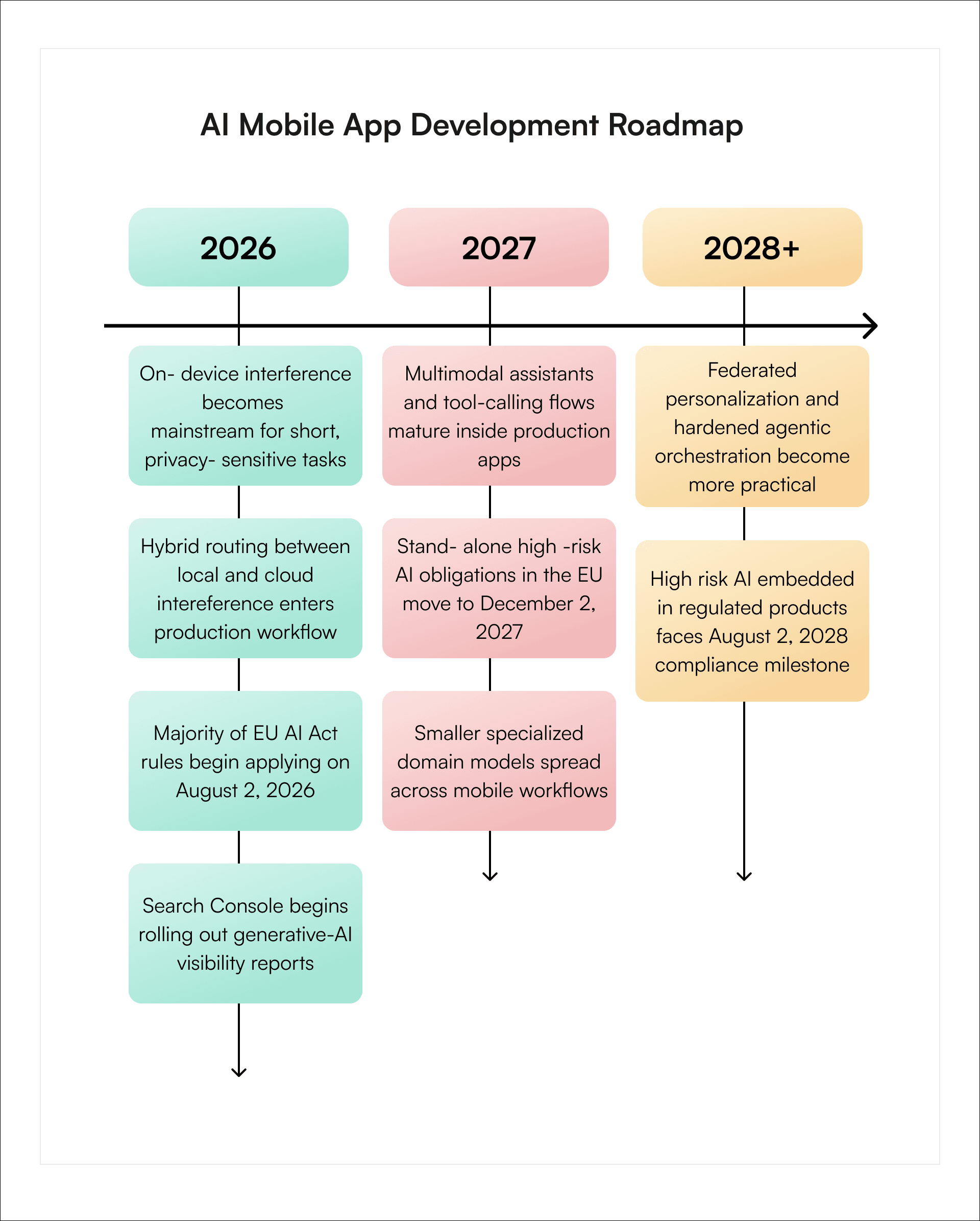
There are two technical facts about which 2026 trends must revolve. First, recent studies indicate that at the moment mobile devices can run only smaller models and that the latency problem is a true limit for on-device LLM models.
Second, there are efforts made by the platforms for developing better small on-device models and hybrid routing. This is why the most reliable trends for 2026 and further are not "everything runs locally" or "everything runs in the cloud," but well-balanced architectures.
Below you will find the timeline that outlines the main milestones on the way to success for mobile developers going to work after 2026. The dates provided here reflect the changes in the platform, governance and maturation curve based on both vendor roadmaps and current research.
AI Mobile Trend | Analysis | Example |
On-Device AI | • Processes data directly on the device • Reduces latency and cloud dependency • Improves privacy and offline access | Offline voice recognition or image classification |
Generative AI Integration | • Creates contextual content and responses • Supports more adaptive user experiences • Automates content-heavy mobile tasks | An in-app AI writing or shopping assistant |
Agentic AI | • Moves beyond answering questions to completing tasks • Connects multiple app functions and services • Requires permissions and human confirmation | An assistant that books an appointment and adds it to a calendar |
Multimodal Interfaces | • Combines text, voice, images, and gestures • Improves contextual understanding • Makes mobile interactions more accessible | A user uploads a product image and asks a voice-based question |
Hyper-Personalization | • Adapts content and journeys using live behavioural signals • Improves recommendations and engagement • Must operate within privacy controls | A fitness app that adjusts daily goals based on activity and recovery |
Intelligent Automation | • Automates repetitive mobile workflows • Reduces manual input and processing time • Supports faster operational decisions | An insurance app that extracts and validates claim details |
Real-Time Language Intelligence | • Enables translation, transcription, and summarization • Supports multilingual users • Makes voice-led workflows more practical | Live translation during a customer-support conversation |
AI Governance and Compliance | • Adds controls for privacy, bias, and explainability • Supports model monitoring and audit trails • Reduces regulatory and reputational risk | A banking app that records why an AI-generated risk alert was triggered |
Understanding the Cost Breakdown of Mobile App Development in 2026
The most realistic method of updating the cost segment is the segmentation of the initial build costs from the operational costs. Most of the 2025 articles tend to lump these segments together or under-emphasize the AI-specific segments. This will no longer suffice in 2026. The AI-enabled applications need to factor in budget for evaluation, observability, data management, model orchestration and governance in addition to user interface, backend, and QA testing. All current benchmarking prices available in the marketplace from Clutch, outsourcing rate benchmarks from Accelerance, official application store listing fee from Apple and Google Play and current vendor platform capabilities support this model of cost structure.
Below is a real-world model of budgeting for the initial development of an AI-enabled business app.
Table Cost Guide:
Basic AI app or MVP: $30,000–$80,000
Mid-complexity AI app: $80,000–$200,000
Complex enterprise AI app: $200,000–$500,000+
Cost component | Typical cost range | Typical share of initial build | What it covers |
Discovery and product strategy | $3,000–$50,000 | 5%–10% | Requirements, use-case prioritisation, feature scoping, AI feasibility, architecture decisions, data assessment, and success metrics |
UX and UI design | $6,000–$100,000 | 10%–20% | User flows, wireframes, visual systems, accessibility, multimodal interaction design, and prototyping |
Mobile app engineering | $12,000–$150,000+ | 20%–30% | iOS, Android, or cross-platform development, local storage, permissions, offline functionality, and performance tuning |
Backend and integrations | $9,000–$125,000+ | 15%–25% | APIs, business logic, authentication, databases, admin panels, and external system integrations |
AI feature integration and evaluation | $6,000–$125,000+ | 10%–25% | Prompt design, tool calling, model orchestration, safety filters, evaluation frameworks, model testing, and fallback logic |
Data and knowledge layer | $3,000–$75,000+ | 5%–15% | Embeddings, retrieval systems, content pipelines, data cleaning, labelling, vector databases, and feature stores |
QA and device testing | $4,800–$75,000+ | 8%–15% | Functional testing, security testing, performance checks, edge cases, low-end-device validation, and AI-output testing |
Security, privacy, and compliance | $3,000–$60,000+ | 5%–12% | Threat modelling, encryption, secure storage and networking, policy design, audit controls, and regulated workflows |
DevOps, MLOps, observability, and release | $1,800–$40,000+ | 3%–8% | CI/CD, cloud configuration, model monitoring, rollback systems, alerting, analytics, and experiment controls |
Launch and distribution administration | $600–$15,000 | 1%–3% | App-store submissions, account setup, release preparation, production rollout, and launch validation |
The component-level dollar figures are indicative ranges calculated from the percentage shares and the overall project ranges. They should not be added together, because each row reflects a range across projects of different sizes.
Cost component | Typical share of initial build | What it covers |
Discovery and product strategy | 5%–10% | requirements, use-case prioritization, feature scoping, architecture decisions, success metrics |
UX and UI design | 10%–20% | flows, wireframes, visual systems, multimodal interaction design, prototyping |
Mobile app engineering | 20%–30% | iOS, Android, or cross-platform client work, local storage, permissions, performance tuning |
Backend and integrations | 15%–25% | APIs, business logic, auth, databases, admin panels, external systems |
AI feature integration and evaluation | 10%–25% | prompts, tool calling, model orchestration, safety filters, evaluation harnesses, fallback logic |
Data layer and knowledge layer | 5%–15% | embeddings, retrieval, content pipelines, data cleanup, labeling, feature stores |
QA and device testing | 8%–15% | functional testing, performance, edge cases, low-end-device validation, model output testing |
Security, privacy, and compliance | 5%–12% | threat modeling, secure storage/networking, policy design, audit controls, regulated workflows |
DevOps, MLOps, observability, and release | 3%–8% | CI/CD, monitoring, rollback, alerting, analytics, experiment controls |
Launch and distribution admin | 1%–3% | store submissions, release prep, account setup, production rollout |
Cost by App Complexity: What You Can Expect to Spend
App development budgets vary widely, depending on how complex the product is and how many systems it connects to. The ranges are synthesized from 2026 app-pricing guides and Clutch’s current marketplace data.
App complexity | Typical 2026 scope | Typical budget | Typical timeline |
Simple MVP or internal utility | one core workflow, few screens, minimal backend, light or no custom AI | $15,000–$50,000 | 2–3 months |
Mid-complexity business app | auth, APIs, payments or notifications, admin panel, one or two AI features | $50,000–$150,000 | 4–6 months |
Complex AI-enabled product | real-time features, offline behavior, multiple roles, deeper integrations, hybrid/on-device AI | $150,000–$300,000+ | 6–12 months |
Regulated or AI-native platform | fintech, healthcare, marketplace, heavy security/compliance, advanced orchestration, large backend | $300,000–$750,000+ | 9–18+ months |
The key determinant is the feature set. Every new module—chat, AI recommendations, third-party APIs—adds cost. At GeekyAnts, we help clients scope their MVPs carefully and design modular architectures to keep costs proportional to real user value.
Phase-Wise Cost Allocation: From Discovery to Deployment
A mobile app is not built all at once. The budget is spread across specific development phases, each contributing to final product quality and business viability.
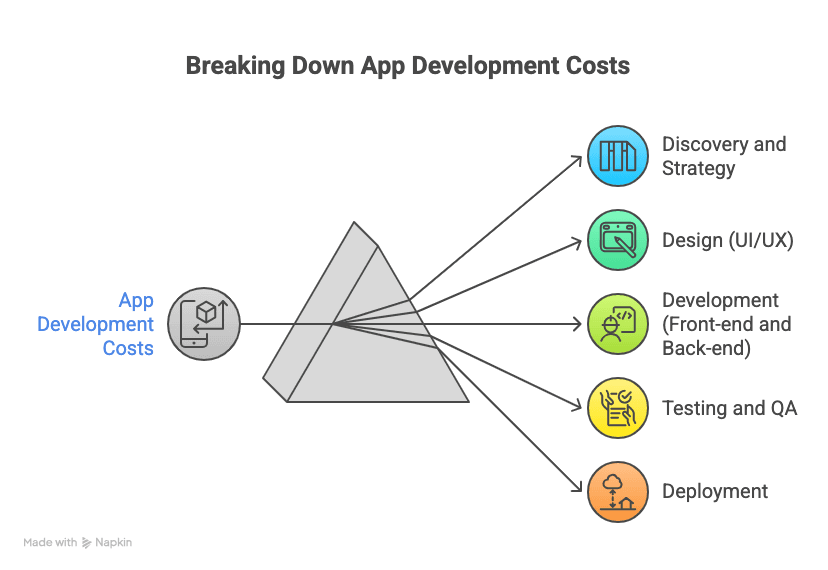
- Discovery and Strategy: Around 5–15% of the budget. This includes research, goal setting, technical planning, and requirement analysis. Even for modest apps, this phase typically costs $5,000–$10,000. It lays the groundwork for a project that is technically sound and aligned with business needs.
- Design (UI/UX): Accounts for 20–25% of the total cost. Designers create wireframes, high-fidelity screens, and interactive prototypes. Expect to spend $10,000–$50,000, depending on screen count, complexity, and the need for branding. A good design reduces user churn, and we often validate it through user testing before a single line of code is written.
- Development (Front-end and Back-end): The largest slice—40–60% of the total cost. For a $100,000 app, development might cost $40,000–$60,000+. This includes API setup, database connections, business logic, and cloud infrastructure. Development timelines stretch from a few months to over a year, depending on complexity.
- Testing and QA: Allocated 15–20% of the total. This includes manual testing, automated test scripting, usability validation, and load testing. For an average app, this might cost $5,000–$20,000. At GeekyAnts, QA is integrated throughout the build cycle, not treated as a last-minute phase.
- Deployment: Typically under 5% of the cost. Expect to spend $2,000–$5,000 to get the app published on app stores, configure cloud hosting, and run pre-launch verification.
For a $100k budget, a typical allocation might look like:
- Discovery: $7k
- Design: $20k
- Development: $55k
- Testing: $15k
- Deployment: $3k
This structured view ensures clients can assess each stage independently and avoid underbudgeting critical components like QA or infrastructure setup.
Developer Rates by Region: The Geography of Cost
The following rate bands are based on the directional triangulation of Clutch’s July 2026 location benchmarks.
It should be offered as an anchor for budgeting purposes, not a standard pricing for contracts. Specialists on AI/ML, mobile-security, and senior product engineering are usually priced higher than the generalists.
Region | Directional hourly rates in 2026 | Notes |
North America | $100–$250+ | Clutch country anchors are lower in some cases, but enterprise agencies and senior specialists commonly sit above marketplace medians |
Western Europe | $70–$150 | Premium engineering markets remain strong, especially for regulated and enterprise work |
Eastern Europe | $40–$95 | Still cost-effective for product engineering, though senior specialists can exceed this band |
Latin America | $35–$90 | Nearshore advantage keeps demand high; senior mobile and cloud talent often lands at upper-mid band |
South and Southeast Asia | $25–$80 | Lowest broad cost base, but quality varies widely by firm maturity and specialization |
Hiring a senior developer in the U.S. might cost $150/hr or more, while equally experienced engineers in India or Eastern Europe can deliver comparable quality at a lower rate. GeekyAnts operates from Bangalore, India—delivering robust engineering at globally competitive pricing—often using hybrid models with U.S. partners to bridge time zones and maximize collaboration.
Cost Factors Beyond the Build
Your development budget is just one part of the financial story.
- Maintenance: Post-launch, plan to spend 15–20% of your initial budget per year. This includes bug fixes, OS updates, library upgrades, and small improvements. For a $100k app, that is around $15,000–$20,000 annually.
- Marketing: Launch campaigns can cost as much as the app itself. Budget for paid ads, app store optimization, and social promotion. Even modest apps need a few thousand dollars to get noticed.
- Updates and Features: Most apps evolve. A healthy roadmap includes 2–3 update cycles in the first year. These may cost a few thousand to tens of thousands, depending on the scope.
- Third-party Services and Infrastructure: APIs, analytics, cloud storage, and server infrastructure incur recurring costs. Add to that app store fees and legal or compliance consulting if needed. Factoring these in from the start prevents budget overruns later.
How to Hire the Right Mobile App Development Company in the USA
Hiring the right development partner is one of the most decisive factors in a successful mobile app project, especially when AI capabilities are involved. In the U.S. market, where technical expectations and compliance standards are high, finding a team that blends technical depth with transparent communication and proven delivery is critical. Below is a structured guide to evaluating and selecting a capable mobile app development company.
1. Clarify Your Needs and Budget Early
Before approaching any vendors, define your product vision. Will the app be native, cross-platform, or PWA? Does it require AI features such as recommendations, vision models, or real-time prediction? These choices will shape the tech stack, scope, and hiring criteria. Establish a realistic budget range—not only for development, but also for testing, launch, iteration cycles, and post-launch maintenance.
Companies that understand the full product lifecycle will help map your investment to both current priorities and future scale. At GeekyAnts, this process often starts with a discovery phase to align technical execution with business goals from the outset.
2. Review Portfolios with a Critical Eye
A company’s track record is your best indicator of fit. Look for mobile apps in their portfolio that resemble your domain, use similar technologies, or serve similar user types. Review not just aesthetics but the complexity of functionality: have they delivered AI-powered apps? Do they have experience with enterprise-grade architecture?
Case studies and client references are key. Direct conversations with past clients often reveal how well a team communicates, hits deadlines, or supports scale post-deployment. Positive signals include projects for U.S.-based clients, successful app store launches, or AI integration for fintech, health, or commerce platforms.
3. Validate Technical and AI Expertise
Beyond mobile fluency—React Native, Flutter, Kotlin, Swift—look for evidence of backend engineering, cloud integration, and AI/ML capability. AI features are not just “add-ons”; they require deep support across infrastructure, data flow, and model lifecycle.
Ask whether the team has experience in:
- Training and deploying ML models
- Using tools like TensorFlow Lite, Core ML, or Firebase ML
- Connecting to external AI services like OpenAI, Amazon SageMaker, or custom APIs
- Managing edge cases like on-device inference, offline sync, or streaming data
Companies with AI fluency will provide architectural guidance, identify pitfalls early, and ensure AI is embedded responsibly and scalably. At GeekyAnts, AI-readiness is part of the technical design conversation from the earliest planning sprint.
4. Gauge Communication and Transparency
Remote collaboration demands clarity and accountability. The best companies are easy to talk to, quick to respond, and deliberate in their process. Early interactions should include detailed project breakdowns, realistic estimations, and transparent feasibility assessments.
Pay attention to how they explain constraints or surface tradeoffs. Do they use tools like Jira, Trello, or Slack for project tracking? Are you introduced to your delivery team early? These are signs of operational maturity.
At GeekyAnts, structured agile sprints, regular demos, and shared backlogs give clients visibility into every stage of development.
5. Understand Their Development Process and Team Model
Ask how they run projects: Is the team Agile? Are there sprint retros, stakeholder reviews, and roadmap updates? Understand the team composition—do you get a dedicated PM, a QA analyst, a frontend/backend specialist, and optional AI engineers?
Determine their ability to adapt to your workflows—whether through overlap in U.S. time zones, flexible team scaling, or regular sync-ups. A well-managed team will reduce friction and improve velocity.
6. Evaluate Proposals and Pricing Structure Carefully
A strong proposal includes a clear breakdown of deliverables, tech stack choices, timeline by phase, and pricing per module or milestone. Look for:
- Clarity on scope boundaries
- Transparent change request processes
- Options for post-launch support
- Code/IP ownership clauses
Low-cost vendors may cut corners on testing or architecture. Reputable teams may cost more, but save you from costly rebuilds. At GeekyAnts, pricing is always mapped to scope clarity, tech complexity, and post-launch support needs, so there are no surprises mid-project.
7. Prioritise U.S. Market Familiarity
For U.S.-based businesses, regulatory awareness and user expectations matter. A good development company should understand ADA accessibility, HIPAA (for healthcare), PCI DSS (for fintech), and relevant app store compliance.
Also important is cultural fit: fluency in English, timezone overlap, and familiarity with the U.S. consumer landscape. Teams that work extensively with U.S. clients will have stronger instincts about product-market fit, engagement patterns, and UX standards.
8. Verify Reputation and Client Feedback
Lastly, cross-check their public reviews on platforms like Clutch, GoodFirms, or G2, and look for consistent praise around communication, reliability, and project outcomes. Direct testimonials offer the best insight into their problem-solving under pressure.
If a company has worked on high-stakes apps for demanding clients and delivered consistently, it is usually a safe bet. At GeekyAnts, over 100 five-star Clutch reviews underscore our commitment to building scalable, successful digital products for global clients.
Choosing the Right App Development Company: How GeekyAnts Stands Out
For businesses planning to build a mobile or web app—particularly those integrating AI, cross-platform support, or complex systems—the development partner you choose will influence everything from product velocity to long-term scalability. GeekyAnts brings together technical excellence, cross-domain experience, and a delivery model designed for deep collaboration, making them a reliable partner for both startups and global enterprises.
Deep Expertise in Modern Technologies
GeekyAnts is not just a user of frameworks like React Native and Flutter—their developers contribute directly to their evolution. The team is behind NativeBase, a widely adopted React Native UI library with over 18,000 GitHub stars.
This level of engagement equips them with architectural insight that translates into better-performing, more scalable applications. Their work in AI and Generative AI focuses on solutions that are not only technically sound but also designed to drive user engagement and operational value.
Full-Lifecycle Product Development
Rather than acting as a transactional vendor, GeekyAnts participates in the full product lifecycle—from design and prototyping to development, testing, release, and support. With over 800 successful projects delivered for 550+ global clients, including Google, Darden Restaurants, and PayPoint, they have developed a delivery rhythm that blends engineering rigour with business clarity.
Agile methodologies, milestone-based planning, and proactive communication keep stakeholders informed and projects aligned with their strategic goals.
Multi-Industry Impact, Tailored to Each Domain
GeekyAnts has delivered tangible results across multiple industries, adapting its capabilities to meet the compliance, UX, and performance standards unique to each sector:
- Healthcare: Developed a HIPAA-compliant mobile platform for Marigold Health that enables secure, moderated group therapy sessions with 24/7 peer support.
- Fintech & Logistics: Revamped PayPoint’s billing and logistics app with a modern UI, real-time parcel tracking, delivery agent tools, and analytics via Firebase. The partnership has continued for over three years.
- Retail & Hospitality: Designed the Olive Garden app, contributing to a 5% increase in user satisfaction and supporting a growing loyalty base of over 1.6 million users.
- Real Estate: Delivered a feature-rich mobile platform for Torii, complete with map-based search, biometric authentication, and AI-powered chat assistance to streamline home-buying.
- Education: Built PopSmartKids, an ed-tech platform for collaborative learning, with modules for story creation, drawing, and purchase-supported content.
Each solution was engineered for flexibility, scale, and user experience, tailored to meet the expectations of its target audience and aligned with the client’s business goals.
A Transparent, Collaborative Delivery Model
GeekyAnts begins every project with a discovery process focused on clarity and alignment. Clients are involved throughout development via sprint-based cycles, real-time demos, and direct access to project managers and developers.
With an established presence in San Francisco and a globally distributed team, they provide responsiveness and scale without compromising transparency or speed. Clients benefit from structured processes, open communication, and informed technical guidance at every phase of development.
Post-Launch Support and Long-Term Value
Support does not end once the app goes live. GeekyAnts continues to offer performance monitoring, maintenance, and planning for future iterations. Their engagement model encourages lasting partnerships, particularly valuable for product teams without in-house technical depth. This approach ensures the apps they build continue to evolve with the platform, scale with demand, and deliver value over time.
Top Industries that Benefit from AI Apps
AI’s role is no longer an experimental layer added on top of operations. It is part of the core architecture, powering systems that need to learn, adapt, and deliver outcomes in real time. Let us look at key sectors where AI is redefining how challenges are addressed and how growth is sustained.
1. Healthcare
AI is revolutionizing healthcare by improving diagnostics, personalizing treatment, and streamlining operations. The data-intensive nature of medicine makes it ideal for AI-driven analysis and prediction.
Key AI applications and benefits in healthcare include:
- Diagnostics and Medical Imaging: AI can analyze X-rays, MRIs, and CT scans with accuracy matching expert radiologists. This enables earlier, more precise disease detection, improving outcomes.
- Personalized Medicine: Machine learning tailors treatment plans by analyzing patient data (genetics, history, lifestyle). This enhances effectiveness and reduces side effects.
- Drug Discovery and Research: AI accelerates drug development by analyzing chemical and genomic data, identifying promising compounds faster and more affordably.
- Administrative Efficiency: AI automates tasks like medical coding, billing, scheduling, and record-keeping. Hospitals save time and money, and staff can focus on patient care.
Real-world examples:
- FDA-approved AI tools assist pathologists in cancer detection.
- DeepMind’s AI diagnosed eye diseases from scans with specialist-level accuracy.
2. Finance and Banking
The finance industry has adopted AI to enhance security, improve decision-making, and boost customer service. Real-time analysis of vast data makes AI indispensable.
Key AI applications and benefits in finance include:
- Fraud Detection and Risk Management: AI detects fraud faster and more accurately than manual methods, reducing false positives and protecting customer funds.
- Algorithmic Trading and Investment: AI analyses market data and automates high-speed trades, maximising returns and minimising risk. Robo-advisors offer tailored investment advice.
- Credit Scoring and Risk Assessment: AI evaluates non-traditional data to assess loan risk, expanding access to credit and improving decision-making.
- Customer Service and Personalization: AI chatbots handle 24/7 banking queries and transactions. Personalised financial advice increases engagement and satisfaction.
Real-world examples:
- JPMorgan’s COIN automates legal document review, saving 360,000 hours annually.
- Mastercard and insurers use AI to accelerate claims and reduce fraud.
3. Retail and E-commerce
AI is transforming retail and e-commerce by improving customer targeting, streamlining supply chains, and enhancing both online and in-store experiences. Retailers use AI to drive efficiency, personalization, and higher sales.
Key AI applications and benefits in retail include:
- Personalized Recommendations: AI analyses browsing and purchase behaviour to suggest relevant products, boosting upsells and engagement. Platforms like Amazon and Netflix see major revenue from recommendation systems.
- Inventory Management and Demand Forecasting: AI forecasts demand to reduce stockouts and overstocking. This improves supply chain efficiency and reduces inventory waste.
- Dynamic Pricing: AI updates prices in real time based on demand, customer behaviour, and competition, maximizing profits and competitiveness.
- Chatbots and Virtual Assistants: AI bots answer customer questions, track orders, and recommend products. AR-based assistants allow virtual try-ons, improving shopping convenience.
Real-world examples:
- Amazon generates over 35% of its sales through its AI recommendation engine.
- Target reduces stockouts and inventory costs using predictive AI.
- IKEA uses visual search powered by AI to match products to uploaded photos.
4. Manufacturing
AI is modernizing manufacturing by increasing automation, improving product quality, and reducing downtime. This shift, often referred to as Industry 4.0, is data-driven and focused on operational excellence.
Key AI applications and benefits in manufacturing include:
- Predictive Maintenance: AI monitors machine data to predict failures, reducing downtime and extending equipment life.
- Quality Control and Defect Detection: AI-powered vision systems detect flaws in real time with high precision, reducing defects and rework.
- Robotics and Automation: AI enables robots to perform complex assembly, packaging, and material handling tasks with speed and accuracy.
- Production and Supply Chain Optimization: AI adjusts schedules, inventory, and logistics based on demand and material flow, reducing bottlenecks and improving throughput.
Real-world examples:
- Siemens uses AI for predictive maintenance to cut downtime.
- Audi applies AI to inspect weld seams more efficiently.
- Boeing uses AI analytics to reduce production delays.
5. Transportation and Logistics
AI is enhancing transportation and logistics by improving routing, enabling autonomous systems, and streamlining supply chains. It increases safety, reduces costs, and improves delivery efficiency.
Key AI applications and benefits in transportation and logistics include:
- Autonomous Vehicles: AI powers self-driving technology by enabling vehicles to perceive their surroundings and make driving decisions. This reduces accidents and improves last-mile delivery through autonomous robots and drones.
- Route Optimization: AI analyses traffic, weather, and delivery constraints in real time to identify optimal routes. This saves time, reduces fuel costs, and minimizes environmental impact.
- Warehouse and Logistics Automation: AI-powered robots handle sorting, picking, and packing tasks in warehouses. This speeds up order fulfillment and reduces human labour costs.
- Predictive Analytics for Supply Chain: AI forecasts demand surges, disruptions, or inventory needs. This enables proactive planning and improves supply chain reliability.
Real-world examples:
- UPS’s ORION system saves over 10 million gallons of fuel annually through AI route optimization.
- Amazon uses warehouse robots for faster, lower-cost fulfillment.
- Uber and Lyft use AI for real-time ride matching and route planning.
6. Education
AI is transforming education by personalizing learning, automating administrative work, and improving access for all students. It enhances both teaching efficiency and student performance.
Key AI applications and benefits in education include:
- Personalized Learning: AI platforms adapt to student performance in real time, offering tailored lessons, quizzes, and feedback to match learning pace and style.
- Intelligent Tutoring Systems: AI-powered virtual tutors assist students with questions and provide feedback instantly, reinforcing learning even outside classroom hours.
- Administrative Automation: AI systems handle grading, scheduling, and attendance tracking. This frees teachers to focus on lesson planning and student interaction.
- Accessibility and Support: AI helps students with disabilities by converting speech to text, translating lessons, or reading content aloud, improving inclusivity.
Real-world examples:
- Carnegie Learning’s AI math tutor improved test scores through adaptive instruction.
- Georgia Tech used an AI teaching assistant that responded to student questions with human-like accuracy.
- Florida’s St. Petersburg College uses an AI chatbot to assist students with enrollment and financial aid.
7. Agriculture
AI is transforming agriculture by helping farmers boost yields, reduce waste, and adapt to changing environmental conditions. With AI-powered insights, farming is becoming more precise, sustainable, and efficient.
Key AI applications and benefits in agriculture include:
- Precision Farming: AI analyses sensor, drone, and satellite data to optimise irrigation, fertilisation, and pesticide use. This reduces costs and minimises environmental impact.
- Crop Monitoring and Disease Detection: AI-powered drones and vision systems detect signs of stress, pests, or disease early. This allows for timely interventions and healthier crops.
- Autonomous Farm Machinery: Self-driving tractors and robotic harvesters use AI to perform tasks with high accuracy and minimal supervision, increasing productivity.
- Supply Chain and Yield Prediction: AI forecasts crop yields and demand, helping plan harvests, reduce waste, and streamline logistics from farm to market.
Real-world examples:
- John Deere’s “See & Spray” system uses AI to target weeds precisely, reducing herbicide use by up to 90%.
- Farmers in Africa use AI apps that diagnose crop issues from smartphone photos.
- AI helps manage climate risk by guiding planting and irrigation strategies.
Conclusion
AI mobile app development in 2026 has moved forward with requirements that align to user business needs, data quality, model performance, security & compliance, and long- term scalability from start to finish.
Some of the most powerful AI apps use a combination of product strategy and reliable mobile architecture. Therefore, choosing the right development approach and technology partner is important. GeekyAnts brings a unique blend of technical fluency, real-world case experience, and delivery discipline—qualities that are essential for building not just functional apps, but future-ready platforms.
Whether the goal is to launch a new AI feature, modernize legacy systems, or roll out a cross-platform product at scale, their approach focuses on outcomes that align with both business needs and user value. For teams seeking more than outsourced execution—for those looking for a trusted product partner—GeekyAnts stands ready.