
For years, automation engineers have followed a familiar rhythm. Requirements come in, test cases are written, scripts are automated, locators break, scripts fail, and debugging begins. Fix, re-run, repeat.
This cycle hasn’t changed much, even though frameworks have evolved from Selenium to Cypress to modern tools like Playwright.
What if your automation framework didn’t just execute tests — what if it planned them, wrote them, ran them, and even fixed them when they broke? That’s exactly what Playwright Test Agents bring to the table.
Playwright introduced these AI-powered agents in version 1.56 to automate key parts of the testing lifecycle — planning, generating, and healing tests — using an agentic loop that interacts with your live application.
In this blog, we’ll explore what Playwright Agents are, how to set them up, how to use seed tests and prompts, what files they generate (like in your screenshot), and how each agent works in the development lifecycle. We’ll close with practical tips on prompt design and real differences versus generic AI coding tools like Cursor or ChatGPT.
The Evolution of Automation with Playwright
Playwright became popular by addressing common automation challenges like flaky tests and synchronization issues. With features like automatic waiting, semantic locators such as getByRole, and built-in tracing, it reduced the effort required to stabilize tests. This allowed QA engineers to focus more on test coverage rather than debugging framework issues. However, even with these improvements, designing and maintaining test scripts still remained a manual effort.
We still had to:
- Translate requirements into scenarios
- Convert scenarios into code
- Refactor when UI changes
- Fix broken locators
Playwright Agents aim to assist in exactly those areas.
Introducing Playwright Test Agents
Playwright Test Agents are AI-assisted automation workflows embedded directly into your Playwright project, designed to help you:
- Explore an application and produce a test plan
- Transform that plan into executable Playwright test code
- Run tests and automatically repair failures
There are three core agents:
The Planner Agent takes natural language input and converts it into structured test scenarios. It uses the seed test as context to explore the application, understand user flows, and identify possible edge cases. The output is a detailed test plan with steps and expected outcomes, similar to how a QA engineer would design test cases.
The Generator Agent takes these structured scenarios and converts them into executable Playwright scripts. While generating code, it interacts with the live application to validate selectors, identify stable locators, and ensure assertions reflect actual UI behavior. It can also follow architectural patterns like Page Object Model, producing manageable and scalable test code.
The Healer Agent focuses on maintaining test stability. When a test fails, it replays the scenario, inspects the DOM, and identifies what caused the failure. It then attempts to fix the issue by updating selectors, adjusting waits, or modifying interaction logic, reducing the manual effort required for test maintenance.
These agents can be invoked independently or chained together in a complete “agentic loop”:
Planner → Generator → Healer
This turns a natural language description of test requirements into a stable test suite with minimal manual coding.
Project Setup — Step by Step (Beginner Friendly)
If you already know basic Playwright automation, this should feel like an extension of that knowledge. If not, stick with it. By the end, you will understand how these agents help even if you’re new to automation.
1. Create a Playwright Project
Start by creating a new directory and initializing a Node project:
mkdir playwright-agent-demo
cd playwright-agent-demo
npm init -y
npm install -D @playwright/test
npx playwright installNow install Playwright:
You now have a basic Playwright project.
2. Initialize Playwright Agents
To add agent definitions to your project, run:

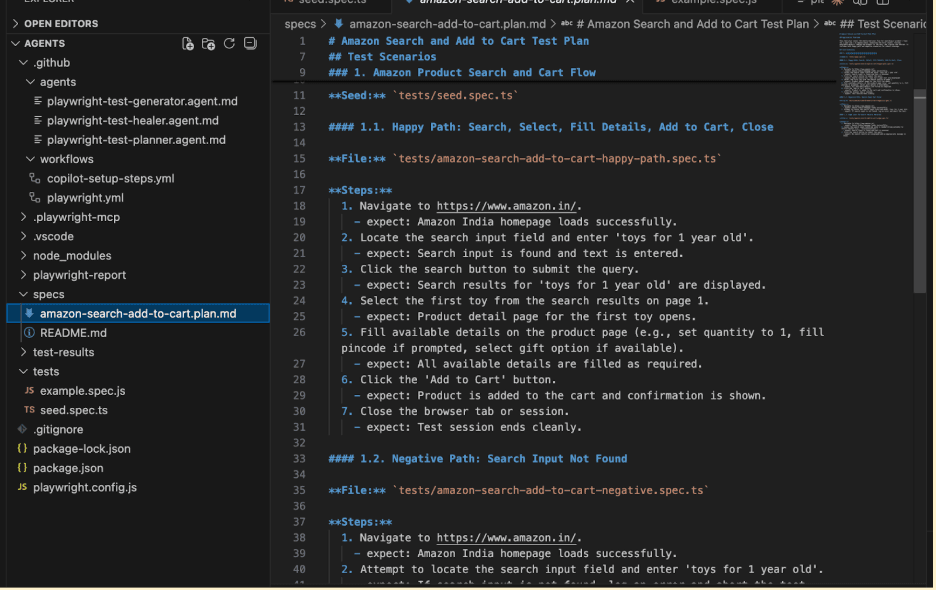
This command generates agent files in your project — which you’ll recognize in the screenshot below:
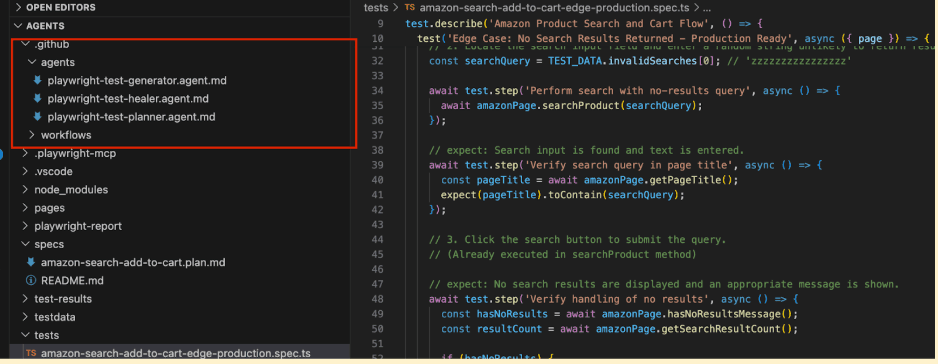
A folder named .github/agents contains:
- playwright-test-planner.agent.md
- playwright-test-generator.agent.md
- playwright-test-healer.agent.md
These are the agent definitions that your AI tool (like Claude Code, VS Code Copilot, or OpenCode) uses to understand how to plan, generate, and heal tests.
Under the root folder, you also see:
- specs/ – for Markdown plans
- tests/ – for generated Playwright test files
- seed.spec.ts – a seed test that bootstraps the environment
This exact file structure is aligned with Playwright’s agent conventions: .github/agents, specs/, and tests/
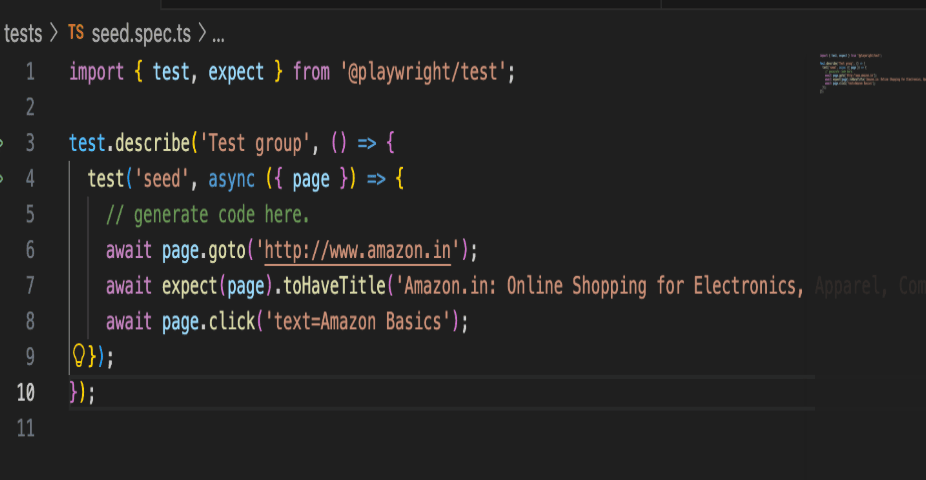
A seed test is essential because it provides a starting context that the planner uses to understand where to begin exploration, including any setup required (like logging in or navigating to a landing page).
Create tests/seed.spec.ts:
Next, add dummy seed data to a JSON file (optional but recommended):
testdata/seed.json
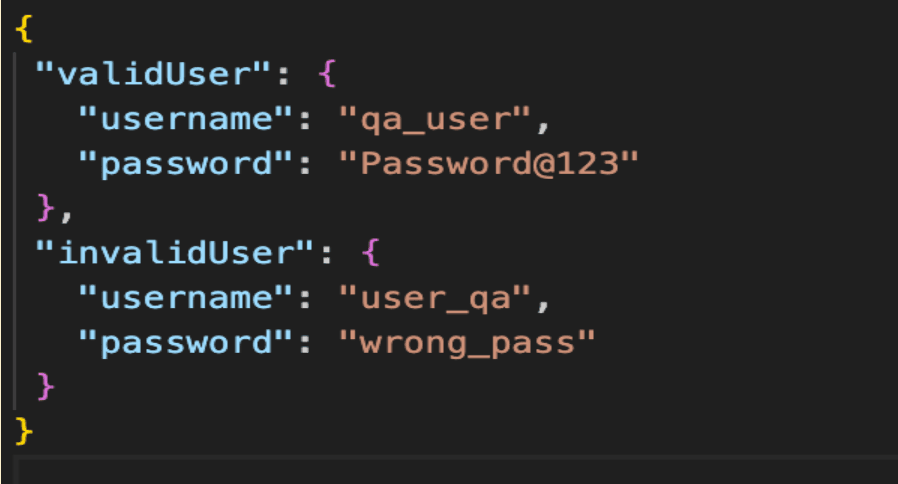
The seed test and seed data help the Planner understand context and scenarios, which makes its output far more relevant and accurate.
How the Planner Agent Works
The Planner Agent is like a QA analyst powered by AI. Rather than immediately writing code, it first produces a structured Markdown test plan that describes required test scenarios, user flows, steps, expected outcomes, and test data.
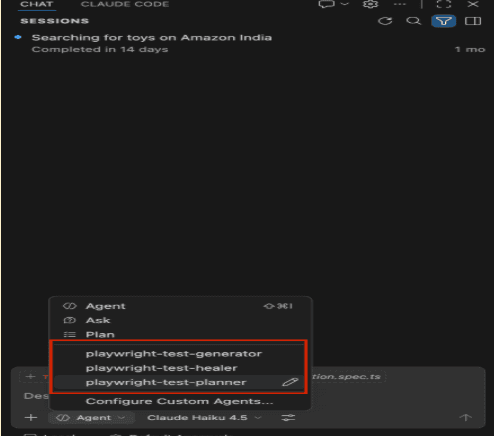
You can review this file before moving to code generation.
Generator Agent: Turning Plans into Code
Once you have a test plan, it’s time to generate actual automation scripts.
Switch your AI assistant to Generator mode and provide a prompt such as:
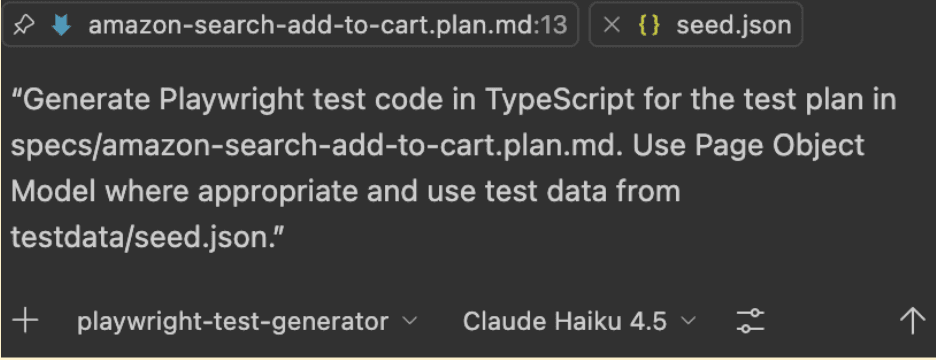
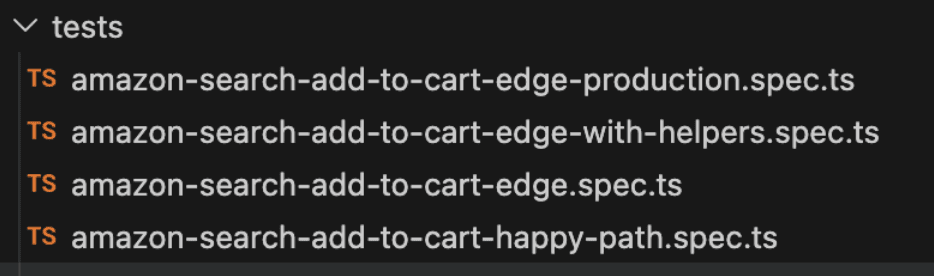
The Generator reads the Markdown plan, actively interacts with the browser to verify selectors and assertions, and produces test scripts under the tests/ directory. Similar to this:
For example, provide a prompt like:
“Create a test plan for login functionality with valid and invalid user scenarios using the seed test context.”
The Planner will explore your live application (through the seed test) and generate a Markdown file under specs/ such as:
specs/login-plan.md
This file contains detailed, human-readable test plans, not code, but instructions for how you want the generator to build tests.
This step mirrors the typical QA process of writing test case documentation, except that the agent generates it automatically.
Each test should mirror a scenario from the plan.
Because the Generator interacts directly with the live app and evaluates selectors as it writes code, the tests it generates are often more stable and accurate than typical prompt-only AI output.
Healer Agent: Using AI to Fix Failing Tests
Inevitably, tests fail. It might be due to UI changes, such as an updated locator or changed button label.
Traditionally, you would open your editor, inspect the DOM, update selectors, and re-run tests. With Playwright’s Healer Agent, this can be assisted by AI.
Invoke the healer with a prompt like:
“Run and fix the failing test tests/amazon-search-add-to-cart-edge.spec.spec.ts.”
The healer will:
- Replay the failing test in debug mode
- Inspect the DOM to find equivalent elements or flows
- Propose updates to locators or waits
- Re-run until the test passes, or decide that the test really reflects a broken feature.
This reduces repeated manual debugging cycles, especially for tests that only break due to minor UI refactors.
From Prompt to Execution: Inside the Agent Workflow
While using Playwright Test Agents feels simple from a user perspective, there is significant processing happening in the background.
The agents operate through an agentic loop where they can read project files, execute tests, interact with the browser, and inspect the live DOM. For example, the Planner uses the seed test to explore the application and understand flows, the Generator validates selectors in real time while generating scripts, and the Healer replays failing tests to identify and fix issues.
In the foreground, this complexity is abstracted into simple inputs and outputs. Users provide prompts and receive structured test plans, executable test scripts, or suggested fixes without directly interacting with the underlying processes. This separation is what makes Playwright Agents both powerful and easy to use.
Structuring Tests with Page Object Model
One of the biggest benefits of designer prompts is instructing the generator to produce maintainable code, and that starts with architecture.
If you prompt:
“Use Page Object Model and store locators in separate page files.”
The generator will output something like:
pages/login.page.ts
tests/login/login.spec.ts
Where:
- login.page.ts contains locator definitions and reusable page actions
- login.spec.ts uses the page object and seed data for test logic
This results in a clean, maintainable automation framework that scales well.
The Agentic Loop: From Plan to Stable Tests
When you use all three agents together, you get:
Seed Test + Prompt
↓
Planner → Create Markdown Plan
↓
Generator → Create Tests
↓
Healer → Fix Failures
↓
Stable Automation Suite
This mirrors a full human automation lifecycle, except now it is assisted by AI and deeply integrated with Playwright’s tooling.
How Playwright Agents Differ from Generic AI Tools
Feature | Regular AI Code Generation | Playwright Agents |
|---|---|---|
Generates code based on prompts | Yes | Yes |
Runs tests | No | Yes |
Fixes failing tests autonomously | No | Yes |
Understands live DOM while generating code | No | Yes |
Integrated into the Playwright ecosystem | No | Yes |
It’s easy to confuse Playwright Agents with other AI coding tools, such as:
- Cursor AI
- ChatGPT code generation
- Generic AI assistants
But there is a fundamental difference:
Playwright Agents integrate with MCP (Model Context Protocol) and interact with your application and tests as part of the lifecycle. This makes them far more context-aware and useful than simple prompt-to-code generation.
Best Practices for Using Playwright Test Agents
Here are some practical tips based on real usage trends:
Provide Good Context
- Always include a clear seed test
- Use structured seed data
- Reference environment details
Write Clear Prompts
Make sure your prompts include architecture preferences, test data references, and expected outputs.
Review Generated Tests
AI can generate great boilerplate, but human review is still important.
Integrate into CI Carefully
Treat healed and generated tests as drafts until fully reviewed.
Conclusion
Playwright Agents, Planner, Generator, and Healer bring AI directly into the automation lifecycle. They:
- Plan test scenarios from natural language
- Generate well-structured automation code
- Check and repair failing tests
- Help QA teams move faster with less manual overhead
For any QA engineer with basic Playwright knowledge, these agents unlock productivity leaps, from planning without code to generating and healing tests with AI.
If you want to experiment with this in your own project, run the agent setup, build a seed test, and start with simple prompts. You will be amazed at how much of the automation lifecycle can now be AI-assisted.