
Customizable Video Editing App
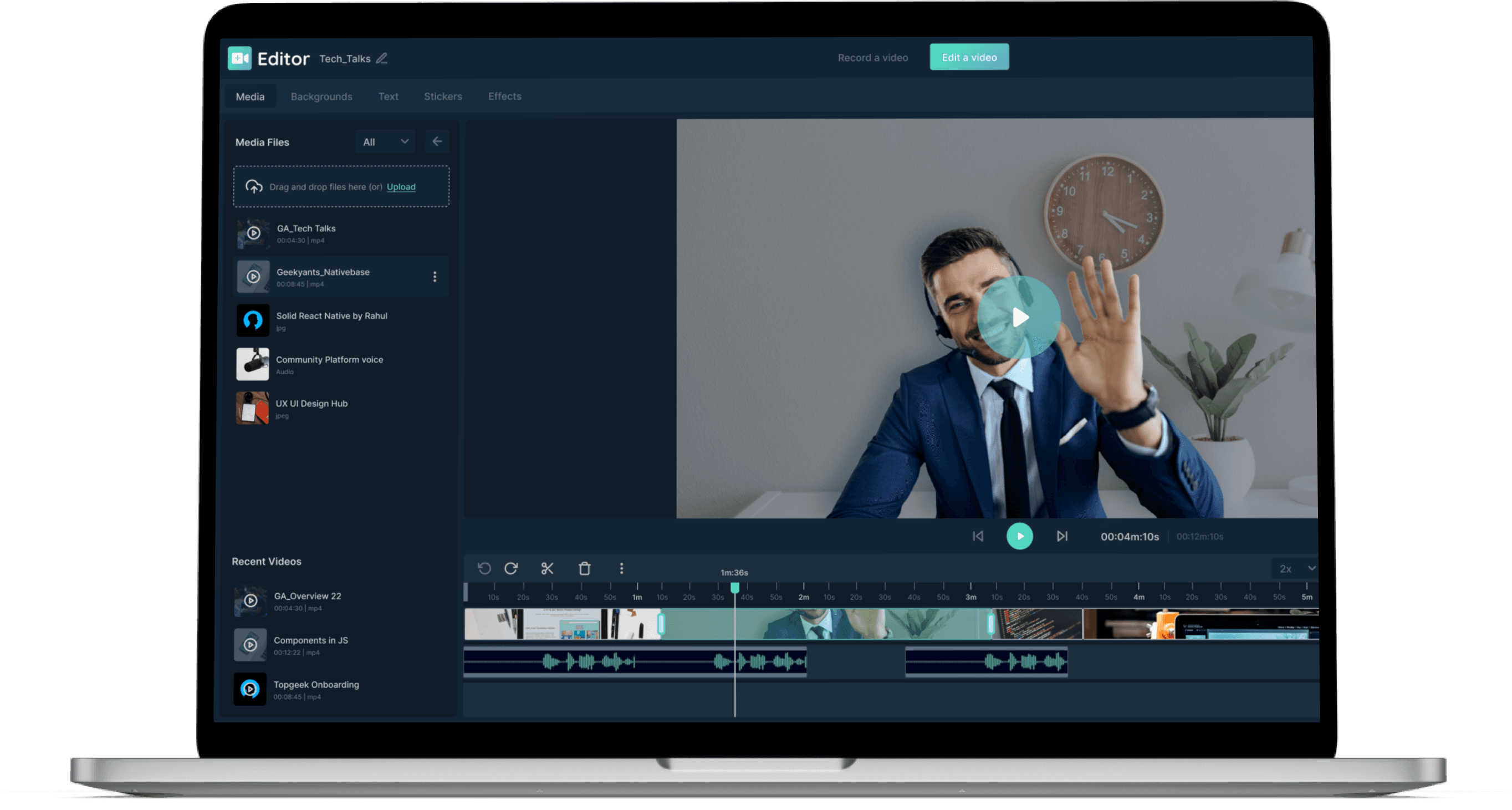
A web-based video editing platform that offers a variety of tools for editing and recording video and audio files. Can be customized based on your project requirements saving hundreds of design & development hours. Create your MVP fast and be market-ready in a jiffy.
About the Customizable Video Editing App
Most traditional video editing programs are used to create high-quality films. These video editing solutions are typically large and heavy to work with, complicated to learn for non-professionals, and require expensive hardware.
We wanted to create an accessible, easy-to-use product for non-professional editors who wish to record or edit a video quickly, which can be tailored according to your specific needs.
VideoCraft is a fully-customizable browser-based video editor app that does not require installation and is intuitive enough to let you get started within a few minutes. Quickly trim, speed up, split, merge, or color-correct your videos. The app also enables you to take multiple shorts without redoing the entire recording and create social media-ready content instantly.
A web-based video editing platform that offers a variety of tools for editing and recording video and audio files. Can be customized based on your project requirements saving hundreds of design & development hours. Create your MVP fast and be market-ready in a jiffy.
Services
Main Modules

Recorder
The Recorder part of the app has multiple functionalities. Some of them include audio/video recording, ability to apply virtual background, and screen recording.

Editor
The Editor is built using FFmpeg. The main functionalities are the selection of audio and video clips, editing functionalities (like trim, speed up, split, merge, color correction), pause and play controls, operations preview, and rendering.
Services
Features
VideoCraft is built to meet all the editing requirements of a modern video editing application. It is built to address end-to-end editing requirements to a large extent. The application has the following features.
Signup / Login
Users can signup with Google or with email. Logged-in users can upload and save their video files and images.
Recording
Users have the option for video/audio/screen recording. They can also use virtual backgrounds, choose from available backgrounds, upload and save background image, and blur background with different intensities.
Editing
The application supports trimming, merging, and splitting of videos. Users can also resize video, reposition video, add background music, insert voice-overs, and save work or progress.
Export
The application contains features that allow changing the size, quality, and format of the final export video. Users can also choose the export format.
Services
Technologies Used
A look at the tools and tech stacks we used for the video editor app.

React.js
Front-end technologies
React.js was used for making the Graphic User Interface. It is easy to integrate, provides efficient performance, and has great community support.

TypeScript
Front-end technologies
This was used for adding type safety to the codebase. It allows easy resolution of errors, allows faster collaboration, and improves readability.

MediaPipe Selfie Segmentation
Front-end technologies
This was used for separating the subject from the background and manipulating the background, for example, adding virtual background and blurring the background.

FFmpeg.wasm
Front-end technologies
This was primarily used to render the final output video the user could download. It was used for its robust features and alignment with other tech stacks.

Native Web AP
Front-end technologies
This was used to allow users to access various media formats, such as camera, microphone, and screen, and to record the user's media.

Firebase
Back-end technologies
This was used for user authentication, saving user data, and logging project data. It has great support, contains cloud storage facilities, and provides a real-time database.
Services
Can Be Used to Build Apps Similar To

Adobe Premiere Pro

Final Cut Pro X

iMovie

DaVinci Resolve

Filmora

Lightworks
100%
Themeable
2x
Faster Development
50%
Cost Reduction
Plug & Play
Features
Want to Customise This Video Editing App to Suit Your Business Needs?
We can help you do that!
FAQ
What You Need to Know
The timeline for building a custom video editing app like Premiere Pro and Filmora can vary widely depending on several factors. Typically, however, a new customization process can take 10-20 weeks to develop.
The duration of the project depends on the scope of the project. Features such as user authentication, payment processing, and push notifications can add to the development time. Additionally, platform compatibility and team size can also impact the timeline. Generally, it's essential to work closely with the development team to establish a clear timeline and ensure the project stays on track. For a deeper understanding, schedule a call with us today.
The general duration is 12-24 weeks.
The complexity of the application will be the primary factor in the project duration. While pre-built features can be customized easily, if new features are to be built, there will be stretched in duration. The API necessary and the tech stack compatibility will also be determining factors in getting the application up and running.
The development cost to build a fully customizable video editing app like Filmora, iMovie will vary from 15-40k USD, depending on the complexity of the application and the level of customization needed. But whatever the case, we can provide a custom solution that will help you cut costs while achieving the same performance envision for the application.
We have a team of talented developers that are skilled in the latest tech stacks. Our team consists of core contributors to key front-end technologies like React Native and Flutter. The backend team is also skilled in using the latest frameworks. Add to this our industry experience and proven expertise, you have a winning formula you cannot get anywhere else.
It definitely can.
The application is made to be scalable, 100% themeable, and accommodating of new upgrades. You will face no hiccups in achieving your target application by using the customizable video app as a foundation to build. In fact, using the customizable app will make the process 2X faster.
React Native enables us to use familiar web development techniques and libraries to build native iOS and Android apps, resulting in faster development times and cost savings. It also has a rich set of UI components and supports hot reloading, allowing for quick iteration and testing.
The framework also has a large and active community that continually contributes new features, tools, and documentation. This allows developers can leverage their existing knowledge and skills to build high-quality, performant, and responsive mobile apps for both iOS and Android platforms.
We can definitely help with upgrading the existing video editing application.
If there is a match in the tech stacks, the process will be straightforward and super-fast. Even if tech stacks do not match, we will happily share a custom solution that matches your business goals.