

This article series will introduce us to TypeScript and concepts such as:
- Why should you learn TypeScript?
- What exactly is TypeScript?
- What are the benefits of TypeScript?
- How to configure your project to use TypeScript?
- Some TypeScript features, plus many more!
When I come across new technologies, I simply ask myself one question: Why would I want to utilize this technology in the first place?
In this blog, we will answer the question "Why?" and explore what solutions does typescript provide.
Static Type Vs Dynamic Type
Static Type
The static type of language has a typing system, and the statement that we are writing must be specified. Static languages are often compiled languages.
We must first compile it before running it.
This category includes languages like C, Java, C++, and C#.
The code itself explains what it is designed to do.
int a = 2;

a = `H` // this will raise an error. :(

// This function will return integer.
int main() {
    return 0;
}
Dynamic Type
In case of a dynamic language, there is no such thing as a typing system. A variable's value can be assigned dynamically. Dynamic languages require run-time environments, such as Node.js, to execute the code.
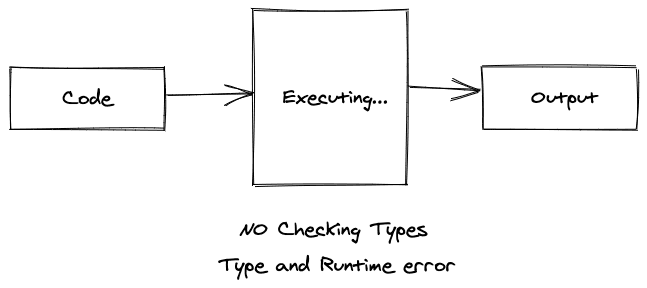
It is a little challenging to determine what the code is intended to do without actually running it. Usually, there is no compilation process.
let a = 2;

a = "I am a string" // this will work :)

// This function may or may not return.
function main() {
}
What is a TypeScript?
Let's move on to TypeScript.
TypeScript is a static programming language that has a typing system, as opposed to JavaScript.
But Why Do We Use Typescript In The First Place?
Let's start at the top. When the complexity of an application begins to rise, dynamic language cannot be relied on. Especially, when creating complex apps with frameworks such as React, Angular, or Vue, your projects must comprise numerous modules. It would be inconvenient if you had to run everything to ensure that there were no type checking mistakes.
Developers with a background in static languages like Java are likely to have encountered runtime errors like this throughout their JavaScript journey.
Undefined is not an object.
Undefined is not a function.
Uncaught TypeError: Cannot read property 'value' of null.
This is where Typescript comes in.
Typescript ensures that we would not encounter this error at run-time anymore.
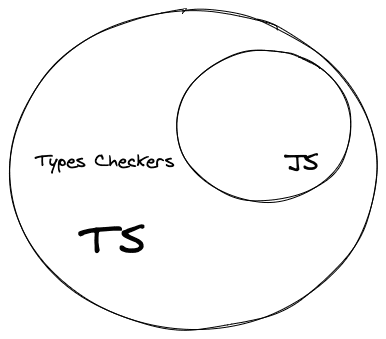
Typescript is supposed to be a superset of JavaScript. This means that a JavaScript code is a TypeScript code. Javascript can be written in typescript.
TypeScript is not supported by browsers. The browsers only comprehend JavaScript, that's why we require a compiler capable of converting TypeScript code to Java. There are numerous compilers available, such as Babel, TypeScript, and others.
Now, that we have a fundamental understanding of TypeScript, it's time to write some code!
We will not be using any frameworks and will first install the TypeScript compiler before writing TypeScript code.
PS: If you just want to get your hands dirty with TypeScript without any customizations, this is the place to be.
Let's make sure our environment is ready to run typescript.
Node.js is used to compile and run TypeScript. (You should be able to use yarn as a package management.)
To write typescript, use VScode. It will also feature IntelliSense, which can detect errors without even running your code.
In the terminal, run this command. This will make package.json file with the default config.
npm init -yNow let's install the typescript compiler as a dev dependency. You can install it either globally or locally.
npm install --save-dev typescriptNow that we have installed TypeScript, it's time to write some code.
Let's start with the most famous Hello World program.
Create a new file app.ts. Typescript has ts as an extension.
let message :string = "Hello World";
console.log(message);
This is a very basic code of TypeScript. Let's understand what is happening here.
We have declared a variable message. There is a new syntax :string. This is known as a type annotation. We are telling typescript that the variable message can only hold string data.
In the second line, we have just printed the value. Remember what I said earlier?
A valid JavaScript code is also a TypeScript code.
In packages.json let's add a new script to compile the typescript code.
"validate": "tsc app.ts"
I prefer this way to compile code. You can change the script's name.
Now, in order to run this code, we need to compile it.
npm run validateThis program compiles the code and generates a javascript file.
If you open that file, you will notice that it contains the old javascript code that browsers understand.
Now let's execute this file.
node app.jsSince TypeScript has to transpile the code to JavaScript, we can execute .js file and see the output Hello World.
This was a very basic example of how you can get started with TypeScript.
Configuration
Typescript lets you configure the environment to compile your code.
Run this command to generate tsconfig.json.
npx tsc --init```
Typescript will generate this file with default configuration. You can open this file and edit configuration.

Let's explore some config properties.
```json
{
"module": "commonjs", /* Specify what module code is generated. */
"target": "es2016", /* ECMA standard */
"allowJs": true, /* Allow JS to be a part of your program. */
}You can learn more about the configuration here.
I hope this blog helped you understand why we need TypeScript? In the upcoming blogs, we will be exploring more about TypeScript.
Until next time!







