

In the current digital landscape, optimizing website performance is essential. Fortunately, there are multiple solutions available to achieve this. Be aware that a website that performs poorly can result in customers migrating to your competitors.
Here's a question for you: what is the average load time of a webpage before a customer moves away? The answer is five seconds. If your desktop site takes more than two seconds to load, you risk losing revenue. For mobile browsers, the threshold is eight seconds.
So, what can you do to improve performance? Let's take a look at this example.
import * as React from 'react';
import * as ReactDOM from 'react-dom/client;

class Check extends React.Component {
    render() {
        return <h2>Hi!</h2>;
    }
}
const container = document.getElementById('root');
const root = ReactDOM.createRoot(container);
root.render(<Check />);
There is one basic mistake in this code. Developers often prioritize finishing their work quickly over paying attention to the quality of the code. While this mistake may seem small for a single file, it can quickly become a huge issue when there are thousands of files and components involved.
The mistake is importing unnecessary code.
For example, using import * as ReactDOM from ‘react-dom/client’; may seem harmless, but when used in 300 lines of code, it can add a significant amount of time to the performance work.
To avoid such problems, developers should:
- Avoid unnecessary imports
- Use hook fragments
- Avoid using local storage unless absolutely necessary
While local storage can be useful for storing cookies or analytics data, it should be used sparingly to prevent performance issues.
Now let's talk about what is perhaps the most underrated function in React i.e React DOM.
export function Movie({ title, releaseDate }) {
    return (
    <div>
        <div> Movie title: {title}</div >
		    <div> Release date: {releaseDate}</div>
    </div>
    );
}
export const MemoizedMovie = React.memo(Movie);
In the example above, a change to a prop triggers a chain reaction where a component and its children re-render, causing changes to the DOM data.
This is where React Memo comes in handy.
React Memo Advantage
Suppose you have a parent component with three functionalities: movie title, release date, and live view count. The live view count is real-time data, but the other two are not. When you render the parent component, it will re-render everything. However, if you use React Memo, it will create a separate component for the non-real-time data and store the previous state in virtual memory. If there is no change, it will not re-render the child components, saving time and resources.
This approach can be especially useful in production-level scenarios where you have a large catalog of products. However, you should avoid using React Memo in situations where the states vary infinitely, as it may do more harm than good. It is important to analyze where it can be used and to exercise due diligence.
Take a look at the following map
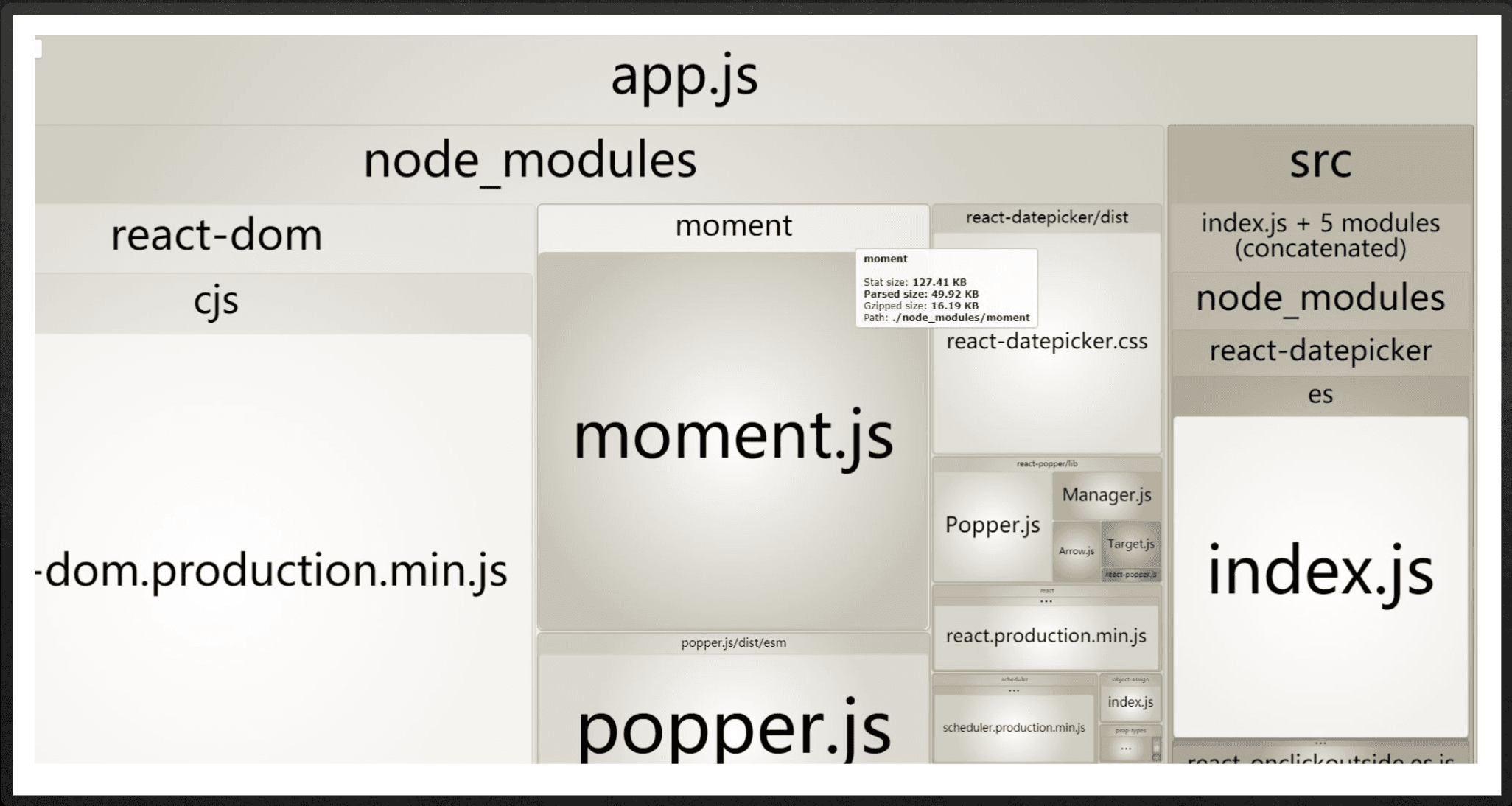
Bundle sizing and the index.js file are two common causes of performance degradation. The index.js file is often too large and causes longer load times when not chunked out. To resolve this issue, you can split the file into smaller chunks using lazy loading.
Lazy loading loads content first and then loads the necessary bundles or files in the background as the user scrolls down. For example, on a dashboard page with graphs and order details, you can bundle the features above the dashboard and load them in one separate bundle. Similarly, you can load the features below the dashboard in another separate bundle. Use lazy loading for component tests to avoid loading unnecessary content.
A question that often comes up is when to chunk the files, it is best to separate out the bundle file for React if it is over 2 MB. If the site has a lot of content, it can go up to 3.5 or 4 MB at most.
The example below can be used as a reference to improve your website's performance, even if you are not familiar with the code.
import React, { Suspense, lazy } from 'react';

const Home = lazy(() => import(/* webpackChunkName: "home" / '/routes/Home'));
const Billing = lazy(() => import(/ webpackChunkName: "billing" / '/routes/Billing'));
const FeatureA = lazy(() => import(/ webpackChunkName: "feature-a" / '/routes/FeatureA'));
const FeatureB = lazy(() => import(/ webpackChunkName: "feature-b" */ '/routes/FeatureB'));

const App = () => (
    <Router>
        <Suspense fallback={<div>Loading...</div>}>
            <Routes>
                <Route path="/" element={<Home />} />
                <Route path="/billing" element={<Billing />} />
                <Route path="/feature-a" element={<FeatureA />} />
                <Route path="/feature-b" element={<FeatureB />} />
            </Routes>
        </Suspense>
    </Router>
);

export default App;
To improve the performance of a project, optimizing certain functionalities is crucial. Let's discuss some effective strategies.
Firstly, applying the lazy load function and spreading functionalities across different bundles can significantly enhance performance. By loading only the necessary components or data when required, you can reduce the initial load time and improve the overall user experience.
Keeping dependencies updated is another important aspect. Regularly updating dependencies not only ensures the latest features and bug fixes but also helps avoid security flaws. Additionally, updating dependencies can contribute to reducing the bundle size, resulting in faster loading times.
When dealing with expensive operations like auto-suggestions in a search bar, it's essential to consider implementing throttling or debounce techniques. Throttling limits the number of queries made within a specific time period, preventing excessive querying and optimizing resource usage. On the other hand, debounce introduces a delay before executing a function, allowing handling expensive operations efficiently. For instance, debouncing can be useful in scenarios where real-time consideration is required for executing priority tasks quickly.
To implement debouncing, you can create a debounce function that returns a new function with a timer. This timer determines the delay before the function gets executed. For more advanced debouncing functionality, third-party libraries like Lodash can be utilized.
Additionally, flushing can be employed for performance enhancement, especially in cases where delayed actions are necessary. By applying a timer and flushing the tasks, you can avoid interference with priority tasks. Storing arguments and executing delayed tasks can be accomplished by integrating a debounce function.
Conclusion
It's worth noting that the decision to use throttling or debouncing depends on the importance of intermediate results. If intermediate results are not critical, debouncing is suitable. However, if fast results are vital, throttling should be implemented.
Finally, let's highlight a common mistake that developers should avoid: initializing props in the constructor. Doing so can lead to issues if the props change later on. It's important to handle prop updates appropriately to maintain optimal performance.
For example, the Amazon homepage effectively utilizes throttling to load content quickly, ensuring a seamless user experience.
By following these strategies and utilizing appropriate techniques, you can optimize the performance of a project and provide a better user experience.
Check out the full address here ⬇️