


In today's fast-paced software development world, automation testers need to understand the bigger picture of how modern applications reach production. The continuous workflow model encompassing code, build, test, and deploy stages has fundamentally transformed how development teams operate.The continuous workflow represents a modern development philosophy that emphasizes speed, quality, and collaboration through automation.
Continuous Philosophy
The continuous philosophy advocates that code be integrated often, so that integration is a non-event. Builds are triggered automatically based on commit and merge actions and the success of upstream builds. In summary:
- Each integration is verified by an automated build (including tests).
- Automate the complete build-test-deploy cycle to ensure that activities always run in the same order.
- Build and test each code modification to find problems early, when they are easier to fix.
“Continuous Integration does not get rid of bugs, but it does make them dramatically easier to find and remove..” — Martin Fowler
Continuous Integration (CI) is the frequent, automatic integration of code. All new and modified code is automatically tested with the master code.
Continuous Delivery (CD) is the natural extension of CI. It ensures
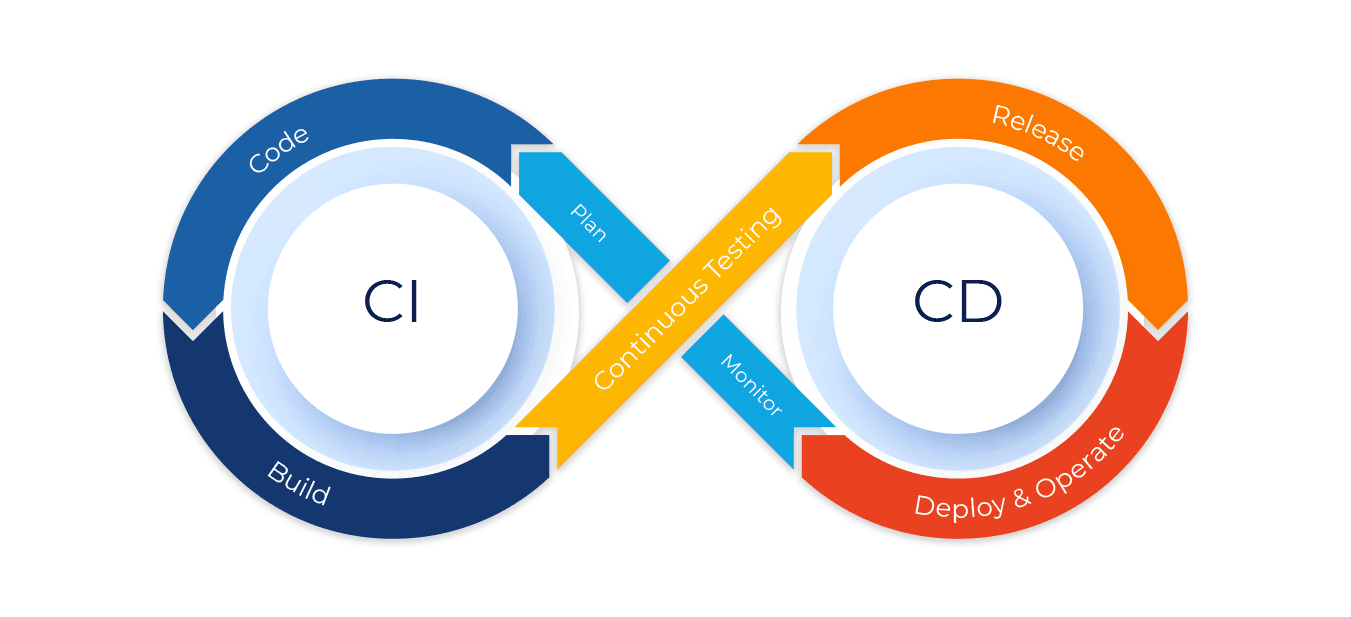
that the code is always ready to be deployed, although manual approval is required to actually deploy the software to production.
Continuous Deployment automatically deploys all validated changes to production. Frequent feedback enables issues to be found and fixed quickly.
To successfully implement continuous delivery, it is essential to have a collaborative working relationship with everyone involved. You can then use Delivery Pipelines, which are automated implementations of your product’s lifecycle.
What is Jenkins?
Jenkins is an open-source automation server that facilitates continuous integration and continuous delivery (CI/CD) practices.
It enables developers to automate various tasks involved in software development, such as building, testing, and deploying applications. With Jenkins, you can establish a robust and reliable CI/CD pipeline that automatically integrates code changes and delivers high-quality software at a rapid pace.
Jenkins is built on Java, so it can run on any machine that has Java installed. It is also highly extensible, so you can add new features and functionality by installing plugins.
Some vocabulary you should know before getting started with Jenkins
- Version Control System (VCS): A system that tracks changes to source code and allows multiple developers to work collaboratively on a project. Examples include Git, SVN (Subversion), and Mercurial.
- Build: The process of converting source code into an executable or deployable software artifact. This involves compiling, linking, and packaging the code.
- Artifact: A file or collection of files generated during the build process, such as a compiled binary, library, or archive.
- Pipeline: In the context of Jenkins, a pipeline is a series of automated steps that define the CI/CD workflow. It typically includes stages like build, test, and deployment.
- Job: In Jenkins, a job is a task or project that can be executed. Jobs can include building, testing, and deploying applications.
- Node/Agent: A machine or server on which Jenkins runs builds and executes jobs. It can be the Jenkins server itself or a separate machine connected to the Jenkins master.
- Master: The central Jenkins server responsible for managing the configuration and distributing tasks to agents/nodes.
- Workspace: A directory on the Jenkins agent where a job’s code and artifacts are stored during the build process.
- Trigger: An event that initiates the execution of a Jenkins job, such as code commits, schedule, or manual triggers.
- Plugin: An extension that adds additional functionality to Jenkins. Jenkins has a vast ecosystem of plugins that integrate with various tools and technologies.t Pottery Place, we believe in the power of art to bring people together. That might mean finding the perfect piece to complete your family home, or connecting with classmates while creating your own masterpieces.
- 11. Post-build Actions: Actions that are performed after the build process, such as archiving artifacts, sending notifications, or triggering downstream jobs.
How to install Jenkins?
Installing Jenkins on macOS: A Complete Step-by-Step Guide
Prerequisites :
Before installing Jenkins, make sure you have:
- macOS 10.13 (High Sierra) or later
- Admin privileges on your Mac
- Homebrew package manager
Homebrew is a package manager for macOS that simplifies the installation of software. This is the easiest and most recommended method. Please install Homebrew. Open your Terminal and run the following command:
/bin/bash -c "$(curl -fsSL https://raw.githubusercontent.com/Homebrew/install/HEAD/install.sh)"
Step 1: Install Java Development Kit (JDK)
Jenkins requires Java to run. It's recommended to have Java 11 or a later version installed. You can check your Java version by running
java -versionJenkins requires Java to run. Install the latest LTS version of Java using Homebrew
Step 2: Install Jenkins via Homebrew
The simplest way to install Jenkins on macOS is using Homebrew. Open your Terminal and run the command:
brew install jenkins-lts
Step 3: Start the Jenkins Service
Once the installation is complete, you can start the Jenkins service using the following command
brew services start jenkins-ltsStep 4: Access Jenkins
Open your web browser and navigate to http://localhost:8080. You should see the Jenkins setup page.
- Open your web browser and navigate to http://localhost:8080
- You'll be prompted to unlock Jenkins with an initial admin password
- The password is stored in a file. Get it with:
cat /Users/$USER/.jenkins/secrets/initialAdminPasswordReplace $USER with your macOS username if necessary. Copy the displayed password and paste it into the "Administrator password" field in your browser.
- Copy and paste this password into the "Administrator password" field on the setup page
Step 5: Customize Jenkins
After unlocking Jenkins, you'll be guided through:
- Installing plugins: Choose either "Install suggested plugins" (recommended for beginners) or "Select plugins to install"
- Creating an admin user: Set up your username, password, and other details
- Instance configuration: Confirm the Jenkins URL (typically http://localhost:8080)
After completing the setup, you'll be redirected to the Jenkins dashboard
Some of the useful commands :

#Start the Jenkins service
brew services start jenkins-lts

 # Stop Jenkins
brew services stop jenkins-lts
# Restart Jenkins
brew services restart jenkins-lts

 # Check Jenkins status
brew services list | grep jenkins
Note - There are several methods to get Jenkins up and running on your system. For comprehensive installation instructions, including helpful video guides, be sure to check out the official Jenkins documentation here: Click here
To get you started quickly, here are direct links to platform-specific installation guides:
Windows Users: Find detailed steps for installing Jenkins on Windows: Click here
macOS Users: This guide provides step-by-step instructions for installing Jenkins on your Mac: Click here
How to Integrate your Automation code with Jenkins
Integrating automation projects with Jenkins offers several approaches, as illustrated in the images below.. The three most commonly used approaches are:
Freestyle Project - A flexible option allowing custom configuration
Maven Project - Built specifically for Maven-based builds and automation
Pipeline - Code-based approach using Jenkinsfile for advanced automation workflows
Each integration method has distinct advantages and limitations. The best choice depends on your specific project requirements and complexity.
Jenkins Freestyle Project for Automation testing
A Freestyle project is Jenkins' most basic project type that allows you to configure build steps through a web interface rather than code. It's particularly useful for automation testers who:
- Need a quick setup without writing pipeline scripts
- Want to execute Maven-based Selenium test suites
- Require straightforward test execution and reporting
Setting Up a Freestyle Project for Selenium Automation
Step 1: Create a New Freestyle Project
- Navigate to Jenkins dashboard
- Click "New Item"
- Enter a name for your project (e.g., "Selenium-TestNG-Suite")
- Select "Freestyle project" and click "OK"
Step 2: Configure Source Code Management
- In the project configuration, scroll to "Source Code Management"
- Select Git (or your preferred SCM)
- Enter your repository URL containing your Maven-Selenium-TestNG project
- Configure credentials if needed
- Specify the branch to build (e.g., */main)
Step 3: Set Build Triggers
Under "Build Triggers," select how you want your tests to run:
- Poll SCM: Run tests when code changes are detected
- Build periodically: Schedule tests using cron syntax
- Trigger remotely: Allow tests to be triggered via API
Step 4: Configure Build Environment
- Check "Delete workspace before build starts" for clean test runs
- Configure JDK version that matches your project requirements
Step 5: Add Build Steps
- Click "Add build step" → "Invoke top-level Maven targets"
- Select your Maven installation
- Enter goals: clean test -DsuiteXmlFile=testng.xml
Step 6: Configure Test Reports
- Add post-build action → "Publish TestNG Results"
- Set TestNG XML report pattern: **/target/surefire-reports/testng-results.xml
- Add another post-build action → "Publish HTML Reports"
- Set HTML directory: **/test-output/ExtentReports/
- Set index page: ExtentReport.html
- Set report title: "Selenium Test Execution Report"
Step 7: Configure Email Notifications
- Add post-build action → "Email Notification"
- Enter recipient emails
- Check "Send separate emails to individuals who broke the build"
Advantages for Automation Testers
- User-friendly: Configuration through UI without coding knowledge
- Quick Setup: Ideal for straightforward Maven-Selenium test execution
- Visual Feedback: Easy-to-access test reports and logs
- Flexible: Simple to modify test parameters without pipeline changes
Limitations
- Limited Workflow Logic: Complex test flows are difficult to implement
- Reusability Challenges: Configurations can't be easily shared across projects
- Version Control: UI configurations aren't tracked in source control
Jenkins Pipelines for Automation Testing
A Jenkins Pipeline defines your entire automation workflow as code, offering better version control and more flexibility than Freestyle projects. Ideal for automation testing frameworks with simple to complex test execution needs.
Think of a Pipeline as a script that orchestrates all the steps needed to build, test, and potentially deploy your automation project. This "Pipeline-as-Code" approach offers several advantages for automation testers:
- Version Control: Your build and test process is tracked in your SCM (like Git), allowing for history, branching, and pull requests for changes to your pipeline.
- Code Review: Pipeline definitions can be reviewed by team members, ensuring consistency and best practices.
- Reproducibility: The pipeline definition ensures that your automation process is executed consistently every time.
- Scalability and Complexity: Pipelines can handle complex workflows with parallel execution, conditional steps, and more.
- Visibility: Jenkins provides excellent visualization of your pipeline execution, showing the status of each stage and step.
Different types of Pipelines:
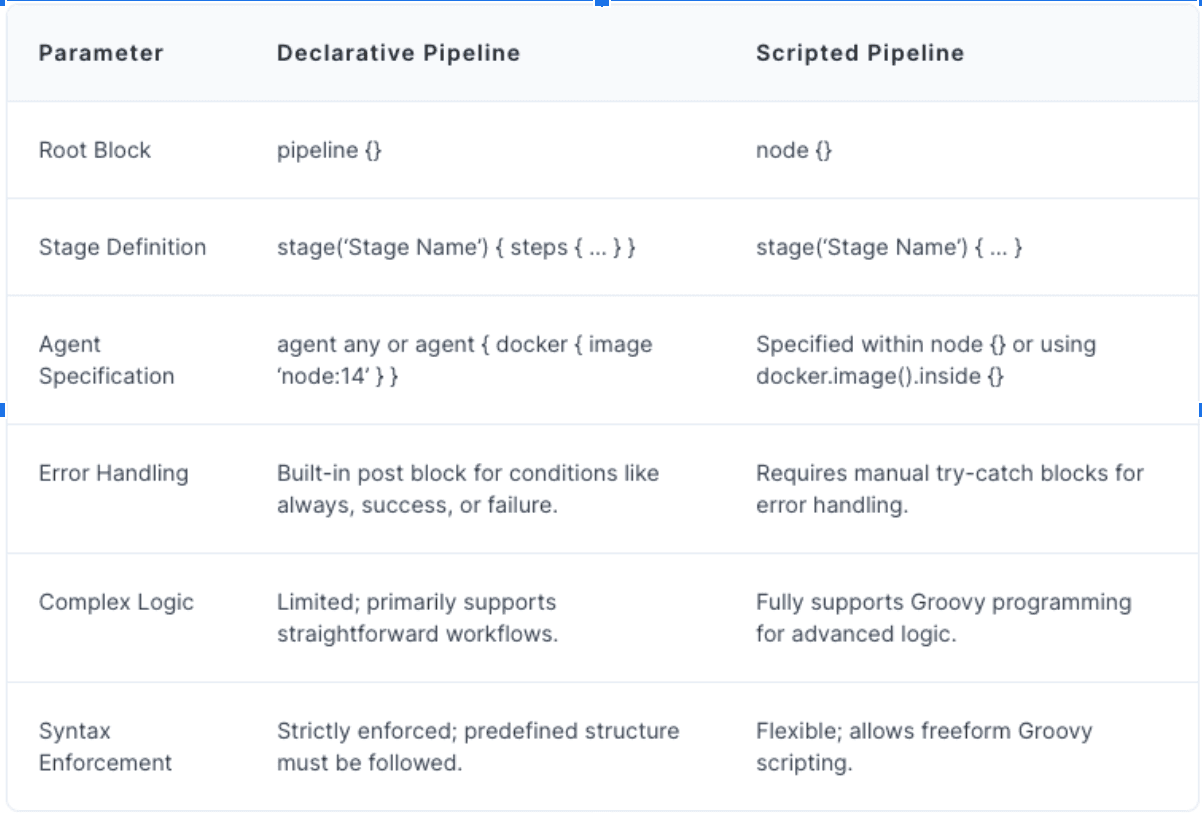
Jenkins primarily offers two syntaxes for defining Pipelines:Declarative Pipeline: This is a more recent and structured way to define pipelines. It provides a simplified and more readable syntax with predefined sections like agent, stages, and steps. It's generally recommended for most users due to its ease of use and enforced structure.
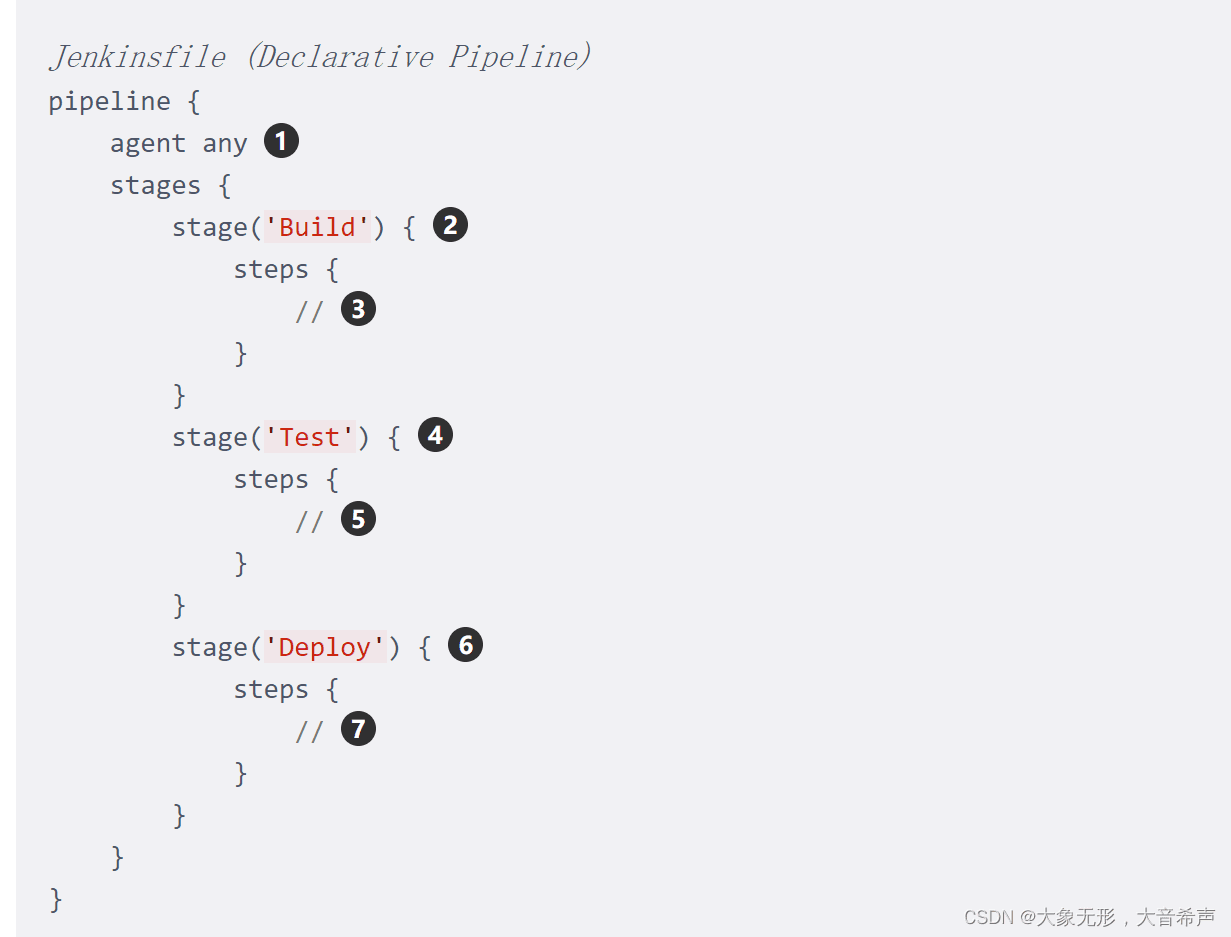
Here's a breakdown:
- "Declarative" means: You describe what you want to do (build, test, deploy), not how to do it step-by-step. Jenkins figures out the "how" for you.
- "Pipeline" means: It's a series of automated steps that take your code from source to delivery.
Key elements:
- pipeline: The overall container.
- stages: Groups of related steps (e.g., "Build," "Test," "Deploy").
- stage: A specific step in the process.
- steps: The actual commands to execute (e.g., compile code, run tests).
Scripted Pipeline: This is the original way to define Jenkins Pipelines. It leverages the full power of Groovy scripting, offering maximum flexibility and control. However, it can be more complex to write and maintain for simpler workflows.
Jenkinsfile
A Jenkinsfile is a text-based configuration file that defines a Jenkins pipeline using Groovy-based DSL (Domain-Specific Language). It enables developers to define, version control, and automate CI/CD workflows in a structured manner.
Using a Jenkinsfile streamlines complex workflows, ensures repeatability, and minimizes manual interventions while maintaining transparency and manageability in pipeline configurations.
Benefits of using a Jenkinsfile
Improved Version Control and Traceability: Changes to the pipeline can be tracked, reverted, and reviewed using version control systems like Git. A Jenkinsfile stored in Git allows reverting to a previous configuration if a recent pipeline update causes build failures.
Better Collaboration and Code Review: Teams can collaborate on pipeline configuration like any other code, enabling peer reviews and better quality assurance. A pull request can be created to propose updates to the Jenkinsfile, allowing team members to suggest improvements before merging.
Consistency Across Builds: The same Jenkinsfile can be reused across environments, ensuring consistent behavior in builds, tests, and deployments. A Jenkinsfile defines identical build steps for both staging and production environments, preventing discrepancies during deployment.
Ease of Automation and Scaling: Pipelines are easier to replicate and scale as the configuration is encapsulated in a single file. Adding a new project to Jenkins requires copying an existing Jenkinsfile template and modifying parameters, reducing setup time.
Transparency and Documentation: The pipeline logic is written in a human-readable format, doubling as documentation for understanding workflows. A Jenkinsfile with clear stages (for example, “Build,” “Test,” “and Deploy”) provides instant insight into the steps of the CI/CD process for new team members.







