


Deep Dive: Strategies for Data Privacy and Regulatory Compliance in React Native Development
As React Native developers, we often think performance, UI polish, and DX—but in regulated environments, privacy and security aren’t just checkboxes. They’re foundational. During my training, I developed a comprehensive HRMS system, but I soon encountered the challenges of handling sensitive employee data. Since then, working as a core contributor to gluestack-UI and theappmarket, I’ve faced real-world security incidents, package integrity threats, and compliance reviews at scale.
This is not just theory—it’s what actually breaks, what regulators care about, and how you can architect apps that don’t just pass audits, but genuinely respect user data.
In this guide, I will walk you through hard-learned lessons and practical strategies for baking privacy into every layer of your React Native app—from consent modals to CI/CD security.
1. Privacy by Design & Regulatory Awareness
Lesson learned (HRMS): During development, we initially designed the HRMS workflows with convenience in mind. But when it came time to handle sensitive data like health info, salary details, and ID proofs, we realized our design lacked the required abstraction layers to limit access.
Start with privacy by design: Bake privacy into every layer—data models, APIs, and even UI. Don’t wait for it to be legal to ask for it later.
Know your regulations: GDPR requires data access and deletion; HIPAA mandates encryption and logging. Create a regulation checklist that maps to your app's features.
Pro tip: Partner early with a privacy counsel or DPO. Their input can influence how you structure authentication, analytics, and even UI text.
2. User Consent and Data Minimization
Real scenario (HRMS): We initially didn’t prompt for consent before collecting employee metadata (e.g., device info, location during check-ins). This raised flags during internal review, especially since some modules interfaced with payroll and medical records.
What we did:
- Added purpose-specific consent prompts (e.g., “We collect location data for attendance logging. Do you agree?”)
- Avoided asking for unnecessary permissions (e.g., camera or contacts)
- Scoped data collection strictly to what was essential for HR workflows
Example: Consent Modal
const [consent, setConsent] = useState(false);
return (
  <Modal visible={!consent}>
    <Text>We need your consent to log attendance via location. Do you agree?</Text>
    <Button title="Agree" onPress={() => setConsent(true)} />
  </Modal>
);
3. Secure Data Storage
What went wrong (HRMS): We used AsyncStorage for storing employee session tokens during early builds. When testing on rooted devices, we found tokens could be easily extracted, posing a major risk.
Fix: Migrated to expo-secure-store for Expo builds and react-native-keychain for custom native code. Also encrypted sensitive data like health claims using AES-256 before local DB storage.
import * as SecureStore from "expo-secure-store";
await SecureStore.setItemAsync("employeeToken", token);
Trade-off: Secure stores can slow down reads/writes and don’t support bulk queries. You might need a hybrid approach with encrypted databases.
4. Data in Transit: Network Security
What went wrong (HRMS): Our dev backend was running on HTTP instead of HTTPS. During staging, we noticed some API payloads could be intercepted using a proxy.
Fix: Enforced HTTPS for all environments and introduced SSL pinning using react-native-ssl-pinning.
Caveat: During backend cert renewal, apps failed to connect. We resolved this by enabling remote config flags to temporarily disable pinning.
5. Authentication and Authorization
Case Reference (HRMS): Managers needed access to sensitive data like salary breakdowns and leave reasons. Originally, we used simple role flags but lacked endpoint-level scoping.
Fix:
- Implemented OAuth 2.0 with access tokens scoped per role
- Used biometric login for managers via react-native-fingerprint-scanner
- Enforced fine-grained backend permissions
Session strategy:
- Stored tokens securely
- Revoked tokens on logout or inactivity
6. Input Validation and API Security
What went wrong (HRMS): A feedback form allowed HTML input, which resulted in XSS issues in admin dashboards.
Fix:
- Added input sanitation with libraries like validator.js
- Backend also performed schema validation using Joi
Also:
- Rate-limited attendance check-in endpoints
- Enforced strict auth headers on every API call
7. Key Management and Cryptography
In HRMS: We stored employee KYC and tax files. These needed stronger protection than default storage.
Fix:
- Used encrypted SQLite storage for attachments
- Stored AES keys in Android Keystore/iOS Keychain
- Rotated encryption keys every 90 days using a key derivation function
Trade-off: Key rotation increased complexity in backward decryption. We handled this using versioned encryption metadata.
8. Secure Third-Party Integrations
Scenario (HRMS): Our initial push notification provider did not guarantee data residency in India, which was required for the org.
Fix:
- Switched to a provider with in-region data centers and SOC2 compliance
- Restricted all 3rd-party integrations to read-only access when possible
Checklist:
- Review SDK permissions
- Verify compliance docs
- Restrict shared fields
9. Regulatory Compliance Operations
In HRMS:
- We implemented a GDPR-style data deletion feature so employees could request removal from internal systems post-offboarding.
- Logged consent agreements with timestamps in a separate audit table.
Incident Response:
- Created mock scenarios with simulated data leaks
- Practiced response plans: notifying stakeholders and revoking exposed tokens
10. Code Protection and App Store Compliance
Real-life (HRMS): Our beta app was rejected from Play Store for requesting background location without justification.
Fixes:
- Added transparent onboarding explaining location use for attendance
- Updated manifest with android:allowBackup="false"
<application android:allowBackup="false" ... />Also used Proguard to obfuscate sensitive native code.
11. Real-World Breach: Lessons from a Compromised Maintainer
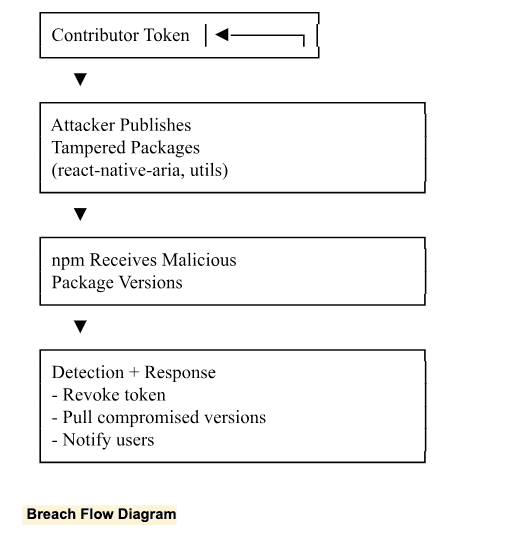
In July 2025, while working on gluestack UI, we experienced a serious security breach involving our react-native-aria and @gluestack-ui/utils packages on npm and GitHub.
What happened:
- A contributor’s public access token was compromised.
- A malicious actor published tampered versions of the packages via the compromised maintainer account.
- These versions were distributed via npm before we detected and revoked access.
Breach Flow Diagram
✅ Best Practices We Enforced Post-Incident:
Enforced 2FA for all maintainers.
- Revoked all previous tokens and regenerated access credentials.
- Moved publishing rights to GitHub actions with scoped, read-only tokens.
- Added package integrity checks before publishing.
Important Note for CI/CD: Be extremely cautious while creating GitHub Actions.
- Avoid permitting workflows to accept user input that can be executed.
- Use permissions: read-only and restrict secrets usage to specific jobs.
- Review third-party GitHub Actions and don’t blindly run community-contributed actions.
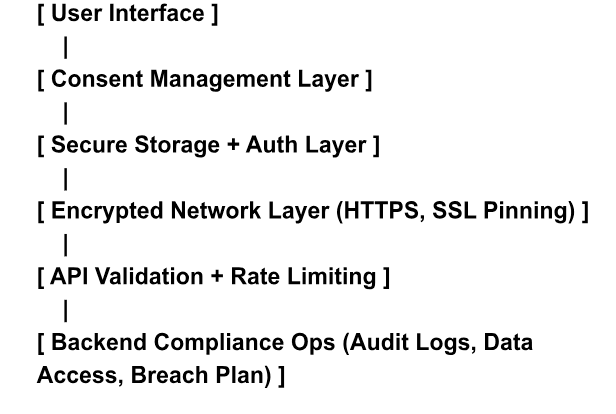
Visual: Data Privacy Layered Architecture
Summary Table
Area | Key Strategy/Tool |
|---|---|
Consent | Explicit prompts, audit trails |
Data Minimization | Least privilege, minimal permissions |
Secure Storage | Keychain, Keystore, SecureStore, encrypted DBs |
Network Security | HTTPS/TLS, SSL pinning, encrypted payloads |
Auth & Authorization | OAuth2, OpenID, JWT, MFA, biometrics |
Input Validation | Schema validation, sanitize inputs |
Key Management | Hardware storage, key rotation, white box crypto |
SDKs | Compliance audits, restrict data sharing |
User Rights | Data access/deletion, opt-out flows |
Code Protection | Obfuscation, disable auto-backup |
Compliance Ops | Policies, audits, breach response |
CI/CD Hygiene | Secure GitHub actions, restrict secrets/input |
Wrapping Up: Privacy is a Feature, Not a Burden
React Native developers often see privacy as a legal checklist, but in my experience, it’s a product differentiator. Users trust apps that respect their data. Teams ship faster when compliance is baked in early. Yes, it takes work, and yes, you’ll face trade-offs, but the payoff—user trust, regulatory peace of mind, and long-term scalability—is worth every line of secure code.
If you're starting a React Native project for a regulated industry, don't wait. Prioritize privacy now. Your future self (and your users) will thank you.







