

Understanding Live Activities & Dynamic Island
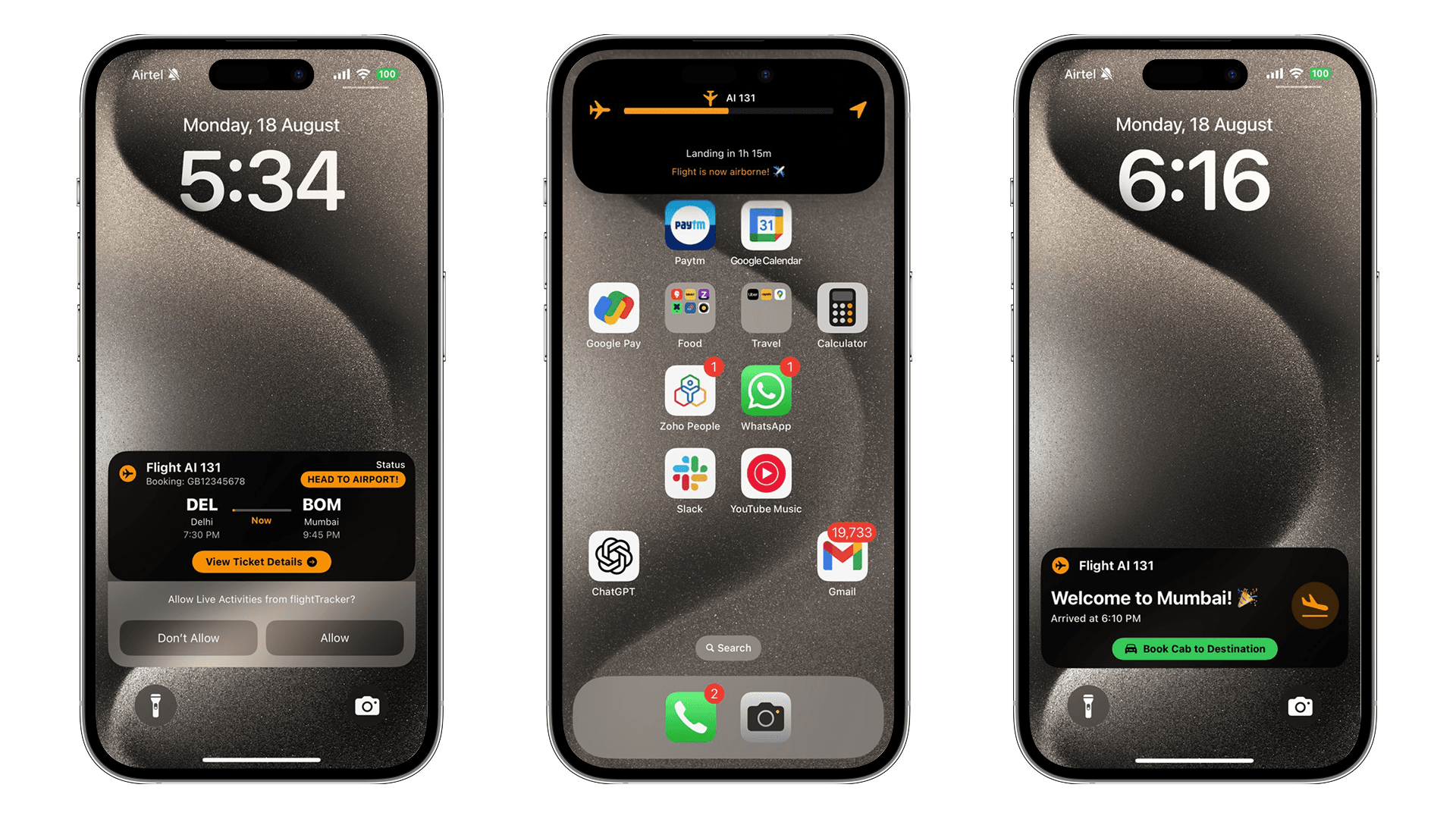
Live Activities change how users engage with time-sensitive information. They bring real-time updates straight to the iPhone's Lock Screen and Dynamic Island. For flight-tracking apps, this means you do not have to keep opening them to check departure gates, delays, or boarding status.
Dynamic Island Integration (iPhone 14 Pro and later) provides three distinct presentation modes:
- Minimal: Single icon or short text (gate number)
- Compact: Leading and trailing elements (flight status + countdown)
- Expanded: Full, detailed view with interactive elements
In flight-tracking scenarios, users can monitor boarding countdowns, receive gate-change notifications, and access quick actions like viewing boarding passes—all without unlocking their device.
Key Benefits:
- 40% higher engagement than traditional push notifications
- Persistent visibility during critical travel moments
- Seamless integration with iOS design language
- Real-time updates even when the app is terminated
Project Configuration Requirements
Push Notification Setup
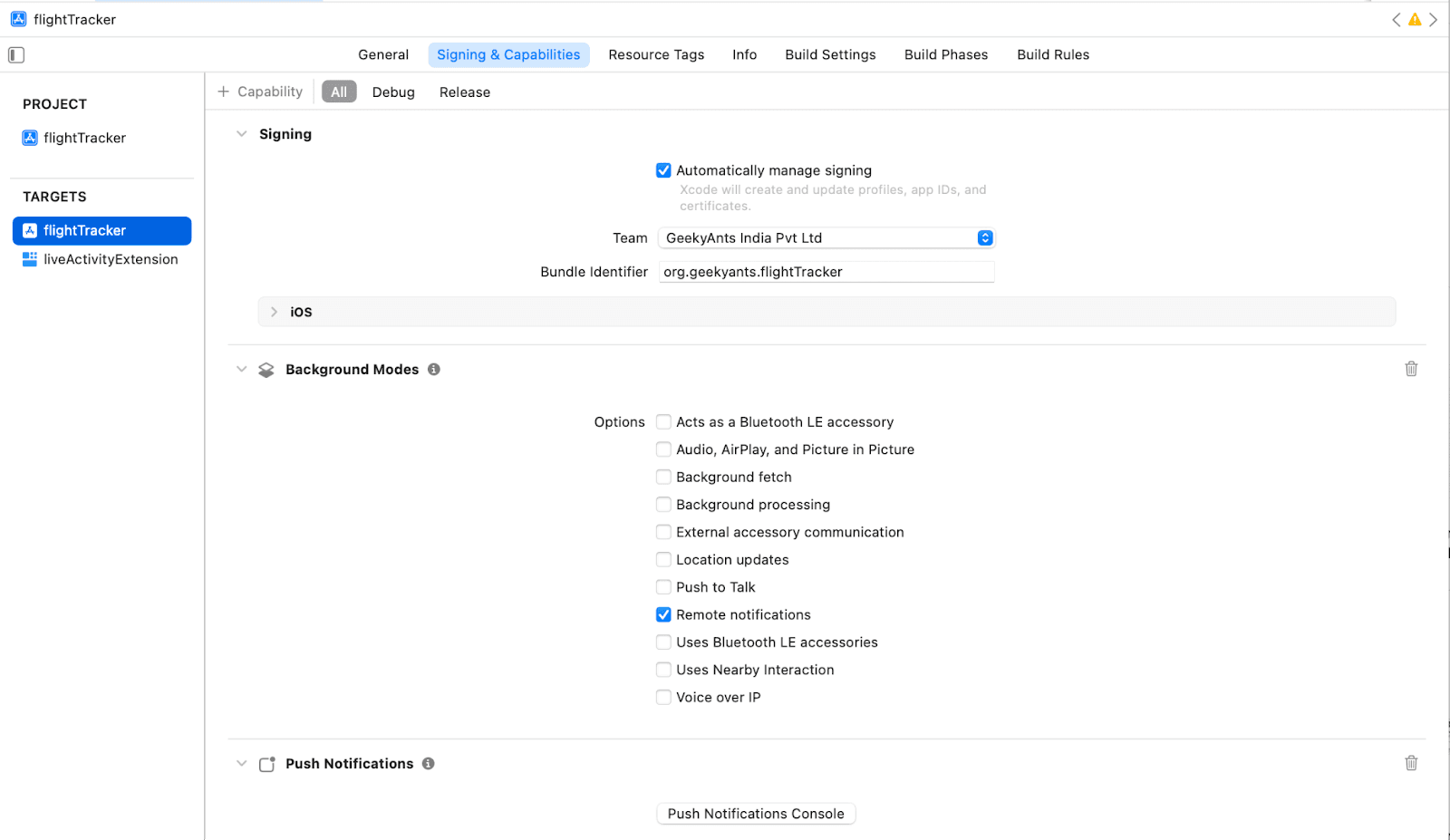
Live Activities depend on Apple Push Notification Service (APNs) for real-time updates. Configure push notifications first:
- In Xcode: Select your app target → Signing & Capabilities
- Add Capability: Click "+" and select "Push Notifications"
- Verify Entitlements: Ensure aps-environment is properly configured
Info.plist Configuration
Enable Live Activities in your main app's Info.plist:
<key>NSSupportsLiveActivities</key>
<true/>
<key>NSSupportsLiveActivitiesFrequentUpdates</key>
<true/>
The NSSupportsLiveActivitiesFrequentUpdates key is essential for flight tracking as it allows updates more frequently than the standard limit—critical for gate changes and boarding updates.
Widget Extension Target
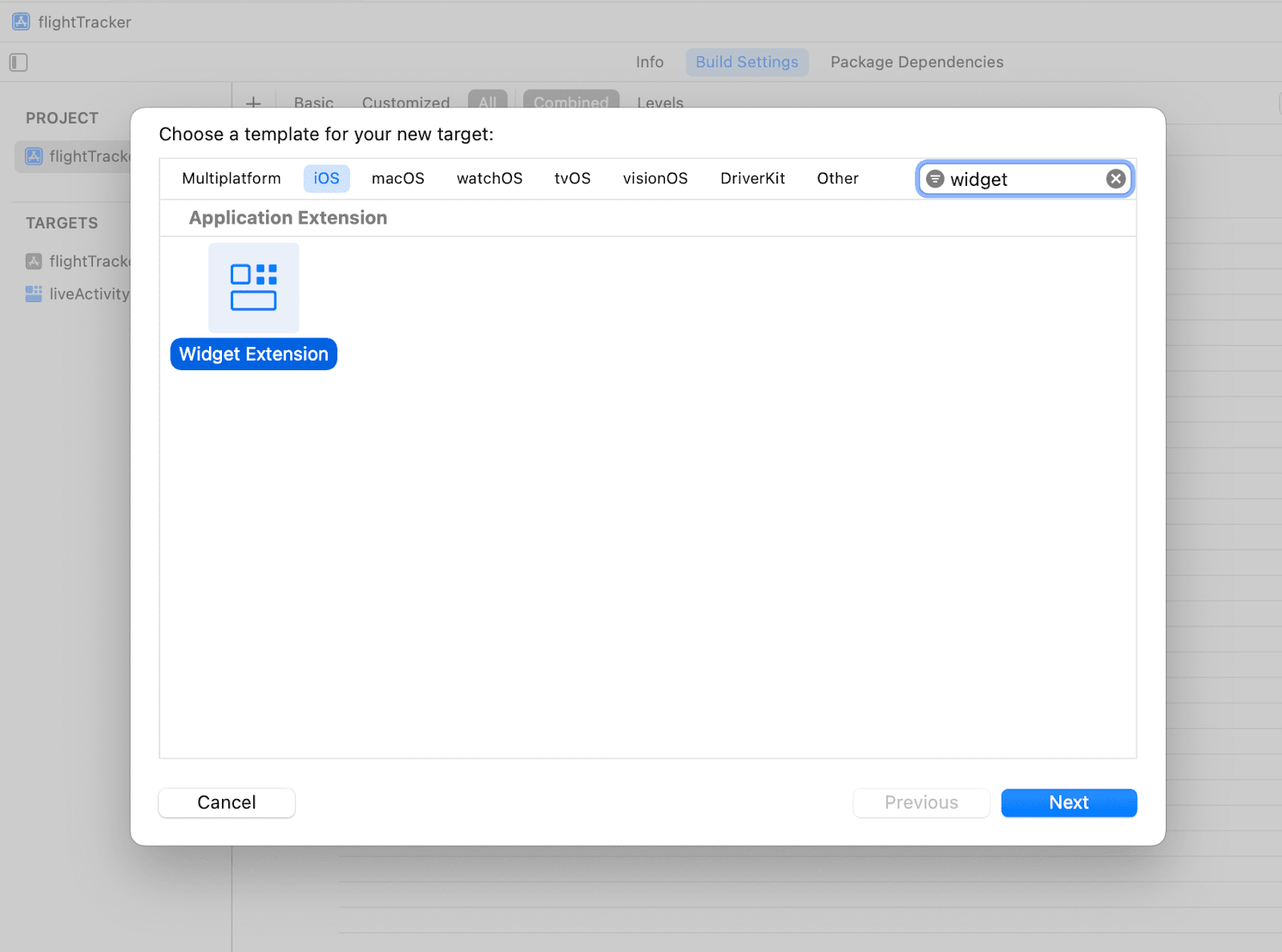
Create a separate Widget Extension for Live Activities:
- Add Target: File → New → Target → Widget Extension
- Configuration: Name it FlightTrackerWidget, include Live Activity intent
- Build Settings: Set deployment target to iOS 16.1+, configure App Groups for data sharing
Build Phases Critical Step
For React Native compatibility, verify the Build Phases configuration:
- Navigate to Build Phases → Embed App Extensions
- Ensure "Copy only when installing" is unchecked
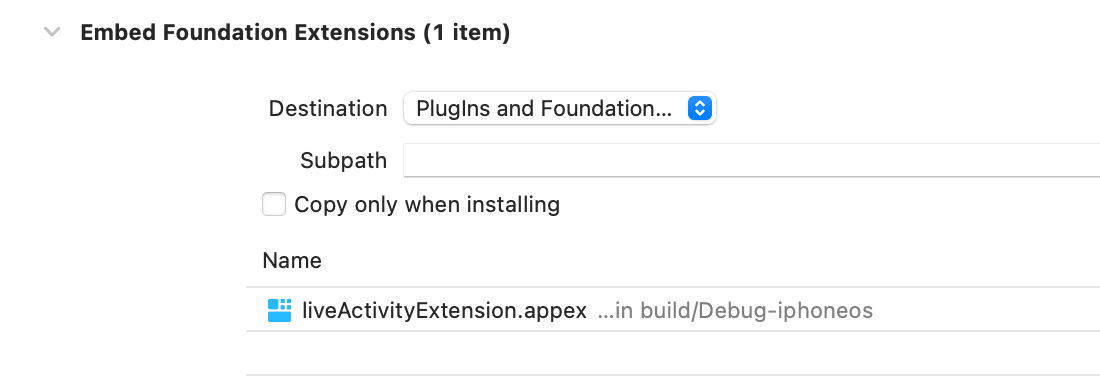
This step is crucial for Live Activities to function properly in React Native environments.
Live Activity Widget Structure
Core SwiftUI Implementation
The Widget Extension contains several key files, but focus on these essential components:
FlightActivityAttributes.swift (Data Structure example ):
struct FlightActivityAttributes: ActivityAttributes {
    public struct ContentState: Codable, Hashable {
        // Dynamic properties - updated via push or app
        var status: String      // "Boarding", "Delayed", "On Time"
        var gate: String        // "A12", "B7", "TBD"
        var countdown: Date     // Departure time
    }

    // Fixed properties - set once during creation
    var flightNumber: String    // "AI 101"
    var route: String          // "DEL → BOM"
    var airline: String        // "Air India"
}
FlightActivityWidget.swift (UI Implementation example ):
struct FlightActivityWidget: Widget {
    var body: some WidgetConfiguration {
        ActivityConfiguration(for: FlightActivityAttributes.self) { context in
            // Lock Screen UI
            FlightLockScreenView(
                flight: context.attributes.flightNumber,
                route: context.attributes.route,
                status: context.state.status,
                gate: context.state.gate
            )
        } dynamicIsland: { context in
            DynamicIsland {
                DynamicIslandExpandedRegion(.center) {
                    FlightStatusExpandedView(context: context)
                }
            } compactLeading: {
                FlightStatusIcon(status: context.state.status)
            } compactTrailing: {
                Text(context.state.gate)
                    .font(.system(.caption, design: .rounded))
                    .fontWeight(.semibold)
            } minimal: {
                FlightProgressIndicator(
                    departureTime: context.state.countdown
                )
            }
        }
    }
}
Understanding the Architecture:
- ActivityAttributes: Defines both static data (flight details) and dynamic state (status, gate)
- Lock Screen Layout: Primary real estate for detailed information
- Dynamic Island Regions: Different areas serve specific purposes (leading for status, trailing for gate info)
Native Module Bridge Implementation
To control Live Activities from React Native, create a bridge using three essential files:
1. LiveActivityModule.swift (Core Logic)
import ActivityKit
import Foundation

@objc(LiveActivityModule)
class LiveActivityModule: RCTEventEmitter {
    private var currentActivity: Activity<FlightActivityAttributes>?
    private var hasListeners: Bool = false

    override func startObserving() {
        hasListeners = true
        startFlightActivity()
    }

    private func startFlightActivity() {
        let attributes = FlightActivityAttributes(
            flightNumber: "AI 101",
            route: "DEL → BOM",
            airline: "Air India"
        )

        let initialState = FlightActivityAttributes.ContentState(
            status: "Scheduled",
            gate: "TBD",
            countdown: Date().addingTimeInterval(7200) // 2 hours
        )

        do {
            currentActivity = try Activity.request(
                attributes: attributes,
                contentState: initialState,
                pushType: .token
            )

            monitorTokenUpdates()
        } catch {
            print("Failed to start Live Activity: \(error)")
        }
    }

    private func monitorTokenUpdates() {
        guard let activity = currentActivity, hasListeners else { return }

        Task {
            for await tokenData in activity.pushTokenUpdates {
                let token = tokenData.map { String(format: "%02x", $0) }.joined()
                self.sendEvent(withName: "onTokenUpdate", body: [
                    "token": token,
                    "activityId": activity.id
                ])
            }
        }
    }

    override func supportedEvents() -> [String] {
        return ["onTokenUpdate", "onActivityStart", "onActivityEnd"]
    }

    @objc override static func requiresMainQueueSetup() -> Bool {
        return true
    }
}

@objc(FlightActivity)
class FlightActivity: NSObject {
    @objc(updateFlight:status:gate:resolver:rejecter:)
    func updateFlight(
        activityId: String,
        status: String,
        gate: String,
        resolve: @escaping RCTPromiseResolveBlock,
        reject: @escaping RCTPromiseRejectBlock
    ) {
        Task {
            let activities = Activity<FlightActivityAttributes>.activities
            guard let activity = activities.first(where: { $0.id == activityId }) else {
                reject("NOT_FOUND", "Activity not found", nil)
                return
            }

            let newState = FlightActivityAttributes.ContentState(
                status: status,
                gate: gate,
                countdown: activity.contentState.countdown
            )

            await activity.update(using: newState)
            resolve(["success": true])
        }
    }

    @objc(endActivity:resolver:rejecter:)
    func endActivity(
        activityId: String,
        resolve: @escaping RCTPromiseResolveBlock,
        reject: @escaping RCTPromiseRejectBlock
    ) {
        Task {
            let activities = Activity<FlightActivityAttributes>.activities
            await activities
                .filter { $0.id == activityId }
                .first?
                .end(dismissalPolicy: .immediate)
            resolve(["ended": true])
        }
    }
}
2. RCTFlightActivityModule.m (Objective-C Bridge)
#import "FlightActivity-Bridging-Header.h"

@interface RCT_EXTERN_MODULE(FlightActivity, NSObject)
RCT_EXTERN_METHOD(updateFlight:(NSString)activityId
                  status:(NSString)status
                  gate:(NSString)gate
                  resolver:(RCTPromiseResolveBlock)resolve
                  rejecter:(RCTPromiseRejectBlock)reject)

RCT_EXTERN_METHOD(endActivity:(NSString)activityId
                  resolver:(RCTPromiseResolveBlock)resolve
                  rejecter:(RCTPromiseRejectBlock)reject)
@end

@interface RCT_EXTERN_MODULE(LiveActivityModule, RCTEventEmitter)
RCT_EXTERN_METHOD(supportedEvents)
@end
3. FlightActivity-Bridging-Header.h
#import <React/RCTBridgeModule.h>
#import <React/RCTEventEmitter.h>
#import <Foundation/Foundation.h>
Critical Setup: Add the bridging header file path in Build Settings → Swift Compiler - General → Objective-C Bridging Header.
React Native Service Integration
FlightActivityService.ts
Creating a service to manage Live Activities from JavaScript:
import { NativeEventEmitter, NativeModules, Platform } from 'react-native';

const activityEmitter = new NativeEventEmitter(NativeModules.LiveActivityModule);
const FlightActivityNative = NativeModules.FlightActivity;

interface FlightActivityData {
  flightNumber: string;
  route: string;
  status: 'Scheduled' | 'Boarding' | 'Delayed' | 'On Time' | 'Departed';
  gate: string;
  departureTime: Date;
}

class FlightActivityService {
  private currentActivityId: string | null = null;
  private tokenListener: any = null;

  async startFlightTracking(flightData: FlightActivityData): Promise<void> {
    if (Platform.OS !== 'ios') return;

    try {
      // Clear any existing activities
      await this.stopFlightTracking();

      // Listen for token updates
      this.tokenListener = activityEmitter.addListener('onTokenUpdate', (data) => {
        console.log('Activity Token:', data.token);
        this.currentActivityId = data.activityId;
        // Send token to your backend for push notifications
        this.registerTokenWithBackend(data.token, data.activityId);
      });

    } catch (error) {
      console.error('Failed to start flight tracking:', error);
    }
  }

  async updateFlightStatus(status: string, gate: string): Promise<void> {
    if (!this.currentActivityId || Platform.OS !== 'ios') return;

    try {
      await FlightActivityNative.updateFlight(this.currentActivityId, status, gate);
    } catch (error) {
      console.error('Failed to update flight status:', error);
    }
  }

  async stopFlightTracking(): Promise<void> {
    if (Platform.OS !== 'ios') return;

    try {
      if (this.currentActivityId) {
        await FlightActivityNative.endActivity(this.currentActivityId);
      }

      this.tokenListener?.remove();
      this.currentActivityId = null;
    } catch (error) {
      console.error('Failed to stop flight tracking:', error);
    }
  }

  private async registerTokenWithBackend(token: string, activityId: string): Promise<void> {
    // Send token to your backend for push notifications
    try {
      await fetch('https://your-api.com/register-activity-token', {
        method: 'POST',
        headers: { 'Content-Type': 'application/json' },
        body: JSON.stringify({
          activityId,
          pushToken: token,
          userId: 'current-user-id'
        })
      });
    } catch (error) {
      console.error('Failed to register token:', error);
    }
  }
}

export const flightActivityService = new FlightActivityService();
App Integration (React based Example)
import React, { useState } from 'react';
import { View, Button, Text } from 'react-native';
import { flightActivityService } from './services/FlightActivityService';

export const FlightTrackingScreen = () => {
  const [isTracking, setIsTracking] = useState(false);

  const startTracking = async () => {
    await flightActivityService.startFlightTracking({
      flightNumber: 'AI 101',
      route: 'DEL → BOM',
      status: 'Scheduled',
      gate: 'A12',
      departureTime: new Date(Date.now() + 2 * 60 * 60 * 1000) // 2 hours from now
    });
    setIsTracking(true);
  };

  const updateStatus = async () => {
    await flightActivityService.updateFlightStatus('Boarding', 'A15');
  };

  const stopTracking = async () => {
    await flightActivityService.stopFlightTracking();
    setIsTracking(false);
  };

  return (
    <View style={{ padding: 20 }}>
      <Text>Flight AI 101: DEL → BOM</Text>

      <Button
        title="Start Live Tracking"
        onPress={startTracking}
        disabled={isTracking}
      />

      <Button
        title="Update: Now Boarding at A15"
        onPress={updateStatus}
        disabled={!isTracking}
      />

      <Button
        title="Stop Tracking"
        onPress={stopTracking}
        disabled={!isTracking}
      />
    </View>
  );
};
Push Notifications Architecture
Backend Implementation (Node.JS based example)
Live Activities can receive updates even when your app is completely terminated through APNs:
const apn = require('apn');

class FlightNotificationService {
  constructor() {
    this.apnProvider = new apn.Provider({
      token: {
        key: process.env.APPLE_PUSH_KEY,
        keyId: process.env.APPLE_KEY_ID,
        teamId: process.env.APPLE_TEAM_ID
      },
      production: process.env.NODE_ENV === 'production'
    });
  }

  async updateFlightStatus(activityToken, flightUpdate) {
    const notification = new apn.Notification();

    notification.topic = 'your.bundle.id.push-type.liveactivity';
    notification.pushType = 'liveactivity';
    notification.payload = {
      'aps': {
        'timestamp': Math.floor(Date.now() / 1000),
        'event': 'update',
        'content-state': {
          status: flightUpdate.status,
          gate: flightUpdate.gate,
          countdown: flightUpdate.departureTime
        },
        'alert': {
          'title': `Flight ${flightUpdate.flightNumber}`,
          'body': `Gate changed to ${flightUpdate.gate}`
        }
      }
    };

    try {
      const result = await this.apnProvider.send(notification, activityToken);
      console.log('Push notification sent:', result);
    } catch (error) {
      console.error('Push notification failed:', error);
    }
  }

  async startRemoteActivity(userToken, flightData) {
    // Push-to-Start capability (iOS 17.2+)
    const notification = new apn.Notification();

    notification.topic = 'your.bundle.id.push-type.liveactivity';
    notification.payload = {
      'aps': {
        'timestamp': Math.floor(Date.now() / 1000),
        'event': 'start',
        'attributes-type': 'FlightActivityAttributes',
        'attributes': {
          flightNumber: flightData.flightNumber,
          route: flightData.route,
          airline: flightData.airline
        },
        'content-state': {
          status: 'Scheduled',
          gate: 'TBD',
          countdown: flightData.departureTime
        }
      }
    };

    await this.apnProvider.send(notification, userToken);
  }
}
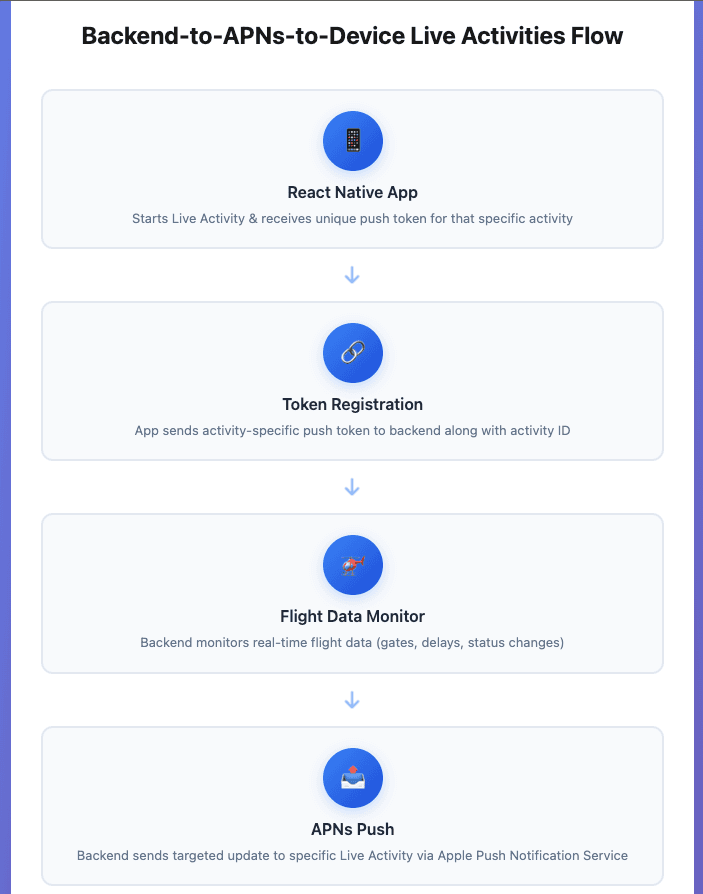
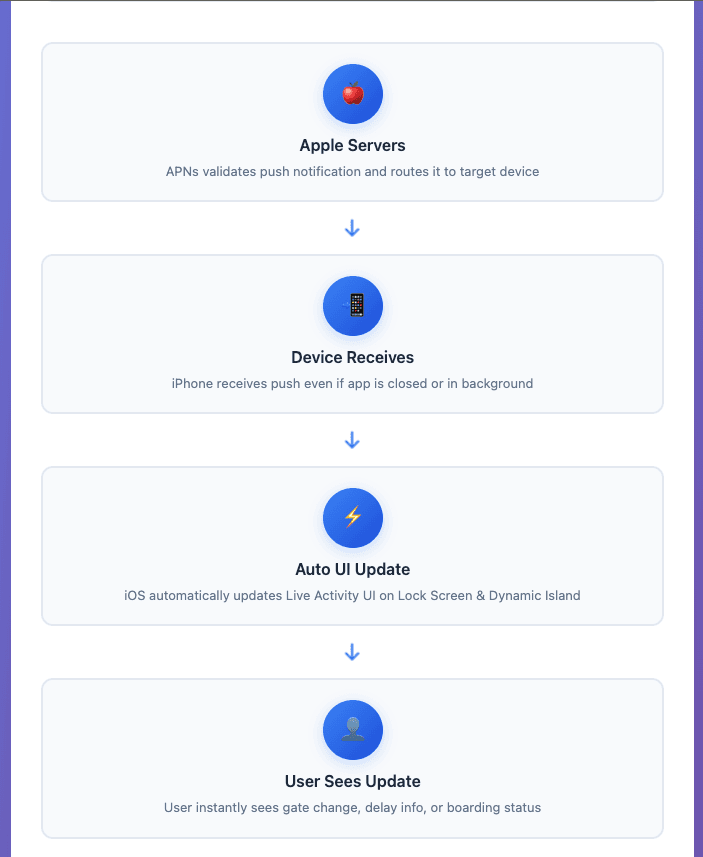
Push Notification Flow:
- App starts Live Activity and receives a unique push token
- Token sent to the backend and stored with the activity ID
- Backend monitors flight data changes
- Real-time updates are sent via APNs to a specific activity
- iOS automatically updates Live Activity UI
Key Flow Benefits
- Updates work even when the app is completely closed
- Each Live Activity has a unique push token
- No polling required - real push notifications
- Automatic UI refresh by the iOS system
- Battery efficient - no background processing
- Multiple activities can run simultaneously
Example APNs Payload structure :
{
  "aps": {
    "timestamp": 1672531200,
    "event": "update",
    "content-state": {
      "status": "Boarding",
      "gate": "A15",
      "countdown": 1672534800
    },
    "alert": {
      "title": "Flight AI 101",
      "body": "Now boarding at Gate A15"
    }
  }
}
Interactive Elements & Deep Links
AppIntents Implementation
Adding interactive buttons to your Live Activity:
import AppIntents

struct ViewBoardingPassIntent: AppIntent {
    static var title: LocalizedStringResource = "View Boarding Pass"

    @Parameter(title: "Flight Number")
    var flightNumber: String

    func perform() async throws -> some IntentResult {
        let url = URL(string: "flighttracker://boarding-pass/\(flightNumber)")!
        await UIApplication.shared.open(url)
        return .result()
    }
}

struct BookGroundTransportIntent: AppIntent {
    static var title: LocalizedStringResource = "Book Cab"

    func perform() async throws -> some IntentResult {
        let url = URL(string: "flighttracker://book-transport")!
        await UIApplication.shared.open(url)
        return .result()
    }
}
Integration in Live Activity UI
// Add to your Lock Screen view
VStack {
    // Flight information display
    FlightInfoView(context: context)

    HStack(spacing: 12) {
        Button(intent: ViewBoardingPassIntent(flightNumber: context.attributes.flightNumber)) {
            HStack {
                Image(systemName: "airplane")
                Text("Boarding Pass")
            }
            .padding(.horizontal, 16)
            .padding(.vertical, 8)
            .background(Color.blue)
            .foregroundColor(.white)
            .cornerRadius(20)
        }

        Button(intent: BookGroundTransportIntent()) {
            HStack {
                Image(systemName: "car.fill")
                Text("Book Cab")
            }
            .padding(.horizontal, 16)
            .padding(.vertical, 8)
            .background(Color.green)
            .foregroundColor(.white)
            .cornerRadius(20)
        }
    }
}
React Native Deep Link Handling:
import { Linking } from 'react-native';

const setupDeepLinkHandling = () => {
  const handleDeepLink = (url: string) => {
    if (url.includes('boarding-pass')) {
      const flightNumber = url.split('/').pop();
      navigation.navigate('BoardingPass', { flightNumber });
    } else if (url.includes('book-transport')) {
      navigation.navigate('TransportBooking');
    }
  };

  Linking.getInitialURL().then(url => {
    if (url) handleDeepLink(url);
  });

  const subscription = Linking.addEventListener('url', ({ url }) => {
    handleDeepLink(url);
  });

  return () => subscription?.remove();
};
Push-to-Start Implementation (iOS 17.2+)
Push-to-Start allows your backend to initiate Live Activities without user interaction:
Backend Implementation
async function startFlightTrackingRemotely(userId, flightData) {
  const userDeviceToken = await getUserDeviceToken(userId);

  const notification = new apn.Notification();
  notification.topic = 'your.bundle.id.push-type.liveactivity';
  notification.payload = {
    'aps': {
      'timestamp': Math.floor(Date.now() / 1000),
      'event': 'start',
      'attributes-type': 'FlightActivityAttributes',
      'attributes': {
        flightNumber: flightData.flightNumber,
        route: flightData.route,
        airline: flightData.airline
      },
      'content-state': {
        status: 'Check-in Open',
        gate: 'TBD',
        countdown: flightData.departureTime
      }
    }
  };

  await apnProvider.send(notification, userDeviceToken);
}

// Trigger scenarios
const triggerScenarios = {
  // 24 hours before departure
  preFlightReminder: (flightData) => {
    setTimeout(() => {
      startFlightTrackingRemotely(flightData.userId, flightData);
    }, calculateTimeUntil24HoursBefore(flightData.departureTime));
  },

  // After booking confirmation
  postBookingActivation: (bookingData) => {
    startFlightTrackingRemotely(bookingData.userId, bookingData.flightData);
  },

  // Gate assignment notification
  gateAssignment: (flightData) => {
    startFlightTrackingRemotely(flightData.userId, {
      ...flightData,
      gate: flightData.assignedGate
    });
  }
};
Strategic Use Cases:
- Auto-activate tracking 24 hours before departure
- Begin monitoring immediately after successful booking
- Start the activity when the gate is assigned
- Initiate during the mobile check-in process
Business Impact & Implementation Strategy
Engagement Metrics
Live Activities create measurable business value through enhanced user engagement and new revenue streams:
User Engagement:
- 40% higher interaction rates vs traditional push notifications
- 60% reduction in app abandonment during flight delays
- 50% higher session duration when Live Activities are active
Conversion Impact:
- 30% increase in ancillary service bookings (seat upgrades, meals)
- 45% higher click-through rates on cross-sell offers
- 20% reduction in customer support queries
Conclusion
iOS Live Activities represent a significant evolution in mobile user experience, particularly for time-sensitive applications like flight tracking. The technical implementation requires coordination between native iOS development and React Native, but the user engagement and business benefits justify the complexity.
Key Success Factors:
- User-Centric Design: Focus on displaying only essential information that users need at critical moments
- Technical Reliability: Robust error handling and graceful degradation for network issues
- Performance Optimization: Minimize battery impact through intelligent update strategies
- Business Integration: Leverage Live Activities for revenue generation, not just user experience
The investment in Live Activities technology positions your application at the forefront of mobile user experience while creating new opportunities for user engagement and revenue generation.
Note -
This guide reflects best practices as of September 2025 for iOS 17.5+ and React Native 0.74+. Also, I suggest always referring to Apple's latest documentation for current APIs and requirements.







