
Are your Flutter web apps struggling with sluggish animations? The wait for smoother performance is finally over. With the stable release of Flutter 3.22, WASM integration unlocks significant performance improvements for your web apps. WASM tackles performance bottlenecks, resulting in silky-smooth frame rates for animations and transitions. This translates to a more responsive, engaging, and delightful user experience.
Ready to experience the difference firsthand? Dive into our comprehensive guide and start incorporating WASM into your Flutter web apps today!
Understanding WebAssembly (WASM)
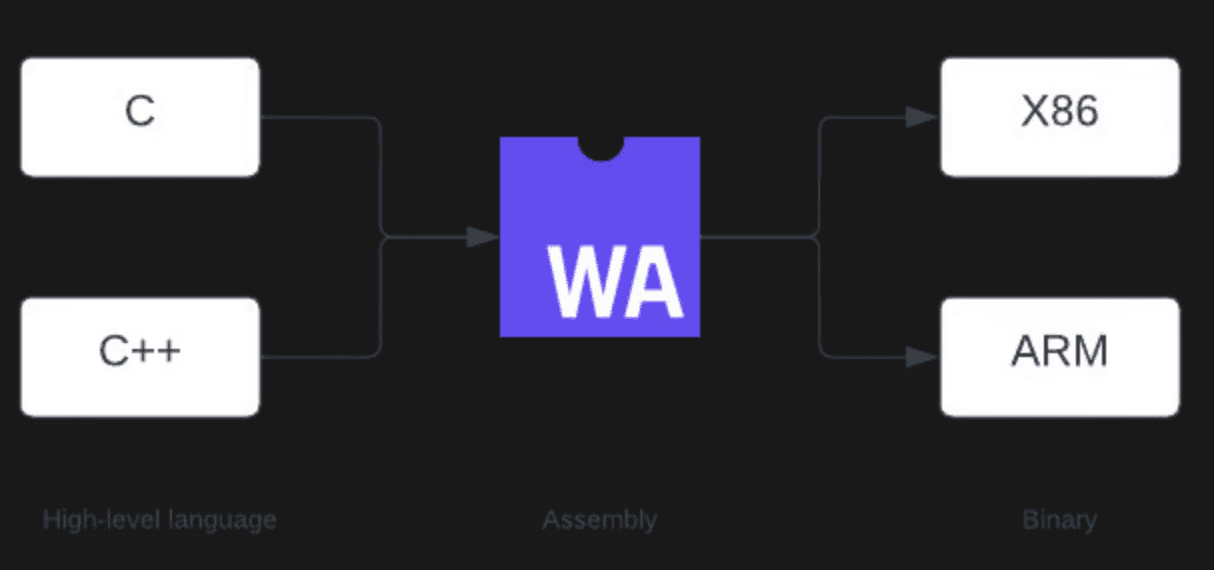
WebAssembly, often abbreviated as WASM, isn't just a binary instruction format; it's a revolution in web development. It functions as a portable target, allowing code written in various high-level languages like C/C++, Rust, and even Dart to be compiled into a format that runs efficiently within web browsers. This allows developers to leverage their existing codebases or preferred languages to create high-performance web applications.
What is WebAssembly?
WebAssembly is a low-level binary format closer to machine code than JavaScript. This means that a WASM module, once compiled, can execute at near-native performance. Unlike JavaScript, a text-based language that needs to be parsed and interpreted, WASM files are delivered in a binary format that is much smaller and faster to decode and execute.
Why should we use WebAssembly?
For years, JavaScript reigned supreme as the language browsers understood. While it served well for many applications, its performance limitations became evident when dealing with resource-intensive tasks like complex 3D games, high performance animations etc. These experiences demanded a near-native level of speed, something JavaScript often struggled to deliver.
Enter WebAssembly (WASM), a revolutionary technology that complements JavaScript. WASM acts as a bridge, allowing code written in various high-level languages (like C/C++) to be compiled into a format that runs efficiently within web browsers. This unlocks significant performance improvements, bringing us closer to achieving a native-like experience for web applications. WASM's benefits extend beyond raw speed. Its modular design keeps the code size small, leading to faster loading times and a smoother user experience. Additionally, WASM prioritises memory safety and is designed as an open standard, meaning it has the potential to run on platforms beyond the web.
How Flutter and WebAssembly Work Together
The connection between Flutter and WebAssembly is a fascinating one. With the recent announcement from the Dart team about the support for WebAssembly as a compilation target, this connection has become even stronger. Now, we can compile our Dart code into a WASM module, which can then be executed in the browser. This opens up a world of possibilities for Flutter web applications.
The recent integration of WASM support in Flutter allows developers to leverage its benefits within their Flutter web applications. This means:
- Faster and Smoother User Experiences: By handling performance-intensive tasks like complex animations and 3D graphics using WASM modules, Flutter web apps can achieve smoother frame rates and a more responsive user experience.
- Reduced App Size (Potentially): While the WASM code itself might be slightly larger than its JavaScript equivalent, it can often be compressed effectively. This can, in some cases, lead to a smaller overall application size compared to pure JavaScript.
- Unlocking New Possibilities: WASM allows developers to leverage existing codebases written in languages they're familiar with, potentially saving development time and effort. Additionally, WASM opens doors for functionalities like running machine learning models directly in the browser.
To start using WASM with your Flutter web apps, check out our Dart Wasm documentation and Flutter Wasm documentation.
Getting Started with a WASM Demo in Flutter
Now that you're pumped about the potential of WASM in Flutter, let's get hands-on with a practical demo. We'll be building two versions of a simple Flutter web app:
- Flutter (v3.19): This version will be built using a standard Flutter setup without WASM.
- WASM-Powered Flutter (v3.22 or above): This version will leverage the latest Flutter release (with stable WASM support) to create a coffee shop app.
Both apps will feature a scrollable list view with animations. By comparing their performance, we'll witness the real-world impact of WASM on animation smoothness and overall user experience.
This demo serves as a fantastic springboard to explore the capabilities of WASM in your Flutter web projects. Let's dive in and see the magic unfold!
Assuming you have a functioning Flutter installation, let's embark on creating our comparison apps!
Standard Flutter Web App (v3.19 or below):
For this version, we'll utilise a Flutter version that predates the introduction of stable WASM support (ideally version 3.19 or lower). This will serve as our baseline for performance comparison.
WASM-Powered Flutter Web App (v3.22 or above):
In this version, we'll leverage the latest stable Flutter release (version 3.22 or above) to harness the power of WASM.
Let's take a look at a sample screen, "CoffeeMenu" which features a list of menu items displayed within a scrollable list view. These list items will be adorned with smooth scroll animations.
import 'package:flutter/material.dart';
import 'package:flutter_bloc/flutter_bloc.dart';
import 'package:google_fonts/google_fonts.dart';

import '../models/items.dart';
import '../utils/screen_offset.dart';
import '../widgets/item_card.dart';
import '../widgets/text_reveal.dart';

class CoffeeMenu extends StatefulWidget {
  const CoffeeMenu({super.key});

  @override
  State<CoffeeMenu> createState() => _CoffeeMenuState();
}

class _CoffeeMenuState extends State<CoffeeMenu> with TickerProviderStateMixin {
  late AnimationController controller;

  @override
  void initState() {
    controller = AnimationController(
      vsync: this,
      duration: const Duration(milliseconds: 1000),
      reverseDuration: const Duration(milliseconds: 375),
    );
    super.initState();
  }

  @override
  Widget build(BuildContext context) {
    return LayoutBuilder(
      builder: (context, constraints) {
        double titleFontSize = constraints.maxWidth < 600 ? 32.0 : 55.0;
        double cardSpacing = constraints.maxWidth < 600 ? 20.0 : 70.0;
        double wrapSpacing = constraints.maxWidth < 600 ? 20.0 : 180.0;
        double buttonPaddingVertical = constraints.maxWidth < 600 ? 10.0 : 20.0;
        double buttonPaddingHorizontal =
            constraints.maxWidth < 600 ? 15.0 : 25.0;
        double buttonFontSize = constraints.maxWidth < 600 ? 14.0 : 20.0;

        return Column(
          children: [
            BlocBuilder<DisplayOffset, ScrollOffset>(
              buildWhen: (previous, current) {
                if ((current.scrollOffsetValue >= 900 &&
                        current.scrollOffsetValue <= 1300) ||
                    controller.isAnimating) {
                  return true;
                } else {
                  return false;
                }
              },
              builder: (context, state) {
                if (state.scrollOffsetValue > 1100.0) {
                  controller.forward();
                } else {
                  controller.reverse();
                }
                return TextReveal(
                  controller: controller,
                  maxHeight: 70.0,
                  child: Text(
                    'CoffeeMenu',
                    style: GoogleFonts.quicksand(
                      fontSize: titleFontSize,
                      fontWeight: FontWeight.w700,
                    ),
                  ),
                );
              },
            ),
            const SizedBox(height: 50.0),
            Container(
              padding:
                  const EdgeInsets.symmetric(vertical: 8.0, horizontal: 20.0),
              child: Center(
                child: Wrap(
                  runAlignment: WrapAlignment.center,
                  crossAxisAlignment: WrapCrossAlignment.center,
                  runSpacing: cardSpacing,
                  spacing: wrapSpacing,
                  children: items
                      .map(
                        (item) => ItemCard(
                          image: item.image,
                          title: item.title,
                          subtitle: item.subtitle,
                          description: item.description,
                          price: item.price,
                          index: items.indexOf(item) + 1,
                        ),
                      )
                      .toList(),
                ),
              ),
            ),
            const SizedBox(height: 50.0),
            TextButton(
              style: TextButton.styleFrom(
                padding: EdgeInsets.symmetric(
                  vertical: buttonPaddingVertical,
                  horizontal: buttonPaddingHorizontal,
                ),
                shape: RoundedRectangleBorder(
                  borderRadius: BorderRadius.circular(50.0),
                ),
                foregroundColor: Colors.white,
                backgroundColor: const Color(0xFFBE133C),
              ),
              onPressed: () {},
              child: Text(
                'View More',
                style: GoogleFonts.quicksand(
                  fontWeight: FontWeight.w600,
                  fontSize: buttonFontSize,
                ),
              ),
            ),
          ],
        );
      },
    );
  }
}
Now to make our CoffeeMenu even more visually appealing, let's add some animations to the ItemCard widget.
import 'package:flutter/material.dart';
import 'package:flutter_bloc/flutter_bloc.dart';
import 'package:google_fonts/google_fonts.dart';

import '../utils/constants.dart';
import '../utils/screen_offset.dart';

class ItemCard extends StatefulWidget {
  final String image;
  final String title;
  final String subtitle;
  final String description;
  final String price;
  final int index;
  const ItemCard({
    super.key,
    required this.image,
    required this.title,
    required this.subtitle,
    required this.description,
    required this.price,
    required this.index,
  });

  @override
  State<ItemCard> createState() => _ItemCardState();
}

class _ItemCardState extends State<ItemCard> with TickerProviderStateMixin {
  bool isHovered = false;

  late AnimationController controller;

  late Animation<double> imageReveal;
  late Animation<double> imageOpacity;
  late Animation<double> headingTextOpacity;
  late Animation<double> subTextOpacity;
  late Animation<double> descriptionOpacity;
  late Animation<double> priceOpacity;

  @override
  void initState() {
    controller = AnimationController(
        vsync: this,
        duration: const Duration(milliseconds: 1500),
        reverseDuration: const Duration(milliseconds: 500));

    imageReveal = Tween<double>(begin: 00.0, end: 170.0).animate(
        CurvedAnimation(
            parent: controller,
            curve: const Interval(0.0, 0.50, curve: Curves.easeInOutCubic)));

    imageOpacity = Tween<double>(begin: 0.0, end: 1.0).animate(CurvedAnimation(
        parent: controller,
        curve: const Interval(0.0, 0.5, curve: Curves.easeOut)));

    headingTextOpacity = Tween<double>(begin: 0.0, end: 1.0).animate(
        CurvedAnimation(
            parent: controller,
            curve: const Interval(0.3, 0.5, curve: Curves.easeOut)));

    subTextOpacity = Tween<double>(begin: 0.0, end: 1.0).animate(
        CurvedAnimation(
            parent: controller,
            curve: const Interval(0.4, 0.6, curve: Curves.easeOut)));

    descriptionOpacity = Tween<double>(begin: 0.0, end: 1.0).animate(
        CurvedAnimation(
            parent: controller,
            curve: const Interval(0.6, 0.8, curve: Curves.easeOut)));

    priceOpacity = Tween<double>(begin: 0.0, end: 1.0).animate(CurvedAnimation(
        parent: controller,
        curve: const Interval(0.8, 1.0, curve: Curves.easeOut)));
    super.initState();
  }

  @override
  Widget build(BuildContext context) {
    return LayoutBuilder(
      builder: (context, constraints) {
        double containerHeight = constraints.maxWidth < 600 ? 160.0 : 180.0;
        double containerWidth =
            constraints.maxWidth < 600 ? constraints.maxWidth * 0.9 : 520.0;
        double fontSizeTitle = constraints.maxWidth < 600 ? 18.0 : 20.0;
        double fontSizeSubtitle = constraints.maxWidth < 600 ? 13.0 : 15.0;
        double fontSizeDescription = constraints.maxWidth < 600 ? 11.0 : 12.0;
        double fontSizePrice = constraints.maxWidth < 600 ? 12.0 : 13.0;
        double verticalSpacing = constraints.maxWidth < 600 ? 5.0 : 10.0;

        return MouseRegion(
          onEnter: (event) {
            setState(() {
              isHovered = true;
            });
          },
          onExit: (event) {
            setState(() {
              isHovered = false;
            });
          },
          child: AnimatedContainer(
            duration: const Duration(milliseconds: 375),
            height: containerHeight,
            width: containerWidth,
            decoration: BoxDecoration(
              borderRadius: BorderRadius.circular(10.0),
              boxShadow: isHovered
                  ? [
                      const BoxShadow(
                        offset: Offset(0, 5),
                        blurRadius: 20.0,
                        color: Colors.black12,
                      ),
                    ]
                  : [],
            ),
            child: Material(
              shape: RoundedRectangleBorder(
                borderRadius: BorderRadius.circular(10.0),
              ),
              clipBehavior: Clip.antiAlias,
              color: Colors.white,
              child: InkWell(
                hoverColor: Colors.white,
                highlightColor: Colors.white,
                splashColor: Colors.black12,
                onTap: () {},
                child: BlocBuilder<DisplayOffset, ScrollOffset>(
                    buildWhen: (previous, current) {
                  if ((current.scrollOffsetValue >= 1000 &&
                          current.scrollOffsetValue <= 1950) ||
                      controller.isAnimating) {
                    return true;
                  } else {
                    return false;
                  }
                }, builder: (context, state) {
                  if (state.scrollOffsetValue >=
                      (1100 + (widget.index * 100))) {
                    controller.forward();
                  } else {
                    controller.reverse();
                  }
                  return AnimatedBuilder(
                      animation: imageOpacity,
                      builder: (context, child) {
                        return SingleChildScrollView(
                          child: Row(
                            children: [
                              SizedBox(
                                height: containerHeight,
                                width: containerHeight,
                                child: Center(
                                  child: FadeTransition(
                                    opacity: imageOpacity,
                                    child: SizedBox(
                                      height: imageReveal.value,
                                      width: imageReveal.value,
                                      child: ClipRRect(
                                        borderRadius:
                                            BorderRadius.circular(10.0),
                                        child: Image.network(
                                          widget.image,
                                          fit: BoxFit.cover,
                                          filterQuality: FilterQuality.medium,
                                          scale: 0.5,
                                        ),
                                      ),
                                    ),
                                  ),
                                ),
                              ),
                              const SizedBox(
                                width: 20.0,
                              ),
                              Flexible(
                                fit: FlexFit.loose,
                                child: Column(
                                  crossAxisAlignment: CrossAxisAlignment.start,
                                  mainAxisAlignment: MainAxisAlignment.center,
                                  children: [
                                    FadeTransition(
                                      opacity: headingTextOpacity,
                                      child: Text(
                                        widget.title,
                                        style: GoogleFonts.quicksand(
                                          fontWeight: FontWeight.w700,
                                          fontSize: fontSizeTitle,
                                        ),
                                      ),
                                    ),
                                    FadeTransition(
                                      opacity: subTextOpacity,
                                      child: Text(
                                        widget.subtitle,
                                        style: GoogleFonts.quicksand(
                                          fontWeight: FontWeight.w500,
                                          fontSize: fontSizeSubtitle,
                                          color: Colors.black38,
                                        ),
                                      ),
                                    ),
                                    SizedBox(
                                      height: verticalSpacing,
                                    ),
                                    FadeTransition(
                                      opacity: descriptionOpacity,
                                      child: Text(
                                        widget.description,
                                        style: GoogleFonts.quicksand(
                                          fontWeight: FontWeight.w600,
                                          fontSize: fontSizeDescription,
                                          color: Colors.black54,
                                        ),
                                      ),
                                    ),
                                    SizedBox(
                                      height: verticalSpacing,
                                    ),
                                    FadeTransition(
                                      opacity: priceOpacity,
                                      child: Text(
                                        widget.price,
                                        style: GoogleFonts.quicksand(
                                          fontWeight: FontWeight.w700,
                                          fontSize: fontSizePrice,
                                          color: primaryColor,
                                        ),
                                      ),
                                    ),
                                  ],
                                ),
                              ),
                            ],
                          ),
                        );
                      });
                }),
              ),
            ),
          ),
        );
      },
    );
  }
}
To manage and update the scroll position within our Flutter app, let's create a file named screen_offset.dart which will handle the ScrollOffset and DisplayOffset . This file will utilise the flutter_bloc package to establish a mechanism for handling scroll offset values.
import 'package:flutter_bloc/flutter_bloc.dart';

class ScrollOffset {
  int scrollOffsetValue;

  ScrollOffset({
    required this.scrollOffsetValue,
  });

  ScrollOffset copyWith(int scrollOffsetValue) {
    return ScrollOffset(scrollOffsetValue: scrollOffsetValue);
  }
}

class DisplayOffset extends Cubit<ScrollOffset> {
  DisplayOffset(super.display);

  void changeDisplayOffset(int value) {
    emit(state.copyWith(value));
  }
}
Here's how we can leverage the ScrollOffset Cubit upon widget initialisation (within the initState method). This allows us to access the initial scroll offset value or potentially set up listeners for changes.
import 'package:flutter/material.dart';
import 'package:flutter_bloc/flutter_bloc.dart';

import '../utils/screen_offset.dart';
import 'footer.dart';
import 'header.dart';
import 'order.dart';
import 'menu.dart';

import 'payment.dart';

class ScreenLayout extends StatefulWidget {
  const ScreenLayout({
    super.key,
  });

  @override
  State<ScreenLayout> createState() => _ScreenLayoutState();
}

class _ScreenLayoutState extends State<ScreenLayout> {
  late ScrollController controller;
  @override
  void initState() {
    controller = ScrollController();

    controller.addListener(() {
      context.read<DisplayOffset>().changeDisplayOffset(
          (MediaQuery.of(context).size.height + controller.position.pixels)
              .toInt());
    });
    super.initState();
  }

  @override
  Widget build(BuildContext context) {
    return SingleChildScrollView(
      controller: controller,
      child: LayoutBuilder(
        builder: (BuildContext context, BoxConstraints constraints) {
          double verticalSpacing = constraints.maxWidth < 600 ? 50 : 100;
          return Column(
            children: [
              const Header(),
              SizedBox(
                height: verticalSpacing,
              ),
              const CoffeeMenu(),
              SizedBox(
                height: verticalSpacing,
              ),
              const Payment(),
              SizedBox(
                height: verticalSpacing,
              ),
              const Order(),
              SizedBox(
                height: verticalSpacing * 2,
              ),
              const Footer(),
            ],
          );
        },
      ),
    );
  }
}
The complete source code for this project can be found on the following GitHub repository: https://github.com/ashishgourr/wasm_web_poc
Building a Web Application with WASM
For building a standard Flutter web application (without WASM) using Flutter version 3.19, execute the following command:
flutter build web
Now to leverage WebAssembly (WASM) for performance improvements in your Flutter web application, simply add the --wasm flag to the existing flutter build web command. Here's how it looks:
flutter build web --wasm
This command generates two essential files in the build/web directory relative to your project's root:
main.dart.wasm: This file contains the compiled WASM version of your Dart code, optimised for efficient execution within web browsers.main.dart.js: This file remains the standard JavaScript representation of your Dart code, necessary for overall functionality.
The output structure mirrors the standard flutter build web command, ensuring a smooth transition to WASM integration.
Note
Even with the --wasm flag, flutter build web will still compile the application to JavaScript. If WASMGC support is not detected at runtime, the JavaScript output is used so the application will continue to work across browsers.
As of May 14, 2024, only Chromium-based browsers (Version 119 or later) are able to run Flutter/WASM content.
Experience the Difference: WASM vs. Standard Flutter Web
We've built two versions of the same app to showcase the power of WASM in Flutter web development. Check out the links below and experience the difference for yourself!
- WASM-Powered App: https://flutter-wasm-95893.web.app/
- Standard Flutter App: https://flutter-web-animation.web.app/
Compare the performance and smoothness of animations in each app. You'll likely notice a significant improvement in the WASM-powered version, thanks to its optimized rendering capabilities.
This side-by-side comparison offers a real-world example of the benefits WASM brings to enhance user experience in Flutter web applications.
WASM vs. Standard Flutter: Performance Analysis using Chrome DevTools
Now, let's compare two versions of the same app: one built with standard Flutter and another leveraging the power of WASM. Using Chrome DevTools, a powerful browser analysis tool, we'll conduct a side-by-side performance analysis to uncover the real-world impact of WASM on factors such as animation smoothness, frame rates, and overall user experience.
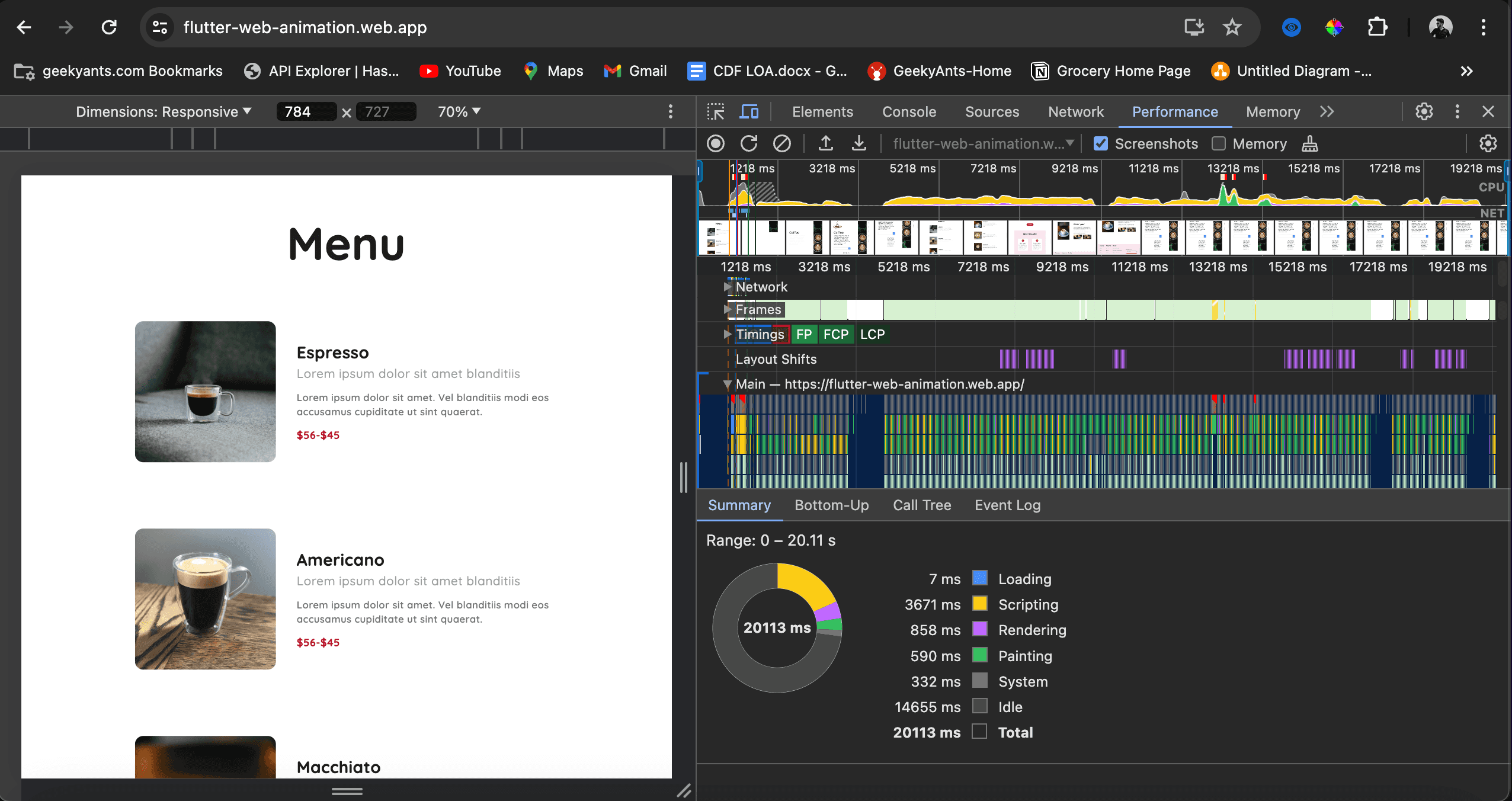
Standard Web App ( Compiled with Flutter version 3.19)
WASM Web App ( Compiled with latest Flutter version 3.22 )
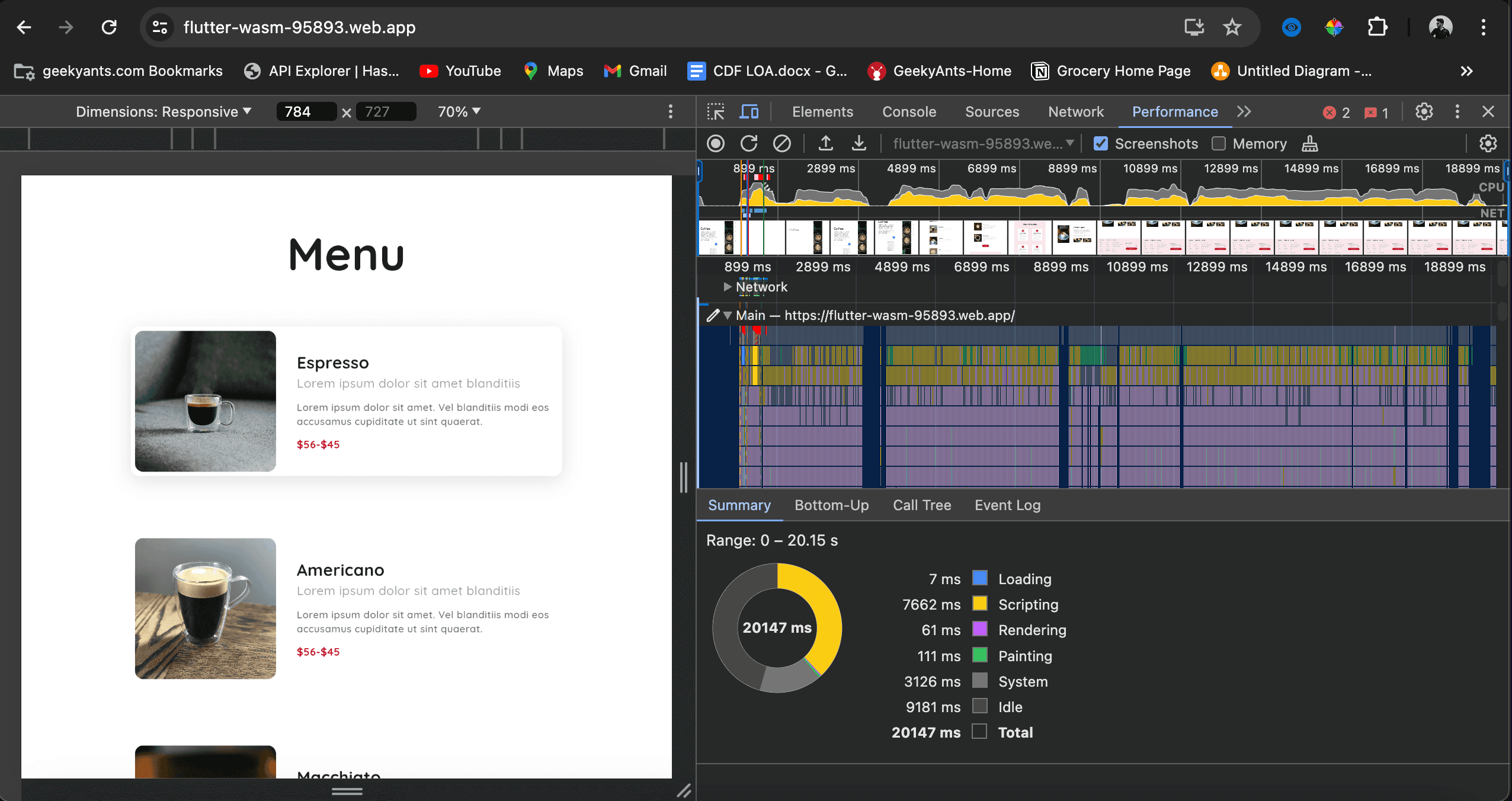
This analysis compares the performance profiles of two versions of the same Flutter web app captured using Chrome DevTools:
- Standard Flutter Web App (v3.19): This app utilises the standard Flutter web build process without WASM integration.
- WASM Flutter Web App (v3.22): This app leverages the latest Flutter release with WASM support.
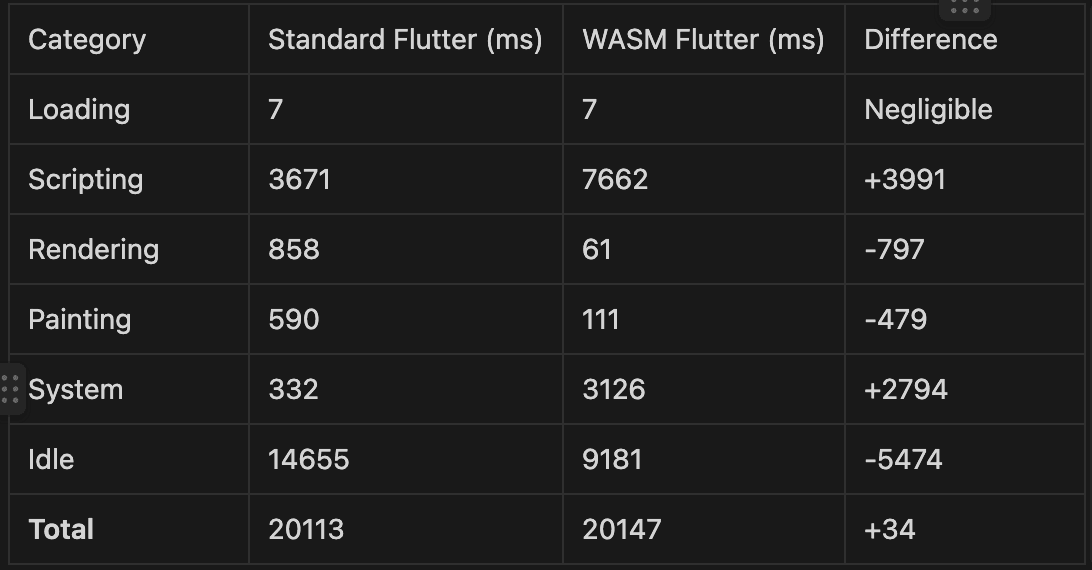
Breakdown by Category:
Analysis:
While the total execution times are very similar (within 34ms), a closer look reveals significant differences in how each app utilizes resources:
- Scripting: The WASM app exhibits a much higher scripting time (+3991ms). This is likely due to the additional overhead of loading and processing the WASM module.
- Rendering & Painting: However, the WASM app shines in rendering and painting times (-797ms and -479ms respectively). This indicates that the WASM-based processing handles these tasks more efficiently, leading to smoother animations and visuals.
- System & Idle: The WASM app spends more time in the system category (+2794ms) and less time idle (-5474ms). This suggests that the browser might be working harder to execute the WASM code than the standard JavaScript approach.
Conclusion
Despite the higher scripting time, the WASM Flutter app demonstrates a clear advantage in rendering and painting. This translates to a potentially smoother and more responsive user experience, especially for animations and complex visuals. However, the increased system time suggests there might be some overhead associated with WASM execution.
Overall, the WASM Flutter app appears to be a better choice for performance-critical scenarios that prioritise smooth animations and rendering. However, for simpler apps where scripting time is a major concern, the standard Flutter approach might still be suitable.
Additional Considerations:
- This analysis is based on a specific app and might not translate directly to all scenarios.
- Further investigation into the breakdown of the "Scripting" category for the WASM app could reveal potential areas for optimization.
- Ultimately, the best approach depends on your app's specific needs and the trade-offs between scripting time, rendering performance, and development complexity.
If you found this exploration of WASM in Flutter web development valuable, please share it with your fellow developers! Let's spread the word and empower the community to build even more performant and engaging web experiences.
We encourage you to leave comments or questions below. Share your experiences with WASM, ask for clarification on specific aspects, or suggest new topics for discussion. Let's continue the conversation and contribute to the vibrant Flutter development community!