


Picture yourself writing a Python script to process data. Everything works fine, but then your manager asks you to add logging, dynamic configuration, and maybe even a way to handle new types of input automatically. Suddenly, your simple script turns into a tangled web of repetitive code.
Now, imagine if your Python code could think for itself—adapting, validating, and evolving as it runs. Sounds futuristic? That's exactly what metaprogramming allows you to do. It's where ordinary scripts turn into smart, self-aware programs that can adapt to changing conditions without a lot of manual intervention.
If you have ever wanted your code to do more than just "work," metaprogramming is the edge you don't want to miss.
Why Metaprogramming Matters
Python is already versatile and beginner-friendly. But in large-scale applications—AI pipelines, backend systems, or plugin-based software—manual coding often becomes repetitive and error-prone. Metaprogramming helps you:
- Reduce boilerplate: Stop writing the same logging, validation, or setup code over and over
- Make code adaptive: Automatically configure behavior based on runtime data
- Boost maintainability: Update behavior in one place instead of hunting through dozens of scripts
- Increase creativity: With dynamic classes, attributes, and decorators, you can build powerful tools quickly
Think of it this way: traditional Python is like giving your code a map. Metaprogramming is like giving it a compass and the ability to explore on its own.
1. Introspection – Let Your Code Understand Itself
Introspection is Python's way of asking your program to look in the mirror. It lets your code inspect itself at runtime, checking what objects, methods, and attributes exist—and then adapting its behavior accordingly.
Why Introspection Matters
You will find introspection incredibly useful for:
- Dynamic plugin detection – automatically discovering available modules
- Debugging and logging – understanding what's happening in real-time
- Adaptive behavior in APIs or AI pipelines
- Self-documenting configurations – your code can explain itself
Python Tools for Introspection
Here are the key functions you'll use:
- type(obj) – Returns the object's type
- id(obj) – Returns the object's unique identifier
- dir(obj) – Lists all attributes and methods
- getattr(obj, name[, default]) – Fetches an attribute dynamically
- hasattr(obj, name) – Checks if an attribute exists
- isinstance(obj, cls) – Checks type membership
Beginner-Friendly Examples
Inspecting a Class
class User:
    name = "Alice"
    age = 25

print(dir(User))              # List all attributes
print(getattr(User, 'name'))  # Output: Alice
print(hasattr(User, 'email')) # Output: False
Dynamic Functions Based on Object Type
def describe(obj):
    print(f"Object type: {type(obj)}")
    print("Attributes:", dir(obj))

describe(User)
describe("Hello, world!")
Self-Documenting Object
class Config:
    debug = True
    version = "1.0"
    user_limit = 5

cfg = Config()

# Automatically print all attributes
for attr in dir(cfg):
    if not attr.startswith("__"):
        print(f"{attr} = {getattr(cfg, attr)}")
Real-World Applications
Where you'll see this in action:
- Plugin loaders that initialize available modules automatically
- ORMs (like Django or SQLAlchemy) inspecting model fields
- Auto-generating logs or configuration summaries
2. Dynamic Attributes & Methods – Flexibility at Runtime
Python allows objects to gain or change attributes and methods dynamically, without modifying the original class. This is where things start getting really interesting.
Why It is Useful
- Add features without rewriting classes
- Customize behavior per instance
- React to runtime data
- Build adaptive AI pipelines or plugin-based apps
Examples
Adding Attributes Dynamically
class Config:
    pass

cfg = Config()
setattr(cfg, 'debug', True)
setattr(cfg, 'version', '1.0')

print(cfg.debug)   # True
print(cfg.version) # 1.0
Adding Methods Dynamically
def greet(self, name):
    return f"Hello, {name}!"

setattr(cfg, 'greet', greet.__get__(cfg))
print(cfg.greet("Alice"))  # Hello, Alice!
Smart Defaults with __getattr__
class DynamicConfig:
    def __getattr__(self, name):
        return f"{name} is not set!"

cfg = DynamicConfig()
cfg.debug = True
print(cfg.version)  # version is not set!
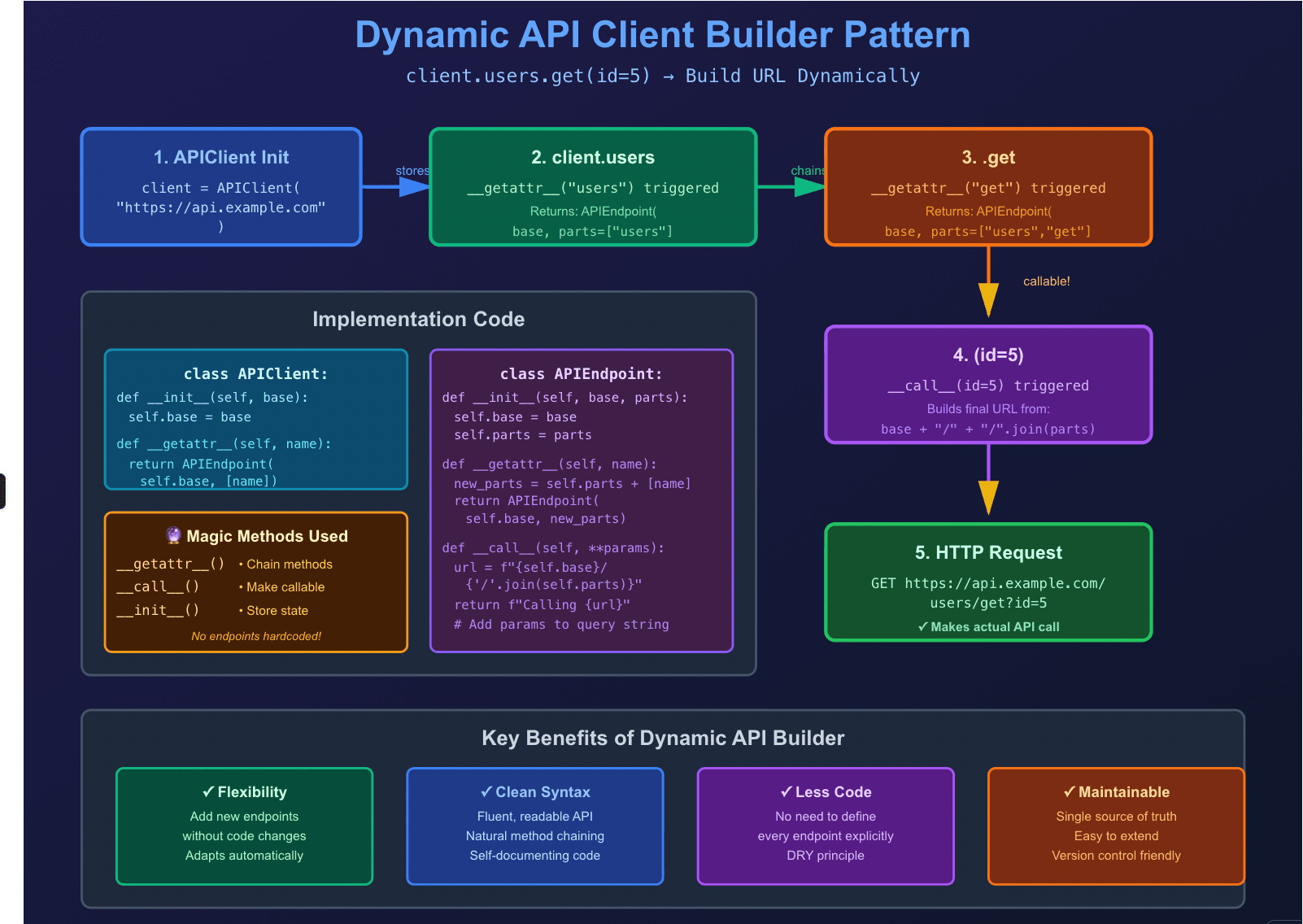
Mini Dynamic API Client
Here's where it gets fun. Watch how we can create a fluent API interface:
class APIEndpoint:
    def __init__(self, base, parts):
        self.base = base
        self.parts = parts

    def __getattr__(self, name):
        return APIEndpoint(self.base, self.parts + [name])

    def __call__(self, **params):
        url = f"{self.base}/{'/'.join(self.parts)}"
        return f"Calling {url} with {params}"

class APIClient:
    def __init__(self, base):
        self.base = base

    def __getattr__(self, name):
        return APIEndpoint(self.base, [name])

client = APIClient("https://api.example.com")
print(client.users.get(id=5))
# Output: Calling https://api.example.com/users/get with {'id': 5}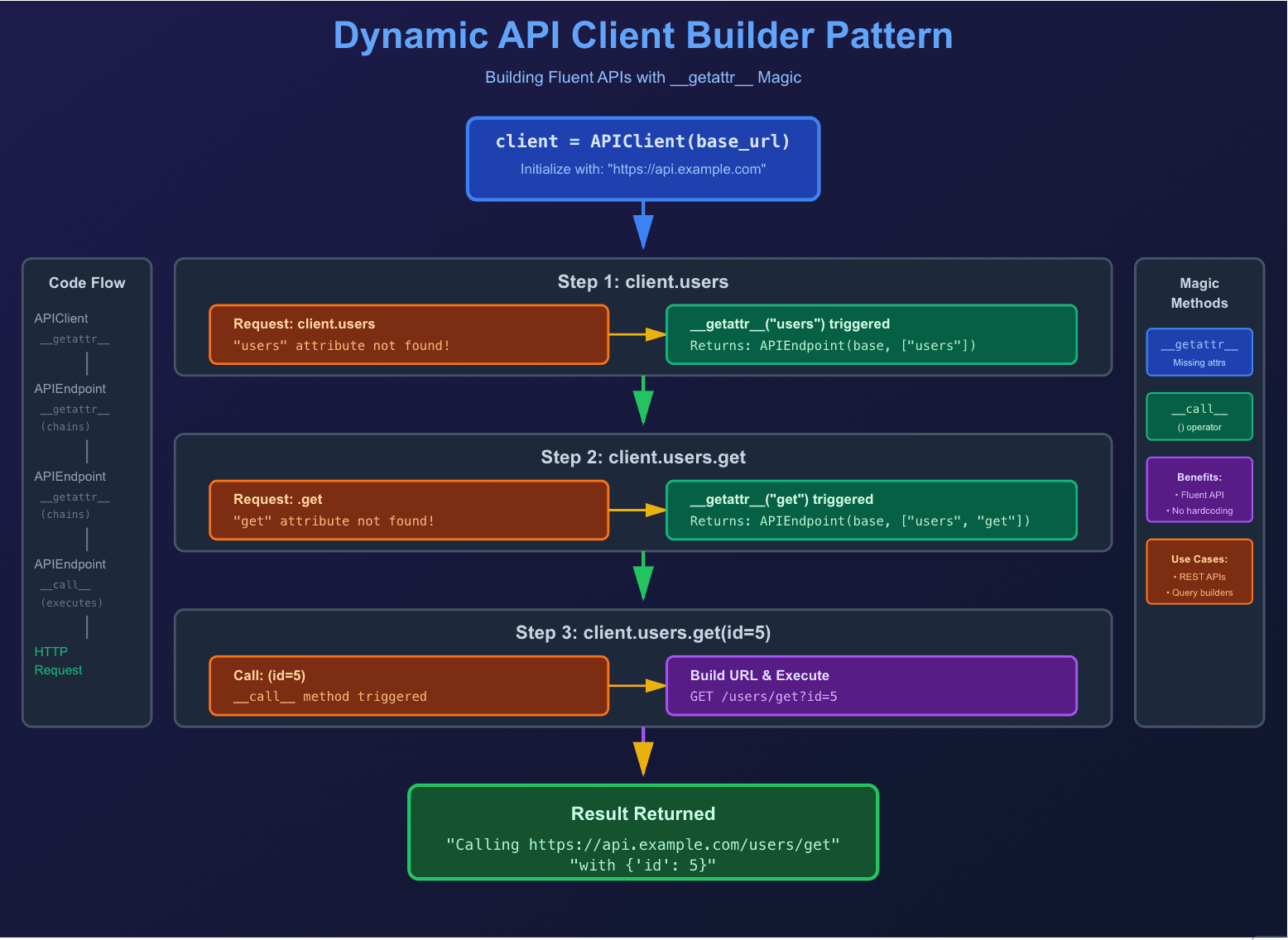
Pretty cool, right? You can chain method calls naturally without defining each endpoint explicitly.
3. Decorators – Wrapping Functions for Power and Elegance
Decorators are one of Python's most elegant features. They wrap functions or classes to extend or modify behavior without changing the original code. If you're not using decorators yet, you're missing out on some serious productivity gains.
Examples
Uppercase Decorator
import functools

def uppercase_result(func):
    @functools.wraps(func)
    def wrapper(*args, **kwargs):
        return func(*args, **kwargs).upper()
    return wrapper

@uppercase_result
def greet(name):
    return f"Hello, {name}"

print(greet("Alice"))  # HELLO, ALICE
Logging Decorator
def log_call(func):
    @functools.wraps(func)
    def wrapper(*args, **kwargs):
        print(f"Calling {func.__name__} with {args} {kwargs}")
        result = func(*args, **kwargs)
        print(f"{func.__name__} returned {result!r}")
        return result
    return wrapper
Retry Decorator
This one's a lifesaver when dealing with flaky APIs or network requests:
import time, random
def retry(attempts=3, delay=1):
    def decorator(func):
        @functools.wraps(func)
        def wrapper(*args, **kwargs):
            for i in range(attempts):
                try:
                    return func(*args, **kwargs)
                except Exception as e:
                    print(f"Attempt {i+1} failed: {e}")
                    time.sleep(delay)
            raise RuntimeError("All attempts failed")
        return wrapper
    return decorator
Real-World Applications in AI
Decorators shine in AI and ML workflows:
- Logging model predictions dynamically
- Measuring performance or runtime
- Input validation in preprocessing pipelines
- Automatically retrying failed API requests
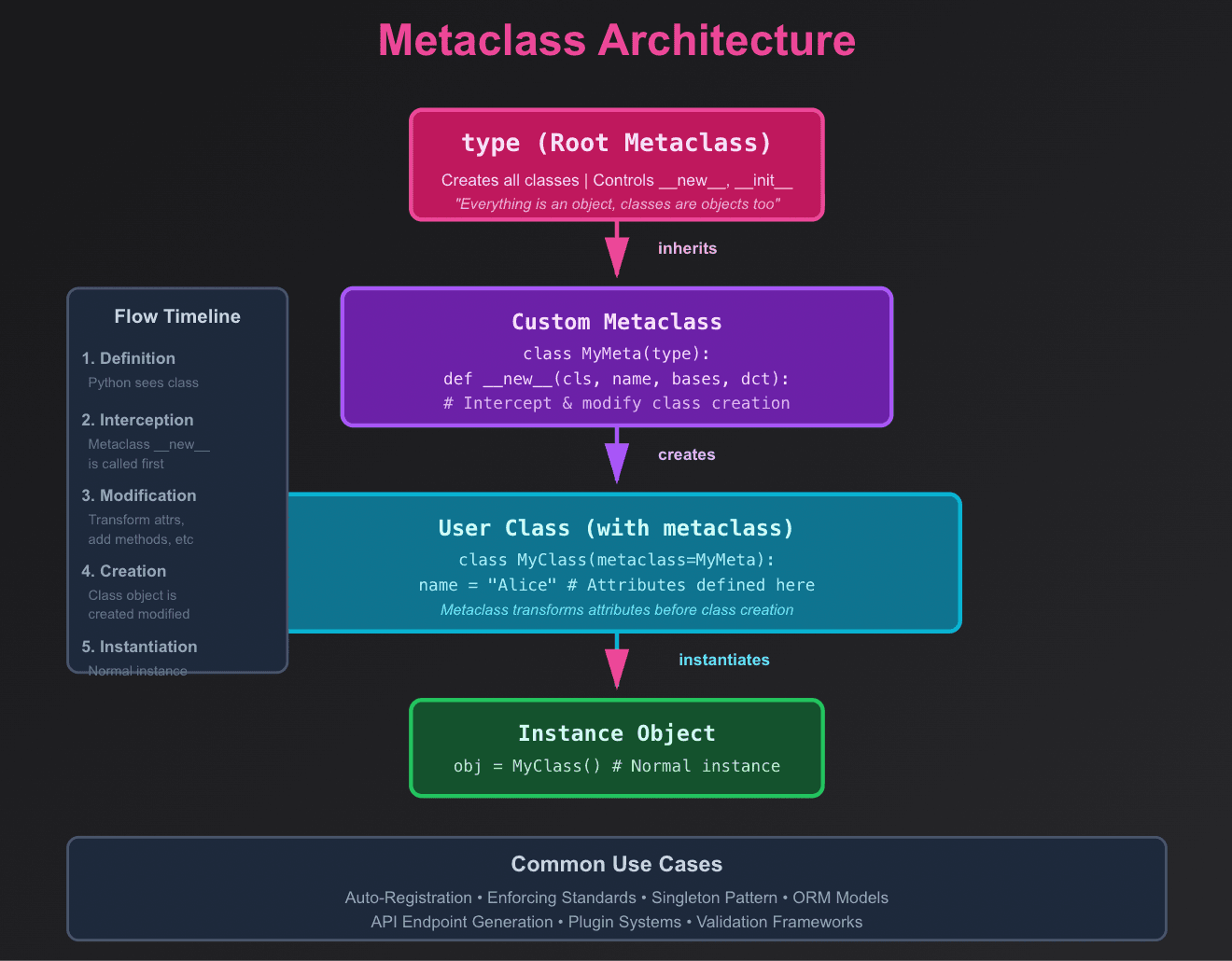
4. Metaclasses – Classes That Control Classes
Now we're getting into advanced territory. Metaclasses define how classes themselves are constructed. They are "class factories" that can modify or register classes automatically.
Fair warning: metaclasses are powerful but can make your code harder to understand. Use them sparingly and only when simpler solutions won't work.
Example: Auto-uppercase Attributes
class UpperAttrMeta(type):
    def __new__(cls, name, bases, dct):
        attrs = {k.upper(): v for k, v in dct.items()}
        return super().__new__(cls, name, bases, attrs)

class User(metaclass=UpperAttrMeta):
    name = 'Alice'

print(hasattr(User, 'NAME'))  # True
Use Cases
Where metaclasses actually make sense:
- Enforcing coding standards automatically
- Auto-registering classes in a registry
- Dynamically creating API endpoints or AI models
5. Putting It All Together: A Mini AI Pipeline
Let's combine everything we've learned into a practical example. Here's a sentiment analysis pipeline that uses metaclasses, decorators, and dynamic methods:
class PipelineMeta(type):
    def __new__(cls, name, bases, dct):
        dct = {k.upper(): v for k, v in dct.items()}
        return super().__new__(cls, name, bases, dct)

def log_step(func):
    def wrapper(*args, **kwargs):
        print(f"Running step: {func.__name__}")
        return func(*args, **kwargs)
    return wrapper

class SentimentPipeline(metaclass=PipelineMeta):
    @log_step
    def preprocess(self, text):
        return text.lower().split()

    @log_step
    def analyze(self, tokens):
        return "Positive" if "good" in tokens else "Neutral"

pipeline = SentimentPipeline()
tokens = pipeline.PREPROCESS("This is a good day")
result = pipeline.ANALYZE(tokens)
print(result)  # Positive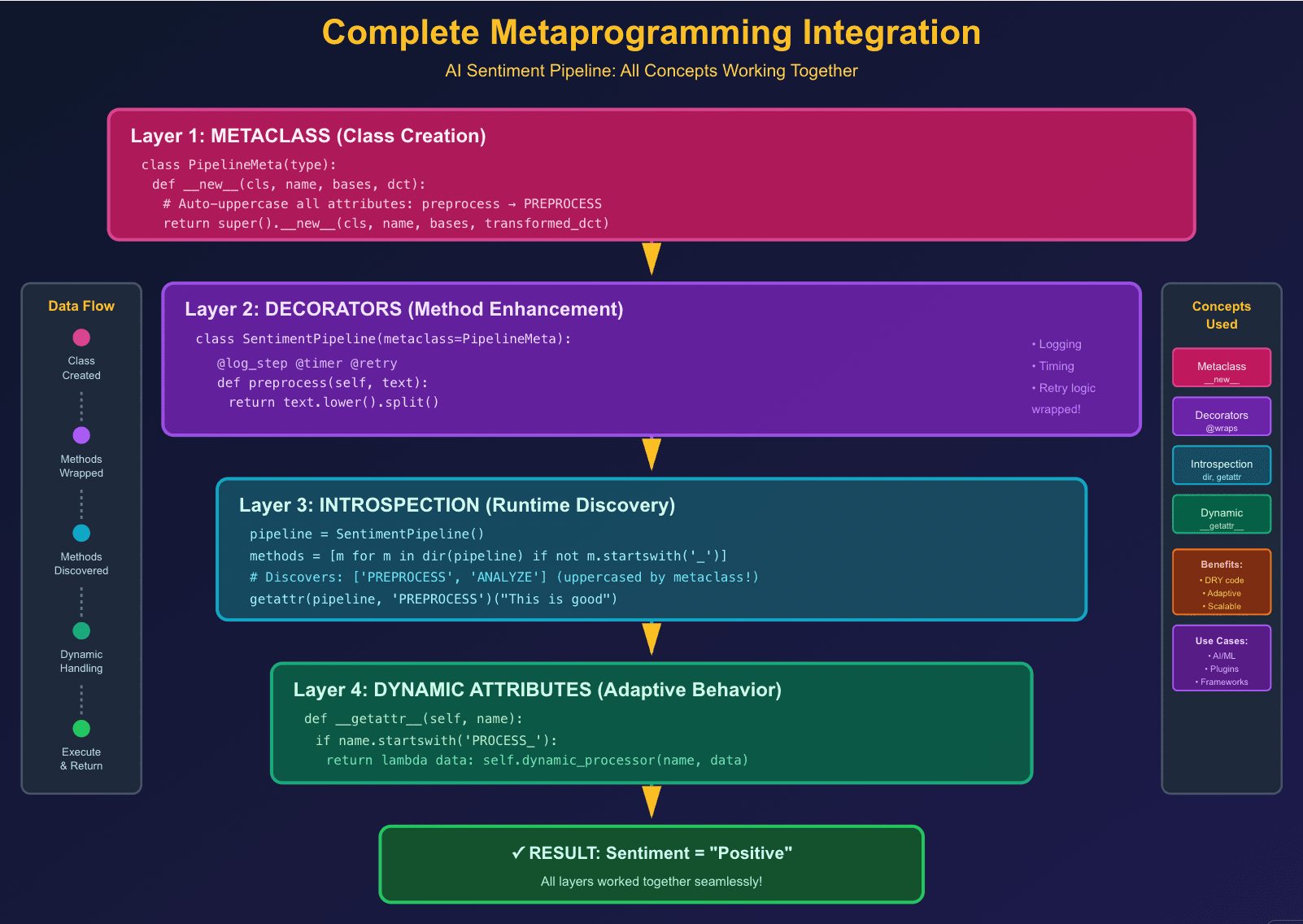
See how we combined metaclasses for attribute transformation, decorators for logging, and dynamic methods for a self-aware pipeline? That's the power of metaprogramming.
6. Common Pitfalls (and How to Dodge Them)
Before you go metaprogramming-crazy, here are some gotchas to watch out for:
- Overuse: Too much metaprogramming can confuse others (and future you). Just because you can doesn't mean you should.
- Performance: Heavy runtime introspection may slow down large systems. Profile before optimizing.
- Documentation: Always explain dynamic behaviors for your teammates. Your clever trick won't seem so clever when someone's debugging it at 2 AM.
- Incremental Approach: Start simple. Master decorators first, then move to dynamic attributes, and only tackle metaclasses when you really need them.
7. When NOT to Use Metaprogramming
Here's the truth nobody tells you: metaprogramming isn't always the answer. Sometimes, simple is better. Here's when to pump the brakes:
Skip metaprogramming if:
- Your team is new to Python—they will struggle with debugging
- The problem has a simple, straightforward solution
- You are building a small, one-off script
- Performance is critical (dynamic lookups add overhead)
- You can not explain WHY you need it in one sentence
Use metaprogramming when:
- You're eliminating significant code duplication (100+ lines of boilerplate)
- Building frameworks, libraries, or plugin systems
- Creating DSLs (Domain-Specific Languages)
- The dynamic behavior genuinely simplifies the codebase
- You have good test coverage to catch runtime issues
Remember: Just because you can make your code self-aware doesn't mean you should. Always ask: "Does this make my code easier to understand or harder?"
8. Debugging Metaprogramming: Tips from the Trenches
Dynamic code can be tricky to debug. Here are some lifesavers:
1. Use functools.wraps in decorators
# Bad - loses function metadata
def my_decorator(func):
    def wrapper(*args, **kwargs):
        return func(*args, **kwargs)
    return wrapper

# Good - preserves function name, docstring, etc.
import functools
def my_decorator(func):
    @functools.wraps(func)
    def wrapper(*args, **kwargs):
        return func(*args, **kwargs)
    return wrapper
2. Add verbose logging
class VerboseClass(metaclass=SomeMeta):
    def __init__(self):
        print(f"[DEBUG] Initializing {self.__class__.__name__}")
        print(f"[DEBUG] Available methods: {dir(self)}")
3. Use pdb or ipdb for interactive debugging
import pdb

def complex_dynamic_method(self):
    pdb.set_trace()  # Pause execution here
    # Inspect variables, call dir(), check attributes
4. Document dynamic behavior aggressively
class DynamicAPI:
    """
    This class generates methods dynamically based on endpoint names.

    Usage:
        api = DynamicAPI()
        api.users.get(id=5)  # Calls /users/get

    Note: Methods are NOT defined in source code - see __getattr__
    """
Performance Considerations: The Real Cost of Magic
Let's talk about the elephant in the room: metaprogramming isn't free. Here's what you need to know:
Speed Comparisons
import time

class StaticClass:
    def method(self):
        return "Hello"

class DynamicClass:
    def __getattr__(self, name):
        return lambda: "Hello"

# Static access
static = StaticClass()
start = time.time()
for _ in range(1000000):
    static.method()
print(f"Static: {time.time() - start:.4f}s")

# Dynamic access
dynamic = DynamicClass()
start = time.time()
for _ in range(1000000):
    dynamic.method()
print(f"Dynamic: {time.time() - start:.4f}s")

# Dynamic is typically 2-5x slower
When Performance Matters
- Hot paths: Avoid metaprogramming in code that runs millions of times per second
- Initialization is okay: Dynamic class creation at startup? No problem
- Balance: Use metaprogramming for convenience, not in performance-critical loops
- Profile first: Do not optimize prematurely—measure before you worry
Optimization Tips
1. Cache dynamic lookups
class OptimizedDynamic:
    def __init__(self):
        self._cache = {}

    def __getattr__(self, name):
        if name not in self._cache:
            self._cache[name] = self._create_method(name)
        return self._cache[name]
2. Use __slots__ with dynamic classes (when possible)
3. Compile regex patterns once if using eval() or code generation
Challenge for Readers
Ready to put your new skills to the test? Here's your challenge:
Beginner Challenge: Build a configuration system that:
- Loads settings from environment variables dynamically
- Has smart defaults using __getattr__
- Validates types automatically with decorators
Intermediate Challenge: Create a plugin loader that:
- Discovers plugins in a directory automatically (introspection)
- Registers them using a metaclass
- Allows dynamic plugin configuration
Advanced Challenge: Build a mini-framework that:
- Defines routes using decorators (@app.route("/users"))
- Validates request/response types dynamically
- Auto-generates API documentation from introspection
Ask yourself: “Can your program adapt to a new feature without changing its core logic?”
Share your creations in the comments below—I would love to see what you come up with!
What is Next?
If you found this helpful, here is what to explore next:
- Abstract Base Classes (ABC) – for enforcing interfaces
- Descriptors – for fine-grained attribute control
- Context Managers – for resource management with __enter__ and __exit__
- Type hints and runtime validation – combining static and dynamic type checking
Happy coding, and remember: with great power comes great responsibility. Use metaprogramming wisely!







