

Hey there, fellow coder! Have you ever wished you could just step through your Node.js app running on Heroku like a local app? Well, grab your favorite drink and get comfy because we’re about to embark on a fun journey to set up remote debugging on Heroku!
Why Remote Debugging?
Debugging is a crucial part of development, ensuring your app runs smoothly and efficiently. Remote debugging is especially important when your app is deployed on a server, allowing you to diagnose issues that only appear in a deployed environment.
Prerequisites
Before we jump in, make sure you have:
- A Node.js application deployed on Heroku.
- The Heroku CLI installed on your machine.
Debugging Steps
Step 1: Enable Remote Debugging
First, we need to enable remote debugging for your Node.js app. Heroku uses the inspect flag to allow remote debugging.
- Modify Your
Procfile: Add the--inspectflag to yourProcfile. It should look something like this:
web: node –inspect index.js2. Deploy Changes to Heroku: Commit your changes and push to Heroku:
git add Procfile
git commit -m “Enable remote debugging”
git push heroku master
Step 2: Open a Remote Debugging Session
Now that your app is configured, it’s time to connect to the remote debugger.
- Restart Your Heroku App: Restarting ensures the
inspectflag is applied:
heroku restart2. Forward Debugging Port: Forward traffic on a local port to a port inside a dyno; in this case both the local port and dyno port are 9229:
heroku ps:forward 9229Step 3: Connect Your Debugger
With the SSH tunnel set up, you can now connect your favourite debugger.
Using VS Code
- Open VS Code: Launch VS Code and open your project.
- Configure Debugger: Add a new configuration in your
launch.json:
{
   "version": "0.2.0",
   "configurations": [{
       "address": "localhost",
       "localRoot": "${workspaceFolder}",
       "name": "Attach to Remote",
       "port": 9090,
       "remoteRoot": "/app",
       "request": "attach",
       "skipFiles": ["<node_internals>/**"],
       "type": "node",
   }]
}
3. Start Debugging: Select the "Attach to Heroku" configuration and start debugging. Set breakpoints, inspect variables, and step through your code like in a local environment.
Using IntelliJ IDEA / Webstorm
- Open Run Config: Open your IDE and go to
Run > Edit Configurations. - Configure Debugger: Click the
+button and selectAttach to Node.js/Chrome:
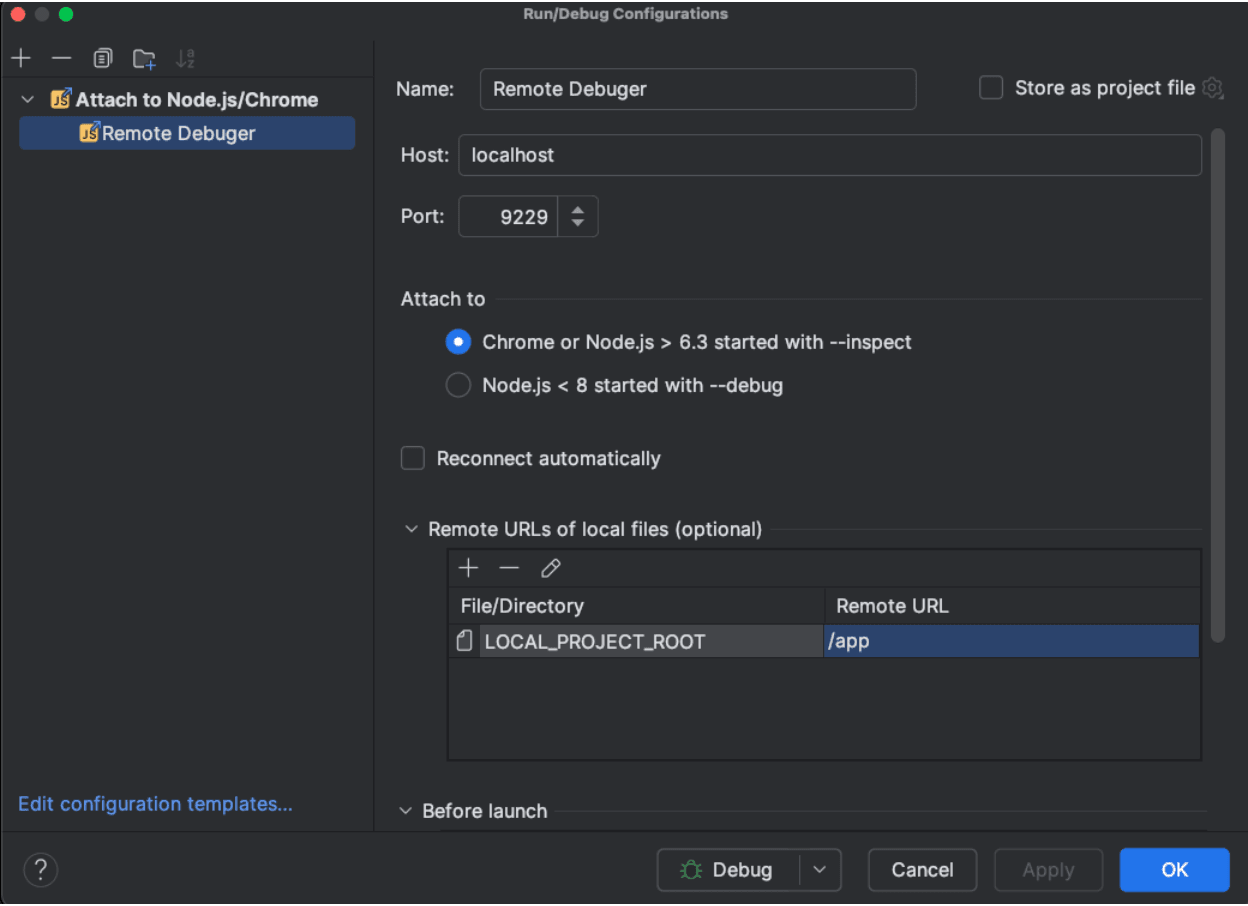
3. Start Debugging: Select your newly created Node.js Remote Debug configuration, Click the debug icon and start debugging. Set breakpoints, inspect variables, and step through your code like in a local environment.
And there you have it! You’ve just set up remote debugging for your Node.js app on Heroku. High five! Debugging in the cloud just became a whole lot cooler, right? If you hit any bumps along the way, double-check your SSH tunnel and configurations. Happy debugging!







