

Key takeaways -
- Cost Drivers Are Multi-Dimensional: CRM development expenses in the U.S. are influenced by factors beyond coding—compliance, integrations, scalability requirements, and ongoing maintenance significantly impact overall budgets.
- Build vs. Buy Affects ROI Trajectory: Off-the-shelf CRMs provide faster deployment but limited flexibility, while custom-built solutions demand higher upfront investment yet deliver long-term adaptability and ownership advantages.
- Strategic Partner Selection Is Critical: Engaging an experienced development partner ensures regulatory alignment, optimized workflows, and a future-ready architecture that maximizes value from every dollar invested.
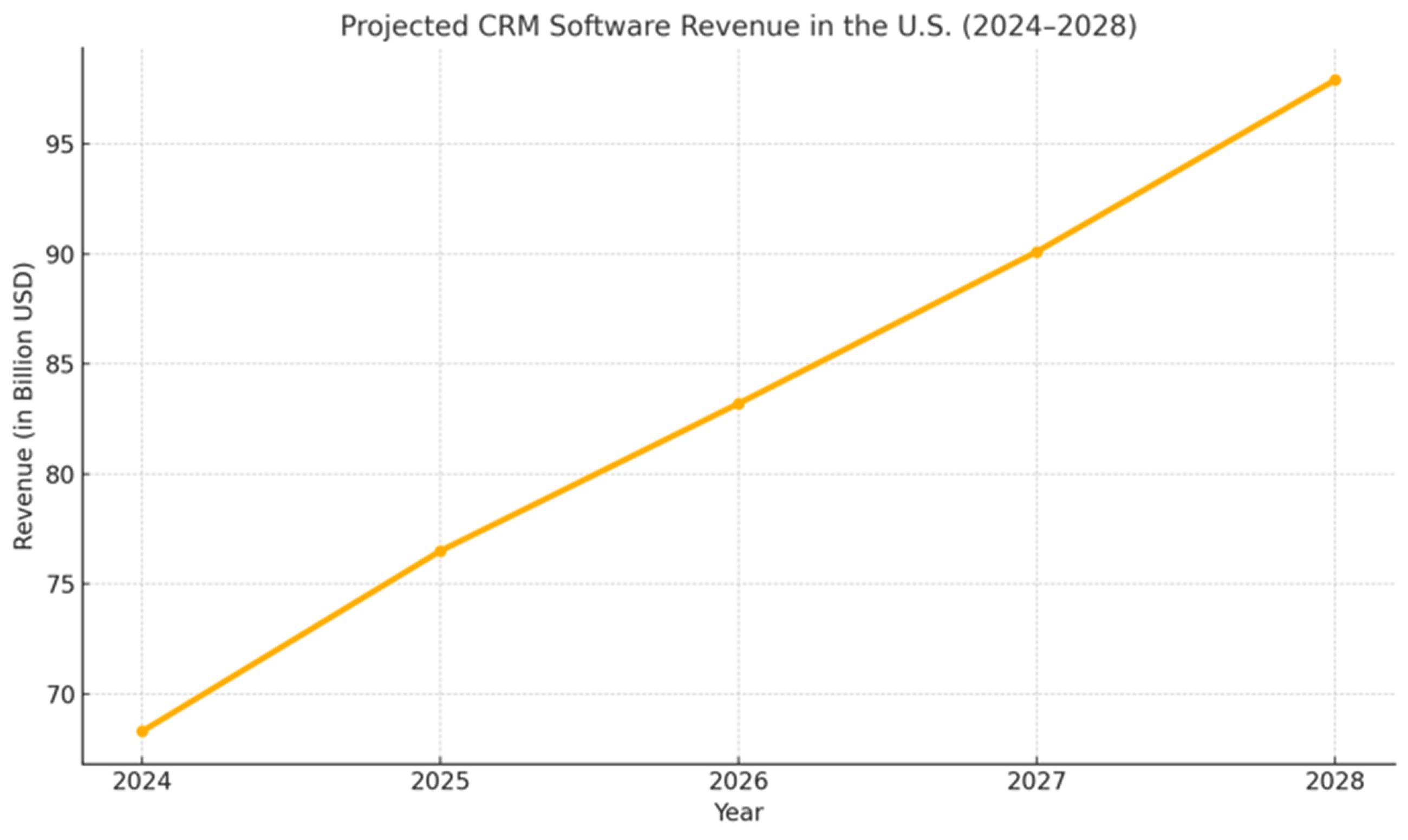
Manual workflows and disconnected tools may get you started, but they can not sustain scale. Every missed follow-up, misaligned campaign, or lost opportunity becomes a direct hit to revenue. For businesses competing in U.S. and global markets, this inefficiency is not a growing pain—it is a systems challenge. According to Statista, CRM software revenue in the U.S. is projected to exceed $97.9 billion by 2028—reflecting how much businesses are investing in off-the-shelf tools. But for many organizations, especially those in fintech, healthcare, or B2B SaaS, the real question is no longer which CRM to buy, but whether to build one that aligns with their workflows, data strategy, and long-term growth. That decision looks different depending on where you are in your journey—whether you are a mid-sized enterprise modernizing legacy systems or a fast-scaling startup building a unified foundation from scratch. Understanding what it costs to build a CRM in the U.S. is essential—for both initial investment and long-term value across infrastructure, ownership, and innovation. In this blog, we break down the real cost of CRM development in the U.S., the factors that shape pricing, cost-saving opportunities, and how to choose between custom and off-the-shelf solutions.
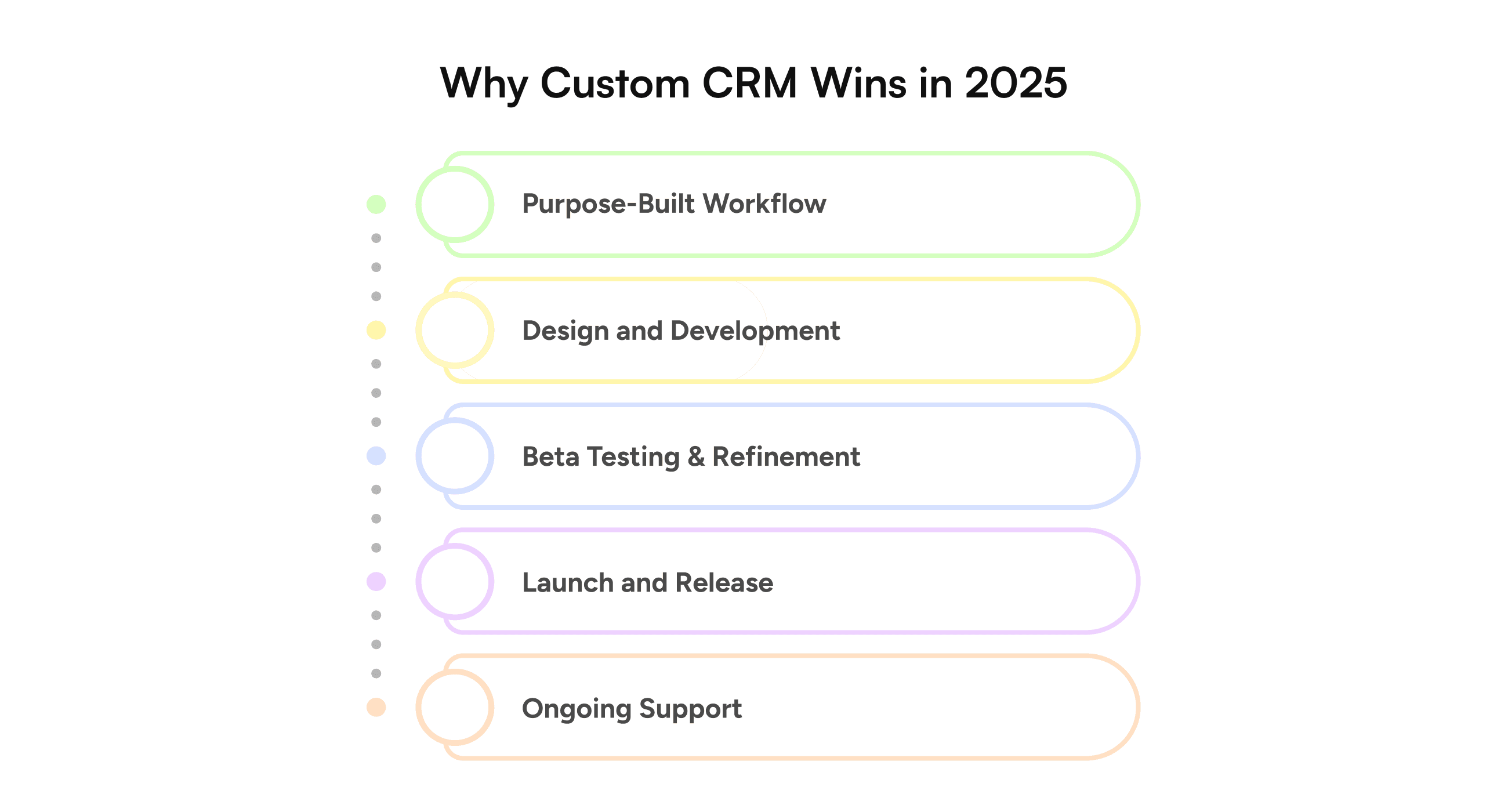
Why Build a Custom CRM Software in 2025
In early 2024, a U.S.-based multi-state healthcare provider was losing time and revenue to fragmented systems—patient data scattered across spreadsheets, manual appointment reminders, and inconsistent insurance tracking.
Their turning point? A custom CRM that aligned with HIPAA standards, automated patient reminders, mapped insurance eligibility by state, and integrated with their EHR system. Within six months, they reduced no-show rates by 26% and cut administrative time by half. That kind of impact is not rare—it reflects what is possible when technology fits the business, not the other way around. According to Nucleus Research, every dollar invested in CRM returns an average of $8.71—a 55% jump from a decade ago. But this return hinges on how well the system is tailored to the organization’s structure, workflows, and data needs. Rigid, off-the-shelf platforms often fail to deliver full value because they force businesses to adapt to their limitations rather than enabling smarter operations. For U.S. enterprises preparing for 2025, the return on a well-aligned CRM is measurable:
- 30% improvement in sales productivity
- 25% increase in marketing ROI
Up to 27% lift in customer retention (Salesforce)
When enhanced with custom logic, automation, and AI, those numbers go further.
Companies leveraging CRM platforms built around their own data models and workflows have reported up to a 41% increase in revenue per sales rep—powered by predictive analytics, dynamic segmentation, and automated task handling.
CRMs should not force companies to adapt. The smartest companies build systems that adapt to them—automating what matters, securing what is critical, and scaling without friction.
 Kunal KumarChief Revenue Officer
Across industries, companies that implement adaptable CRMs see faster ROI and higher user adoption. Our client data shows that tailoring workflows to existing business processes can reduce onboarding time by up to 40% and cut operational overhead by 25%. Kunal Kumar’s view is shaped by delivering platforms for enterprises handling millions of customer records, where every second saved in automation and every added layer of security directly impacts revenue growth and regulatory compliance. His outlook reflects a market reality: scalability without friction isn’t a luxury—it’s a competitive advantage.
What Are the Core Key Features That Impact CRM Software Development Cost?
Building a custom CRM software development is not a feature-counting exercise—it’s about embedding your business logic, operational workflows, and compliance requirements into a secure, scalable system. In the U.S. market, where industries demand precision and regulatory alignment, each core feature carries strategic depth and cost implications.
1. Role-Based Access and Multi-Tenant Permissions
CRM platforms often serve distributed teams across roles and departments. Designing secure, role-specific access means more than toggling visibility—it requires carefully planned user hierarchies, audit trails, data isolation, and compliance. For example, a healthcare CRM may require distinct views and access for doctors, admins, and insurers, all governed under HIPAA standards. Building this access logic at the database and UI level adds meaningful engineering complexity.
2. Lead, Contact, and Opportunity Management
Managing leads, accounts, and deals forms the backbone of a CRM. But the structure varies widely across businesses. If your CRM is routing leads by region, capturing communication histories, and linking accounts to multi-stage sales pipelines, that demands custom backend services, intelligent data mapping, and a flexible front-end logic. The richer your sales process, the more extensive the development effort.
3. Sales Pipeline and Workflow Automation
Sales success hinges on speed and consistency. Workflow automation—whether for follow-ups, alerts, or escalations—translates unique business rules into real-time system behavior. This means designing a rules engine, implementing conditional logic, and building error-tolerant flows. In domains like legal or finance, these automations must pass rigorous compliance checks, increasing the development and QA effort.
4. Third-Party Integrations
A CRM that operates in silos adds friction. Integrations with tools like Slack, Stripe, HubSpot, Twilio, and Zoom require stable middleware, consistent API handling, webhook management, and long-term maintenance plans. The more integrations required, the more effort needed to ensure seamless data flow and error handling.
5. Custom Dashboards and Reporting
Dashboards are strategic tools. Executives use them to track performance, marketers need campaign insights, and sales leaders rely on real-time forecasts. Building dynamic, role-based dashboards with advanced filtering, cross-metric analytics, and predictive models adds considerable engineering scope—especially when data accuracy and speed are critical.
6. Mobile Usability and Field Access
Field teams require lightweight, reliable mobile interfaces. Whether through a responsive web app or native mobile versions, mobile readiness introduces additional design and logic considerations—especially around offline access, syncing, and secure authentication.
7. Security, Compliance, and Audit Readiness
When handling personal or financial data, security is embedded into every layer. This includes data encryption, multi-factor authentication, access logging, export restrictions, and compliance with standards like SOC 2, HIPAA, or PCI-DSS. These safeguards must be designed from the start and validated regularly, directly impacting the CRM’s architecture and budget.
How Much Does It Cost to Build a CRM in the U.S.?
Based on our experience developing CRM platforms for U.S.-based clients—from healthcare providers managing multi-state operations to SaaS startups scaling sales workflows—CRM development is not one-size-fits-all. The cost depends on your platform’s architecture, user roles, regulatory standards, and automation depth. Unlike plug-and-play tools, custom CRMs are built for alignment with your data, workflows, compliance needs, and long-term growth. At GeekyAnts, we have engineered platforms that include HIPAA-grade security, multi-tenant modules, and AI-powered pipelines. And the costs vary accordingly. The table below outlines pricing based on feature depth and UI complexity, using U.S. development rates at $75/hour. These estimates reflect the real cost of scalable, production-grade CRM software designed for modern U.S. businesses.
CRM Cost Breakdown by Features & Design Complexity
Below, we break down CRM development costs across features, design complexity, and phases, giving you a clearer picture of how different requirements translate into real-world budgets.
Feature & Design Complexity | Details | Average CRM Development Cost (U.S. – Adjusted) |
Basic Features | Contact management, task tracking | $45,000 – $75,000+ |
Advanced Features | AI-driven analytics, workflow automation, third-party integrations | $75,000 – $105,000+ |
Simple Design | Minimalist UI, intuitive mobile-first layouts | $37,500 – $67,500+ |
Complex Design | Responsive UI, intuitive dashboards, deep customization | $52,500 – $75,000+ |
CRM Pricing Breakdown by Development Phase
To put these factors into perspective, let’s look at how CRM costs unfold across different features, design choices, and development stages in the U.S. market.
Development Phase | Tasks Covered | Hours (Avg.) | Estimated Cost (at $75/hr) |
Discovery & Planning | Requirements gathering, stakeholder interviews, technical scope | 40–80 hrs | $3,000–$6,000 |
UI/UX Design | Wireframing, user journey mapping, high-fidelity UI screens | 80–120 hrs | $6,000–$9,000 |
Frontend Development | Dashboard, data views, responsive components (React, Flutter, etc.) | 150–250 hrs | $11,250–$18,750 |
Backend Development | Architecture, API integrations, business logic, database setup | 200–300 hrs | $15,000–$22,500 |
Integrations | Stripe, Twilio, HubSpot, EHRs, internal tools, cloud infra | 60–100 hrs | $4,500–$7,500 |
AI/ML Layer (Optional) | Forecasting, NLP-based workflows, personalization | 80–150 hrs | $6,000–$11,250 |
QA & Testing | Manual + automated testing, cross-browser/device QA | 60–100 hrs | $4,500–$7,500 |
Project Management | Sprint planning, timeline management, status reporting | 40–80 hrs | $3,000–$6,000 |
DevOps & Deployment | CI/CD, environment setup, security provisioning | 50–80 hrs | $3,750–$6,000 |
Cost by CRM Type
Choosing the right CRM type depends on whether you need a simple internal workflow tool or a fully integrated enterprise solution. The following estimates show how scope and complexity impact costs and delivery timelines.
CRM Type | Scope | Timeline | Estimated Cost (at $75/hr) |
Basic Internal CRM | Contact management, internal team workflows, task tracking | 3–4 months | $40,000 – $55,000 |
Sales CRM | Lead management, opportunity tracking, pipeline dashboards | 4–5 months | $55,000 – $75,000 |
Customer Support CRM | Ticketing, SLAs, chat/email logs, escalation rules | 4–5 months | $50,000 – $70,000 |
Marketing CRM | Campaign builder, email automation, segmentation, A/B testing | 5–6 months | $65,000 – $90,000 |
Enterprise CRM | All modules + integrations + role-based access + compliance | 6–9 months | $95,000 – $150,000 |
Modular CRM | Built with plugin-based flexibility for scale/customization | 5–7 months | $80,000 – $110,000 |
Custom Hybrid CRM | Cross-functional CRM (Sales + Support + Analytics) | 6–8 months | $90,000 – $135,000 |
Industry-wise CRM Development Cost in the USA
CRM costs also shift depending on the industry, since compliance, integrations, and user expectations vary widely. The table below outlines typical U.S. cost ranges and must-have features across key verticals.
Industry | CRM Type | Estimated Cost (U.S.) | Must-Have Features |
Healthcare | HIPAA-compliant CRM | $95,000 – $130,000 | EHR integrations, appointment automation, insurance workflows, audit logs |
Fintech | Finance CRM | $90,000 – $125,000 | KYC, encrypted messaging, payment integrations, role-based access |
SaaS | B2B Multi-tenant CRM | $85,000 – $120,000 | Multi-client support, billing APIs, usage analytics, user provisioning |
Logistics | Operations CRM | $70,000 – $100,000 | Route tracking, fleet integrations, delivery SLAs |
Retail & eCom | Marketing CRM | $65,000 – $95,000 | Campaign automation, loyalty programs, segmentation, product insights |
Real Estate | Deal & Client CRM | $60,000 – $90,000 | Property listings, agent-client dashboards, appointment schedulers |
Education | Student CRM | $55,000 – $85,000 | Admissions funnel, communication logs, course tracking |
CRM Development Process: From Idea to Scalable Product
Building a custom CRM is not simply about writing code—it’s about engineering a platform that can evolve with your business, align with your processes, and deliver long-term value. At GeekyAnts, we approach CRM development as a journey, not a project. Each phase in the process is designed to de-risk delivery, ensure stakeholder alignment, and build for scale and sustainability. Let’s walk through the complete development lifecycle, highlighting how strategy, architecture, and execution come together to bring a CRM to life.
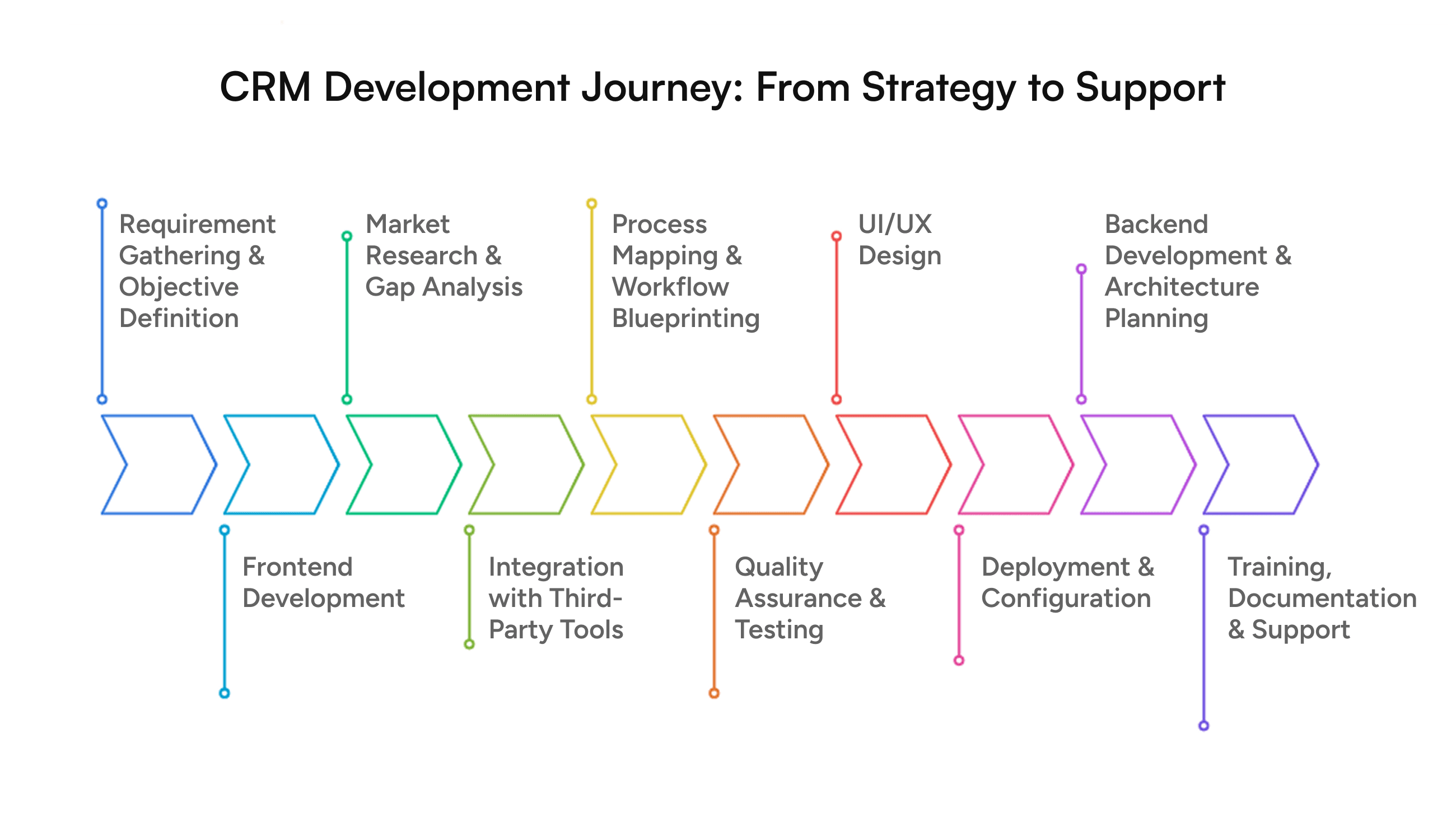
1. Requirement Gathering & Objective Definition
The process begins with understanding the "why" behind your CRM. We collaborate with key business stakeholders to capture goals—be it revenue growth, pipeline visibility, compliance, or automation. This is also where we identify pain points in current workflows. For example, a U.S.-based logistics client came to us with eight different Excel-based systems. During discovery, we mapped every user journey and turned their scattered tools into one centralized platform.
2. Market Research & Gap Analysis
We benchmark your needs against industry standards and analyze existing tools—commercial CRMs or internal systems—to identify what’s missing. This helps in defining what needs to be built from scratch vs. what can be improved. For a healthcare CRM, this step included reviewing HIPAA compliance requirements, patient data models, and third-party systems like EHRs and insurance portals.
3. Process Mapping & Workflow Blueprinting
Once requirements are clear, our team creates detailed process flowcharts that simulate how users will navigate the CRM. This includes lead capture, sales workflows, support tickets, notifications, and approvals. For example, in a fintech CRM we designed, we mapped auto-escalation rules for loan approvals that reduced manual intervention by 60%.
4. UI/UX Design
With the process map in hand, our UI/UX design team prototypes the user experience—focusing on clarity, accessibility, and visual hierarchy. Custom dashboards, modular card views, and mobile-first layouts are built in tools like Figma. A SaaS provider we worked with saw a 40% boost in daily CRM usage simply by streamlining how their reps viewed deal pipelines.
5. Backend Development & Architecture Planning
This phase is foundational. We define data models, APIs, role-based permissions, and choose the right tech stack (Node.js, NestJS, PostgreSQL, etc.). Scalable multi-tenant architecture is implemented if your CRM needs to serve multiple clients or departments. Our internal framework gluestack helps accelerate this process while ensuring robust performance and modularity.
6. Frontend Development
Frontend teams bring the UI to life using modern frameworks like React or Flutter (for cross-platform apps). We focus on component reusability, speed, and accessibility. All features—calendar syncs, email automation, deal boards—are built with performance and flexibility in mind.
7. Integration with Third-Party Tools
Modern CRMs rarely exist in isolation. Whether it’s Stripe for billing, Twilio for notifications, or Slack for internal collaboration, we integrate external tools seamlessly. For a B2B SaaS CRM, we embedded a ChatGPT-powered assistant to guide users contextually—reducing training time by over 50%.
8. Quality Assurance & Testing
We test at multiple levels—unit, integration, performance, and security. Test cases cover everything from API load to role-based access control. Before going live, our QA team ensures zero critical issues and a seamless user experience across devices.
9. Deployment & Configuration
Once stable, the CRM is deployed via CI/CD pipelines. Cloud infrastructure—usually AWS or GCP—is configured for auto-scaling, backups, and monitoring. Access control, environment variables, and API keys are secured before launch.
10. Training, Documentation & Support
Before handover, we provide detailed SOPs, admin panels, and role-based walkthroughs. User manuals and training modules are created for your teams. Post-launch, we offer support packages that include maintenance, upgrades, and feature enhancements.
US Hiring Models & Their Impact on CRM Costs
The cost of building and maintaining CRM applications in the US is heavily shaped by the hiring model an organization chooses.
In-House Teams
Hiring full-time, in-house developers offers the highest level of control and IP security but significantly increases costs due to salaries, benefits, infrastructure, and compliance. This model is often best suited for companies with long-term, high-volume development needs and the resources to sustain operational overhead.
Local Agencies & System Integrators
Partnering with US-based agencies provides access to specialized talent and established processes. However, hourly rates and project retainers in mature markets like the US can drive up overall CRM build and maintenance costs. This model is ideal for businesses needing rapid deployments with minimal hiring complexity.
Freelancers & Contract Developers
Freelancers can reduce upfront costs but often pose risks related to code consistency, continuity, and project scalability. This model works for short-term fixes or experimental MVPs but rarely supports enterprise-grade CRM demands.
Offshore and Hybrid Models
Engaging offshore or hybrid teams helps companies control costs while accessing experienced talent pools. This approach balances quality, speed, and budget by leveraging specialized development expertise without the overhead of domestic hiring.
How GeekyAnts Offers a Better Model
GeekyAnts’ hybrid engagement approach provides US businesses with access to dedicated Android development expertise at globally optimized cost structures—without compromising on quality or security. Our model enables:
- Dedicated Offshore Teams – Full-time, product-focused Android experts who integrate directly with your internal team, reducing hiring friction and operational costs.
- On-Demand Scaling – Ramp up or down based on project needs, avoiding long-term payroll commitments.
- Specialized Expertise – Immediate access to Android specialists skilled in Kotlin, Jetpack Compose, and advanced integrations, eliminating the need for extended recruitment cycles.
- End-to-End Accountability – Unlike freelancers, our teams bring structured processes, DevOps maturity, and post-launch support for long-term success.
Best Use Cases for This Model
- CRM Modernization Projects – Quickly scale up experienced resources for migrating legacy CRMs to modern Android & iOS -based mobile solutions.
- Startups & Mid-Market Enterprises – Control early-stage costs while ensuring product-market fit through expert-guided delivery.
- Enterprise Rollouts – Launch multi-region CRM applications without the financial burden of local hiring in every geography.
- Maintenance & Feature Expansion – Keep costs predictable while ensuring access to continuous Android expertise for future updates.
By aligning technical excellence with cost efficiency, GeekyAnts offers a hiring approach that empowers US organizations to innovate faster, scale smarter, and maximize ROI on CRM initiatives.
Ongoing Maintenance, Hidden Costs & Challenges of Building a CRM Software in the USA
Launching CRM software in the US is only the beginning. The true cost extends well beyond initial development, driven by ongoing maintenance, regulatory compliance, API licensing, and evolving user expectations. Companies often underestimate these recurring expenses, leading to budget overruns and operational friction.
Hidden Costs to Consider
- Third-Party API Licenses
CRM systems frequently rely on external APIs for email automation, payment gateways, communication (e.g., Twilio), mapping (e.g., Google Maps), and analytics tools. Many of these are billed monthly or per usage, impacting long-term cost predictability. - AI & Advanced Analytics Models
CRMs increasingly embed AI-driven features like predictive lead scoring, natural language processing, or recommendation engines. Using third-party AI APIs (OpenAI, Google AI, AWS ML) or training custom models requires additional compute resources and licensing costs. - Compliance & Data Security
US businesses must adhere to multiple data protection frameworks like HIPAA (healthcare CRMs), GLBA (financial CRMs), and CCPA (California consumer data privacy). Achieving and maintaining compliance requires ongoing audits, data encryption upgrades, and security patching. - Infrastructure & Scalability
Cloud hosting on AWS, GCP, or Azure scales with usage, but heavy data loads, backups, and redundancy systems increase operational costs. High-availability architectures and disaster recovery plans add further recurring costs. - User Support & Continuous Training
Enterprise CRMs require a support layer to handle onboarding, bug resolution, and user training. Frequent updates in UI/UX, workflows, and feature sets mean additional documentation and training cycles. - App Store & Ecosystem Updates (For Mobile CRMs)
Mobile components of CRM solutions must align with OS updates (Android/iOS), device variations, and accessibility standards, requiring dedicated testing and release management cycles.
Challenges of Building a CRM in the USA
- Regulatory Complexity: Different states (like California, New York, or Texas) enforce unique data privacy and retention laws, complicating compliance strategies.
- High Talent Acquisition Costs: Recruiting or retaining top-tier CRM developers, DevOps engineers, and AI specialists in the US drives up project budgets.
- Integration Complexity: CRMs must often integrate with legacy ERPs, third-party marketing tools, and external data pipelines, requiring specialized expertise.
- Rapidly Evolving Tech Stack: Keeping up with AI integrations, cloud-native architectures, and cross-platform mobility increases both technical complexity and costs.
- Cybersecurity Risks: The CRM database, often storing sensitive customer information, is a primary target for cyber threats, necessitating robust security frameworks and frequent penetration testing.
- Cybersecurity Risks: The CRM database, often storing sensitive customer information, is a primary target for cyber threats, necessitating robust security frameworks and frequent penetration testing. To address these Cybersecurity Risks, businesses can leverage advanced AI and ML-based strategies for threat detection and prevention, as detailed in our guide on AI and ML in cybersecurity risk management.
The upfront cost of building a CRM solution is only one dimension. For US businesses, regulatory compliance, evolving AI-driven features, licensing fees, and ecosystem updates can quickly expand operational costs and development timelines. Strategic planning and partner selection are essential to ensure budget predictability and long-term sustainability.
Custom-Build vs Off-the-Shelf CRM: ROI Analysis
Choosing between building a custom CRM or purchasing an off-the-shelf solution has long-term cost and strategic implications. While packaged CRMs can speed up deployment, they often come with feature limitations and licensing dependencies. A custom-built CRM demands higher initial investment but can deliver stronger ROI through tailored functionality, integration flexibility, and ownership of the product roadmap.
ROI Comparison: Build vs Buy
Criteria | Custom-Build CRM | Off-the-Shelf CRM |
Initial Cost | Higher upfront investment (design, development, QA) | Lower initial cost with subscription-based pricing |
Time-to-Deploy | 4–9 months depending on complexity | Immediate to a few weeks |
Customization | Fully tailored to business processes and workflows | Limited to vendor-defined features and flexibility |
Integration | Native integration with existing ERP, data pipelines, and industry-specific tools | Limited integration; often requires additional middleware |
Scalability | Architected for growth; add features, modules, and users without vendor dependency | Dependent on vendor’s roadmap and pricing tiers |
Data Ownership | Full control over data and compliance management | Vendor-managed data, often with geographic restrictions |
Long-Term Cost | Lower total cost of ownership (no recurring license fees; predictable scaling costs) | High recurring licensing fees; cost increases as user base grows |
Security & Compliance | Designed to meet specific regulatory requirements (HIPAA, CCPA, GLBA) | Dependent on vendor certifications and policies |
Support & Evolution | Internal or partner-driven roadmap aligned to business growth | Vendor-controlled updates and feature rollouts |
ROI Horizon | Higher ROI over 3–5 years due to ownership and flexibility | Quick ROI in short term, lower adaptability long term |
AI & Automation in Modern CRM: 2025 Trends
CRM platforms are no longer static data repositories—they are evolving into intelligent systems that automate decision-making, streamline workflows, and enhance customer engagement. In 2025, AI and automation are set to redefine CRM functionality, turning them into predictive, proactive, and adaptive platforms.
Key AI & Automation Trends Shaping CRM
1. Predictive Lead Scoring & Sales Forecasting
AI models now evaluate historical interactions, buying patterns, and external data sources to score leads and predict sales outcomes. This enables teams to focus on high-value prospects and create accurate revenue forecasts.
2. Conversational AI & Smart Agents
Modern CRMs are integrating AI-driven chatbots and autonomous agents capable of handling complex queries, appointment scheduling, and transactional tasks—reducing manual intervention and enhancing customer experience.
3. Automated Workflow Orchestration
AI-powered automation is simplifying repetitive workflows—such as email sequences, contract approvals, and customer onboarding—freeing sales and support teams to focus on strategic activities.
4. Sentiment & Intent Analysis
By leveraging Natural Language Processing (NLP), CRMs can now detect customer sentiment and intent in real-time, enabling personalized outreach and improving retention strategies.
5. AI-Driven Cost Optimization
Advanced analytics can forecast resource requirements and operational costs, similar to GeekyAnts’ AI-powered project estimation models, helping businesses plan budgets more effectively and reduce financial risks.
At GeekyAnts, our mission is to simplify complex problems through innovation and engineering excellence. Mobile app development is about creating digital ecosystems that deliver measurable business outcomes. Our experts combine deep technical expertise with domain understanding to ensure every solution we deliver is scalable, secure, and future-ready. That’s why global product teams trust GeekyAnts as their long-term technology partner.
 Kumar PratikFounder & CEO
Why Choose GeekyAnts as Your CRM Development Partner
Full-Cycle CRM Solutions Engineered for Business Impact
GeekyAnts builds end-to-end CRM platforms that centralize customer data, automate workflows, and integrate seamlessly with existing enterprise systems. Our Android and web engineering expertise ensures your CRM is not only feature-rich but also secure, scalable, and compliant—ready to handle evolving customer engagement needs and complex operational demands.
Proven Expertise Through Real-World Deliveries
- Global Payment Processor (North America)
Delivered a multi-channel CRM for real-time transaction monitoring, customer onboarding, and automated support workflows. The platform now supports 400M+ annual transactions with 120K+ active users across regions, delivering greater transparency and speed in customer interactions.
- Sprive (UK) Loan Optimization CRM
Engineered a customer-facing CRM module with secure authentication, mortgage data integration, and real-time analytics. Built using React Native and TypeScript, the platform went live in four months under a fixed-cost engagement model, streamlining customer communication and retention.
- Healthcare CRM for Complex Care Delivery
Created a HIPAA-compliant CRM for caregiver-patient coordination, integrating secure communication, personalized care workflows, and advanced reporting. This improved operational efficiency and enhanced patient experience through timely support.
- IoT-Integrated Athlete Monitoring CRM
Designed a Flutter-based CRM system that linked IoT sensors with performance dashboards for healthcare teams and athletes. This enabled proactive care, leveraging real-time hydration and performance data to optimize outcomes.
Structured, Transparent Delivery Model
- Specialized Teams: Product strategists, Android experts, UI/UX designers, AI/ML engineers, backend specialists, and QA testers working as one integrated unit.
- Agile Execution: Sprint-based delivery with Jira for tracking, GitHub for code reviews, and Figma for real-time design collaboration.
- Flexible Engagement: Whether launching a MVP, scaling enterprise deployments, or augmenting internal teams, we adapt to your project lifecycle.
Outcomes That Drive Measurable ROI
- Improved Sales and Support Efficiency: Automated workflows and real-time analytics enabling faster responses and better customer retention.
- Cost-Optimized Scalability: CRM systems designed to scale across multiple regions and user segments without high licensing overhead.
- Compliance & Security Assurance: Architectures aligned with HIPAA, GDPR, PCI, and SOC 2 standards, supporting secure data handling and audit-ready systems.
- Proven Impact Across Verticals: Success in fintech, healthcare, and IoT demonstrates our ability to deliver CRM platforms for varied business models and industries.
Trusted by U.S. Clients for Local Alignment and Global Reach
We ensure time-zone alignment for U.S. engagements while leveraging globally distributed delivery teams for cost efficiency and speed. From 2-member proof-of-concept squads to 20+ engineer teams, GeekyAnts scales with your vision while maintaining clear communication and predictable outcomes.
Your CRM Transformation Starts Here
Accelerate your roadmap, optimize operational costs, and deliver customer experiences that scale. GeekyAnts brings the expertise, process maturity, and engineering excellence needed to build CRMs that power your business forward.
Book Your Free CRM Consultation
Conclusion
A CRM built for the U.S. market must balance compliance, integration complexity, and long-term scalability. The true cost lies not just in development but in creating a system that aligns with evolving workflows, regulatory demands, and customer engagement strategies. Partnering with the right development team ensures every dollar invested translates into operational efficiency, actionable insights, and sustainable growth.
1. How much does it cost to build a CRM software in the USA?
The cost of building a CRM software in the USA typically ranges from $50,000 to $150,000+, depending on factors like feature complexity, third-party integrations, cloud infrastructure, and compliance requirements (e.g., HIPAA for healthcare, GDPR for data privacy).
- Basic CRMs with contact management and simple workflows cost on the lower end.
- Mid-complexity CRMs with analytics, automation, and role-based access are mid-range.
- Enterprise-grade CRMs with AI-driven automation, IoT or multi-platform integration, and advanced security often exceed $150,000.
2. How long does it take to build a CRM?
Development timelines depend on scope, complexity, and the team structure:
- MVP or basic CRM: 3–4 months (basic contact management, lead tracking, and reporting).
- Mid-complexity CRM: 5–7 months (custom workflows, mobile apps, integrations with ERP or marketing tools).
- Enterprise CRM: 8–12+ months (multi-region deployments, advanced AI features, compliance certification, and large-scale data migration).
Using agile methods and experienced development partners can reduce delivery timelines without compromising quality.
3. What are the key benefits of using or developing a CRM system in the USA?
- Centralized Customer Data: Provides a single source of truth for customer interactions, improving decision-making.
- Workflow Automation: Reduces manual processes like lead assignment, follow-ups, and reporting, improving team productivity.
- Improved Customer Experience: Enables personalized interactions, faster response times, and better customer retention.
- Compliance Readiness: Ensures adherence to data privacy regulations like CCPA, HIPAA, and other industry-specific standards.
- Scalability: A custom CRM grows with your business, supporting new features, regions, and technologies as needed.
4. What tech stack is best for CRM development?
The optimal tech stack depends on your goals, scalability needs, and existing ecosystem:
- Frontend: React.js, Angular, or Vue.js for fast, responsive user interfaces.
- Backend: Node.js for scalable applications, Python (Django/Flask) for rapid development, or Java (Spring Boot) for enterprise-grade security and performance.
- Databases: PostgreSQL or MySQL for structured data; MongoDB for flexible schema handling.
- Cloud Hosting & DevOps: AWS, Azure, or Google Cloud with CI/CD pipelines for reliable deployment.
- Mobile Companion Apps: React Native or Flutter for cross-platform mobile support.
- Integrations: REST or GraphQL APIs to connect marketing tools, ERPs, and payment gateways.
5. How can AI in a custom CRM help reduce costs in the long run?
AI-powered CRMs introduce intelligence and automation that directly reduce operational costs and improve efficiency. Features like predictive lead scoring help sales teams focus on high-value prospects, reducing time spent on low-conversion leads. Automated customer support through chatbots and AI agents handles routine queries without human intervention, lowering support overhead. Workflow optimization powered by AI identifies bottlenecks, predicts resource needs, and automates repetitive tasks, while advanced analytics deliver actionable insights and accurate forecasting to optimize marketing spend and operational planning. Over time, these capabilities increase productivity, minimize manual effort, and uncover new revenue opportunities, delivering measurable long-term cost savings.
6. What are the hidden costs of CRM development?
Beyond initial development, businesses should account for:
- Third-Party Licenses: Fees for APIs (e.g., messaging, payments, maps), analytics tools, or marketing integrations.
- Cloud Infrastructure & Scaling: Costs for hosting, storage, backups, and load balancing as data and users grow.
- AI & Advanced Analytics Models: Subscription or compute costs for implementing machine learning models.
- Compliance & Security: Regular audits, penetration testing, and updating security protocols to meet regulations like HIPAA or SOC 2.
- Maintenance & Support: Bug fixes, OS updates for mobile apps, performance tuning, and continuous feature enhancements.
User Training & Change Management: Costs associated with onboarding teams and adapting processes to the new CRM system.