

Editor’s Note: This article was originally written by Puja Agrawal, Software Engineer III, and published in August 2023. It was revised and updated by Harrini in October 2026 to reflect the AI application development best practices, implementation guidance, and API recommendations. The technical content was reviewed by Chayan, Growth Marketing Specialist.
Key Takeaways
- The global AI market is projected to reach US$1.87 trillion by 2032, making AI app development a strategic investment for businesses.
- Building an AI app starts with identifying the right use case, choosing the appropriate OpenAI API, and integrating it into the application.
- OpenAI APIs help businesses add AI features like chat, content generation, image creation, and automation without building models from scratch.
- Testing, deployments, and continuous improvements are essential for launching secure, scalable AI-powered applications.
OpenAI has created a Topsy-Turvy situation in the professional workspace. Since it came into the picture, some processes have been getting faster while various operations have become murky.
As AI app development continues to grow, businesses have begun using OpenAI APIs to build large language model (LLMs) applications, automate business processes, and create smarter customer experiences. The OpenAI API is enabling businesses to integrate advanced AI capabilities into web and mobile applications without building LLMs from scratch.
But one thing is clear — For companies to compete and succeed in the new landscape, using OpenAI’s capabilities is a must. Recent industry reports suggest that the global artificial intelligence (AI) industry is expected to reach a whopping US$ 4,216 billion by 2035, starting from an estimated US$ 757.58 billion in 2025. That’s an increase in CAGR of 18.30% from 2026 to 2035.
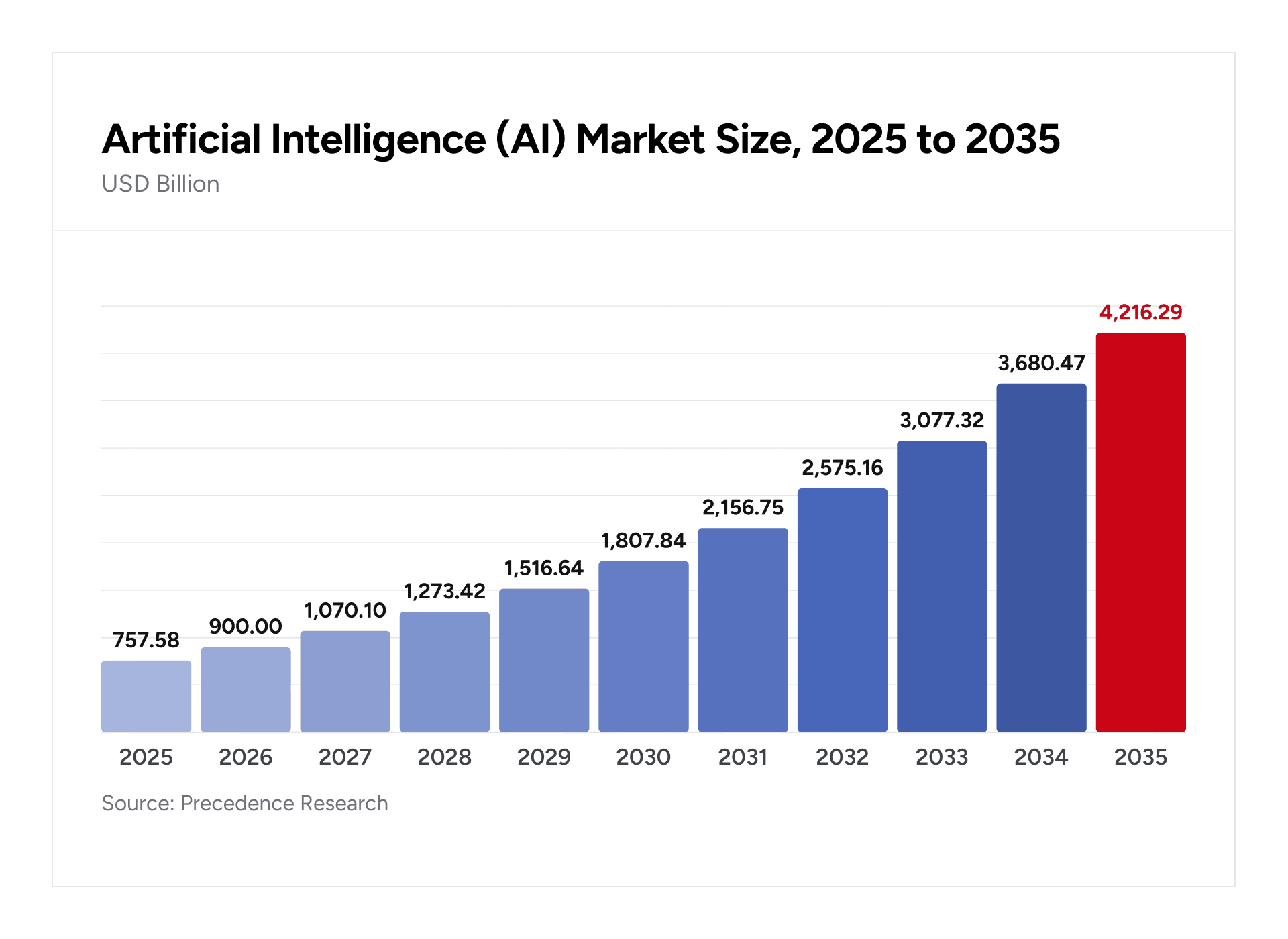
Source: Precedence Research
Any application that a company builds — for internal use or external engagement — AI-powered tools and processes need to be incorporated. This blog gives an explanation of how to create such an app.
We discuss the following topics in detail:
- Steps to create an AI app with OpenAI’s API (Example and demo included)
- Advantages of using OpenAI’s API
- Key OpenAI APIs to be aware of
Steps to Create an AI App Using OpenAI's API
Step 1. Identify the specific requirements and goals of your AI app, including the features and functionalities you want to incorporate. Determine the use cases where AI can add value to your app, such as natural language processing, image recognition, or code generation.
Step 2. Explore the available OpenAI APIs, such as GPT-3, Codex, DALL-E, or ChatGPT, and select the one that best aligns with your app requirements and use cases. Consider factors such as the API's capabilities, limitations, pricing, and integration complexity.
Step 3. Familiarize yourself with the API documentation, guidelines, and code samples provided by OpenAI. Follow the integration instructions to connect your AI app with OpenAI's API, ensuring that you authenticate your requests and handle API responses appropriately.
Step 4. Implement the AI functionality within your app using the OpenAI API. This may involve tasks like setting up conversational interfaces, generating code snippets, or processing natural language input. Test the AI features thoroughly to ensure they perform as expected and provide accurate and meaningful results. Validate the responses, handle edge cases, and optimize the AI behavior as needed.
Step 5. Deploy your AI app to the desired platform, such as mobile devices, web servers, or cloud platforms. Continuously monitor the performance of your AI app, including response times, accuracy, and user feedback. Iterate and improve your app based on user feedback and analytics, incorporating updates and enhancements to further optimize the AI functionality.
Demo: Making an App using OpenAI’s API
We will be using GPT-3 powered model for our project and building a Tech Stack Recommender
First, let us outline the steps to create your Machine Learning Model on top of GPT-3.
Step 1: Decide between fine-tuning or embedding techniques based on your project's requirements.
Remember that fine-tuning is ideal with a pre-defined dataset, a pre-trained model like GPT-3, and abundant computational resources. Embedding, however, is suitable when you need to create something from scratch without a dataset or pre-trained model.
For our tech stack recommendation system, we'll use fine-tuning on GPT-3.
Step 2: Set up Python and PIP on your system.
Step 3: Access your dataset from popular repositories like Kaggle or other online sources.
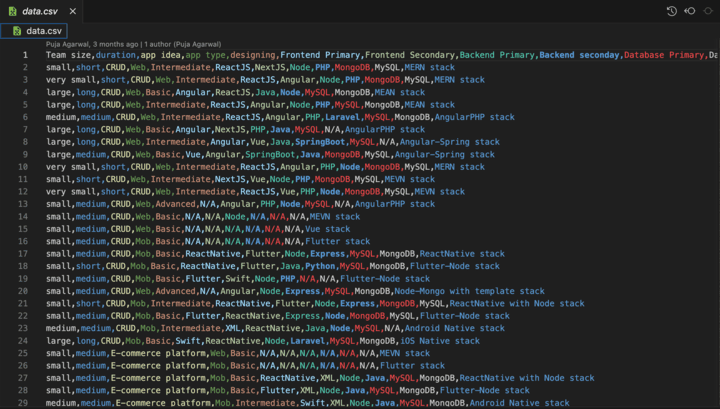
For this project, we utilized the following dataset:
Link to dataset: https://www.kaggle.com/datasets/puju12/tech-stack-recommendor
Step 4: Secure your API key from the OpenAI dashboard.
As a bonus, you'll receive $5 credits to kickstart your fine-tuning process.
Step 5: Using a Python script, convert your dataset into prompts and completion pairs.
Use the provided script to make this conversion seamless.
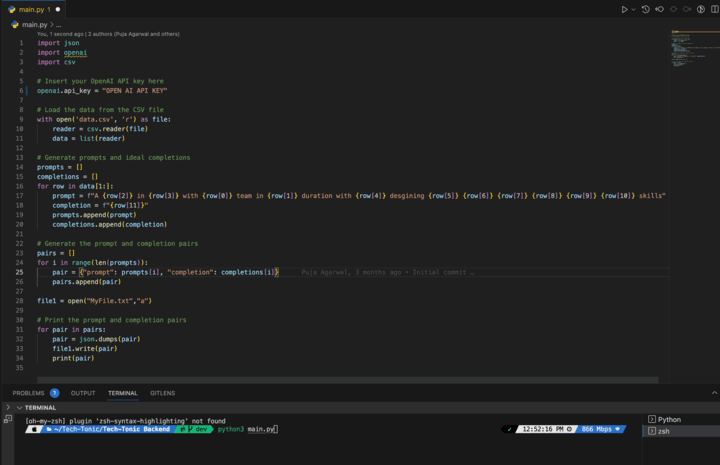
Step 6: Once you run the Python script, you'll find a file named MyFile.txt in the current directory.
This file contains a wealth of data in the desired format.
{ "prompt": "<prompt text>", "completion": "<ideal generated text>"}
{ "prompt": "<prompt text>", "completion": "<ideal generated text>"}
{ "prompt": "<prompt text>", "completion": "<ideal generated text>"}
...
Step 7: Install the OpenAI package on your CLI using PIP, ensuring you have the necessary tools.
pip install openaiStep 8: Set your API KEY from the Command Line Interface to establish the connection with OpenAI's powerful resources.
export OPEN_API_KEY ="<OPENAI_API_KEY>"Step 9: Transform your text data into JSON format
As GPT-3 accepts data in this format for fine-tuning. OpenAI provides convenient tools for converting data to JSONL.
Specify the name of the text file generated in the current directory (e.g., MyFile.txt in our case).
openai tools fine_tunes.prepare_data -f <LOCAL_FILE>Step 10: It's time for the final step! Begin the fine-tuning process on the GPT-3 model and witness the birth of your very own fully functional machine-learning model.
Execute the following command to initiate fine-tuning:
Replace TRAIN_FILE_ID_OR_PATH with the path to the JSONL file created in Step 9, and select any of the BASE_MODEL options provided by GPT-3.
openai api fine_tunes.create -t <TRAIN_FILE_ID_OR_PATH> -m <BASE_MODEL>Step 11: Retrieve your model name from OpenAI, a moment of celebration as you have successfully created your machine-learning model powered by GPT-3. Kudos!
# List all created fine-tunes
openai api fine_tunes.list
Integrating the Model into Your Node/React Project
Now that you have a fully functional model, it's time to integrate it into your Node or React project to build a real-time website. Follow these steps:
Step 1: Set up the basic project template to provide a solid foundation for your integration efforts.
Step 2: Determine the prompt with which you wish to feed your model, shaping the inputs and guiding the model's responses.
Step 3: Seamlessly integrate and connect with your model, enabling real-time interactions and unlocking the power of GPT-3 in your Node or React project.
Install the openAI library:
npm install openaiWrite a method to send your prompts to the model.
const openAPIDataFetch = async (prompt) => {
const configuration = new Configuration({
apiKey: process.env.REACT_APP_APIKEY,
});
const openai = new OpenAIApi(configuration);
const completion = await openai.createCompletion({
model: "curie:ft-personal-2023-04-16-17-31-39",
prompt: prompt,
max_tokens: 6,
temperature: 0.5, // Adjust the temperature value as desired
});
return completion.data.choices[0].text;
};
Yay! This method will send your prompt to the model and get the response.
Complete Guidance for Model Integration is Included in the Video Below
Here is a simple explanation of how to integrate OpenAI Models into your projects.
Benefits of Using OpenAI API for AI App Development
Let’s understand the benefits of using OpenAI’s APIs for application development:
- Enhanced Natural Language Processing: OpenAI's API provides advanced natural language processing capabilities, allowing your AI app to understand and respond to user queries more humanistically.
- Seamless Integration: OpenAI's APIs are designed to be easily integrated into your AI app, which is useful in leveraging their powerful AI capabilities without extensive development effort
- Time and Cost Savings: Using OpenAI's APIs can significantly reduce the time and cost required for developing AI functionalities from scratch. These pre-built APIs offer ready-to-use solutions for language processing, code generation, image manipulation, and more tasks
- Access to State-of-the-Art Models: OpenAI is renowned for its cutting-edge AI models, such as GPT-3 and Codex. By utilizing their APIs, you can leverage these state-of-the-art models to enhance the intelligence and performance of your AI app.
- Rapid Prototyping and Iteration: With OpenAI's APIs, you can quickly prototype and iterate on your AI app's features. The APIs provide a flexible environment for testing and refining your app's functionality, allowing you to iterate and improve faster.
- Scalability and Reliability: OpenAI's APIs are built to handle large-scale usage, ensuring your AI app can scale as your user base grows. Additionally, OpenAI's infrastructure ensures high availability and reliability, minimizing downtime and providing a seamless experience to your app users.
- Continuous Improvement and Updates: OpenAI actively maintains and updates its APIs, incorporating user feedback and advancements in AI research. This means that your AI app can benefit from ongoing improvements and new features without requiring significant development effort on your part
- Support and Documentation: OpenAI provides comprehensive documentation, tutorials, and developer resources to assist you in using their APIs effectively. Additionally, they offer developer support, ensuring you can resolve any technical issues or challenges that may arise during the app development process.
OpenAI APIs Every AI App Developer Should Know
OpenAI GPT-3 API
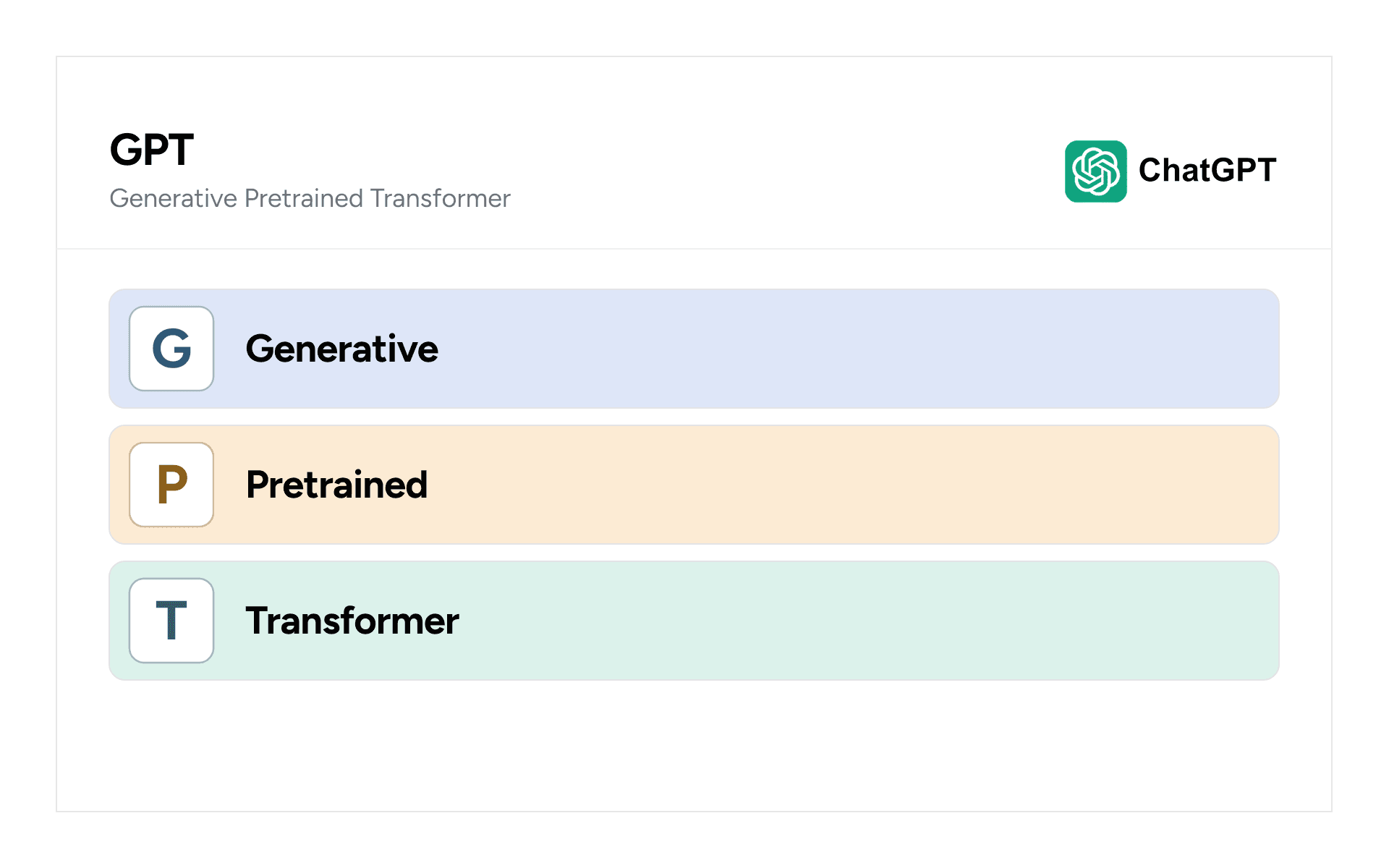
OpenAI GPT-3, "Generative Pre-trained Transformer 3," is one of the largest language models created, consisting of 175 billion parameters. GPT-3 has been trained on a massive amount of data, including text from books, websites, and other sources, making it capable of producing human-like text responses.
USP: GPT-3's versatility and ability to understand context make it highly valuable for various language-related tasks, including chatbots, content generation, language translation, and code generation.
OpenAI Codex API
The Codex API is built on the foundation of GPT-3's language model but is specifically designed to generate code based on natural language instructions. The Codex API can process vast amounts of code and programming knowledge, allowing developers to leverage its capabilities to generate code snippets efficiently.
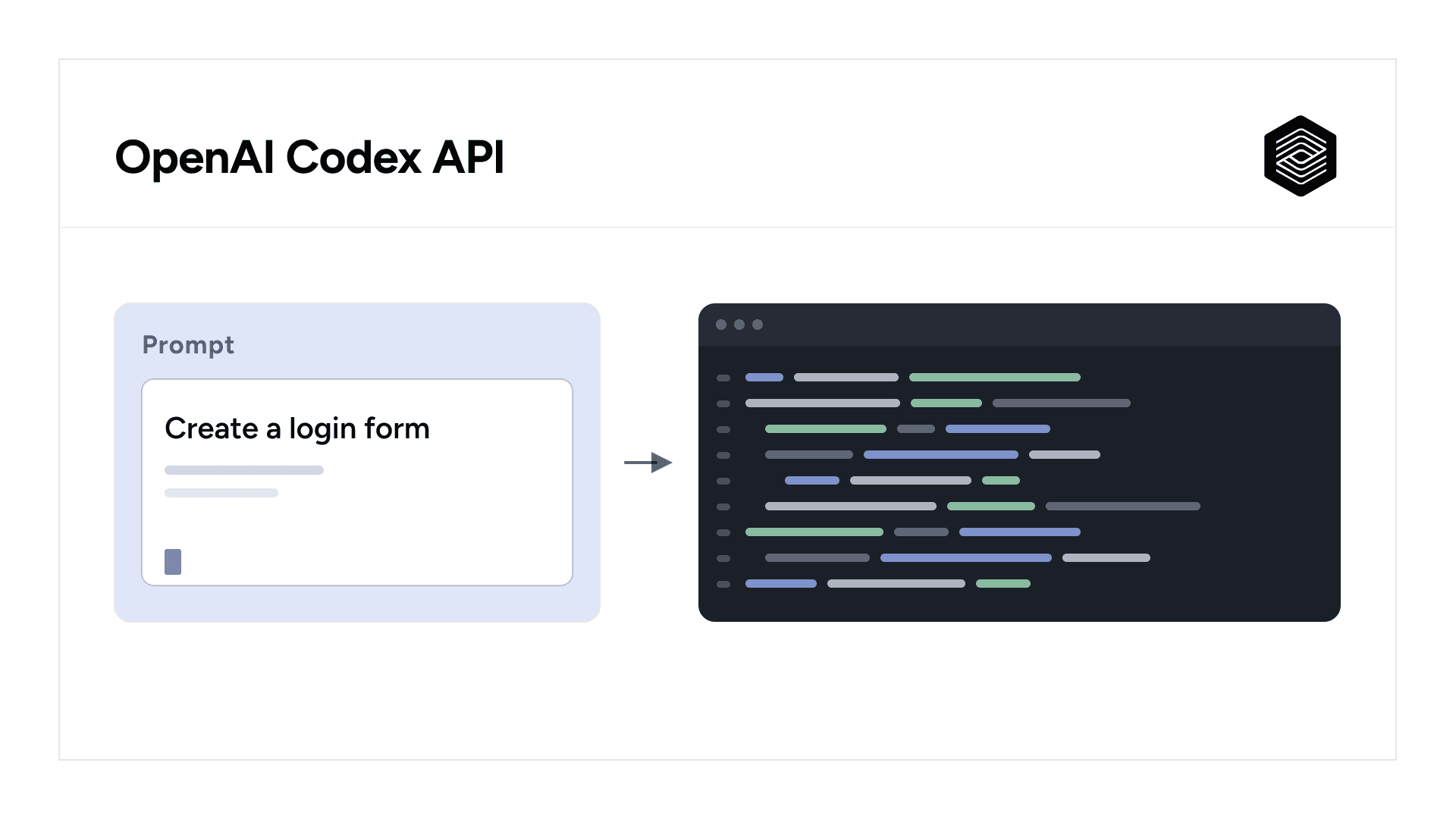
USP: The ability of Codex to understand and generate code in various programming languages can significantly benefit mobile app development, automating tasks, improving code quality, and speeding up the development process.
OpenAI DALL-E API
The DALL-E API is named after the famous surrealist artist Salvador Dalí and the animated character Wall-E from the Disney-Pixar movie. The DALL-E model has been trained on a dataset containing 250 million images, enabling it to understand and generate images with remarkable diversity and quality.
USP: With the DALL-E API, developers can describe images through text and obtain unique and realistic images generated based on those descriptions. This functionality can revolutionize image-based content creation, virtual reality applications, and visual storytelling in mobile apps.
OpenAI ChatGPT API
ChatGPT is based on the GPT-3 model but fine-tuned specifically for conversational AI applications.ChatGPT can handle long conversations with up to 4096 tokens, enabling in-depth interactions between users and chatbots within mobile apps.
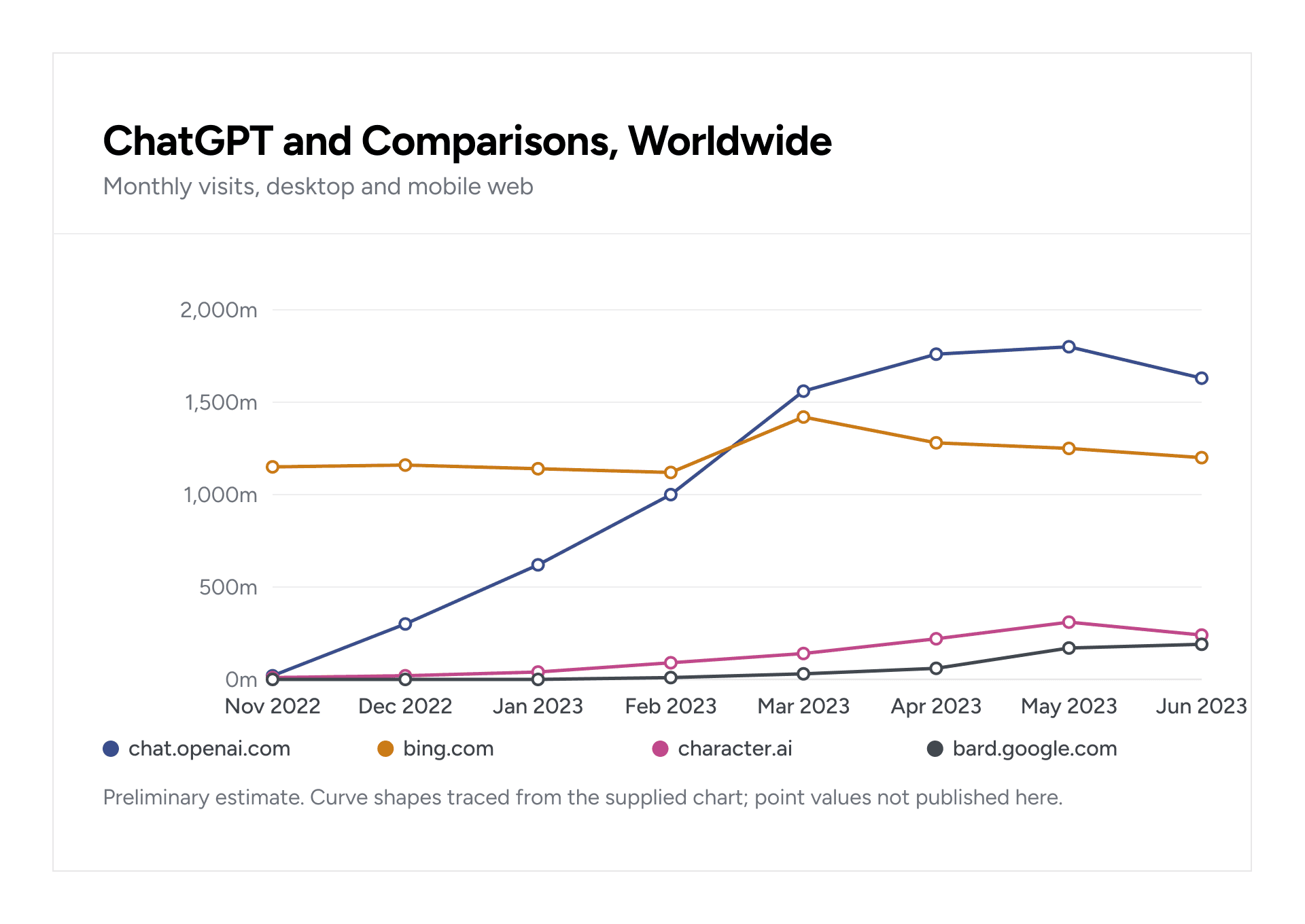
USP: The ChatGPT API empowers developers to integrate interactive chatbots, virtual assistants, or customer support agents into their mobile apps. Users can engage in meaningful conversations with these AI-powered entities, providing personalized and contextual assistance within the app.
How GeekyAnts Can Help You Develop an AI Software Using OpenAI
Looking to create mind-blowing applications? Look no further! With OpenAI APIs, you can unlock a world of possibilities. 🌍🔓
At GeekyAnts, we've harnessed the magic of OpenAI's ChatGPT to create revolutionary products that will blow your mind. 😮✨
👉 Our Work So Far
🤖 HR bot: Say goodbye to HR headaches! Simplify tasks, automate workflows, and boost employee satisfaction. Let the bot handle the nitty-gritty while you focus on what matters most. 💼🤝
💾 Database Generator: Kiss database headaches goodbye! This tool is your secret weapon for seamless database creation and management. Say hello to intuitive commands, automated setup, and intelligent migrations. 💡💾
💪 FitnessGPT: Level up your fitness game with AI-powered guidance. Personalized meal plans, tailored exercise routines, and a calorie counter to keep you on track. It's like having a personal trainer in your pocket! 🏋️🥗💯
At GeekyAnts, there is a constant focus on pushing the envelope, with tech innovations, and AI is no stranger to us. With extensive meet-ups and hackathons, we strive to create ingenious in-house products.
Click now to explore the limitless potential of OpenAI APIs with GeekyAnts! ✨👩💻👨💻