MCP is how an AI application discovers what an outside system can do, then asks it to perform an action. This guide covers the protocol in plain terms, then the OAuth layer that decides whether a remote MCP server is safe to put on the internet.
Part 1 | Part 2 |
Part 1: Getting Started
This section covers the components of MCP and the messages exchanged between them before authorization is introduced.
What MCP is
Before MCP, every AI application that wanted to reach an outside system wrote its own integration. Five assistants and ten internal systems meant fifty custom connectors, each with its own idea of how to describe an action and how to report a failure.
MCP replaces that with one agreement. A system describes what it can do, once, as an MCP server. Any application that speaks MCP can then use it. Fifty integrations become fifteen implementations.
An MCP server can offer three kinds of primitives:
Primitive | Who decides to use it | Example |
Tools | The model, during a conversation | get_leave_balance, create_ticket |
Resources | The application, to add context | A file, a policy document, a database row |
Prompts | The user, picked from a menu | "Summarize this sprint" |
Tools are where most teams start, and they are what this guide follows from end to end.
Host, client, server
MCP has exactly three roles. Keeping these roles distinct is important because ‘client’ in MCP does not mean the application the user sees.
Host | Client | Server |
Claude Desktop, an IDE, your own chat app | The host's connection to one server | Your HR connector, a filesystem server |
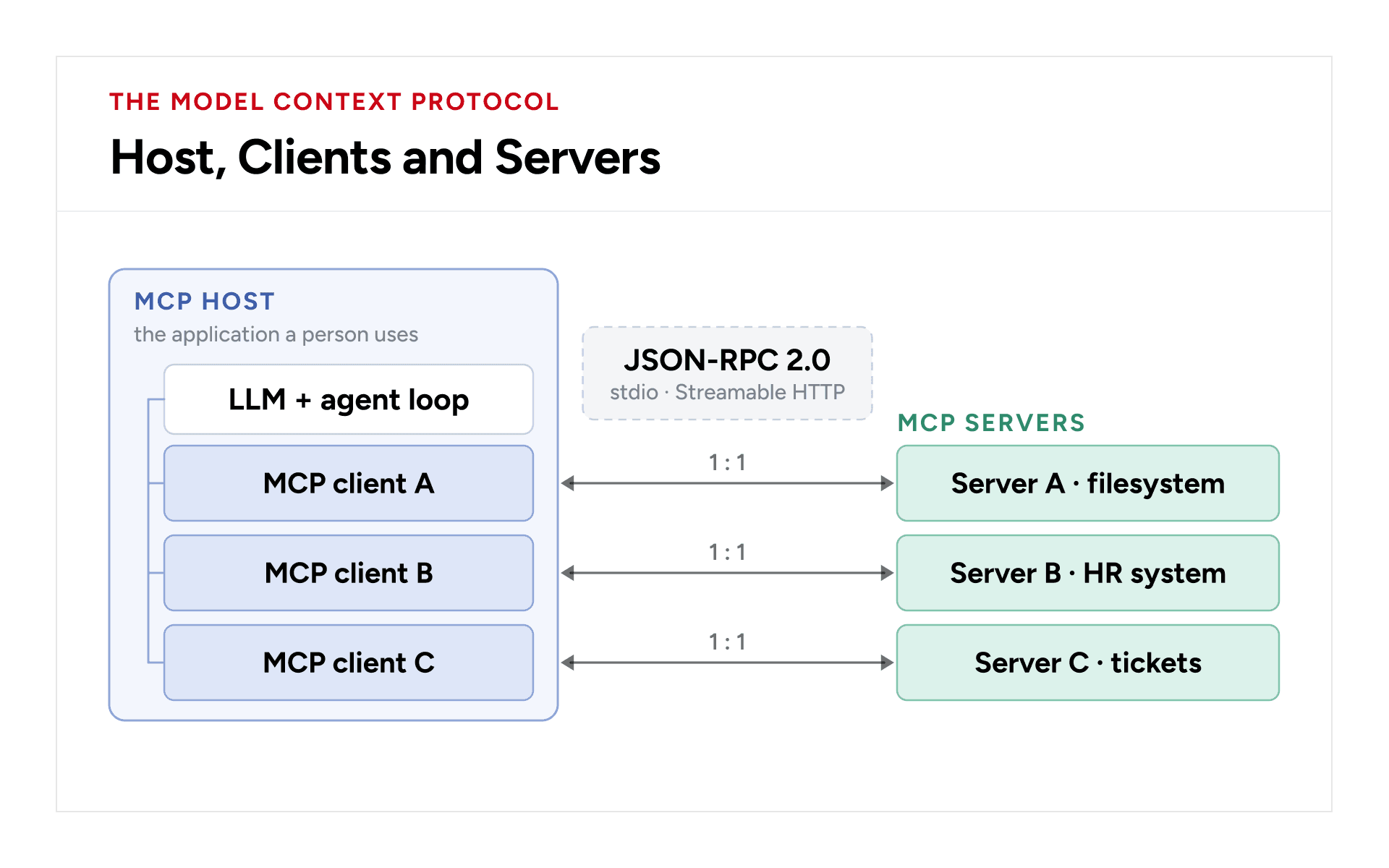
One host, three servers, three clients. Each client talks to exactly one server, sends its protocol version and capabilities with every request, and, once auth is added, holds one token.
JSON-RPC on the wire
Every MCP message is JSON-RPC 2.0. There are three shapes, and no others.
// Request: has an id, expects exactly one response
{ "jsonrpc": "2.0", "id": 7, "method": "tools/call",
  "params": { "name": "get_leave_balance", "arguments": { "employee_id": "4471" },
    "_meta": { "io.modelcontextprotocol/protocolVersion": "2026-07-28",
               "io.modelcontextprotocol/clientCapabilities": {} } } }

// Response: same id, carries either result or error, never both
{ "jsonrpc": "2.0", "id": 7,
  "result": { "resultType": "complete",
              "content": [ { "type": "text", "text": "12.5 days of annual leave" } ] } }

// Notification: no id, never answered
{ "jsonrpc": "2.0", "method": "notifications/tools/list_changed" }
Protocol failures use the standard JSON-RPC codes: -32700 parse error, -32600 invalid request, -32601 method not found, -32602 invalid params, -32603 internal error.
Easy to get wrong
A tool that fails is not a JSON-RPC error. It returns a normal result with isError: true and a message in content. That way the model reads the failure ("employee not found") and can recover, instead of the host swallowing an exception.
No handshake, no session
Revisions up to 2025-11-25 opened every connection with an initialized handshake. The current revision, 2026-07-28, removed it: MCP is now stateless. Every request carries its own protocol version and the client's capabilities in _meta, and the server handles each request on its own.
client → server/discover optional: which versions and capabilities?
server → result supportedVersions, capabilities, serverInfo
client → tools/list _meta: protocolVersion, clientCapabilities
client → tools/call _meta: protocolVersion, clientCapabilities
Every server must implement server/discover, although clients are not required to call it. A request for a version the server does not support gets an UnsupportedProtocolVersionError listing the versions it does. A server must not rely on a capability the client did not declare on that request; if it needs one, it returns MissingRequiredClientCapabilityError. Clients that also talk to older servers detect them and fall back to the initialize handshake.
Two transports
stdio | Streamable HTTP | |
Where the server runs | On the same machine, as a child process of the host | Anywhere; one endpoint such as POST /mcp |
How messages move | Newline-delimited JSON on stdin and stdout | HTTP requests; replies as JSON or as a Server-Sent Events stream |
Per-request context | _meta in the message body; a running process is not a session | _meta in the body, mirrored into MCP-Protocol-Version, Mcp-Method and Mcp-Name headers |
Who is trusted | Whoever can start the process (the OS decides) | Whoever holds a valid token; authorization is covered in Part 2. |
stdio Tip
Write logs to stderr, never stdout. A single stray print on stdout corrupts the message stream, and the host drops the connection.
Tools: discover, decide, call
Three steps occur in order: discovery, decision, and execution. The host never hardcodes a tool list. It asks for one.
1 | 2 | 3 |
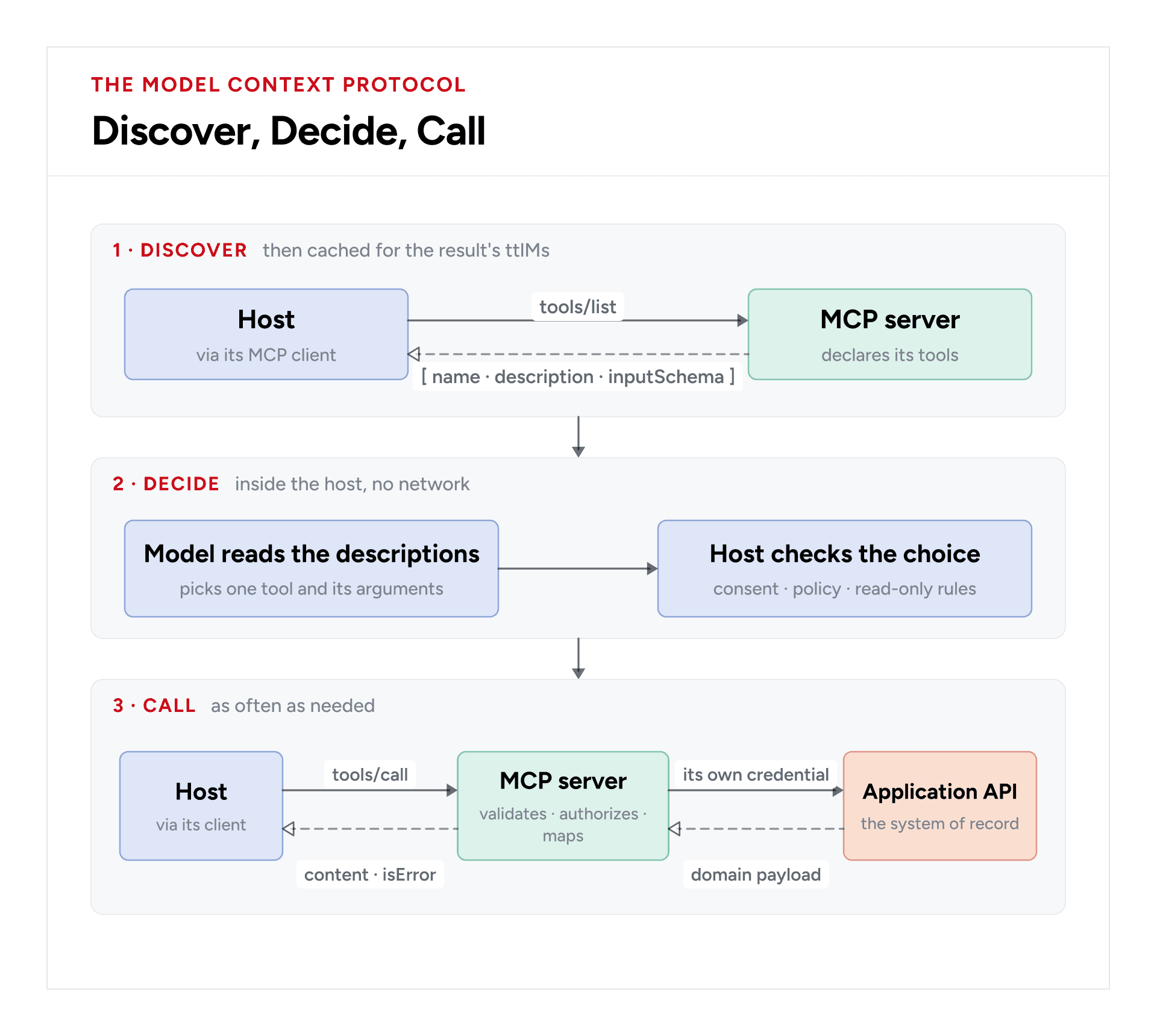
Ask, decide locally, call as needed. Nothing crosses the network in step 2: the model chooses only from the catalogue it received in step 1. Solid arrows are requests; dashed arrows are replies.
Here is what a single entry in that catalogue looks like:
{

"name": "get_leave_balance",

"description": "Leave left per type for one employee. Use for 'how much leave do I have?'",

"inputSchema": {

"type": "object",

"properties": {

"employee_id": { "type": "string", "description": "Employee ID, e.g. 4471" }

},

"required": ["employee_id"]

},

"annotations": { "readOnlyHint": true }

}
The description is the prompt. It is the only thing the model reads to decide whether a tool applies. A vague description is a broken tool.
Treat descriptions as product copy: say what the tool returns, when to use it, and when not to. The inputSchema is the only structure the model's arguments get, and the server must still validate them itself. The model is not a validator.
Many clients, one server
A remote server is a funnel. Every client arrives with its own identity and its own token, but they all reach one server, and that server is the only thing that talks to the application behind it.
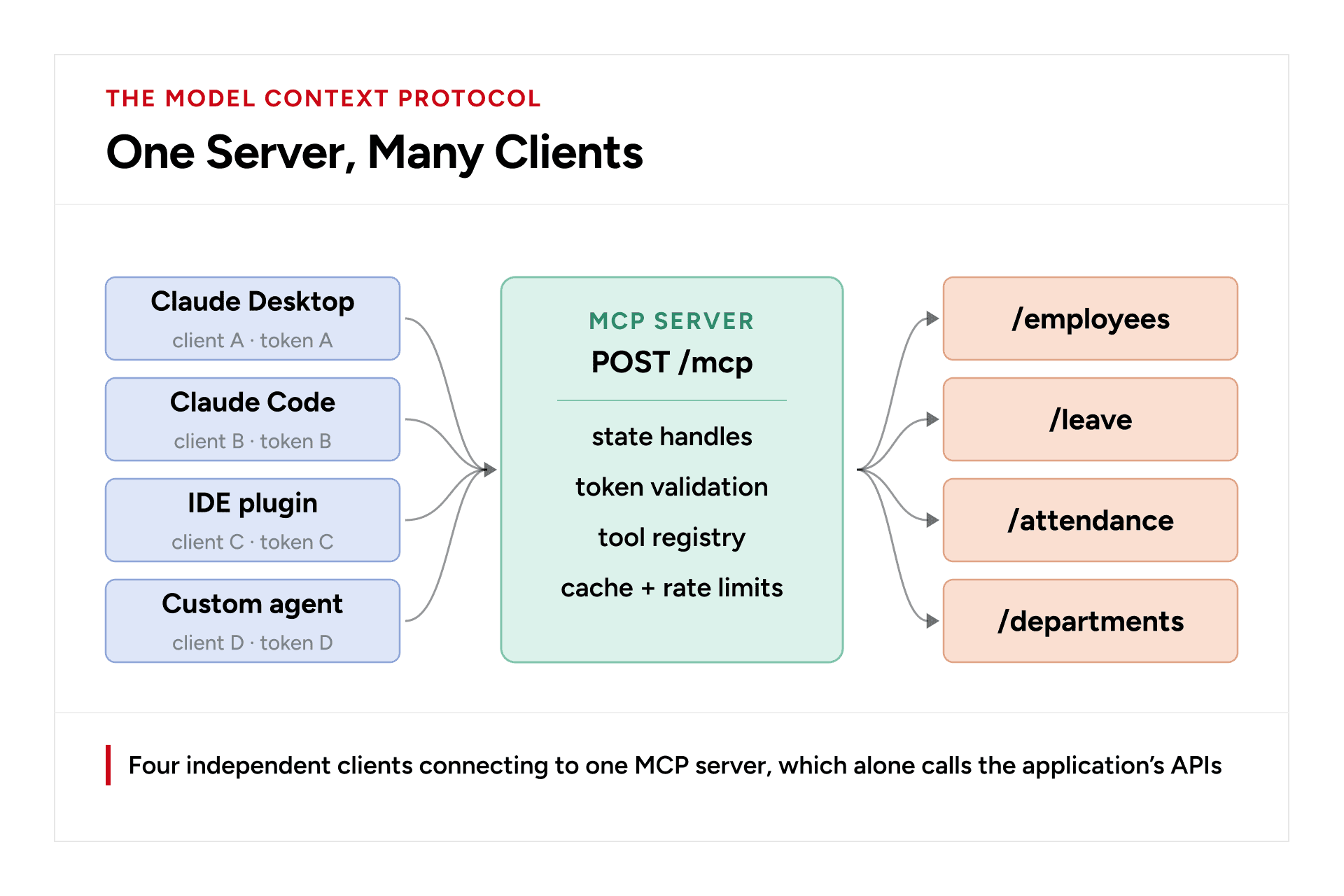
This architecture gives you one place for upstream credentials, one cache, one audit trail, and one rate limiter against the vendor's quota. Clients never see the upstream credential.
In return, it requires strict isolation between callers.
Lesson from production
Build every cache key from the authenticated identity, never from the tool arguments alone. Many business systems return different data to different roles: a manager sees more than an employee. A cache hit never reaches the upstream system, so its permission check never runs. If two callers share a cache key, the second one reads whatever the first one was allowed to see, and nothing downstream will notice.
Connection rules
Situation | What happens |
Every request | Carries protocolVersion and clientCapabilities in _meta; over HTTP also MCP-Protocol-Version, Mcp-Method and Mcp-Name headers, which must match the body |
Version not supported | Server answers UnsupportedProtocolVersionError listing its versions; client retries with one of them |
State across calls | There is no protocol session. A tool returns an explicit handle, and the client passes it back as an ordinary argument |
Tool list changes | Client opens a subscriptions/listen stream with toolsListChanged: true; server sends notifications/tools/list_changed on it; client calls tools/list again |
Long-running work | Client puts a progressToken in the request's _meta; server sends notifications/progress carrying that token on the request's own response stream |
User cancels | Streamable HTTP: client closes that request's response stream. stdio: client sends notifications/cancelled naming the request id |
Stream breaks mid-request | The request is lost; streams are not resumable. Client re-issues it with a new id |
Parallel requests | Each is independent; responses are matched by id, never by arrival order |
A build order that works
- Start with stdio and one tool that returns a hardcoded string. With no network or authorization involved, this gives you the fastest feedback loop.
- Next, connect the tools to the upstream API. Decide now which tools are read-only and which have write access; this decision shapes your scopes later.
- Descriptions and schemas. Spend real time here. This is where most "the model picked the wrong tool" bugs are fixed.
- Switch to Streamable HTTP. Same tool handlers, new front door.
- Add auth. That is the rest of this guide.
- Add state handles, caching, and rate limits, all keyed by the authenticated identity. Recheck the caller's access to a handle on every call: a handle is a name, not a permission.
Part 2: OAuth for Remote MCP Servers
Authorization is optional in MCP, and this flow applies to servers over HTTP. A stdio server should not use it; instead, it takes credentials from its environment. This part explains how a client that has never met your server ends up holding a token it is allowed to use.
Two Separate OAuth Flows
Most MCP servers wrap some other product, and that product usually has its own OAuth. Those are two separate authorizations, and keeping them apart is the first rule.
Who proves what to whom | Where the token lives | |
MCP OAuth | MCP client → MCP server | Authorization: Bearer header on POST /mcp |
Upstream OAuth (Google, Slack, an HR suite…) | MCP server → vendor API | Server-side store. The client never sees it |
The following sections focus on MCP OAuth between the client and the MCP server.
One URL in, discovery out
The unusual thing about MCP auth is that the client and the server have never met. A user pastes a URL and expects it to work. No portal, no support ticket, no shared secret. The server has to explain, in machine-readable form, how the client can get in.
It starts with a refusal. The first unauthenticated request gets a 401 that points at the server's metadata:
HTTP/1.1 401 Unauthorized

WWW-Authenticate: Bearer resource_metadata="https://mcp.example.com/.well-known/oauth-protected-resource"

That document, the Protected Resource Metadata (RFC 9728), names the authorization server this resource trusts:

// GET https://mcp.example.com/.well-known/oauth-protected-resource

{

"resource": "https://mcp.example.com/mcp",

"authorization_servers": ["https://auth.example.com"],

"scopes_supported": ["mcp:tools:read", "mcp:tools:write"],

"bearer_methods_supported": ["header"]

}
The client then fetches that authorization server's own metadata (RFC 8414, or OpenID Connect discovery) to learn its authorization_endpoint, token_endpoint, supported PKCE methods, and how clients register.
Two hops, both over HTTPS, and each document is checked against the URL it came from. The metadata's resource must match the server URL the client used (RFC 9728), and the authorization server's issuer must match the URL its metadata was fetched from (RFC 8414). This check stops one server from publishing metadata that claims to belong to another.
It does not make an unknown server trustworthy. Any server can name any authorization server, including one it runs itself, and RFC 9728 leaves deciding which authorization servers to trust to the client. Discovery tells the client where to go; it does not vouch for the URL the user pasted.
Getting a client_id
Before it can ask for a token, the client needs a client_id the authorization server will accept. A useful way to think about it:
The passport and the visa
A client_id is a passport; the authorization server is border control. Border control does not care much which country issued it, only that it can be verified. A passport says who you are, not what you may do. That is the visa, and in OAuth the visa is the scope, stamped when the user consents, not when the client registers.
There are three ways to obtain a client ID. The MCP spec (2026-07-28) tells a client that supports all three to try them in this order, and to ask the user for client details only if none works:
Option A | Option B | Option C · deprecated |
What a metadata document looks like
// served at https://client.example.com/oauth/client.json

{

"client_id": "https://client.example.com/oauth/client.json", // must equal its own URL

"client_name": "Example Assistant",

"redirect_uris": ["https://client.example.com/oauth/callback"],

"grant_types": ["authorization_code", "refresh_token"],

"response_types": ["code"],

"token_endpoint_auth_method": "none"

}
What a DCR request looks like
// POST https://auth.example.com/register

{

"client_name": "Example Assistant",

"redirect_uris": ["https://client.example.com/oauth/callback"],

"grant_types": ["authorization_code", "refresh_token"],

"response_types": ["code"],

"application_type": "web", // required; "native" for desktop and CLI clients

"token_endpoint_auth_method": "none" // a public client: no secret

}

// → 201 Created { "client_id": "c_9f3a…", "client_id_issued_at": 1757000000 }
Pre-registration | CIMD | DCR | |
Status in the 2026-07-28 spec | Supported | Recommended | Deprecated |
Human step | Yes, per client | None | None |
Auth server stores a record | Yes | No, cache only | Yes |
Identity anchored to | Operator's decision | DNS + HTTPS | Whatever was posted |
Works with unknown clients | No | Yes | Yes |
Rate limiting needed | No | On metadata fetches | On the endpoint |
Most MCP clients are public clients
This is not a detail. It shapes the whole flow. Most MCP clients are desktop apps, CLIs, or browser extensions. They cannot keep a secret: anything shipped inside them can be extracted. The spec does allow confidential clients (a pre-registered client can be given credentials, and a CIMD client may authenticate with private_key_jwt), but design for the public case:
- For a public client, token_endpoint_auth_method is none: there is no client_secret to ship or leak.
- A stolen client_id is worthless on its own. It identifies; it does not authenticate.
- PKCE is mandatory and does the job a secret used to do.
- Redirect URIs are matched exactly. No prefixes, no wildcards. Exact matching is what stops an attacker from borrowing a public client_id to catch someone else's authorization code.
Resource Server vs. Authorization Server
The most important structural idea in MCP authorization is that the MCP server acts as an OAuth resource server. Its job is to check tokens. Issuing them is the authorization server's job.
These are roles, not necessarily separate deployments. Two setups are common:
- An existing identity provider (Okta, Microsoft Entra ID, Auth0, Keycloak) plays the authorization server. You inherit login, MFA, consent, and user-management capabilities from the provider. This is the preferred setup when an existing identity provider is available.
- The authorization server lives in the same app as the MCP server. This is common when you wrap a SaaS product that has no identity provider of its own. This setup is valid as long as the code that checks tokens never takes shortcuts through the code that issues them.
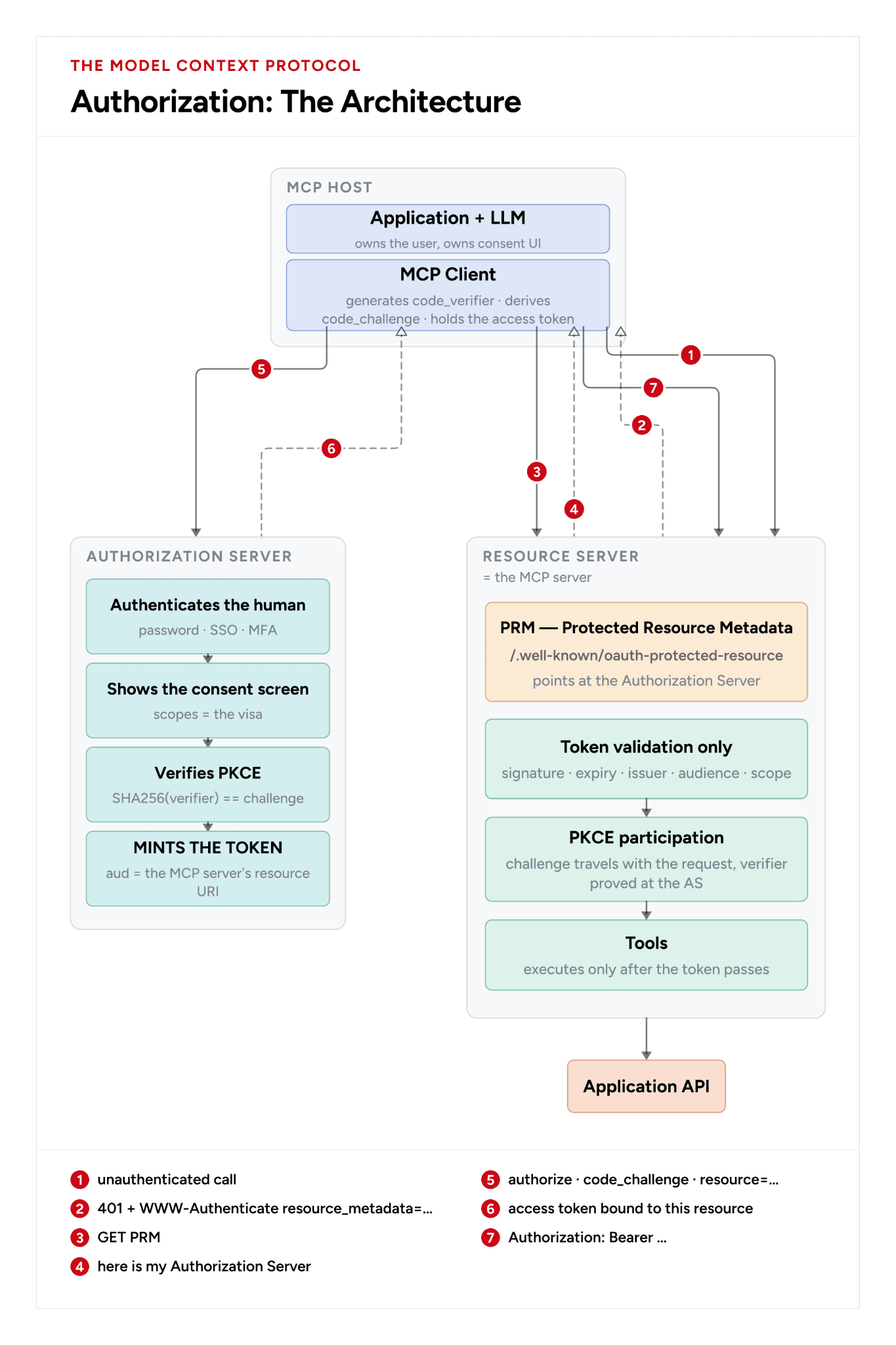
The MCP server validates tokens; it never issues them. Follow the numbers: refused (1–2), pointed at the authorization server (3–4), the user signs in there and a token is minted for this server (5–6), then every call carries it (7). Solid arrows are requests, dashed are replies, thick ones carry the token flow.
MCP client | Resource server | Authorization server |
inside the host | the MCP server | your IdP, or a co-hosted one |
Responsibility | Resource server | Authorization server |
Sign the user in, show consent | — | Yes |
Issue and refresh tokens | — | Yes |
Verify the PKCE verifier | — | Yes |
Check signature, exp, iss | Yes | — |
Check that aud is its own URL | Yes, always | — |
Enforce scope per tool | Yes | — |
Advertise the auth server (PRM) | Yes | — |
Run tools, call upstream APIs | Yes | — |
PKCE: proof without a secret
With no client secret, something has to prove that whoever redeems the authorization code is whoever asked for it. That is PKCE (RFC 7636).
1 client code_verifier = 43–128 random characters, kept in memory, never sent yet
2 client code_challenge = BASE64URL( SHA256( code_verifier ) )
3 → /authorize ?… &code_challenge=<challenge> &code_challenge_method=S256
4 ← redirect back with ?code=<authorization code>
5 → /token grant_type=authorization_code &code=<code> &code_verifier=<verifier>
6 AS SHA256(verifier) == stored challenge ? issue token : reject
An attacker who intercepts the code at step 4 cannot use it. They never saw the verifier, and the challenge is a one-way hash. Accept S256 only; reject plain.
Audience binding: the part people skip
The client sends resource=https://mcp.example.com/mcp on both the authorize and token requests (RFC 8707). The authorization server writes that into the token's aud claim. The MCP server then rejects every token whose audience is not itself.
Skip this check and a malicious MCP server can take a token a user gave it, and replay it against your server, provided both trust the same identity provider. This is the confused-deputy problem, and audience validation is the key defense in this flow.
Check audience first
A valid signature proves who issued a token, not who it was issued for. Put the audience check at the front of validation:
aud → iss → exp / nbf → signature → user still exists → grant not revoked
Recheck the last two on every request, not just when the token is issued. A token that outlives the user's access is a key to a door that should no longer open.
The same isolation principle applies to upstream APIs. Never pass the client's token through to an upstream API. The MCP server calls upstream with its own credential for that user. The client's token was minted for the MCP server and should never be accepted anywhere else.
The full flow
The full flow follows a cold start from the moment a user pastes a URL through the returned tool result and eventual token expiration.
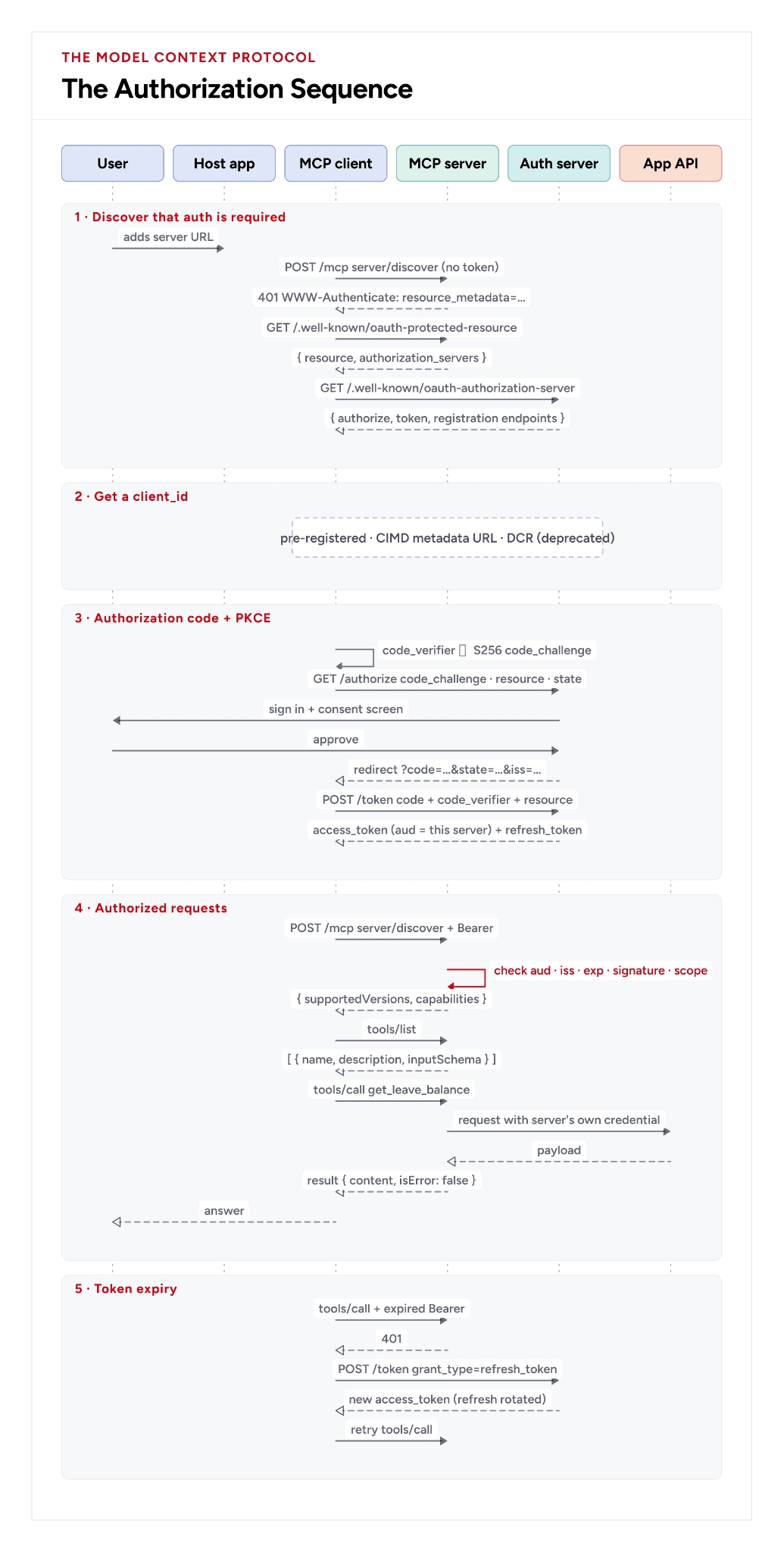
Solid arrows are requests; dashed arrows are replies. The red step is the one that must never be skipped. On a narrow screen, scroll the diagram sideways.
Pre-launch checklist
Use this checklist before deploying a remote MCP server to production.
- aud checked against this server's own resource URL, on every request
- PKCE S256 required; plain rejected
- Redirect URIs matched exactly, with no prefix or wildcard matching
- state generated, checked, and single-use
- iss in the authorization response, when present, compared with the expected issuer before the code is redeemed (RFC 9207)
- HTTPS everywhere; no token ever in a URL query string
- Origin header validated on the HTTP transport (DNS-rebinding defense)
- Local servers bind to 127.0.0.1, not 0.0.0.0; so do their caches and databases
- Tool arguments validated against the schema on the server
- Client tokens never passed upstream; upstream credentials never returned in a tool result
- Cache keys built from the authenticated identity, not the arguments alone
- Short-lived access tokens; refresh tokens rotated on use
- Revocation clears every cached copy of that user's data, not just the token
- Registration endpoint rate-limited, if DCR is enabled
Specifications
Spec | What it gives you |
Protocol, transports, authorization; the revision this guide follows | |
The message envelope | |
OAuth 2.0 core; bearer tokens | |
PKCE | |
Dynamic Client Registration | |
Authorization Server Metadata | |
Resource Indicators: the resource parameter, and so aud | |
Protected Resource Metadata | |
The iss parameter in authorization responses | |
URL-based client identifiers (IETF OAuth WG draft) |
Conclusion: Taking MCP From Integration to Production
The Model Context Protocol provides a standard way for AI applications to discover and interact with external systems. Moving from a working MCP integration to a production deployment requires more than tool discovery and execution. Teams must account for authorization, token validation, access controls, and isolation between clients. These considerations form part of building AI applications that can interact with business systems without compromising security or control.
For teams developing AI applications that need secure connections to enterprise data and workflows, GeekyAnts provides AI Agent Development Services, covering custom agents, system integrations, and production-ready implementations.