


In this article, we will be exploring how to use Expo to its fullest potential and also look at some tools to make it easier.
The Role of Config Plugins and Mods
Expo projects often require tweaks like:
- Adding third-party libraries
- Modifying native configuration files
- Injecting custom code and settings
Doing this directly complicates maintenance. Enter config plugins and mods!
Config plugins extend Expo's capabilities in a maintainable way. They modify the Expo config during the pre-build phase.
Mods handle automatically changing native files like AndroidManifest.xml. They abstract away these complexities.
The need for config plugins and mods in Expo arises from the desire for customization, maintainability, compatibility across different workflows, and the efficient automation of configurations.
These tools empower developers to add functionality, customize native configurations, enhance cross-platform development, and simplify their development workflows.
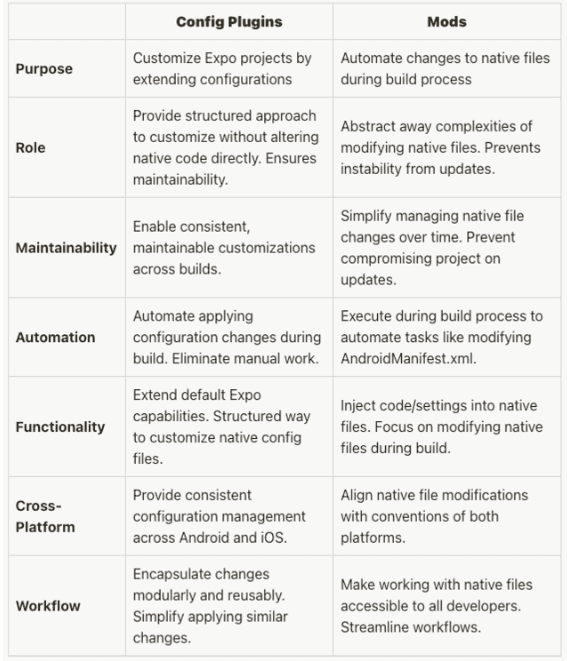
Together, they facilitate customization without compromising stability. Let's see them in action!
Understanding Config Plugins
Config plugins are essential for extending app configurations and customizing the pre-build process according to your specific requirements. To better understand this, let's examine the fundamental structure of an ExpoConfig object before delving into the intricate details.
{
  "name": "config-plugins",
  "slug": "config-plugins",
  "version": "1.0.0",
  // ... other properties ...
  "plugins": [
    ["./plugins/build/withReactNativeContacts.js"],
    "expo-camera"
  ],
  // ... platform-specific configurations ...
}
Anatomy of a Config Plugin
A configuration plugin is essentially a synchronous function that takes an object of ExpoConfig as input and produces a modified object of ExpoConfig as output. By following a naming convention, such as with<PluginFunctionality>, these plugins offer limitless possibilities for customization. Let's explore a practical example:
const withApplicationBuildGradle: ConfigPlugin = config => {
  return withAppBuildGradle(config, async config => {
    // Add the 'implementation' configuration to the dependencies in the correct block
    const dependenciesBlock = 'dependencies {';
    const implementationLine =
      "    implementation project(':react-native-contacts')";

    if (config.modResults.contents.includes(dependenciesBlock)) {
      // If 'dependencies' block is found, append the implementation line
      config.modResults.contents = config.modResults.contents.replace(
        dependenciesBlock,
        `${dependenciesBlock}\n${implementationLine}`
      );
    }

    return config;
  });

  return config;
};

export default withReactNativeContacts;

// Main custom config plugin
const withReactNativeContacts = (config: ExpoConfig) => {
  // Apply the AppBuildgradle mod
  config = withApplicationBuildGradle(config);

  return config;
};

export default withReactNativeContacts;
To integrate this plugin, simply add it to your app.json:
{
  "expo": {
    "name": "config-plugins",
    "plugins": [["./plugins/build/withReactNativeContacts.js"]],
    // ... other configurations ...
  }
}
When you run npx expo prebuild --clean with this setup, the plugin will modify native files seamlessly.
Mastering Mods
Mods, or modifiers, are asynchronous functions designed to manipulate native project files during code generation. While they might seem daunting initially, Expo provides helper mods for common tasks like working with AndroidManifest.xml and Info.plist.
Real-world Example Mod: withMainApplication
const withReactNativeContacts: ConfigPlugin = config => {
  config = withMainApplication(config, async config => {
    if (
      config.modResults.language === 'java' &&
      config.modResults.contents.includes('MainApplication')
    ) {
      const reactNativeContactsImport =
        'import com.rt2zz.reactnativecontacts.ReactNativeContacts;';
      const reactNativeContactsPackage = 'new ReactNativeContacts()';

      if (!config.modResults.contents.includes(reactNativeContactsImport)) {
        // Add the import statement
        config.modResults.contents = config.modResults.contents.replace(
          'import com.facebook.react.ReactApplication;',
          `import com.facebook.react.ReactApplication;\n${reactNativeContactsImport}`
        );
      }

      if (!config.modResults.contents.includes(reactNativeContactsPackage)) {
        // Add the ReactNativeContacts package to the list
        config.modResults.contents = config.modResults.contents.replace(
          'return packages;',
          `packages.add(${reactNativeContactsPackage});\n        return packages;`
        );
      }
    }

    return config;
  });

  return config;
};

export default withReactNativeContacts;
Include this mod in your app.json:
{
  "expo": {
    "plugins": [["./plugins/build/withReactNativeContacts.js"]],
    // ... other configurations ...
  }
}
Executing npx expo prebuild --clean with this setup applies the mod, injecting "MY_CUSTOM_API_KEY" into Info.plist.
Types of Packages in Expo
Let's begin by clarifying the difference between Managed Expo Packages and Bare Workflow Packages before we explore more examples.
Managed Expo Packages
These packages can be easily integrated into Expo projects by adding them to the plugin array in app.json. Expo will take care of any necessary native configuration changes.
Bare Workflow Packages
Packages that are not Expo-aware require custom configuration for integration. Developers can enter custom config plugins, which modify native code during the pre-build process while keeping the application Expo-managed.
Real-world Examples: Putting It All Together
// Custom config plugin for react-native-contacts
import { ExpoConfig } from '@expo/config-types';
import {
  withAndroidManifest,
  withInfoPlist,
  ConfigPlugin,
} from 'expo/config-plugins';

// Mod to add Android permissions to the manifest
const withAndroidPermissions: ConfigPlugin = config => {
  return withAndroidManifest(config, async config => {
    const permissionsToAdd = [
      'android.permission.READ_CONTACTS',
      'android.permission.WRITE_CONTACTS',
    ];

    permissionsToAdd.forEach(permission => {
      const existingPermission = config.modResults.manifest[
        'uses-permission'
      ]?.find(p => p['$'] && p['$']['android:name'] === permission);

      if (!existingPermission) {
        config.modResults.manifest['uses-permission'] =
          config.modResults.manifest['uses-permission'] ?? [];
        config.modResults.manifest['uses-permission'].push({
          $: {
            'android:name': permission,
          },
        });
      }
    });

    return config;
  });
};

// Mod to add iOS usage description to Info.plist
const withIosPermissions: ConfigPlugin = config => {
  return withInfoPlist(config, async config => {
    if (!config.modResults.NSContactsUsageDescription) {
      config.modResults.NSContactsUsageDescription =
        'Your app uses contacts to provide important functionality';
    }
    return config;
  });
};

// Main custom config plugin
const withReactNativeContacts = (config: ExpoConfig) => {
  // Apply the AndroidManifest mod
  config = withAndroidPermissions(config);

  // Apply the Info.plist mod
  config = withIosPermissions(config);
  return config;
};

export default withReactNativeContacts;
Include this custom plugin in your app.json:
{
  "expo": {
    "plugins": [["./withReactNativeContacts.js"]],
    // ... other configurations ...
  }
}
Running npx expo prebuild --clean applies the mods, making necessary changes to AndroidManifest.xml and Info.plist.
Going Above and Beyond
Config plugins and mods empower Expo developers to shape their projects according to specific requirements. Whether dealing with Managed Expo Packages or Bare Workflow Packages, these tools offer a robust framework for customization.
For business owners, the process discussed has three advantages:
- Better Flexibility: Tech teams can use more fancy libraries and tools to make apps better. That means faster development with more awesome features.
- Increased Efficiency: Config plugins and mods do all the hard work for us when it comes to making changes to the native code. No more manual errors or wasting time trying to figure things out ourselves.
- Easier Maintainability: With config plugins, everything stays nice and organized within our project. We won't get lost or confused because it's easy to understand what's going on with our native code.
Basically, any app we build using Expo that needs special libraries with native code changes can benefit from config plugins and mods.
Experiment with these examples, explore the documentation, and unlock the full potential of Expo config plugins and mods in your projects! Happy coding! 🚀






