

Introduction
This article discusses the creation of a Bluetooth module using React Native's new architecture. The module is designed to enable Bluetooth communication between mobile devices and other Bluetooth-enabled devices.
New Architecture
React Native's new architecture is designed to improve performance and reliability in mobile applications. It includes several new features that make it easier for developers to build high-quality apps, including:
- Fabric: A new architecture for rendering views that improves performance and memory usage
- TurboModules: A new system for building native modules that improves start-up time and reduces memory usage
- WebView: A new implementation of WebView that is faster and more reliable than the previous version
By using these new features, developers can build Bluetooth modules and other features that are faster, more reliable, and consume less memory on mobile devices.
Performance Comparison
Physical Device: Google Pixel 4
Scenario | Old Architecture | New Architecture | Difference |
|---|---|---|---|
1500 View components | 282ms | 258ms | New Architecture is ~8% faster |
5000 View components | 1088ms | 1045ms | New Architecture is ~4% faster |
1500 Text components | 512ms | 505ms | New Architecture is ~1% faster |
5000 Text components | 2156ms | 2089ms | New Architecture is ~3% faster |
1500 Image components | 406ms | 404ms | New Architecture is neutral with Old Architecture |
5000 Image components | 1414ms | 1370ms | New Architecture is ~3% faster |
Bluetooth Classic Demo
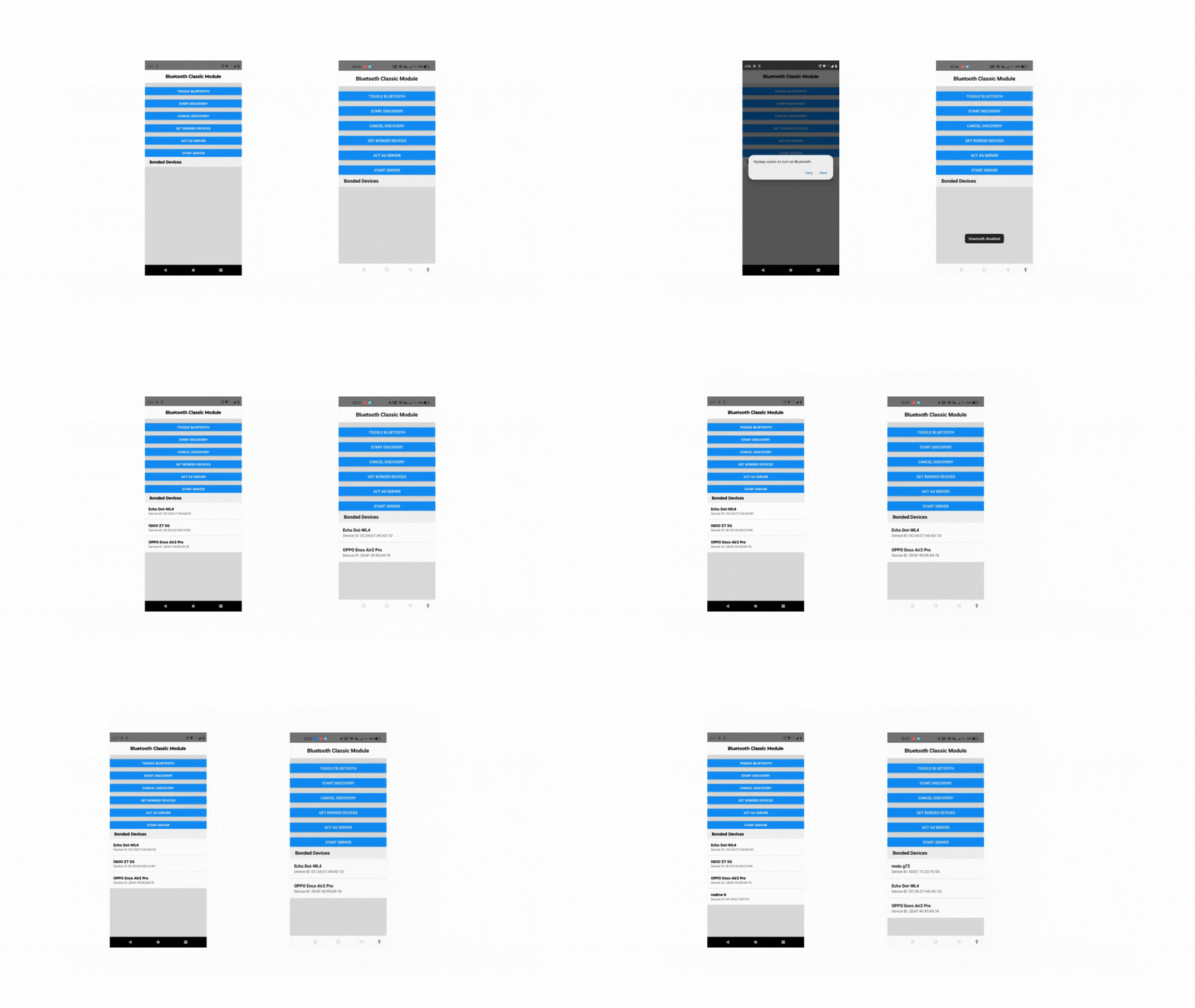
Steps for Creating a Turbo Module for Bluetooth (Android)
- Define the JavaScript specification.
- Configure the module so that Codegen can generate the scaffolding.
- Write the native code to finish implementing the module.
Folder Setup
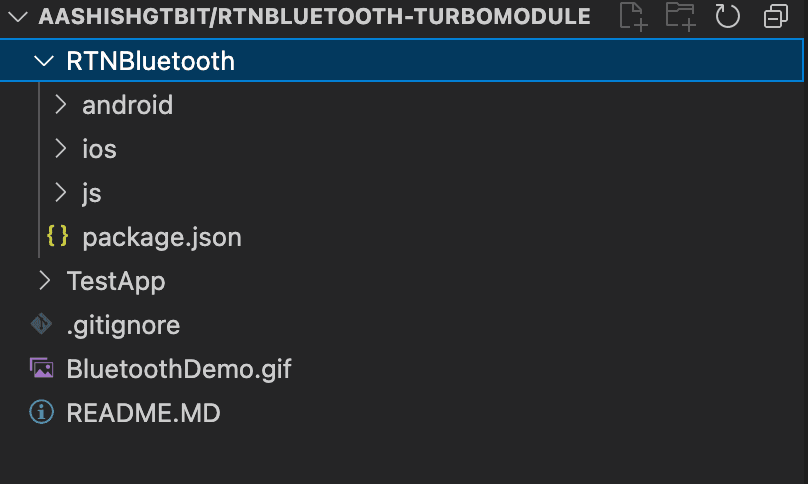
Defining Javascript Specification
Create a file in js/NativeBluetooth.ts and add the following contents. The file name should follow the Native<ModuleName>.ts. The exported Name should be Spec.
import type { TurboModule } from "react-native/Libraries/TurboModule/RCTExport";
import { TurboModuleRegistry } from "react-native";

export interface Spec extends TurboModule {
  checkBluetoothSupport(): Promise<boolean>;
  toggleBluetooth(): Promise<string>;
  enableBluetooth(): Promise<string>;
  addListener: (eventType: string) => void;
  removeListeners(count: number): void;
}

export default TurboModuleRegistry.get<Spec>("RTNBluetooth") as Spec | null;
Create a Package.json file at the root of the project. Here we have added the basic details for our package and also added the Codegen config, which contains the Java package name for the android modules. Here the name field should follow the particular naming convention RTN<PackageName>Spec.
{
    "name": "rtn-bluetooth",
    "version": "0.0.1",
    "description": "Add numbers with Turbo Native Modules",
    "react-native": "js/index",
    "source": "js/index",
    "files": [
      "js",
      "android",
      "ios",
      "rtn-bluetooth.podspec",
      "!android/build",
      "!ios/build",
      "!**/__tests__",
      "!**/__fixtures__",
      "!**/__mocks__"
    ],
    "keywords": ["react-native", "ios", "android"],
    "repository": "https://github.com/<your_github_handle>/rtn-bluetooth",
    "author": "<Your Name> <your_email@your_provider.com> (https://github.com/<your_github_handle>)",
    "license": "MIT",
    "bugs": {
      "url": "https://github.com/<your_github_handle>/rtn-bluetooth/issues"
    },
    "homepage": "https://github.com/<your_github_handle>/rtn-bluetooth#readme",
    "devDependencies": {},
    "peerDependencies": {
      "react": "*",
      "react-native": "*"
    },
    "codegenConfig": {
      "name": "RTNBluetoothSpec",
      "type": "modules",
      "jsSrcsDir": "js",
      "android": {
        "javaPackageName": "com.rtnbluetooth"
      }
    }
  }
Creating Android-specific Changes
In the Android folder create a build.gradle file with the following content build.gradle
buildscript {
  ext.safeExtGet = {prop, fallback ->
    rootProject.ext.has(prop) ? rootProject.ext.get(prop) : fallback
  }
  repositories {
    google()
    gradlePluginPortal()
  }
  dependencies {
    classpath("com.android.tools.build:gradle:7.3.1")
  }
}

apply plugin: 'com.android.library'
apply plugin: 'com.facebook.react'

android {
  compileSdkVersion safeExtGet('compileSdkVersion', 33)
  namespace "com.rtnbluetooth" // this is your javaPackageName.
}

repositories {
  mavenCentral()
  google()
}

dependencies {
  implementation 'com.facebook.react:react-native'
  implementation 'androidx.fragment:fragment:1.3.6'
}
Generating Android Code Using Codegen
From the root of the project, run the following script. Before that, please create a React Native basic app using react-native init template with the name TestApp. It will add the rtn-bluetooth package to the node-modules. You can find the generated code in the following path TestApp/node_modules/rtn-bluetooth/android/build/generated/source/codegen . The Codegen helps us to generate a lot of scaffolding code, which will save us time.
cd TestApp
yarn add ../RTNBluetooth
cd android
./gradlew generateCodegenArtifactsFromSchema
In the Android folder, create the following folder structure. src/main/java/com/rtnbluetooth
Create a file inside rtnbluetooth folder named [BlcManager.java](<https://github.com/Aashishgtbit/RTNBluetooth-TurboModule/blob/main/RTNBluetooth/android/src/main/java/com/rtnbluetooth/BlcManager.java>). Here we will add the logic for checking the Bluetooth support and enabling and disabling Bluetooth support.
Create BlcManager Class
package com.rtnbluetooth;

/* imports here */


class BlcManager extends ReactContextBaseJavaModule implements  ActivityEventListener {
    public static final String LOG_TAG = "ReactNativeBlcManager";
    private static final int ENABLE_REQUEST = 539;
    private BluetoothAdapter bluetoothAdapter;
    private BluetoothManager bluetoothManager;
    private Context context;
    private ReactApplicationContext reactContext;
    private Promise enableBluetoothPromise;

    public ReactApplicationContext getReactContext() {
        return reactContext;
    }

    public BlcManager(ReactApplicationContext reactContext) {
        super(reactContext);
        context = reactContext;
        this.reactContext = reactContext;
        reactContext.addActivityEventListener(this);
        Log.d(LOG_TAG, "BlcManager created");
    }

    @Override
    public void onNewIntent(Intent intent) {

    }
    @Override
    public String getName() {
        return "BlcManager";
    }

		private BluetoothManager getBluetoothManager() {
        if (bluetoothManager == null) {
            bluetoothManager = (BluetoothManager) context.getSystemService(Context.BLUETOOTH_SERVICE);
        }
        return bluetoothManager;
    }

    private BluetoothAdapter getBluetoothAdapter() {
        if (bluetoothAdapter == null) {
            BluetoothManager manager = getBluetoothManager();
            bluetoothAdapter = manager.getAdapter();
        }
        return bluetoothAdapter;
    }

    public void checkBluetoothSupport(Promise promise){
        if(getBluetoothAdapter() == null){
            Log.d(LOG_TAG, "No bluetooth support");
            promise.resolve(false);
        }else{
            promise.resolve(true);
        }
    }

  }
In the above code, we have created a basic Java class that extends ReactContextBaseJavaModule, and here in the constructor method, we are updating the value of reactContext and also attaching activityEventListener with the context. We will use this activityEventListener for listening to the opening and closing of activity on the native side, like opening of the Bluetooth permission dialog.
Here we have added the getBluetoothManager and getBluetoothAdapter, which will provide the bluetoothAdapter instance that exposes different APIs of Bluetooth like getBondedDevices method (which will provide the list of already paired devices) , methods for enabling and disabling Bluetooth.
Finally, we have added checkBluetoothSupport method, which will return a boolean promise based on Bluetooth availability on the device.
Enabling Disabling Bluetooth
Here we will expose one more public method toggleBluetooth that will toggle the Bluetooth states. Here we are showing toast while disabling the Bluetooth, and if the Bluetooth is disabled, we are enabling it by asking the user for the BLUETOOTH_CONNECT permission by checking the current BuildSDK version. If we have the required permission It will create an intent that will ask the user to enable Bluetooth.
public void toggleBlueTooth(Promise promise) {
        if(getBluetoothAdapter() == null){

        }else{
            if(getBluetoothAdapter().isEnabled()){
                getBluetoothAdapter().disable();
                Toast toast = Toast.makeText( reactContext , "bluetooth disabled" ,Toast.LENGTH_SHORT);
                toast.show();
                promise.resolve("disabled");
            }else{
                enableBluetooth(promise);
            }
        }
    }

@SuppressLint("MissingPermission")
public void enableBluetooth(Promise promise) {
    if (getBluetoothAdapter() == null) {
        Log.d(LOG_TAG, "No bluetooth support");
        promise.resolve("No bluetooth support");
        return;
    }
    if( Build.VERSION.SDK_INT >= Build.VERSION_CODES.S && ContextCompat.checkSelfPermission(reactContext,Manifest.permission.BLUETOOTH_CONNECT) != PackageManager.PERMISSION_GRANTED ){

        ActivityCompat.requestPermissions(getCurrentActivity() , new String[]{Manifest.permission.BLUETOOTH_CONNECT}, 1);

    }else {
        if (!getBluetoothAdapter().isEnabled()) {
            Intent intentEnable = new Intent(BluetoothAdapter.ACTION_REQUEST_ENABLE);
            if (getCurrentActivity() == null)
                promise.resolve("Current activity not available####");
            else {
                try {
                    enableBluetoothPromise = promise;
                    getCurrentActivity().startActivityForResult(intentEnable, ENABLE_REQUEST);
                } catch (Exception e) {
                    Log.d(LOG_TAG, e.getStackTrace().toString());
                    promise.resolve("Current activity not available!!!");
                }

            }

        } else
            promise.resolve("default case");
    }
}
After that, we will override onActivityResult from the interface ActivityEventListener. It will listen for the activity events like when the user either accepted or denied the Bluetooth opening request, and based on the request code we are sending the appropriate message and toasts.
@Override
public void onActivityResult(Activity activity, int requestCode, int resultCode, Intent intent) {
    Log.d(LOG_TAG, "onActivityResult  called "+ requestCode);

    if (requestCode ==ENABLE_REQUEST&& enableBluetoothPromise != null) {
        if (resultCode ==RESULT_OK) {
            Toast toast = Toast.makeText( reactContext , "bluetooth enabled" ,Toast.LENGTH_SHORT);
            enableBluetoothPromise.resolve("user accepted the request!");
        } else {
            enableBluetoothPromise.resolve("User refused to enable");
        }
        enableBluetoothPromise = null;
    }
}
Create BluetoothModule Class
Here we will create [BluetoothModule.java](<https://github.com/Aashishgtbit/RTNBluetooth-TurboModule/blob/main/RTNBluetooth/android/src/main/java/com/rtnbluetooth/BluetoothModule.java>) file in the rtn-bluetooth folder, which will call the Methods used in the BlcManager class. This module extends the NativeBluetoothSpec class, which is generated by the codegen using the js/NativeBluetooth.ts file exported Spec.
package com.rtnbluetooth;
// add imports here.
import com.rtnbluetooth.NativeBluetoothSpec;

public class BluetoothModule extends NativeBluetoothSpec {

    public static String NAME = "RTNBluetooth";
    private Context context;
    final private BlcManager mRNCBluetoothManagerImpl;

    BluetoothModule(ReactApplicationContext context) {
        super(context);
        mRNCBluetoothManagerImpl = new BlcManager(context);
    }

    @Override
    @NonNull
    public String getName() {
        return NAME;
    }

    @Override
    public void checkBluetoothSupport(Promise promise) {
        mRNCBluetoothManagerImpl.checkBluetoothSupport(promise);
    }

    @Override
    public void toggleBluetooth(Promise promise) {
        mRNCBluetoothManagerImpl.toggleBlueTooth(promise);
    }

    @Override
    public void enableBluetooth(Promise promise) {
       mRNCBluetoothManagerImpl.enableBluetooth(promise);
    }

		@Override
    public void addListener(String eventType) {
    // NOOP
    }

    @Override
    public void removeListeners(double count) {
        // NOOP
    }
}
Now we will add the BluetoothPackage.java class that will extend TurboReactPackage class. This class uses the BluetoothModule we created by overriding methods from the TurboReactPackage abstract class.
package com.rtnbluetooth;
// add imports here.

public class BluetoothPackage extends TurboReactPackage {

    @Nullable
    @Override
    public NativeModule getModule(String name, ReactApplicationContext reactContext) {
        if (name.equals(BluetoothModule.NAME)) {
            return new BluetoothModule(reactContext);
        } else {
            return null;
        }
    }

    @Override
    public ReactModuleInfoProvider getReactModuleInfoProvider() {
        return () -> {
            final Map<String, ReactModuleInfo> moduleInfos = new HashMap<>();
            moduleInfos.put(
                    BluetoothModule.NAME,
                    new ReactModuleInfo(
                            BluetoothModule.NAME,
                            BluetoothModule.NAME,
                            false, // canOverrideExistingModule
                            false, // needsEagerInit
                            true, // hasConstants
                            false, // isCxxModule
                            true // isTurboModule
            ));
            return moduleInfos;
        };
    }
}
Finally, We need to make sure that we have enabled new architecture in our TestApp. We can enable it by going to TestApp/android/gradle.properties and setting newArchEnabled=true.
In our TestApp, we need to make sure that we have the following Bluetooth permission in our TestApp/android/app/src/main/AndroidManifest.xml.
<!-- Request legacy Bluetooth permissions on older devices. -->
    <uses-permission android:name="android.permission.BLUETOOTH"
                     android:maxSdkVersion="30" />
    <uses-permission android:name="android.permission.BLUETOOTH_ADMIN"
                     android:maxSdkVersion="30" />

    <!-- Needed only if your app communicates with already-paired Bluetooth
         devices. -->
    <uses-permission android:name="android.permission.BLUETOOTH_CONNECT" />

    <uses-feature android:name="android.hardware.bluetooth" android:required="true"/>
If we are making any changes to our RTNBluetooth folder, we have to run the following command from the root of the project.
cd TestApp
yarn add ../RTNBluetooth
cd android
./gradlew generateCodegenArtifactsFromSchema
React Native Side Usage
App.tsx
/**
 * Sample React Native App
 * https://github.com/facebook/react-native
 *
 * @format
 */

import React, {useEffect, useState} from 'react';
import {
  Button,
  SafeAreaView,
  StatusBar,
  StyleSheet,
  Text,
  View,
} from 'react-native';
import RTNBluetooth from 'rtn-bluetooth/js/NativeBluetooth';

function App(): JSX.Element {

  const checkBlueToothSupport = async () => {
    const res = await RTNBluetooth?.checkBluetoothSupport();
    const isEnabled = await RTNBluetooth?.enableBluetooth();
  };

  useEffect(() => {
    checkBlueToothSupport();
  }, []);

  const handleToggleBluetooth = async () => {
    const res = await RTNBluetooth?.toggleBluetooth();
  };

  return (
    <SafeAreaView style={styles.container}>
      <StatusBar barStyle={'dark-content'} />
      <View style={styles.header}>
        <Text style={styles.headerText}>Bluetooth Classic Module</Text>
      </View>
      <View style={styles.btnWrapper} />
      <Button title="toggle Bluetooth" onPress={handleToggleBluetooth} />
      <View style={styles.btnWrapper} />
    </SafeAreaView>
  );
}
export default App;
Summing Up
🎉Woohooo… 😎 We have finally completed the basic Bluetooth classic module, which can handle the enabling and disabling of Bluetooth. In the same way, we can expose other Native Android APIs to the React native.
For the complete code with more functionality, you can visit https://github.com/Aashishgtbit/RTNBluetooth-TurboModule repo. I hope you liked this article, and if you did, please share it with your friends. For any queries, please connect with me on Twitter.
References: