

From a rough brief to merged code. With traceability at every step.
Software teams have a strange problem right now. Writing code has become fast. AI can produce working code in minutes. But everything around the code can still be slow and fragmented. Requirements sit in emails and meeting notes. Documents go stale the week they are written. Tickets lose context as they move between teams. And when someone asks six months later why something was built, the answer isn't always easy to trace.
AntFlow AI is our answer to that. It's GeekyAnts AI Agentic development framework where AI agents handle much of the repetitive work while people stay in control of the decisions that matter.
You put in a short brief. AntFlow AI gets back to you with structured requirements, technical documents, implementation tasks, reviewed code and, eventually, pull requests in your own repository.
Equally important, those artifacts remain related. It is possible to follow up on what was constructed back to the need that generated it, and who – or what – reviewed and approved each stage.
This article discusses how this is done, from a brief to merged code.
AI made Coding Faster. Software Delivery is still Fragmented.
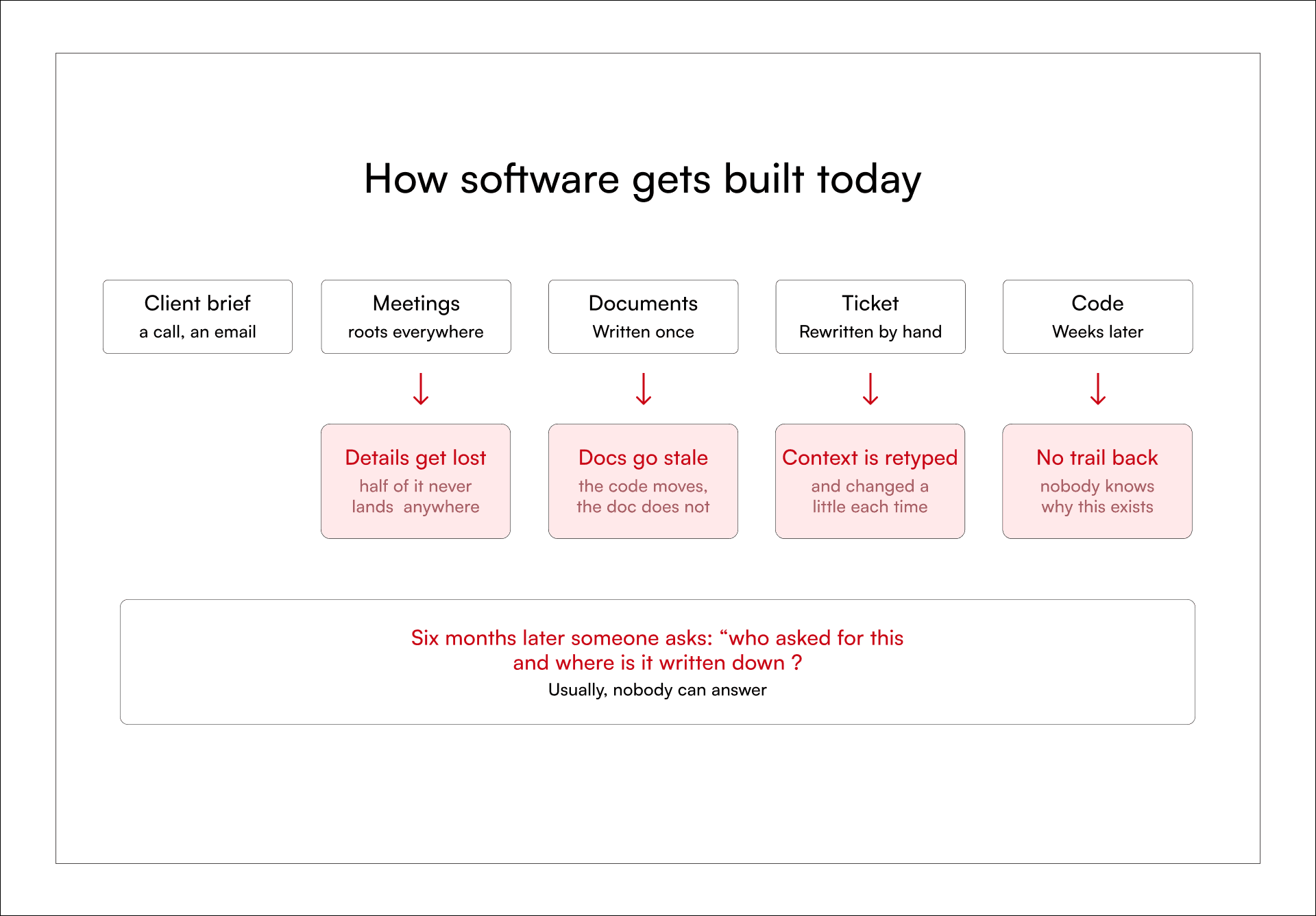
Every arrow in this workflow represents a handoff. and every handoff is a place where context can get lost.
Meeting notes never fully land in the document. The document stops being updated after week two. Tickets are retyped by hand, so they drift from the document a little more each time. By the time code ships, nobody can trace it back to the original task. This is not a people problem. It is a plumbing problem.
One Connected Workflow from Requirements to Code: What Ant AI Does?
AntFlow AI replaces those handoffs with one connected workflow. Agents write the first draft of everything. Requirements, documents, task breakdowns, code and review. People check the work and sign off at fixed gates.
The goal isn't to remove developers from the loop. It's to remove the repeated handoffs while keeping human approval where it matters.
So the output is code plus the paper trail behind it.
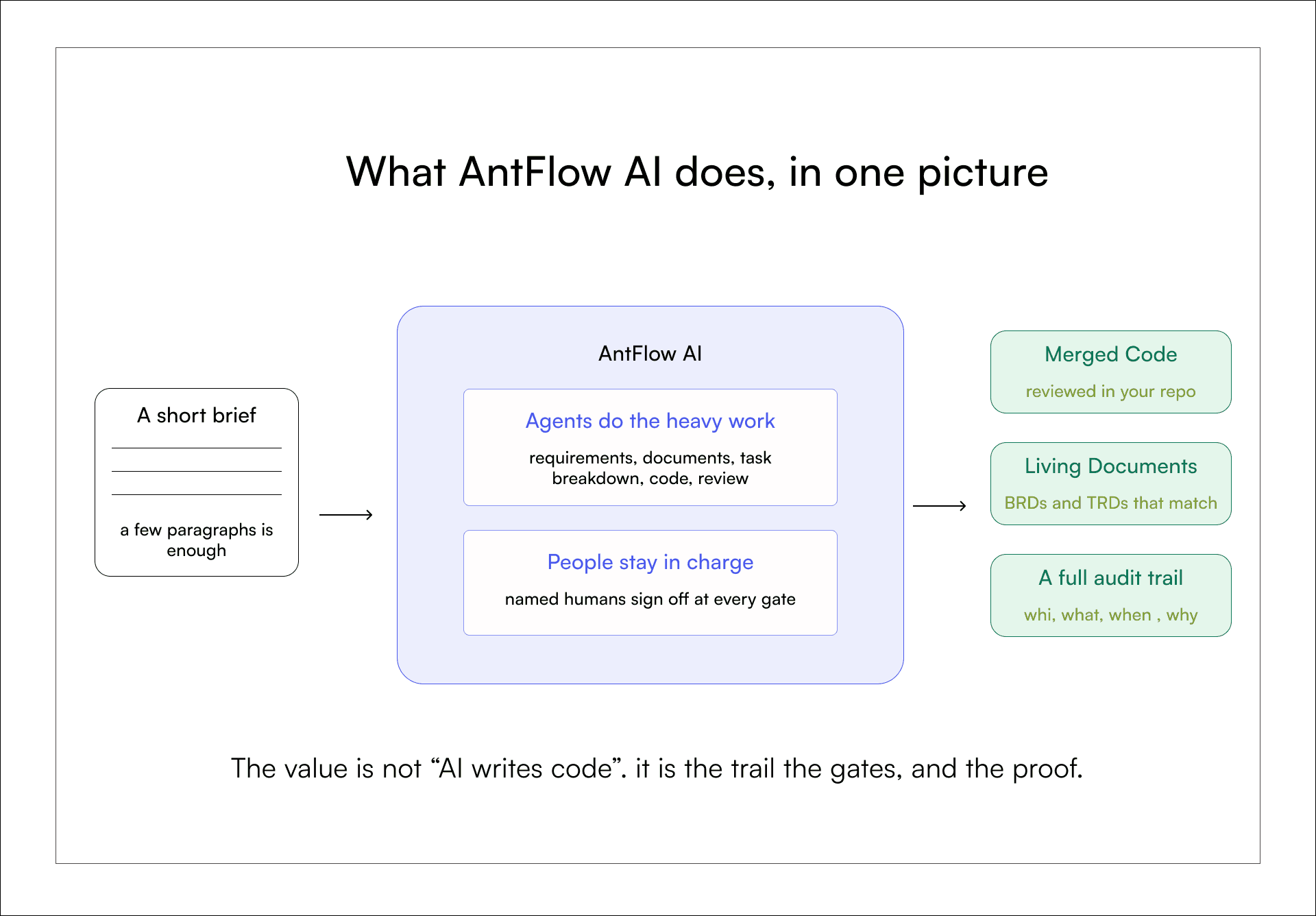
Underneath this workflow, AntFlow AI applies a Spec-Driven Development (SDD) methodology, which sits within GeekyAnts’ broader AI Native Engineering practice.
The principle is simple: define and agree on what should be built before implementation begins, break that intent into connected business, technical and task-level specs, and then build and verify against those specs. AntFlow AI operationalizes spec-to-code approach, carrying the original intent from the brief through BRDs, TRDs and implementation tasks so that AI can move quickly without losing the context or proof behind the work.
How AntFlow AI turns a Brief into a Pull Request
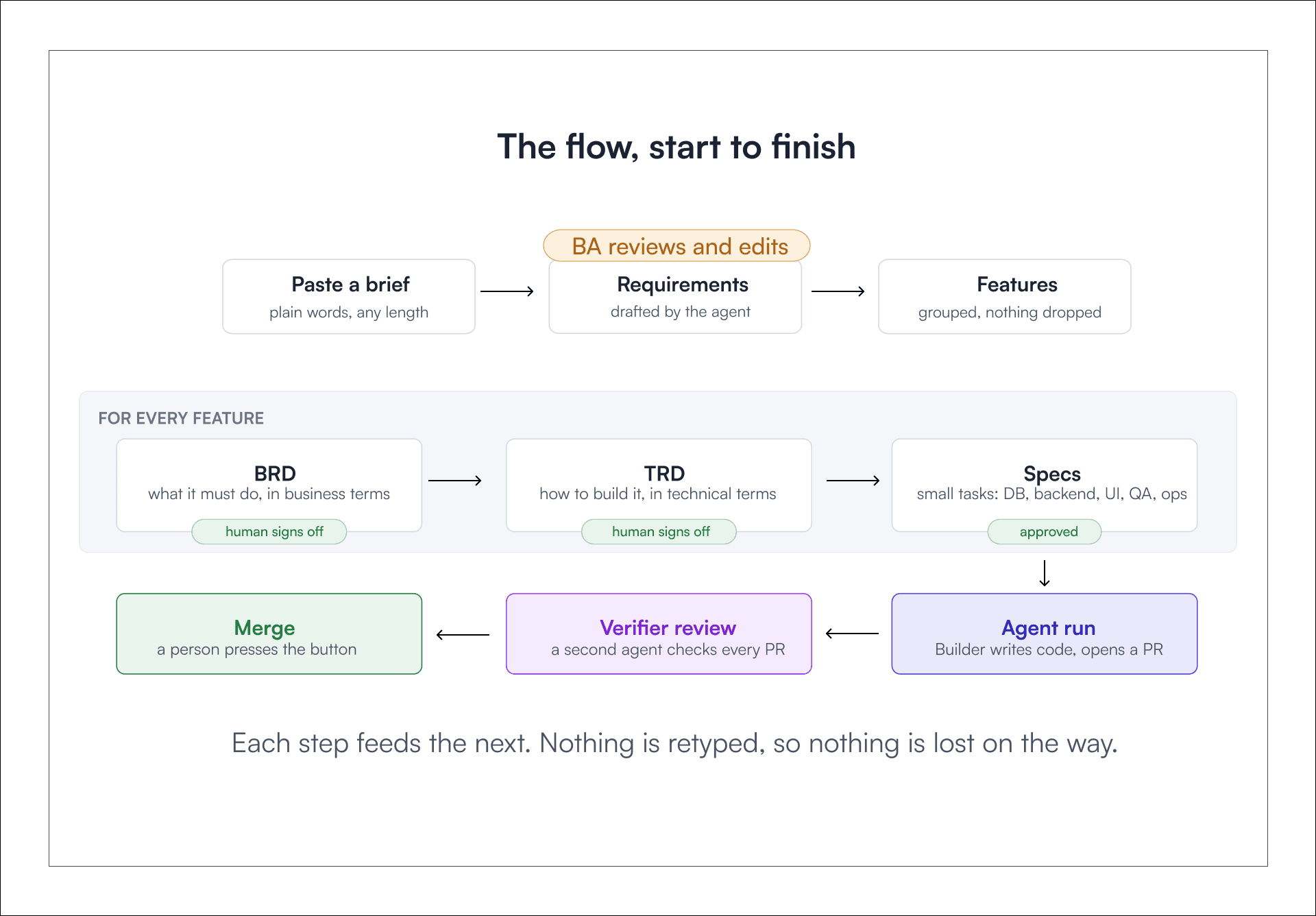
It begins with a brief draft using simple language. An agent creates the structured requirements from the draft brief and which can be reviewed by a business analyst.
The requirements are divided into features. Each feature gets a Business Requirements Document (BRD) that captures what needs to be built and a Technical Requirements Document (TRD) that describes how it will be implemented. All that's left to do is the human signoff.
From there, the TRD is further divided into implementation tasks. The agents complete these implementation tasks while another agent reviews the code and then a person makes the final merge decision.
Why AntFlow AI separates the Builder and Verifier
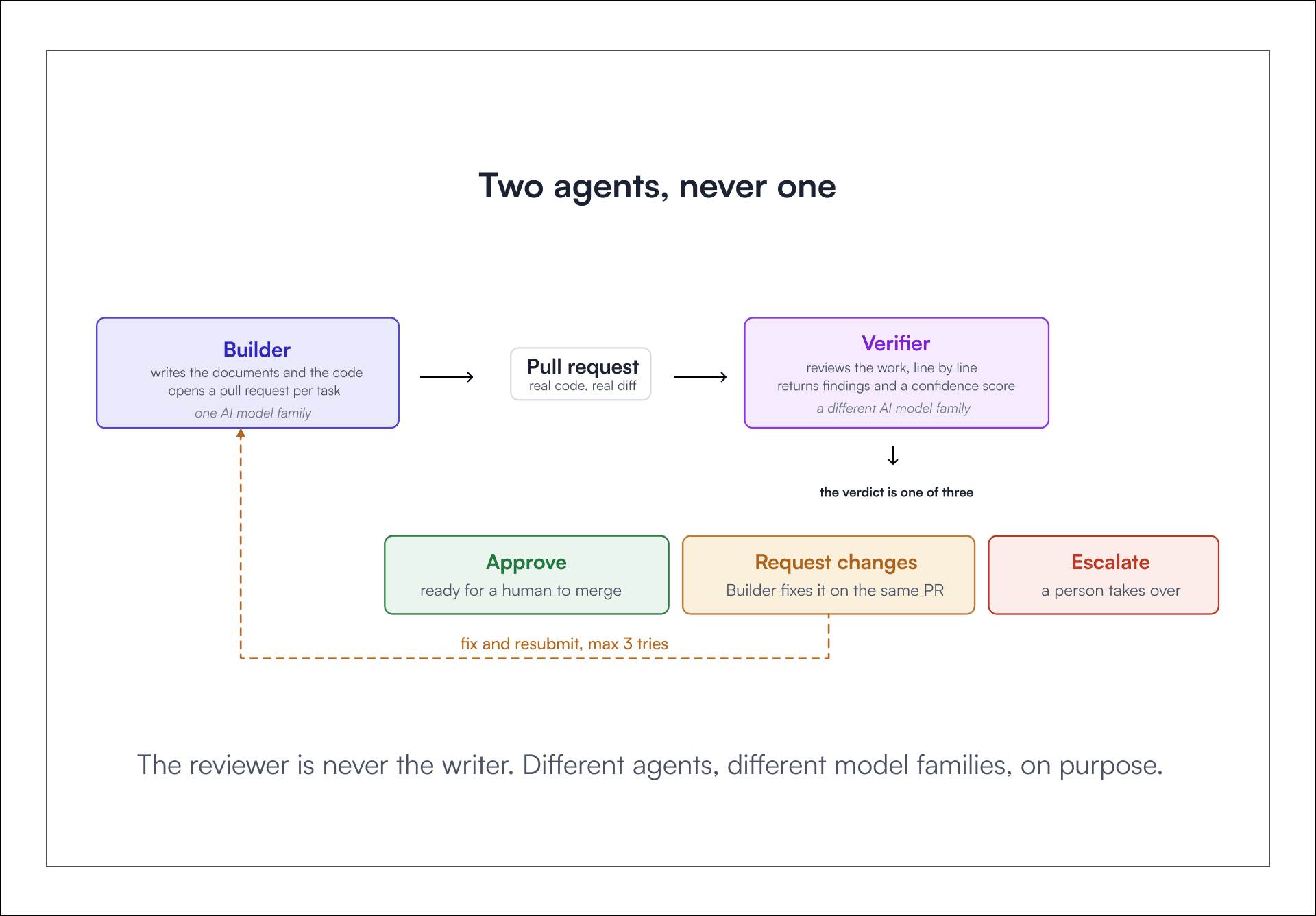
One agent writing and grading its own homework proves nothing. So AntFlow AI separates those responsibilities.
The Builder writes. The Verifier reviews.
They run on different AI model families, which helps reduce the risk of correlated errors and identical failure modes. On every pull request, the Verifier returns findings and a confidence score, then gives one of three verdicts: approve, request changes or escalate.
Fixes go back to the Builder on the same pull request, three tries at most, and anything unresolved goes to a person.
Self-review before Human Review
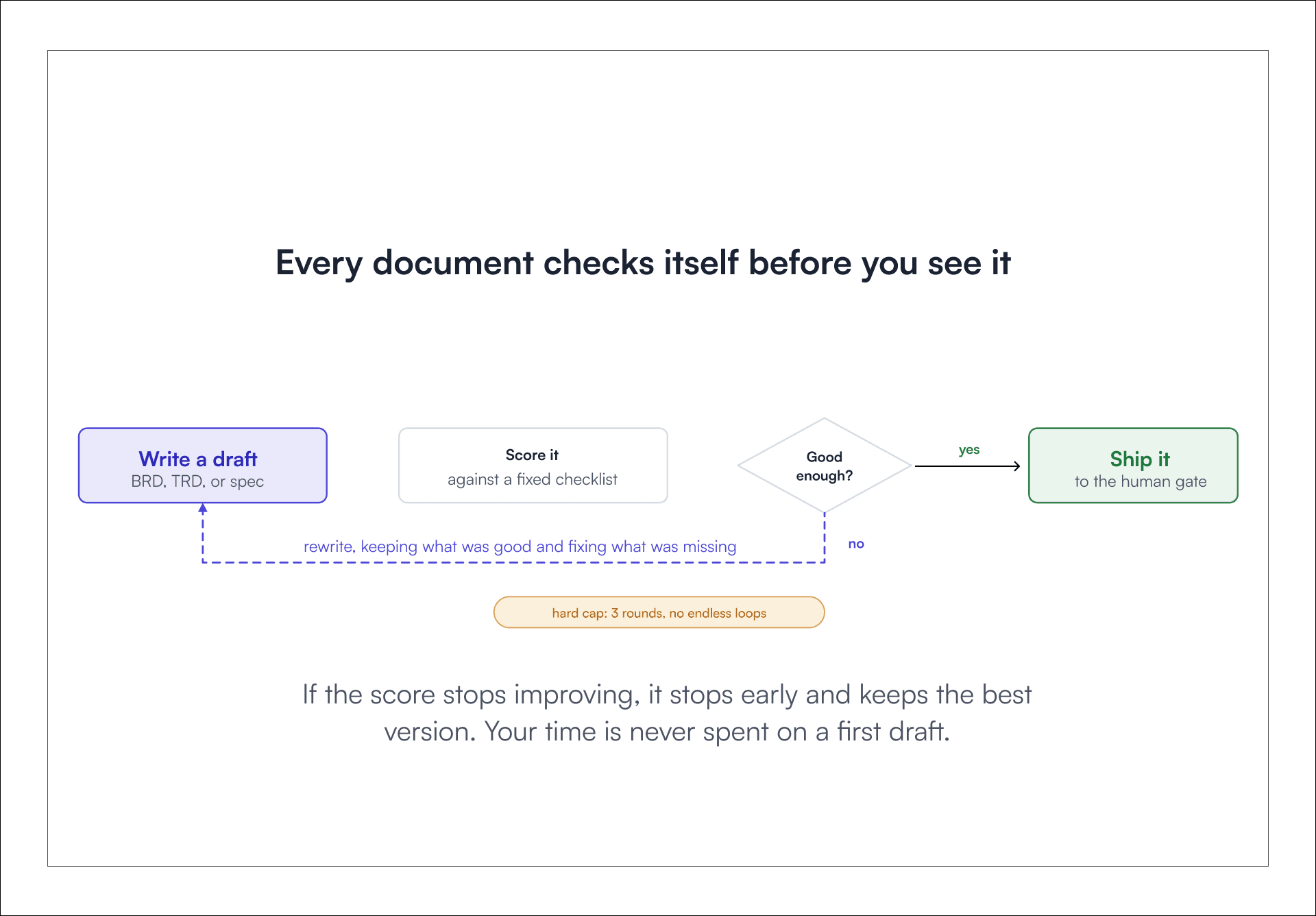
Before any document reaches a person, the agent evaluates its own draft against a fixed checklist and rewrites if required. The loop has a hard cap of three rounds, so it can never spin forever, and if the score stops improving it stops early and keeps the best version. What reaches a human reviewer is a refined draft, produced after up to three self-review rounds rather than the agent’s first attempt.
Dependency-aware Execution, not a Flat Task Queue
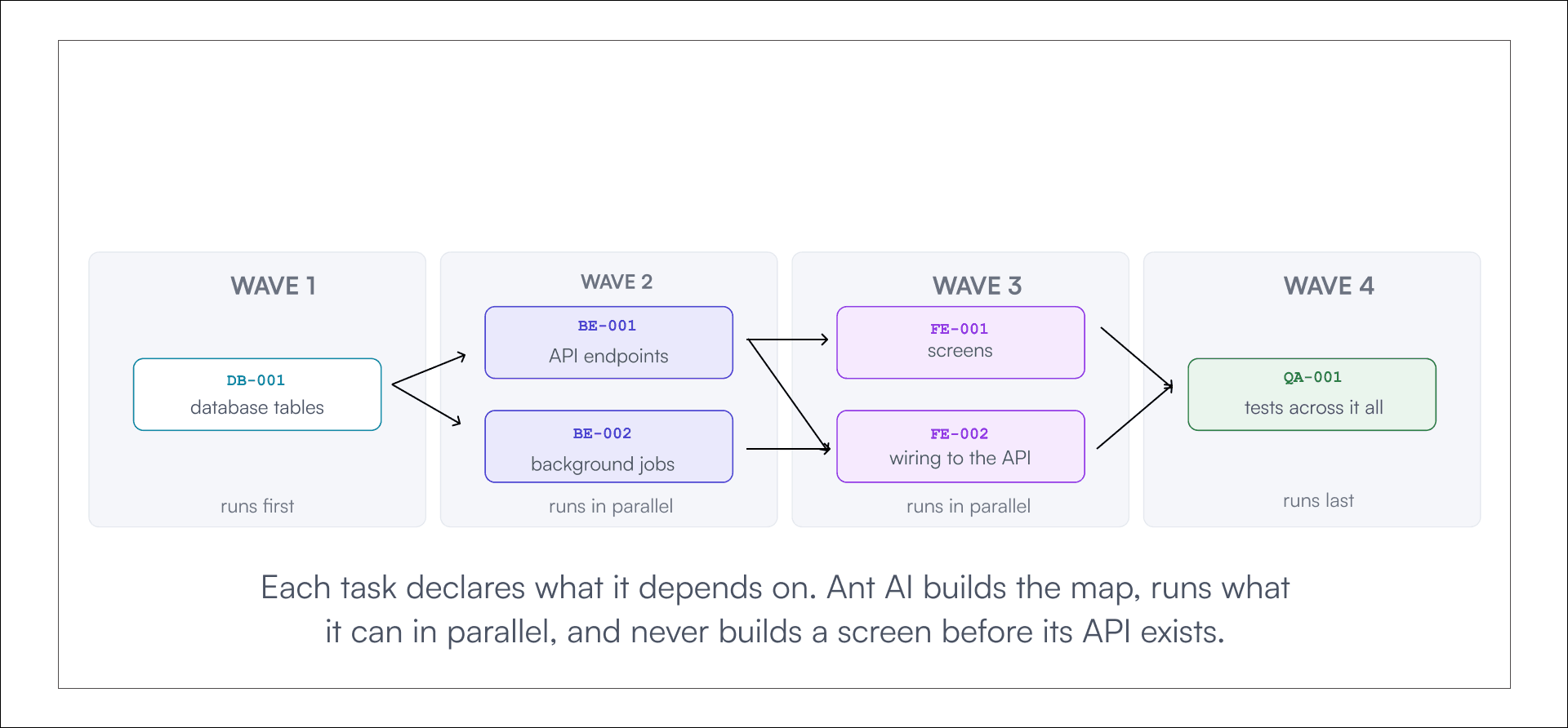
A real project is not a list. It is an interconnected web. A database change may need to land before an API can be implemented, and the API may need to exist before the frontend can integrate with it.
In AntFlow AI, every task declares what it depends on. The platform turns those links into waves, runs each wave in parallel, and holds a task back until everything it needs is done.
Every Change Has a Traceable History
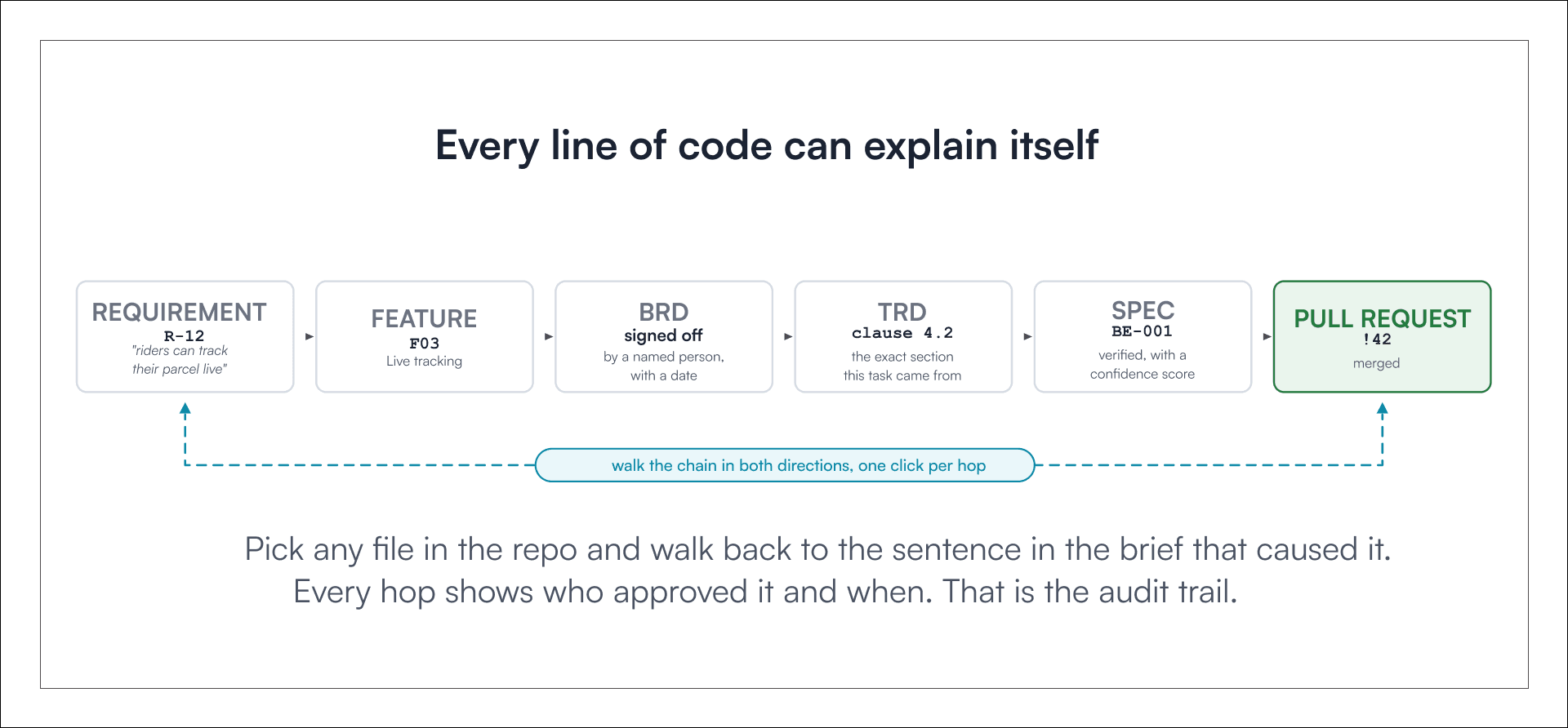
This is the part clients and auditors care about most. Every artifact links to the one before it. Start from a requirement and walk forward to the merged pull request. Or start from a file in the repository and walk backward to the sentence in the brief that caused it.
Each hop names the person or agent behind it, with a timestamp. The delivery history does not have to rely on someone remembering what happened months later.
In practice, that creates a traceable path: requirement → feature → BRD → TRD → spec → pull request.
AntFlow AI Works Inside your Existing Git Workflow
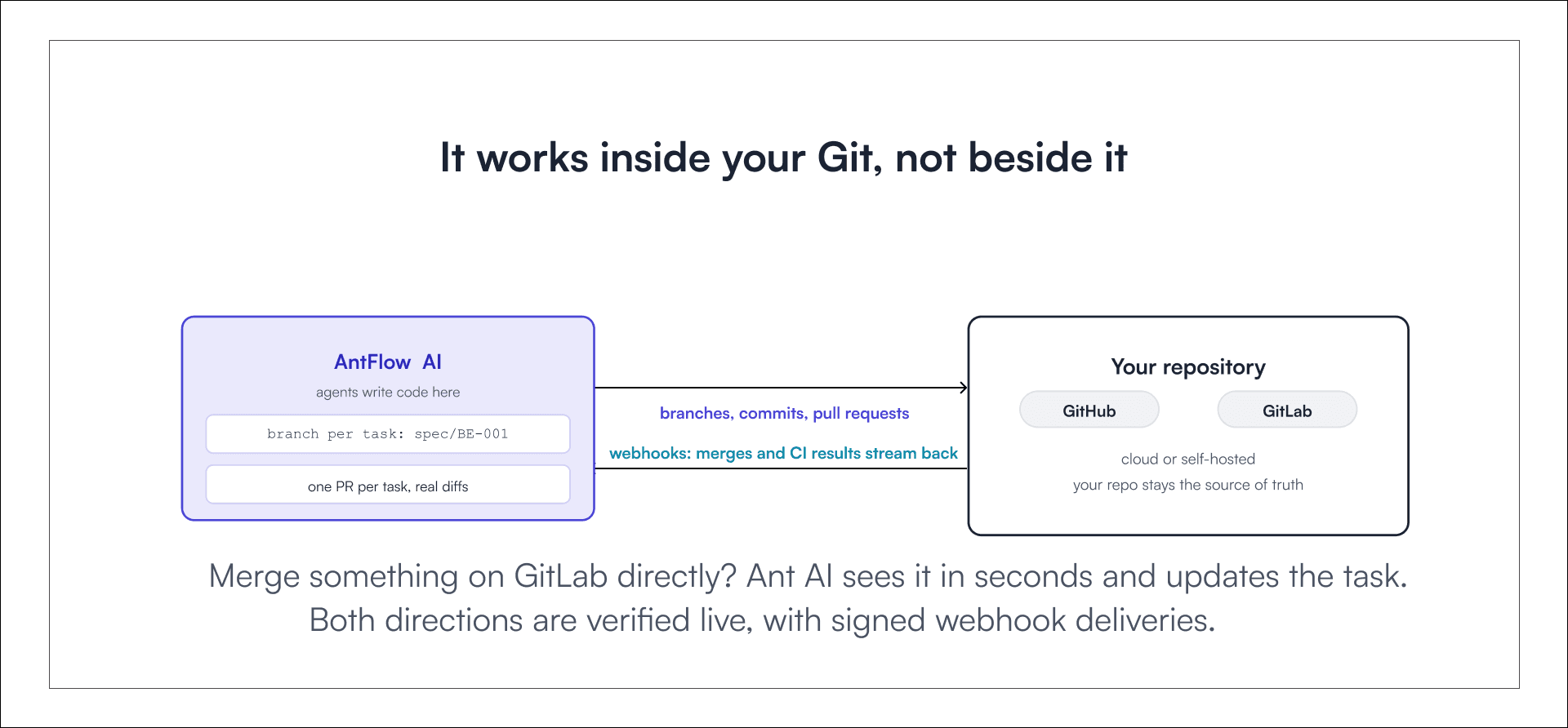
AntFlow AI does not ask you to move your code. It connects to GitHub and GitLab, including supported cloud and self-managed deployments.
Agents work on real branches and open real pull requests, one per task.
It listens too. If someone merges directly on GitLab, AntFlow AI receives repository events through webhooks and automatically updates the corresponding task.
Control that Grows with Trust
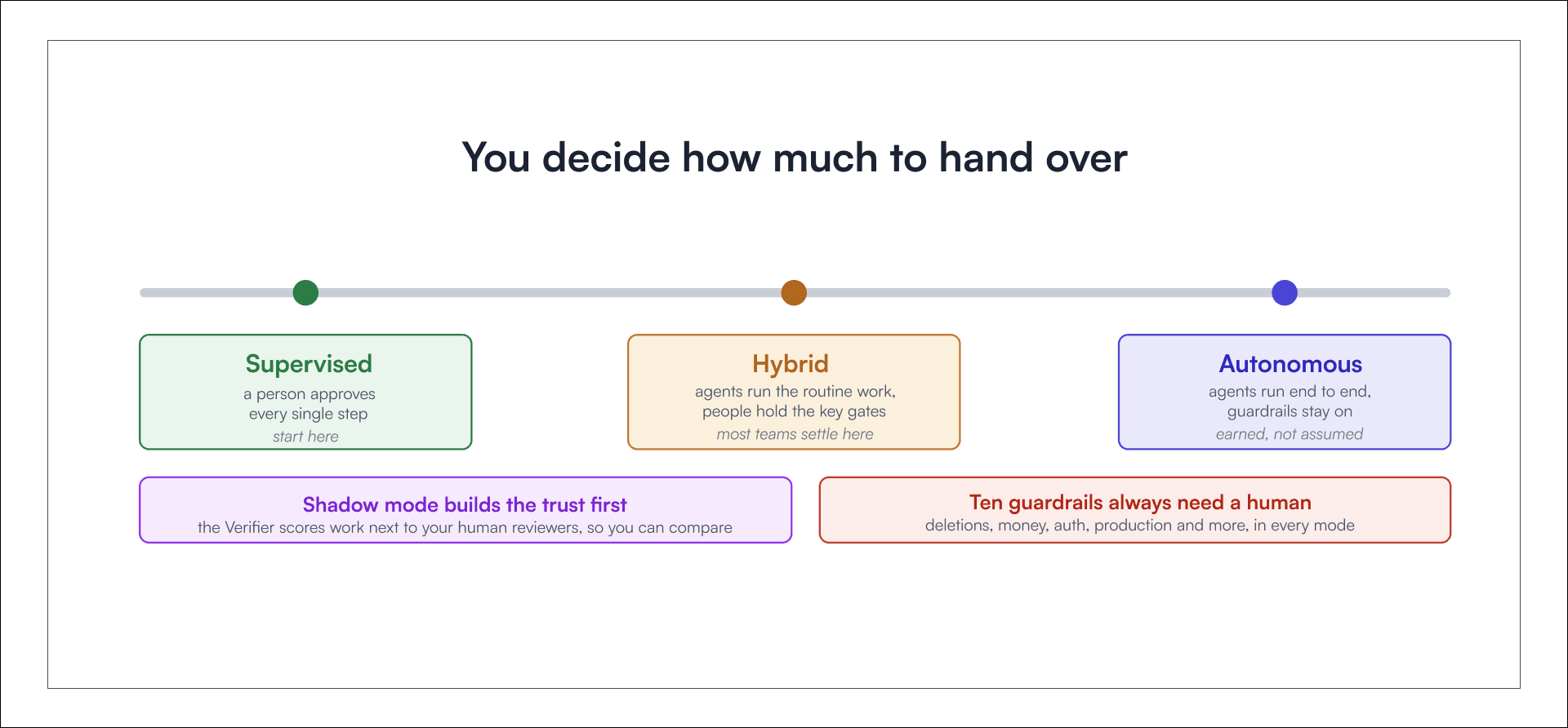
Trust in agents is earned, not assumed. So control is a dial, not a switch. Teams start in supervised mode, where a person approves every step. Most settle into hybrids, where agents run the routine work and people retain the key approval gates.
Shadow mode provides another way to build confidence: the Verifier evaluates work alongside human reviewers so teams can compare the results.
There are some actions that are controlled by humans irrespective of the mode. These are the ten guardrails mentioned by AntFlow AI which include actions involving deletions, money and production access, among others.
Different Roles, One Delivery Context
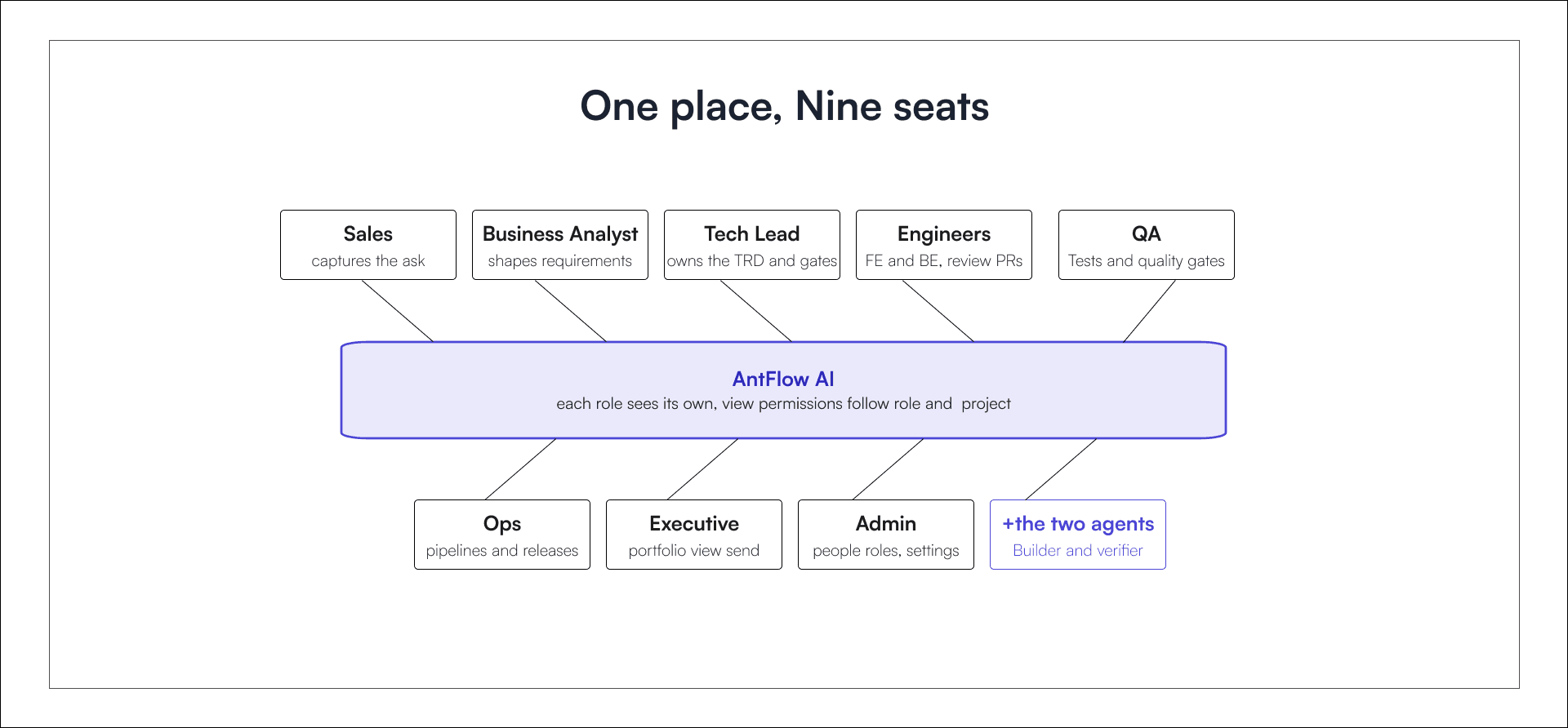
Nine roles work in the same place, from sales to admin. Each one sees a view built for their job, and permissions follow both role and project.
The sales rep doesn’t need to navigate engineering workflows or deployment pipelines. The engineer never digs through contract notes. And nobody has to ask around to learn the state of a delivery.
AntFlow AI isn't another Coding Assistant or Project Tracker
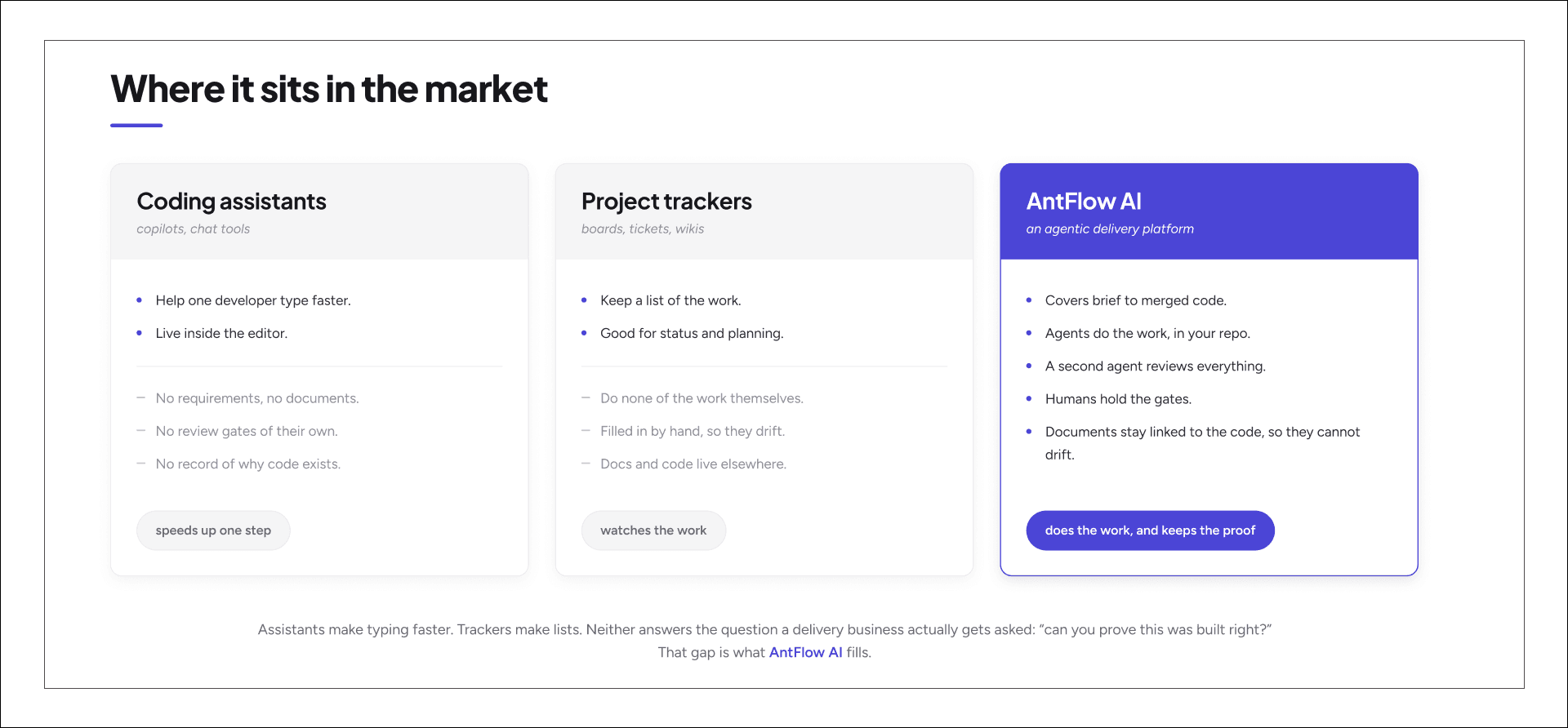
Coding assistants and project trackers are both useful, and we use them too. But an assistant speeds up a single developer, and a tracker only watches the work. A project tracker helps a team organize and monitor work.
AntFlow AI targets the workflow between those layers, namely translating requirements into code while maintaining the reviews, approvals and traceability associated with the end product.
The difference is how requirements become reviewed, approved code.
From Brief to Merged Code with the Context Intact
From the brief to requirements, technical documentation, and implementation, the whole process of development within AntFlow AI includes context which is taken care of by AI agents in terms of performing repetitive tasks, whereas people perform all the decision-making and gating actions within the process.
The result is reviewed code with all the requirements, decisions, approvals and documentation intact with it.
As AI makes implementation faster, that context becomes increasingly important.
Code writing might not always be the slowest stage in software delivery. Knowing what to build, verifying that it was built correctly, and being able to explain why it exists are the harder problems AntFlow AI is designed to address.