


Figma’s Plugin API helped us turn AI-generated React apps into designer-ready Figma files.
For years, building digital products followed a familiar pattern: designers created interfaces, developers implemented them, and teams managed the gap between design and code. With AI now capable of generating complete React applications in seconds, we saw a new problem emerge — not creating interfaces, but converting AI-generated code into clean, editable Figma files that teams could easily review, iterate on, and collaborate around.
The Moment Everything Broke
When gluestack-ui Pro generated its first complete application screens, our first instinct was simple:
"Let's export them into Figma."
It sounded like a solved problem. HTML-to-Figma tools have existed for years, and there were plenty of plugins promising one-click imports from the browser into Figma.
So we started testing them.
At first, the results looked promising. The exported files looked visually similar to the original application. But the moment designers started working with them, the problems became obvious.
The exported files consistently suffered from a few major issues:
- Poor Auto Layout support — Layouts built with Flexbox often became deeply nested frames with fixed dimensions. Instead of behaving like responsive Figma layouts, they behaved like static screenshots.
- No reusable components — Buttons, Inputs, Cards, and other UI elements were recreated as individual layers every time they appeared. Ten buttons on a page became ten unrelated layer groups instead of instances of the same component.
- Broken design system relationships — There was no connection between elements that originated from the same source component. Updating one button wouldn't update the others because the exporter had no concept of component instances.
- Difficult-to-edit layer structures — Simple UI elements often turned into dozens of nested frames and groups, making the generated file harder to edit than rebuilding it manually.
- Missing component variants — Hover states, disabled states, sizes, and other variants weren't recognized as part of the same component family. Everything was exported as separate disconnected layers.
- No understanding of design intent — The exporter could reproduce what the page looked like, but not what it actually was. A Button wasn't recognized as a Button. A Card wasn't recognized as a Card. Everything was reduced to generic HTML elements.
After trying tool after tool, we reached a simple conclusion:
The problem wasn't that these tools were poorly built. The problem was that they were starting from the wrong source of truth. They were trying to understand the application through the DOM. But the DOM only knows about divs and spans. We needed something that understood React components.
The Breakthrough: Stop Reading HTML, Start Reading React
The moment everything changed was when we stopped looking at the DOM.
Instead, we started looking at React Fiber.
React Fiber is React's internal representation of the component tree.
Unlike the DOM, Fiber understands:
- Component boundaries
- Component names
- Parent-child ownership
- Props
- React state
That means Fiber can tell us:
"This isn't a div."
"This is a gluestack-ui Button."
<div>
  <span>Continue</span>
</div>
But React Fiber knows:
<Button variant="solid">
  <Text>Continue</Text>
</Button>
And that distinction changes everything.
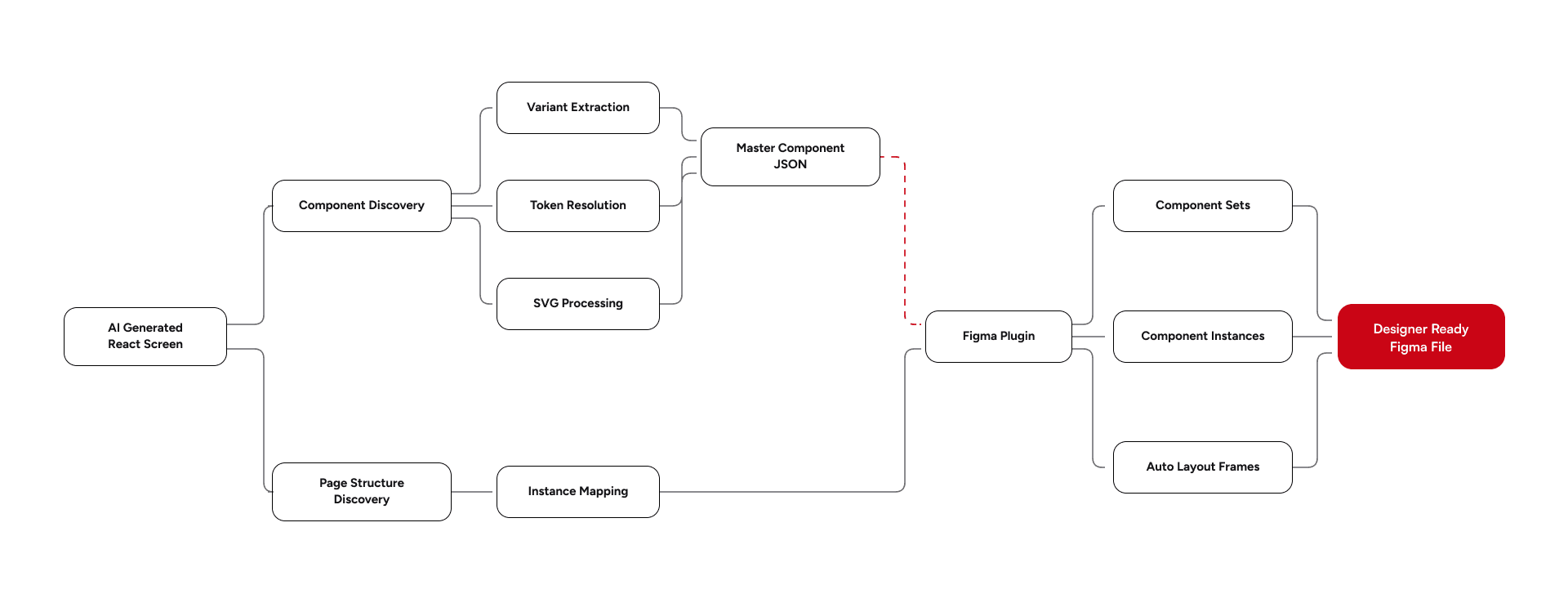
Phase 1: Discovering Components Through React Fiber
Before we can generate a Figma file, we first need to understand what actually exists in the application — which meant building an extractor that traverses React Fiber instead of the DOM.
The extractor traverses the React Fiber tree and identifies every gluestack-ui component present in the application—Buttons, Inputs, Cards, Selects, Modals, Menus, Avatars, and more.
This gives us something the DOM can never provide: actual component boundaries.
Instead of seeing a collection of divs and spans, the extractor knows exactly where a Button begins, where a Card ends, and which elements belong to each component.
Alongside component discovery, the extractor captures:
- Component hierarchy
- Absolute bounding boxes (getBoundingClientRect)
- Computed styles (getComputedStyle)
- Design token references
- Asset references
By the end of this phase, we have a complete map of the application's component structure.
However, we quickly discovered another problem.
The components visible on a page represent only a tiny fraction of the design system.
Phase 2: The Variant Expander
A page might contain a single Button.
A designer needs the entire Button system.
That means every size, every variant, every style, and every state—not just the one that happened to appear on the screen.
To solve this, we built a Variant Expander.
Instead of simply extracting rendered components, the exporter introspects the component's variant definitions and generates every possible prop combination.
It then forces React to render those combinations in isolation so they can be measured, extracted, and reconstructed inside Figma.
For example, imagine a Button supports:
Dimension | Count | Values |
|---|---|---|
Semantic Variant | 3 | Success, warning, error |
Size | 5 | xs, sm, md, lg, xl |
Style | 3 | Solid, outline, rounded |
State | 4 | Default, Hover, Focus, Disabled |
Without states, the exporter automatically generates 3 × 5 × 3 = 45 configurations. Adding component states expands the total to 3 × 5 × 3 × 4 = 180 configurations.
Even if only one Button exists in the application, all 180 combinations are rendered and extracted.
This ensures the generated Figma library contains the complete behavior surface of the component rather than a snapshot of what happened to be visible during export.
State Collapsing
Generating hundreds of combinations introduces another challenge.
Many component libraries model states through multiple boolean props:
isHovered
isFocused
isDisabled
Exporting these directly would create a confusing collection of controls inside Figma.
Instead, the exporter intelligently collapses them into a single variant dimension:
State
├─ Default
├─ Hover
├─ Focus
└─ Disabled
This produces clean Component Sets that feel like they were created by a designer rather than generated by a machine.
Phase 3: Extracting Hidden UI States
Then we encountered the hardest engineering problem in the project.
- Overlays
- Modals
- Menus
- Popovers
- Tooltips
These components usually don't exist until they're opened.
Traditional exporters simply miss them.
We couldn't.
Because if AI generated a workflow involving modals, those modals needed to appear inside Figma.
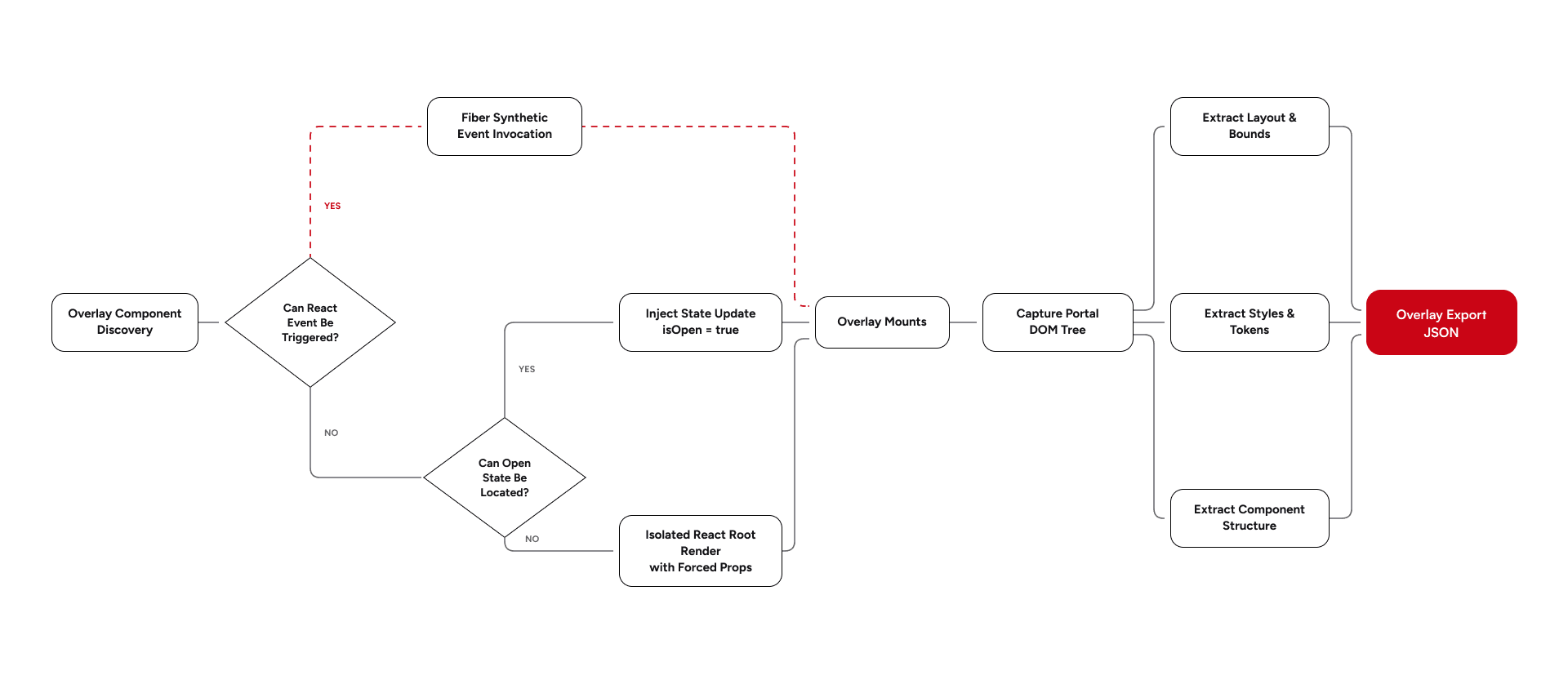
So we built a three-layer extraction strategy.
Strategy A: Fiber Synthetic Events
The extractor traverses React Fiber and identifies nodes containing interaction handlers such as:
onPress
onClick
Instead of simulating browser interactions, we invoke those handlers directly through Fiber.
This allows us to open many overlays without relying on DOM events.
Strategy B: State Dispatch Injection
Some components don't respond to interactions.
For those cases, we search Fiber internals for React state dispatchers controlling visibility.
When we locate something like:
const [isOpen, setIsOpen] = useState(false)We directly trigger:
setIsOpen(true)The overlay opens instantly.
Strategy C: Isolated Portal Rendering
Some overlays remain stubborn.
As a final fallback, we render the component independently using React's createRoot API and explicitly force:
isOpen={true}This creates an isolated environment where the overlay can be captured regardless of application state.
Phase 4: Reconstructing Figma Through Auto Layout
By this point, we had extracted the component library, generated all possible variants, discovered hidden overlays, and reconstructed the page structure using component instances.
The final challenge was turning all of that information into a Figma file that behaved like a real design file.
This responsibility falls to the Figma Plugin.
The plugin consumes the exported JSON payload and recursively rebuilds the entire canvas using Figma's Plugin API. Every frame, component, instance, text node, image, and layout relationship is recreated natively inside Figma.
Generating the visual hierarchy was only half the problem — the real challenge was layout.
Modern React applications rely heavily on Flexbox for responsive behavior. Containers grow, shrink, stretch, wrap, and adapt based on their content and available space.
Figma, on the other hand, relies on Auto Layout.
While the concepts are similar, the underlying APIs are completely different.
To preserve responsiveness, we built a translation layer that maps web layout semantics directly into native Figma Auto Layout properties.
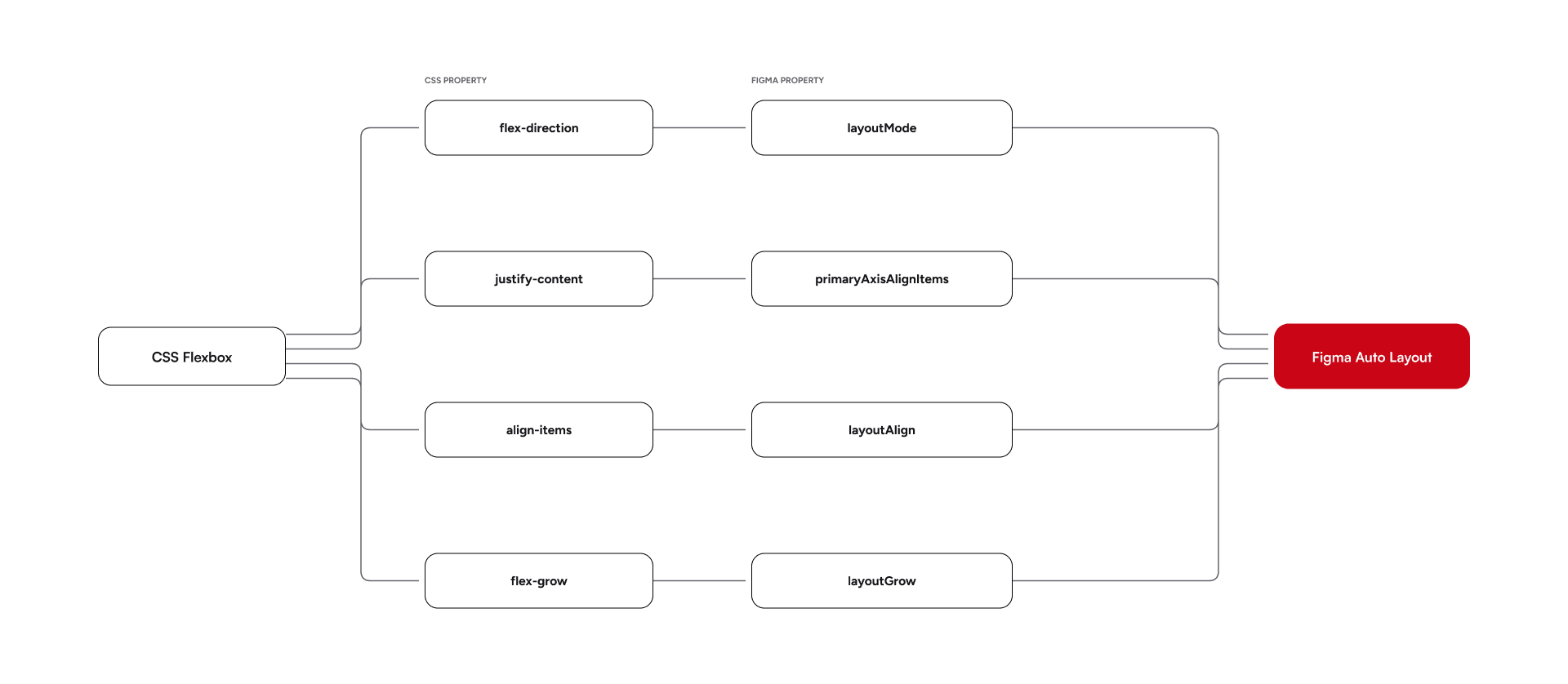
On the web, text naturally wraps and expands within flex containers. Inside Figma, simply applying stretch properties isn't enough to reproduce that behavior.
To achieve true "Fill Container" semantics, we explicitly configure text nodes with:
layoutAlign = "STRETCH"
layoutSizingHorizontal = "FILL"
textAutoResize = "HEIGHT"
This combination allows text layers to behave responsively inside Auto Layout frames, closely matching how they behave in the browser.
Once layout reconstruction is complete, the plugin merges all exported component variants back into native Figma ComponentSetNodes and establishes instance relationships throughout the generated screens.
The end result isn't just a visual copy of the application.
It's a fully editable Figma file with:
- Native Auto Layout
- Component Sets
- Component Instances
- Variant Properties
- Responsive Containers
- Token-aware styling
Most importantly, the generated screens behave exactly like a UI/UX designer would expect them to. Components stretch correctly, containers fill available space, text reflows naturally, and layouts remain responsive long after the export process is complete.
Instead of importing a static snapshot of a webpage, we're generating a real Figma document that can continue evolving alongside the React application it came from.
From gluestack-ui Pro to Figma in Seconds
Connecting gluestack-ui Pro to Figma realizes our vision of transforming AI-generated application screens into professional, designer-ready Figma files in seconds. By analyzing the React application, our extraction pipeline automatically generates the design system and reconstructs page structures using native component instances. The Figma plugin then rebuilds the interface using Auto Layout, eliminating the need for manual recreation. By maintaining a single source of truth across both environments, this process ensures that Figma files remain as dynamic and responsive as the React applications they represent.
The Future Isn't Figma-to-Code
While the industry spent years attempting to translate design into code, AI is shifting the point of origin for interfaces.
As interfaces are increasingly born directly in code, a new hurdle appears: integrating these elements back into design workflows.
Our solution was React-to-Figma.
By leveraging Figma's Plugin API alongside React Fiber, automated extraction, design system generation, and overlay discovery, we created a pipeline that turns React apps into professional design assets.
Currently, this system allows us to:
- Generate the gluestack-ui design system straight from source code.
- Transform AI-generated gluestack-ui Pro applications into editable Figma files.
- Ensure every update in the component library flows automatically back to the design environment.







