


Building real-time video experiences traditionally required deep expertise in WebRTC, signaling infrastructure, media synchronization, and browser-specific handling. With modern SDKs like 100ms, teams can now focus more on product experience and less on low-level media infrastructure.
In this article, we will walk through how to build a real-time video calling experience with synchronized photo sharing and chat, powered by the 100ms JavaScript SDK, a reactive state architecture, and a modular frontend design.
We will cover:
- Core concepts of 100ms architecture
- Pre-join (green room) experience
- Joining and managing a live video room
- Real-time photo synchronization across participants
- Chat integration using broadcast messaging
- State management strategies for responsive UI
- Synchronization correctness, conflict resolution, and reconnect handling
High-Level Architecture
Before diving into the implementation, it’s worth understanding how the system components interact.
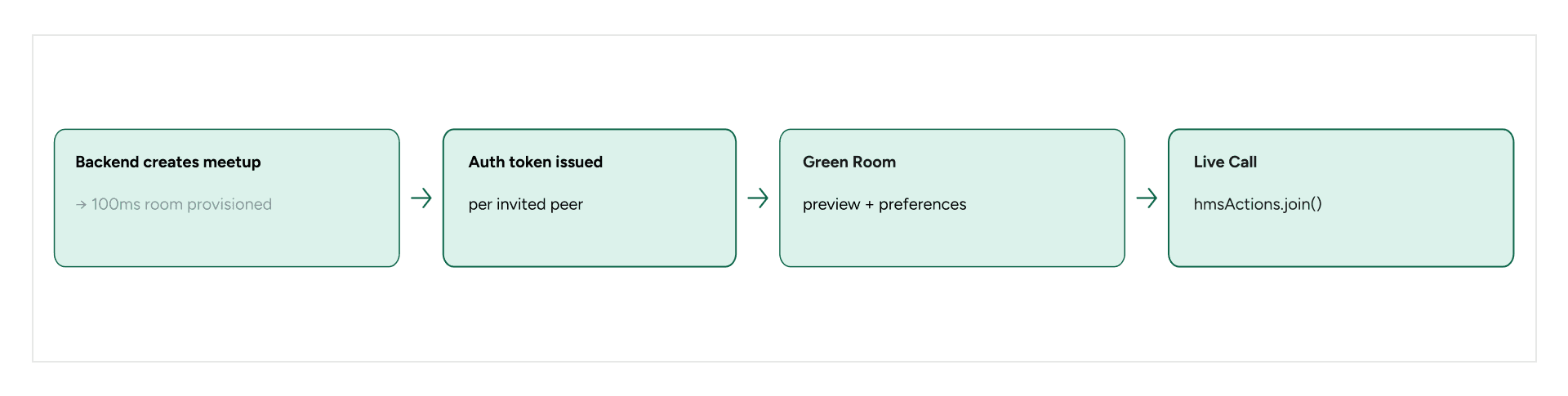
On the backend, when a meetup is created, the server calls the 100ms Rooms API to provision a room and generate authentication tokens for invited participants. Each participant receives a token tied to the same room ID, ensuring everyone joins the same session.
On the frontend, a single HMSReactiveStore instance acts as the centralized source of truth for media state, participants, tracks, and messages. Both the Green Room and the Live Call screens subscribe to slices of this store rather than maintaining disconnected local state.
The SDK exposes three key primitives:
- Store → Reactive room state
- Actions → Methods for operations such as join, mute, or messaging
- Notifications → Event listeners for peer updates and room events
This architecture provides a predictable data flow for real-time applications and keeps media state, participant state, and UI subscriptions centralized. The synchronized-photo feature still requires explicit conflict-resolution and lifecycle handling, which we address below.
Why a Pre-Join (Green Room) Matters
A pre-join experience is critical for user confidence and system readiness.
100ms provides a preview API that allows users to:
- Test camera and microphone
- Set initial mute/unmute states
- Validate network readiness and authentication before joining
Key Implementation Flow
- Fetch authentication token from backend
- Call preview() with user config
- Attach local video track to UI
- Allow user to toggle mic and camera
await hmsActions.preview({
 authToken: '<token from backend>',
 userName: 'Alice',
});
Once preview is successful:
- Local tracks are created
- Permissions are verified
- Settings persist into the join phase
This reduces friction during room entry.
Setting Up the 100ms SDK
The 100ms JavaScript SDK ships through @100mslive/hms-video-store.
Everything flows from a single HMSReactiveStore instance:
// Initialize once — treated as a module-level singleton
import { HMSReactiveStore } from '@100mslive/hms-video-store';
const hmsManager = new HMSReactiveStore();
hmsManager.triggerOnSubscribe(); // fire callbacks immediately with current state
const hmsStore = hmsManager.getStore();
const hmsActions = hmsManager.getActions();
const hmsNotifications = hmsManager.getNotifications();
Calling triggerOnSubscribe() is important because it ensures subscribers immediately receive the current SDK state instead of waiting for the next state update.
Reading State with Selectors
The store exposes state through memoized selectors rather than raw state objects. This enables efficient reactive subscriptions.
import {
  selectPeers,
  selectIsLocalVideoEnabled,
  selectIsLocalAudioEnabled,
  selectLocalVideoTrackID,
  selectLocalPeer,
  selectTrackByID,

  selectPeerByID
} from '@100mslive/hms-video-store';

// One-time read
const isVideoOn = hmsStore.getState(selectIsLocalVideoEnabled);

// Reactive subscription — returns an unsubscribe function
const unsubscribe = hmsStore.subscribe((enabled) => {
  // runs whenever local video enabled/disabled
  updateVideoButton(enabled);
}, selectIsLocalVideoEnabled);
Subscribing to fine-grained selectors helps avoid unnecessary re-renders. In our implementation, this was useful for participant and track updates because changes could be scoped to the affected selector rather than causing broad UI updates.
The Green Room: Pre-Join Experience
The Green Room acts as a staging area before users join the room.
Attaching Local Video
Once preview mode starts, we subscribe to the local video track and attach it to a <video> element.
// Wire local video into a <video> element
hmsStore.subscribe(async (trackId) => {
  if (trackId && videoElement) {
    await hmsActions.attachVideo(trackId, videoElement);
  } else if (videoElement) {
    videoElement.srcObject = null;
  }
}, selectLocalVideoTrackID);
If the user disables their camera, the video track disappears and the UI reflects the change.
Toggling Camera and Microphone
Media controls during preview work the same way as they do during a live call.
// Toggle camera
const next = !hmsStore.getState(selectIsLocalVideoEnabled);
await hmsActions.setLocalVideoEnabled(next);

// Toggle mic
const next = !hmsStore.getState(selectIsLocalAudioEnabled);
await hmsActions.setLocalAudioEnabled(next);
Because the UI subscribes to the store, button states remain synchronized.
Transitioning to the Live Call
When the user clicks "Join", we stop the preview session first by calling hmsActions.leave(). This releases the preview peer from the 100ms session and prevents a ghost local peer from remaining alongside the new peer after the user joins. After leave completes, we navigate to the Live Call route.
The camera/microphone preferences chosen in the Green Room are persisted to a Pinia store (with localStorage persistence) so the Live Call can restore them on mount without asking the user again.
To join a room, 100ms requires:
- Auth token
- Username
The join flow is straightforward:
await hmsActions.join({
  authToken: savedToken,
  userName:  'Alice',
});

// Restore preferences from Green Room
await Promise.all([
  hmsActions.setLocalVideoEnabled(preferredCameraOn),
  hmsActions.setLocalAudioEnabled(preferredMicOn),
]);
After joining:
- The SDK emits events such as ON_JOIN, ON_PEER_UPDATE, and ON_TRACK_UPDATE
- Reactive store subscriptions keep the UI aligned with the resulting SDK state
Rendering the Peer Strip
All connected peers are available via the selectPeers selector. We subscribe to it and re-render the participant strip whenever anyone joins or leaves. The local peer is sorted to the front; remote peers are sorted by join time.
Each peer tile has a <video> element whose DOM reference is stored in a Map keyed by peer ID. When a peer's video track changes (e.g. they turn their camera on), we call attachVideo to bind the new track. When a peer leaves, we call detachVideo to clean up.
// Subscribe to the peer list — fires on every join/leave
hmsStore.subscribe((peers) => {
  renderParticipants(peers);
}, selectPeers);

// Attach video for a specific peer
async function attachPeerVideo(peer, videoEl) {
  if (peer.videoTrack) {
    await hmsActions.attachVideo(peer.videoTrack, videoEl);
  }
}
This provides:
- UI updates when participants join or leave
- Consistent track state across components
The store acts as a single source of truth for SDK-backed room state, while application-specific state such as the current synchronized photo is handled separately with explicit synchronization rules.
Showing Live Audio and Video Status
For remote peers, track enabled/disabled state is read from the store using selectTrackByID. For the local peer, we use selectIsLocalVideoEnabled and selectIsLocalAudioEnabled directly. This allows the mic icon next to each participant tile to update in real time as participants toggle their devices, without polling.
await hmsActions.attachVideo(trackId, videoElement);Important considerations:
- Handle track changes dynamically
- Detach video when track is removed
- Retry attaching in case of async delays
Media toggling is handled via actions:
await hmsActions.setLocalVideoEnabled(true);
await hmsActions.setLocalAudioEnabled(false);
State is synced using selectors:
- selectIsLocalVideoEnabled
- selectIsLocalAudioEnabled
Persisting Preferences
Camera and microphone preferences are stored locally and reused:
- During preview
- During join
This creates a consistent user experience across sessions.
Real-Time Chat via Broadcast Messages
Rather than spinning up a separate WebSocket or a third-party chat service, we used 100ms's built-in messaging primitives. hmsActions.sendBroadcastMessage(text) delivers a message to every peer in the room. The SDK stores all messages in HMSStore and exposes them via the selectHMSMessages selector.
// Send a chat message
await hmsActions.sendBroadcastMessage(userInput);

// React to new messages
hmsStore.subscribe((messages) => {
  // Filter to 'chat' type only — other types are used internally (e.g. photo sync)
  const chatMessages = messages.filter(m => m.type === 'chat');
  renderMessages(chatMessages);
}, selectHMSMessages);
One important design decision: messages are typed. The default type for a regular chat message is 'chat'. We use a custom type 'PHOTO_SYNC' for the carousel sync messages described in the next section. The chat panel filters to type === 'chat' so photo-sync events never appear as chat bubbles.
Unread Message Badge
We track how many chat messages were visible the last time the panel was open (lastReadCount). When a new message arrives while the panel is closed and the sender isn't the local peer, we set an unread flag that drives a red dot on the chat button. When the panel opens, we reset the count.
Synced Image Carousel Across All Peers
The synchronized carousel required a separate state-management approach. We wanted participants to converge on the same photo when someone navigated the carousel. We built the synchronization on top of 100ms's broadcast message API, with no additional signaling infrastructure.
An important distinction is that these messages are navigation events, not durable shared state. Broadcast messaging works for transient actions such as ‘move to photo 5,’ but it should not serve as the canonical state for late joiners. If the application needs the current photo to survive missed messages or reconnects, the 100ms Session Store is a better fit for a canonical session-level state.
Defining the Sync Message Shape
We define a typed interface for the payload so that both the sender and all receivers agree on the structure:
interface PhotoSyncMessage {
  type:       'navigate_photo';
  photoId:    string; // Primary resolution: unique ID of the photo
  navigatorId: string; // which peer triggered the change
  timestamp:  number; // Diagnostic metadata (clocks may drift, do not use for ordering)
  sequenceId: number; // Monotonic counter to reject stale messages
}
Note on Synchronization Correctness
To prevent concurrent navigation conflicts (e.g., two users changing photos simultaneously) and distributed clock drift issues, this architecture enforces an authoritative navigator model. The presenter acts as the authoritative navigator. Navigation initiated by other participants is ignored by receivers, preventing simultaneous navigation from producing conflicting shared state. Each accepted navigation event also carries a monotonic sequence ID, allowing receivers to reject stale events.
Sending a Navigation Event
Whenever the local user taps a thumbnail or presses a carousel arrow, we broadcast a PHOTO_SYNC message alongside updating local state:
const AUTHORITATIVE_ROLE = 'presenter';
// Module-level sequence tracker
let localSequenceId = 0;

async function handlePhotoSelected(photo) {
  // Only the authoritative navigator can initiate synced navigation
  if (currentUser.roleName !== AUTHORITATIVE_ROLE) { return; }
  localSequenceId++;
  store.setCurrentPhotoId(photo.id);  // local update
  await hmsActions.sendBroadcastMessage(
    JSON.stringify({
      type:        'navigate_photo',
      photoId:     photo.id,
      navigatorId: currentUser.id,
      timestamp:   Date.now(),
      sequenceId:  localSequenceId
    }),
    'PHOTO_SYNC'         // custom type keeps it separate from chat
  );
try {
  await hmsActions.sessionStore.set('canonical_photo_id', photo.id);
} catch (error) {
  console.warn('Failed to update canonical session state', error); }
}
Receiving and Applying Navigation Events
On the receiver side, we hook into hmsNotifications.onNotification(), filter to NEW_MESSAGE events with our custom type, parse and validate the payload, and resolve the target photo by its stable ID before updating local state.
// Track the latest applied sync sequence for the room
let lastSyncSequence = 0;
// Define which role is allowed to navigate to prevent simultaneous conflicts
const AUTHORITATIVE_ROLE = 'presenter';

hmsNotifications.onNotification((notification) => {
  if (notification.type !== 'NEW_MESSAGE') return;

  let payload;
  try { payload = JSON.parse(notification.data.message); }
  catch { return; }

  if (payload.type !== 'navigate_photo') return;

  // --- 1. AUTHORITATIVE NAVIGATOR CHECK ---

// Restrict synchronization to an authoritative peer role.
// This prevents multiple participants from independently
// updating the shared navigation state.

  const senderPeer = hmsStore.getState(selectPeerByID(payload.navigatorId));
  if (senderPeer?.roleName !== AUTHORITATIVE_ROLE) {
    console.warn('Rejected navigation event from non-authoritative peer');
    return;
  }

  // --- 2. DETERMINISTIC SEQUENCE ORDERING ---
  // Reject out-of-order/stale messages from the authoritative peer
  if (payload.sequenceId <= lastSyncSequence) {
    console.warn('Rejected stale navigation sequence');
    return;
  }

  // --- 3. STABLE ID RESOLUTION (No Index Fallback) ---
  // Match strictly by stable photoId. If lists diverge and ID is unknown,
  // do not guess using index. Ignore event and rely on Session Store recovery.
  const targetPhoto = photos.find(p => p.id === payload.photoId);
  if (!targetPhoto) {
    console.warn('Photo ID not found in local state, ignoring event.');
    return;
  }

  // Apply state and update tracker
  store.setCurrentPhotoId(targetPhoto.id);
  lastSyncSequence = payload.sequenceId;
});
Syncing New Joiners
A participant who joins mid-session could see the carousel start at index 0 while the rest of the room has moved to another photo. For late joiners, the implementation relies on the 100ms Session Store instead of allowing multiple peers to broadcast competing states. When a user joins, they simply read canonical_photo_id from the Session Store to land on the correct image.
Persisting Media Preferences Between Screens
The user selects their camera and mic state in the Green Room. These preferences need to persist through the route change to the Live Call screen and a page refresh.
We store preferredCameraOn and preferredMicOn in a Pinia store configured with selective localStorage persistence. Only these two fields are persisted; sensitive data like the HMS auth token is kept in memory only and is re-fetched on every session.
// Pinia store — persist only media prefs
persist: {
  key:     'app-meetup',
  storage: localStorage,
  paths:   ['preferredCameraOn', 'preferredMicOn'],
}
When the Live Call screen mount, we read these two values back and call setLocalVideoEnabled / setLocalAudioEnabled immediately after join() resolves. This means the peer publishes with the camera and microphone state configured in the Green Room.
Live Session Teardown
Proper session teardown prevents stale participant and media state.
If a participant disconnects without completing session teardown, other users may see stale or ‘ghost’ participants for a short period.
We handle cleanup in three places:
- Explicit leave button
- Browser unload events
- Component unmount lifecycle hooks
For browser lifecycle handling, do not rely on unload alone. Modern browsers may skip or limit unload processing, so lifecycle handling should account for pagehide, beforeunload, and freeze where appropriate. These events should be treated as best-effort lifecycle signals rather than a guarantee that an awaited asynchronous leave() operation will finish before the page disappears.
async function explicitTeardown() {
  unsubscribers.forEach(unsub => unsub?.());
  // For explicit leave button, we safely await
  await hmsActions.leave();
}

// For browser lifecycle (closing tab, backgrounding, freezing)
function setupBrowserLifecycleTeardown() {
  const bestEffortCleanup = () => {
    unsubscribers.forEach(unsub => unsub?.());
    // Do not await leave() during lifecycle events; it's a best-effort fire-and-forget
    hmsActions.leave().catch(console.error);
  };

  // Modern alternatives to the deprecated 'unload' event
  window.addEventListener('pagehide', bestEffortCleanup);
  window.addEventListener('beforeunload', bestEffortCleanup);
  document.addEventListener('freeze', bestEffortCleanup);
}
For an explicit leave action or route transition, the async leave() call can be awaited normally. For browser termination events, cleanup should be best-effort and should not assume asynchronous work will always complete. The application should also remove subscriptions and detach UI references during component teardown, while relying on the SDK/browser lifecycle for connection termination.
Performance and UX Considerations
1. Avoid Duplicate State
Use the reactive store instead of local component state wherever possible.
2. Lazy Rendering
Attach video tracks only when elements are mounted.
3. Optimistic UI Updates
Update the UI when the user changes a photo, then synchronize the change.
4. Graceful Error Handling
- Token failures
- Permission issues
- Network interruptions
- Reconnects and late joiners
- Unknown or stale PHOTO_SYNC messages
For synchronized navigation, network interruption is especially important: a participant may miss transient broadcast messages. The design should recover from canonical session-level state when the product requires convergence after reconnect.
Synchronization Validation and Failure Cases
Before describing a real-time synchronization flow as production-ready, it is important to validate failure modes rather than relying only on the happy path. Useful acceptance checks include:
- Rapid navigation: repeatedly move forward/backward and verify that older messages do not overwrite the latest accepted sequence.
- Simultaneous navigation: have two participants navigate at the same time and verify that the defined authority/conflict-resolution rule produces one deterministic final state.
- Late join: join after the room has already moved through several photos and verify that the participant converges to the canonical current photo rather than starting at index 0.
- Reconnect: interrupt a participant's network connection, restore it, and verify that the participant recovers the current session state.
- Divergent photo ordering: use stable photoId matching rather than assuming every participant's array has identical ordering.
- Browser lifecycle: leave through the explicit button, route away, background/freeze the page, and close the tab to verify that subscriptions and media references are cleaned up as far as the browser lifecycle permits.
These checks make the synchronization guarantees explicit. When behavior has not been measured under a defined participant count or network condition, describe the implementation as a maintainable foundation rather than making an absolute scalability or production-readiness claim.
Extensibility Opportunities
This architecture can support additional capabilities:
- Screen sharing
- Role-based permissions
- Recording and streaming
- Collaborative annotations
- Session-level shared state using the Session Store
- Deterministic conflict resolution for collaborative controls
Key Takeaways
Building this feature reinforced several architectural patterns for real-time applications:
1. Centralized reactive state simplifies synchronization
Maintaining a single HMSReactiveStore instance prevents UI desynchronization and keeps media state consistent across screens.
2. Preview mode improves pre-join UX
The Green Room gives users confidence and control before entering the live session.
3. Broadcast messaging can support multiple event types
We used the same messaging layer for chat and photo-navigation events by namespacing message types. For durable shared state, such as the current photo for late joiners, session-level state is a better model.
4. Fine-grained subscriptions improve performance
Track-level subscriptions prevent unnecessary participant list re-renders.
5. Clean teardown logic matters
Explicit transitions should await leave(), while browser lifecycle cleanup must be treated as best-effort and designed around modern lifecycle events rather than assuming unload will complete asynchronous work.
Conclusion
Real-time collaboration is no longer limited to basic video calls.
Combining 100ms’s reactive SDK architecture with a structured frontend state model supports interactive shared experiences without requiring a separate synchronization layer for every feature.
The synchronized-media feature also highlights an important engineering lesson: real-time UX requires more than broadcasting an event. Correctness depends on defining the source of truth, resolving concurrent updates, rejecting stale messages, handling late joiners and reconnects, and managing cleanup across browser lifecycle states.
With those considerations in place, the patterns described here provide a maintainable foundation for collaborative experiences involving shared media, live messaging, and reactive participant management.
As real-time applications expand beyond traditional conferencing, reactive synchronization, centralized media state, and event-driven collaboration provide a foundation for shared digital experiences.
For teams building real-time video and interactive media products, GeekyAnts provides Media & Entertainment software development services for developing and scaling digital media experiences.






