

In today's rapidly evolving technological landscape, the ability to create a minimal chat system has emerged as a fundamental skill for developers across various domains.
The importance of a well-designed chat system cannot be overstated, whether it's facilitating quick discussions among team members, providing customer support in real-time, or enabling social interaction among users.
This blog will guide you through building a simple chat application using Hasura, a real-time GraphQL engine.
Steps to Follow
- What is GraphQL and subscription
- Import GraphQL packages from pub.dev
- create GraphQL client
- Bloc state management
- How do we implement a chat screen in which users can chat with each other?
Step 1: What is GraphQL and Subscriptions?
GraphQL makes getting data more accessible because clients can ask for what they need. Subscriptions let you see updates in real time by keeping a constant connection between your device and the server.
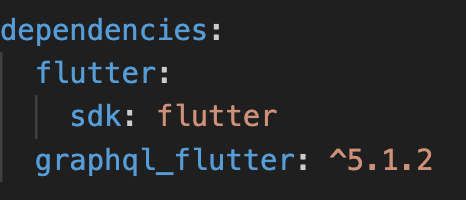
Step 2: Import GraphQL Package
To get started, import the GraphQL Flutter package from pub.dev. This powerful package seamlessly integrates GraphQL queries, mutations, and subscriptions into your Flutter app.
Step 3: Create GraphQL Client
Creating a GraphQL client in this project is necessary to efficiently fetch and manage data from a GraphQL server. It ensures the app can communicate effectively with the server, request specific data, and receive real-time updates, providing a seamless user experience.
Set up a GraphQL client with HTTP and WebSocket links, connecting it to your server URL.
import 'package:graphql_flutter/graphql_flutter.dart';

class GraphQLService {
  static final GraphQLService _graphqlService = GraphQLService._internal();

  factory GraphQLService() {
    return _graphqlService;
  }

  GraphQLService._internal();

  /// GraphQL client to handle queries and mutations operations
  GraphQLClient client({String? uri, Map<String, String>? headers}) {
    Map<String, String> defaultHeaders = {};


    defaultHeaders.addAll(headers ?? {});

    HttpLink link = HttpLink(
      uri ?? "http://<IP ADDRESS OF SERVER URL>:<PORT NO.>/v1/graphql",
      defaultHeaders: defaultHeaders,
    );

    final WebSocketLink websocketLink = WebSocketLink(
      'ws://<IP ADDRESS OF SERVER URL>:<PORT NO.>/v1/graphql',
      config: SocketClientConfig(
        autoReconnect: true,
        headers: headers,
        inactivityTimeout: const Duration(seconds: 30),
      ),
    );

    Link currentLink =
        Link.split((request) => request.isSubscription, websocketLink, link);

    final client = GraphQLClient(
      link: currentLink,
      cache: GraphQLCache(
        store: InMemoryStore(),
      ),
      defaultPolicies: DefaultPolicies(

        watchQuery: Policies(fetch: FetchPolicy.cacheAndNetwork),
        watchMutation: Policies(fetch: FetchPolicy.cacheAndNetwork),
        query: Policies(fetch: FetchPolicy.cacheAndNetwork),
        mutate: Policies(fetch: FetchPolicy.cacheAndNetwork),
      ),
    );

    return client;
  }
}
Step 4: Bloc State Management
Bloc state management in Flutter helps keep the user interface separate from the business logic by using Events, Blocs, and States. This makes the code easier to understand and maintain, and it's great for building bigger Flutter apps because it handles state changes efficiently.
In our app, we made a bloc like the one below.
Message Bloc:
The MessageBloc class manages messages in a Flutter app, connecting it to a GraphQL server. It retrieves messages and sends new ones, using variables like offset and limit for fetching messages in parts for implementing pagination. When fetching, it shows loading signs to keep users updated. If successful, it shows success, or failure with error messages. The _sendMessage function reliably sends messages, handling both success and failure scenarios.
Overall, the MessageBloc ensures smooth communication between users, managing messages effectively. Its features like pagination and error handling improve the user experience by making it more seamless and reliable.
- message_bloc.dart
class MessageBloc extends Bloc<MessageBlocEvent, MessageBlocState> {
  QueryResult<Mutation_SENDMESSAGE>? sendMessage;
  List<Object> messages = [];
  int offset = 0;
  int limit = 20;
  bool isLoading = false;

  MessageBloc() : super(MessageBlocInitialState()) {
    on<GetMessage>(_getMessage);
     on<SendMessage>(_sendMessage);
  }

  FutureOr<void> _getMessage(
      GetMessage event, Emitter<MessageBlocState> emit) async {
    try {
      if (event.firstTime) {
        emit(MessageBlocLoadingState());
        offset = 0;
      } else {
        isLoading = true;
      }

      //fetch all messages according to offset
      QueryResult<Query_GET_All_MESSAGE> message =
          await event.client.query_GET_All_MESSAGE(
        Options_Query_GET_All_MESSAGE(
          variables: Variables_Query_GET_All_MESSAGE(
              chat_id: event.chatId, offset: offset, limit: limit),
        ),
      );

      if (message.data != null) {

        if (event.firstTime) {
          messages = message.parsedData?.chat_messages ?? [];
        } else {
          messages.addAll(message.parsedData?.chat_messages ?? []);
        }

        if (message.parsedData?.chat_messages.isNotEmpty == true) {
          offset = offset + limit;
        }
        isLoading = false;

        emit(MessageBlocSuccessState());
      } else {
        isLoading = false;

        if (isUserUpdated.data == null) {
          emit(MessageBlocFailedState(
              error: isUserUpdated.exception?.graphqlErrors[0].message ??
                  "Failed to update user status"));
        } else {
          emit(MessageBlocFailedState(
              error: message.exception?.graphqlErrors[0].message ??
                  "Failed to fetch messages"));
        }
      }
    } catch (e) {
      isLoading = false;

      emit(MessageBlocFailedState(error: e.toString()));
    }
  }


}

  // Event handler to send a message
  FutureOr<void> _sendMessage(SendMessage event, Emitter<ChatBlocState> emit) async {
    try {
      sendMessage = await event.client.mutate_SENDMESSAGE(
        Options_Mutation_SENDMESSAGE(
          variables: Variables_Mutation_SENDMESSAGE(
            chatId: event.chatId,
            chatMessage: event.message,
            senderId: event.senderId,
          ),
        ),
      );

      if (sendMessage?.data != null) {
        emit(SendMessageSuccessState());
      } else {
        emit(SendMessageFailedState(
          error: sendMessage?.exception?.graphqlErrors[0].message ?? "Failed to send message",
        ));
      }
    } catch (e) {
      emit(SendMessageFailedState(error: e.toString()));
    }
  }
message_bloc_event.dart
class MessageBlocEvent {}

// Event to get messages
class GetMessage extends MessageBlocEvent {
  final GraphQLClient client;
  final String chatId;

  final bool firstTime;

  GetMessage(
      {required this.client, required this.chatId, required this.firstTime});
}


// Event to send a message
class SendMessage extends ChatBlocEvent {
  final String chatId;
  final String message;
  final String senderId;
  final GraphQLClient client;

  SendMessage({
    required this.chatId,
    required this.message,
    required this.senderId,
    required this.client,
  });
}
message_bloc_state.dart
class MessageBlocState {}

class MessageBlocInitialState extends MessageBlocState {}

class MessageBlocLoadingState extends MessageBlocState {}

class MessageBlocSuccessState extends MessageBlocState {}

class MessageBlocFailedState extends MessageBlocState {
  final String error;
  MessageBlocFailedState({required this.error});
}

//send message
class SendMessageSuccessState extends ChatBlocState {}

class SendMessageFailedState extends ChatBlocState {
  final String error;
  SendMessageFailedState({required this.error});
}
Step 5: How Do You Implement a Chat Screen in Which Users Can Chat with Each Other?
Query: This Query we are using for fetching previous messages
query GET_All_MESSAGE($chat_id: uuid!, $offset: Int!, $limit: Int!) {
  chat_messages(where: {chat_id: {_eq: $chat_id}}, limit: $limit, order_by: {created_at: desc}, offset: $offset) {
    chat_id
    message
    id
    created_at
    sender_id
  }
}Mutation: This mutation will be used on sending messages
mutation SENDMESSAGE($chatId: String!, $chatMessage: String!, $senderId: String!) {
  sendmessage(input: {senderId: $senderId, chatMessage: $chatMessage, chatId: $chatId}) {
    status
    message
    success
  }
}
Subscription: This Subscription will be use for fetching last message of chat room with input as chat id
static String fetchMessages = '''
  subscription ChatMessages(){
  chat_messages(order_by: {created_at: desc}, limit: 1) {
    chat_id
    id
    message
    sender_id
  }
}
 ''';
We add a listener to the _scrollController to detect when the user reaches the top of the screen, indicating a need for previous chats. Scrolling up triggers the event to fetch previous messages, ensuring smooth navigation and access to chat history.
EVENT: GetMessage
To implement pagination, the firstTime parameter in the GetMessage event controls message retrieval. When set to true, it fetches the first 20 messages, and when set to false, it fetches the next 20 previous messages, enabling smooth navigation and loading of chat history in the app.
@override
  void initState() {
    super.initState();

    _scrollController.addListener(_scrollListener);

    chatBloc = BlocProvider.of<ChatBloc>(context);
    authBloc = BlocProvider.of<AuthBloc>(context);
    messageBloc = BlocProvider.of<MessageBloc>(context);

    messageBloc.add(GetMessage(
        client: authBloc.state, chatId: chatId, firstTime: true));
  }

  @override
  void dispose() {
    _scrollController.removeListener(_scrollListener);
    _scrollController.dispose();
    super.dispose();
  }

  void _scrollListener() {
    if (_scrollController.position.pixels == 0) {

      firstTime = false;
      messageBloc.add(GetMessage(
          client: authBloc.state, chatId: chatId, firstTime: false));

      setState(() {});
    }
  }
This is how you can use subscription for getting realtime message updates of this chat room
 Subscription(
        options: SubscriptionOptions(
            document: gql(fetchMessages),
            variables: {"chat_id": widget.chatId}),
        builder: (QueryResult result) {
        if (result.data?["chat_messages"].isNotEmpty == true) {
          addNewMessageToList(Query_GET_All_MESSAGE_chat_messages(
              id: result.data?["chat_messages"][0]["id"],
              created_at: DateTime.now().toString(),
              message: result.data?["chat_messages"][0]["message"],
              sender_id: result.data?["chat_messages"][0]
                  ["sender_id"]));
        } else if (result.hasException) {
          // Handle subscription errors
          return Center(
            child: Text(
                'Subscription Error: ${result.exception?.graphqlErrors[0].message}'),
          );
        }
        // reverse a list when we are displaying so that latest message should come at last message of screen.
        return ListView.builder(
                    controller: _scrollController,
                    itemCount:
                        messageBloc.messages.reversed.length,

                    shrinkWrap: true,
                    physics:
                        const AlwaysScrollableScrollPhysics(),
                    itemBuilder: (context, index) {

        // this checks,who send this message and get type by comparing of our user id
                      String type = messageBloc
                                  .messages.reversed
                                  .toList()[index]
                                  .sender_id ==
                              userId
                          ? "sender"
                          : "reciever";

        // this formattedDate we are using in display dates between the messages
                      String? formattedDate;
                      if ((index - 1) > 0) {
                        DateTime current = DateTime.parse(
                            messageBloc.messages.reversed
                                .toList()[index]
                                .created_at);


                        DateTime next = DateTime.parse(
                            messageBloc.messages.reversed
                                .toList()[index - 1]
                                .created_at);


                        if (current.day != next.day) {
                          formattedDate =
                              DateFormat('E, d MMM yyyy')
                                  .format(current);
                        }
                      } else if (index == 0) {
                        formattedDate =
                            DateFormat('E, d MMM yyyy').format(
                                DateTime.parse(messageBloc
                                    .messages.reversed
                                    .toList()[index]
                                    .created_at));
                      }

                  //return chat bubble component which you can use to display
                  // item of this list, making like this if it is of type reciever align left if sender align right in a screen

    );
  }
)
If a message is received from the subscription, it's added to the list only if it's not already there. This prevents duplicates and ensures new messages are included in the existing list seamlessly.
void addNewMessageToList(Query_GET_All_MESSAGE_chat_messages message) {
    List<Query_GET_All_MESSAGE_chat_messages> currentMessages =
        messageBloc.messages;

    messageBloc.messages = [];


    bool isExist = currentMessages.any((element) => element.id == message.id);


    if (!isExist) {
      messageBloc.messages.add(message);

      Future.delayed(Duration(milliseconds: 50), () {
        _scrollController.animateTo(
          _scrollController.position.maxScrollExtent,
          duration: Duration(milliseconds: 300),
          curve: Curves.easeInOut,
        );
      });
    }

    messageBloc.messages.addAll(currentMessages);
    _controller.clear();


  }
Conclusion
Using GraphQL subscriptions in a Flutter chat app means instant updates without refreshing. It's like getting notifications for new messages, making chatting quick and effortlessly responsive.







