



This detailed guide explores why SEO is crucial for Flutter web apps and provides actionable strategies to enhance it, even when only a few pages need optimization.
In today's rapidly evolving digital landscape, the first question that often comes to mind when seeking solutions is, "Why do we need this?" Grasping the 'why' behind a concept not only makes the learning process more engaging but also helps us understand its importance more deeply.
In this blog, we will first address why SEO performance is essential for Flutter web apps and then explore how you can effectively achieve it if you have only a few pages that need SEO optimization.
- What is SEO?
- The Importance of SEO
- Understanding Flutter Web App Rendering Architecture on the browser.
- How to improve SEO In Flutter Web.
- Tools for Evaluating SEO Performance.
What is SEO?
SEO, or search engine optimization, is all about making a website more visible on search engines like Google. The goal is to get more organic traffic by creating relevant, high-quality content and providing a great user experience. By optimizing various elements of your site, you can help search engines understand and rank your content better. This leads to increased visibility, more visitors, and, ultimately, brings more success for your website.
What is the Importance of SEO and How Does it Work?
Let’s understand the importance of SEO. Each day, billions of searches are conducted on Google for information and products. Search engines are among the largest sources of website traffic. To tap into this potential, your site must appear in the top search results for your target keywords. The concept is straightforward—the higher your rank, the more visitors your page will attract.
Higher rankings lead to increased traffic, which means more customers and greater brand visibility. Ignoring SEO would mean neglecting one of the most crucial traffic channels, giving your competitors a significant advantage. Focusing on SEO ensures your website can compete, draw in more visitors, and expand your online reach.
Let’s understand how Search engines work. The ultimate goal of any search engine is to ensure users are satisfied with the results they find. Search engines must identify and display the best pages as the top search results to accomplish this.
While Google is the most popular search engine, it's important to remember that it's not the only one. However, because it dominates the market, we often refer to Google when discussing search engines. The basic principles of SEO apply similarly across most search engines.
Google follows several stages to discover and rank content:
- Crawling: Google uses "bots" or automated programs to scour the web for new or updated pages. For Google to discover a page, it needs at least one link pointing to it.
- Indexing: Once a page is found, Google analyzes its content to understand what it's about. This information is then stored in the Google Index, an extensive database of web pages.
- Serving Results: When a user enters a query, Google evaluates which pages are the most relevant and of the highest quality, then ranks them in the search engine results pages.
Almost Every browser uses relatively complex processes, known as “algorithms,” to rank pages. Your No. 1 job in SEO is to ensure that you're offering relevant content to show users relevant results.
Understanding Flutter Web App Rendering Architecture on Browser?
Flutter's web support delivers consistent experiences across both web and mobile platforms. This is achieved by implementing Flutter's core drawing layer on top of standard browser APIs and compiling Dart to JavaScript instead of the ARM machine code used for mobile applications. By leveraging a combination of DOM, Canvas, and WebAssembly, Flutter ensures high performance and rich, interactive user interfaces. This approach allows developers to create web applications that maintain the same look and feel as their mobile counterparts, providing a seamless and cohesive user experience across different devices and platforms.
Flutter web apps primarily use two rendering modes: CanvasKit and HTML.
CanvasKit is a rendering backend that uses WebAssembly and the Skia graphics library (the same library used by Flutter on mobile). It provides high-performance rendering and supports all of Flutter's features.
HTML rendering may not perform as well as CanvasKit for graphics-intensive applications. The reliance on the browser's native rendering capabilities can lead to slower performance and less smooth animations, particularly for complex UIs.
By now, you must understand that Flutter web apps using CanvasKit render content directly onto a canvas in the browser, which can hinder SEO. Since this rendering method creates a graphical representation rather than standard HTML elements, search engines struggle to crawl and index the content. The reliance on JavaScript and the absence of semantic HTML and textual content further complicate indexing, making it challenging for search engines to understand and rank the app's pages effectively.
If you wonder, "But we learned that browsers only understand JavaScript," don't doubt your knowledge—you are correct. In the case of Flutter web, the Flutter engine converts Dart logic into JavaScript, allowing it to run seamlessly in the browser.
How to improve SEO In Flutter Web?
Steps to follow to Create a Landing page in Flutter Web:
SEO is essential for web apps to enhance marketing efforts and increase user reach. While Flutter supports web app development, its SEO performance can be limited due to how it renders content. To address this, you can create landing pages using standard HTML before the Flutter engine renders the UI widgets in the browser. This approach allows search engines to crawl and index the HTML content effectively, improving the website's visibility and search rankings.
Step 1: Install Flutter and set up your development environment if you haven't already.
Step 2: Create a new Flutter project:
flutter create my_landing_page
cd  my_landing_page
Step 3: In the root directory of your project, open the web folder.
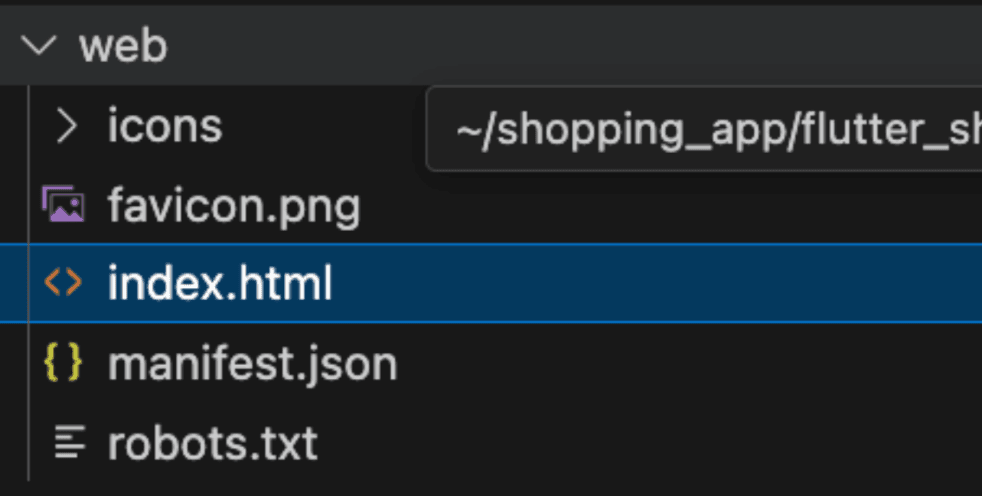
Step 4: You will see the following code in your index.html file. This script automatically runs the Flutter engine when the Flutter web application is loaded in a browser. We have to modify this script before including this script; we have to create a landing page with SEO improvement suggestions.
<script>
    window.addEventListener('load', function(ev) {
      // Download main.dart.js
      _flutter.loader.loadEntrypoint({
        serviceWorker: {
          serviceWorkerVersion: serviceWorkerVersion,
        },
        onEntrypointLoaded: function(engineInitializer) {
          engineInitializer.initializeEngine().then(function(appRunner) {
            appRunner.runApp();
          });
        }
      });
    });
  </script>
Step 5: Create a landing page with cards for various products, such as cameras, caps, goggles, and shirts. Each card should include an image, a title, and a brief product description. Include links for sharing the website on Facebook, Twitter, and LinkedIn, each with its corresponding icon. Don’t forget to add a login button.
<!DOCTYPE html>
<html lang="en">
<head>
<base href="$FLUTTER_BASE_HREF">
<meta charset="UTF-8">
<meta http-equiv="X-UA-Compatible" content="IE=Edge">
<!-- iOS meta tags & icons -->
<meta name="apple-mobile-web-app-capable" content="yes">
<meta name="apple-mobile-web-app-status-bar-style" content="black">
<meta name="apple-mobile-web-app-title" content="flutter_shopping_app">
<meta name="viewport" content="width=device-width, initial-scale=1.0">
<link rel="apple-touch-icon" href="icons/Icon-192.png">
<link rel="icon" type="image/png" href="favicon.png"/>
<link rel="manifest" href="manifest.json">
<!-- <link rel="canonical" href="https://htmlflutterpoc.web.app/" /> -->
<script src="flutter.js" defer></script>
</head>
<body>
<div id="loader" class="loader">
Loading...
</div>
<div id="content" style="display: none;">
<div class="navbar">
<h1 class="app-name">Discover Your Ultimate Shopping Destination Here</h1>
<button class="login-button">Login</button>
</div>
<div class="card-container">
<div class="card">
<img src="https://images.unsplash.com/photo-1720442238401-8436967064f6?w=800&auto=format&fit=crop&q=60&ixlib=rb-4.0.3&ixid=M3wxMjA3fDB8MHxmZWF0dXJlZC1waG90b3MtZmVlZHwyfHx8ZW58MHx8fHx8" alt="Placeholder Image">
<div class="card-content">
<h2>Explore Top Cameras & Photography Gear</h2>
<p>Capture every moment with Your Ultimate Shopping Destination Here, your ultimate camera companion. Explore a variety of powerful tools and filters to enhance your photos and videos. Whether you're a professional photographer or a casual shooter, Your Ultimate Shopping Destination Here offers intuitive controls and stunning effects to elevate your photography experience. Download now and unleash your creativity!</p>
</div>
</div>
<div class="card">
<img src="https://images.unsplash.com/photo-1719968070073-c6e644a25976?q=80&w=2564&auto=format&fit=crop&ixlib=rb-4.0.3&ixid=M3wxMjA3fDB8MHxwaG90by1wYWdlfHx8fGVufDB8fHx8fA%3D%3D" alt="Placeholder Image">
<div class="card-content">
<h2>Discover Trendy Caps & Hats</h2>
<p>Elevate your style with Your Ultimate Shopping Destination Here, your go-to destination for trendy caps and hats. Discover a diverse collection of caps that blend fashion and functionality seamlessly. Whether you're into streetwear or classic designs, Your Ultimate Shopping Destination Here offers a curated selection to suit every taste. Browse, shop, and stay ahead in style with our latest arrivals and exclusive deals. Download Your Ultimate Shopping Destination Here now and redefine your hat game!</p>
</div>
</div>
<div class="card">
<img src="https://images.unsplash.com/photo-1496346236646-50e985b31ea4?q=80&w=2574&auto=format&fit=crop&ixlib=rb-4.0.3&ixid=M3wxMjA3fDB8MHxwaG90by1wYWdlfHx8fGVufDB8fHx8fA%3D%3D" alt="Goggles Image">
<div class="card-content">
<h2>Discover Stylish Goggles</h2>
<p>Stay trendy with stylish goggles from Your Ultimate Shopping Destination Here. Explore our latest collection of goggles designed to protect your eyes while making a fashion statement. Whether you need them for sports, fashion, or everyday wear, we have goggles that fit your lifestyle. Shop now and find the perfect pair to enhance your look!</p>
</div>
</div>
<div class="card">
<img src="https://images.unsplash.com/photo-1508243771214-6e95d137426b?q=80&w=2574&auto=format&fit=crop&ixlib=rb-4.0.3&ixid=M3wxMjA3fDB8MHxwaG90by1wYWdlfHx8fGVufDB8fHx8fA%3D%3D" alt="Shirt Image">
<div class="card-content">
<h2>Discover Trendy Shirts</h2>
<p>Upgrade your wardrobe with trendy shirts from Your Ultimate Shopping Destination Here. Explore our wide range of shirts, including casual, formal, and everything in between. With styles that suit every occasion, finding the perfect shirt has never been easier. Browse our collection now and elevate your fashion game with our latest designs!</p>
</div>
</div>
</div>
<div class="social-sharing">
<a class="facebook" href="https://www.facebook.com/sharer/sharer.php?u=https%3A%2F%2Fyourwebsite.com" target="_blank" rel="noopener noreferrer" title="Share on Facebook">
<i class="fab fa-facebook-f">F</i>
</a>
<a class="twitter" href="https://twitter.com/intent/tweet?url=https%3A%2F%2Fyourwebsite.com&text=Check%20out%20Your%20Ultimate%20Shopping%20Destination%20Here%20-%20A%20seamless%20shopping%20experience%20for%20fashion%20enthusiasts!" target="_blank" rel="noopener noreferrer" title="Share on Twitter">
<i class="fab fa-twitter">T</i>
</a>
<a class="linkedin" href="https://www.linkedin.com/sharing/share-offsite/?url=https%3A%2F%2Fyourwebsite.com" target="_blank" rel="noopener noreferrer" title="Share on LinkedIn">
<i class="fab fa-linkedin-in">L</i>
</a>
</div>
</div>
<script type="module">Step 6: Before Moving to the next point, let’s discuss some SEO suggestions for a good SEO Score.
- Meta Information
Meta Title and Description: Explain the significance of having a well-crafted meta title and description. Highlight that they should be engaging and accurately reflect the page content. The ideal length for meta titles (50-60 characters) and descriptions (150-160 characters).
Meta Specifications: Note the importance of using correct meta tags like description, viewport, and charset.
Viewport Configuration: The viewport meta tag is crucial for mobile optimization. It controls how a web page displays on different devices, ensuring it scales correctly. The tag <meta name="viewport" content="width=device-width, initial-scale=1.0">.
- Page Quality
- Focus on creating meaningful content that provides substantial value, aiming for around 800 words for optimal depth and engagement.
- Use relevant keywords in the title, headings, and throughout the content to improve SEO and boost search visibility.
- Avoid keyword stuffing to maintain readability and ensure content flows naturally.
- To enhance content clarity and quality, minimize the use of stop words (e.g., "and," "the," "but").
- Structure content with paragraphs, subheadings, and proper formatting to improve readability.
- Ensure text length is balanced—neither too short nor too long.
- Prioritize perfect spelling and punctuation for professionalism and credibility.
- Deliver unique content that offers added value to the reader.
- Assign appropriate file names to images and use relevant text in pictures and videos to support the overall message.
- Page Structure
- Headings (H1-H6): Stress the importance of a well-organized structure for readability and SEO.
- Bold and Strong Tags: Advice using these tags to highlight important content but avoid overuse.
- Link Structure
- Internal Links: Explain why internal linking is crucial for SEO and user navigation(e.g., using descriptive anchor text).
- External Links: Discuss the role of external links and ensure they’re relevant and trustworthy.
- Server Configuration
- Redirects: Explain the necessity of using 301 redirects for handling domain variations (www vs. non-www).
- HTTP Headers: Talk about proper HTTP headers and configuring redirects.
- Performance
- Page Response Time: Discuss the impact of response time on SEO and user experience. Provide tips to improve page speed.
- File Size: Mention that while the file size is fine, minimizing it can enhance performance.
- External Factors
- Backlinks: Explain how backlinks contribute to SEO and strategies to acquire quality backlinks (e.g., guest blogging, outreach).
- Social Media: Highlight the benefits of promoting your page on social networks.
Step 7: The output comes like this when we run the Flutter Web App following my code.

Step 8: Moving to the next step, when a user clicks the login button, we have to run the same flutter engine script to run the flutter code.
<script >
    const button = document.querySelector('.login-button');
    button.addEventListener('click', function() {
      _flutter.loader.loadEntrypoint({
        serviceWorker: { serviceWorkerVersion }
      }).then(engineInitializer => {
        engineInitializer.initializeEngine().then(appRunner => {
          appRunner.runApp();
        });
      });
    });
  </script>
Step 9: After logging in, users who refresh the browser are incorrectly redirected to the landing page, which is not the intended behavior. To resolve this, we store the access token locally. In HTML script, we can check for this token: if the token is present, we will directly invoke the Flutter engine script. Otherwise, we will render the landing page.
<script>
    const serviceWorkerVersion = null;
    window.addEventListener("load", function() {
      const token = localStorage.getItem('flutter.token');
      if (token) {
        document.getElementById('content').style.display = 'none';
        document.getElementById('loader').style.display = 'none';
        _flutter.loader.loadEntrypoint({
          serviceWorker: { serviceWorkerVersion }
        }).then(engineInitializer => {
          engineInitializer.initializeEngine().then(appRunner => {
            appRunner.runApp();
          });
        });
      } else {
        document.getElementById('loader').style.display = 'none';
        document.getElementById('content').style.display = 'block';
      }
    });
  </script>
10. We can create more pages before rendering the Flutter widgets. We can also host the Flutter web app on Firebase for enhanced performance.
Tools for Evaluating SEO Performance:
- Seobility: Seobility checks your complete website by crawling all linked pages.
- Google SEO Checker: Google SEO Checker provides a thorough analysis of your website, highlighting areas that need improvement to enhance your SEO.
- SEOquake: SEOquake is a browser extension that provides SEO metrics and insights for any webpage. It’s a handy tool for quick analysis and competitive research.
Github Link for Code Reference:







