
Customizable Telemedicine App
Contains features for daily use in healthcare and telemedicine-related scenarios like appointment scheduling, prescription management, and video consultation. This customizable healthcare app uses React Native and Next.js for the frontend. The backend is Node.js and PostgreSQL. The app is highly customizable and can be created to accommodate multiple healthcare needs.
Product Design
About the Fully Customizable Healthcare App
GeekCare is a one-stop solution for everything healthcare. It can be customized to handle any healthcare solution requirement — telemedicine, clinic management, learning management system, hospital management system, pharma (e‑commerce), and patient portal.
It makes it simple for patients and physicians to communicate. It contains features for video conferences or chatting with medical professionals. The application interface is created according to the latest trends and tech stacks.
Users can use the application for appointment setting, keeping health records, connecting with doctors, and tracking prescriptions. It is designed to be easily usable by a wide range of demographics.
Contains features for daily use in healthcare and telemedicine-related scenarios like appointment scheduling, prescription management, and video consultation. This customizable healthcare app uses React Native and Next.js for the frontend. The backend is Node.js and PostgreSQL. The app is highly customizable and can be created to accommodate multiple healthcare needs.
Main Modules

Find Doctors
Users can find doctors by selecting specialization, date, and price. Patients can also view doctor details, education qualifications, ratings, and available slots before booking an appointment.

Book Appointment
Users can book an appointment after reviewing the doctor's details and selecting the date and time slot. It is required to select if they are booking an appointment for themselves or for others.

Manage Appointments
Both members and physicians can cancel and reschedule appointments from their accounts. They can also join the video call and chat during the appointment. The physician can also accept or decline the appointment.

Manage Healthcare Data/EHR/EMR
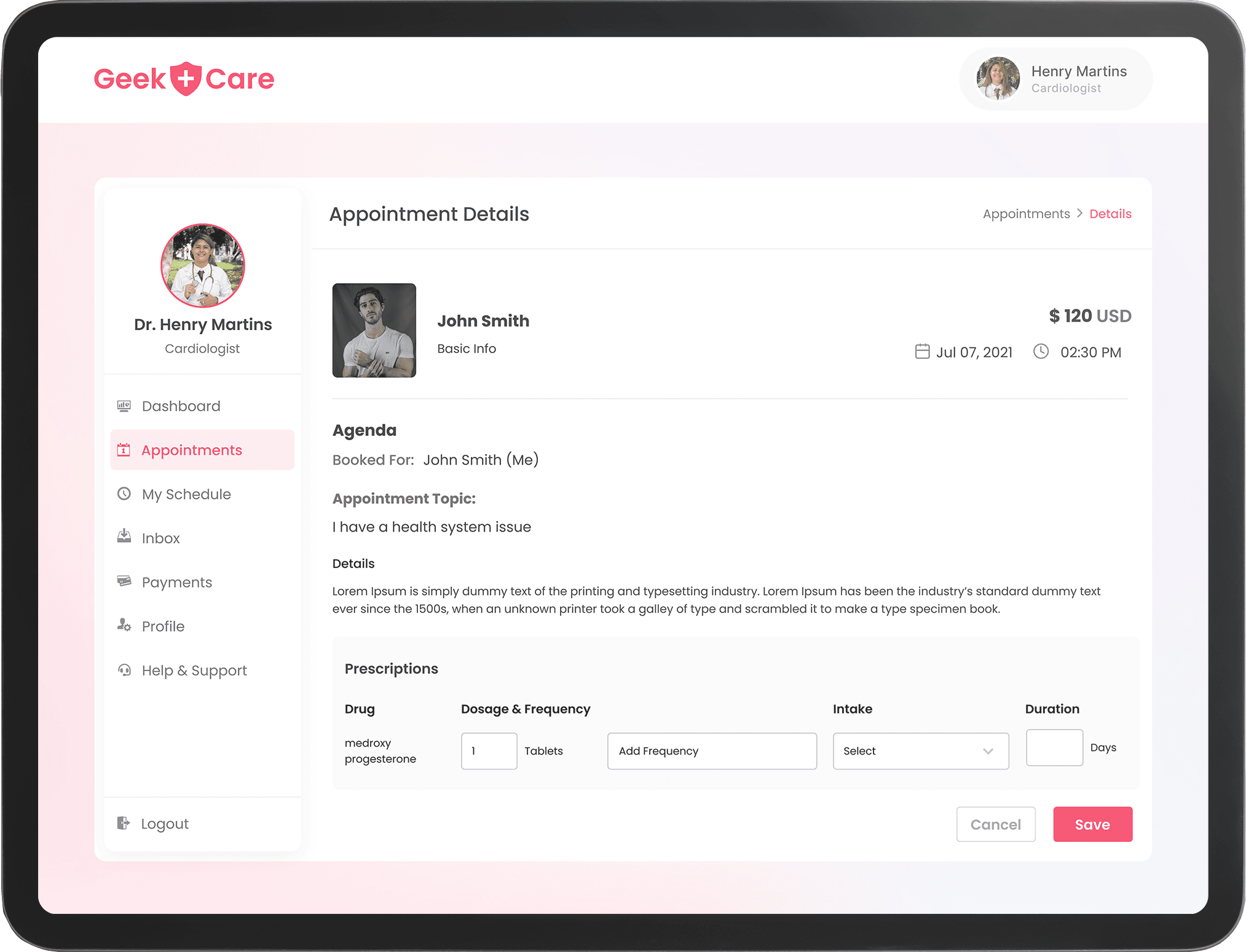
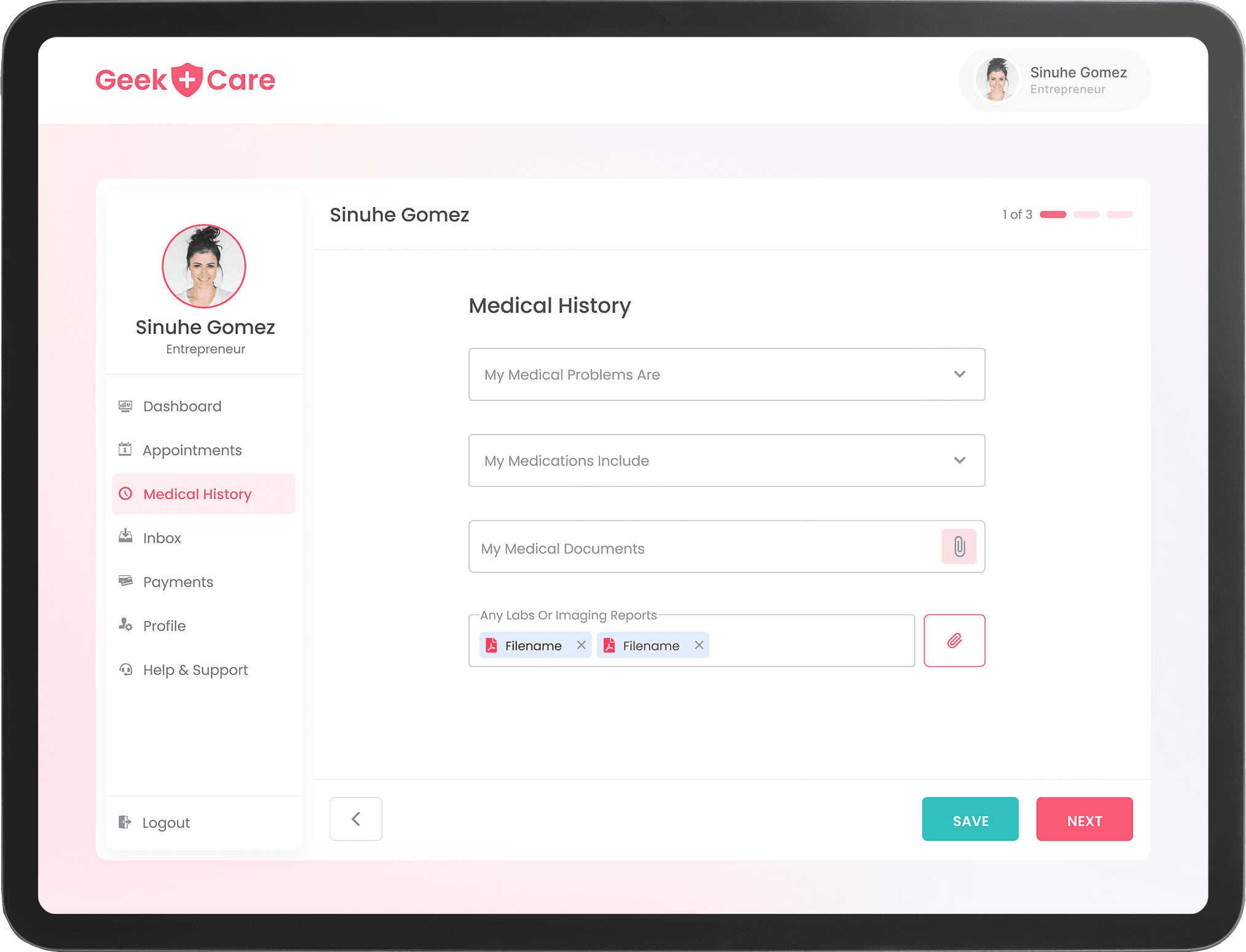
Members can update their medical history and reports in the application. Doctors can check their healthcare reports and add prescriptions after their appointment.

Video Call
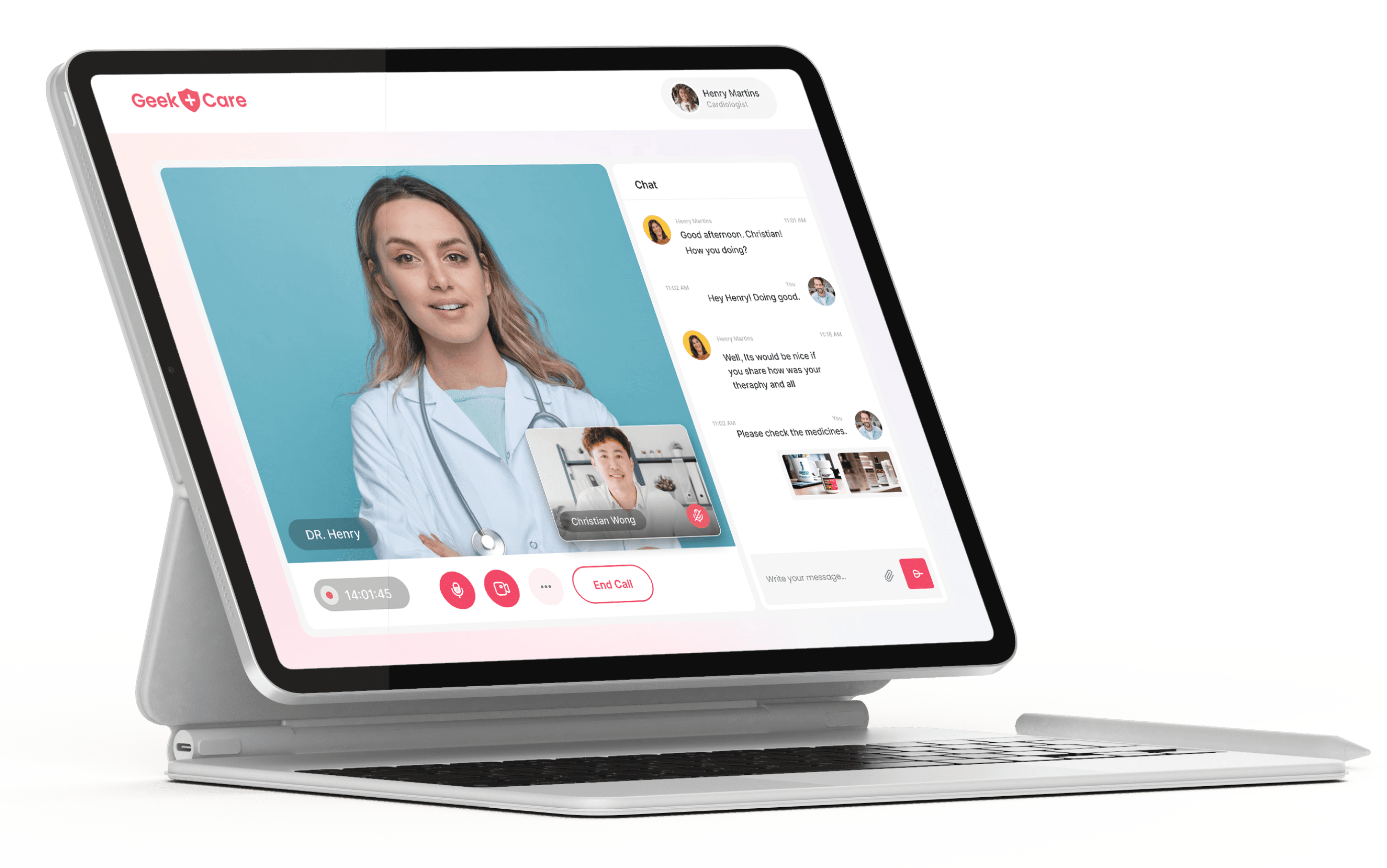
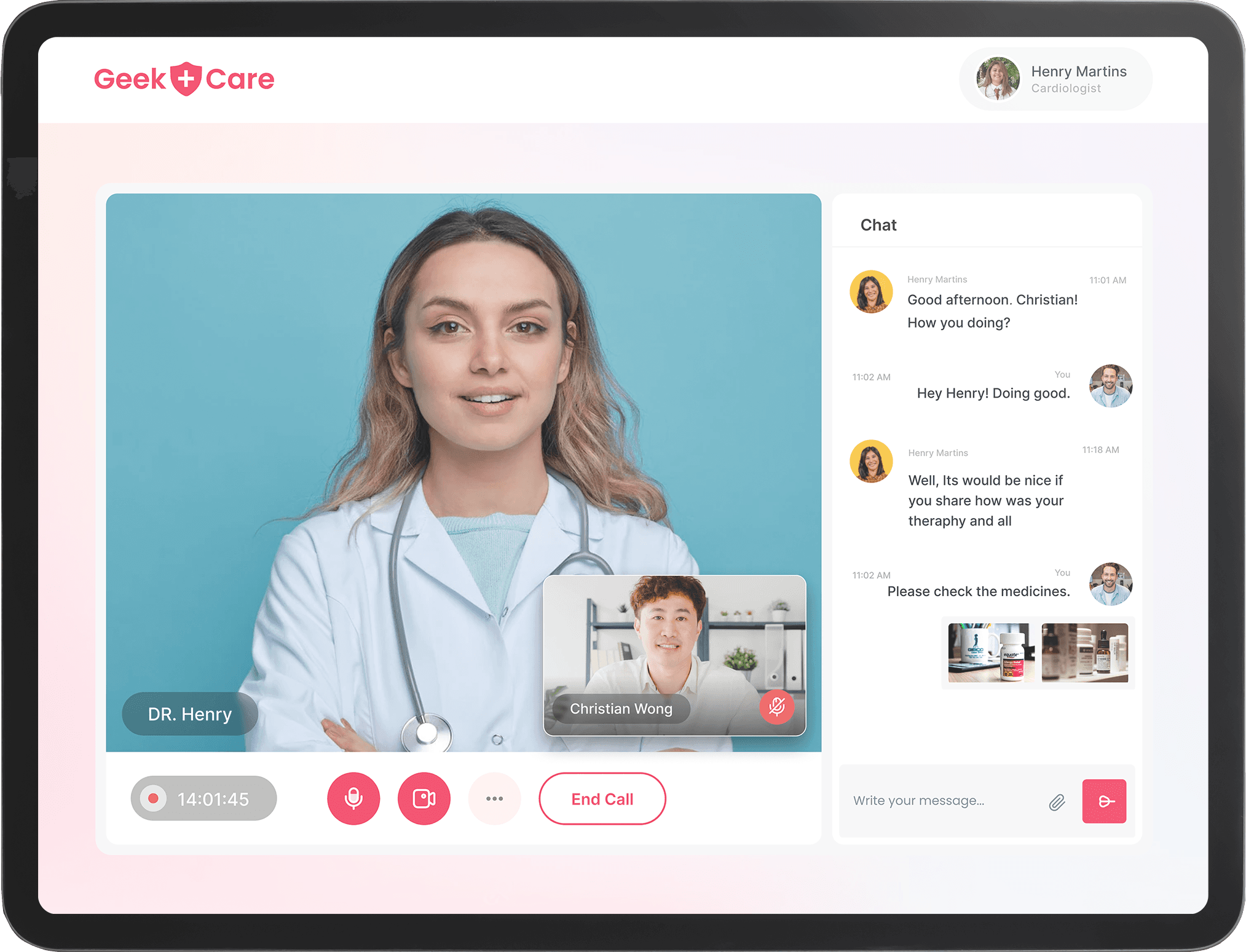
Both members and physicians can connect on a video call or chat session for consultation, and the physician can prescribe medicines.

Chat
The physicians can provide consultation to their patients through chat features and share images and documents if required.

Payment Management
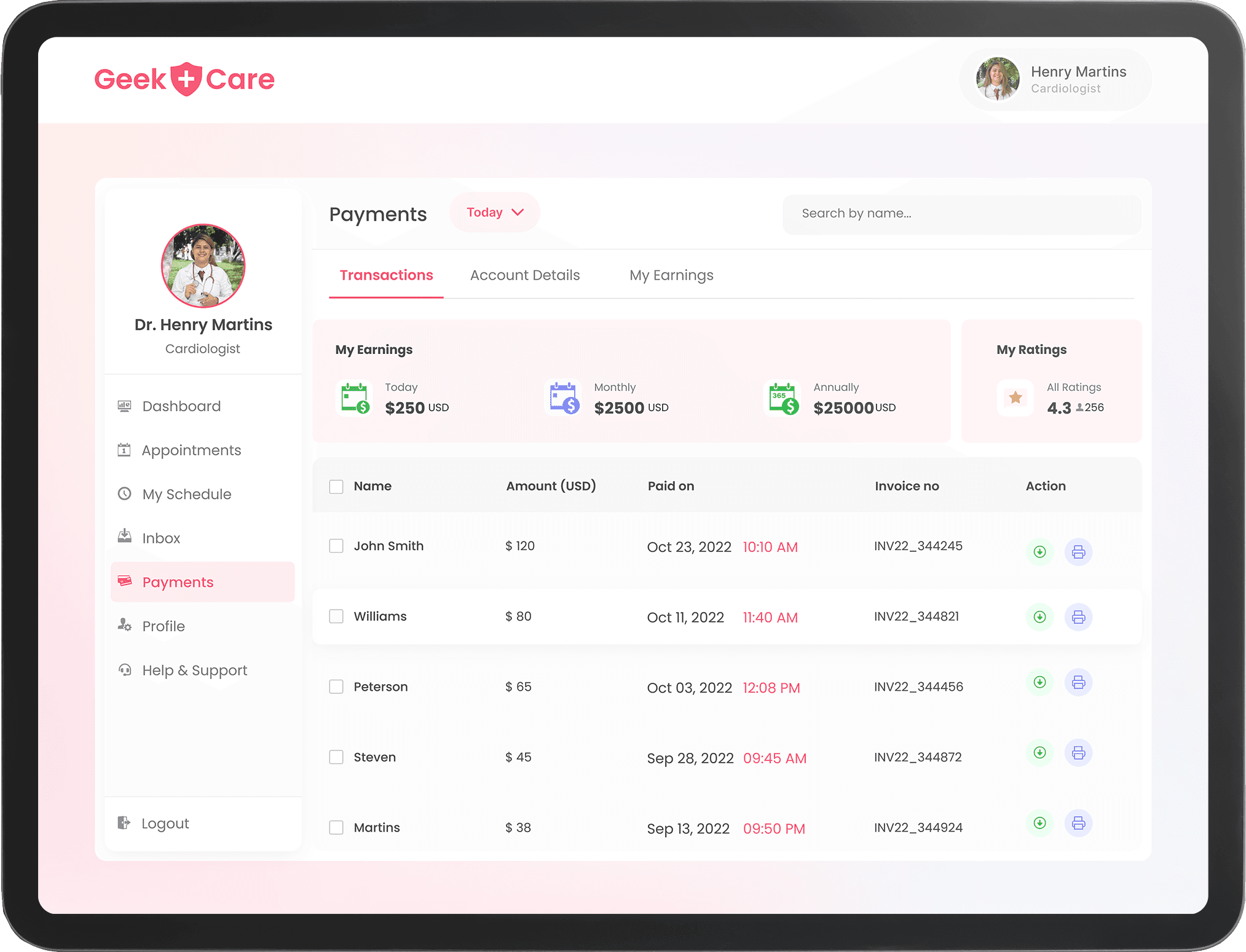
Members will be able to track their transactions, and the physicians will be able to track their earnings through the application.

Support
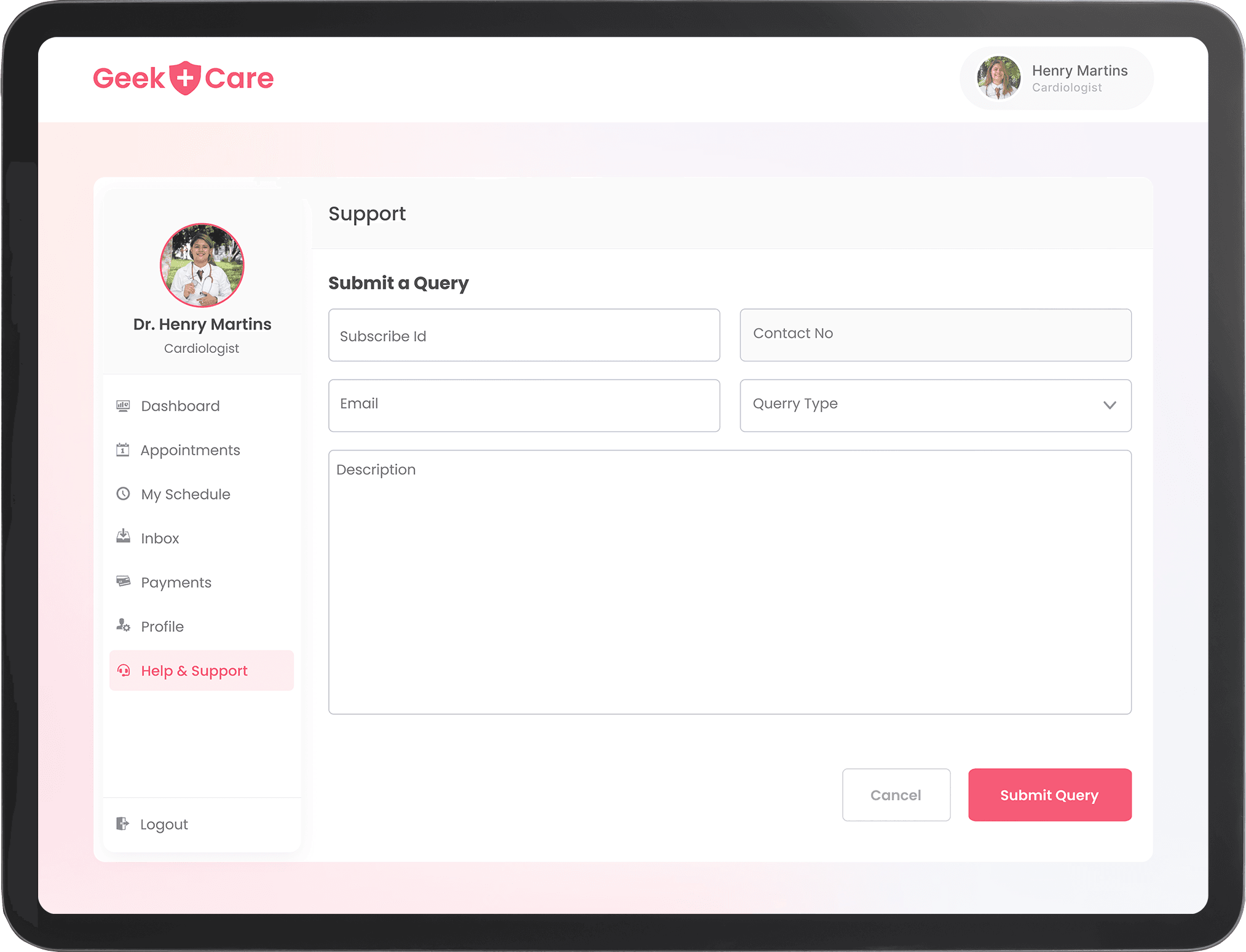
Both members and physicians can raise support tickets to the admin or institution’s email id if they face any issue with the application, payments, or consultation.
Features
GeekCare is designed to be a one-stop solution for all healthcare needs. The customizable healthcare app is loaded with multiple features for delivering a comprehensive experience. The main features of the application are given below:
Registration & Sign-in Process
Patient-Specific Features
Users can register or sign in to the app through multiple modes. For security, an OTP is required during the registration and sign-in process.
Home Page
Patient-Specific Features
The home page is a wealth of resources for the user with doctor choices, blogs, and navigation features to important pages like Profile and settings.
Appointment Booking
Patient-Specific Features
Users can book appointments through the app. The flow includes the selection of the doctor, redirection to a payment window, and confirmation.
My Appointments
Patient-Specific Features
Users can manage appointments from the My Appointment section. They can also cancel, reschedule and attend sessions from the section.
Video Call
Patient-Specific Features
As a member, users can attend video chat with the physician. They can mute and unmute themselves and turn the camera on and off.
Medical History
Patient-Specific Features
Users can view, add, edit, and delete any healthcare/medical problem details, current/past medication, medical documents, and reports from this section.
Payments
Patient-Specific Features
After payment, users can view transaction history, filter according to date range, view invoice details, and even download the invoice.
Landing Page
Physician-Specific Features
Doctors who click on the website link are directed to a landing page. On the page, doctors can view the community of doctors, browse popular services and get login options.
Registration & Login
Physician-Specific Features
Physicians can sign in to the account with a new email ID, and an OTP. They can then use the same details to log in later.
My Appointments
Physician-Specific Features
Doctors can accept or cancel the appointment as per the request received by the member. They can also view appointment details and check the patient's reason for the appointment.
My Schedule
Physician-Specific Features
Doctors can view all the available time slots with an option to filter based on day, week, and month. They can create/edit and delete any time slot from My Schedule.
Payments
Physician-Specific Features
Doctors can see the list of all transactions in the transaction history, download the invoice of each transaction and track earnings in My Earning section.
Inbox
Common Features
Users and their respective doctors can chat with their doctors through the inbox feature. They can also upload and send documents that will help in the diagnosis.
My Profile
Common Features
Using the profile section, one can edit and add basic details on the profile section, i.e, name, phone number, address, etc. There is also an option for a password reset.
Support
Common Features
Users and doctors can raise support requests to the doctor/admin if they face any issue related to appointments, payments, etc.
Logout
Common Features
Users and doctors are logged out of the account once they click the Logout button. They are then redirected to the login screen.
Technologies Used
We used a combination of tech stacks to create a fast application with great UI and UX.

Next.js
Front-end
We chose Next.js as it is fast and provides efficient server-side rendering. This means better performance across the app and more SEO friendliness.

Redux
Front-end
We used Redux as our state management tool. This is because it gives a centralized, immutable store and a unidirectional data flow that makes the state updates consistent.

TypeScript
Front-end
TypeScript was chosen primarily for the optional static type-checking. This helps in catching errors early in the development process. Additional perks are robust interfaces, classes, and modules.

React Query
Front-end
React-Query allowed us to handle and manage network requests with ease. This simplified the handling of loading and error states, refreshing data, and automatic caching.

Tailwind CSS
Front-end
Tailwind CSS allowed us to keep the design consistent throughout the entire app. This was done by utilizing a standard set of CSS classes.

Node.js
Back-end
Node.js allowed us to use the same language for both the front-end and back-end. This meant that the development team could work simultaneously on the frontend and backend.

Hasura
Back-end
Using Hasura cloud allowed us to improve the development and deployment process thanks to its GraphQL API capabilities, easy-to-use interface, and automatic database migration feature.

GraphQL
Back-end
GraphQL was our query language. It allowed us to handle complex and evolving data requirements with ease.

WebSockets
Third-Party Applications & NPM Packages
Using WebSockets allowed the app to handle multiple simultaneous connections efficiently. It also allowed real-time, two-way communication between the application and its users.

Twilio
Third-Party Applications & NPM Packages
Twillio allowed us to improve the video call functionality of the app. This gave real-time audio and video processing features, along with recording options, and easy integration.

Cloudinary
Third-Party Applications & NPM Packages
Cloudinary allowed us to store, retrieve, and manipulate the data type stored in the application. It also provided centralized storage and efficient media management perks.

FullCalendar
Third-Party Applications & NPM Packages
We used the FullCalendar npm package to give doctors the option to showcase their availability. It allowed physicians to create timeslots and manage requests.

RazorPay
Third-Party Applications & NPM Packages
RazorPay was our primary payment flow. It allowed patients to pay for their appointments using a method of their choice — credit/debit cards, UPI, and e-wallets.

Nodemailer
Third-Party Applications & NPM Packages
Nodemailer is used for sending emails. This allows users to send OTPs for validating users during initial sign-up, reducing fraudulent sign-ups.
Can Be Used to Build Apps Similar To

Practo

Medlife

1mg

Doctor on Demand

Zocdoc

Teladoc
100%
Themeable
2x
Faster Development
50%
Cost Reduction
Plug & Play
Features
Want to Customise Healthcare App to Suit Your Business Needs?
We can help you do that!
What You Need to Know
The cost of building healthcare and Telemedicine apps like Practo, MedPlus, 1mg will depend on factors like the features to be added to the application, the functions the app needs to support, and the expertise of the development team.
However, a cost range can be 10,000 to 30,000 USD. This will also likely change based on how long the development cycle lasts. Engaging with an experienced development team is therefore important, to ensure the best ROI.
Yes, GeekCare can be customized to address specific requirements.
The GeekCare telemedicine and telehealth app is built using customizable features and is made to scale. From the patient user flow to the doctor’s user management, each part of the app can be designed according to business use cases.
The healthcare and telehealth development process usually takes about 2-5 months. However, if the goal is to create an extensive app like Practo, the process can take longer.
We can help you chart out the complexities of the features to be added. They can then be mapped to respective tech stacks. We will then suggest the most efficient development methodology to use in the development engagement.
GeekyAnts has a team of talented developers that are adept at using the latest tech stacks to create innovative solutions. Many of our Geeks are also core contributors to key open-source front-end technologies like React Native and Flutter. We are also recommended partners by Vercel, the creators of Next.js.
Couple this with our years of industry experience, we make for an unstoppable team that can build a powerful app with the best ROI for your business.
Node.js gives us the option to JavaScript on the server side. This makes it possible to use the same language for both the frontend and backend. A big advantage of this is that the development of the frontend and backend can happen simultaneously. This reduces the time for development considerably.
