

Introduction:
In this article, we are going to understand what Dependency injection in Flutter & Inversion of control is and how using it along with Provider can help you to reduce code redundancy and make things easier for you.
Let’s first understand what is Inversion of control?
Inversion of control (IoC):
In layman’s term, Suppose you drive a car to your workplace. This means you control the car. The IoC principle suggests inverting the control, Meaning that instead of driving the car yourself, you hire a cab, where another person will drive the car. So the control of the car is shifted from yourself to the driver.
Now let’s understand it with some dart code:
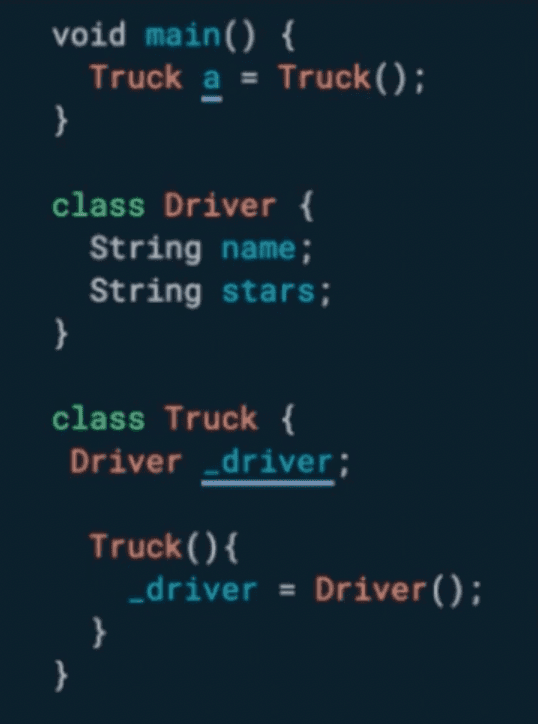
In this example, we are creating the instance of Driver class within the constructor of Truck class. So the control of creating a driver is with truck class only. Now Suppose we want Truck b (new truck) with the same driver. There is no way to do that!
Now let's apply IoC on the above code:
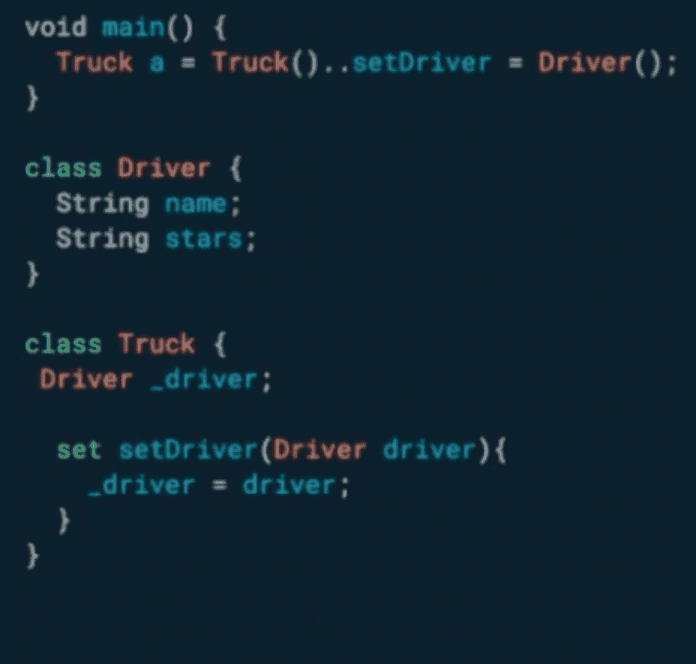
Using the IoC principle, we created a setter function in class Truck to set the instance of Driver. So, the control of creating an instance of Driver class is shifted from Truck class to the one who is creating the class itself.
Dependency Injection:
Dependency injection in Flutter is a technique in which one object supplies the dependencies of another object. A dependency is an object that can be used in the class. It can be a Network service, Database service, Location service etc.
So now let's discuss about Provider.
Provider:
- InheritedWidget, but simple!
For someone who is new to Flutter, let me explain a little about Inherited Widget. It’s a big topic in itself so I’ll leave you with the simplest example of it. It provides a base class for widgets that efficiently propagate information down the tree.
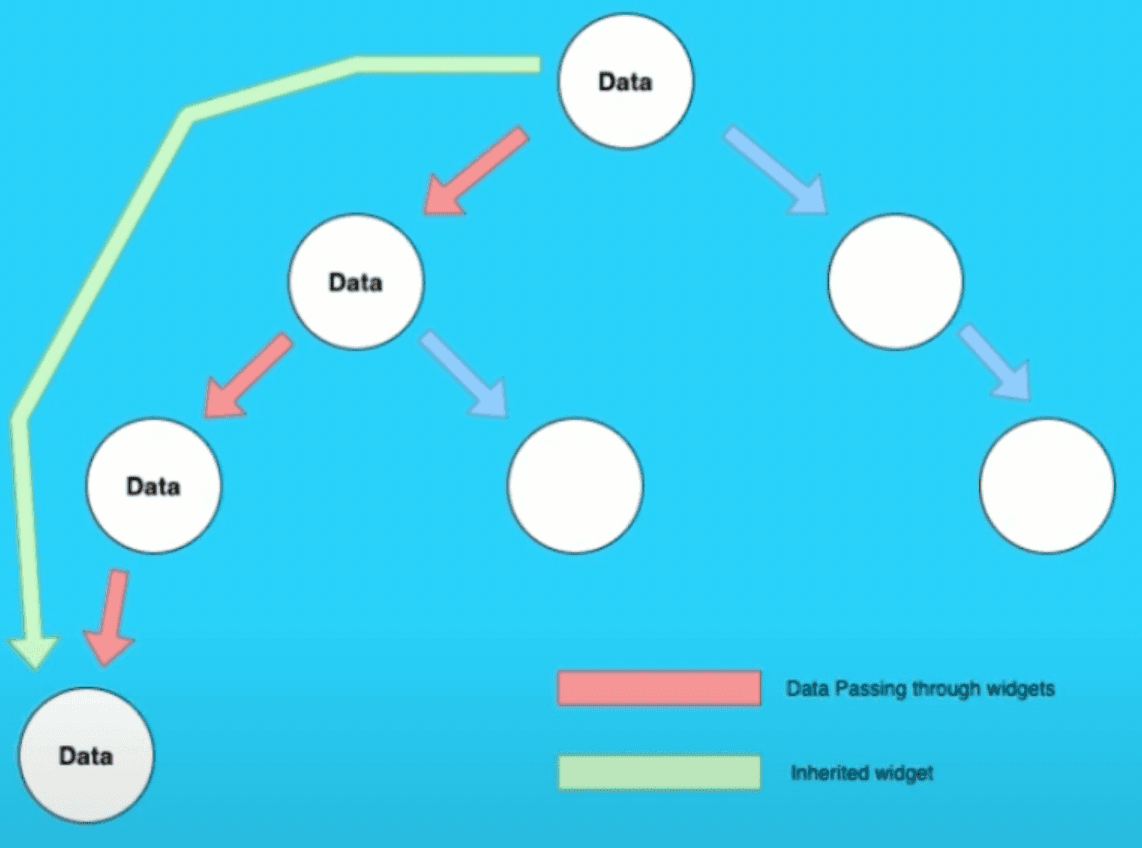
Using Inherited widgets requires a lot of boilerplate code and here providers help you a lot with reducing the code to the strict minimum.
Here is the example of boilerplate code in official docs:
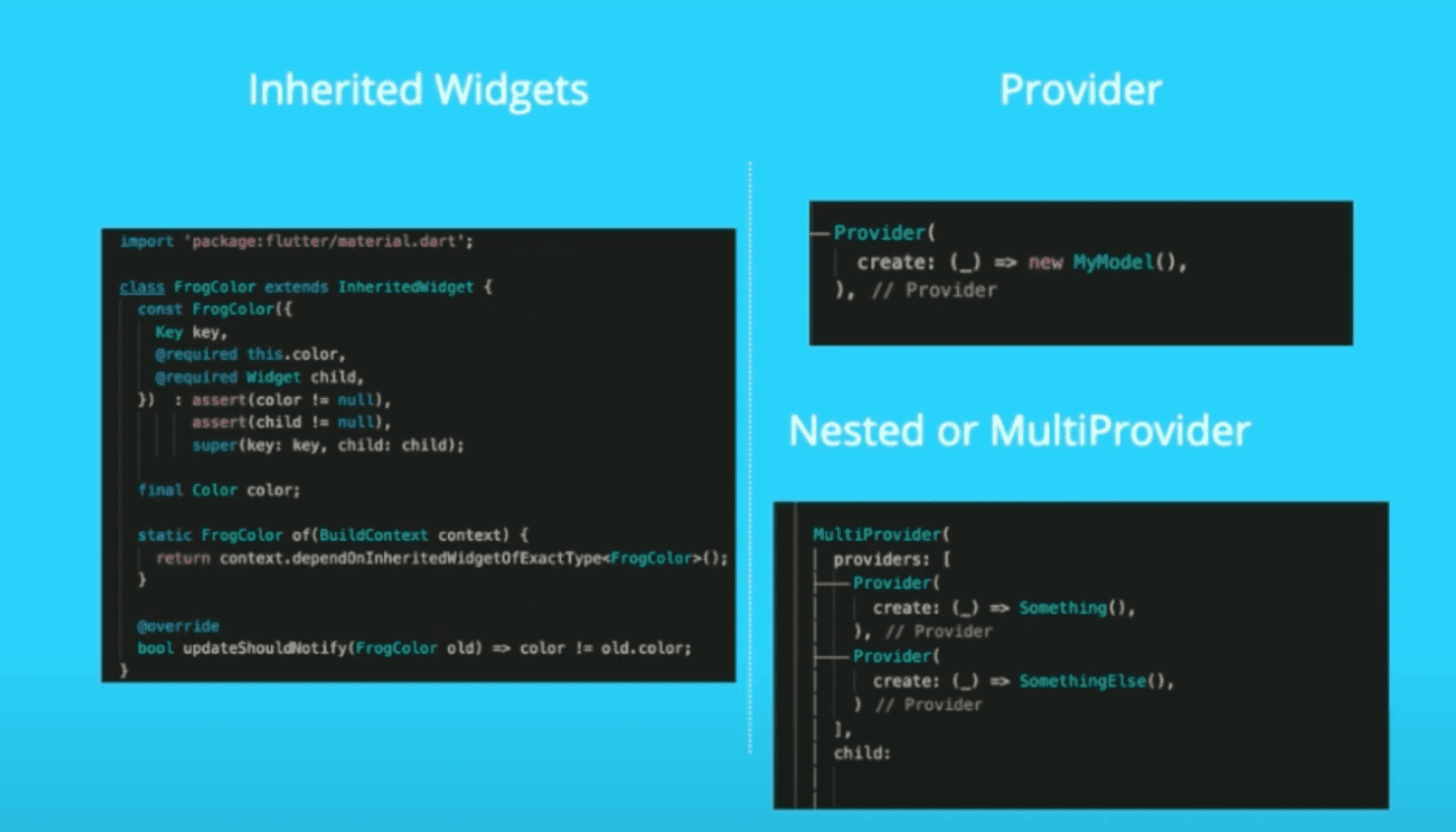
- A mixture of dependency injection (DI) and state managementt, built with widgets for widgets.
Let’s discuss this point with a case study:
The same screen on different tabs with different data. Suppose you have two tabs in your application and both tabs use the same UI (screens) but with different data.
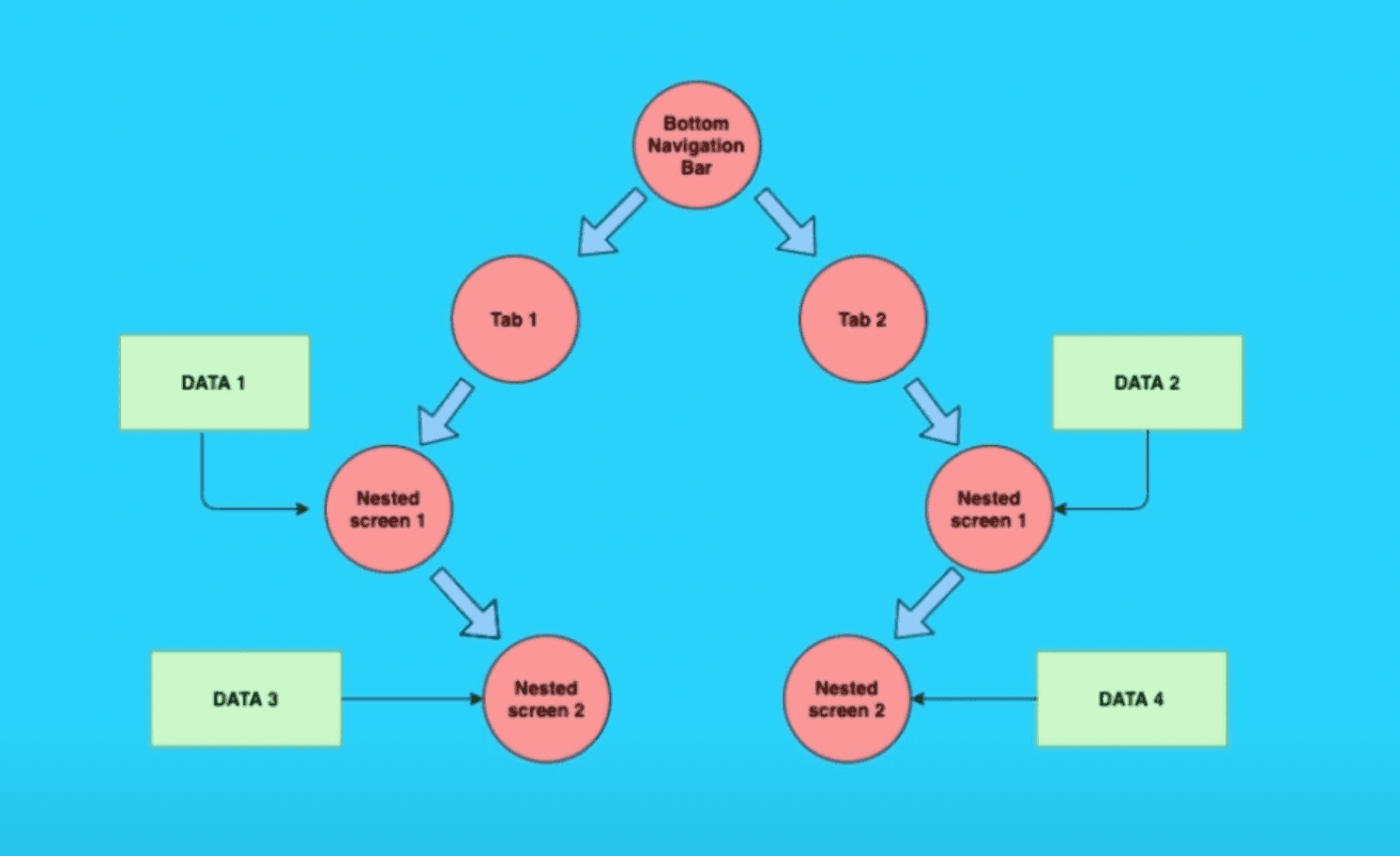
As clear from the picture we have 2 tabs : 'Tab 1' and 'Tab 2'. Inside both tabs, we have two nested screens i.e. Nested screen 1 and Nested screen 2 which look alike but represent different data.
To create this kind of flow we have many approaches.
Let’s discuss them one by one.
Approach 1:
Creating multiple screens with a dedicated view model.
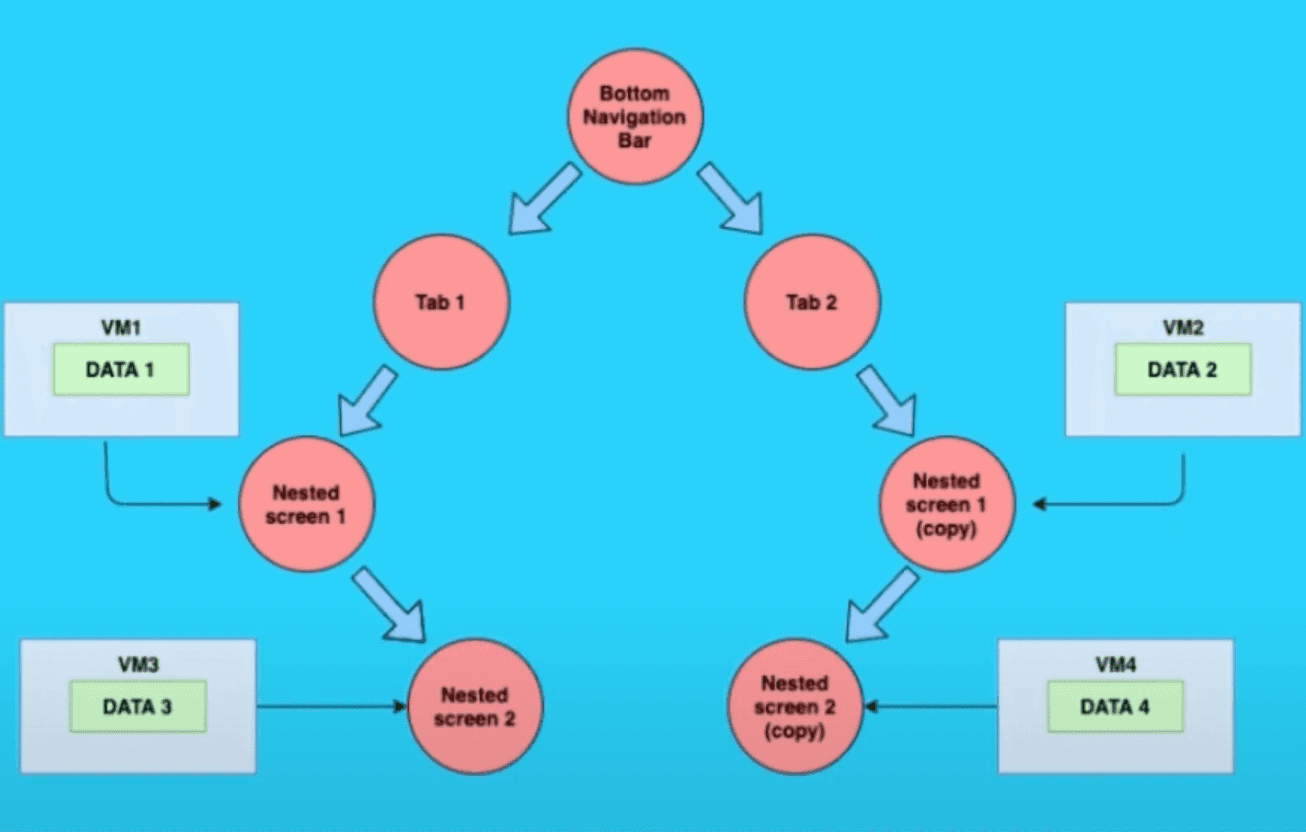
In this approach, we will create a dedicated view model for each screen and create object of Data in their view model respectively, as shown in the above figure "Nested screen 1" have "View model 1" with "DATA 1", "Nested screen 2" have "View model 2" with "DATA 2" and so on. The states of each screen are maintained in their separate dedicated view model.
Analysis:
We have to create 2 extra screens(Nested screen 1(copy), Nested screen 2(copy)) and view models with redundant code.
Approach 2:
Using duplicate variables in the same view model to show data according to screens.
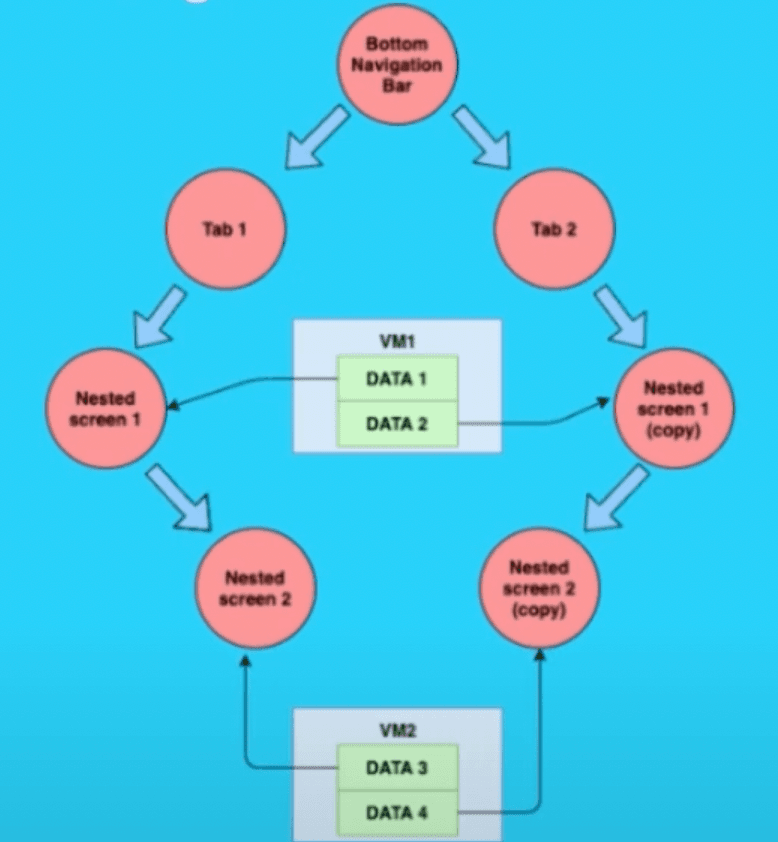
As we already know both screens are the same so they will have the same states.
In this approach instead of creating dedicated view models, we created a single view model with different data objects accordingly, As shown in the figure above both Nested Screen and Nested Screen 1 (copy) shares the same View Model i.e. VM1 with two Data objects Data 1 and Data 2.
Analysis :
We have to create 2 extra screens and view models with redundant(or duplicate) data objects.
Approach 3 :
Creating multiple instance of view model & screen and injecting VM accordingly using provider and IoC.
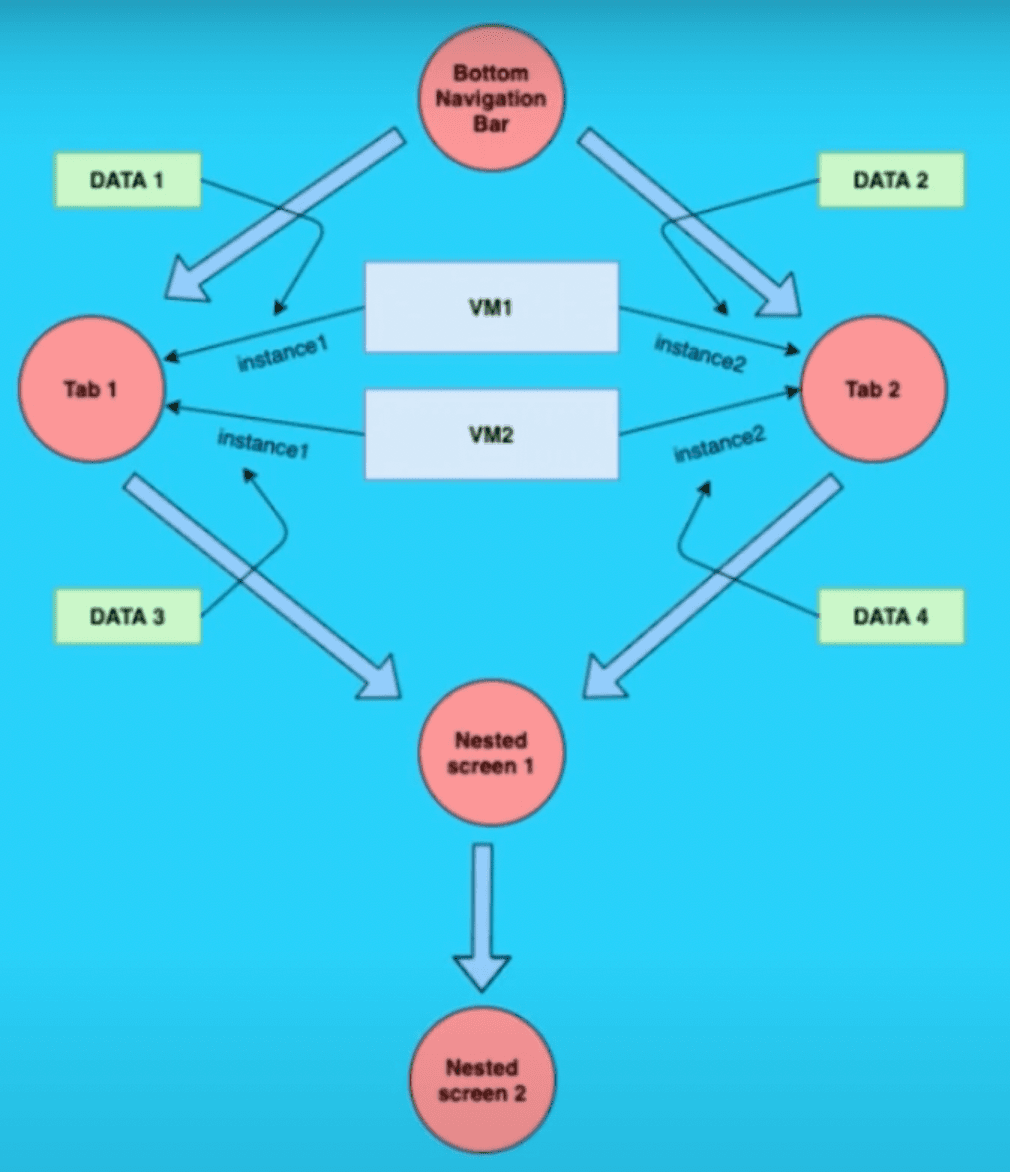
In this approach instead of creating the instance of the View Model on the screen level, we created it on the Tab level and injecting the data while creating the instance of the view model itself.
As shown in the above figure we created "instance 1" of "VM1" and "instance 1" of "VM2" on Tab1,and "instance 2" of "VM1" and "instance 2" of "VM2" on Tab2 respectively. So when we create Nested Screen 1,Nested Screen 2 inside Tab 1 then Nested Screen 1 will have "instance 1" of "VM 1" and Nested Screen 2 will have "instance 1" of "VM 2".
So each screen is attached with it’s dedicated instance of the view model with the data it needs.
We can also easily manage the state of the screen according to some event which changes the data.
Analysis :
No need to create an extra screen or view model, instead of an instance of the view model and repeated screens are created.
Code redundancy is highly reduced.
Conclusion:
With Dependency Injection using Provider, we can achieve IoC quite easily which would, in turn, reduce redundancy in code drastically. There are State Management techniques in Provider which we can use to manage states but that is a topic for a different post.
Here’s the link to the repo containing the code of Approach 3:
https://github.com/rajajain08/provider_di_example
Thank you for reading.
Get more insights here ↓







