


Amazon Web Services (AWS) recently launched AWS HoneyCode, a no-code mobile and web app builder. I built an app using the app builder of HoneyCode and in this article, I am sharing my experience of development with HoneyCode and why I think it is the future.
Basics of HoneyCode:
Projects in HoneyCode are categorized as WorkBooks. Users can create multiple apps inside a single workbook.
HoneyCode Dashboard
A HoneyCode workbook has a collection of Tables. The tables have a spreadsheet-like environment, one key characteristic of HoneyCode.
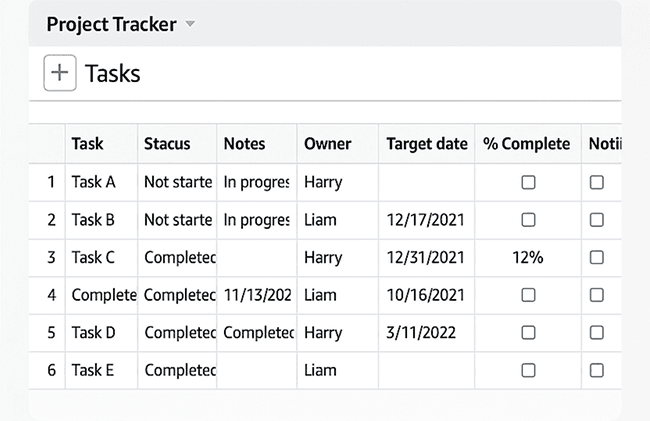
A table (named Tasks) in WorkBook
Users can create basic apps to visualize and edit the data in workbook tables (using Actions). In regards to the development experience, the app development process feels data-centric (or data-first), which is in-line with the motivation behind creating HoneyCode.
Prerequisites / Learning Curve
Spreadsheet environment is a basic characteristic of HoneyCode and thus, development with HoneyCode requires knowledge of using spreadsheets. To consume table data in the app or to write data from the app to the tables, it is required to know how to write spreadsheet formulas, conditionals, etc.
Using HoneyCode has its own learning curve for writing data related queries
Features
- Spreadsheet like environment
Spreadsheet environment provides support of features like writing formulae and expressions for table cells, giving extensive control for manipulating data.
- Easy Support for linking and consuming data across tables
Referencing data of one table in another is quite simple. While writing formulae, mentioning the name of the table (with optional filters) gives access to the specific data. At other input fields, HoneyCode auto-suggests a list of tables to select from. All tables are accessible globally across any workbook app.
- Feature to build different UIs for web and mobile
There exists support for building separate UIs for mobile and web views. By toggling button, developer can unlink mobile and web layout and develop them individually.
- Support for sharing apps or workbook and maintaining access levels across teams
Individual apps or the whole workbook can be easily shared and the owner can manage access levels for each member.
- Quick to get started
Though using HoneyCode has a learning curve related to queries, still the process is quite quick to understand and it is easy to get started with writing queries.
Drawback and Scope of Improvement
- Restricted real-time collaboration
A general restriction with such app-building-platforms is the lack of real-time collaboration. Only one user can edit the app at a time, else changes being made become prone to inconsistency. We will need to see how supportive HoneyCode is of this feature.
- Lack of UI finesse
The platform doesn't have much support for UI finesse. Users can create basic column-like layouts, but for more than that, there is a very limited scope of customizing UI.
- Not all spreadsheet features are available
Among the features that I needed for my app development, I couldn't find multiple spreadsheet features. e.g changing the table cell background or app content background based on cell value.
- Significant Action response time
Any changes or activity is performed by creating actions (e.g: to add a new row in a table on button click, the user needs to create action). The response of these actions takes time to reflect. Based on my experience of working with app-building platforms, on adding complex & multiple action flows, the app will take a significant amount of time to respond.
To Summarise
HoneyCode is a good go-to tool to create a basic app for data understanding and interaction with minimal efforts in app development. With a small learning curve, non-coding professionals can get up-and-running with using the platform. Yet, the platform at present falls short of expectations in terms of fine control on UI, finding features available otherwise in spreadsheet tools and smoothness in performance (when heavy-actions performed).
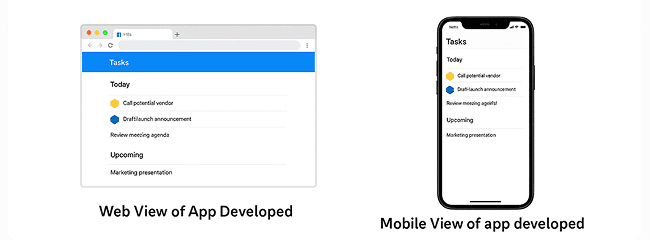
Web and Mobile view of the app developed using HoneyCode







