


Reducing App Size in React Native: A Deep Dive with Spotify Ruler & Proguard
One of the most important aspects of building a mobile app is ensuring that the final packaged application is lightweight, efficient, and optimized for distribution. Large app sizes can negatively affect user acquisition, as potential users are often discouraged from downloading apps that take up significant storage space. Moreover, smaller apps typically load faster, consume fewer resources, and provide an overall smoother user experience.
In this blog, I’ll walk you through some changes I implemented in a React Native app that successfully reduced both the download size and the install size. The methods discussed here are production-tested and make use of tools such as the Spotify Ruler plugin, ProGuard, resource shrinking, and Gradle configurations.
Why App Size Matters
Before diving into the technical implementation, let’s quickly touch upon why app size optimization is critical:
- User Retention and Acquisition: According to studies, users are less likely to download apps above a certain size threshold, especially in regions where data plans are expensive or network connectivity is slow.
- Performance: A leaner app often results in faster installs, reduced memory consumption, and improved runtime performance.
- Play Store and App Store Ranking: Optimized apps are more likely to get recommended, as both stores track app performance metrics.
- Update Adoption: Smaller update packages mean that users can quickly upgrade to the latest version without hesitation.
Step 1: Analyzing App Size with Spotify Ruler
The first step in optimizing app size is measurement. Without visibility into what contributes to the app’s bulk, it is nearly impossible to optimize effectively. This is where the Spotify Ruler Gradle plugin comes into play.
The Ruler plugin provides insights into your APK or AAB (Android App Bundle) size. It breaks down the contribution of Java bytecode, resources, assets, and even external libraries. By using this tool, you can identify exactly which modules or dependencies are consuming unnecessary space.
To get started, add the following dependency in your android/build.gradle:
buildscript {
    dependencies {
        classpath("com.spotify.ruler:ruler-gradle-plugin:2.0.0-beta-3")
    }
}
Then, apply the plugin in your android/app/build.gradle:
apply plugin: "com.spotify.ruler"
apply plugin: "com.android.application"
Once configured, you’ll be able to generate size reports after building your release bundle.
Step 2: Enabling ProGuard for Bytecode Optimization
Next, we need to optimize the compiled Java/Kotlin bytecode. ProGuard is a powerful tool that shrinks, optimizes, and obfuscates code. By removing unused classes and methods, ProGuard reduces the overall size of your APK or AAB.
In android/app/build.gradle, enable ProGuard by setting:
def enableProguardInReleaseBuilds = trueThis ensures that when you build your release version, ProGuard minifies the code and strips away any unused logic, resulting in a smaller build.
Step 3: Shrinking Resources
Another contributor to app size is unused resources such as images, layouts, and XML files. Android provides a resource shrinker that works hand-in-hand with ProGuard to remove unused resources from your final build.
Update your buildTypes block in android/app/build.gradle as follows:
buildTypes {
    debug {
        signingConfig signingConfigs.debug
    }
    release {
        signingConfig signingConfigs.debug
        minifyEnabled enableProguardInReleaseBuilds
        shrinkResources enableProguardInReleaseBuilds
        proguardFiles getDefaultProguardFile("proguard-android.txt"), "proguard-rules.pro"
    }
}
Here’s what each line does:
- minifyEnabled: Enables ProGuard to shrink bytecode.
- shrinkResources: Removes unused resources.
- proguardFiles: Uses the default ProGuard configuration along with a custom rules file to fine-tune optimizations.
This combination ensures that only essential code and resources make it into your final build.
Step 4: Configuring Ruler for Custom Analysis
You can further customize Ruler to simulate different runtime environments. Add the following configuration at the end of your android/app/build.gradle:
ruler {
    abi.set("arm64-v8a")
    locale.set("en")
    screenDensity.set(480)
    sdkVersion.set(rootProject.ext.compileSdkVersion)
}
Here’s what these parameters mean:
- abi: Specifies the CPU architecture (e.g., ARM64).
- locale: Sets the language/region (e.g., English).
- screenDensity: Simulates the pixel density of the target device.
- sdkVersion: Matches the compile SDK version of your project.
By tweaking these settings, you can better understand how your app behaves in different environments and how resources contribute to size.
Step 5: Running the Analysis Command
Once you’ve set up the Ruler plugin and Gradle configurations, you can generate a size report for your release bundle. Navigate to the android folder of your project and run:
cd android
./gradlew analyzeReleaseBundle
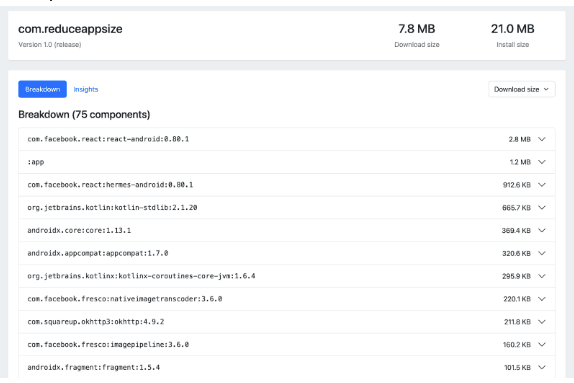
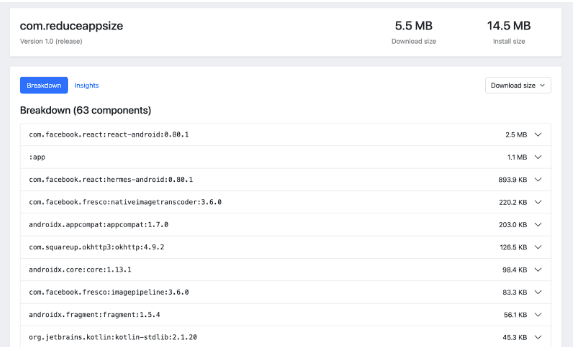
This command generates a detailed report highlighting the size contribution of different modules, libraries, and resources. With this report, you can identify heavy dependencies or unused assets and take corrective measures. Below is the evidence which showcases the difference in install and download size with a detailed breakdown of the components.
Before: -
After:-
A Closer Look at Spotify Ruler
According to the official Spotify Ruler GitHub documentation, the plugin provides:
- Size Breakdown: Categorizes app size into code, resources, assets, and native libraries.
- Change Tracking: Helps you see how app size evolves over multiple builds.
- Configuration Options: Allows customization for ABI, locale, and screen density.
- CI/CD Integration: Can be integrated into your continuous integration pipeline to prevent sudden spikes in app size.
These features make Ruler not just a one-time analyzer but a continuous monitoring tool that helps maintain size discipline across versions.
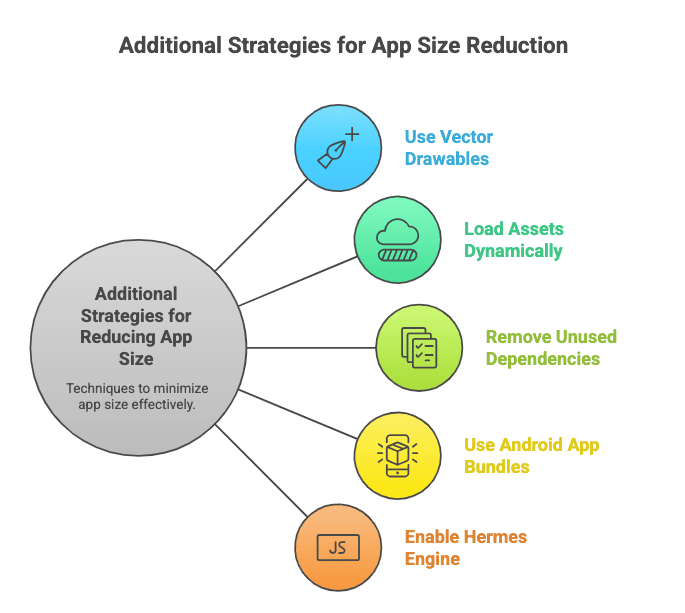
Additional Strategies for Reducing App Size
While ProGuard, resource shrinking, and Ruler form the backbone of optimization, here are some additional strategies you can adopt:
- Use Vector Drawables Instead of PNGs
Vector graphics scale better and consume less space than multiple PNG assets. - Load Large Assets Dynamically
Instead of bundling heavy media files in your app, consider fetching them from a CDN on-demand. - Remove Unused Dependencies
Audit your package.json and Gradle dependencies to remove unnecessary libraries. - Use Android App Bundles (AAB)
AAB allows the Play Store to deliver only the resources and binaries required for a specific device, reducing the installed size. - Enable Hermes Engine
For React Native apps, enabling the Hermes JavaScript engine can reduce the APK size and improve runtime performance.
Business Impact of App Size Reduction
Reducing app size is not just a technical exercise—it directly impacts business outcomes:
- Increased Downloads: A smaller app is more attractive to users with limited storage.
- Reduced Uninstall Rate: Users are less likely to uninstall apps that don’t hog device storage.
- Cost Efficiency: Smaller apps reduce bandwidth costs for both developers (distribution) and users (downloads/updates).
- Improved App Store Ratings: A smoother, faster app often results in higher ratings and reviews.
Conclusion
Optimizing app size in React Native is an iterative process that involves analysis, configuration, and continuous monitoring. By using tools like the Spotify Ruler plugin, enabling ProGuard, shrinking resources, and following best practices, you can significantly reduce both the download and install sizes of your app.
The key takeaway is that app size optimization is not just about technical performance—it also drives business value by improving user experience, increasing adoption rates, and lowering churn.
If you haven’t already, integrate these practices into your development workflow and start monitoring app size today. Small changes at the build level can have a huge impact on your app’s success in the market.







