

Editor’s Note: This article was originally written by Amrit Saluja and published in June 2025. It was substantially updated by Harrini in July 2026 to refresh the market insights, AI-powered video conferencing guidance, technology recommendations, architecture, security best practices, development costs, and FAQs reflect the latest trends in custom video conferencing software development. The technical content was reviewed by Saurabh Sahu, Chief Technology Officer (CTO), and Anusha HP (Senior Business Analyst).
Key Takeaways
- Market Trends & Growth: Why U.S. demand for custom video platforms is surging—projected to reach $24.6B by 2033.
- Built for Compliance & Trust: Go beyond Zoom with platforms tailored for HIPAA (Health Insurance Portability and Accountability Act), SOC 2, and GDPR requirements.
- AI-Powered Innovation: Integrate real-time transcription, noise suppression, auto summaries, and emotion detection.
- Tailored Architecture for Scale: Use the right stack—WebRTC, SFU, RTMP/HLS—for 1:1 chats, large conferences, or live events.
- Cost & Tech Stack Breakdown: Detailed estimates and tools for each development phase—from MVP to full-scale launch.
- Expert Build Process: How GeekyAnts creates secure, branded, and scalable video platforms with embedded AI.
The Rise of Custom Video Conferencing App in the U.S.
Today, building an AI-powered video conferencing app in the USA market demands more than just adding video call features within the app. You need AI-powered collaboration features, the right architecture, enterprise-grade security measures, scalable infrastructure, and compliance with regulations such as HIPAA and SOC 2 for better communication experiences.
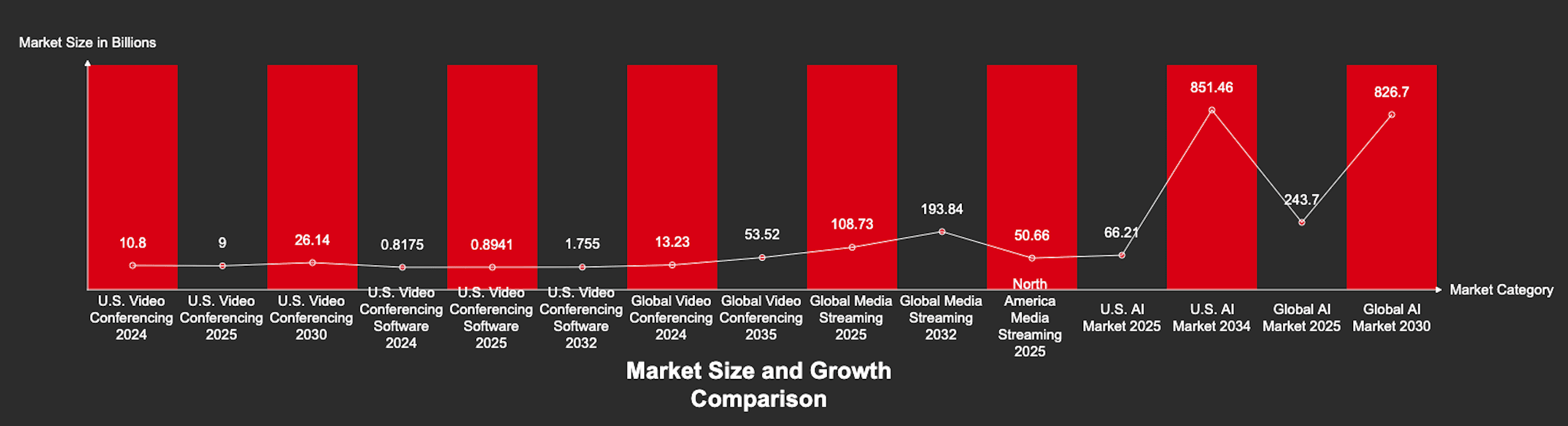
As remote work matures and AI capabilities surge, off-the-shelf video tools no longer meet the security, compliance, and performance standards demanded by healthcare, finance, education, and other regulated industries. The global video conferencing market is projected to grow from approximately USD 14.4 billion in 2026 to USD 24.46 billion by 2033 which reflects an increasing demand for AI-enabled communication platforms.
At the same time, the U.S. artificial intelligence market is projected to reach approximately USD 82.6 billion in 2026, which demonstrates a broader investment in AI across industries. Video conferencing is one area where businesses are applying AI to improve transcription, meeting summaries, speaker recognition, and collaboration.
In this blog, you’ll learn why custom-built video platforms are a strategic necessity in today’s high-trust, high-performance digital landscape. In addition, you’ll get a glimpse into choosing the right technology stack and AI tools, securing user data, and estimating development costs. Whether you are building for healthcare, finance, education, or enterprise collaboration, this guide walks you through the decisions to create a secure and scalable solution.
Why Now? U.S. Market Demand for Custom Video Conferencing App is Surging
Across the United States, organizations are moving beyond generic video conferencing tools to build AI-powered communications platforms for their business requirements. As hybrid work becomes standard and industries such a s healthcare, finance, education, and enterprise SaaS face stricter security and compliance requirements, businesses are investing in custom video solutions that offer greater control over user experience, data privacy, and workflow integration.
Demand Is Up—But So Are Expectations
The U.S. video conferencing app market is expected to exceed $95 billion by 2032 (Global Market Insights) with a projected 10% CAGR. But this surge is not just about growth—it is about smarter, embedded, and compliant communication.
Modern users expect:
- Real-time AI transcription
- Context-aware interfaces
- Industry-grade security for healthcare, finance, and education
Generic tools can not meet these demands. Custom platforms offer full control over user experience, data flow, and performance.
AI is a Dealbreaker
According to Gartner, 60% of virtual meetings will incorporate AI-driven engagement features by 2026. But off-the-shelf AI is often too generic to serve niche or regulated industries.
For example:
- Healthcare providers require HIPAA-compliant AI transcriptions
- Legal teams need searchable and secure case-call archives
- EdTech platforms benefit from adaptive learning features tied to video behavior
Custom solutions equal precision, relevance, and reliability.
Privacy and Compliance Are Now Product Features
With rising pressure from compliance frameworks like SOC 2, HIPAA, and FedRAMP, privacy must be built into the product from the ground up.
Custom video platforms enable:
- On-premise or hybrid hosting options
- Comprehensive audit trails
- End-to-end encryption is configured to your business needs
Security is a product design imperative.
Video as a Feature, Not a Platform
Video is becoming an integrated part of every product journey. From customer support and internal collaboration to live learning and virtual onboarding, companies are embedding video directly into their workflows.
SDKs like 100ms, Agora, and Twilio make it easy to:
- Seamlessly integrate live video into apps
- Customize call logic and flow
- Deliver fully branded, cohesive user experiences
Custom conferencing capabilities lead to higher engagement, reduced churn, and stronger customer trust.
Thought Leader Perspective: This Is Bigger Than Meetings
If your product handles high-trust interactions—healthcare consults, legal advice, and financial planning—you need to own the right video experience.
This is about delivering secure, intelligent, and brand-aligned communication that serves your users better than any third-party tool can.
Do not settle for workaround solutions. And gain a competitive advantage in regulated markets.
Why Build a Fully Custom Video Conferencing Software in the USA?
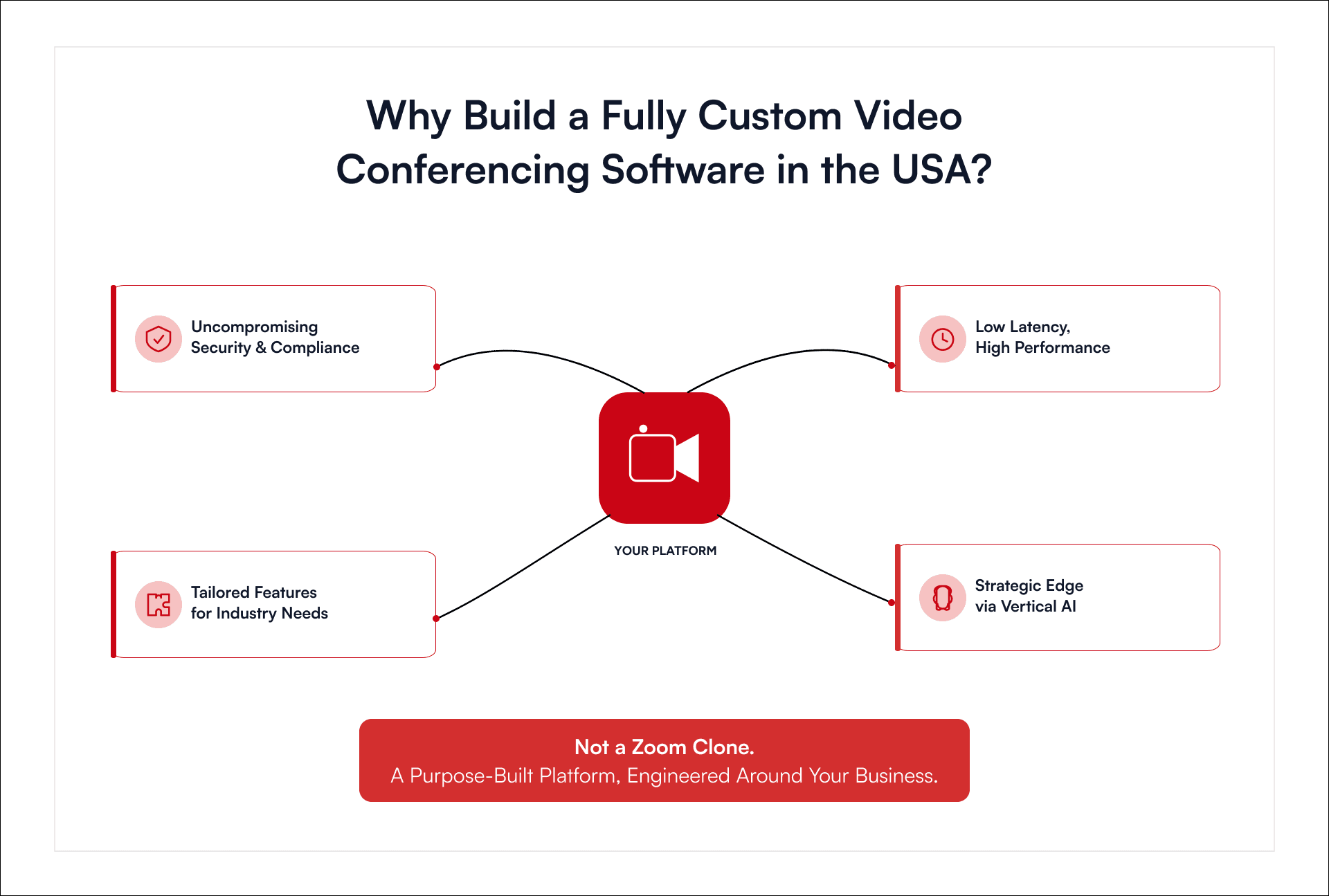
Building a custom video conferencing app in the USA is a strategic response to the limitations of generic, one-size-fits-all solutions. Organizations operating in high-trust, regulation-heavy, or performance-sensitive environments increasingly require customized communication tools that align with their unique operational demands, technical environments, and compliance requirements. Below are the key reasons why custom development is not just preferable, but essential.
1. Uncompromising Security and Compliance
Generic platforms are often inadequate when it comes to granular security control. In industries such as finance, healthcare, and law, safeguarding sensitive information is not optional, but mandatory.
Custom solutions can embed:
- End-to-end encryption (E2EE)
- Multi-factor authentication (MFA)
- Secure file storage protocols
- Custom audit trails and access control
More importantly, they can be engineered from the ground up to comply with regulations like HIPAA, PCI DSS, or GDPR, ensuring that security is a built-in feature.
2. Tailored Features for Industry-Specific Needs
Generic apps often lack compatibility with specialized hardware and legacy systems used across industries. A custom-built solution enables deep integration and flexibility across use cases.
Examples include:
- Finance: Integration with e-signature workflows and trading compliance systems
- Healthcare: Real-time EHR access and medical imaging support
- Education: Advanced classroom management, breakout tools, and LMS sync
- Live Events & Music: Near-zero latency for live streaming, compatibility with pro audio gear, and VR setups
- Cinematography: Support for 4K/8K streaming, live direction, and studio-grade AV feeds
Customizable App platforms can be designed to mirror real workflows, providing an experience no generic tool can replicate.
3. Low Latency and High Performance
Off-the-shelf apps may suffice for basic video calls, but they fall short where ultra-low latency and streaming fidelity are mission-critical.
Custom solutions allow teams to:
- Choose optimized streaming frameworks (e.g., GStreamer, WebRTC, or Apache Storm)
- Build protocol-specific enhancements
- Create custom AV drivers for superior audio-video performance
This level of optimization is crucial for music production, sports broadcasting, and interactive live events, where even milliseconds matter.
4. Compliance by Design
Industries are facing more complex and fragmented regulations. Generic apps tend to retrofit compliance after the fact, which often leads to gaps and risk.
In contrast, custom app platforms enable:
- Fine-grained role-based access
- Industry-specific consent workflows
- Modular architecture for regional compliance rules
Compliance becomes a foundational design element.
5. Strategic Differentiation Through Vertical AI
Modern video conferencing platforms in the USA are increasingly powered by domain-specific AI, not generic chatbots or transcription tools, but intelligent systems trained on industry-specific data.
Examples include:
- Healthcare: Predictive diagnostics and patient insights
- Finance: Fraud detection and behavioral analysis
- Manufacturing: Visual QA via machine vision during remote inspections
This aligns with the rise of Vertical AI—AI-targeted applications where depth beats breadth. Custom app platforms can leverage AI to deliver outcomes tailored to real problems in a vertical, thereby creating premium value and user loyalty.
In short, building a custom video conferencing application or software is not about reinventing Zoom—it is about creating purpose-built infrastructure that enhances trust, performance, integration, and regulatory alignment in ways no general-purpose platform can.
Video Streaming and Conferencing App Architecture: Roadmap for Performance, Purpose, and Scale
The architecture behind a video streaming or conferencing app is a strategic decision that defines product behavior, scalability, user trust, and long-term business value. Whether building a live concert platform, a telehealth tool, or an enterprise-grade Zoom alternative, architecture is the invisible hand that shapes user experience.
Let us break down what works, what scales, and what moves the needle across three core categories.
Live Streaming Apps: Building Broadcast-Ready Experiences
Live streaming is not only about sending video from point A to point B. It is about delivering an immersive, uninterrupted, and responsive broadcast experience—often to millions of viewers—without fail.
To build a robust live streaming application, you must start with a foundation that handles scale without compromising fidelity. At the core, RTMP (Real-Time Messaging Protocol) delivers low-latency ingestion, while HLS (HTTP Live Streaming) provides adaptive delivery, adjusting video quality based on viewer bandwidth in real time.
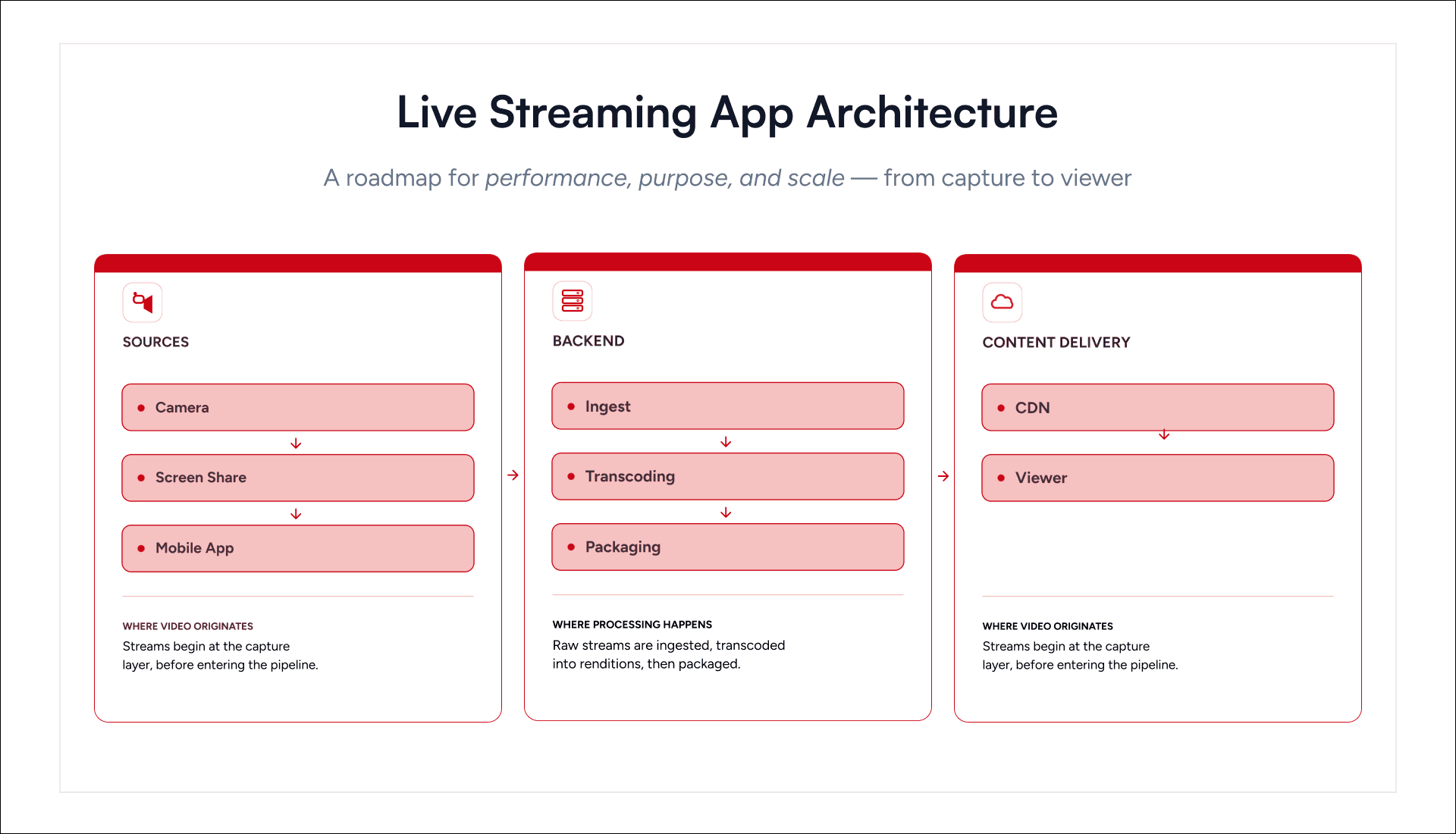
This architecture works best when anchored by three key components:
- A streaming server, which ingests and processes incoming video feeds.
- A transcoder, which reshapes the media into multiple quality tiers for seamless playback.
- A CDN (Content Delivery Network)—which distributes those streams globally, caching intelligently to reduce load time and buffering.
The business side rides on a logic and billing layer, handling everything from user subscriptions to access control and personalized content suggestions.
If you are building a scalable alternative to YouTube Live or Twitch, this is your architectural playground. But remember: assembling it requires judgment. Plug-and-play tools like NodeMediaServer work for lightweight pilots; enterprise-grade builds demand modular, cloud-native stacks.
One-to-One Video Chat: Direct, Encrypted, and Immediate
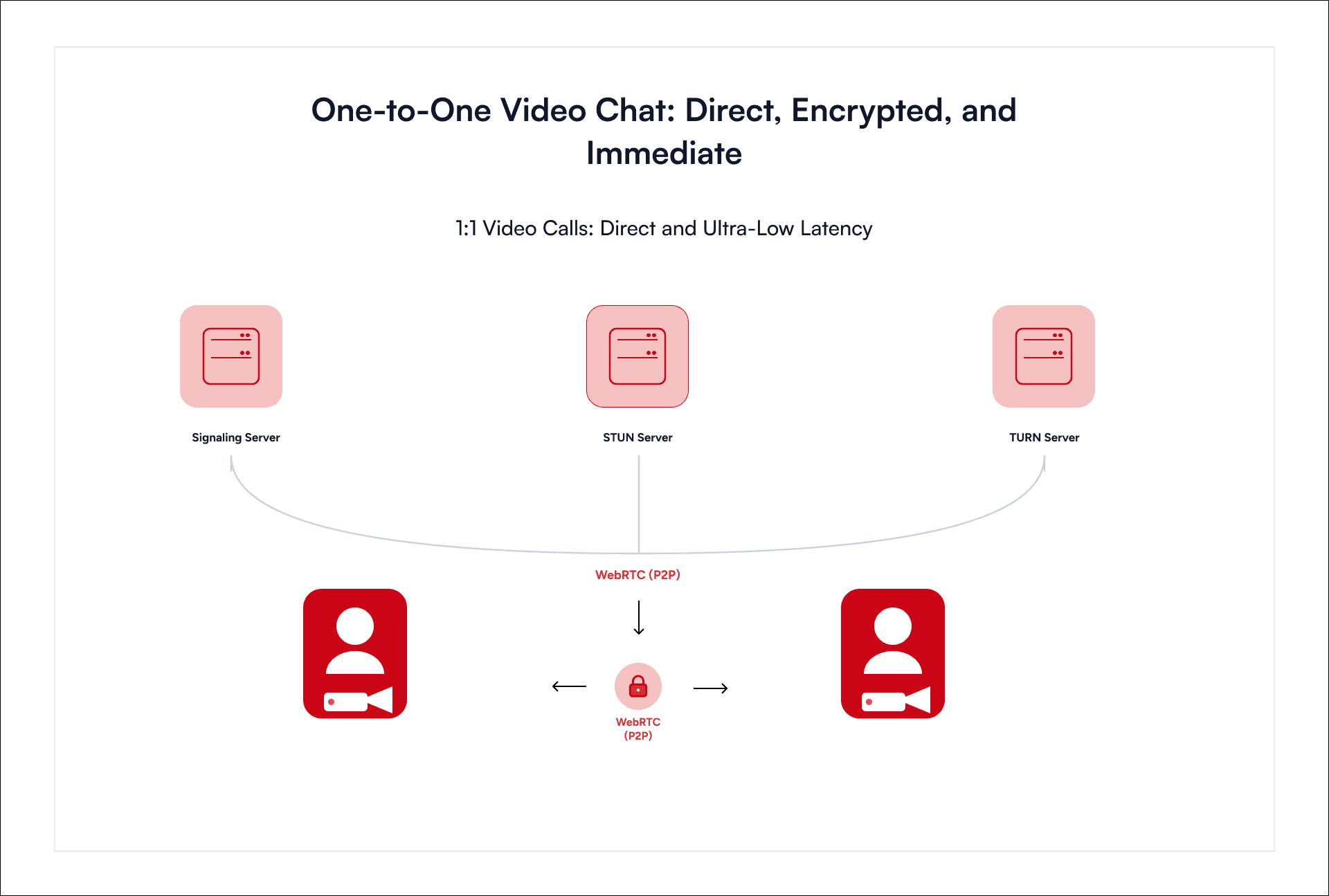
If your customers complain about lag in 1:1 coaching calls, or if your therapists lose clients due to unreliable video, it is an architecture issue
This is where WebRTC in P2P mode shines. The connection is direct. No server stands in the middle. You deliver ultra-low latency with minimal overhead.
To make this work reliably, you must incorporate:
- Signaling server for call setup and negotiation,
- STUN server to traverse firewalls,
- TURN server for relay fallback—especially in strict network environments like banking, healthcare, or mobile carriers.
Here, architecture must anticipate real-world chaos: mobile networks with NAT, corporate firewalls with anti-spoofing policies, and unpredictable device hardware. A tightly engineered backend with lightweight signaling and intelligent relay logic ensures stability and privacy where it matters most.
Do not overbuild. But never under-engineer. In a one-on-one chat, the call either works instantly, or the product fails.
Video Conferencing Platforms: The Art of Scaling Conversation
If your product vision includes team collaboration, multi-participant webinars, or virtual courtrooms, you are stepping into the architecture of real-time coordination at scale. And nothing handles that better than WebRTC with SFU.
Unlike P2P, where every participant connects to everyone else, or MCU, where the server does all the media mixing (and burns your cloud budget), SFU (Selective Forwarding Unit) finds the balance.
Participants send one stream. The SFU intelligently routes it to others. No transcoding. No bloat. And when paired with simulcast, the SFU adapts stream quality in real-time, based on device power, network strength, and user behavior.
This is about performance that adapts dynamically.
Support that with:
- Node.js or Go (Golang) to establish faster connection between participants before audio and video streaming begins.
- Java (Spring Boot) for robust orchestration, compliance, and integrations,
- Python for AI features like real-time transcription, emotion detection, and smart layouts.
Leading SDKs like Agora, Twilio, and Zoom SDK offer solid foundations, but the real innovation happens in how you extend them. Layer in your logic. Build your user flows. Architect for the nuance of your vertical.
Because a Zoom clone is not the future. A vertical-specific, AI-powered, UX-refined video platform is.
Architecture Is the Strategy
The choice of architecture is a declaration: what your product stands for, who it serves, and how it will grow. A live conferencing app platform needs reach. A one-to-one chat tool needs trust. A conferencing solution needs coordination without chaos.
Architecture is your product’s DNA. It shapes how it performs, scales, and earns user trust.
How to Create a Video Conferencing App Like Zoom with AI Integration in the USA?
When teams cannot connect clearly, businesses slow down. Generic video apps struggle with noise, privacy, and scale. What the market needs now is not another Zoom, but a smarter, faster, and industry-aware alternative.
This guide is built for product owners, startup founders, and innovation leads in industries where generic tools fall short—healthcare, education, enterprise SaaS, law, and events. If your users demand trust, compliance, or performance, this is your roadmap.
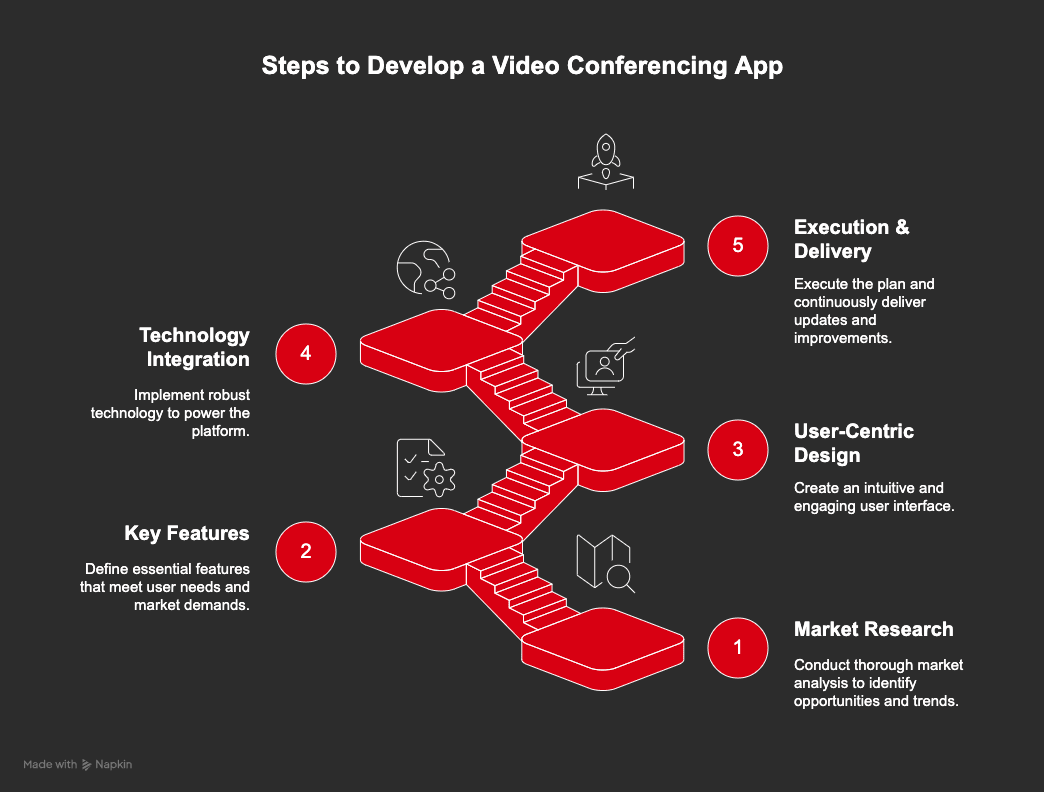
1. Market Research and Planning
A successful product begins with clarity and purpose. Before development, founders and product leaders must understand the landscape and commit to a direction grounded in user needs.
Study the Competition
Evaluate platforms such as Zoom, Microsoft Teams, and Google Meet. Examine their strengths, weaknesses, user feedback, and pricing models. Identify opportunities to provide better performance, more relevant features, or deeper integration.
Understand the Audience
Clarify who the platform is for—enterprises, educators, healthcare providers, event organizers, or specialized services. Define the user environment, workflows, and frustrations to guide every feature and design decision.
Define Features and Intelligent Capabilities
Establish a strong foundation: HD video and audio, group calls, chat, scheduling, screen sharing, and recording. Then elevate the experience:
- Remove background noise with precision
- Transcribe and translate speech in real time
- Generate meeting summaries and action items instantly
- Focus automatically on active speakers
- Detect gestures to support non-verbal feedback
Prepare for Scale and Ensure Security
Architect the platform to support thousands of concurrent users. Integrate robust authentication, encryption, and access control. Align with global privacy laws, including GDPR, HIPAA, and CCPA.
Design a Revenue Model
Select a monetization path that aligns with your audience: subscription, usage-based pricing, freemium tiers, or API licensing.
2. Key Features That Matter
Modern video conferencing demands more than just video and audio—it must feel effortless, intelligent, and adaptive. At its core, the platform must offer a smooth, secure, and collaborative experience that works every time. Users should never think about the tools—they should focus on the conversation.
Here are the essentials your product must deliver:
- HD video and audio with reliable group support
- Scheduling, calendar integration, and meeting reminders
- Screen sharing, in-call chat, and file exchange
- Whiteboarding for real-time collaboration
- Participant controls, waiting rooms, and host tools
- End-to-end encryption and seamless cross-platform access
To rise above the noise, integrate AI where it adds real value—quietly solving problems, enhancing clarity, and anticipating user needs.
- Real-time transcription and translation
- Automated meeting summaries and action items
- AI-powered noise suppression and voice isolation
- Smart speaker tracking and gesture recognition
- Engagement analytics and sentiment detection
- Virtual backgrounds, filters, and adaptive streaming
- Augmented reality for annotations and VR for immersive meetings
Build what people rely on daily—but make it smarter, faster, and surprisingly human.
3. Design That Supports Users
Design drives behavior. A clear, well-structured interface improves every user interaction. Map the ideal user journey—from account creation to the post-call summary. Use this map to shape a product that feels intuitive, efficient, and intelligent.
Ensure the interface:
- Place controls exactly where users expect them
- Adapts seamlessly to desktop, tablet, and mobile
- Reflects your brand through typography, color, and motion
- Meets accessibility standards for all users by the use of screen-reader-friendly labels
- Provide live captions and implement keyboard navigation.
4. Technology That Powers the Platform
Select tools and architecture that offer performance, flexibility, and speed.
Frontend Development | Backend Development | Databases & Sync | Media & SDKs | AI & ML Tools | Security Stack | Cloud & DevOps |
Web: React, Vue, Angular Mobile: Flutter, React Native, Swift, Kotlin Desktop: Electron, Native (Windows/macOS) | Node.js (real-time signaling) Python (AI services, orchestration) Java (logic, compliance) | MongoDBCassandra PostgreSQL Firebase (real-time sync) | WebRTC (core) Twilio, Agora, Zoom SDK, Vonage, ZEGOCLOUD | Model Building: TensorFlow, PyTorch NLP: Hugging Face, spaCy Computer Vision: OpenCV, MediaPipe, Speech-to-Text: AWS Transcribe, Google Cloud Speech | DTLS, SRTP OAuth2, JWT RBAC Regular audits | AWS, Azure, GCP Kubernetes Jenkins, GitLab, GitHub Actions Prometheus, Grafana |
5. Execution and Continuous Delivery
Launch with speed, precision, and flexibility. Build fast, test thoroughly, and improve constantly.
- Automate testing and deployments
- Integrate AI agents to assist with code, prediction, and optimization
- Collect real user feedback and apply improvements in real-time
Great video conferencing app platforms emerge when creators address clear problems with a purpose. Success belongs to teams that build trust, act decisively, and design with vision. Choose architecture that scales. Choose intelligence that adapts. Choose to lead by solving what others overlook.
Key Features of a Next-Gen AI Video Conferencing App
A modern AI-integrated video conferencing app platform must do more than connect voices—it must empower teams, protect conversations, adapt in real time and think innovatively to solve interesting problems. From high-stakes boardrooms to virtual classrooms, the right features can turn meetings into momentum.
Advanced Video Conferencing: Smarter, Sharper, More Human
Video calls are no longer just face-to-face—they are AI-fueled, AR-enhanced, and VR-immersed. The future is interactive, intelligent, and immersive.
1. Smarter with AI
- Clearer Conversations: Noise vanishes. AI filters barking dogs, typing, and echoes—leaving only your voice.
- Live Transcripts & Captions: Every word appears in real time. Ideal for accessibility and searchable notes.
- Multilingual Meetings: Real-time translations make global teamwork effortless.
- Auto Summaries: Key points, decisions, and to-dos—AI handles it before the meeting ends.
- Smart Framing: AI tracks the speaker, centers the team, and mimics pro camerawork. Think Owl Labs in action.
- Emotion & Engagement Detection: Gauge mood and attention instantly.
- Next-Gen Visuals: No green screen needed—realistic virtual backgrounds and expressive avatars included.
- Gesture Controls: Thumbs up, hand raises—non-verbal cues made seamless.
- Adaptive Streaming: Smooth quality, even on shaky networks.
- Smart Scheduling: AI finds the right time and sends invites.
- Meeting Analytics: Who spoke, who listened, what mattered—get insights that improve.
- Live Moderation: AI flags inappropriate content in real time.
2. Immersive with AR/VR
- AR Collaboration: Draw, annotate, and interact with 3D models in real-time.
- VR Meeting Spaces: Step into digital offices, auditoriums, or creative zones—avatars and spatial audio bring realism.
- Hybrid Flexibility: Join in VR or via desktop—everyone gets the same immersive feel.
Do not just host meetings. Elevate them.
With AI, AR, and VR, your video calls become smarter, more natural, and more impactful.
Cost Breakdown of Building a Video Conferencing App (with AI Integration)
The cost of developing a video conferencing app like Zoom, Google meet with AI integration varies significantly based on complexity, features, chosen tech stack, development team location, and ongoing maintenance.
Estimated Timeline:
- Basic App (MVP): 4-6 months
- Mid-level App (with core AI): 8-10 months
- Advanced App (with comprehensive AI, AR/VR): 12-18+ months
Investment Blueprint: From Concept to Launch
Every successful product begins with insight and ends in seamless execution. Below is a clear, phase-based cost model for a full-featured, AI-powered video conferencing platform:
Phase | Cost (USD) | % of Total | Focus |
Discovery & Planning | $5 K–$15 K | 3–5% | Market research, competitor analysis, technical feasibility |
UI/UX Design | $15 K–$40 K | 8–12% | Wireframes, interactive prototypes, responsive visual layouts |
Frontend Development | $50 K–$150 K+ | 25–35% | Multi-platform UI, video SDK integration, real-time UX |
$60 K–$200 K+ | 30–40% | APIs, SFU/MCU setup, security, multi-region scaling | |
AI/ML Integration | +$30 K–$100 K+ | 15–25% (dev) | Voice-to-text, smart framing, translation, sentiment analysis |
$15 K–$40 K | 8–12% | Functional, security, performance testing across devices | |
Project Management | $10 K–$30 K | 5–8% | Sprint oversight, coordination, stakeholder alignment |
Total Development | $185 K–$585 K+ | 100% | Core build (excluding ongoing costs) |
- Cloud infrastructure: $10 K–$50 K+/year
- SDK/API usage: $5 K–$50 K+/year
- Ongoing maintenance: 15–20% of dev cost annually
Note: These figures are estimates assuming a moderate user load. Actual costs can fluctuate based on specific requirements, team size, and geographical location of the development team. High concurrency can drive up both SDK and infra expenses
Regional & AI-Specific Pricing Comparison for Video Conferencing Apps
Ambition requires direction. Building a video conferencing app platform with AI demands strategic rigor, precise execution, and clear financial discipline. Whether replicating Zoom or surpassing it, this journey demands both engineering excellence and fiscal clarity.
Scaling video with AI demands that every technical choice earns its cost and justifies user trust.
Aim for speed, but maintain precision. Every month saved matters—every compromised feature does too.
Location Drives Cost — Choose Wisely
Region | Hourly Rate (USD) | Total App Cost | Insight |
US | $65–$150+ | $300 K–$8000 K+ | Top-tier AI/WebRTC talent; speed and quality |
UK | $45–$95 | $200 K–$5000 K+ | Mature market with controlled costs |
Eastern Europe | $30–$60 | $120 K–$3000 K+ | Strong engineering depth at competitive rates |
India | $20–$45 | $120 K–$1000 K+ | Cost-effective with a large talent ecosystem |
Geography affects budget and depth of AI expertise. Choose based on product complexity and timeline.
AI Amplifies Cost and Value
AI embeds differentiation—but at a cost. Here are the key investment points:
- Commercial SDKs/APIs: Google Cloud AI, AWS Transcribe, Rekognition (billed per minute/text/image)
- Zoom Add-Ons: Avatars ($22/mo), Docs ($8.99/mo), AI Sessions ($99+/mo)
- Hardware Upside: Logitech Sight ($2,199), Dell AI Monitors ($409–519)
- Custom AI Models: Can push costs beyond $250K depending on compute and data acquisition. plus high-end engineer salaries
Think of AI as a strategy layer. It advances experience, builds trust, and carves out a competitive advantage.

Optimize Cost and Time Without Compromising Your Business’s Vision
Creating a video conferencing app with AI is a strategic play. Begin with an MVP focused on core features like HD video, chat, and screen sharing. Launch quickly, gather feedback, and adapt. This trims costs and validates direction.
Skip infrastructure headaches by using proven SDKs like Agora, Twilio, or Zoom Video SDK. They offer plug-and-play real-time capabilities and basic AI tools, accelerating development while ensuring stability.
Lean into open-source AI libraries. Tools like RNNoise (noise suppression), Whisper (transcription), and OpenCV (vision tasks) cut licensing costs and enable fine control. Deploy them with serverless architectures (AWS Lambda, GCP Functions) to eliminate idle costs and auto-scale as needed.
Use modular design and cross-platform frameworks like Flutter or React Native. Code once, deploy everywhere. Pair this with agile sprints to stay focused, release fast, and reduce rework.
Select a cloud provider that aligns with scale and AI ambitions. Consider outsourcing to regions like India or Eastern Europe for skilled teams at strategic rates—but only partner with experts in AI and WebRTC.
Optimization is about sharper decisions, smarter tools, and momentum that compounds. Build lean. Build fast. Build with intent.
How GeekyAnts Builds Fully Customizable AI-Powered Video Conferencing Apps That Perform at Scale
At GeekyAnts, we engineer intelligent, real-time video applications tailored for next-gen collaboration. From building low-latency video infrastructure to embedding advanced AI capabilities, we bring the full stack of expertise needed to create conferencing platforms that adapt, learn, and elevate digital interaction.
We architect scalable, intelligent systems—designed to thrive in dynamic environments, integrate across tech stacks, and deliver lifelike communication experiences.
Our Work in AI-Powered Video Communication
We partner with enterprises, startups, and product teams to build video app platforms with deeply integrated intelligence:
Real-Time Communication Engineering –
End-to-end development using WebRTC, Twilio, Agora, and Zoom SDK. We optimize signaling, STUN/TURN architecture, and network resilience for global video delivery.
AI Feature Integration
– We implement and train models for noise suppression, live transcription, speaker tracking, smart framing, and real-time meeting summaries using TensorFlow, PyTorch, and leading cloud AI APIs.
Custom-Branded Video Platforms –
Fully customizable platforms with tailored workflows, bespoke UI/UX, and industry-specific integrations across healthcare, education, enterprise, and media.
Each solution is built to scale securely, iterate rapidly, and support advanced personalization.
Case Study: How Did GeekyAnts Enhance 100ms’s Video Conferencing Platforms with React Native SDK Integration?
A video communications infrastructure provider partnered with GeekyAnts to enhance its mobile application experience by integrating video conferencing SDK capabilities into a React Native-based application. The engagement focused on implementing real-time communication features, improving mobile functionality, and enabling smoother interactions through native integrations.
The project involved building a React Native package to support essential video conferencing features, including joining and leaving rooms, muting and unmuting partticiapnts, chat messaging, role changes, audio controls, recording, and streaming capabilities. GeekyAnts also developed a React Native bridge to connect native Android and iOS functionality using Kotlin and Swift, ensuring seamless communication between the SDK and the mobile application.
The Future Will Not Wait. Build It.
The shift to remote collaboration is permanent. Virtual communication has moved beyond convenience—it now defines how teams operate, decisions unfold, and business scales. Building a custom video conferencing app similar to Zoom is a strategic lever for competitive advantage.
Businesses that lead do not settle for generic solutions. They build platforms that reflect their purpose, anticipate user needs, and embed intelligence into every interaction. With the right strategy, precision engineering, and AI at the core, your vision can shape the next era of human connection. The opportunity is to redefine what comes after.
Let us build what tomorrow demands—today.