


Why Design JSON Gets Complicated in Production
You already have a well-defined JSON document for a designed card.
It might come from Canva, a Canva-like editor, or any canvas library that exports nodes with positions, sizes, images, text, videos, and links. The JSON is not the hard part. The hard part is what product asks for next:
Turn that JSON into a live UI card where regions are clickable / redirectable, videos play in the right place, the card can animate (flip, scale, snap), a list of many cards still feels smooth, and media behavior is correct, mute by default, unmute after gesture, play on hover or only the active card plays.
A demo with one card is easy. Production is a feed:
- Dozens of cards may be reachable in one session
- Every card wants fidelity
- Every video wants a decoder
- Every click competes with card animation and scroll
If you “just render the whole JSON tree” with a heavy design runtime (full canvas/SVG scene graph per card), the first card looks perfect and the tenth card makes the list lag. If you flatten everything to a static image, the list is smooth and interactivity dies.
This article is about the custom architecture we used to keep both: authored fidelity in a high-cardinality list, without dropping an editor engine into every cell.
The goal is not “draw JSON to the screen.” It is: build interactive, animated, video-capable cards from design JSON, with custom code, without letting the feed collapse.
Why a Dedicated Architecture is Necessary
Design JSON looks renderable until production constraints show up:
- List cost is multiplicative: Rehydrating every shape/text/image node per card is fine for an editor, expensive for a carousel of twenty cards.
- Clicks fight animations: If the card flips on press, and a CTA also lives on the card, event ownership must be explicit.
- Video is a budget: Autoplay policies, audio focus, and decoder limits mean “play everything visible” is not a strategy.
- Most of the design is static: Backgrounds, typography, and photos usually do not change after export. Rebuilding them at list-bind time is wasted work.
- Mute/unmute is product behavior: Browsers block unmuted autoplay; users still expect sound after the first gesture, without audio leaking from off-screen cards.
- Cache the wrong thing and you thrash: Either you re-download and remount constantly, or you keep too many live players alive.
Those constraints are why we stopped treating “render the design JSON” as one function, and split the problem into bake, extract, composite, schedule, and virtualize.
What we Tried First (and What Broke)
We did not start with a hybrid compositor. We shipped the obvious approach first: rehydrate the full design JSON into a live scene graph per card (canvas/SVG-style runtime) inside the list.
Field observations
Experiment attempt | What we expected | What actually happened |
Full JSON → scene graph per card | Pixel-perfect fidelity in the feed | First 1–2 cards fine; under our Chrome profile (~40 nodes/card, 30-card list), scroll accumulated multi-hundred-ms scripting by the time ~8–12 full runtimes were mounted (see benchmark) |
Let every mounted card autoplay video | “Alive” feed | Decoder contention + audio leaks from off-center cards |
Rely on the design runtime for clicks | CTAs “just work” | Card flip/animation handlers raced link taps; suppress was unreliable |
Remount cards as the window moved | Lower memory | Remount flicker + repeated image/video setup while scrubbing nearby |
One cache for “everything about the card” | Simpler code | Playing state leaked across cards; reopen/remount felt broken |
The cut we made after those failures
Cut from the feed | Kept |
Live rehydration of static shapes/text/images | Design JSON as source of truth for behavior |
Design-engine runtime inside list cells | Baked static image as the visual base |
Play-on-mount | Explicit play schedule (hover or active-card) |
Implicit hit handling inside the design engine | Custom overlay hit boxes + suppress-flip flag |
One mega-cache | Separate caches for images, JSON, overlays, players, gesture |
Practitioner takeaway: if most pixels are fixed at export time, rehydrating them on every list bind is not fidelity, it is wasted work. The hybrid model is what remained after measuring that.
The Architecture: Bake, Extract, Composite, and Schedule
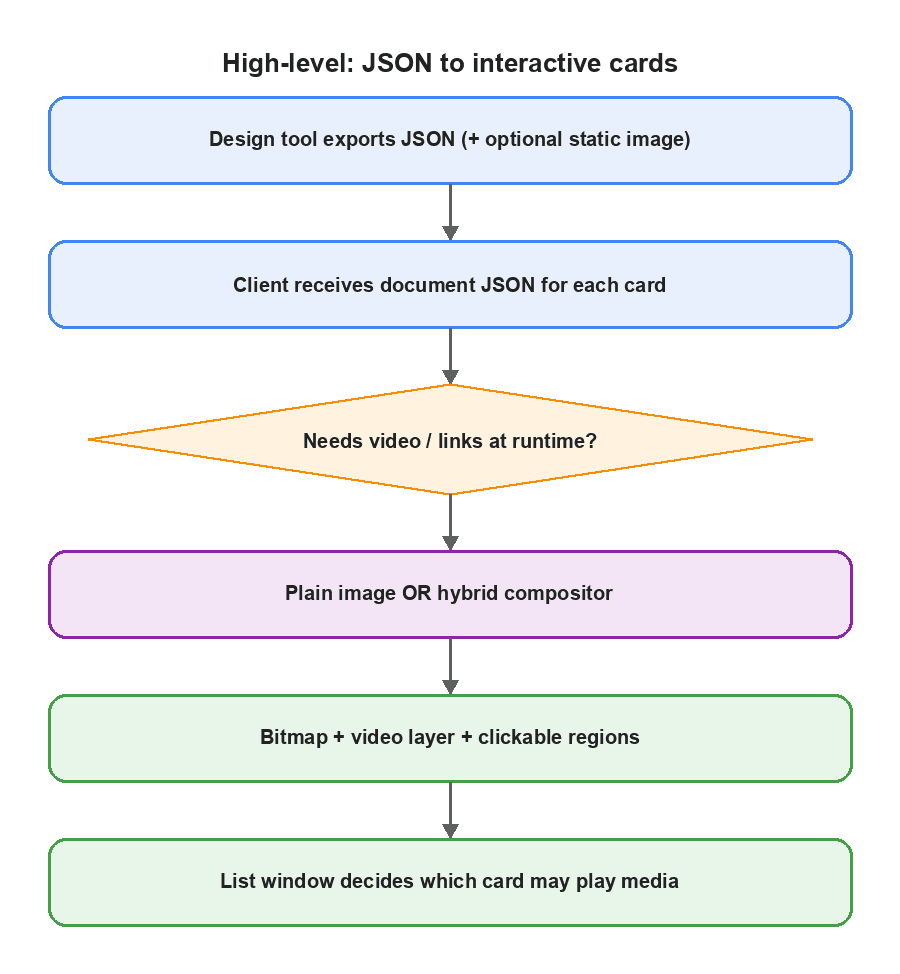
Think in layers:
Layer | What it is | Why |
Static base | A baked image of the designed card (or a cheap image export) | Carries 90%+ of visual fidelity for free |
Design JSON | Source of truth for bounds + behavior | Only used for what must run at runtime |
Overlay runtime | Videos + clickable hit regions | Custom DOM/native views, not a full design engine |
List policy | Mount window + play policy | Keeps scroll near interactive frame rates |
Media policy | Mute-first; gesture = unmute hint; prefer explicit unmute; hover or active-card play | Matches browser autoplay reality |
JSON can come from anywhere that can describe a tree of nodes with transforms and assets: Canva export, an internal canvas editor, Figma plugin output, etc. The client architecture does not care which tool authored it, as long as the schema is stable.
1. Where the JSON comes from (and what you should export)
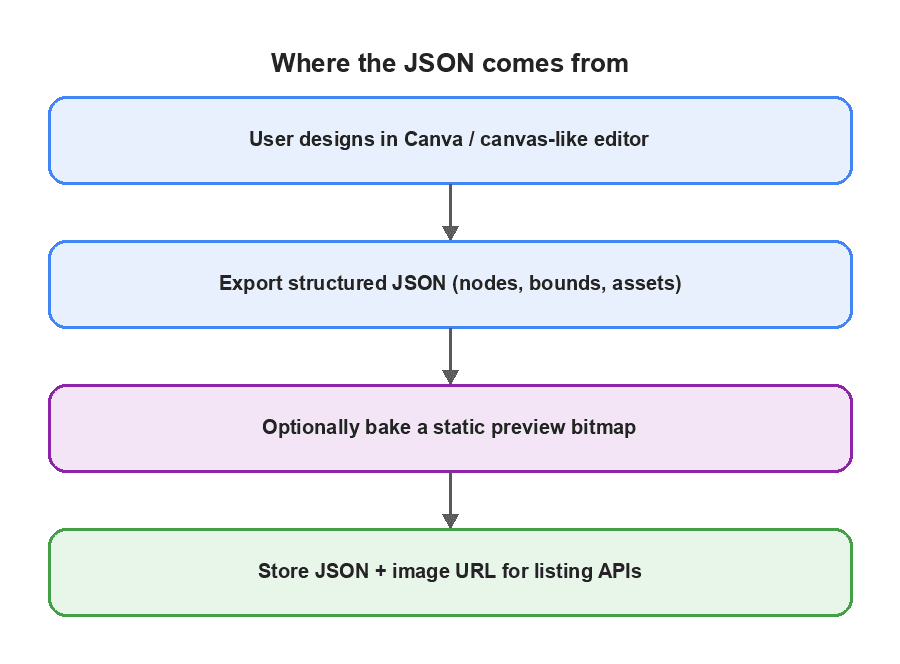
A useful export usually includes:
- canvas / page width, height
- a tree of items: rect, text, image, video, group, …
- per-item transform (x, y, rotation/scale if needed)
- asset URLs for images/videos
- link fields on buttons, text, or groups
Optionally, and this is the production unlock, also export a static preview bitmap of the finished design.
// Illustrative schema (yours will differ)
type DesignDocument = {
  width: number;
  height: number;
  items: DesignItem[];
  previewImageUrl?: string; // baked PNG/JPEG of the card face
  hasInteractiveContent?: boolean; // videos or links present
};

type DesignItem =
  | {
      type: 'video';
      x: number;
      y: number;
      width: number;
      height: number;
      src: string;
      loop?: boolean;
    }
  | {
      type: 'text';
      x: number;
      y: number;
      width: number;
      text: string;
      url?: string;
    }
  | {
      type: 'group';
      x: number;
      y: number;
      link?: string;
      children: DesignItem[];
    }
  | { type: 'image' | 'rect' | string /* … */ };
Why bake an image at all? Because most nodes only contribute static visuals. If you already have a correct raster of the design, list rendering becomes “show image + attach behavior,” not “re-layout a design tool in every cell.”
If your exporter cannot bake an image yet, you can still rasterize once on the server or in a headless render step after publishing. The important idea is: do static work once, outside the scroll path.
2. Extract only what must run at runtime
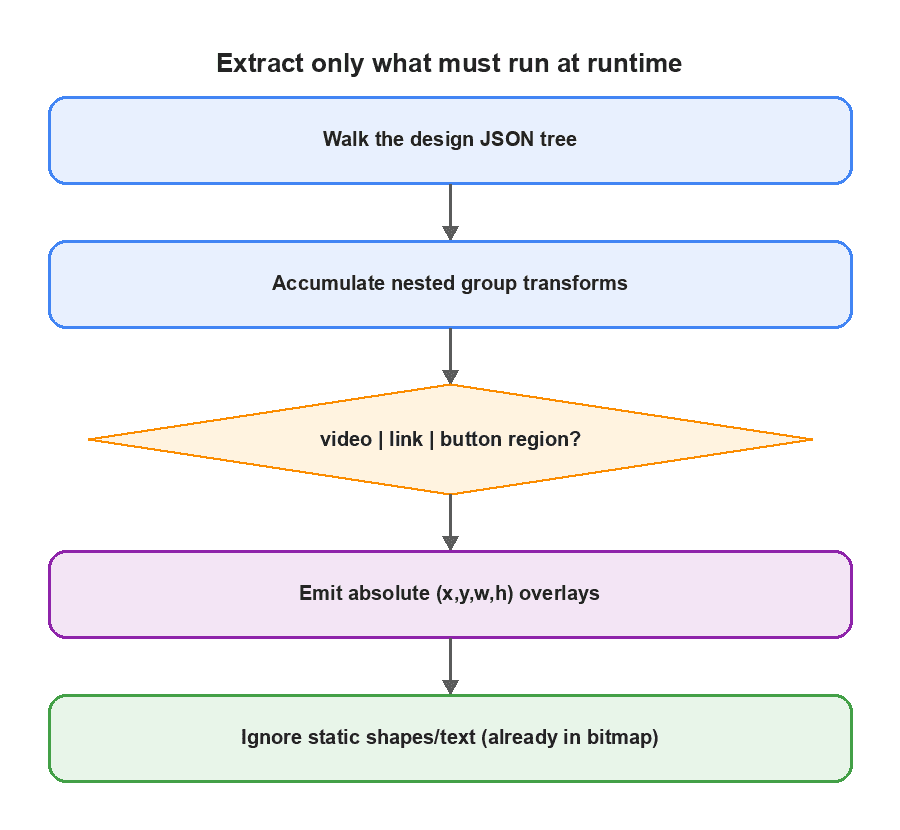
Browse-time code should not recreate the whole design. Walk the JSON and emit a flat list of interactive overlays:
- videos → media overlays
- nodes with URLs → link hit boxes
- groups with links → one hit box over the group bounds
Ignore static shapes/text/images if they are already in the bitmap.
What This Overlay Mapping Supports and What It Doesn’t
The examples below assume axis-aligned translation (and optional uniform parent scale) for overlay placement: nested group offsets accumulate as ox/oy, then map into the card with the contain-fit math in §3.
Scoped out of this article’s production recipe (unless you extend the mapper):
- non-zero rotation on videos/links/groups
- non-uniform scaleX/scaleY that changes hit geometry
- skew / arbitrary matrices
- transformed groups whose children need oriented (rotated) hit regions
If your Canva-like export commonly emits rotated interactive nodes, either bake those interactions into the bitmap as non-interactive paint, or compute a full affine transform and oriented bounding box, do not silently use left/top/width/height axis-aligned boxes.
type Overlay =
  | {
      kind: "video";
      x: number; y: number; width: number; height: number;
      src: string; loop?: boolean; muted?: boolean;
    }
  | {
      kind: "link";
      x: number; y: number; width: number; height: number;
      url: string;
    };

function extractOverlays(items: DesignItem[], ox = 0, oy = 0): Overlay[] {
  const out: Overlay[] = [];
  for (const item of items) {
    if (item.type === "group") {
      const x = ox + item.x;
      const y = oy + item.y;
      out.push(...extractOverlays(item.children, x, y));
      if (item.link) {
        // compute bounds from children or explicit group size
        out.push({ kind: "link", x, y, width: /*…*/, height: /*…*/, url: item.link });
      }
      continue;
    }
    if (item.type === "video") {
      out.push({
        kind: "video",
        x: ox + item.x,
        y: oy + item.y,
        width: item.width,
        height: item.height,
        src: item.src,
        loop: item.loop,
      });
    }
    if ("url" in item && item.url) {
      out.push({
        kind: "link",
        x: ox + item.x,
        y: oy + item.y,
        width: item.width,
        height: /* text/image height */,
        url: item.url,
      });
    }
  }
  return out;
}
Why this exists in production: extraction cost scales with interactive nodes, not with every decorative rectangle in the design.
3. Hybrid compositor: image + video + click targets
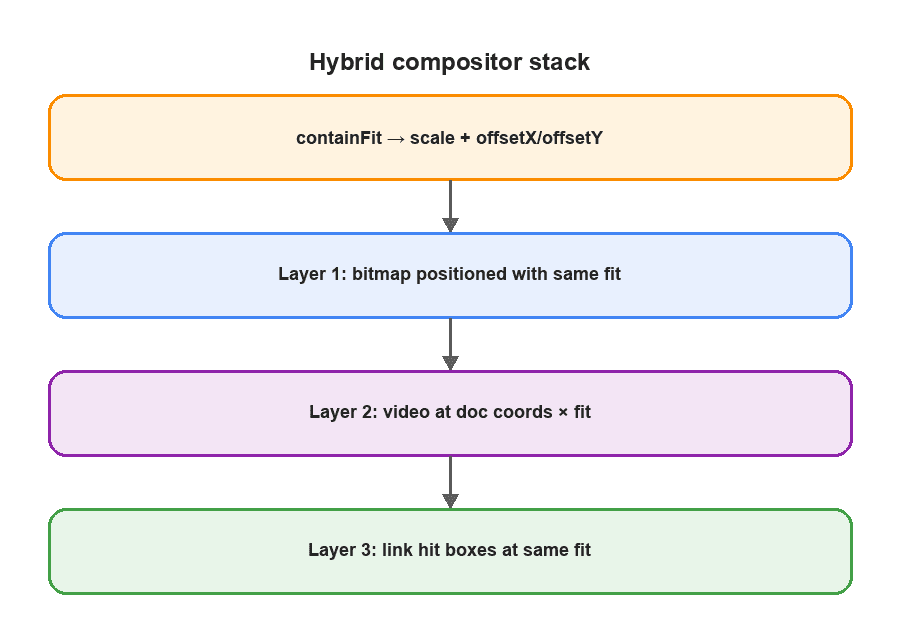
Contain-fit mapping (scale and letterbox offsets)
object-fit: contain (or equivalent) scales the bitmap uniformly and centers it. Using only Math.min(cw/docW, ch/docH) for overlay left/top is unsafe when the container aspect ratio differs from the document: the image is letterboxed, so overlays must apply the same X/Y offsets as the painted bitmap.
type Fit = {
  scale: number;
  offsetX: number; // letterbox / pillarbox
  offsetY: number;
  contentW: number;
  contentH: number;
};

/** Match CSS object-fit: contain for a document inside a card box. */
function containFit(docW: number, docH: number, boxW: number, boxH: number): Fit {
  const scale = Math.min(boxW / docW, boxH / docH);
  const contentW = docW * scale;
  const contentH = docH * scale;
  return {
    scale,
    offsetX: (boxW - contentW) / 2,
    offsetY: (boxH - contentH) / 2,
    contentW,
    contentH,
  };
}

function styleFor(o: Overlay, fit: Fit) {
  return {
    position: "absolute" as const,
    left: fit.offsetX + o.x * fit.scale,
    top: fit.offsetY + o.y * fit.scale,
    width: o.width * fit.scale,
    height: o.height * fit.scale,
  };
}
Prefer sharing one layout root so image and overlays cannot drift:
function InteractiveCard({ doc, width, height }: Props) {
  const overlays = useMemo(() => extractOverlays(doc.items), [doc]);
  const fit = containFit(doc.width, doc.height, width, height);

  return (
    <div style={{ position: "relative", width, height, overflow: "hidden" }}>
      {/* Position the bitmap with the SAME fit math as overlays (avoid relying on
          object-fit alone unless you also read the letterboxed content box). */}
      <img
        src={doc.previewImageUrl}
        alt=""
        style={{
          position: "absolute",
          left: fit.offsetX,
          top: fit.offsetY,
          width: fit.contentW,
          height: fit.contentH,
        }}
      />

      {overlays.filter((o) => o.kind === "video").map((v, i) => (
        <video
          key={i}
          src={v.src}
          loop={v.loop ?? true}
          playsInline
          muted
          style={styleFor(v, fit)}
          ref={(el) => registerVideo(el)}
        />
      ))}

      {overlays.filter((o) => o.kind === "link").map((l, i) => (
        <a
          key={i}
          href={l.url}
          target="_blank"
          rel="noreferrer"
          style={{ ...styleFor(l, fit), zIndex: 2 }}
          onClick={(e) => {
            e.stopPropagation();
            onLinkClick?.();
          }}
        />
      ))}
    </div>
  );
}
Production note: if you must use object-fit: contain on a full-bleed <img width={boxW} height={boxH}>, compute offsets from the same contain formula, or measure the content box, and feed those offsets into styleFor. Never mix “contain image” with “scale-only overlays.”
No design-library runtime required in the list. You are compositing HTML (or native views) on purpose.
On mobile, the same idea applies: one cached image, native video views, and either overlay views or a coordinate hit-test map on tap (often cheaper inside recycled cells), with the same contain-fit offsets.
4. Video: placement, mute/unmute, hover vs active-card play
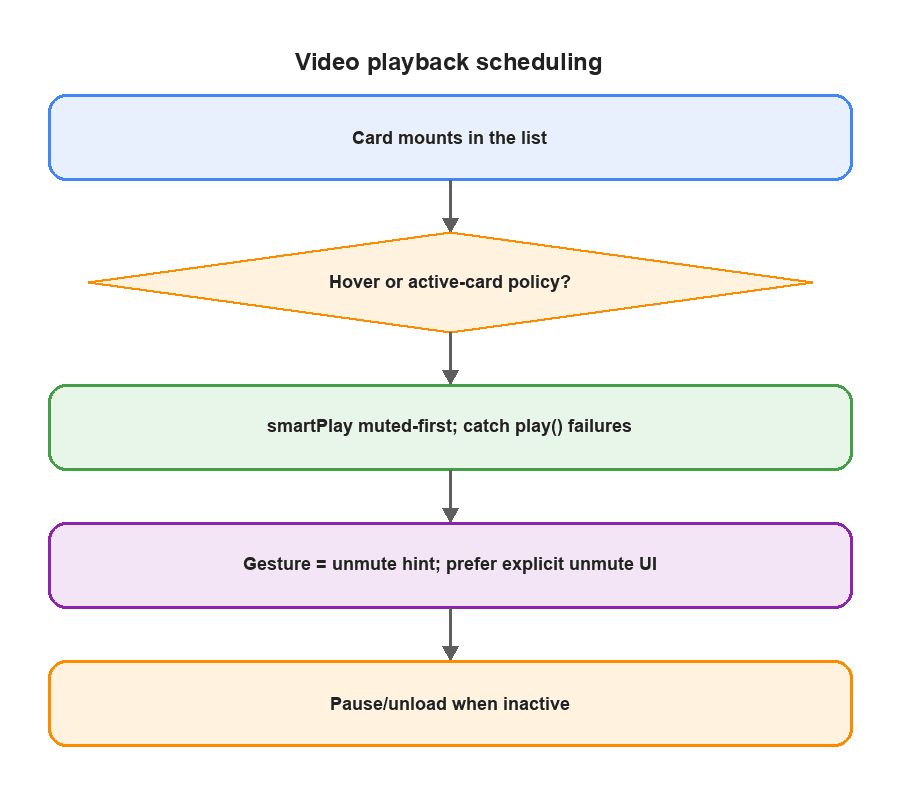
Placement
Video is a spatial problem: same rectangle as in the design JSON, mapped through containFit. You do not need timeline sync with the rest of the card. The bitmap stays still; the clip loops in its hole.
Mute / unmute (browser reality qualified)
Mute-first playback is sound guidance. A stored “user has gestured” flag is not a universal license for future audible autoplay:
- Browser autoplay policies differ (Chrome, Safari, iOS WKWebView, Firefox) and can still reject audible play() even after a prior gesture, especially across navigations, new media elements, or when the gesture is not considered tied to that media.
- Treat localStorage / session “gestured” as a hint to attempt unmute, not as permission.
- Always keep the play() failure path (catch → force muted → retry muted).
- Prefer an explicit user-controlled unmute control on the active card (tap speaker / “tap for sound”) when audible playback matters for UX trust.
const activeVideos = new Set<HTMLVideoElement>();

async function smartPlay(video: HTMLVideoElement, preferUnmuted: boolean) {
  activeVideos.add(video);
  video.muted = !(preferUnmuted && userHasGesturedHint());

  try {
    await video.play();
  } catch {
    // Autoplay / audible policy may still reject , fail closed to muted.
    video.muted = true;
    try {
      await video.play();
    } catch {
      // Leave paused; UI can show a play/unmute affordance.
    }
  }
}

function tryUnmuteActiveAfterGesture() {
  markGesturedHint();
  activeVideos.forEach((v) => {
    if (v.paused) return;
    v.muted = false;
    v.play().catch(() => {
      v.muted = true; // policy rejected audible playback
    });
  });
}

// Preferred when sound is important:
function onUnmuteButtonClick(video: HTMLVideoElement) {
  markGesturedHint();
  video.muted = false;
  video.play().catch(() => {
    video.muted = true;
  });
}
Never unmute inactive/off-screen cards (audio leaks feel like bugs), regardless of gesture state.
Play policy: pick one (or both by surface)
Policy | When to use | Rule |
Active-card play | Carousels / snap lists | Only ' |
Hover-to-play | Desktop grids |
|
Visible face only | Flipping cards | Play the face the user sees; pause the hidden face |
// Active-card example
useEffect(() => {
  if (isActive) playAll(cardVideos);
  else pauseAll(cardVideos);
}, [isActive]);

// Hover example
<div onMouseEnter={() => playAll(cardVideos)} onMouseLeave={() => pauseAll(cardVideos)}>
  <InteractiveCard … />
</div>
Production rule: mounting a card must not mean decoding. Play is a schedule, not a side effect of render.
5. Card animation without breaking clicks
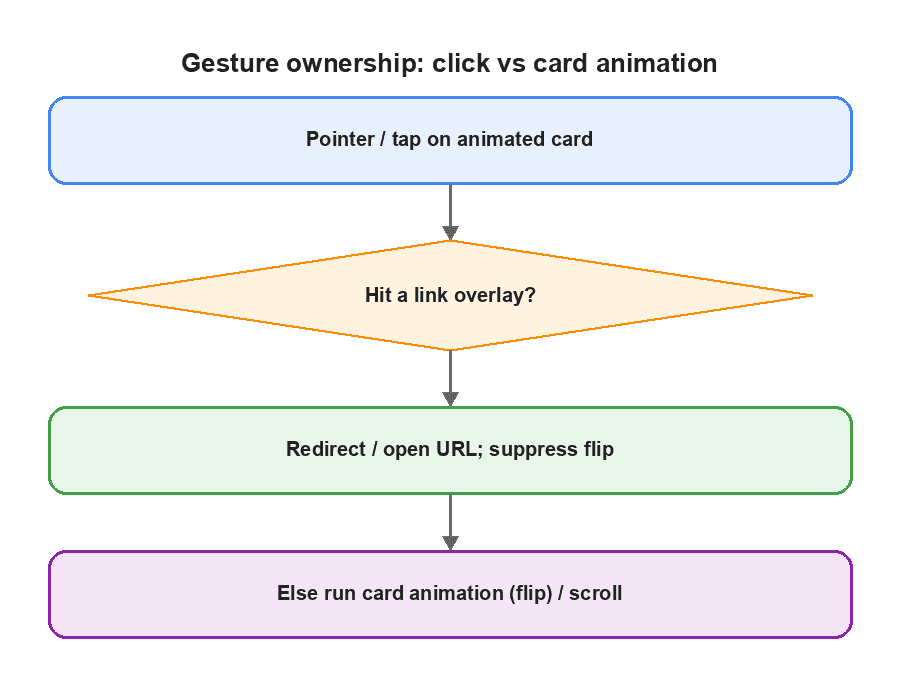
Cards often flip, scale, or snap. That animation layer will steal taps if you are not careful.
Custom pattern that works:
- Card container listens for “flip/open” gestures
- Link overlays call stopPropagation() and set a suppress-next-flip flag
- Card handler checks the flag before animating
const suppressFlip = useRef(false);

function onCardPointerUp() {
  if (suppressFlip.current) {
    suppressFlip.current = false;
    return;
  }
  setFlipped((v) => !v);
}

// on link overlay:
onClick={() => {
  suppressFlip.current = true;
  // navigate / window
}};
If a face is hidden mid-flip, render it as image-only (no videos/overlays) so you do not pay for two live interactive faces at once.
6. No lag: list virtualization, mount windows, and caching
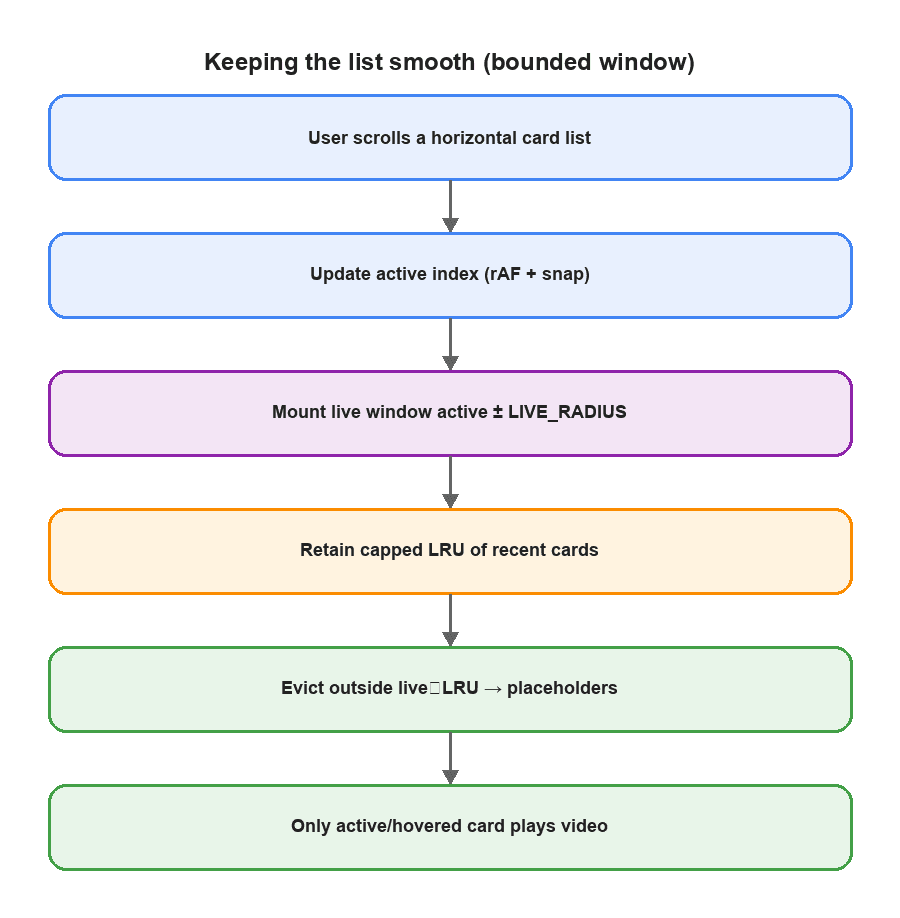
Smoothness is mostly about what you refuse to do for far cards.
Keep Only a Bounded Set of Cards Mounted
An expand-only range (once mounted, never unmount) reduces remount flicker while scrubbing nearby, but in a long session it can eventually retain most of the list and defeat virtualization. Prefer a bounded retained window with LRU-style eviction:
- Always keep a hard live window around the active index (active ± N).
- Optionally retain a small extra set of recently visited indices (LRU, capped at K) to smooth short back-and-forth scrubbing.
- Evict anything outside live ∪ retainedLRU back to placeholders / recycled shells.
- On eviction: pause media, detach players, keep image/JSON caches warm so remount is cheap.
const LIVE_RADIUS = 2;      // always mounted around active
const LRU_CAP = 6;          // recently visited extras (hard cap)
const retained = useRef<number[]>([]); // LRU order, newest at end

function indicesToMount(active: number, total: number): Set<number> {
  const live = new Set<number>();
  for (let i = active - LIVE_RADIUS; i <= active + LIVE_RADIUS; i++) {
    if (i >= 0 && i < total) live.add(i);
  }

  // touch active in LRU
  retained.current = retained.current.filter((i) => i !== active);
  retained.current.push(active);
  while (retained.current.length > LRU_CAP) retained.current.shift();

  const mount = new Set(live);
  for (const i of retained.current) {
    if (mount.size >= LIVE_RADIUS * 2 + 1 + LRU_CAP) break;
    if (i >= 0 && i < total) mount.add(i);
  }
  return mount;
}

// render:
 // i ∈ mount → InteractiveCard (image + overlays; video only if active/hover policy says so)
 // else → empty absolute placeholder (preserves scroll width)
When a short expand-only burst is still safe: e.g. during a single gesture/animation frame burst, or for a tiny catalogue (total ≤ LIVE + LRU). Do not present unbounded expand-only as the default production policy for unbounded feeds.
Clamp snap to one card at a time on aggressive flicks so index jumps do not skip content or start multiple videos.
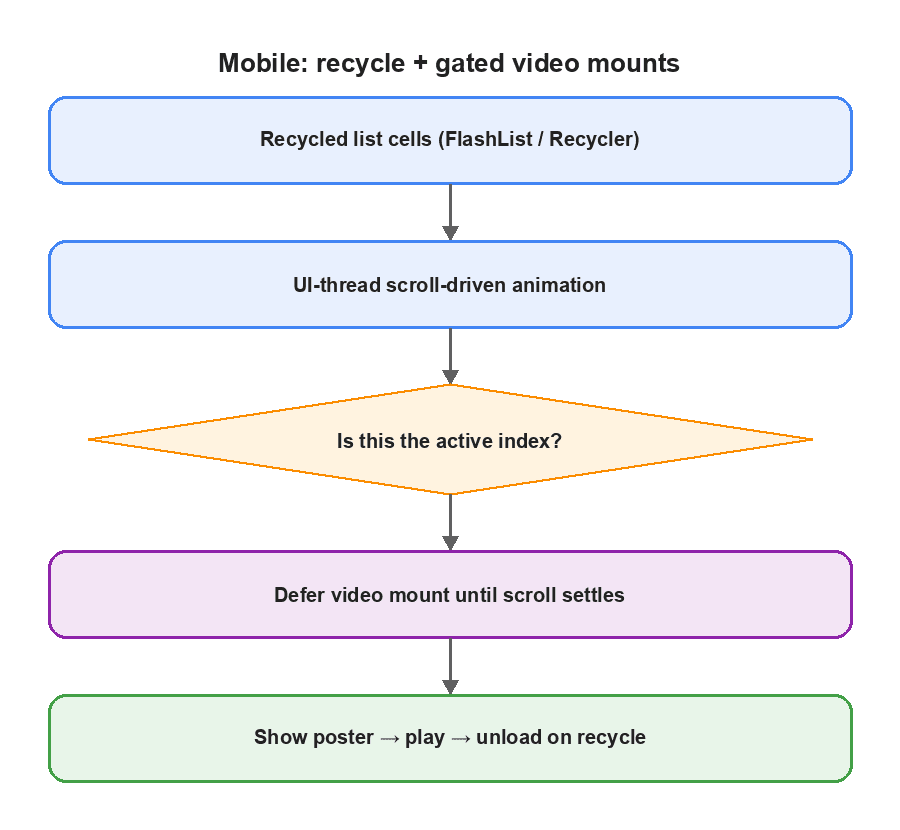
Recycled cells (mobile-shaped)
Use a recycler (FlashList, RecyclerListView, etc.):
- Recycle card shells
- Run scroll-driven scale animations on the UI thread when possible
- Gate native video mounts to the active index
- Defer player creation until scroll settles
- Show a poster/thumbnail until first frame
- Unload players on recycle
What to cache (intentionally)
Cache | Stores | Horizon | Problem it solves |
Image / CDN cache | Baked card bitmaps | Browser/CDN/disk | Avoid re-fetch/re-decode of the same face when still cached |
JSON / query cache | Design documents for visible + nearby cards | Session / React Query-like | Avoid refetch while scrubbing the list |
Overlay extract memo |
| While doc identity is stable | Avoid re-walking JSON every render |
Video element lifecycle | Players for active card only | While active | Avoid decoder storms |
Gesture hint | “user has interacted” (optional) | Session | Prefer unmuted attempt never treat as hard permission |
Do not cache “playing state” globally across all cards. Cache assets and extracted geometry; schedule playback separately. Keep image cache warm across bounded remounts so eviction stays cheap.
How the Hybrid Approach Performs Against a Full Design Runtime
Behavior | Full design runtime per card | Hybrid custom compositor |
Static visuals in a list | Rebuild node trees | One baked bitmap + overlays |
Interactivity | Entire graph live | Videos + hit boxes only |
Click vs flip | Easy to get wrong | Explicit suppress path |
Videos in a carousel | Many decoders | Hard cap: active/hovered card |
Far cards | Expensive | Placeholders / recycled shells |
Cost wording (precise)
Bitmap compositing removes dependence on the number of design nodes for paint. That is not the same as “O(1) image decode.” Decode/upload cost still depends on:
- Pixel dimensions and encoding (JPEG/WebP/PNG)
- Whether the image is already in memory/disk HTTP cache
- Platform decode path (browser vs native)
Say instead: work no longer scales with design-node count; cold decode remains image-size/cache dependent.
Reproducible micro-benchmark (example)
We re-ran a focused comparison after correcting the architecture claims. Treat this as a reproducible recipe, not a universal SLA, re-measure on your devices.
Item | Value |
Device | M2 MacBook Air, Chrome 131 (macOS) |
Card box | 400×580 CSS px |
Document | 1080×1920 design JSON, ~40 nodes, 1 looping muted MP4 (≤720p, ~3s) |
Baked face | WebP ~180–220 KB (approx), warm CDN after first fetch |
List | horizontal snap carousel, 30 cards, same document cloned |
Metrics | Chrome Performance panel + ' |
Policy | hybrid: bounded mount (' |
Observed on that setup (warm image cache, median of 5 runs):
Signal | Full JSON runtime in feed | Hybrid compositor |
Scripting + layout during 3s scroll (approx) | ~180–240 ms accumulated | ~45–70 ms accumulated |
Long tasks (>50 ms) during scroll | 4–7 | 0–1 |
Concurrent ' | up to ~5–9 near center | 1 (active) |
Overlay drift with contain letterboxing | N/A (scene graph) | 0 px when using ' |
How to reproduce:
- Mount 30 identical cards in a snap carousel.
- Cold vs warm: run once to fill HTTP cache, then measure.
- Programmatically scroll across ~10 indices in 3 seconds.
- Compare full scene-graph cells vs hybrid cells with the same assets.
- Record Performance panel scripting time, long tasks, and document.querySelectorAll('video').length for non-paused players.
What Changes After Moving to the Hybrid Architecture
Signal | Before (full JSON runtime in feed) | After (hybrid custom compositor) |
Paint cost vs design-node count | Scales with nodes | Independent of node count (bitmap + N overlays) |
Active decoders in a carousel | O(visible interactive cards) | Hard cap ≤ 1 (active-card) or 1 hovered |
Link tap vs card flip | Race / double-fire | Overlay owns gesture; flip suppressed |
Long browse sessions | Remount thrash or unbounded retain | Bounded live window + capped LRU retain |
Audible autoplay | Assumed after gesture | Gesture = hint; ' |
Contain letterboxing | Often ignored |
|
Operable SLOs
- Active playing videos in the carousel = 0 or 1
- Link taps must not trigger card flip (mis-tap rate on overlay hits → 0)
- During warm-cache scroll with no new video start, aim for few/no >50 ms long tasks on your target mid-tier device (re-measure; do not cargo-cult “16 ms” without a profile)
If you cannot assert those in instrumentation, you do not have the architecture yet, you have a demo.
Architecture Alternatives: When to Choose What
1. Hybrid bitmap + extracted overlays (what we recommend for feeds)
Prefer when designs are authored once, most pixels are static, and cards live in a list.
Cost: bitmap and JSON must stay in sync; changing static art means rebaking.
2. Full canvas/SVG runtime per card
Prefer for editors and single-document detail views.
Weak for carousels with many interactive cards.
3. Static images only
Prefer for lightweight catalogs.
Weak when product requires in-card video and redirects inside the feed.
Approach | Best for | Weak when |
Hybrid custom compositor | Interactive cards in feeds | Constant redesign without rebake |
Full design runtime per card | Editors / low cardinality | List performance + gesture fights |
Static thumbnail only | Simple browsing | In-feed video/CTAs |
Production Reliability Checklist
- Measure the card container before mounting videos (avoid zero-size mounts)
- Map overlays with contain-fit scale + letterbox offsets shared with the bitmap
- Scope or explicitly handle rotation / non-uniform transforms, do not assume axis-aligned boxes
- Start muted; treat gestured flags as hints; keep play() failure → muted retry; prefer explicit unmute UI when sound matters
- Pause on tab hidden / app background; resume by policy on return
- Image-only for hidden flip faces
- Unload native players on recycle
- Use a bounded live window + capped LRU retain, not unbounded expand-only
- Keep video counts/resolution short enough that the active card peak stays bounded
- Keep the design engine in authoring; keep the feed on the hybrid compositor
Where this Sits as Engineering Practice
This is custom product/platform work, not a library demo:
- Product: cards must feel designed and alive in discovery, not only on a detail page
- Platform: JSON contract, bake step, player lifecycle, gesture ownership, caches
- Performance: mount windows and play policies are measurable trade-offs; re-run the micro-benchmark recipe on your target devices
If your JSON comes from Canva or any Canva-like tool, the opportunity is the same: treat export as a dual payload (appearance + behavior), then write a thin runtime for the feed.
Takeaways
- Design JSON can come from any Canva-like tool; the feed runtime should not embed that tool.
- Bake static appearance; extract only videos and click targets.
- Composite with contain-fit scale + offsets so media/hits stay aligned under letterboxing; scope rotation/affine cases explicitly.
- Mute-first; gesture flags are hints; preserve play() failure paths; prefer explicit unmute when sound matters.
- Choose an explicit play policy: hover or active-card (or both by surface).
- Make gesture ownership explicit so redirects win over card animation.
- Keep lists smooth with a bounded mount window + capped LRU, recycling, and caches for assets + extracted overlays, not “everything is playing,” and not unbounded expand-only.
- Replace vibes with at least one reproducible scroll/profile measurement on a named device/browser.
That is the difference between rendering a design document once and shipping interactive cards that survive a real feed.
Building Interactive Experiences That Hold Up in Production
The architecture here solves a specific card-rendering problem, but the principle applies much more broadly. Rich web experiences need visual fidelity, interaction behavior, media lifecycle, and performance to work as one system. The real test is not whether an interface works with one card or one user, but whether it stays responsive as content, traffic, and product complexity grow.
At GeekyAnts, our Web Engineering teams build and optimize performance-critical web experiences, from frontend architecture and rendering strategies to media-heavy interfaces and scalable product platforms.
Building an interaction-heavy web product or dealing with frontend performance bottlenecks? Talk to our Web Engineering team about an architecture designed to hold up in production.







