bluetoothadapter:  Bluetooth Based Client-Server Apps

Sep 16, 2020

bluetoothadapter: Bluetooth Based Client-Server Apps

Facilitating Bluetooth server sockets for Flutter apps using bluetoothadapter plugin.

Author

Aditya Soni
Aditya SoniSoftware Engineer

The Problem

We came across a scenario where we were to communicate with a Raspberry Pi using Bluetooth. For this, we needed to implement a full-duplex type connection with the RPI.

We looked for some quick solutions over the internet, but unfortunately, we found none. There were very few Bluetooth based libraries that were well written and almost none/very few had an implementation for creating Bluetooth server sockets.

That's when we decided to come up with a simple and elegant approach to our problem.

The Solution

bluetoothadapter is a package which enables a Flutter application to communicate with other devices/programs through Bluetooth. It does so using Bluetooth based server sockets, which allows the Flutter app to establish a full-duplex connection with the other Bluetooth based devices which act as its counterpart.

Features provided by bluetoothadapter๏ปฟ

  • Setting up a UUID from the user end.
  • Checking Bluetooth connection status and giving alerts if it is off or not right.
  • Getting a list of paired devices.
  • Get a particular paired device info.
  • Start Bluetooth server.
  • Start Bluetooth client.
  • Send a message to a connected device.
  • Stream for listening to received messages.
  • Stream for listening to connection status (CONNECTED, CONNECTING, CONNECTION FAILED, LISTENING, DISCONNECTED).


Check out the code on Github - https://github.com/GeekyAnts/flutter-bluetooth-adapter๏ปฟ

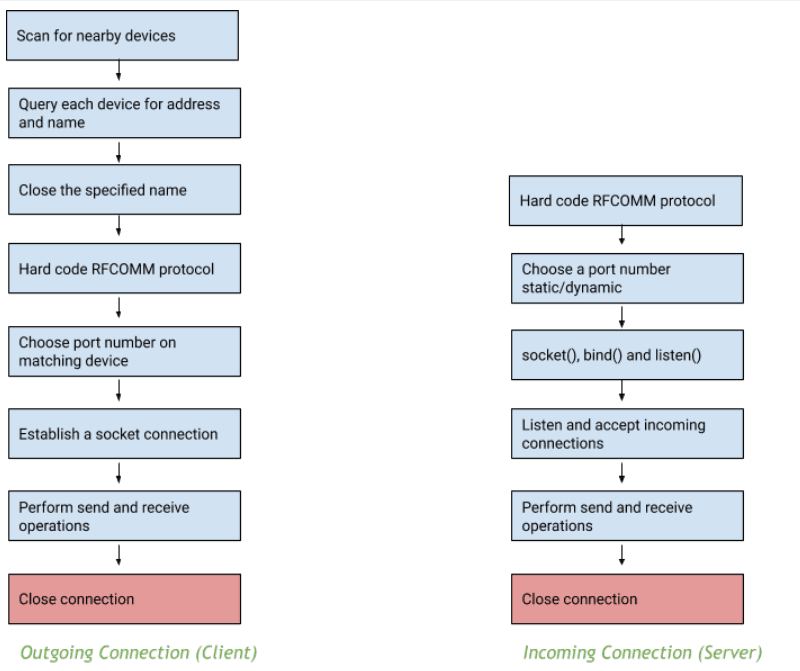
Visualization of the process

Client/Server process flow in a Bluetooth server socket

How to use ?

We start by adding the following dependency to our pubspec.yaml file:

dependencies:
bluetoothadapter: <latest version>โ€‹


There are mainly 4 main steps involved in the process:

  • Initiate the Bluetooth adapter
  • Implement listeners for observing connection status.
  • Implement listeners for receiving messages.
  • Implement methods for sending back the messages to the application counterpart.

Here's a code sample for the same:

//Initiatinng the bluetooth adapter
Bluetoothadapter flutterbluetoothadapter = Bluetoothadapter();

//Listening to the connection status listener
String _connectionStatus = "NONE";
StreamSubscription _btConnectionStatusListener =flutterbluetoothadapter.connectionStatus().listen((dynamic status) {
  setState(() {
    _connectionStatus = status.toString();
  });
});

//Listening to the recieved messages
String _recievedMessage;
StreamSubscription _btReceivedMessageListener = flutterbluetoothadapter.receiveMessages().listen((dynamic newMessage) {
  setState(() {
    _recievedMessage = newMessage.toString();
  });
});

// Sending messages 
void sendMessage(String message){
  flutterbluetoothadapter.sendMessage(
                            message ?? "no msg",
                            sendByteByByte: false);
}

For a full example please check out this link : https://github.com/GeekyAnts/flutter-bluetooth-adapter/tree/master/example

I hope that this solution is what you require to enable your apps to communicate through bluetooth for critical functions and this implementation will help you understand how to use bluetoothadapter.

Thanks for reading!

Subscribe to Our Newsletter

More from the engineering frontline.

Dive deep into our research and insights on design, development, and the impact of various trends to businesses.
Insight
Building a Production-Ready Canva-like Editor with Konva.js, React 19 and Next.js 15
Sep 10, 2026

Building a Production-Ready Canva-like Editor with Konva.js, React 19 and Next.js 15

This blog explains how to build a production-ready canvas editor with Konva.js, React, and Next.js, covering architecture, performance, and key engineering decisions.

Insight
What a PHP-to-NestJS Banking Migration Taught Us About Architecture, Security, and Trust
Sep 8, 2026

What a PHP-to-NestJS Banking Migration Taught Us About Architecture, Security, and Trust

This blog explores the architecture, security, performance, and documentation lessons from migrating a legacy PHP/Laravel banking platform to NestJS.

Insight
Building Production-Grade Video Thumbnail Scrubbing in the Browser: HLS, Frame Extraction, Caching, and Performance Trade-offs
Sep 7, 2026

Building Production-Grade Video Thumbnail Scrubbing in the Browser: HLS, Frame Extraction, Caching, and Performance Trade-offs

This blog explains how to build responsive video thumbnail scrubbing in the browser for local files and HLS streams, covering frame extraction, caching, and performance trade-offs.

Insight
The Agent Can See Your App. How Often Can It Look?
Sep 4, 2026

The Agent Can See Your App. How Often Can It Look?

AI coding agents can now interact with mobile apps, but their effectiveness depends on iteration speed. This blog explores how React Native architecture influences feedback loops and AI-driven developer productivity.

Insight
Building Interactive Cards from Design JSON Without Killing Your Feed: Overlays, Video, Mute/Unmute, and Lag-Free Lists
Sep 1, 2026

Building Interactive Cards from Design JSON Without Killing Your Feed: Overlays, Video, Mute/Unmute, and Lag-Free Lists

Learn how to turn design JSON into interactive, video-enabled cards using overlays, smart media controls, caching, and virtualization without slowing down high-cardinality feeds.

Insight
The Bug That Doesn't Show Up in Code Review: Why Your Flutter Web App Reloads on Safari
Aug 19, 2026

The Bug That Doesn't Show Up in Code Review: Why Your Flutter Web App Reloads on Safari

A real-world look at how oversized images can trigger Safari reloads and iOS crashes in Flutter apps and how smarter image decoding prevents them.

Insight
From Prompting to Process: What Changed When Flutter Shipped Agent Skills
Aug 19, 2026

From Prompting to Process: What Changed When Flutter Shipped Agent Skills

This blog explores how Flutter Agent Skills improve AI-assisted development by combining official framework workflows with project-specific guidance for more consistent development.

The Right Conversation Can

Save You Six Months.

Book a call