
In Flutter, we have lots of ready-made packages for different tasks, like making user interfaces or adding special features. But sometimes, we might need something specific that isn't available as a Flutter package. Luckily, there are many useful libraries written in C/C++ that we can use.
In this article, we learn how to bring these C/C++ libraries into our Flutter apps using Dart FFI. Even though Flutter mainly uses Dart, Dart FFI lets us tap into the power of C/C++ libraries, opening up new possibilities for our Flutter projects. Let's explore how to do this step by step.

The Foreign Function Interface
The FFI allows us to link our C/C++ code to Dart, essentially connecting our native functions with Dart functions. It serves as a bridge for seamless communication between these two languages.
We are aiming for cross-platform development, targeting Android, Windows, macOS, and iOS. However, each platform's build environment has its own peculiarities. Linux utilizes CMake for compiler configuration, Android relies on Gradle (which conveniently supports CMake as an external build), Windows employs CMake with Visual Studio build tools, while macOS and iOS necessitate the use of Xcode.
In a typical Flutter app, these nuances would be handled seamlessly by Flutter's build environment. We would simply execute commands like flutter build linux or flutter build macos. However, venturing into the integration of C/C++ code with Flutter requires us to delve into new build setups and adjustments. Let us familiarize ourselves with these setups and tweaks as we embark on this journey of bridging C/C++ with Flutter.
The Challenge
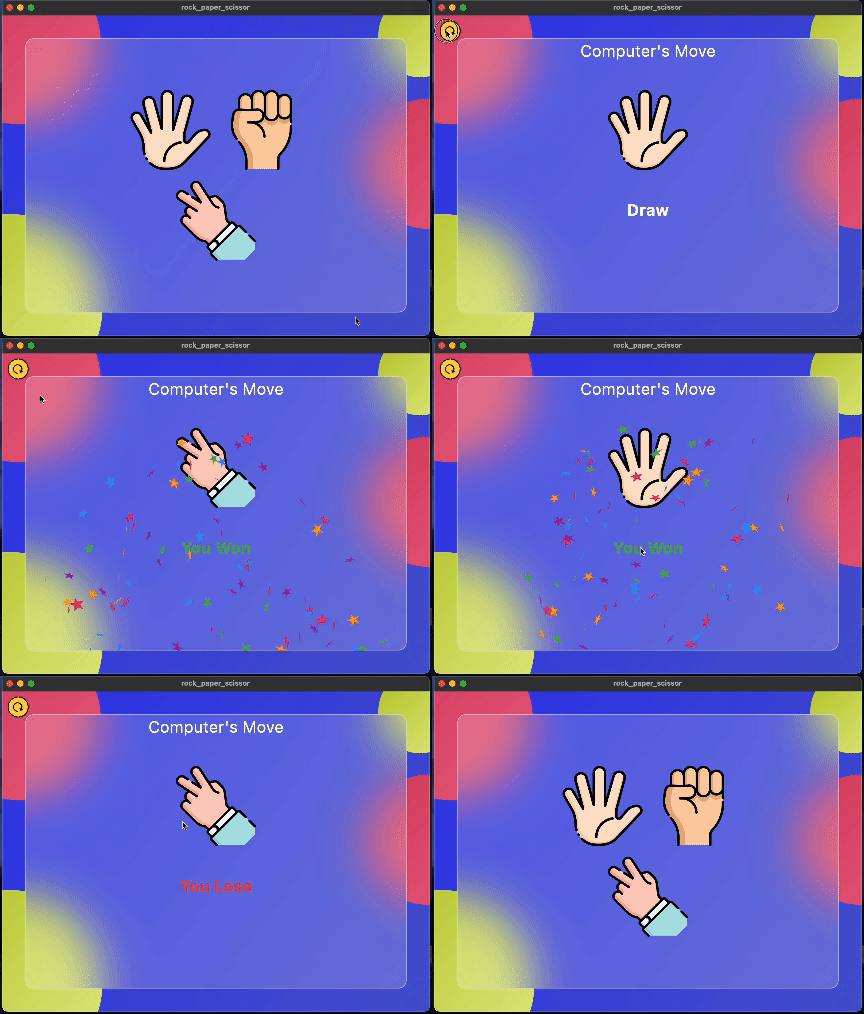
We will try to create a simple rock-paper-scissor game for gaining the basic understanding on how we can set up our Flutter app to run C++ code through Dart FFI. For this example, obviously the UI will be created in Flutter and the logic for the game will be written in a separate CPP file. And we will call native C/C++ from Flutter/Dart.
For this article we will try to keep things simple, and just focus on basics.
So, let’s dive in….
Setting Up Project for Different Platforms
FFI for macOS & iOS
We will first start with macOS and iOS. The build system in macOS and iOS is handled by Xcode and it is very easy to add and link the C++ libraries for these platforms. We can add our native C/C++ code directly in the Runner app.
Open macos/Runner.xcodeproj on XCode
Add a new group — without creating a new folder. Give it any name you want. In this case we call it libs.
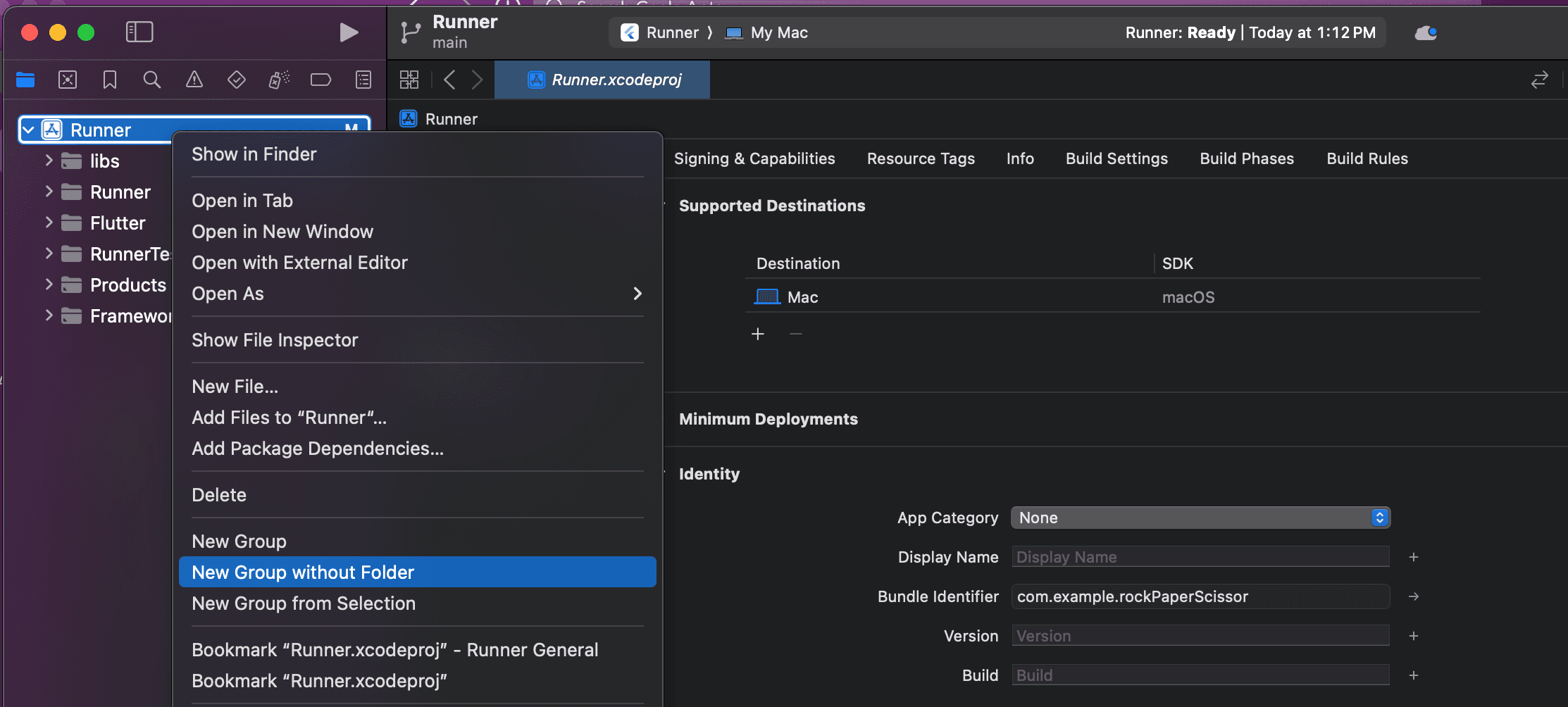
Then, we can add our CPP library and files to this libs folder. We will add our logic.cpp file to the libs folder and that is it. The Native C++ code is ready to be called from Flutter.
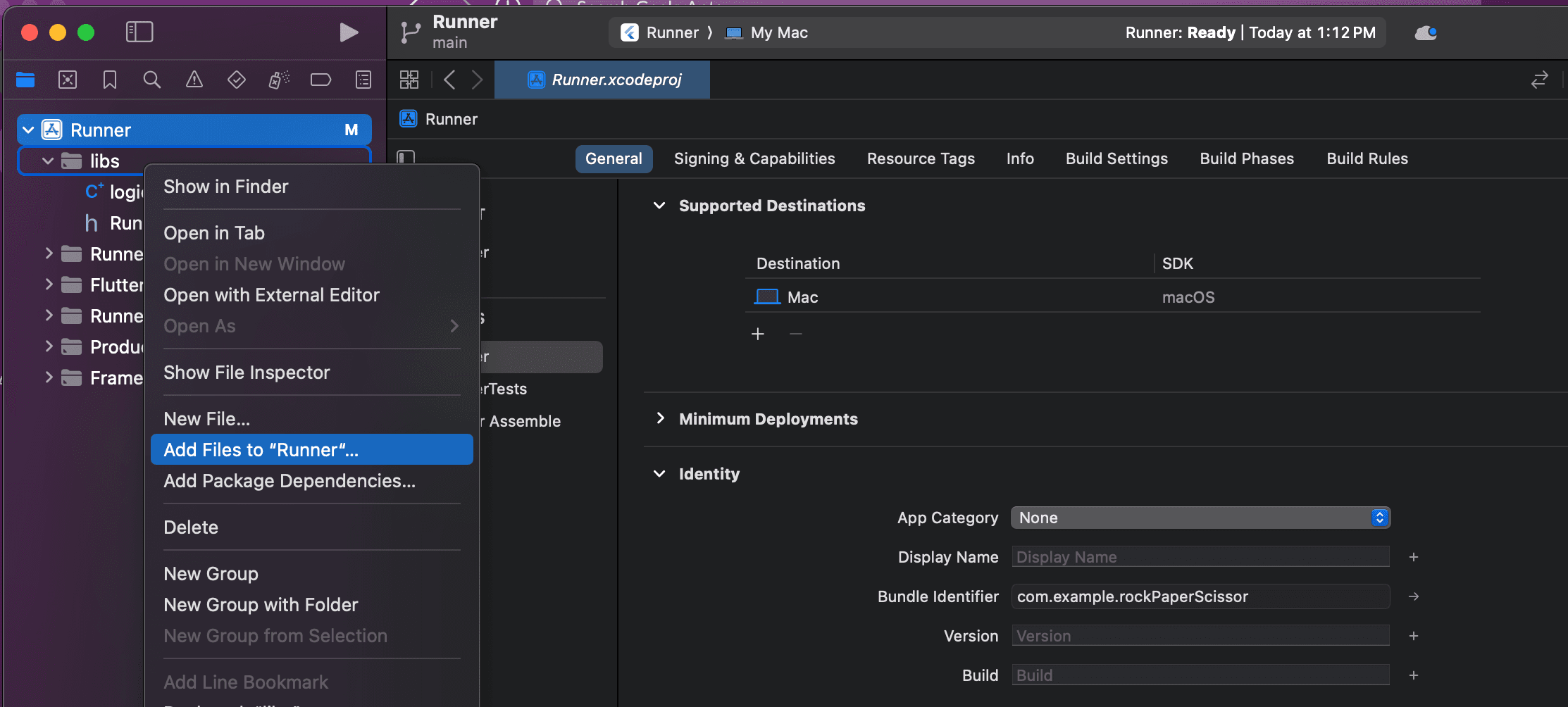
Additionally, we can also add include and other headers path in search path under Build Settings tab.
The same process can be followed for iOS also .
FFI for Android
The build system for Android & Windows is CMake. So, we will make use of a CMake in order to infuse our CPP library in our Flutter project.
We will create our CMakeLists.txt files inside the CPP folder.
cmake_minimum_required(VERSION 3.10)
project(ffi_dart VERSION 1.0)

# Add your source file
set(SOURCES
    ./logic.cpp
)

# Add your library
add_library(ffi_dart_library SHARED ${SOURCES})
Here, we tell CMake to build our shared native library called ffi_dart_library. It will be built as libffi_dart_library.so.
add_library(): This command will create a library target from source files. There are different types of libraries you can create with CMake, such as static libraries (STATIC), shared libraries (SHARED), or module libraries (MODULE). You specify source files for the library just like with add_executable(), but the resulting target is a library file (.a for static, .so for shared, etc.) that can be linked against by other executables or libraries.
In our case , the CPP code does not depend on any major external libraries. But we can link other include header files and external libraries to our CPP library.
Here is an example for the same:
cmake_minimum_required(VERSION 3.10)
project(demo)

# Add your source file
set(SOURCES
    mycpp.cpp
)

# Add your library
add_library(demo_library ${SOURCES})

# Find the external library (assuming it's provided via CMake package)
find_package(ExternalLibrary REQUIRED)

# Link the external library with your library
target_link_libraries(demo_library PUBLIC ExternalLibrary::ExternalLibrary)

# Include directories for your library
target_include_directories(demo_library PUBLIC
    ${CMAKE_SOURCE_DIR}/include
    ${PROJECT_BINARY_DIR}/include
    ${ExternalLibrary_INCLUDE_DIRS} # Assuming the external library provides include directories
)
Linking CMake File for Android
Open android/app/build.gradle:
Add these lines inside the build.gradle file:
android {

    externalNativeBuild {
        cmake {
            path "../../cpp/CMakeLists.txt"
        }
    }

...
That’s it.
Calling Native C/C++ from Flutter
Now it’s time to call the native C++ function from the Flutter app, in order to complete our rock_paper_scissor game.
First we need to load our dynamic library into the Flutter app.
void _initLibrary() {
    native = Platform.isMacOS || Platform.isIOS
        ? DynamicLibrary.process() // macos and ios
        : (DynamicLibrary.open('libffi_dart_library.so'));
    getComputerMove = native
        .lookup<NativeFunction<computerMoveFunctionCPP>>('getComputerMove')
        .asFunction<computerMoveFunctionDart>();
    getResults = native
        .lookup<NativeFunction<getResultFunctionCPP>>('getResults')
        .asFunction<getResultFunctionDart>();
  }
The native function is looked up differently as they are not loaded from a separate dynamic library but from the Flutter Runner library itself for iOS and macOS.
After loading the library we will look for the CPP native function and bind them with Dart function.
Now we can call those C++ functions.
This is it we have successfully linked our C++ file with our Flutter app.
Here is the source code for C++ that we are using in our example, logic.cpp.
In the code,
#ifdef WIN32
   #define EXPORT __declspec(dllexport)
#else
   #define EXPORT extern "C" __attribute__((visibility("default"))) __attribute__((used))
#endif
The EXPORT definition allows us to export our C++ code with C-style symbols used by Flutter/Dart.
EXPORTmacro conditionally based on whether the code is being compiled for Windows (WIN32) or not.- For Windows,
EXPORTis defined as__declspec(dllexport), which is a Microsoft-specific keyword for exporting symbols from a DLL (Dynamic Link Library). - For other platforms,
EXPORTis defined asextern "C" __attribute__((visibility("default"))) __attribute__((used))), which is used to specify the visibility of symbols in shared libraries on Unix-like systems.
getComputerMove(): This function generates a random move for the computer (either 'r' for Rock, 'p' for Paper, or 's' for Scissors) using the rand() function seeded by the current time.
// get the computer move
EXPORT
char getComputerMove()
{
	int move;
	// generating random number between 0 - 2
	srand(time(NULL));
	move = rand() % 3;

	// returning move based on the random number generated
	if (move == 0) {
		return 'p';
	}
	else if (move == 1) {
		return 's';
	}
	return 'r';
}
getResults(char playerMove, char computerMove): This function takes two characters representing the moves of the player and the computer, respectively, and determines the outcome of the game. It returns an integer representing the result: 1 for player win, -1 for player loss, and 0 for a draw.
// Function to return the result of the game
EXPORT
int getResults(char playerMove, char computerMove)
{
	// condition for draw
	if (playerMove == computerMove) {
		return 0;
	}
	// condition for win and loss according to game rule
	if (playerMove == 's' && computerMove == 'p') {
		return 1;
	}
	if (playerMove == 's' && computerMove == 'r') {
		return -1;
	}
	if (playerMove == 'p' && computerMove == 'r') {
		return 1;
	}
	if (playerMove == 'p' && computerMove == 's') {
		return -1;
	}
	if (playerMove == 'r' && computerMove == 'p') {
		return -1;
	}
	if (playerMove == 'r' && computerMove == 's') {
		return 1;
	}
Summing Up
Now as we have the logic of our game sorted , we can call these function from our flutter app giving some meaning and logic to our UI, creating our very basic Stone-paper-scissor game.
The game is very simple, you have to make your move, then the Computer will make their move and winner will be decided; it is as simple as that.
We hope this article will help you get started with the Dart FFI in Flutter. Keep learning and experimenting!