

Editor's Note: This article was originally written by Bitta Singha, UI/UX Designer - I, and published in March 2025. It was revised and updated by Harrini in August 2026 to reflect the latest AI-powered UI/UX design tools, updated recommendations, emerging design trends, and current best practices for integrating AI into modern product design workflows. The technical content was reviewed by Prince Kumar Thakur, Technical Content Writer.
Key Takeaways
- AI streamlines UI/UX workflows by accelerating wireframing, prototyping, usability testing, and design iteration.
- The right AI tools enhance creativity and productivity while keeping human design thinking at the centre.
- Different AI tools serve different purposes, from design automation and visual design to user behaviour analysis and collaboration.
- Choosing AI tools requires evaluating project fit, scalability, integrations, collaboration features, and long-term value.
For decades, UI/UX design has relied on manual creativity, but AI is now a critical driver of innovation. According to Adobe's 2026 Creators' Toolkit Report, 75% of creators say creative AI is now integrated into or essential to their workflow, highlighting how AI has become a core part of modern creative and design processes. With global investments in AI-powered design tools expected to surpass $8.2 billion by 2026, the real challenge is no longer about whether to adopt AI—it is about selecting the right tools that enhance creativity without replacing human intuition.
This blog highlights the top 10 AI tools every UI/UX designer should master in 2026. From AI-powered prototyping and wireframing to visual design and usability testing, each tool is evaluated based on its features, ideal use cases, pricing, to help expand the creative possibilities of digital design. Whether you are integrating AI for the first time or optimizing an AI-driven workflow, this guide ensures you stay ahead in an increasingly automated design landscape.
Key Benefits of AI Tools for UI/UX Designers
AI is redefining UI/UX by automating workflows, optimizing user experiences, and enhancing creativity. Design tasks that once took days—prototyping, testing, and personalization—are now accelerated with AI. As industry leaders like Adobe, Google, and Figma integrate AI into their platforms, adopting these tools is no longer optional but essential for staying ahead.
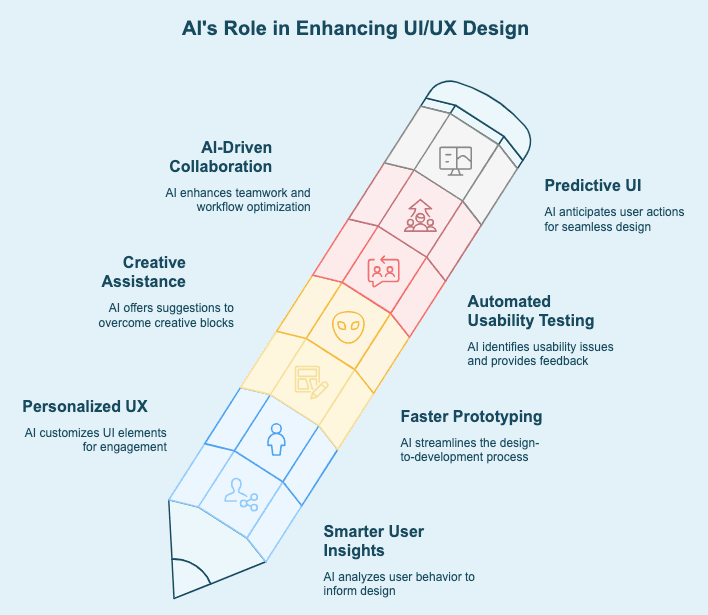
How AI is Transforming UI/UX Design:
- Smarter User Insights – AI analyzes user behavior, heatmaps, and interactions, helping designers create more intuitive and data-driven experiences.
- Personalized UX – AI adapts UI elements in real-time, tailoring layouts and content for higher engagement.
- Faster Prototyping – AI auto-generates wireframes and UI components, streamlining the design-to-development process.
- Creative Assistance – AI tools like DALL·E and Runway help designers break creative blocks with intelligent design suggestions.
- Automated Usability Testing – AI detects usability issues, friction points, and interaction gaps, providing instant feedback.
- AI-Driven Collaboration – Smart tools automate tasks, optimize workflows, and enhance real-time teamwork.
- Predictive UI – AI anticipates user actions and adjusts designs dynamically for a seamless experience.
Types of AI Tools for UI UX Design
AI is transforming UI UX at every stage—from automating designs to analyzing user behavior and improving collaboration. However, not all AI tools serve the same purpose. Some streamline prototyping, others enhance visual design, while many focus on data-driven decision-making.
To simplify the landscape, we have categorized AI tools into six key types, each playing a crucial role in modern UI/UX design. Here is a breakdown:
AI Tool Category | Functionality | Benefits |
Design Automation Tools | Automate repetitive tasks like layout generation and component placement. | Saves time, and allows designers to focus on creativity. |
Prototyping Tools | Create interactive models and simulate user flows before development | Speeds up iteration and enhances user testing. |
Wireframing Tools | Generate low-fidelity design structures using AI suggestions. | Provides quick visual structure for early-stage designs. |
Visual Design Tools | Enhance aesthetics with AI-driven colour palettes, typography, and imagery. | Improves design consistency and brand alignment. |
User Behavior Analysis Tools | Track and analyze user interactions to refine UX strategies | Helps create data-driven, user-centric experiences. |
Collaboration & Handoff Tools | Facilitate seamless teamwork between designers and developers. | Enhances workflow efficiency and reduces manual handoff errors. |
Top 10 AI-Driven UI/UX Tools Every Designer Should Master in 2026
AI is redefining UI/UX design by streamlining workflows, automating repetitive tasks, and enabling data-driven decision-making. At GeekyAnts, we actively integrate AI-powered tools to accelerate prototyping, enhance design precision, and improve collaboration between designers and developers.
This curated list highlights the AI tools we use and recommend, selected based on their ability to enhance efficiency, improve design quality, and optimize user experiences. Whether it's wireframing, component generation, branding, or interactive UI elements, these tools are shaping the future of UI/UX design.
1. Uizard – AI-Powered Prototyping and Wireframing
Overview: Uizard now supports prompt-based UI generation, allowing designers to create editable wireframes and mockups from natural language descriptions in addition to sketches. It automates layout generation based on best practices, allowing designers to focus on user experience rather than manual structuring.
Key Features:
- Converts text prompts and sketches into editable UI layouts.
- AI-powered screen generation and theme suggestions.
- Collaborative editing with reusable components.
Best Use Cases:
- Rapid prototyping for mobile and web applications.
- Transforming rough design ideas into functional wireframes.
Pros and Cons:
- Fast and intuitive for beginners and professionals.
- Reduces manual effort in wireframing.
- Limited customization compared to advanced design tools.
Pricing: Free plan available; premium plans start at $12/month.

2. Visily – AI-Driven Wireframing and Screenshot-to-Design
Overview: Visily enables rapid wireframing with AI-powered screenshot-to-design and sketch-to-design features, allowing designers to convert sketches or screenshots into editable UI layouts.
Key Features:
- AI Prompt-to-Wireframe and Design Assistant
- Improved design import accuracy
Best Use Cases:
- Quick UI mockups and wireframe creation.
- Converting legacy designs into editable components.
Pros and Cons:
- Speeds up the wireframing process significantly.
- Intuitive and easy to use.
- Limited animation support for advanced prototyping.
Pricing: Free plan available; pro plans start at $10/month.

3. Claude AI – AI-Assisted UI Generation and Code Output
Overview: Claude AI enhances the UI/UX design process by generating intelligent UI concepts and developer-ready code, bridging the gap between design and development.
Key Features:
- Generates production-ready frontend code.
- Helps review UX copy and interaction flows.
- Assists with design documentation and developer handoff.
Best Use Cases:
- Automating UI concept generation.
- Speeding up the transition from design to development.
Pros and Cons:
- Improves efficiency in handoff between designers and developers.
- Saves time by generating structured UI components.
- AI-generated designs require validation for usability.
Pricing: Custom pricing based on usage.

4. Magician Design – AI-Powered UI, Illustrations, and Animations
Overview: Magician Design is an AI-enhanced design tool that generates UI components, illustrations, and animations to streamline creative workflows.
Key Features:
- AI component generation, copy suggestions, and illustrations
- Figma plugin improvements
Best Use Cases:
- Automating UI elements and branding assets.
- Generating custom illustrations for projects.
Pros and Cons:
- Enhances creative workflows.
- Speeds up UI and animation design.
- Lacks deep customization compared to full-scale design suites.
Pricing: Free plan available; premium plans start at $15/month.

5. Adobe Firefly – AI-Powered Enhancements in Creative Cloud
Overview: Adobe Firefly integrates AI-driven capabilities into Photoshop, Illustrator, and Adobe XD, allowing designers to automate image editing and generate UI assets with precision.
Key Features:
- Firefly Image Models
- Vector generation
- Generative Fill
- Generative Expand
- Video generation (if available in Creative Cloud)
- Better integration with Photoshop, Illustrator and Express
Best Use Cases:
- Enhancing UI assets and branding materials.
- AI-powered image modifications for UI design.
Pros and Cons:
- Advanced AI editing and content generation.
- Native integration with Adobe’s design ecosystem.
- Requires an Adobe subscription.
Pricing: Included in Adobe Creative Cloud; plans start at $20/month.

6. Freepik – AI Resource Generator for UI Assets
Overview: Freepik provides AI-powered asset creation and a vast library of design resources, enabling designers to access ready-to-use templates, illustrations, and AI-generated images.
Key Features:
- Customizable UI templates.
- A resource hub for UI designers.
- AI Image Generator, Mockup Generator, Background Remover, Upscaler and Video (if included)
Best Use Cases:
- Quick asset generation for UI projects.
- Creating branding elements and illustrations.
Pros and Cons:
- Saves time on asset creation.
- Extensive design library with AI-generated resources.
- Advanced features require a subscription.
Pricing: Free plan available; premium starts at $12/month.

7. UX Pilot – AI-Powered Wireframing Generator
Overview: UX Pilot is a specialized AI tool for wireframing, allowing designers to generate functional wireframes quickly.
Key Features:
- AI-generated user flows
- AI UX recommendations
- Better prompt-driven layouts
Best Use Cases:
- Rapid layout structuring for new projects.
- Concept validation through wireframing.
Pros and Cons:
- Fast and efficient for UX teams.
- Reduces manual wireframing effort.
- Limited customization for complex designs.
Pricing: Pricing varies based on usage.

8. Relume – AI-Powered Component and Wireframe Generator
Overview: Relume automates wireframing and component generation, making it easier to create user-friendly interfaces at scale.
Key Features:
- AI Site Builder, Sitemap generation, and Wireframe Builder
- Better Webflow integration
- Figma sync
Best Use Cases:
- Creating scalable UI component libraries.
- Reducing the time spent on wireframing.
Pros and Cons:
- Great for systematized UI design.
- Speeds up wireframe iteration.
- Limited deep customization options.
Pricing: Starts at $19/month.

9. Khroma – AI-Generated Color Palettes for Branding
Overview: Khroma uses AI to generate color palettes tailored to a brand’s design needs, ensuring consistent and visually appealing UI elements.
Key Features:
- AI-curated color combinations.
- Branding-focused color suggestions.
- AI learns colour preferences.
- Accessibility-aware palettes.
Best Use Cases:
- Creating cohesive and on-brand color schemes.
Pros and Cons:
- Simplifies color selection for UI/UX designers.
- Limited to color palette generation.
Pricing: Free.

10. Fontjoy – AI-Powered Font Pairing Generator
Overview: Fontjoy leverages AI to automatically pair fonts, ensuring typography choices align with UI/UX best practices.
Key Features:AI-recommended font pairings.
- Optimized typography suggestions.
- Variable font support (if available)
- Better Google Fonts compatibility
Best Use Cases:
- Selecting visually balanced font combinations.
Pros and Cons:
- Enhances typography consistency.
- Limited beyond font selection.
Pricing: Free.
These AI tools are integral to how we at GeekyAnts approach UI/UX design. By strategically leveraging AI, designers can streamline workflows, enhance creativity, and build smarter, data-driven interfaces.

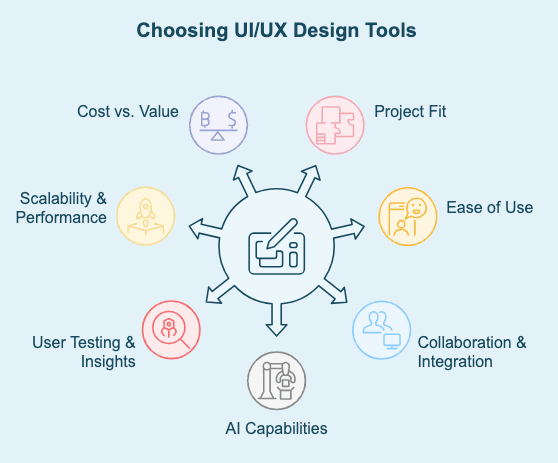
Criteria for Choosing UI and UX Design Tools
With a growing number of UI/UX tools available, selecting the right one requires careful consideration of functionality, efficiency, and long-term usability. A tool should not only meet current project needs but also scale with evolving design workflows. Here are the key factors to consider:
1. Project Fit
The tool must align with your specific design needs, whether for web, mobile, or multi-platform development. It should support scalability, prototyping, and high-fidelity designs, ensuring that early concepts translate seamlessly into final products.
2. Ease of Use
An intuitive tool accelerates onboarding and productivity. Look for a UI that is easy to navigate, minimizes the learning curve, and integrates with existing design workflows. A tool that complicates rather than streamlines design can slow progress.
3. Collaboration & Integration
Design teams require real-time collaboration, especially in remote and cross-functional environments. A good tool should seamlessly integrate with other platforms like Figma, Sketch, Adobe XD, and development tools to ensure smooth handoffs.
4. AI Capabilities
AI should enhance creativity and efficiency rather than override human decision-making. Look for AI-driven automation that simplifies layout adjustments, predictive design suggestions, and repetitive tasks, freeing designers to focus on strategic decisions.
5. User Testing & Insights
A tool with built-in analytics, behavior tracking, and usability testing helps designers make data-driven design improvements. Features like heatmaps, session recordings, and A/B testing integrations provide valuable user insights.
6. Scalability & Performance
As projects grow, the tool should support complex workflows, large design files, and expanding team needs. Consider whether it allows version control, component libraries, and scalable prototyping without performance slowdowns.
7. Cost vs. Value
Price should be weighed against features, security, and support. Free tools may lack advanced AI capabilities, enterprise security, or dedicated customer support, making premium options a better long-term investment for large teams and high-stakes projects.
Selecting the right UI/UX design tool is about balancing innovation, efficiency, and adaptability. Prioritizing scalability, collaboration, and AI-enhanced capabilities ensures that design teams remain agile and ahead of industry shifts.
Which AI Tool Should Businesses Choose for UI/UX Design?
The best AI tool for UI/UX design depends on where you are in the design process. Use this quick guide to identify the right solution based on your immediate needs.
Design Process | Recommended Tool |
Create wireframes quickly | Uizard |
Convert screenshots into editable designs | Visily |
Generate UI ideas with AI | Claude AI |
Create illustrations and icons | Magician Design |
Edit or generate visual assets | Adobe Firefly |
Access AI-generated design resources | Freepik |
Build UX wireframes | UX Pilot |
Create scalable design systems | Relume |
Generate colour palettes | Khroma |
Find matching font combinations | Fontjoy |
Many design teams use several of these tools together to support research, wireframing, prototyping, visual design, and developer handoff throughout the product design process.
Tips and Best Practices for Using AI-Driven UI and UX Design Tools
AI does not replace decision-making—it refines it. The best results come not from AI itself, but from how well it is directed. Without a clear strategy, AI overwhelms with possibilities; with the right approach, it enhances precision, accelerates workflows, and improves outcomes.
This is especially true in hiring, where AI can either streamline recruitment or amplify existing inefficiencies. The difference lies in execution—when guided by a well-defined vision, AI transforms hiring from a reactive process into a strategic advantage.
At GeekyAnts, we have seen this firsthand while building Hirosope, our AI-driven hiring platform. By combining structured data with intelligent automation, we’ve helped businesses optimize recruitment and make smarter hiring decisions.
Here is how to ensure AI works for you, not the other way around:
1. Define the Outcome Before Using AI
AI is most effective when used with a clear goal in mind. Before relying on AI for layouts, content generation, or usability insights, ask:
- What do I want to achieve?
- What design problems am I solving?
- How will AI fit into my existing workflow?
A well-defined design objective ensures AI enhances efficiency rather than creating more noise.
2. AI Should Assist, Not Lead—Creativity Still Belongs to Designers
AI can generate layouts, color palettes, and UX flows, but it doesn’t understand storytelling, brand identity, or user empathy. Use AI for automation and inspiration, but let your expertise, intuition, and user insights drive the final design. The best results come from human-AI collaboration, not blind automation.
3. Keep the User at the Center, Not the Algorithm
AI-driven personalization and predictive UX models can adjust interfaces dynamically, but the user experience isn’t just about patterns—it’s about understanding human behavior.
- Validate AI-driven decisions through user testing.
- Cross-check AI recommendations with real-world feedback.
- Ensure AI doesn’t create overly complex or unpredictable experiences.
AI should enhance usability, not dictate it.
4. AI is a Speed Tool—Use it for Rapid Iteration
AI-powered wireframing, automated prototyping, and usability testing cut design time significantly, but speed doesn’t equal quality. The best designers use AI to generate quick variations, test multiple layouts, and iterate based on insights—not to finalize designs in one go. The faster you iterate, the better your final output.
5. Balance AI-Driven Personalization With Predictability
AI can adjust UI elements based on user behavior, but too much automation can lead to inconsistent experiences. Define clear UX standards so AI-driven adaptations remain:
- Structured and seamless across different user journeys.
- Predictable enough to avoid frustrating users.
- Aligned with your brand identity rather than feeling random.
6. Leverage AI-Powered Design Systems for Consistency
AI-enhanced design systems like Figma’s AI plugins and Adobe Sensei ensure:
- Design consistency across projects and teams.
- Smarter, automated component updates.
- Faster collaboration between designers and developers.
When used correctly, AI in design systems reduces redundancy and improves efficiency.
7. Make Data-Driven Decisions—But Don’t Ignore Human Judgment
AI-generated heatmaps, behavior tracking, and insights from A/B testing can guide UX decisions, but they are not always context-aware.
- Cross-check AI-generated insights with real user research.
- Use AI data to support, not replace, human analysis.
- Avoid over-optimizing based purely on AI predictions.
Data should inform decisions, but human oversight ensures better, user-friendly design choices.
8. AI Can Improve Accessibility, But It Needs Oversight
AI-driven accessibility tools can automatically adjust contrast, check font legibility, and optimize navigation, but accessibility isn’t just about compliance—it’s about usability for all users. Always:
- Manually review AI-generated accessibility enhancements.
- Test designs with real users, not just AI simulations.
- Ensure inclusivity beyond what AI detects.
9. Stay Ahead—AI in Design is Evolving Fast
AI design tools are improving at an unprecedented rate. To stay competitive, designers must continuously learn, test new features, and refine their use of AI. Those who embrace AI strategically rather than fear it will lead the next era of UI/UX design.
Overall AI is not a replacement for great design thinking—it is an accelerator for those who know how to use it well. The difference between an AI-powered designer and an average one? Control, direction, and the ability to refine AI’s output into something truly meaningful.
In the next section, we’ll explore emerging AI trends that will shape the future of UI/UX design.
Future Trends in UI and UX Design Tools
The next wave of UI/UX design will be shaped by AI-driven adaptability, immersive experiences, and hyper-personalization. Designers who embrace these advancements will enhance user engagement and stay ahead in an evolving digital landscape.
1. Predictive Design: Anticipating User Needs
AI will move from reactive to proactive design, predicting user behavior, preferences, and intent to deliver context-aware interfaces. From dynamic content adjustments to automated UX optimizations, predictive design will ensure seamless, frictionless interactions.
2. AI-Integrated AR and VR Interfaces
The fusion of AI with Augmented and Virtual Reality will create hyper-immersive digital environments. AI will adapt AR/VR interfaces in real time, optimizing interactions, accessibility, and engagement across e-commerce, education, and healthcare.
3. Voice & Conversational Interfaces: The Next UI Evolution
With advancements in voice recognition and Natural Language Processing (NLP),voice-driven interfaces will become more intuitive. AI-powered assistants will understand context, tone, and intent, making interactions faster and more seamless—especially in hands-free and accessibility-driven UX.
4. AI-Driven Personalization at Scale
Personalization will evolve beyond basic recommendations, with AI dynamically adapting UI layouts, colors, and workflows based on individual user behavior. This will lead to self-optimizing interfaces that evolve with the user, enhancing engagement and retention.
5. Ethical & Inclusive AI Design
As AI takes on more UX responsibilities, bias and inclusivity will be key concerns. Designers must ensure AI-driven experiences are ethically designed, bias-free, and accessible to all users, preventing algorithmic discrimination.
AI is no longer a tool of efficiency—it’s becoming a core driver of user experiences. Designers who stay ahead of these trends will define the future of UI/UX, creating more intelligent, personalized, and inclusive digital experiences.
GeekyAnts’ Approach: Leveraging AI for Next-Level UI/UX Design
AI is fundamentally reshaping UI/UX design, not by replacing designers, but by amplifying their capabilities. From automated prototyping and predictive user flows to real-time usability insights, AI is transforming how interfaces adapt, evolve, and respond to users. The shift is not about automation for the sake of efficiency—it is about creating dynamic, data-informed experiences that anticipate user needs with precision.
The real advantage lies in how AI is applied. Designers who integrate AI intelligently—balancing automation with human insight—will build experiences that are not only functional but adaptive and deeply intuitive. The future of UI/UX isn’t static; it’s learning, evolving, and responding in real time—and those who harness AI effectively will set the standard for what is next.