

While Appium is a go-to for mobile automation and Pytest is a favorite in the Python ecosystem, using them together is surprisingly rare. This article breaks down why this combo is powerful, how we made it work, and how you can, too.
Why Appium + Pytest?
- Appium gives cross-platform mobile automation (Android/iOS)
- Pytest offers elegant test writing, fixtures, and plugin support
- Most teams use Appium with Java/TestNG — but if your stack is Python-heavy, Pytest is a perfect fit
Use case at our org: We needed mobile UI + API integration tests running inside a unified framework. Pytest gave us modularity and speed, while Appium handled real device automation.
Pre-requisites for Appium + Pytest Setup on Mac
1. Install Homebrew (if not already installed)
Homebrew helps install packages easily on Mac.
/bin/bash -c "$(curl -fsSL https://raw.githubusercontent.com/Homebrew/install/HEAD/install.sh)"
2. Install Python 3
brew install python
3. Install Pip and Virtual Environment
python3 -m ensurepip --upgrade
Create and activate a virtual environment (recommended):
python3 -m venv venv
source venv/bin/activate
4. Install Appium Server
You can install Appium globally using npm (Node Package Manager).
First, install Node.js: brew install node
Then install Appium: npm install -g appium
Verify Appium: appium -v
5. Install Appium Doctor
To check your environment setup easily:
npm install -g appium-doctor
appium-doctor
6. Install Android Studio
7. Install Appium-Python-Client and Pytest
Inside your virtual environment: pip install Appium-Python-Client pytest
Optional but useful: pip install pytest-xdist pytest-html
8. Enable Developer Mode on Your Mobile Device (Android or iOS)
If you are using a physical device:
- Enable Developer Options and USB Debugging (Android).
- For iOS, configure WebDriverAgent (more setup needed).
9. Start Appium Server
Run via Terminal: appium
10. ADB Devices Check (Android)
Verify that your device/emulator is connected: adb devices
You should see your device ID listed.
After Setup
You’ll be ready to:
- Launch Appium server
- Connect an emulator or device
- Run pytest-based test cases using Appium driver sessions!
Directory structure:
mobile_automation/
├── tests/
│ └── test_demow.py
├── pages/
│ └── demo_page.py
├── utils/
│ └── driver_setup.py
├── conftest.py
1. driver_setup.py
import os
from appium import webdriver
from appium.options.android.uiautomator2.base import UiAutomator2Options

def get_driver():
   appium_url = "http://127.0.0.1:4723"
   desired_caps = {
       "platformName": "Android",
       "deviceName": "Pixel_8",
       "appPackage": "io.appium.android.apis",
       "appActivity": "io.appium.android.apis.ApiDemos",
       "automationName": "UiAutomator2"
   }
   options = UiAutomator2Options().load_capabilities(desired_caps)


   driver= webdriver.Remote(command_executor=appium_url, options=options)
   return driver
2. conftest.py (with Pytest Fixture)
import pytest
from drivers.driver_setup import get_driver

@pytest.fixture(scope="function")
def driver():
   driver = get_driver()
   yield driver
   driver.quit()
3. Page Object: demo_page.py
import time
from appium.webdriver.common.appiumby import AppiumBy

class DemoPage:
   def __init__(self, driver):
       self.driver = driver


   def press(self):
       self.driver.find_element(AppiumBy.XPATH, "//android.widget.TextView[@content-desc=\"Accessibility\"]").click()
4. Test File: test_demo.py
import pytest
from Pages.demo_page import DemoPage

def test_addition(driver):
   obj_button = DemoPage(driver)
   obj_button.press()
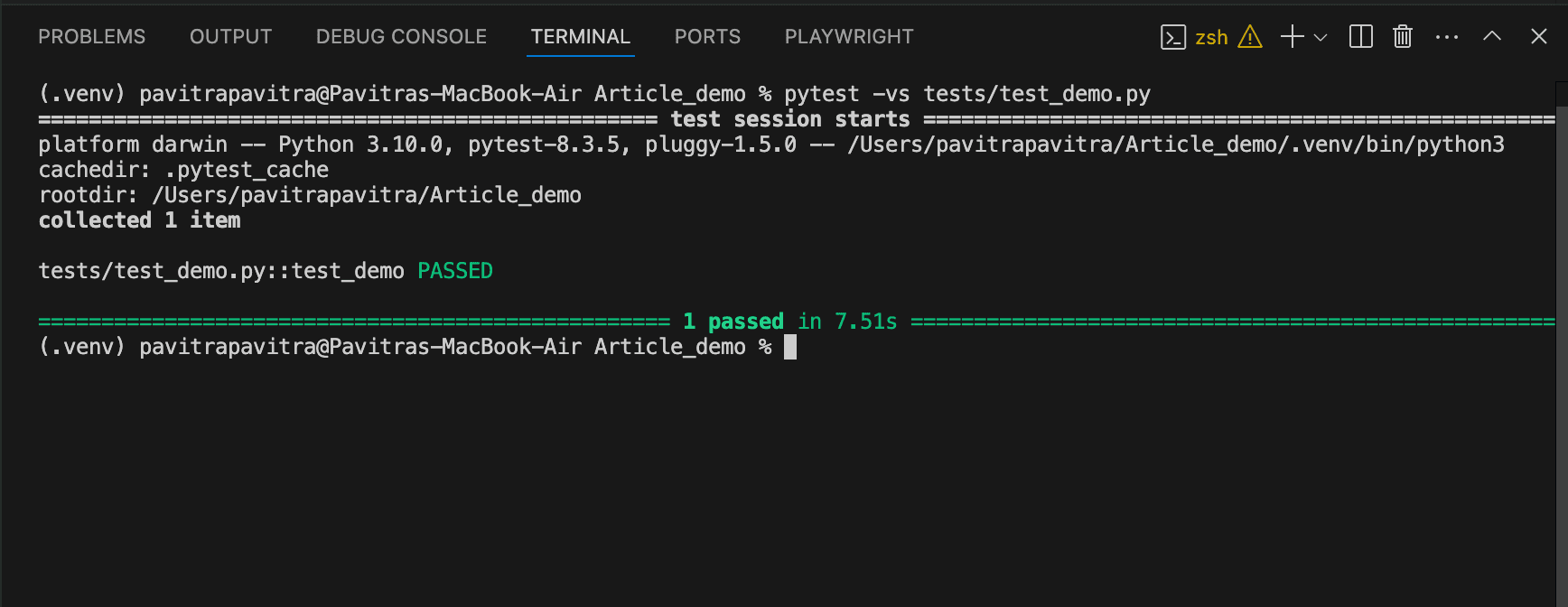
5. Command to run the pytest file: pytest -vs tests/test_demo.py(pytest with the relative path)
Challenges
- Issue: pytest not detecting Android environment
- Fix: Ensure pytest runs from the project root with PYTHONPATH= pytest
- Issue: Flaky UI loading
- Fix: Added explicit waits and fallback API validations
The Benefits of This Stack
- Unified Python automation for web + mobile + API
- Reusable Pytest fixtures
- Super fast local debugging
- Easily scalable with Allure reports
Final Thoughts
Appium + Pytest might not be the default combo, but it can be the perfect fit for teams looking to unify their testing across layers. With good structure and the right fixtures, it’s fast, flexible, and fun to work with







