


The Problem
We came across a scenario where we were to communicate with a Raspberry Pi using Bluetooth. For this, we needed to implement a full-duplex type connection with the RPI.
We looked for some quick solutions over the internet, but unfortunately, we found none. There were very few Bluetooth based libraries that were well written and almost none/very few had an implementation for creating Bluetooth server sockets.
That's when we decided to come up with a simple and elegant approach to our problem.
The Solution
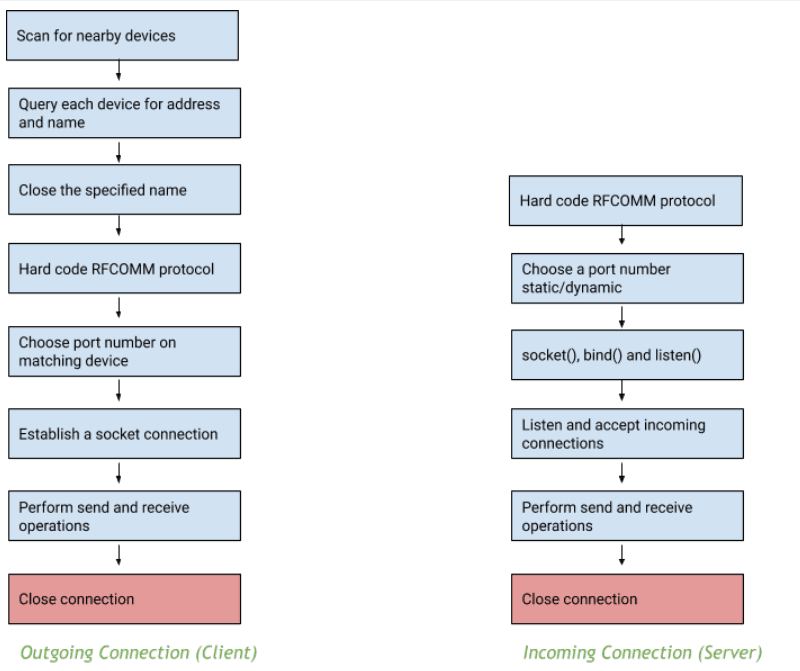
bluetoothadapter is a package which enables a Flutter application to communicate with other devices/programs through Bluetooth. It does so using Bluetooth based server sockets, which allows the Flutter app to establish a full-duplex connection with the other Bluetooth based devices which act as its counterpart.
Features provided by bluetoothadapter
- Setting up a UUID from the user end.
- Checking Bluetooth connection status and giving alerts if it is off or not right.
- Getting a list of paired devices.
- Get a particular paired device info.
- Start Bluetooth server.
- Start Bluetooth client.
- Send a message to a connected device.
- Stream for listening to received messages.
- Stream for listening to connection status (CONNECTED, CONNECTING, CONNECTION FAILED, LISTENING, DISCONNECTED).
Check out the code on Github - https://github.com/GeekyAnts/flutter-bluetooth-adapter
Visualization of the process
How to use ?
We start by adding the following dependency to our pubspec.yaml file:
dependencies:
bluetoothadapter: <latest version>
There are mainly 4 main steps involved in the process:
- Initiate the Bluetooth adapter
- Implement listeners for observing connection status.
- Implement listeners for receiving messages.
- Implement methods for sending back the messages to the application counterpart.
Here's a code sample for the same:
//Initiatinng the bluetooth adapter
Bluetoothadapter flutterbluetoothadapter = Bluetoothadapter();

//Listening to the connection status listener
String _connectionStatus = "NONE";
StreamSubscription _btConnectionStatusListener =flutterbluetoothadapter.connectionStatus().listen((dynamic status) {
  setState(() {
    _connectionStatus = status.toString();
  });
});

//Listening to the recieved messages
String _recievedMessage;
StreamSubscription _btReceivedMessageListener = flutterbluetoothadapter.receiveMessages().listen((dynamic newMessage) {
  setState(() {
    _recievedMessage = newMessage.toString();
  });
});

// Sending messages
void sendMessage(String message){
  flutterbluetoothadapter.sendMessage(
                            message ?? "no msg",
                            sendByteByByte: false);
}
For a full example please check out this link : https://github.com/GeekyAnts/flutter-bluetooth-adapter/tree/master/example
I hope that this solution is what you require to enable your apps to communicate through bluetooth for critical functions and this implementation will help you understand how to use bluetoothadapter.
Thanks for reading!







