
Key Takeaways
- Automate by Risk: Focus automation on business-critical, high-risk workflows rather than raw test-case count, since more tests do not mean better quality.
- Cheapest Effective Layer: Validate business logic through API tests where possible and reserve UI automation for the user journeys that matter most.
- Keep Exploratory Testing: Human testers surface unexpected behaviour, usability gaps, and edge cases that predefined tests never anticipate.
- Measure Quality, Not Volume: Track defect detection, leakage, flakiness, maintenance effort, and investigation time instead of counting automated tests.
- AI as an Accelerator: Let AI assist with test generation, failure analysis, and maintenance while engineers stay responsible for quality decisions.
Why Passing QA Tests Can Still Ship Poor Experiences
Software teams are expected to release faster while maintaining reliable digital experiences. Automation has become a critical part of achieving this goal.
A typical automated regression workflow looks like:
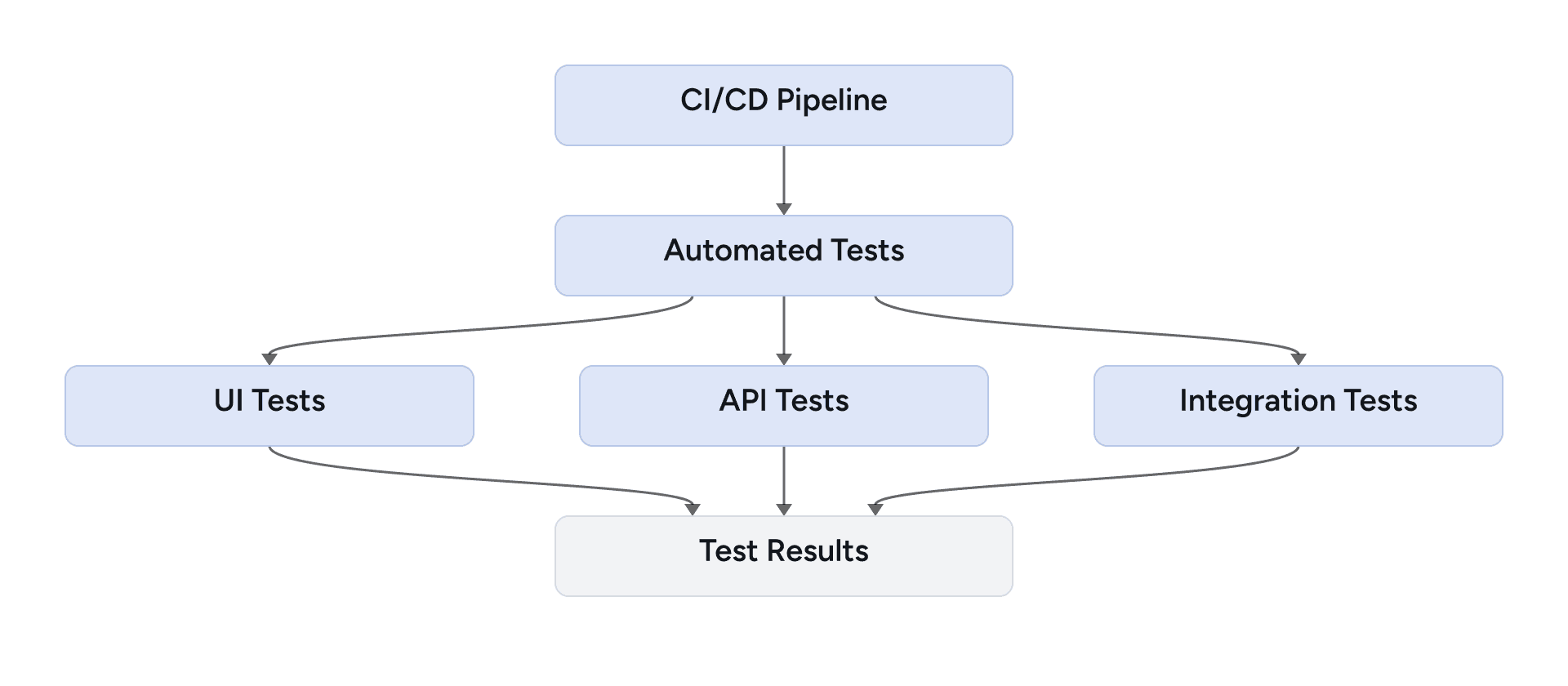
This provides fast and repeatable feedback, but passing tests do not necessarily mean that users are experiencing a high-quality product.
For example, an automated checkout test may verify that an order is successfully created while missing:
- confusing error messages,
- poor mobile usability,
- inaccessible controls,
- unclear navigation,
- unexpected user workflows.
This creates an important distinction:
Technical correctness and user-perceived quality are related, but they are not the same thing.
Moving From Test Automation to Quality Engineering
Traditional testing often follows:

A Quality Engineering approach distributes quality throughout the lifecycle:
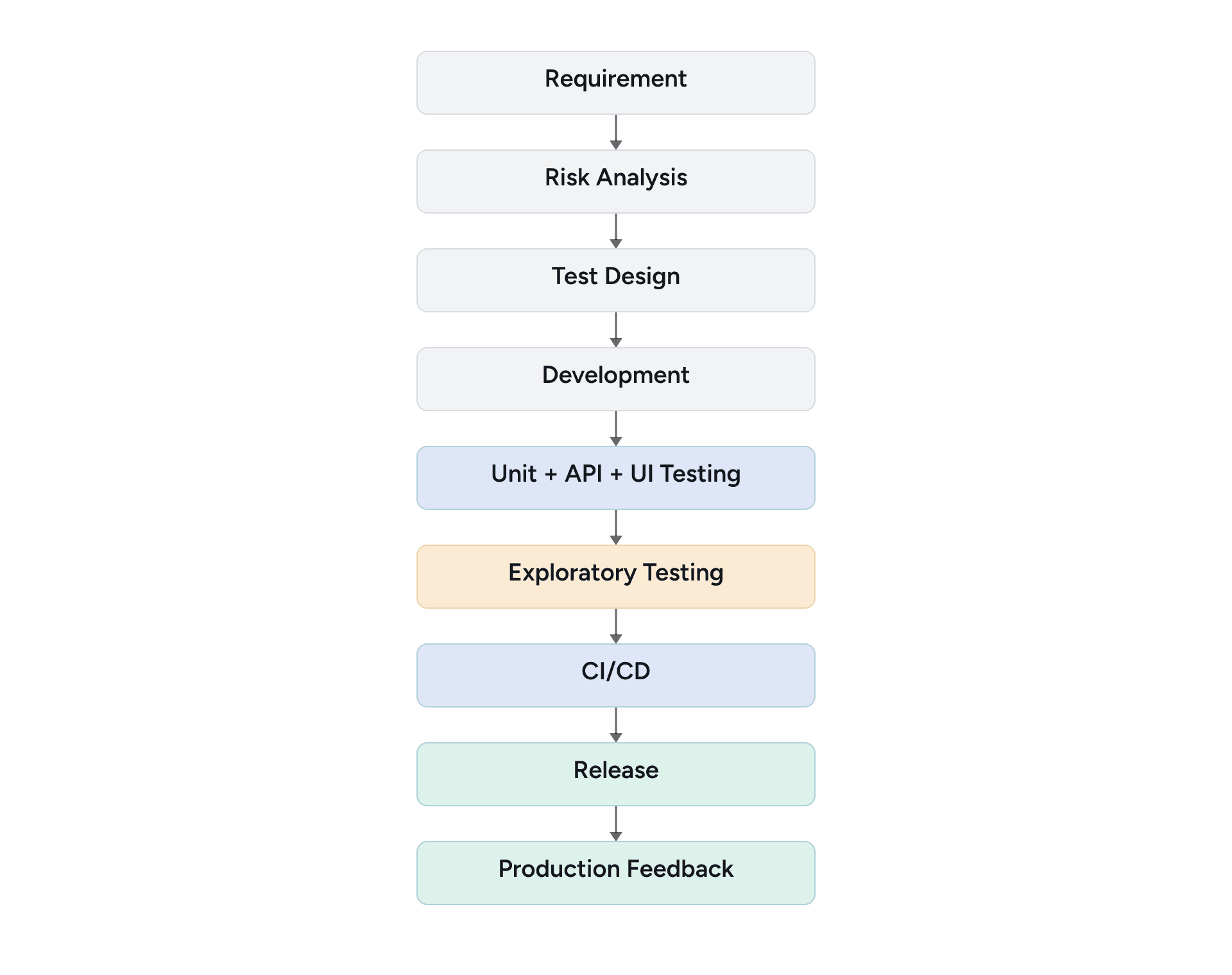
The goal is not simply to find more bugs. It is to provide fast, reliable quality feedback at the appropriate layer.
What a Balanced Testing Model Looks Like
A balanced QE strategy can combine five capabilities:
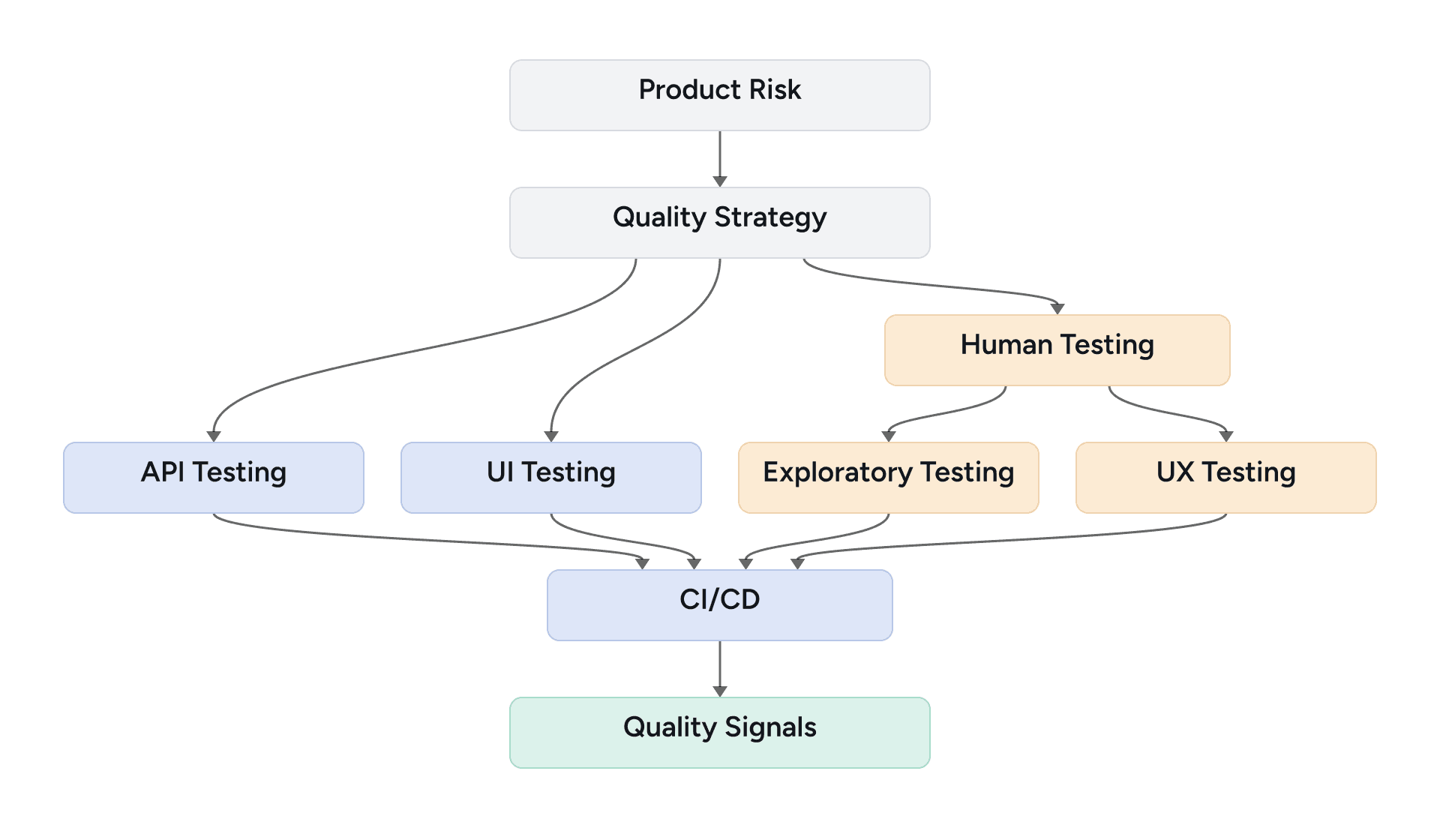
Each layer has a different purpose.
Testing approach | Primary purpose |
Unit testing | Validate isolated logic |
API testing | Validate services and business rules |
UI automation | Validate critical user journeys |
Exploratory testing | Discover unexpected behavior |
UX testing | Validate the user experience |
AI assistance | Accelerate testing activities |
Deciding What to Automate
Not every scenario should become a UI automation test. Strong automation candidates are generally:
- repeatable,
- deterministic,
- frequently executed,
- business-critical,
- expensive to execute manually.
For example:
- Login
- Checkout
- Payment
- Order creation
- Permission validation
- API contracts
A useful decision process is:
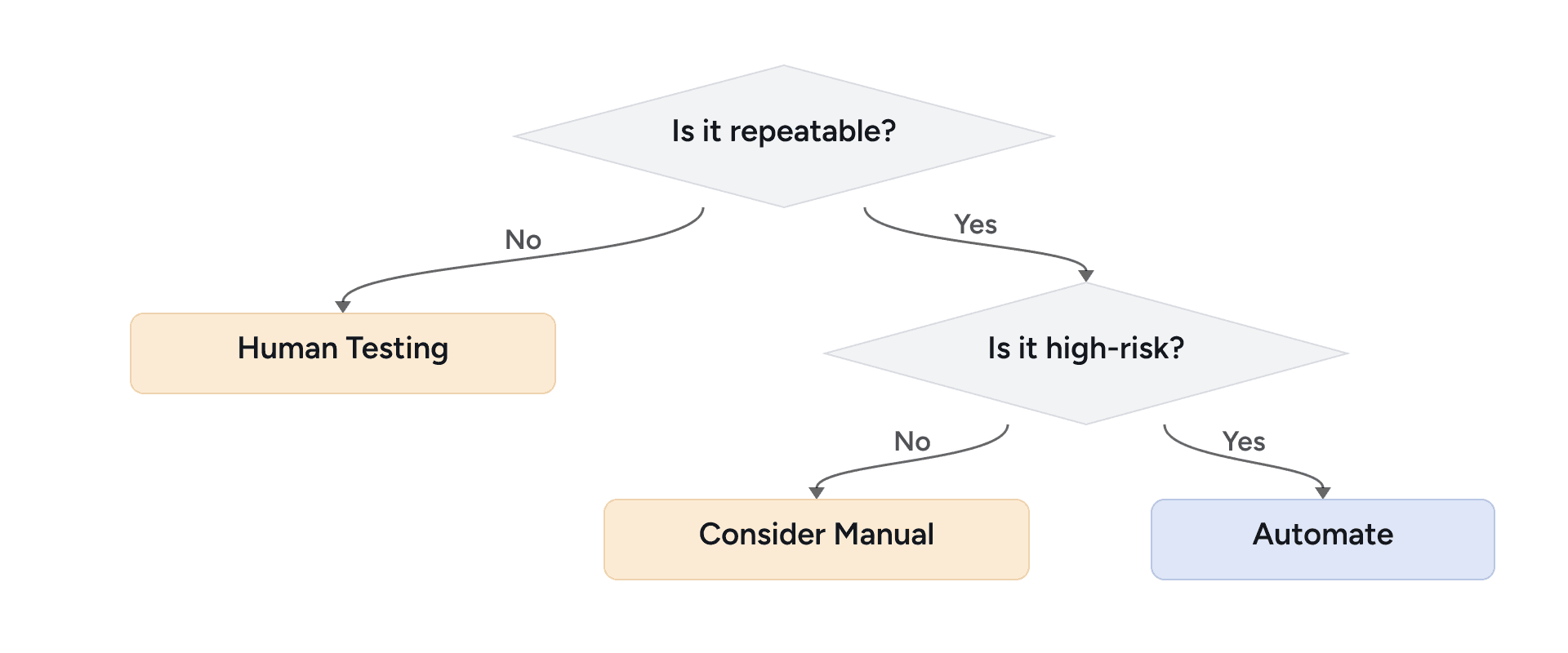
The objective should not be 100% automation.
It should be meaningful risk coverage.
Validate Business Rules Through APIs, Not the UI
One common mistake is validating every business rule through the UI.
Suppose an application exposes:
POST /api/ordersThe business logic can be validated directly:
const response = await request.post("/api/orders", {
  data: {
    productId: 123,
    quantity: 2
  }
});

expect(response.status()).toBe(201);

const body = await response.json();

expect(body.quantity).toBe(2);
expect(body.status).toBe("created");
The UI test can then focus on whether a user can successfully complete the workflow. This creates a useful separation:
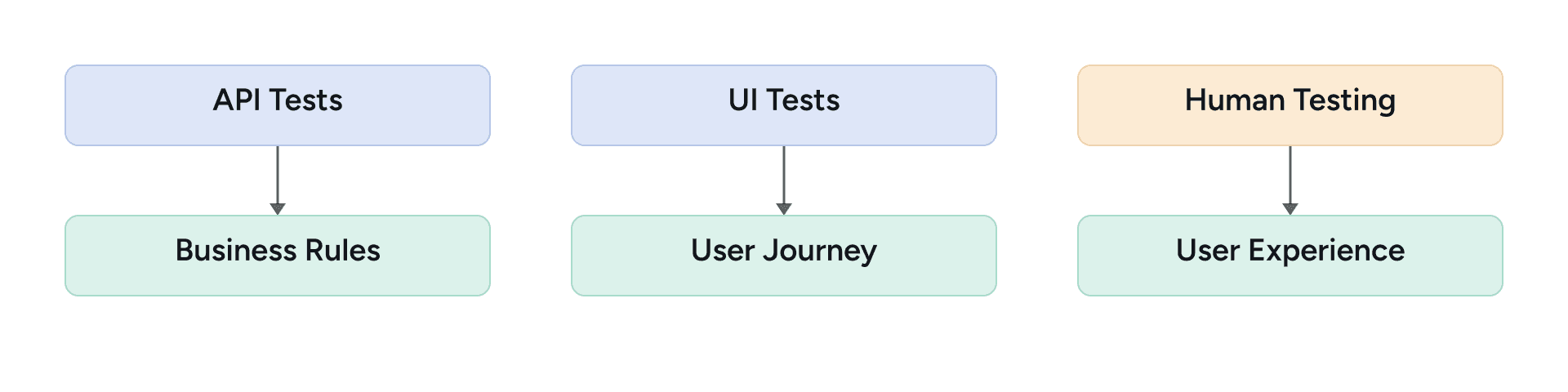
This can reduce unnecessary UI automation and make regression suites faster and easier to maintain.
What Human Testers Catch That Automation Misses
Automation executes what engineers explicitly define.
Humans can investigate what was not anticipated.
For example, an exploratory checkout charter might include:
Explore checkout with focus on:
- invalid inputs
- browser back button
- session expiry
- duplicate submission
- slow network
- mobile viewport
- unexpected navigation
A tester might discover:
Field | Observation |
Action | Submit payment twice quickly. |
Expected | One order. |
Actual | Two orders created. |
Risk | Duplicate order/payment. |
A standard happy-path automation test might never discover this scenario. This is why exploratory testing should not disappear when automation increases.
Why a Green Suite Isn't Proof of a Good Experience
Consider:
await page.getByRole("button", {
  name: "Place Order"
}).click();

await expect(
  page.getByText("Order confirmed")
).toBeVisible();
The test proves that the order can be placed.
It does not necessarily prove that:
- the button is easy to find,
- the error messages are understandable,
- the workflow is accessible,
- the mobile experience is usable,
- the customer understands the payment status.
This is where human-centered testing complements automation.
Metrics That Show Whether the Strategy Works
A balanced QE strategy should be measurable.
Instead of measuring only:
- Number of automated tests
track metrics such as:
- Execution time
- Defects detected
- Defect leakage
- Flaky tests
- Maintenance effort
- Failure investigation time
- Exploratory findings
A practical experiment can use a fixed set of application workflows:
- Registration
- Login
- Product Search
- Cart
- Checkout
- Payment
- Order Confirmation
- Invoice Download
Then evaluate them using:
- UI Automation
- API Testing
- Exploratory Testing
- UX-focused Testing
The experiment should record the same measures for each testing approach. Until real results are available, it is better to define the measurement plan rather than show placeholder values.
Metric | What to record |
Execution time | Time required to complete the selected workflow or test set |
Unique defects detected | Distinct defects found by each testing approach |
Maintenance effort | Time spent updating or repairing tests as the application changes |
Investigation time | Time required to understand and classify a failed test or observed issue |
Defect leakage | Defects that escaped earlier test layers and were found later |
Flaky-test rate | Intermittent automated failures that do not consistently reproduce |
Exploratory findings | Unexpected behaviors, usability problems, or risk scenarios discovered through human investigation |
Charts Worth Publishing Once You Have Real Data
Once the experiment has produced real measurements, two graphs can communicate the results clearly without making the article visually heavy:
- Execution Time by Testing Approach — compare the measured execution time for UI automation, API testing, exploratory testing, and UX-focused testing.
- Unique Defects Detected by Testing Approach — compare the number of distinct defects found by each approach, ideally with defect categories called out where useful.
Do not publish these charts with illustrative or fabricated values. Generate them only from the completed experiment and label the units, sample size, and test conditions so readers can interpret the results correctly.
These graphs should reinforce an important point:
Different testing approaches detect different categories of risk.
Keeping Automation Reliable Enough to Trust
Automation becomes less valuable when teams stop trusting test results.
A test that behaves like this:
Run 1 → PASS
Run 2 → PASS
Run 3 → FAIL
Run 4 → PASS
Run 5 → PASS
is potentially flaky.
Avoid solving this by adding arbitrary waits:
await page.waitForTimeout(5000);Instead, synchronize with application state:
await expect(
  page.locator('[data-testid="order-confirmation"]')
).toBeVisible();
The principle is:
Wait for conditions, not time.
Automation should be treated as production-quality software, with code review, maintainability, monitoring, and refactoring.
Where AI Helps — and Where It Shouldn't Decide
AI can extend the QE workflow without replacing deterministic testing.
A practical architecture is:
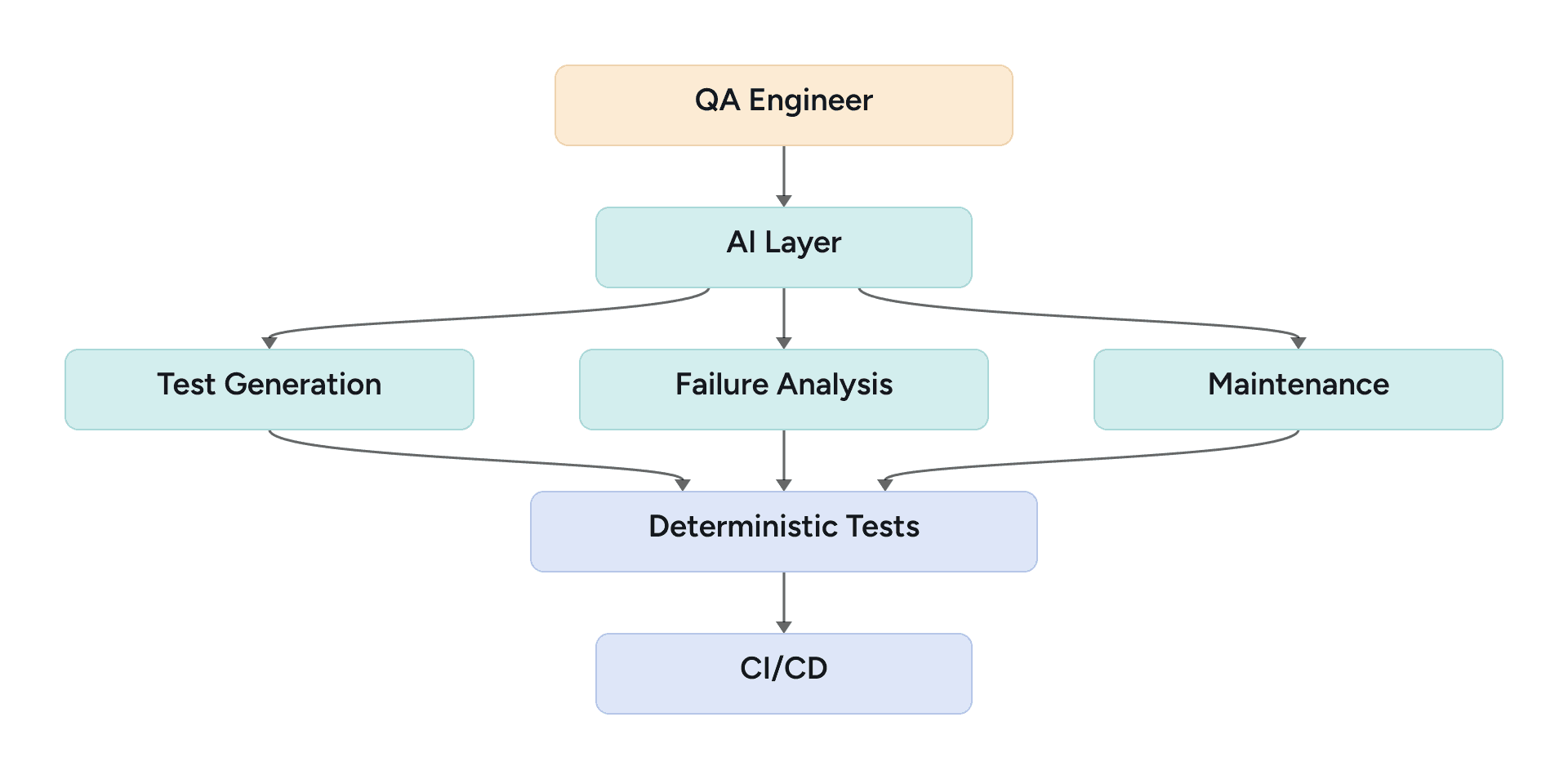
For example, AI can analyze:
- Playwright Trace
- Screenshot
- DOM
- Console Logs
- Network Errors
- Test History
and suggest a failure category:
- Test defect
- Application defect
- Environment issue
- Data issue
- Network issue
However, the engineer should validate the result.
A useful operating model is:
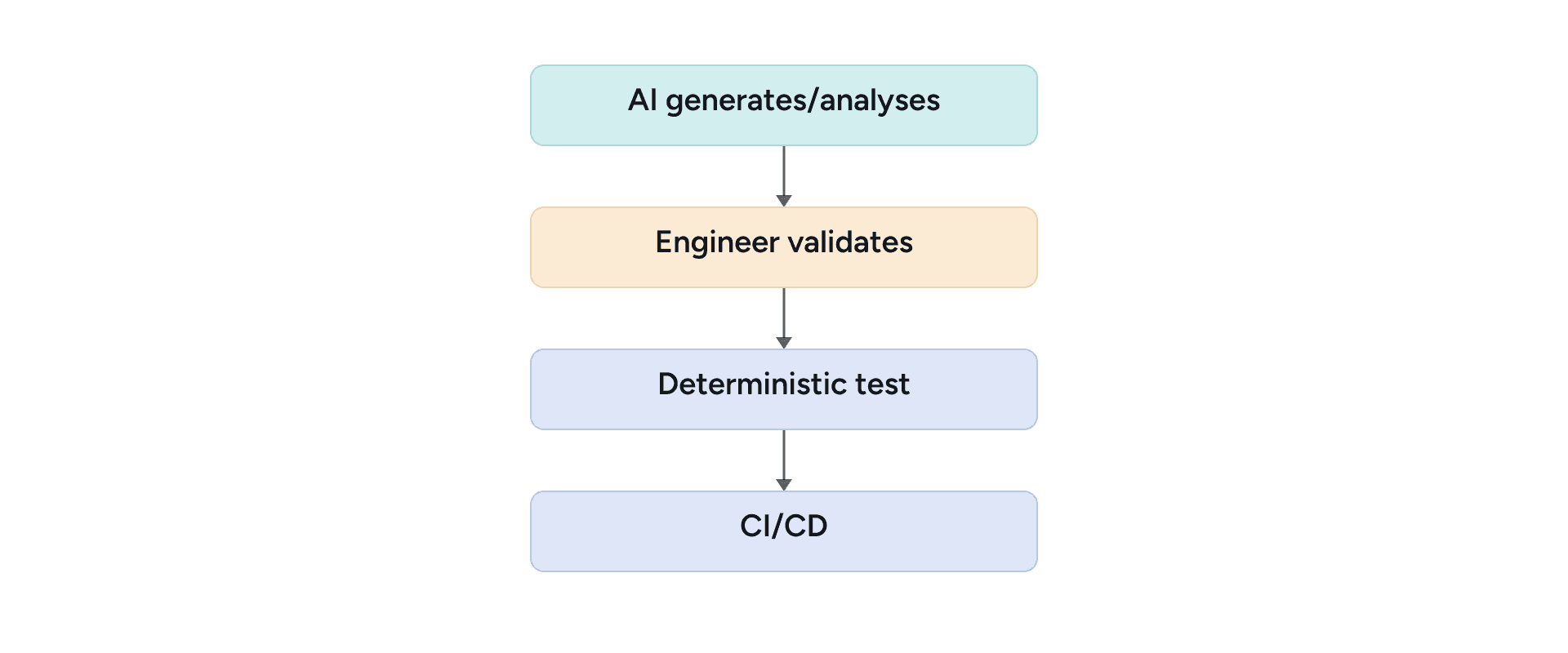
This keeps AI as an accelerator rather than an uncontrolled decision-maker.
Fitting the Approach Into Your CI/CD Pipeline
The balanced approach fits naturally into a modern CI/CD pipeline:
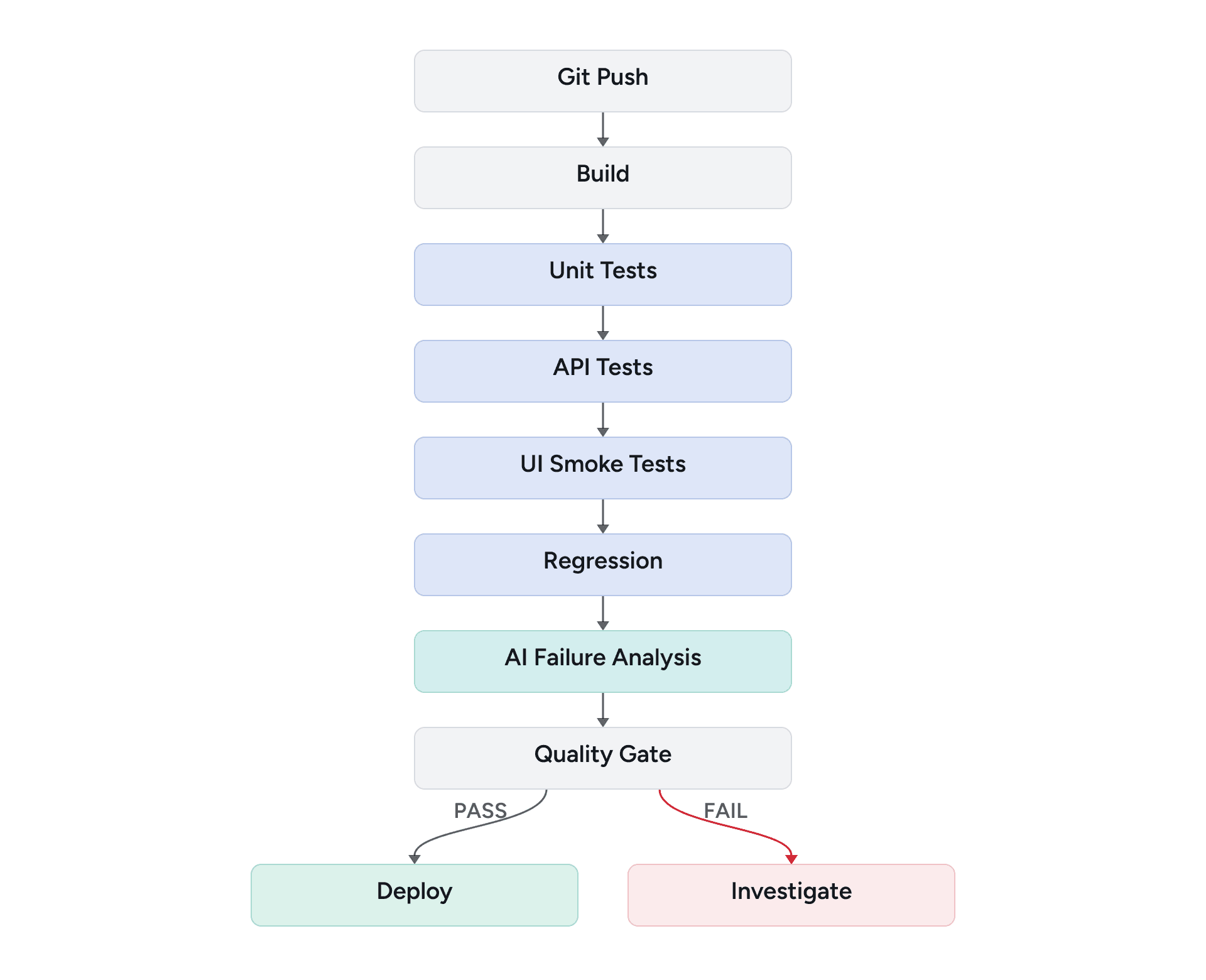
Different test layers provide feedback at different speeds, allowing teams to avoid using expensive UI tests for problems that can be detected earlier.
Trade-Offs Between Testing Approaches
There is no single testing technique that covers every quality dimension.
Approach | Strength | Limitation |
UI Automation | End-to-end regression | Maintenance cost |
API Testing | Fast business validation | Doesn't validate UX |
Exploratory | Finds unexpected issues | Less repeatable |
UX Testing | User experience | Requires human effort |
AI Testing | Faster analysis/generation | Requires validation |
The right strategy combines these capabilities according to product risk.
A Reference Architecture You Can Adapt
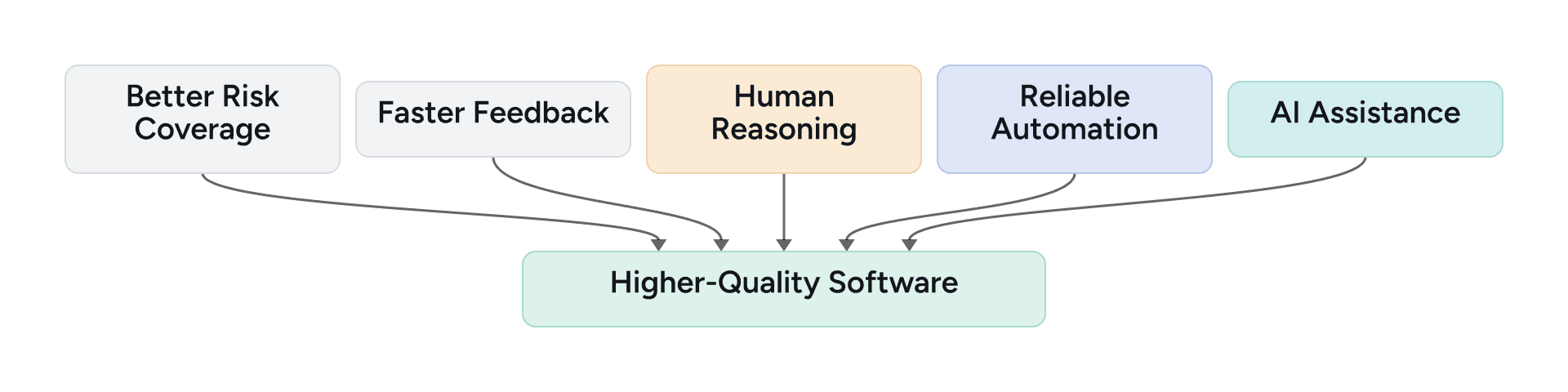
The complete model can be summarized as:
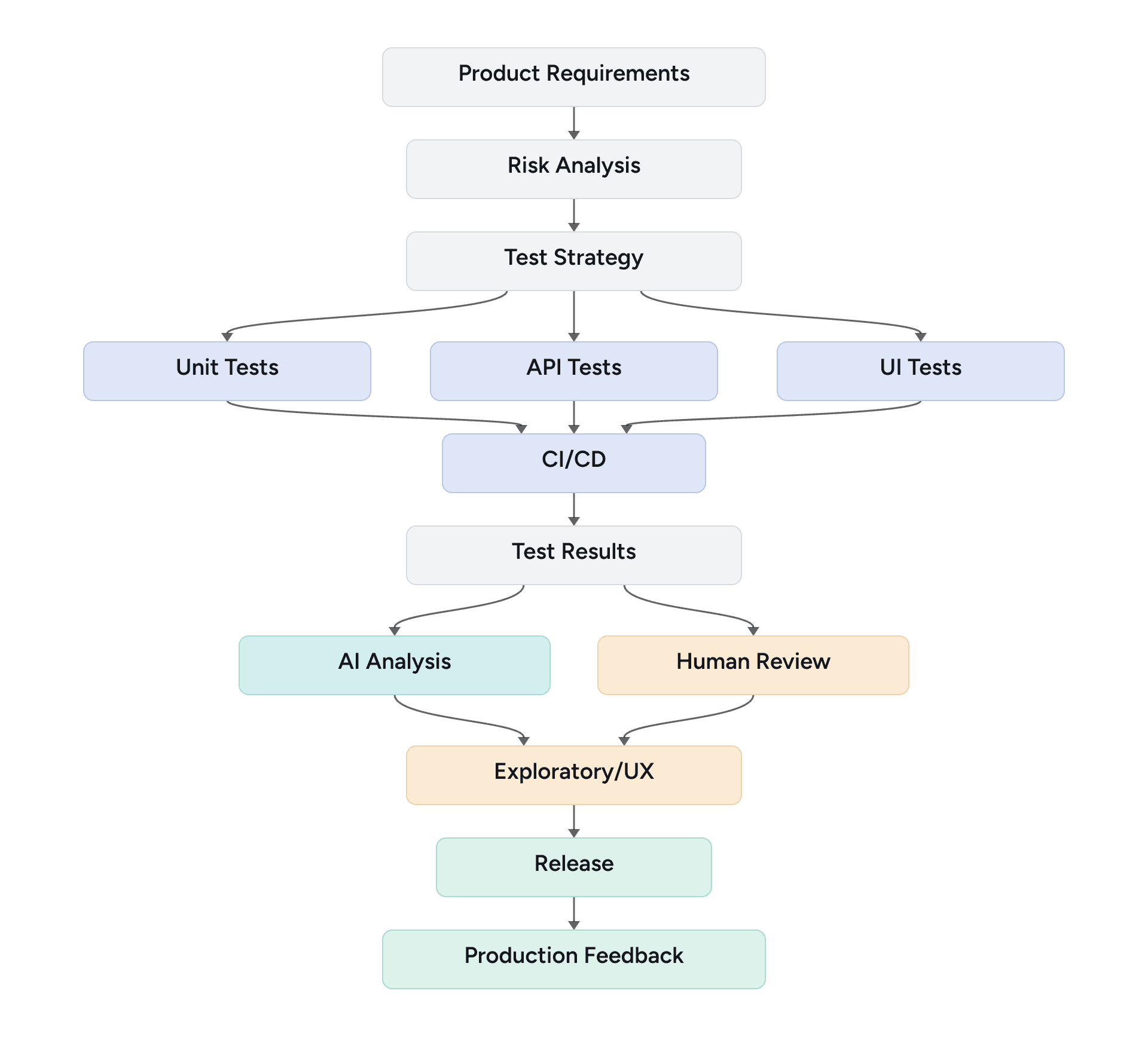
This model does not attempt to eliminate human testing.
Instead, it places automation, APIs, AI, and human reasoning where each provides the most value.
Conclusion: Getting the Balance Right
Modern Quality Engineering should not be a competition between manual testing and automation.
Automation provides speed, repeatability, and scalable regression coverage. API testing provides efficient validation of business behavior. Exploratory and human-centered testing provide contextual reasoning and help identify problems that deterministic automation may miss. AI can further accelerate these activities by assisting with generation, analysis, and maintenance.
The most effective Quality Engineering strategy is one that uses technology to accelerate testing without losing sight of the person ultimately using the software.
The goal is not maximum automation. The goal is maximum meaningful quality feedback for the engineering effort invested.