


In the dynamic realm of digital design, ensuring your website or mobile app delivers an exceptional user experience (UX) is crucial. One effective approach to achieve this is through UX audits, which help pinpoint strengths, weaknesses, and areas for enhancement in your design. However, selecting the most suitable one for your project can be challenging with various audit types available. Let's delve into the different audit types and how to determine the best fit for your needs.
The Prerequisites for Starting UX Audit
When deciding which audit to conduct for your website or mobile app, consider these factors:
- Goals and Objectives:
Identify the primary goals and objectives of your project. If you aim to improve usability and user satisfaction, a usability audit may be most beneficial. If your goal is to reach a broader audience, an accessibility audit should be a priority.
- Target Audience:
Understand the characteristics and needs of your target audience. For example, if your audience includes people with disabilities, an accessibility audit is essential. If visual appeal is crucial, a visual design audit should be considered.
- Current Issues:
Identify any known issues or pain points with your design. This can help prioritize which audit to conduct. For example, a performance audit would be a priority if users frequently complain about slow loading times.
- Competitive Analysis:
Conduct a competitive analysis to understand how your design compares to competitors. This can help identify areas for improvement and inform which audit to prioritize.
- Budget and Resources:
Consider your budget and resources available for conducting audits. Some audits may require more time and resources than others, so choosing one that fits your budget and timeline is essential.
Recognizing when it's time to audit your design(How GeekyAnts Conducts Audits?)
Knowing the right time to conduct a design audit for your website or mobile app involves being aware of various signals and indicators. Some key signs that may suggest it's time for a design audit include:
- User Feedback and Complaints:
Consistent negative feedback or issues reported by users regarding the design.
- Decline in Key Metrics:
A decrease in conversion rates, user engagement, or retention rates.
- Changes in Business Goals or Audience:
Significant changes in business objectives, target audience, or market positioning.
- Introduction of New Features or Updates:
Adding new features or updates that may impact the overall user experience.
- Technological Advances or Industry Trends:
Changes in technology or design trends may affect the competitiveness of your design.
- Competitive Analysis:
Falling behind competitors in terms of design and user experience.
- Regulatory Compliance Requirements:
Changes in regulations or standards that require compliance updates in your design.
Understanding the UX Audit terrain (GeekyAnt’s way of doing an audit)
1. Usability Audit:
This audit evaluates the ease of use and overall user experience of your website or mobile app. It involves testing the interface with real users by asking the right questions to identify usability issues and gather feedback for improvement.
At GeekyAnts, we meticulously record every observation and input during user testing sessions. This detailed documentation allows us to uncover user pain points, derive actionable insights, and continuously refine the experience for better engagement and performance. Our team ensures that every user’s feedback is documented, as shown in the below picture. We begin by drafting questions based on the web or mobile app's features. Next, we conduct user interviews and record their inputs. After completing all interviews, we analyze the feedback to uncover key insights. These insights guide our decisions, which are also thoroughly documented for future reference.

2. Accessibility Audit:
An accessibility audit assesses your website or mobile app's compliance with accessibility standards like the Web Content Accessibility Guidelines (WCAG). It ensures that people with disabilities can access and use your digital product effectively.
At GeekyAnts, we prioritize inclusivity by strictly following WCAG guidelines. We meticulously document our findings, enabling future reference to address similar challenges and ensure every website we build remains accessible to all users.

3. Visual Design Audit:
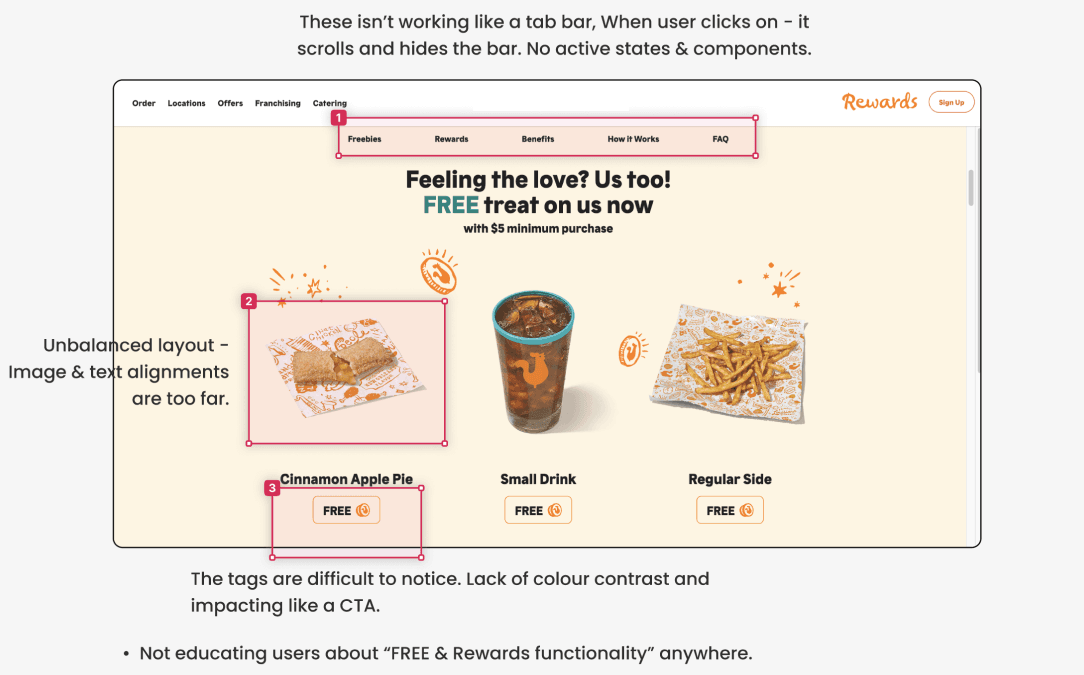
This audit assesses the visual aspects of your design, including layout, typography, color scheme, and branding consistency. It ensures your design is visually appealing and aligns with your brand identity.
At GeekyAnts, we delve deep into the finer details of visual design to identify and enhance elements that directly impact the visibility and effectiveness of a website.
4. Content Audit:
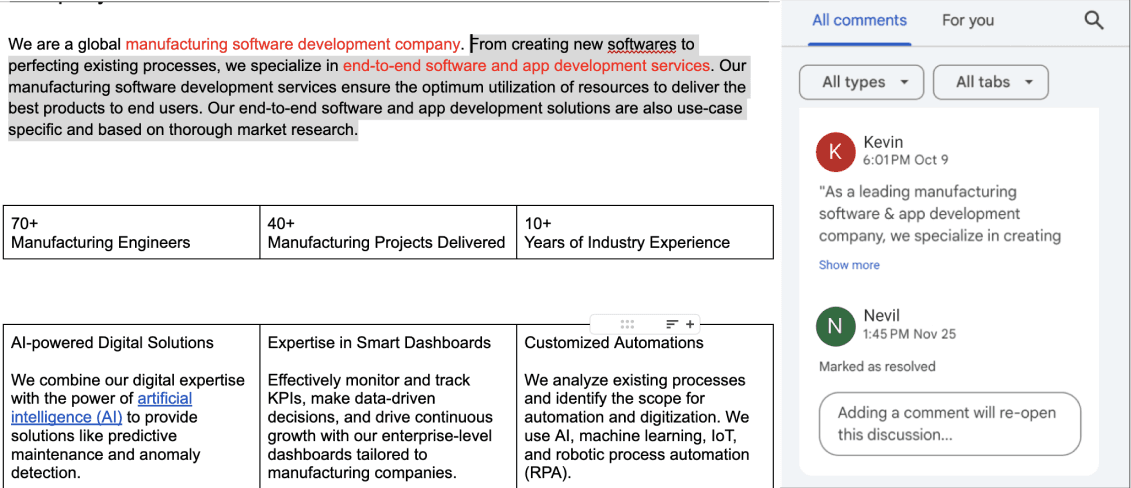
A content audit focuses on evaluating the quality, relevance, and effectiveness of the content on your website or mobile app. It ensures your content meets the needs of your target audience and supports your overall UX goals.
At GeekyAnts, we prioritize meticulous proofreading of every sentence to guarantee the content is accurate, engaging, and ready before the website goes live. Our content team ensures that the content is thoroughly checked and ensures that SEO optimization is implemented effectively. We strive to create content that resonates with the target audience, enhances discoverability, and drives meaningful engagement.
5. Heuristic evaluation:
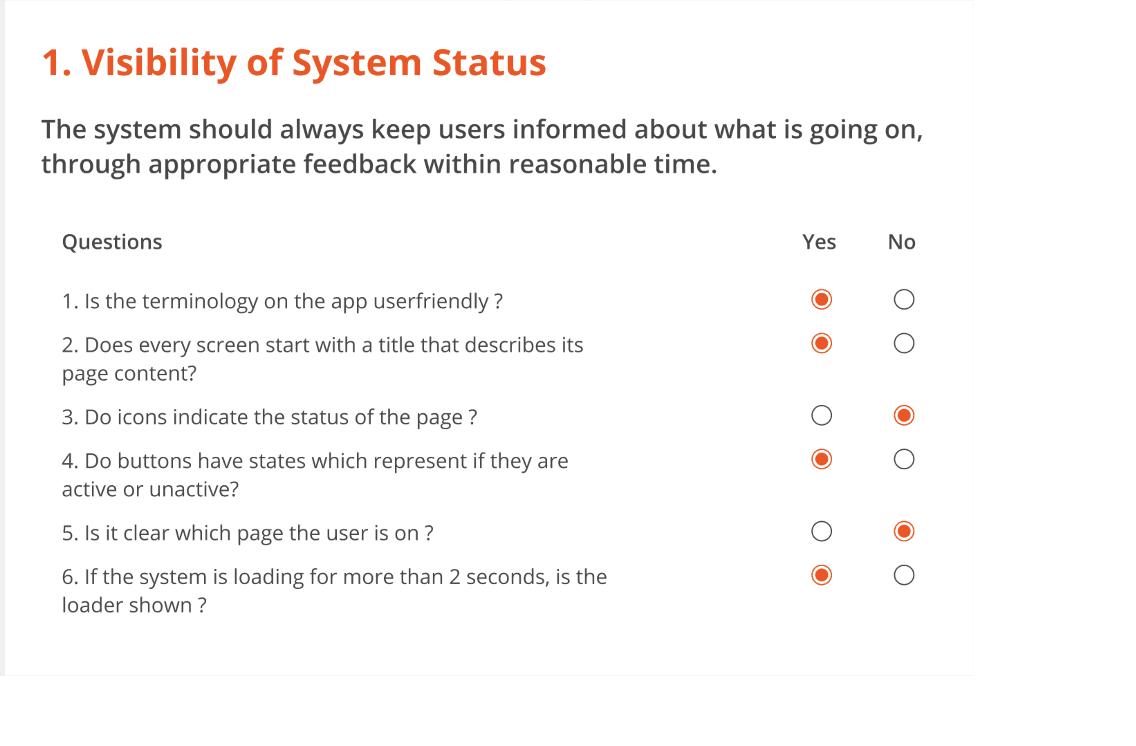
Heuristic evaluation assesses your design against established usability principles to identify potential issues. Unlike user testing, it relies on expert analysis to uncover design flaws systematically, enabling teams to address usability challenges early in the process.
At GeekyAnts, we ensure a thorough heuristic evaluation to provide clients with detailed insights into their user experience. This empowers them to make informed, strategic decisions that elevate their product’s usability and overall impact.
6. Competitive analysis
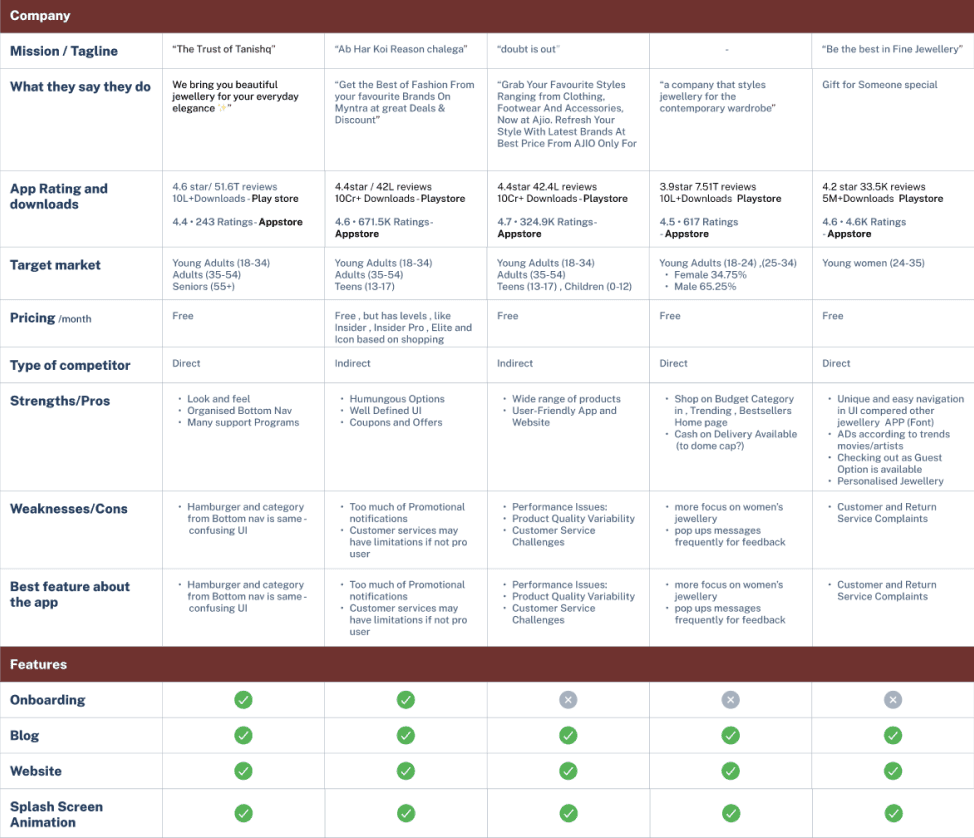
Competitive analysis enhances usability audits by benchmarking your product's usability against industry leaders. It identifies gaps in user flows, navigation efficiency, and feature accessibility, helping you understand whether your product meets or surpasses user expectations shaped by competitors.
At GeekyAnts, we conduct comprehensive market research and meticulously document our findings. This process ensures our clients receive valuable insights to refine their product strategy and stay ahead in the market.
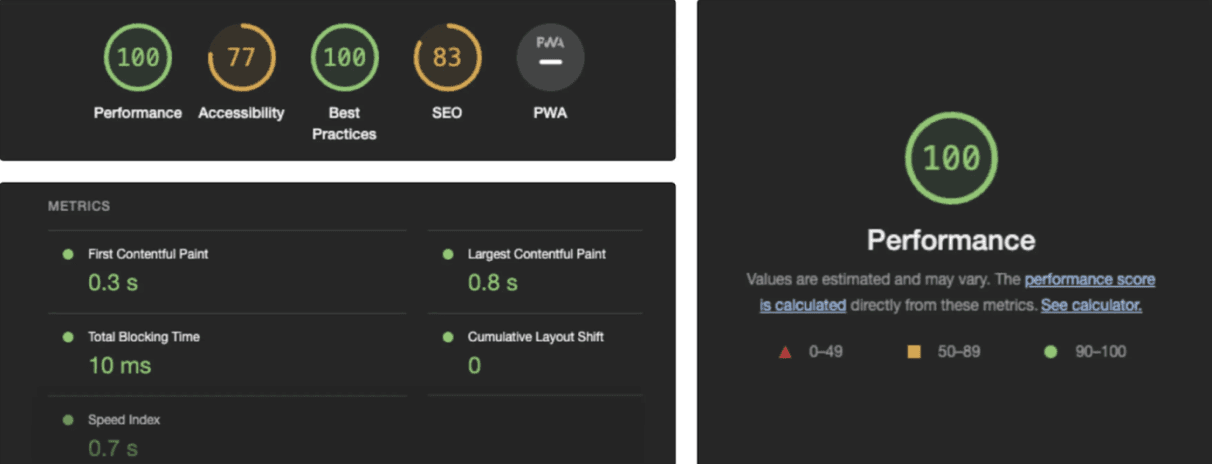
7. Performance Audit:
This audit assesses the performance of your website or mobile app, including factors like page load times, responsiveness, and scalability. It helps identify and address performance issues that may affect user experience.
At GeekyAnts, we believe that a fully responsive and user-friendly website alone isn’t enough performance is essential to delivering an exceptional user experience.
By paying attention to these signals and indicators, companies can proactively assess the need for a design audit and take steps to improve the user experience of their website or mobile app. A design audit is a valuable tool for identifying areas for improvement and ensuring that the design effectively supports the company's goals and objectives.







