
Introduction
While working with the Flutter projects, we have to write the same repetitive code multiple times. Since all of the tests in Flutter share the same fundamental structure, the basic beginning bundle for the Flutter test is provided by this CLI.
The Flutter Starter CLI is written in Dart, and with the help of this CLI, we can create a Flutter template on the fly.
Out of the box, Flutter Starter CLI includes:-
State Management
- BLoC - BLoC is a popular design/architectural pattern that is used to separate the logic from the UI.
- RiverPod - A state-management library that catches programming errors simultaneously and ensures that the code is testable.
API-Services
- Dio - A powerful HTTP client for Dart, which supports Interceptors, Global configuration, FormData, Request Cancellation, File downloading, Timeout, etc.
- Http - A composable, Future-based library for making HTTP requests.
- Graphql - A standalone GraphQL client for Flutter, bringing all the features from a modern GraphQL client to one easy-to-use package.
Basic Setup
- Themes - Themes are used to share colors and font styles throughout an app.
- Localization - The project supports multiple languages like English, Spanish and French.
- Routing - Go_Router is used to provide a convenient, URL-based API for navigating between different screens.
Testing
- Unit - A unit test examines a single function, method, or class.
- Widget - A widget test tests a single widget.
- Integration - An integration test examines a complete app or a large part of an app.
The Flutter Starter CLI uses the Flutter Starter Template to generate project files.
It comes with the best coding practices and well-organized architecture.
Getting Started
To generate the Flutter Starter app with Flutter Starter CLI, just activate the flutter_starter_cli package globally from pub.dev:
dart pub global activate flutter_starter_cli
After installing the package, use the following command to ensure that the installation is successful.
flutter_starter_cli --version
Then, run the create command to create a scalable, testable, and maintainable flutter project.
flutter_starter_cli create
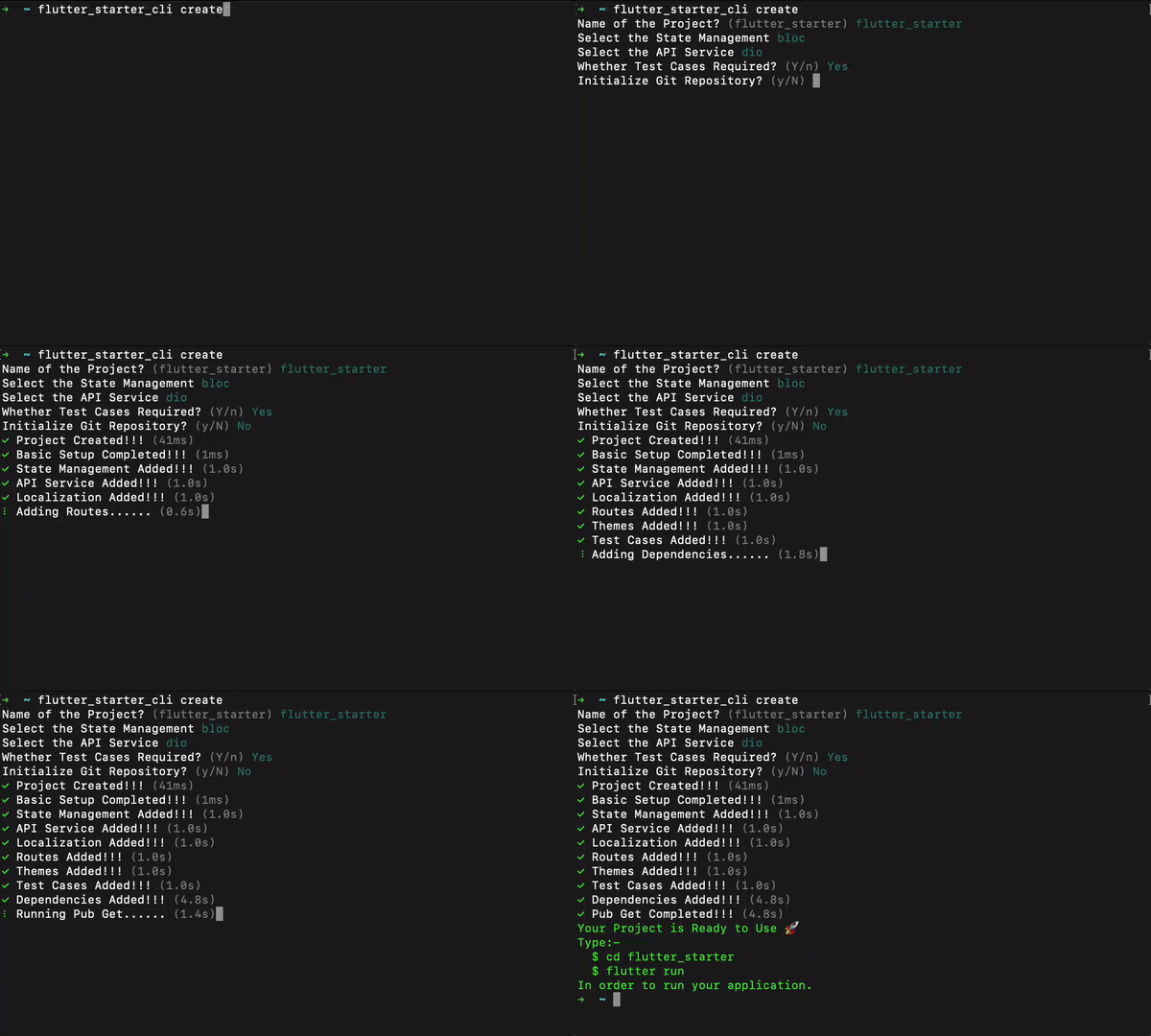
These are the steps that follow:
- The prompt will initially inquire about the project's name.
- Next, the user must select the project's state management.
- Then the user must select the various API services for performing network calls.
- Following that, the prompt will request test cases, whether they are necessary or not.
- Finally, it will prompt you to create a git repository.
~ flutter_starter_cli createName of the Project? (flutter_starter) flutter_starterSelect the State Management blocSelect the API Service dioWhether Test Cases Required? (Y/n) YesInitialize Git Repository? (y/N) Yes
✓ Project Created!!! (2.6s)✓ Basic Setup Completed!!! (4ms)✓ State Management Added!!! (1.0s)✓ API Service Added!!! (1.0s)✓ Localization Added!!! (1.0s)✓ Routes Added!!! (1.0s)✓ Themes Added!!! (1.0s)✓ Test Cases Added!!! (1.0s)✓ Dependencies Added!!! (7.2s)✓ Pub Get Completed!!! (4.8s)✓ Git Initialized!!! (28ms)Your Project is Ready to Use 🚀
In order to run your application.
Type:- $ cd flutter_starter $ flutter run
Salient Features of The Starter Project
- lder Architecture: While building complex Flutter apps, the folder structure plays a very important role.
- State Management: When it comes to developing apps in Flutter, state management is a very crucial topic. To make the app more scalable, testable, and maintainable, the Bloc/Riverpod state management library has been integrated into the starter project.
- Null Safety: The starter template comes with sound null safety. Null safety prevents errors that result from unintentional access of variables set to null.
- Test Cases: The flutter starter project template comes with pre-defined test cases to validate the UI, business logic, functionality, etc
- Cross-Platform Support: We can launch the generated app on six platforms i.e., Android, iOS, Web, Windows, macOS, and Linux straight away.
All Available Commands
In the root of your application, run the following commands:
# Show CLI version$ flutter_starter_cli --version
# Show usage help$ flutter_starter_cli --help
# To create project$ flutter_starter_cli create
# Then follow instructions
# Shorthand to create project$ flutter_starter_cli create --state= --api= -g -t
# Available API services (dio, http, graphql)
# Available State management (bloc, riverpod)
# To upgrade project
$ flutter_starter_cli project upgrade
Complete Usage
The complete usage of the create command with options and flags.
➜ ~ flutter_starter_cli create
Creates a new flutter starter project.
Usage: flutter_starter_cli create -h, --help Print this usage information.--desc The description for the project.(defaults to "A New Flutter Project.")--org The organization for the project.(defaults to "com.example")-p, --path The directory path for the project.-s, --state The state management for the project.[bloc, riverpod]-a, --api The API service for the project. [dio, http]-t, --[no-]test Setup Test Cases.-g, --[no-]git Initialize Git Repository.
Run "flutter_starter_cli help" to see global options.
Directory Structure
The complete structure of the newly created project directory looks like this:
├── android
├── assets
├── integration_test
├── ios
└── lib
├── api_sdk
├── config
├── l10n
├── routes
├── screens
├── shared
├── themes
├── utils
├── widgets
├── app.dart
├── common_export.dart
├── main.dart
├── linux
├── macos
├── test
├── web
├── windows
├── .gitignore
├── analysis_options.yaml
├── l10n.yaml
├── pubspec.lock
├── pubspec.yaml
└── README.md
Demo