


In today’s digital-first world, your website or app’s performance is key to your business's success. Whether you run an online store, offer software services, or manage a company website, your app needs to handle lots of users without slowing down. This is where load testing comes in—and K6 is a great tool to ensure your app can handle heavy traffic smoothly.
What Is Load Testing?
Load testing is a way to check how your website or app works when lots of people use it at the same time. It’s like testing to make sure your site won’t slow down or crash when it gets busy. This helps you find and fix any problems before real users run into them.
Why Does Your Business Need Load Testing?
1. Prevent Website Crashes During Critical Moments
Imagine launching a new product or a big sale, and your website crashes because too many people are visiting. Load testing helps ensure your site or app can handle lots of traffic without shutting down when it matters most.
2. Keep Your Website Fast and Easy to Use
No one likes a slow website. If your pages take too long to load, customers will get frustrated and leave. Load testing helps you spot and fix any issues before they slow down your site, keeping everything running smoothly for your users.
3. Get Ready for High-Traffic Events
Whether it’s a holiday sale or a viral promotion, certain events can bring a lot more traffic to your site. Load testing makes sure your system is ready for these busy times so that you can make the most of every big opportunity.
4. Improve Business Performance
Slow websites don't just upset customers—they can cost you sales. By improving performance through load testing, you’ll have happier customers and more sales in the long run.
Why K6? The Preferred Tool for Modern Load Testing
K6 stands out as one of the most popular choices for load testing because it’s simple, flexible, and effective. Here’s why:
- Easy to Use
K6 is very user-friendly. You can write test scripts using JavaScript, a language many people already know, so you don’t have to be an expert to run tests.
- Flexible and Powerful
K6 lets you test different types of traffic, whether it's a steady flow of users or sudden spikes. This ensures your website, app, or API can handle any kind of load.
- Seamless Integration
K6 works smoothly with your existing tools and workflows. It integrates with monitoring platforms like Grafana and can be automated within CI/CD pipelines, allowing you to continuously improve your app’s performance as part of your regular development cycle.
Installing K6: A Simple Setup for Powerful Results
K6 is easy to get up and running. Here’s how:
On a Mac:
Open your terminal and type:brew install k6
Verify the installation:
After the installation is complete, verify it by checking the K6 version:

Writing and Running a Test:
A typical k6 script includes the following key elements:
import http from 'k6/http';
import { sleep } from 'k6';

//option section
export const options = {
  vus: 10,  // Number of virtual users
  duration: '30s',  // Test duration
};
//default function section
export default function() {
  const res = http.get("https://test-api.k6.io");
  check(res, { 'status is 200': (r) => r.status === 200});
  sleep(1);
}- Options: Control settings like the number of virtual users (VUs) and test duration.
- Default Function: Defines what each virtual user does, such as sending HTTP requests.
- checks: Validate that responses meet certain conditions, such as status codes.
Testing Your System: Key Scenarios to Ensure Performance
K6 helps you simulate real-life situations to test how well your website or app handles different levels of traffic.
1. Load Testing(Normal Traffic): Load testing checks how your system performs under everyday traffic conditions to make sure it runs smoothly.
export const options = {
  // Key configurations for avg load test in this section
  stages: [
    { duration: '5m', target: 100 }, // traffic ramp-up from 1 to 100 users over 5 minutes.
    { duration: '30m', target: 100 }, // stay at 100 users for 30 minutes
    { duration: '5m', target: 0 }, // ramp-down to 0 users
  ],
};
Example:
Gradually increase to 100 users over 5 minutes, keep it steady for 30 minutes, then slowly reduce—just like a typical day of traffic on your website.
2. Stress Testing (Heavy Traffic): Stress testing shows how your system reacts to heavy, unexpected traffic. It helps you find breaking points before your customers do.
export let options = {
  stages: [
    { duration: '2m', target: 100 }, // ramp-up to 100 users
    { duration: '5m', target: 500 }, // increase to 500 users
    { duration: '3m', target: 1000 }, // push to 1000 users
    { duration: '5m', target: 0 }, // ramp-down to 0 users
  ],
};
Example:
Increase to 1,000 users quickly to see if your system can handle extreme loads.
3. Soak Testing(Long-Term Traffic): Soak testing checks how your system performs when it’s used continuously over a long period. It's great for finding long-term issues like memory leaks.
export let options = {
  stages: [
    { duration: '10m', target: 200 }, // ramp-up to 200 users
    { duration: '2h', target: 200 }, // maintain 200 users for 2 hours
    { duration: '10m', target: 0 }, // ramp-down to 0 users
  ],
};
Example:
Keep 200 users active for several hours to ensure your system stays stable.
Spike Testing(Sudden Traffic Surges): Spike testing simulates sudden, sharp increases in traffic, like what happens during flash sales or viral events.
export let options = {
  stages: [
    { duration: '5s', target: 0 }, // Start with 0 users
    { duration: '5s', target: 100 }, // Spike to 100 users in 5 seconds
    { duration: '10s', target: 100 }, // Hold at 100 users for 10 seconds
    { duration: '5s', target: 0 }, // Ramp down to 0 users in 5 seconds
  ],
};
Example:
Instantly jump from 0 to 100 users to mimic the rush of a surprise promotion or viral campaign.
Metrics That Matter: Understanding K6 Results
The following output will be displayed on your terminal.
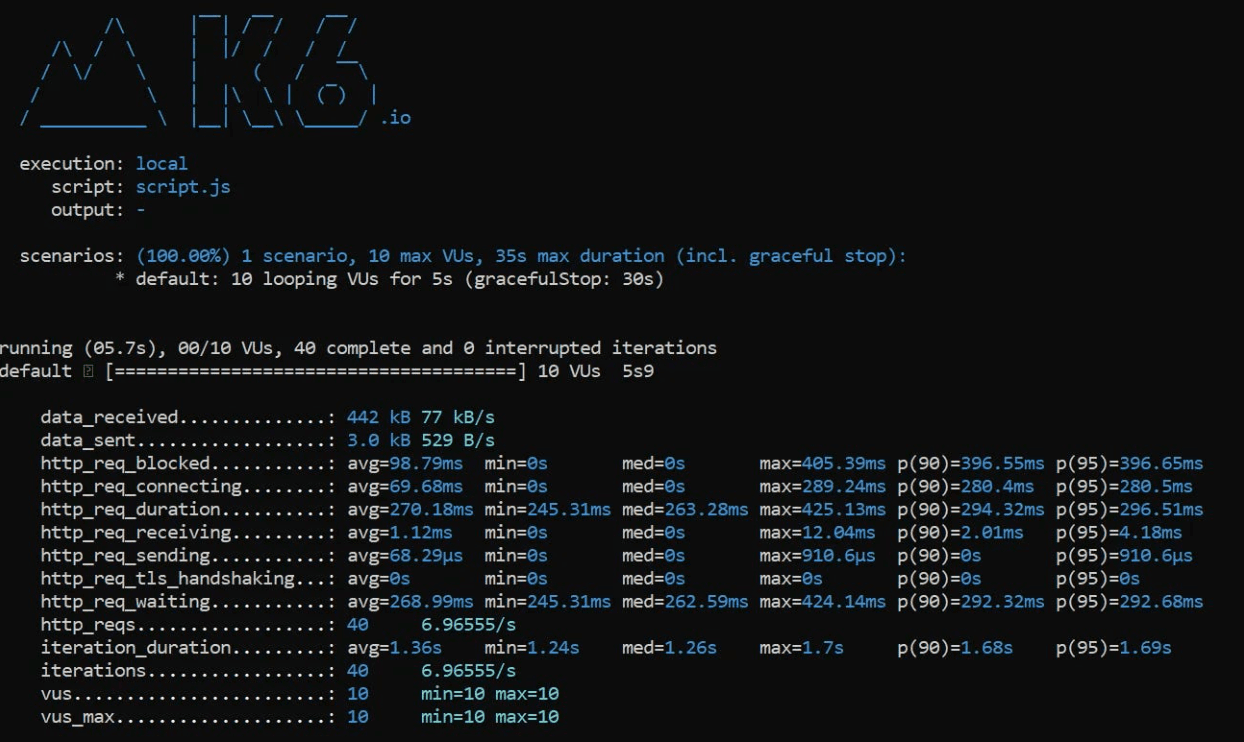
Here are the default metrics k6 tracks:
- vus: The number of active virtual users (VUs) during the test.
- vus_max: The maximum number of VUs allocated for the test.
- iterations: The total count of times all VUs execute the default function.
- iteration_duration: The total time to execute the default function across all VUs.
- data_received: The total amount of data received by all VUs.
- data_sent: The total amount of data sent by all VUs.
- checks: The success rate of checks performed during the test (discussed in more detail later).
In addition to the default metrics, k6 also provides detailed output for each HTTP request made during the test, offering deeper insights into your API's performance:- http_reqs: The total number of HTTP requests generated by k6.
- http_req_blocked: Time spent waiting for a free TCP connection before starting the request.
- http_req_connecting: Time spent establishing a TCP connection with the remote host.
- http_req_tls_handshaking: Time spent on the TLS handshake with the remote host.
- http_req_sending: Time spent sending data to the remote host.
- http_req_waiting: Time spent waiting for a response from the remote host.
- http_req_receiving: Time spent receiving data from the remote host.
http_req_duration: The total time taken for the request, which includeshttp_req_sending, http_req_waiting, and http_req_receiving.
Use Cases for K6
API Testing
Scenario:
Test if an API can efficiently handle multiple simultaneous requests without degrading performance or experiencing failures.
Example Code:
import http from 'k6/http';
import { check, sleep } from 'k6';

// Define options for the test
export const options = {
  vus: 50,  // Number of virtual users
  duration: '1m',  // Test duration
};
// Main test function
export default function () {
  // Send a POST request to the API endpoint
  const response = http.post('https://api.example.com/test',
    JSON.stringify({ message: 'Editing the announcement' }),
    { headers: { 'Content-Type': 'application/json' } }
  );
  // Check that the response status is 200 OK
  check(response, {
    'is status 200': (r) => r.status === 200,
  });
  sleep(1);
}
Website Load Testing
Scenario:
Evaluate how well your website performs when it is subjected to heavy traffic.
Example Code:
import http from 'k6/http';
import { check, sleep } from 'k6';

// Define options for the test
export const options = {
  stages: [
    { duration: '2m', target: 100 }, // Ramp up to 100 users over 2 minutes
    { duration: '5m', target: 100 }, // Maintain 100 users for 5 minutes
    { duration: '2m', target: 0 },   // Ramp down to 0 users over 2 minutes
  ],
};
// Main test function
export default function () {
  // Send a GET request to the website
  const response = http.get('https://www.example.com');
  // Check that the response status is 200 OK
  check(response, {
    'is status 200': (r) => r.status === 200,
  });
  sleep(1);
}
Conclusion
K6 isn’t just for developers—it’s a must-have for businesses that want to protect their online operations and keep customers happy. By regularly using load testing with K6, you can:
- Prevent expensive website crashes.
- Make sure your customers have a smooth experience, even during busy times.
- Boost your business by improving performance.
With its simplicity, flexibility, and valuable insights, K6 is a key tool for any business aiming to succeed in today’s digital world. Start using K6 for load testing and build a website or app that’s ready for anything.







